
Dexnor Keyboard Case
4.3Editor score
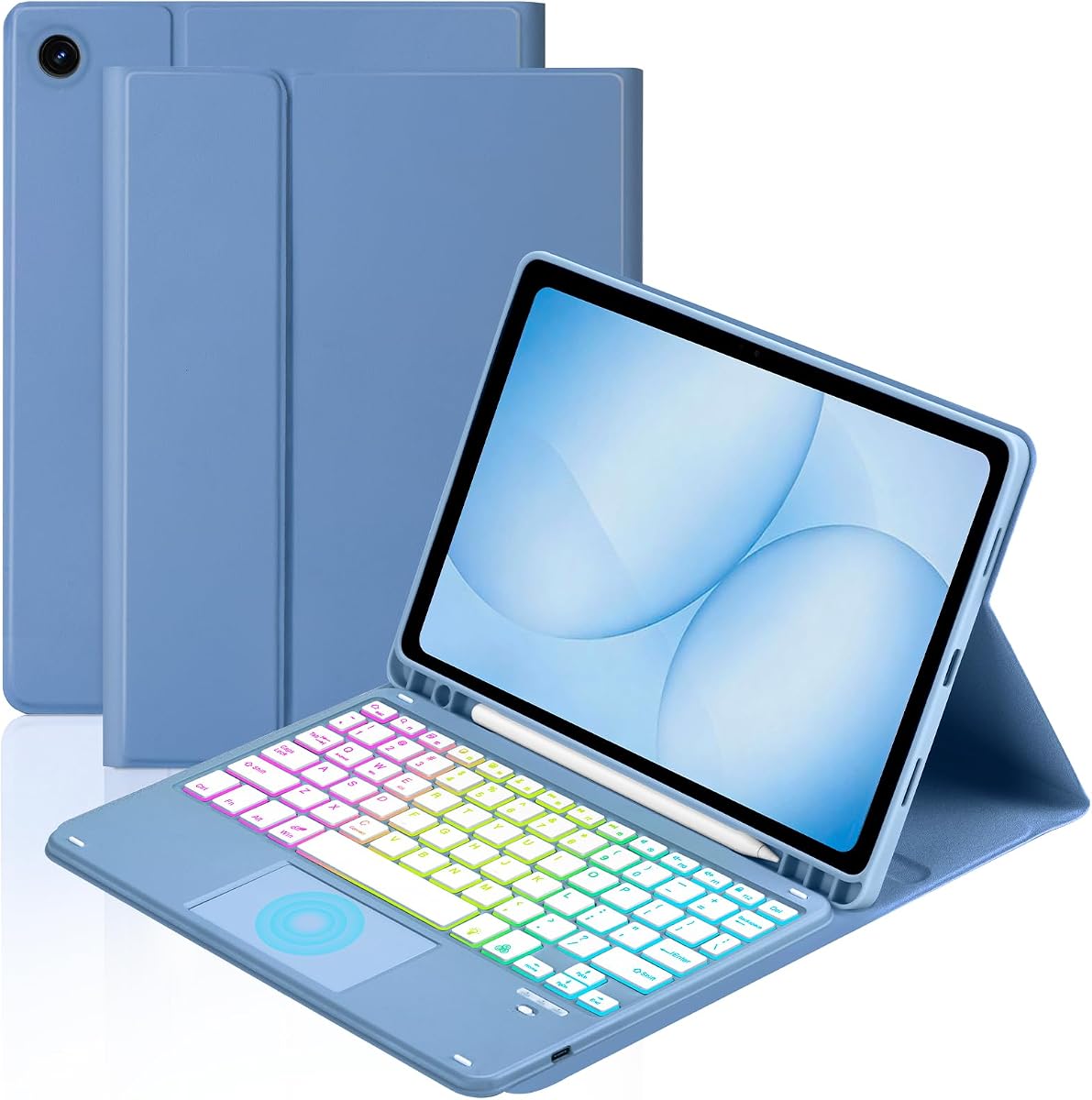
Built-in Multi-touch Trackpad
Rock-Solid Magnetic Support
Adjustable Brightness Backlight
This guide compares ten top-rated keyboards for the Samsung Galaxy Tab A11 tablet, analyzing features like battery life, connectivity, and protection to help
Finding the right keyboard for your Samsung A11 tablet can transform it into a powerful productivity machine. A good accessory should offer responsive typing, reliable connectivity, and robust protection for your device.
We evaluated ten top-rated keyboard cases based on user feedback, build quality, and feature sets. Our comparison highlights compatibility, battery performance, and design versatility to help you make an informed decision.
Each selection below showcases a unique value proposition, from budget-friendly options to premium multi-device solutions. Please note that availability and pricing may change over time, so verify details before purchasing.
4.3Editor score

4.6Editor score

4.5Editor score
The following comparison table outlines key specifications for each of the ten featured keyboard cases to facilitate quick side-by-side evaluation of their core capabilities.




The Soke Keyboard Case stands out as a top contender for transforming your Samsung Galaxy Tab A11 Plus into a versatile workstation. With a high user rating and a sleek black design, it combines protection with functional typing capabilities that many users find reliable for daily tasks.
We may earn a commission when you buy through this link, at no additional cost to you.
This case features a rechargeable magnetic wireless keyboard that connects via Bluetooth with a range of up to 10 meters. The 7-color backlight ensures comfortable typing in low light conditions, while the non-slip grooves allow you to adjust the viewing angle between 120 and 130 degrees for ergonomic use.
While the keyboard is detachable for easy carrying, the case itself offers full-body protection against drops and scratches. The auto sleep/wake function helps preserve battery life effectively. However, users should note that the pen and tablet are not included, and you must provide your own charging head.
Overall, this is an excellent choice for users who need a responsive typing experience with multi-system compatibility. Its blend of style, protection, and connectivity makes it a smart investment for students and professionals alike.
You can freely switch between iOS, Android, and Windows systems to suit your workflow or travel needs.
The two non-slip grooves provide stable support for the tablet at different viewing angles.
We may earn a commission when you buy through this link, at no additional cost to you.
The Dexnor keyboard case is specifically designed for the Galaxy Tab A11+ and A9+ Plus models. It transforms your tablet into a laptop-like device with a built-in multi-touch trackpad, offering precise navigation for multitasking and editing without touching the screen.
We may earn a commission when you buy through this link, at no additional cost to you.
This ultra-light case weighs just 1.36 pounds and features strong magnetic support to keep your tablet secure on your desk or lap. The 120-degree viewing angle ensures comfort, while the adjustable backlight helps you type efficiently even in dim environments.
One limitation is that it does not use a floating cantilever design, meaning the screen does not elevate above the keyboard base. Additionally, the keyboard cannot be folded to the back. Despite this, the 720-hour standby time and energy-saving features make it a reliable companion for long work sessions.
If you value precision navigation and a lightweight build, this case provides excellent value. It is ideal for users who need a reliable workstation setup that prioritizes portability and battery endurance.
Enjoy laptop-like controls with multi-finger gestures for browsing and editing.
The keyboard goes into sleep mode after inactivity to conserve power effectively.
We may earn a commission when you buy through this link, at no additional cost to you.
The YBING Keyboard Case offers a budget-friendly solution for users seeking functionality without breaking the bank. It features a detachable wireless keyboard that allows you to use the tablet independently when typing is not required.
We may earn a commission when you buy through this link, at no additional cost to you.
With a 7-color rainbow backlight and breathing mode options, this case adds a touch of personality to your device. The 360-degree rotation allows for flexible positioning, while the anti-slip grooves ensure the tablet stays steady at your preferred angle.
The keyboard works for about five hours with the backlight on and up to eighty hours with it off. While the pen holder is convenient, remember that the pen is not included. This product is perfect for casual users or students needing versatile protection.
For those on a tight budget who still want a premium feel, this case delivers impressive features. Its strong magnetic adsorption ensures the keyboard stays securely in place during daily use.
The back cover rotates 360 degrees to support landscape and vertical use.
Shortcut keys allow quick access to common actions like copy and paste.
We may earn a commission when you buy through this link, at no additional cost to you.
This case is unique because it includes both a keyboard and a rechargeable Bluetooth mouse, providing a full desktop experience for your tablet. The multi-touch trackpad allows for precise cursor control, enhancing productivity when navigating complex interfaces.
We may earn a commission when you buy through this link, at no additional cost to you.
The keyboard features a rainbow backlight with constant and breathing light modes, adding visual flair to your workspace. With a Type-C charging cable and fast charging capability, you can keep your devices powered for extended sessions without downtime.
The case supports three non-slip viewing angles and includes a stylus slot for secure storage. While managing both the mouse and keyboard requires some attention, the versatility it offers for multitasking is significant for power users.
If you want an all-in-one solution that mimics a laptop setup closely, this package is ideal. It provides the tools needed for efficient document editing and web browsing on the go.
The included mouse and keyboard provide complete control without screen touching.
Rainbow backlight modes allow you to personalize your typing environment.
We may earn a commission when you buy through this link, at no additional cost to you.
The TUNKARMOR case focuses on flexibility with a detachable magnetic keyboard that turns your tablet into a mini laptop quickly. You can reposition the keyboard based on your preference, offering adaptability for various tasks and environments.
We may earn a commission when you buy through this link, at no additional cost to you.
Three viewing angles and anti-slip slots ensure the tablet stays stable whether you are reading or drawing. The inner honeycomb grid provides cushioning that helps protect against overheating and adds to the overall lifespan of your device.
Auto sleep and wake functionality protects battery life by activating the tablet when the lid opens. Although the pen is not included, the built-in holder ensures it is always ready if you have one. This case balances practicality with protective design.
This is a strong option for users who want to switch between typing and touch modes effortlessly. The slim profile makes it easy to carry, ensuring your tablet remains secure during travel.
The honeycomb grid pattern cushions the tablet and reduces overheating.
The keyboard attaches firmly yet detaches easily for versatile use.
We may earn a commission when you buy through this link, at no additional cost to you.
Harvopu offers a durable case with a wireless mouse that includes 3-level DPI adjustment for precision control. This makes it particularly useful for graphic editing or detailed document navigation where accuracy is critical.
We may earn a commission when you buy through this link, at no additional cost to you.
The keyboard boasts a marathon-ready battery life, with up to 180 hours of use on a single charge. The detachable multi-color backlight adds style and visibility in dim settings. The case itself repels stains and is easy to clean, keeping your device looking new.
While the keyboard and mouse add value, the setup might be slightly more complex than single-keyboard options. However, the combination of endurance and precision tools makes it a standout choice for professionals needing reliable performance.
If you prioritize battery life and need extra control precision, this set is worth considering. The protective case ensures your investment remains safe from daily wear and tear.
Switch mouse sensitivity instantly for editing or browsing tasks.
Sleep mode activates automatically to conserve power when not in use.
We may earn a commission when you buy through this link, at no additional cost to you.
The TiMOVO keyboard case is designed for simplicity and reliability with a focus on battery life. It features a built-in rechargeable battery that supports over 90 hours of use and 90 days of standby time on a single charge.
We may earn a commission when you buy through this link, at no additional cost to you.
The 7-color backlight offers three brightness levels to suit different environments. Three adjustable angles provide ergonomic comfort, and the anti-slide design ensures stability. The keyboard detaches easily, allowing you to carry just the case if needed.
One detail to note is that the keyboard disconnects after 10 minutes of inactivity to save power, waking up when a key is pressed. This is a normal feature to conserve energy. It is a solid choice for occasional users who prioritize longevity.
If you need a durable case with excellent battery performance, this is a practical solution. The protection against scratches and bumps ensures your tablet stays safe in daily use.
Enjoy up to 90 days of standby time on one charge.
The 7 vibrant colors add fun to your typing environment.
We may earn a commission when you buy through this link, at no additional cost to you.
This MePadKey case features a smart touchpad with multi-touch capabilities that support up to four-finger gestures for advanced navigation. It allows you to scroll, zoom, switch apps, and take screenshots without touching the screen.
We may earn a commission when you buy through this link, at no additional cost to you.
The keyboard includes shortcut keys for functions like copy and paste, which speeds up document editing. The magnetic adsorption ensures the keyboard stays firm, while the anti-slip grooves provide stable viewing angles for your tablet.
While the touchpad is a strong feature, the device requires a compatible model and does not include a pen. However, the ability to manage multiple gestures efficiently makes it a powerful tool for multitasking users.
If you need a responsive interface similar to a laptop, this touchpad keyboard is a great fit. It offers comprehensive controls to manage your tablet's software effectively.
Swipe and click with multiple fingers to navigate quickly.
First row keys provide instant access to common system functions.
We may earn a commission when you buy through this link, at no additional cost to you.
This MePadKey variant offers 360-degree rotation capability, allowing you to adjust your viewing angle freely. The built-in touchpad supports multi-finger gestures, enhancing usability for browsing and media consumption without screen fatigue.
We may earn a commission when you buy through this link, at no additional cost to you.
The detachable keyboard can be removed when you want to use the tablet in a different mode. The pen holder ensures your stylus is secure and accessible. Multi-system compatibility means you can switch between platforms effortlessly.
While the pen is not included, the case design focuses on organizing your accessories effectively. This is a flexible option for users who need different orientations for reading versus typing.
If you need a case that accommodates various angles and touch inputs, this model is highly adaptable. It ensures your device is protected while remaining versatile for different tasks.
Adjust the tablet angle to suit your current activity.
The pen holder keeps your stylus safe during daily travel.
We may earn a commission when you buy through this link, at no additional cost to you.
Supveco provides robust protection with a honeycomb grid pattern that increases device lifespan and prevents overheating. The case is made of flexible silicone and TPU, offering shock and scratch protection for your new tablet.
We may earn a commission when you buy through this link, at no additional cost to you.
The keyboard is detachable and features seven colors with automatic change for visual enjoyment. Multiple viewing angles and an auto sleep/wake function ensure the device operates efficiently. The magnetic closure is easy to snap on and off.
With a 3.5-hour full charge time, the battery supports long usage periods. The pen holder keeps your stylus accessible without clutter. This is a high-performing option for those seeking durability and style.
If you prioritize device safety and versatile features, this case is an excellent choice. Its design ensures your tablet is protected while providing a convenient typing environment.
The honeycomb grid layer helps protect your tablet from overheating.
Materials like TPU and silicone provide shock resistance.
We may earn a commission when you buy through this link, at no additional cost to you.
Selecting the right keyboard requires considering connectivity, battery life, and build quality to ensure it meets your specific needs.
Ensure the case fits your specific model number like SM-X230 or SM-X210 to avoid fit issues. Manufacturers often produce variants that look similar but have different cutouts for ports.
Always verify your model number in settings before purchasing to guarantee a secure fit.
Bluetooth connectivity allows wireless freedom but requires pairing. Some models include a mouse for extra control which adds to the utility of the accessory.
Look for wireless options that support stable connections without latency issues.
Backlit keyboards consume more power, so check battery endurance figures. Models with sleep modes help preserve energy when the keyboard is not in active use.
Choose a battery that supports your typical work duration without frequent charging.
Detachable keyboards allow you to carry just the case for reading. Some models include trackpads that mimic a laptop experience for better navigation control.
Decide if you need a fixed or detachable layout based on your workflow.
Cases with full edge coverage and honeycomb patterns offer better shock protection. The material quality should be durable enough to resist scratches and daily wear.
Prioritize cases with strong magnets or secure buckles to keep the tablet safe.
Adjustable grooves allow you to find a comfortable angle for typing or watching media. Multiple angles increase ergonomics and reduce neck strain during long use.
Look for cases with non-slip slots to ensure stability at every angle.
Some keyboards support multiple operating systems like Android, Windows, and iOS. This feature is useful if you use your tablet across different environments or with different devices.
Check if the keyboard has a system switch key to change modes easily.
Extra features like S Pen holders, multi-color backlights, and shortcut keys add convenience. These small details can significantly enhance your daily usage experience.
Consider which extra functions align with your personal preferences and needs.
Connect your keyboard to the tablet via Bluetooth by entering pairing mode. Follow the on-screen instructions to establish a stable connection before typing.
Charge the keyboard regularly using the provided USB-C cable. Avoid letting the battery deplete completely to extend its lifespan and performance.
Clean the keys and trackpad with a soft cloth to remove dust and debris. Keep the case in a cool dry place to prevent damage from environmental factors.
Most cases are designed for specific models like SM-X230 or SM-X210. Always check your model number in settings to ensure exact compatibility before purchasing.
Turn on the keyboard and enable Bluetooth on your tablet. Select the device from the list to complete the pairing process.
Most cases come with a holder but do not include the S Pen itself. You will need to purchase the stylus separately if you need one.
The keyboard layout may vary, but you can often change the input language in tablet settings to match your preferences.
Yes, many models have an auto sleep/wake function that activates when you open or close the case lid.
Battery life varies by model but typically ranges from 50 hours to over 100 hours without backlight usage.
Many options are detachable allowing you to remove the keyboard for easier tablet use and transport.
Modern keyboards have built-in safety circuits that prevent overcharging, but it is best to unplug after full charge.
Our top picks include the Soke Case for versatility, the Dexnor for trackpad control, and the YBING for budget-friendly value. Each offers distinct benefits for different user needs.
Prioritize features like battery life and connectivity to ensure a smooth experience. The right keyboard can significantly enhance productivity and comfort.
Remember to check current availability and details before purchasing as specs may vary. Verify compatibility to ensure your choice fits your device perfectly.