
TP-Link AC3200 (Archer C3200)
4.2Editor score
Tri-Band technology for separate bands
Smart Connect balances network demand
Six high-performance antennas maximize coverage
Discover the top AC3200 Tri Band WiFi Routers for 2026. We compare speed, coverage, and security features to help you find the perfect router.
Modern homes demand robust connectivity for streaming, gaming, and remote work. AC3200 Tri Band WiFi Routers offer three separate bands to distribute traffic efficiently. This ensures your devices enjoy consistent speeds without congestion even when many users are active simultaneously.
We evaluated ten top-rated models based on performance, features, and user feedback. Our analysis focuses on throughput, range, security protocols, and ease of setup. We selected products that excel in device-heavy environments to provide reliable connectivity for families and professionals alike.
Each pick highlights unique strengths like advanced QoS, parental controls, or USB sharing capabilities. Prices and availability fluctuate frequently so verify current details before purchasing. Our guide aims to simplify your decision-making process by presenting clear comparisons and expert insights into each model.
4.2Editor score

4.2Editor score

4.2Editor score
This side-by-side comparison highlights the key specifications and features of ten leading AC3200 Tri Band WiFi Routers available in the market. We examine processing power, antenna configurations, security tools, and connectivity options to help you identify the model that best fits your home network needs and performance expectations.


The ASUS AC3200 Tri-Band Gigabit Router stands out as a top performer for security-conscious users. With a rating of 4.2 stars it delivers reliable connectivity across multiple bands. Its standout feature is AiProtection powered by Trend Micro which provides lifetime security updates without additional subscriptions.
We may earn a commission when you buy through this link, at no additional cost to you.
This router excels in managing network traffic with Adaptive QoS ensuring smooth gaming and streaming. The Smart Connect feature automatically assigns devices to the fastest available band reducing congestion significantly. Users appreciate the graphical interface that simplifies complex network controls without technical expertise.
While powerful the unit has a large design that may not fit small spaces easily. The price point is higher than budget alternatives but justified by the lifetime security inclusion and robust feature set. Performance remains stable even with dozens of connected devices simultaneously.
Ideal for families needing strong parental controls and robust cybersecurity features this router is highly recommended. The dual USB ports facilitate easy file sharing and printer access across the network. Overall it balances performance security and usability exceptionally well for demanding home networks.
Trend Micro integration ensures continuous protection against online threats without recurring fees. This adds long-term value compared to routers requiring annual security subscriptions for basic protection.
The ASUSWRT interface offers intuitive controls for bandwidth prioritization and guest networks. Users can manage complex settings through a clean visual dashboard rather than text-heavy menus.
We may earn a commission when you buy through this link, at no additional cost to you.
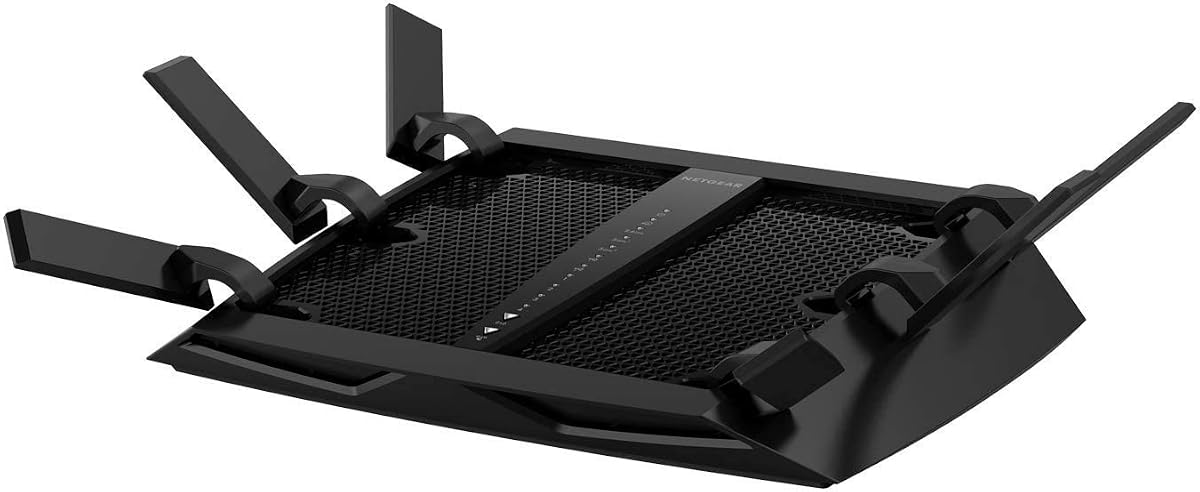
The NETGEAR Nighthawk X6 offers exceptional range and speed for large homes. Rated 4.2 stars it supports up to 50 devices reliably. Its premium positioning is justified by features like Armor Security and Dynamic QoS that prioritize critical traffic for uninterrupted performance.
We may earn a commission when you buy through this link, at no additional cost to you.
With coverage up to 3500 square feet this router eliminates dead zones effectively. The six amplified antennas maximize signal strength throughout multi-story homes. Dynamic QoS allows you to prioritize gaming or video calls ensuring lag-free experiences even during heavy usage times.
The cost is significantly higher than average routers but the extended coverage and security features provide value. Initial setup requires patience due to advanced settings. Once configured the network stability remains consistent without frequent reboots or connectivity drops.
Homeowners with large floor plans who need strong security and speed should consider this model. The inclusion of Armor Security adds a layer of protection against malware and online threats. It is a premium choice for those prioritizing coverage and reliability above budget constraints.
The six high-performance antennas combined with powerful amplifiers deliver extensive wireless reach. This ensures consistent signal strength even in distant rooms or outdoor areas near the home.
NETGEAR Armor provides automatic shield protection across all connected devices. Users gain peace of mind knowing their network is safeguarded against external threats automatically.
We may earn a commission when you buy through this link, at no additional cost to you.
The TP-Link AC3200 Archer C3200 offers great value for budget-conscious buyers. With a 4.2-star rating it balances performance and cost effectively. This model provides Tri-Band technology to spread traffic efficiently without breaking the bank.
We may earn a commission when you buy through this link, at no additional cost to you.
Smart Connect helps devices run faster by assigning them to the best band automatically. Six high-performance antennas ensure broad coverage and stable connections. Users find the interface intuitive making network setup straightforward even for non-technical individuals.
While it lacks some advanced security or parental controls found in higher-end models it handles everyday tasks reliably. The price point makes it accessible for most households needing upgraded speeds. Renewed versions offer additional savings with verified quality standards.
Ideal for medium-sized homes looking for reliable speed without overspending this router is a top pick. It supports 4K streaming and online gaming without interruptions. The combination of speed and affordability makes it a practical choice for many users.
Access combined 3200Mbps wireless speeds without premium costs. This makes high-performance connectivity accessible for families upgrading from older single or dual-band routers.
The Tether app and intuitive interface simplify installation. Users can get online quickly with minimal configuration steps required for basic functionality.
We may earn a commission when you buy through this link, at no additional cost to you.
The Linksys AC3200 Tri-Band Smart Wi-Fi Router offers robust processing power for device-heavy homes. Rated 4.0 stars it utilizes a 1GHz dual-core CPU and integrated co-processors for efficient data handling. This architecture ensures smooth performance during peak usage hours.
We may earn a commission when you buy through this link, at no additional cost to you.
The Smart Wi-Fi app allows remote network control from anywhere. This feature appeals to users managing networks from work or travel. The router supports various operating systems ensuring broad compatibility with existing home computers and devices.
Some users note the app interface feels slightly dated compared to newer competitors. The wireless range is solid but may not cover very large properties without additional extenders. Overall performance remains steady for streaming and browsing activities.
Families needing reliable processing power for multiple simultaneous connections will appreciate this model. The ability to control the network remotely adds convenience. While not the highest rated it provides consistent performance for standard home network needs.
The Smart Wi-Fi app enables remote network management and monitoring. Users can view connected devices and adjust settings without needing physical access to the router.
The penta-core processing power delivers efficient traffic handling. This reduces bottlenecks when many devices are actively downloading or streaming data simultaneously.
We may earn a commission when you buy through this link, at no additional cost to you.
This original model of the Nighthawk X6 remains a benchmark for performance. It features advanced Beamforming+ technology to focus signals on connected devices. The combination of speed and range supports demanding activities like 4K streaming seamlessly.
We may earn a commission when you buy through this link, at no additional cost to you.
Dynamic QoS allows prioritization of specific applications ensuring latency-sensitive tasks perform well. The six amplified antennas maximize coverage across large living spaces. Ethernet ports provide stable wired connections for gaming consoles or desktop PCs.
The investment required is significant but justified by the extensive features and stability. Placement matters for this model to ensure maximum reach throughout the home. Once optimized it delivers consistent high-speed internet reliably.
Power users and tech enthusiasts needing top-tier hardware should consider this router. It offers a complete package of connectivity and security. The build quality and feature set justify the premium cost for those who demand excellence.
Beamforming+ focuses signals directly on devices for stronger connections. This technology enhances reliability and speed compared to standard omnidirectional broadcasting methods.
Dynamic QoS prioritizes critical apps like gaming or video calls. This prevents other downloads from slowing down important network activities during peak times.
We may earn a commission when you buy through this link, at no additional cost to you.
This AC3200 model provides consistent performance for standard home needs. It offers Tri-Band connectivity to reduce congestion during busy hours. The 4.0-star rating reflects reliable operation for streaming and browsing tasks.
We may earn a commission when you buy through this link, at no additional cost to you.
The Tether app simplifies network setup and management significantly. Users can adjust settings easily without technical knowledge. The 2-year warranty provides added peace of mind for purchasers concerned about longevity.
While it lacks some advanced features found in premium models it handles common tasks well. The price remains attractive for those seeking cost-effective upgrades. Signal stability remains strong across typical home environments.
Households requiring simple reliable internet access without complex configurations will find this model suitable. The warranty and app support add value to the purchase. It is a practical choice for everyday use without frills.
Industry-leading 2-year warranty covers manufacturing defects. This support ensures long-term reliability and customer satisfaction for home users.
The Tether app provides easy access to router settings. Users can manage guest networks and parental controls with simple taps on their devices.
We may earn a commission when you buy through this link, at no additional cost to you.
This renewed ASUS router maintains high performance standards for gaming. MU-MIMO technology allows simultaneous data streaming to multiple devices reducing lag. The 4.2 rating confirms consistent reliability for demanding online activities.
We may earn a commission when you buy through this link, at no additional cost to you.
AiProtection security powered by Trend Micro ensures safe browsing for all users. This feature adds essential protection against common online threats. The optimization for gaming reduces latency which is critical for competitive play.
Buying renewed offers cost savings but requires checking physical condition upon arrival. Setup is straightforward though occasional resets may be needed for optimal configuration. Performance remains strong when properly configured.
Gaming enthusiasts seeking reduced latency and strong security should consider this option. The combination of hardware and software features supports smooth gameplay. It balances affordability with the high performance needed for competitive gaming.
Dedicated optimizations reduce lag for real-time applications. This ensures smoother performance for multiplayer games and live streaming without interruptions.
AiProtection provides enhanced threat protection for the network. Users benefit from enterprise-grade security features typically reserved for more expensive systems.
We may earn a commission when you buy through this link, at no additional cost to you.
The Netgear R8000-100PAS offers high-end hardware for demanding networks. While rated 3.8 it provides significant throughput with Tri-band capabilities. This model ensures sufficient bandwidth for heavy internet usage across multiple rooms.
We may earn a commission when you buy through this link, at no additional cost to you.
Smart Connect designates slower and faster devices to separate bands. This separation prevents older devices from slowing down faster modern equipment. The dual-core processor handles multiple connections without significant lag.
Users report mixed experiences regarding initial setup complexity. Advanced features require familiarity with router administration. Once set up the performance remains consistent for gaming and video streaming.
Tech-savvy users wanting high-speed connections should consider this router. It delivers strong raw performance and reliability. The trade-off is a more involved setup process compared to simpler consumer models.
Smart Connect separates devices based on speed needs automatically. This optimizes overall network efficiency by preventing slower devices from congesting faster bands.
The dual-core processor with offload processors boosts overall performance. This architecture handles high traffic loads without freezing or dropping connections.
We may earn a commission when you buy through this link, at no additional cost to you.
This TP-Link model boasts an impressive 4.3-star rating from users. It combines three bands to maximize speed and reduce congestion effectively. The hardware includes three 2.4 GHz antennas and two 5 GHz antennas for superior coverage.
We may earn a commission when you buy through this link, at no additional cost to you.
MU-MIMO technology achieves efficiency by communicating with multiple devices simultaneously. Beamforming delivers efficient wireless connections that adapt to device locations. This ensures stable connectivity even when devices are far from the router.
The interface remains straightforward which may limit advanced users seeking deep customization. Performance remains robust for typical household needs including video streaming and online gaming. Reliability is a standout feature for long-term use.
Families seeking a balance of performance and reliability will find this router suitable. It offers high-speed connectivity without unnecessary complexity. The strong user rating confirms satisfaction among a wide range of customers.
MU-MIMO allows simultaneous communication with multiple devices. This significantly reduces buffering when several household members are streaming content at once.
Beamforming focuses signals directly toward connected devices. This improves signal strength and stability particularly for devices positioned at a distance.
We may earn a commission when you buy through this link, at no additional cost to you.
The Renewed Netgear R8000-100NAR offers a cost-effective way to access high performance. With a 4.1-star rating it retains strong capabilities for data throughput. The 3.2Gbps combined speed supports uninterrupted streaming across multiple devices.
We may earn a commission when you buy through this link, at no additional cost to you.
Smart Connect selects the best Wi-Fi for every device automatically. This feature balances load efficiently across the three available bands. The 1GHz dual core processor ensures smooth data handling without bottlenecks.
Note that refurbished units may have removed serial numbers which can affect customer support. Users should be prepared to state the part number when contacting service. Performance remains consistent despite these minor administrative changes.
Buyers wanting premium features at a reduced price will appreciate this unit. It delivers strong range and speed suitable for large homes. The value proposition is high for those willing to accept renewed condition.
Renewed models offer premium hardware at lower costs. Buyers can access high-speed networking features without the full price of new devices.
Smart Connect ensures each device gets the optimal connection type. This maximizes efficiency for both legacy devices and modern high-speed gadgets.
We may earn a commission when you buy through this link, at no additional cost to you.
Choosing the right router involves evaluating several critical factors to ensure optimal performance. We break down the key elements that define a quality AC3200 router so you can make an informed decision for your home network needs.
AC3200 routers provide combined speeds up to 3200 Mbps split across three bands. Look for a model that offers one 2.4GHz band and two 5GHz bands to distribute traffic effectively. This separation prevents congestion when multiple devices connect simultaneously ensuring each user maintains high speeds.
Prioritize routers that combine at least 3000 Mbps total throughput. This guarantees smooth performance for bandwidth-heavy activities like 4K streaming and online gaming without slowdowns.
Coverage area depends heavily on the number of antennas and signal amplification. Models with six high-performance antennas generally deliver stronger range across large homes. Check specifications for square footage coverage to ensure the router fits your property size.
Select a unit with strong amplifiers if you have a multi-story house. Effective range ensures consistent connectivity without dead zones in distant rooms or backyard areas.
The router's CPU determines how well it handles multiple data streams without lag. Look for a dual-core processor with at least 1GHz speed for reliable performance. Additional co-processors help offload tasks like firewall checks to improve overall speed.
Higher memory capacity supports more simultaneous connections efficiently. A robust processor setup is essential for households with many connected smart devices.
Built-in security protects your network from external threats automatically. Options like Trend Micro AiProtection or NETGEAR Armor offer automatic updates against malware. Some models provide lifetime subscriptions which adds significant long-term value.
Ensure the router supports standard protocols like WPA3 and WPA2 for safe data transmission. Advanced security features safeguard personal information and connected IoT devices effectively.
Quality of Service (QoS) allows you to prioritize specific apps over others. Adaptive QoS ensures gaming or video calls get bandwidth priority even when downloads are running. This feature reduces lag during peak usage times significantly.
Choose a router with advanced QoS controls for better user experience. Effective prioritization ensures critical tasks never suffer due to background network activity.
Gigabit Ethernet ports provide stable wired connections for desktops and consoles. USB ports allow you to share printers or storage drives across the network. Check the number and types of ports available to meet your physical connectivity needs.
Multiple USB ports offer flexibility for media streaming from external drives. Ensure the router supports fast transfer speeds like USB 3.0 for efficient file access.
An intuitive interface makes network administration easier for all users. Look for mobile apps that allow remote management and monitoring of connected devices. Simplified setup processes reduce installation time and technical frustration.
Check if the router supports mesh compatibility for future network expansion. Easy-to-use interfaces help parents manage parental controls without navigating complex menus.
A reliable warranty ensures protection against hardware defects. Industry-leading warranties like two years provide peace of mind for long-term use. Verify the manufacturer offers responsive customer support channels for troubleshooting.
Choose brands known for quality support to handle technical issues quickly. Strong warranty coverage protects your investment against unexpected failures or compatibility problems.
Place your router in a central elevated location to maximize signal reach. Avoid metal obstructions and electronics that interfere with wireless signals like microwaves or cordless phones. This positioning ensures devices receive the strongest possible connection throughout your home.
Regularly update the router firmware to maintain security and performance. Most routers allow automatic updates which should be enabled to protect against new threats. This simple habit prevents vulnerabilities and keeps your network running smoothly over time.
Restart your router occasionally to clear temporary glitches and refresh connections. A quick reboot can resolve issues like slow speeds or dropped devices without technical intervention. This routine maintenance helps sustain optimal network stability for all users.
AC3200 indicates the combined wireless speed across all bands reaches 3200 Mbps. This typically includes a 2.4GHz band and two 5GHz bands that distribute data efficiently. The number helps users identify high-performance routers capable of handling heavy network traffic.
Tri-Band routers offer additional bandwidth for homes with many connected devices. They reduce congestion by splitting traffic across three bands instead of two. This ensures smoother performance for streaming and gaming when multiple users are active simultaneously.
Most AC3200 routers support up to 50 devices comfortably without slowdowns. The three bands distribute the load effectively to maintain speeds for each device. Larger homes may benefit from this capacity for smart home gadgets and multiple streaming devices.
Yes you need a separate modem to connect to your internet service provider. These routers distribute the connection via WiFi and Ethernet but do not provide the internet signal directly. Most ISPs require a compatible modem for fiber or cable connections.
Yes many models support mesh technology or range extenders for larger homes. Some routers allow adding compatible extenders to eliminate dead zones effectively. Always check specific product details for mesh compatibility before purchasing expanders.
Some routers include lifetime security software while others require annual subscriptions. Models with Trend Micro or NETGEAR Armor often offer free lifetime updates for protection. Check product details to understand long-term costs for security features.
We reviewed ten top AC3200 Tri Band WiFi Routers offering varying levels of speed and security. Our top picks include the ASUS AC3200 for security and the NETGEAR Nighthawk X6 for premium range. Each model delivers reliable performance suited for modern high-demand households.
Prioritize coverage and security features based on your specific home size and needs. Families with many connected devices should focus on Tri-Band capacity and QoS controls. Budget buyers can find excellent value in the TP-Link Archer C3200 without sacrificing essential speed.
Prices and availability change frequently so always check current listings before purchasing. Use our comparison table to match specifications with your requirements accurately. We hope this guide helps you find the perfect router for seamless connectivity and enjoyment.