
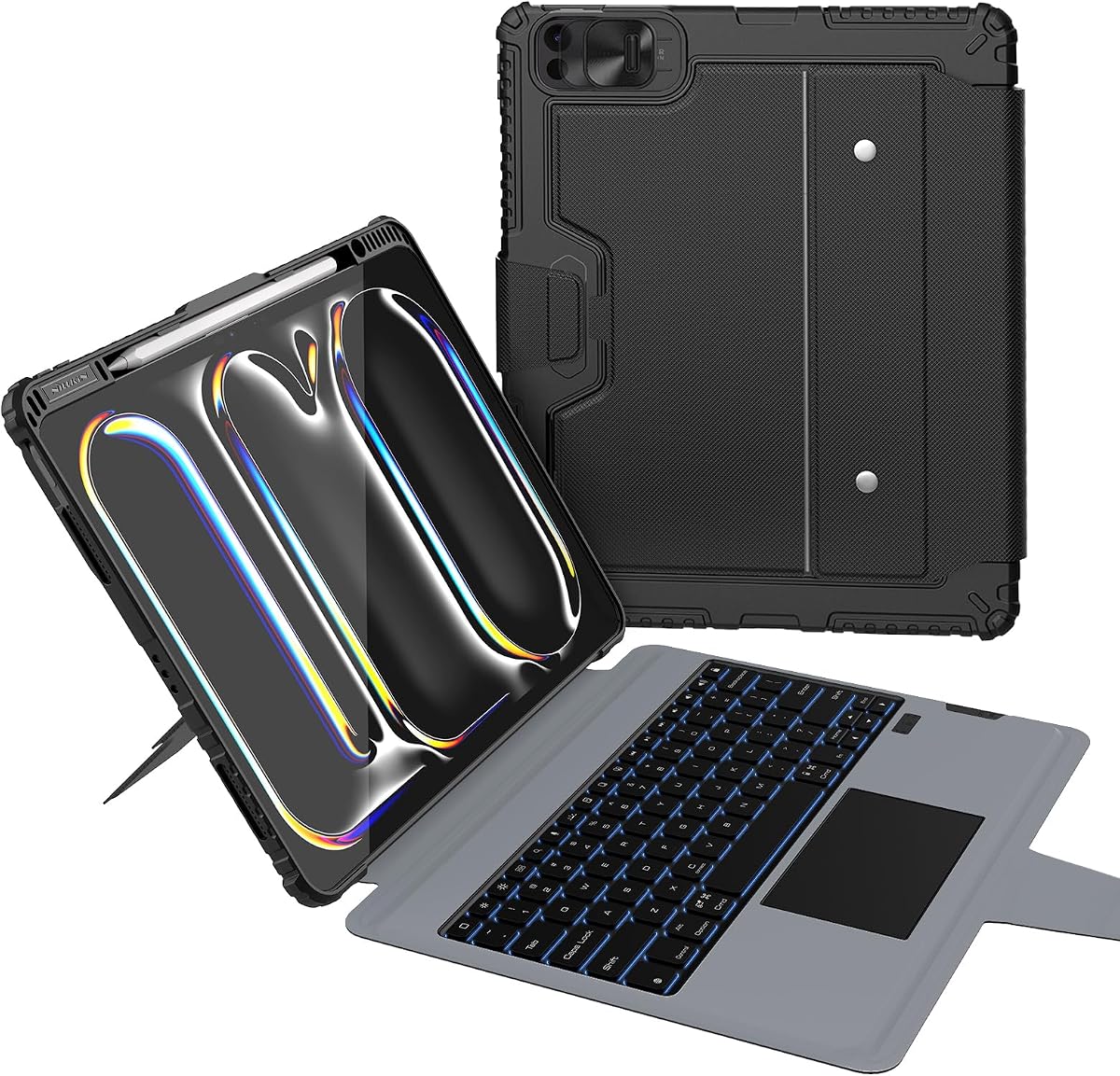
Harvopu Keyboard Case
4.4Editor score
7-color backlit keyboard with brightness control
High-sensitivity multi-touch trackpad
Three stable viewing angles included
Finding the right keyboard case for iPad Pro 13 M4 transforms your tablet into a powerful workstation. These accessories combine protection with typing capability, offering trackpads and stand options for diverse workflows. A good case enhances productivity without adding excessive bulk to your mobile setup.
We compared ten leading models based on compatibility, build quality, and user feedback. Our analysis covers magnetic connectivity, backlight options, and trackpad responsiveness. Each product was evaluated for its ability to support professional and creative tasks effectively.
This guide presents detailed reviews and comparisons to streamline your decision. Every pick highlights unique strengths and potential limitations. Keep in mind that product availability and pricing may vary, so verify details before purchasing to ensure the best fit for your needs.
4.4Editor score

4.3Editor score

3.7Editor score
As an Amazon Associate we earn from qualifying purchases.
This section compares all ten models side by side to highlight their distinct features and compatibility details. Use this overview to quickly identify which case aligns with your specific requirements for typing, protection, and portability.



This Magic Keyboard offers a premium experience for iPad Pro 13-inch M4 users. It features a glass trackpad with haptic feedback and a built-in function row. The scissor mechanism provides a laptop-like typing feel that stands out.
We may earn a commission when you buy through this link, at no additional cost to you.
Its two-cantilever hinge design allows smooth viewing angles without extra mechanisms. USB-C pass-through charging keeps your tablet powered while in use. The magnetic attachability ensures secure placement without needing pairing or charging.
While expensive, the build quality justifies the cost for professionals needing reliability. The lack of multiple stand angles is a trade-off for the sleek profile. It excels in portability and seamless integration with iPadOS features.
Ideal for those seeking a top-tier accessory for productivity tasks. The trackpad supports Multi-Touch gestures effectively for navigation. Invest here if you prioritize typing quality and trackpad performance over cost savings.
The function row provides quick access to media and system controls without leaving apps.
Folds to provide front and back protection ensuring your device stays safe during travel.
We may earn a commission when you buy through this link, at no additional cost to you.
Harvopu delivers solid performance at a budget-friendly cost. The magnetic detachable design allows flexibility for reading or sketching. It includes a 7-color backlit keyboard with adjustable brightness levels.
We may earn a commission when you buy through this link, at no additional cost to you.
Its high-sensitivity trackpad supports scrolling and zooming gestures efficiently. The built-in 500mAh battery supports up to 100 hours of active use. Three viewing angles provide ergonomic options for different tasks.
While not as sleek as premium options, it offers strong value. The Bluetooth connection is stable but needs pairing compared to magnetic connectors. Cleaning is easy due to the stain-resistant material.
Perfect for students or casual users needing affordability. The keyboard offers a smooth feel for typing tasks. Choose this if you prioritize cost without sacrificing essential productivity features.
Three stable viewing angles allow comfortable use whether typing or watching videos.
The special stain-resistant PU material wipes clean easily after daily use.
We may earn a commission when you buy through this link, at no additional cost to you.
Logitech Combo Touch offers versatility with a detachable keyboard design. It uses the Smart Connector for instant secure connectivity without battery charging. The large trackpad enables intuitive navigation similar to a laptop.
We may earn a commission when you buy through this link, at no additional cost to you.
Switching between modes is easy due to the flexible kickstand and detachable layout. You can sketch or read without removing the tablet from the case. Sturdy form-fit protection keeps your device safe from scratches.
The Smart Connector ensures consistent power and data transfer without extra cables. However, the setup might be complex for new users. It balances productivity and protection effectively for professionals on the go.
Recommended for users needing maximum flexibility. The keyboard glows elegantly for dim lighting conditions. Prioritize this if you need a detachable design for varied workflows.
Smart Connector provides instant secure connection powered by your iPad directly.
Detachable keyboard lets you switch to sketching or reading modes instantly.
We may earn a commission when you buy through this link, at no additional cost to you.
ESR offers a magnetic detachable keyboard for versatile usage. The ultra-strong magnets combine case and tablet for seamless setup. Detaching the keyboard allows instant hands-on access for creative work.
We may earn a commission when you buy through this link, at no additional cost to you.
Its extended multi-touch trackpad enhances navigation with gestures for scrolling and swiping. Portrait mode support is ideal for FaceTime and video calls. The floating cantilever stand adjusts smoothly for viewing.
This model bridges the gap between protection and productivity. The magnetic stand simplifies opening and closing. While not premium-priced, it delivers reliable performance for daily tasks.
Great for users needing quick access to the tablet. The back case provides full-body protection. Choose this if magnetic attachment and detachability are priorities.
Detaches instantly for hands-on access making reading or drawing effortless.
Extended trackpad allows precision tapping and pinching for app navigation.
We may earn a commission when you buy through this link, at no additional cost to you.
This ESR model offers ultimate flexibility with adjustable landscape and low-angle support. The sturdy 20-degree support is ideal for writing or drawing tasks. Larger trackpad size enhances gesture support and control.
We may earn a commission when you buy through this link, at no additional cost to you.
Switching between portrait and landscape modes is effortless for work or entertainment. The magnetic detachable design keeps your tablet protected when not typing. A stylus holder prevents your pencil from scratching or falling.
Reinforced Air Guard corners add robust protection against drops. The adjustable stand adapts to various tasks seamlessly. It combines utility with durable build quality effectively.
Ideal for users needing multiple viewing angles. The detachable mode transforms iPad into a sleek tablet. Prioritize this if flexibility in angle and mode is essential.
Low angle magnetic support makes sketching and writing comfortable and stable.
Larger click-anywhere trackpad provides precise control and smoother gestures.
We may earn a commission when you buy through this link, at no additional cost to you.
Typecase Edge brings style with 11-color backlight options for every setting. Adjusting 11 backlight levels ensures clear visuals regardless of time of day. The magnetic closure keeps your iPad safe and secure always.
We may earn a commission when you buy through this link, at no additional cost to you.
Full-area trackpad navigation allows precise control without needing a mouse. The floating cantilever design enables effortless angle adjustments for typing. Instant wake and sleep conserve energy during inactivity.
Slim design makes it ideal for on-the-go users. The magnetic attachment provides reliable connectivity without extra cables. It balances aesthetics and functionality well.
Great for users who value personalization. The lightweight build reduces carrying bulk. Select this if customizable lighting and slimness are key.
Choose from 11 adjustable backlight colors to match your mood or environment.
Slim lightweight profile ensures functionality without adding unnecessary bulk.
We may earn a commission when you buy through this link, at no additional cost to you.
Typecase Edge+ transforms your iPad into a productivity hub with detachable back case. Strong N54H magnets ensure stable connection for smooth experience. The 33% larger touchpad enhances precision for detailed design work.
We may earn a commission when you buy through this link, at no additional cost to you.
Wider stable hinge and floating stand provide smooth adjustments up to 135 degrees. Shortcut keys for brightness and volume streamline workflow. A pencil slot keeps your stylus safe within reach.
All-in-one versatility meets reading and typing needs efficiently. Backlit keys add personalized touch for low light. It is ideal for creative professionals.
Recommended for users needing robust attachment. The detachable case supports handheld use. Prioritize this for stable connectivity and larger trackpad.
Shortcut row for brightness and volume allows control without leaving keyboard.
Dedicated pencil slot ensures stylus safety and immediate access for sketching.
We may earn a commission when you buy through this link, at no additional cost to you.
This case features a 360-degree rotating stand for precise angle adjustment. Whether typing or presenting, it adapts smoothly to your needs. The 7-color illumination adds style and visibility in all settings.
We may earn a commission when you buy through this link, at no additional cost to you.
Responsive wireless keyboard and trackpad deliver laptop-like navigation efficiently. Transparent back highlights original device design while providing protection. Full access to ports ensures convenience for charging.
Excellent for users valuing aesthetics and rotation. Locking viewing angles helps maintain posture. The precise trackpad supports editing and switching effortlessly.
Ideal for visual-focused professionals. The vibrant backlight enhances mood. Choose this for rotating flexibility and sleek look.
360 rotating kickstand adapts instantly to any orientation or angle.
Transparent back showcases device design while maintaining durability and protection.
We may earn a commission when you buy through this link, at no additional cost to you.
Nillkin offers military-grade protection with 1.2-meter drop tested durability. Air-cushion bumpers protect corners and heavy-duty frame prevents damage. It includes a camera cover for privacy when not in use.
We may earn a commission when you buy through this link, at no additional cost to you.
Full 0-180 range kickstand allows typing or drawing flexibility. Carbon-steel hinge is rated for 10,000 cycles ensuring longevity. Multi-touch trackpad handles gestures with palm rejection to avoid errors.
While heavier, the build quality ensures survival in tough environments. Weeks between charges reduce maintenance needs. Perfect for field use or rough handling.
Best for rugged environments. The sliding camera cover adds utility. Choose if durability and privacy are top priorities.
Air-cushion bumpers take hits before screen knows what happened.
Sliding camera cover keeps lens protected and privacy intact when unused.
We may earn a commission when you buy through this link, at no additional cost to you.
TSQQST offers crystal-clear hard case showcasing device design. Reinforced corners and shock-absorbent edges guard against drops. Wireless keyboard and trackpad enable seamless portable workstation setup.
We may earn a commission when you buy through this link, at no additional cost to you.
360-degree rotating base allows effortless multitasking between typing and streaming. Futuristic acrylic design adds tech-inspired appeal with circuitry reveal. 7-color keyboard glow adds sophistication for low-light work.
Ideal for digital nomads needing sleek durability. Transparent panel blends style with rugged protection. Responsive controls ensure smooth editing and navigation.
Perfect for style-conscious professionals. The adjustable angles support comfort. Choose for transparent aesthetic with durability.
Crystal-clear hard case showcases original design while providing shock protection.
Futuristic acrylic design reveals circuitry adding sophistication to workspace.
We may earn a commission when you buy through this link, at no additional cost to you.
Selecting the right accessory requires evaluating compatibility and features. Use this guide to match your workflow needs.
Ensure the case matches your iPad Pro 13 M4 model number such as A3360 or A2925. Some cases only fit specific M4 M5 generations.
Check model compatibility before purchasing to avoid return issues.
Decide between magnetic or Bluetooth connections. Magnetic offers secure attachment without pairing but costs more.
Bluetooth provides flexibility but requires charging and setup.
Look for larger trackpads with multi-touch gesture support. This improves navigation efficiency for productivity apps.
Prioritize haptic feedback for better responsiveness.
Choose adjustable backlight levels and colors for visibility. This helps when working in dim environments.
Consider customizable lighting for personalization needs.
Evaluate case durability such as rugged corners or full-body coverage. This safeguards against drops and scratches.
Select based on your typical environment usage.
Assess weight and thickness for travel. Lightweight cases enhance mobility without sacrificing features.
Look for slim profiles if you carry daily.
Check for adjustable kickstands with multiple angles. This supports ergonomics for typing or reading.
Choose cases with rotating hinges for versatility.
For wireless models, review battery capacity and charging time. Efficient batteries reduce maintenance frequency.
Prioritize long-life options for extended use.
Attach the case securely by aligning the magnetic connectors with the iPad Pro 13 M4 ports. Ensure the keyboard locks into place to avoid accidental disconnection during typing.
Clean the surface regularly using a soft cloth to prevent dust buildup. Avoid harsh chemicals that may damage the trackpad or backlight elements.
Store the iPad in protective mode when not in use to extend the lifespan of hinges and connectors. Update iPadOS firmware to maintain compatibility with accessory features.
Most cases listed are designed specifically for iPad Pro 13 M4 M5 models. Check model numbers to confirm fit before purchasing to avoid incompatibility issues.
Magnetic cases like Apple Magic Keyboard do not require separate charging. Wireless Bluetooth keyboards typically need periodic charging via USB-C.
Many models include pencil holders or support for stylus use. Ensure the design allows access to the side connectors for Apple Pencil.
Warranty terms vary by manufacturer, typically ranging from 12 months. Contact the seller or manufacturer for specific policy details and claims.
Most feature built-in shortcut keys for brightness and media. Some include function rows for direct access to system controls.
Cases with rotatable hinges or flexible stands allow easy transitions. Adjust the angle manually to reposition the screen for your task.
Lightweight and slim cases like Magic Keyboard or typecase Edge are ideal. Prioritize portability and foldable designs for easy storage.
Yes, many models support Multi-Touch gestures for navigation and editing. Larger trackpads offer better precision for detailed tasks.
This guide highlights top options ranging from Apple Magic Keyboard to budget-friendly Harvopu. Each offers unique strengths for productivity and protection.
Prioritize compatibility and connectivity based on your workflow needs. Choose between magnetic and wireless solutions for best integration.
Verify current availability and specs before purchase to ensure the perfect fit. Investing in the right case enhances your iPad Pro 13 M4 experience.