
RubensTab T11 Pro standalone Drawing Tablet
4.4Editor score
10.1 Inch Full HD
Standalone Operation
5800mAh Battery
No Computer Needed
Artists today need versatile tools that match their creative vision without breaking the bank. Whether you are sketching on the go or producing professional illustrations, finding the right tablet is crucial for success in your digital art journey.
We have carefully evaluated ten standout products that offer compelling alternatives to traditional tablets. Our analysis focuses on screen quality, pen performance, portability, and software compatibility to ensure you find a device that truly fits your workflow.
Each pick below highlights specific strengths and ideal use cases for different types of creators. Keep in mind that prices and availability can shift frequently, so checking the latest deals before purchasing is always a smart move.
4.4Editor score

4.5Editor score

4.4Editor score
As an Amazon Associate we earn from qualifying purchases.
This side-by-side comparison breaks down the key specifications of each tablet to help you make an informed decision based on your specific artistic needs and budget constraints.



The HUION KAMVAS Pad 12 stands out as a premier standalone option for serious digital artists. With a 4.5-star rating from users, it delivers on its promise of professional-grade performance without needing a computer.
We may earn a commission when you buy through this link, at no additional cost to you.
Its 16K pressure levels and 90Hz refresh rate ensure smooth strokes and immediate response times. The 12.2-inch 2K+ screen offers ample space for detailed work while maintaining high resolution.
While the device is slightly heavier than some competitors, the trade-off is worth it for the superior display quality and battery performance. It also includes robust parental controls for younger users.
Artists seeking a versatile standalone tablet with high specs will find this device meets their needs effectively. It balances power and portability better than most rivals in this price range.
With factory calibration and 99% sRGB coverage, colors remain consistent and true to life for professional projects.
The 90Hz screen ensures that strokes appear instantly without visible lag, enhancing the drawing experience.
We may earn a commission when you buy through this link, at no additional cost to you.
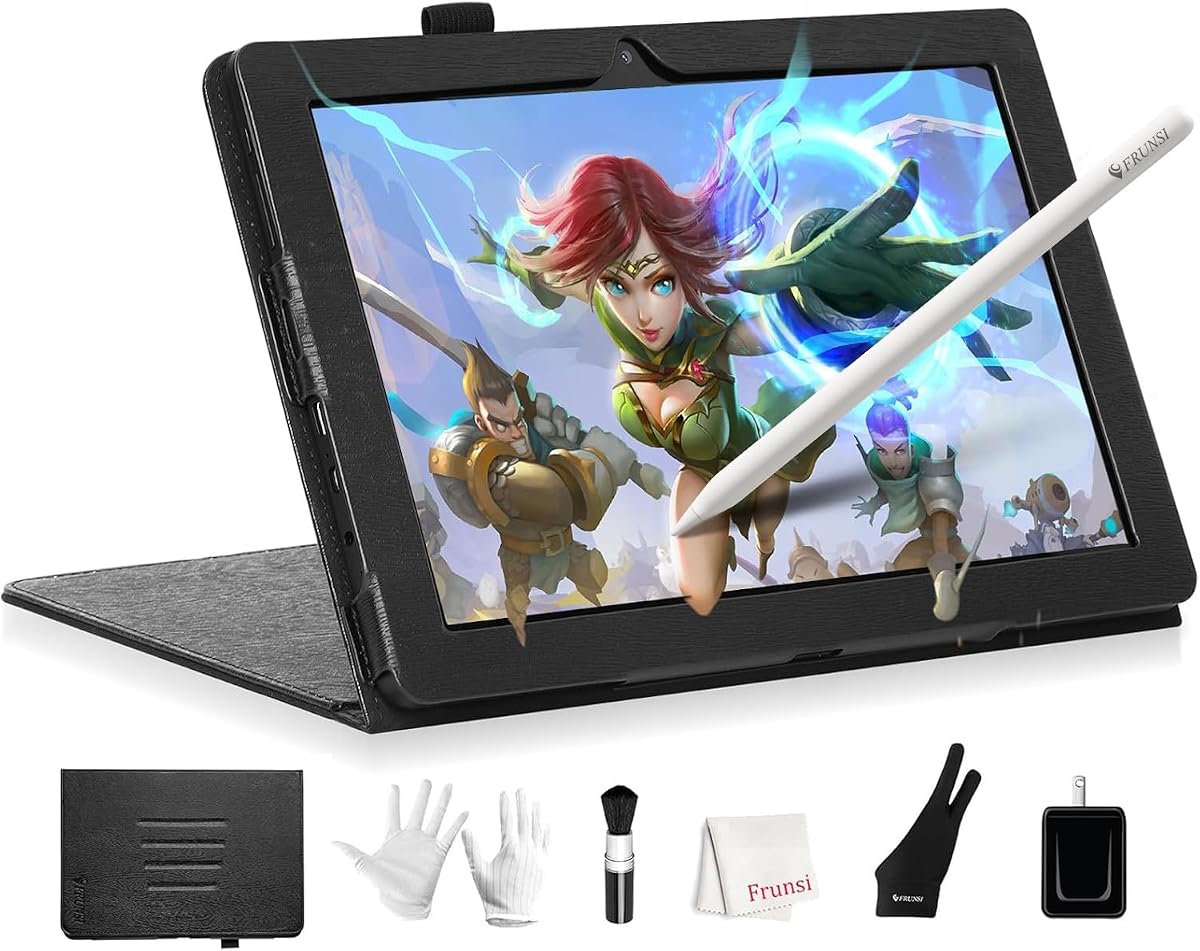
The RubensTab T11 Pro is an excellent entry-level choice for beginners or hobbyists. It offers standalone functionality which makes it very convenient for quick sketching sessions anywhere.
We may earn a commission when you buy through this link, at no additional cost to you.
Featuring a 10.1-inch Full HD screen, it provides a vibrant canvas for digital art. The battery allows for five hours of continuous use which is decent for casual creative tasks.
Although the battery life is not the longest on this list, the low cost makes it a compelling option. The included apps help new users start drawing immediately without extra purchases.
If you need a cost-effective way to transition to digital art without a computer dependency this tablet is a solid starting point. It is easy to carry and simple to set up.
Comes with a suite of professional-grade apps pre-installed to help beginners learn and experienced artists dive right in.
Fully self-contained with no external device required allowing you to create and design anywhere anytime easily.
We may earn a commission when you buy through this link, at no additional cost to you.
Wacom brings its renowned pen technology to a standalone Android tablet with the MovinkPad 11. It is ideal for professionals who demand precision and natural feel from their tools.
We may earn a commission when you buy through this link, at no additional cost to you.
The paper-like etched glass surface reduces glare and provides texture similar to traditional paper. This feature significantly enhances the drawing experience for detailed illustrations and sketches.
While it comes at a premium price point the included Pro Pen 3 offers 8192 pressure levels for superior control. The 11.45-inch form factor makes it highly portable for travel.
For those who value pen accuracy above all else this tablet delivers a professional experience on the go. It is well-suited for designers and illustrators needing high fidelity output.
Designed for MovinkPad this slim version of Wacom Pro Pen 3 delivers 8192 pressure levels and three customizable buttons.
Tap and hold the pen on screen to instantly launch Wacom Canvas and start sketching the moment an idea hits.
We may earn a commission when you buy through this link, at no additional cost to you.
The HUION Kamvas Pro 16 is a powerhouse for desktop users who need accurate color reproduction. It is perfect for illustration work where color fidelity is critical.
We may earn a commission when you buy through this link, at no additional cost to you.
With a 120% sRGB color gamut volume users can see their creations in vibrant true-to-life colors. The anti-glare glass provides a smooth texture that feels natural during drawing.
Its main limitation is that it requires a computer connection to function which limits mobility. However for studio work this is rarely an issue given the performance benefits.
Artists looking for a reliable monitor alternative that integrates seamlessly with Adobe Photoshop or Clip Studio Paint will appreciate this device. It supports multiple operating systems well.
See your creations in vibrant and true-to-life colors on this pen display with 120% sRGB color gamut volume.
Comprises with 6 customized express keys and a touch bar which is helpful to get access to favorite shortcuts.
We may earn a commission when you buy through this link, at no additional cost to you.
The RubensTab T14 expands on the T11 design with a larger screen and better battery life. It is designed for artists who need more canvas space without using a computer.
We may earn a commission when you buy through this link, at no additional cost to you.
Featuring a 14.1-inch Full HD display it offers vibrant colors and sharp details for immersive creative work. The 10000mAh battery supports up to five hours of continuous use.
While the resolution is standard Full HD the screen size makes it useful for complex illustrations. The pre-installed tutorials are great for students learning digital art basics.
This device fits well in the mid-range category offering a balance of performance and features. It is suitable for note-taking in meetings as well as serious drawing sessions.
Built-in 10000mAh battery provides up to 5 hours of continuous use making it perfect for long creative sessions.
Compatible with Wi-Fi networks allowing you to access online resources tutorials and cloud storage directly from the device.
We may earn a commission when you buy through this link, at no additional cost to you.
The PicassoTab 10 is tailored for beginners with its lifetime VIP tutorials and step-by-step guidance. It simplifies the learning curve for those new to digital illustration.
We may earn a commission when you buy through this link, at no additional cost to you.
It features a laminated screen that reduces glare and parallax for a more natural drawing feel. The 4096-level pressure-sensitive stylus delivers accurate and expressive strokes.
Although the screen is only 10 inches the included storage is expandable up to 1TB. This makes it capable of handling large projects and additional files over time.
If you want a device that helps you learn as you draw this tablet is a strong choice. The bonus accessories and app upgrades add extra value for students.
Artixo Lifetime VIP upgrade gives you step-by-step lessons guided practice and beginner-friendly exercises to master drawing.
The laminated 10 screen screen reduces glare and parallax for a smoother more natural drawing feel for artists.
We may earn a commission when you buy through this link, at no additional cost to you.
The XPPen Artist 13.3 Pro V2 offers professional features at a competitive price point for those with a desktop setup. Its fully laminated screen eliminates parallax for precise drawing.
We may earn a commission when you buy through this link, at no additional cost to you.
With up to 60 degrees of tilt function users can add shading naturally without adjusting software settings repeatedly. The Red Dial allows easy zooming and brush size adjustments.
It supports Windows Mac Chrome OS and Linux systems ensuring broad compatibility with creative software. Registration grants access to additional software like ArtRage and openCanvas.
Artists who already have a powerful computer will find this display enhances their workflow significantly. It provides a professional touch without requiring a standalone processor.
The fully-laminated Screen seamlessly combines the glass and screen to create a distraction-less working environment with no parallax.
Register your device to access additional programs like ArtRage 5 and openCanvas for expanded creative possibilities.
We may earn a commission when you buy through this link, at no additional cost to you.
The PicassoTab X14 brings a larger canvas to portable drawing with its 14-inch screen. It remains travel-friendly while providing more space than standard tablets.
We may earn a commission when you buy through this link, at no additional cost to you.
With 128GB storage expandable to 1TB it can hold extensive projects and media files. The pressure-sensitive pen delivers precise natural strokes for sketching and illustration.
It includes a premium case and drawing glove which adds value for new users. Certification by GMS FCC and CE standards ensures safety and quality.
For artists who need more real estate on the go this tablet is an excellent choice. It balances portability and functionality effectively for daily use.
Enjoy the freedom to draw design and learn on the largest portable PicassoTab ever that delivers a premium spacious canvas.
Certification by GMS FCC and CE standards provides you the peace of mind for safety as well as quality product.
We may earn a commission when you buy through this link, at no additional cost to you.
The T8 Standalone is perfect for users who prioritize portability above all else. It fits easily into bags making it ideal for sketching on the go.
We may earn a commission when you buy through this link, at no additional cost to you.
Running on Android 13 it allows access to a wide range of drawing apps via the Play Store. The battery provides up to 20 hours of drawing which is impressive.
While the 8-inch screen is small it compensates with a lightweight design that is easy to hold. It handles heavy graphics programs surprisingly well given its size.
This tablet is an excellent companion for travelers or students who need a quick tool for ideas. The storage is expandable up to 256GB for more files.
A 4000mAh battery ensures up to 20 hours of drawing keeping your creative flow uninterrupted throughout the day.
Embrace the latest Android 13 offering a seamless and intuitive drawing experience with your favorite apps installed.
We may earn a commission when you buy through this link, at no additional cost to you.
The Callsky-Tab 12 offers high specs with 16GB RAM and 256GB ROM for smooth multitasking beyond drawing. It supports Android 15 for the latest app access.
We may earn a commission when you buy through this link, at no additional cost to you.
The included 2K visuals bring vibrant colors and sharp details to your work. A rechargeable pen with 4096 pressure levels ensures precise natural strokes for creative tasks.
Although it is a general tablet it includes features that support artistic creation well. The protective case has folding modes that offer convenient viewing angles for creation.
If you want a versatile device that handles drawing as well as media consumption this model works well. It is particularly useful for online teaching and sketching.
Powered by a T616 octa-core processor with 16GB RAM and 256GB ROM for smooth multitasking and creative work.
Features a powerful 8000mAh battery providing up to 6 hours of video playback or creative work on a single charge.
We may earn a commission when you buy through this link, at no additional cost to you.
Choosing the right tablet depends on several factors including whether you need a standalone device or a monitor connected to a computer.
Standalone tablets operate independently without a computer while connected displays need a host device to function. Standalone models offer mobility but may have less processing power for complex tasks.
Choose standalone if you want portability and choose connected if you rely on powerful desktop software for production work.
Screen sizes range from 8 inches to 16 inches offering different canvas areas for your projects. Larger screens provide more space for detailed work but reduce portability and increase weight.
Consider your typical workspace and whether you need to travel with the device regularly before selecting a size.
Pressure sensitivity levels vary from 4096 to 16384 affecting how your strokes translate on screen. Higher levels allow for more nuanced control of line weight and opacity during drawing.
Look for pen tilt support if you often use shading techniques that mimic traditional brush strokes naturally.
Resolution and color gamut are critical for accurate representation of your artwork. Full HD and 2K displays offer sharp details while wide color coverage ensures your colors print correctly.
A laminated screen reduces parallax so the pen tip appears directly above the mark you make on the surface.
Battery life for standalone tablets generally ranges from five to twenty hours depending on usage intensity. Continuous drawing uses more power than passive viewing so expect shorter runtimes during active work.
Check the battery capacity in mAh to compare how long a tablet can last between charges when unplugged.
Ensure the tablet supports the applications you plan to use such as Clip Studio Paint or Adobe Fresco. Android tablets offer access to mobile apps but may not run full desktop versions of software.
Verify the operating system version to confirm it meets the minimum requirements for your preferred tools.
USB-C and HDMI ports determine how easily you can connect peripherals or a computer. Some models support power delivery so you can charge while drawing without needing an extra outlet.
Wi-Fi and Bluetooth capabilities allow you to access cloud storage and use wireless accessories like foot pedals.
Durable materials ensure your tablet withstands daily use in various environments. Look for certifications like FCC or CE that indicate safety and quality standards have been met.
Protective cases and screen protectors are often included but purchasing additional ones can extend the life of your device.
Start by calibrating your pen settings in the system menu to ensure alignment between the stylus and the cursor. This step is crucial for precision and prevents your strokes from drifting off target.
Keep the screen clean with a soft microfiber cloth to remove fingerprints and dust that may interfere with touch input. Avoid using harsh chemicals that could damage the special coating on the display.
Store your tablet in a cool dry place when not in use to protect internal components from heat and humidity. Use the included stand to prevent scratches on the screen when placed on flat surfaces.
Many models listed such as the Huion KAMVAS Pad 12 and RubensTab series are standalone and do not need a computer. However pen displays like the Kamvas Pro 16 require a PC or Mac to function properly.
Standalone tablets running Android often work well with apps like ibisPaint X and Clip Studio Paint Debut. Always check the App Store for compatibility with your specific device model.
Higher pressure levels allow for more subtle variations in stroke width and opacity. This makes shading and line control more natural and closer to traditional drawing tools.
Yes many models support tilt recognition which changes the stroke angle based on how you hold the pen. This is useful for shading techniques like hatching and cross-hatching.
Battery life varies by model but most standalone tablets offer between five and twenty hours of use. Active drawing drains the battery faster than passive activities like watching videos.
Using a screen protector is recommended to prevent scratches on the display over time. Some tablets come with a textured protector that adds a paper-like feel to the drawing experience.
We reviewed ten excellent options ranging from budget-friendly standalone tablets to professional-grade pen displays. Each offers unique advantages depending on whether you prioritize portability or raw performance.
Consider your primary use case and budget when making your selection. Beginners may prefer devices with tutorials while professionals should focus on screen quality and pen precision.
Prices change frequently so check the current deals on Amazon before finalizing your purchase. This guide ensures you have the facts needed to choose a reliable tool for your art.