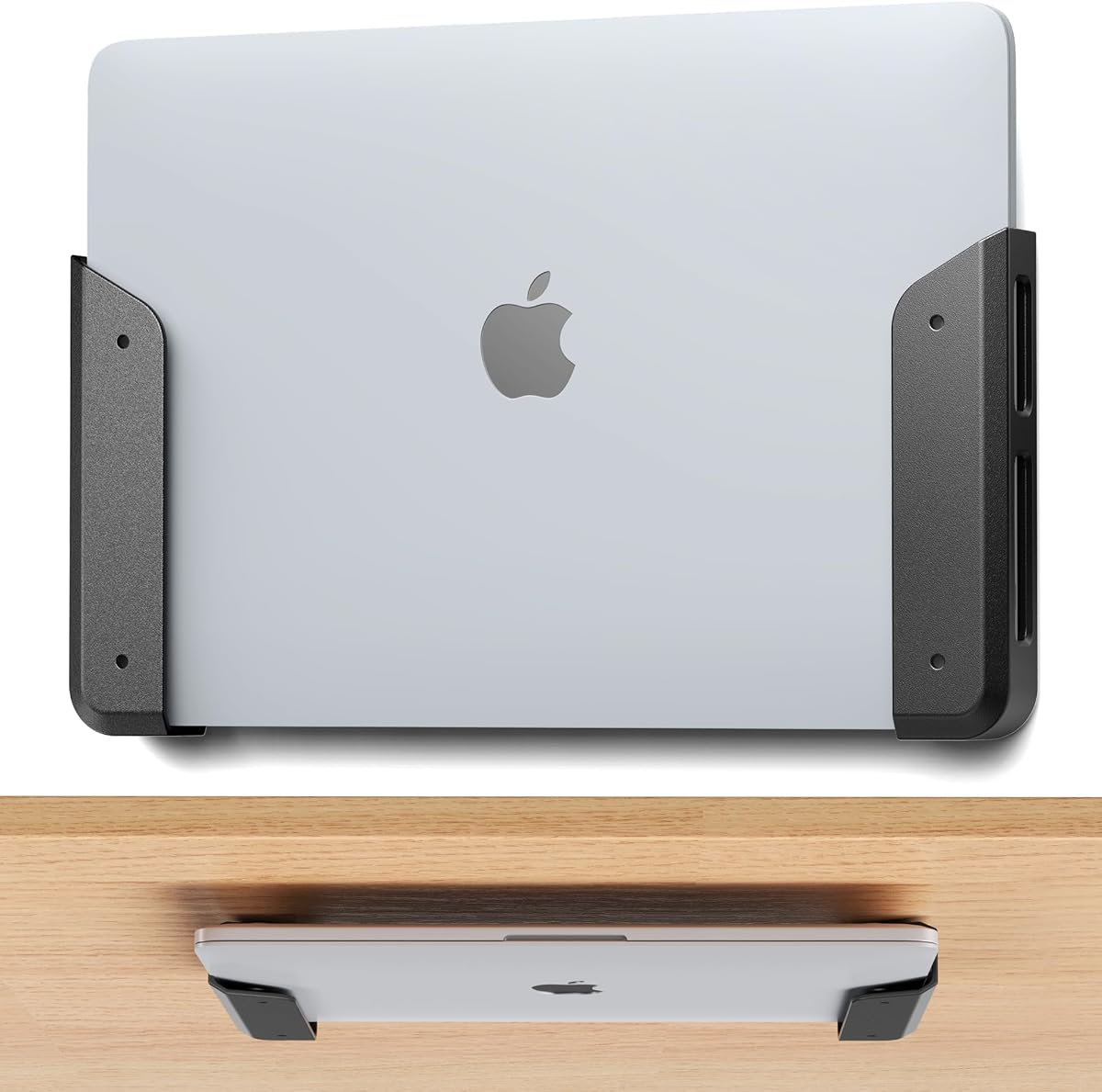
ELETIUO Wall & Under Desk Mount
4.2Editor score
Universal fit for various devices
Dual adhesive and screw options
Anti-scratch pads for protection
Finding the right laptop wall mount can transform your workspace by freeing up valuable desk space and improving ergonomics. Whether you work from home or need a flexible setup for presentations, a quality mount keeps your device secure and accessible.
We have analyzed ten top-rated models based on build quality, motion range, and compatibility with various devices. Our comparisons focus on real-world usability, installation ease, and how well each option adapts to different environments like kitchens or offices.
Each pick highlights specific strengths and ideal use cases to help you decide quickly. Please note that product availability and pricing may change over time, so verify details before purchasing to ensure you get the best deal for your needs.
4.2Editor score

4.6Editor score

4.5Editor score
As an Amazon Associate we earn from qualifying purchases.
This table provides a side-by-side comparison of all ten featured laptop wall mounts, highlighting key specifications like weight capacity, adjustability, and unique features to help you make an informed decision quickly.


The MOUNT PRO Laptop Wall Mount stands out as the top choice for users needing both laptop and monitor support. With a 4.6 rating, it delivers robust performance and flexibility for home offices or retail displays.
We may earn a commission when you buy through this link, at no additional cost to you.
Its ability to switch between holding a 17 inch notebook and a 32 inch monitor makes it uniquely versatile. The ventilated tray ensures airflow while the smooth arms allow precise positioning for comfort during long sessions.
While it costs more than simple fixed brackets, the added motion range and dual use justify the price. Installation requires solid mounting surfaces like studs or concrete, which might limit some temporary setups.
If you need a reliable, adaptable solution that keeps devices secure and cool, this mount is the clear winner. It balances build quality with functional design to suit diverse needs.
Switch seamlessly between laptop and monitor modes using the included VESA plate for maximum workspace utility.
Adjustable straps and ventilation slots protect your device from scratches and overheating during extended use.
We may earn a commission when you buy through this link, at no additional cost to you.
The ELETIUO mount offers an accessible entry point for those seeking simple device storage without breaking the bank. Its universal design supports laptops tablets and even gaming consoles effectively.
We may earn a commission when you buy through this link, at no additional cost to you.
With both adhesive and screw options you can choose permanent or temporary setups easily. The anti-scratch pads protect your gear while port access remains unobstructed for charging and connections.
Though it lacks the motion of premium arms, it excels at keeping devices organized and off surfaces. Users should ensure surfaces are clean for adhesive success and use screws for heavier loads.
For renters or temporary setups, this budget friendly option provides excellent value. It solves clutter issues efficiently while maintaining a sleek look under desks or on walls.
Choose between adhesive strips for quick installs or screws for a secure permanent hold on any surface.
Anti-scratch pads keep your device safe while allowing full access to ports without removal.
We may earn a commission when you buy through this link, at no additional cost to you.
This premium mount delivers unmatched flexibility with its extra long reach, making it ideal for large or unusual spaces. The gas spring system ensures smooth effortless movement that stays put once set.
We may earn a commission when you buy through this link, at no additional cost to you.
The detachable tray expands functionality by supporting monitors up to 32 inches without needing a new purchase. Its sturdy build prevents sagging even after repeated adjustments over time.
While it commands a higher price, the added range and durability justify the investment for serious users. Ensure you mount it on a solid wall to handle the full reach safely and securely.
If you need maximum positioning freedom and long term reliability, this is the ultimate choice. It blends ergonomic comfort with versatile design for professional home or work environments.
Position your device almost anywhere with a reach extending to 27.83 inches for unmatched workspace flexibility.
Advanced gas spring technology maintains position without drift for consistent comfort during use.
We may earn a commission when you buy through this link, at no additional cost to you.
This model excels at space efficiency while maintaining robust support for heavier devices. The innovative locking mechanism ensures your laptop stays secure even when fully extended or tilted.
We may earn a commission when you buy through this link, at no additional cost to you.
With 20.7 inches of reach and full motion capability you can position screens for optimal ergonomics. The open frame design promotes airflow to prevent overheating during intensive tasks like editing.
While it requires solid wall mounting, this ensures stability for heavier loads up to 22 lbs. It is an excellent fit for compact offices needing to maximize usable surface areas quickly.
Choose this if you need a secure space saving solution that supports both laptops and monitors. Its durable construction and smart design make it a reliable daily driver for any setup.
Dual adjustable clamps with locking technology prevent accidental slips for reliable device security.
Free up to 80 percent of desk space for more room for productivity and organization.
We may earn a commission when you buy through this link, at no additional cost to you.
MOUNTUP offers a clean ergonomic solution that balances ease of use with solid performance. The new latch locking system secures devices firmly while the open design keeps them cool.
We may earn a commission when you buy through this link, at no additional cost to you.
Its compatibility with standard VESA patterns makes it easy to integrate with existing monitor setups. The full motion adjustability ensures comfortable viewing angles for long work or gaming sessions.
While the reach is standard, the smooth adjustments and secure hold make it a practical choice. Ensure you mount it on studs or concrete for maximum safety and stability over time.
If you prioritize secure device handling and straightforward setup, this model delivers well. It simplifies workspace organization while providing reliable support for daily laptop and monitor use.
Clever latch design locks your laptop in place to prevent slips during active work or gaming.
Standard VESA compatibility ensures seamless switching between laptop and monitor modes quickly.
We may earn a commission when you buy through this link, at no additional cost to you.
The WALI mount combines quality construction with ergonomic features that support extended use comfortably. Its ventilated platform actively dissipates heat keeping your device running smoothly under load.
We may earn a commission when you buy through this link, at no additional cost to you.
With full motion adjustments you can fine-tune angles to reduce neck and eye strain. The high-grade arm ensures stability whether you are working typing or presenting to others.
While the reach is standard, the balance of features at this price point offers strong value. It is particularly well suited for home offices where reliability and comfort are key priorities.
Opt for this if you need a dependable mount that keeps devices cool and positioned well. It delivers consistent performance for daily tasks without unnecessary complexity or high cost.
Built-in ventilation holes dissipate heat during high speed tasks to maintain optimal performance.
Full tilt swivel and rotation help you achieve healthy postures for long hours.
We may earn a commission when you buy through this link, at no additional cost to you.
This model stands out with a detachable tray design that easily converts to a monitor mount. It provides flexibility to switch use cases without needing to buy separate hardware.
We may earn a commission when you buy through this link, at no additional cost to you.
The concealed cable management keeps wires organized and visible clutter to a minimum. Anti-scratch pads at contact points protect your device while allowing full access to ports.
While adjusting the tray takes care, the height range ensures you find comfortable viewing angles. It works best when mounted on solid surfaces to support the full range of motion safely.
Choose this if you value modularity and a tidy setup without visible cables. It is a smart option for shared spaces where different users may need different configurations.
Remove the tray to repurpose the mount as a standard monitor arm for added versatility.
Concealed channels guide cables neatly along the arm for a clean professional look.
We may earn a commission when you buy through this link, at no additional cost to you.
The VIVO mount features a pneumatic arm for effortless tool-less height adjustments. This makes finding ergonomic viewing angles quick and easy without needing extra tools or effort.
We may earn a commission when you buy through this link, at no additional cost to you.
Its tool-less design simplifies daily use while the VESA plate enables monitor conversion. The warranty coverage provides peace of mind for long term reliability and customer support.
Note the counterbalance arm needs a minimum weight to function properly so lighter tablets might not work well. Ensure your device meets the weight criteria for smooth operation.
If you want smooth manual adjustments and solid warranty support this model fits well. It balances practical design with reliable build for standard laptop setups effectively.
Instant height adjustment without tools saves time and allows quick ergonomic tweaks during work.
Backed by a 3-year manufacturer warranty and friendly tech support for added confidence.
We may earn a commission when you buy through this link, at no additional cost to you.
Unique among the list this mount supports both wall and pole installations. This dual capability makes it ideal for clinics studios or reception desks where space is tight.
We may earn a commission when you buy through this link, at no additional cost to you.
The spring arm keeps your laptop firmly in place without sagging over time. Extended reach allows you to bring devices closer or move them out of the way easily.
Pole support is a bonus but the pole itself must be purchased separately. Ensure you anchor into a stud for maximum stability to avoid wobbling during use.
Choose this if you need to mount on non-wall surfaces or want US-based support. Its versatile design adapts to unique environments better than most standard wall-only options.
Use the included clamp to mount on round poles for flexible placement options.
Tension-adjustable spring ensures your laptop stays exactly where you set it.
We may earn a commission when you buy through this link, at no additional cost to you.
This universal mount is perfect for storing multiple devices vertically without needing complex arms. Its two-tier shelf can hold a laptop and keyboard or several tablets simultaneously.
We may earn a commission when you buy through this link, at no additional cost to you.
Built from high quality metal it provides solid support for devices up to 22 lbs. EVA pads protect your gear from scratches while mounting hardware is included for quick install.
While it lacks motion adjustability its strength lies in organized storage. It works well in kitchens or workshops where you need quick access to multiple tools or devices.
Select this if your priority is organized storage rather than ergonomic adjustability. It offers a simple effective solution to keep devices tidy and accessible in any room.
Store two devices at once to maximize vertical space and reduce clutter effectively.
High-quality metal ensures the mount withstands daily use and heavy device loads.
We may earn a commission when you buy through this link, at no additional cost to you.
Selecting the right laptop wall mount involves balancing compatibility, adjustability, and build quality. Consider your specific needs and environment to find a model that enhances your workspace effectively.
Check that the mount supports your laptop size and weight. Most models accommodate 10 to 17 inch screens but some have specific limits. Verify VESA patterns if you plan to use the mount for monitors as well.
Always confirm weight and size limits before purchasing to ensure your device fits securely.
Full motion mounts offer tilt swivel and rotation for optimal ergonomics. Static mounts are simpler but lack flexibility. Decide how much positional freedom you need for daily use.
Prioritize mounts with multiple adjustability features if you work from different angles.
Durable materials like steel and aluminum ensure long term stability. Look for secure locking mechanisms that prevent sagging over time. Check weight capacity to handle your device plus accessories.
Choose models with strong construction to avoid wobbling or structural failure.
Most mounts require studs or solid concrete walls for safety. Some offer adhesive options but these are less reliable for heavy devices. Ensure your wall type supports the chosen mount.
Verify installation needs to avoid structural damage or unsafe setups.
Ventilated trays or open designs help dissipate heat during use. Overheating can reduce performance or damage internal components. Look for models with airflow slots or cooling platforms.
Opt for mounts with ventilation if you run intensive tasks frequently.
Integrated cable management systems keep wires organized and out of sight. This reduces clutter and makes it easier to move the mount without tangling. Check for channels or clips.
Select mounts with cable management to maintain a tidy workspace appearance.
Some mounts switch between laptop and monitor use with removable trays. This versatility can save money if you need both setups. Ensure the VESA plate is included if required.
Choose 2-in-1 models if you plan to swap between different screen types.
Responsive customer support helps with installation issues or questions. Look for brands offering warranties and clear documentation. Good support can resolve problems quickly.
Prioritize brands with positive support reviews for peace of mind.
Always mount the bracket on a solid wall surface like studs or concrete. Ensure the mount is level and tightly secured before placing your laptop on the tray. This prevents accidental falls or damage.
Regularly check screws and tension bolts to maintain stability over time. Clean the vents and surface with a soft cloth to prevent dust buildup that may affect cooling. Avoid harsh chemicals.
When adjusting positions move the mount slowly and carefully. Ensure your laptop is securely latched before tilting or swiveling. Follow the manufacturer guidelines to avoid voiding the warranty or causing injury.
Yes most modern mounts are engineered to hold devices safely when installed correctly. Check the weight capacity and ensure the mount is anchored into solid wall structures like studs. Avoid drywall-only installations for heavier units.
Many universal mounts support tablets as well as laptops. Verify the thickness and weight limits fit your tablet. Some models include adjustable straps or pads to secure smaller devices.
Quality mounts feature cut-out designs that allow full access to ports. This ensures you can charge and connect peripherals without removing the device. Check product specs for port accessibility details.
Use a dry soft cloth to wipe dust from surfaces. Avoid spraying liquids directly on the mount. Clean ventilation slots gently with compressed air to maintain proper airflow for your device.
Most kits include screws anchors and basic hardware. You may need a drill for pilot holes and a level to ensure the mount is straight. Always follow the included instructions step-by-step.
Moving the mount requires removing it from the wall and reinstalling elsewhere. Plan your location carefully to avoid multiple wall repairs. Some adhesive mounts are easier to relocate but less secure.
The MOUNT PRO Laptop Wall Mount leads our list with its versatile 2-in-1 functionality and robust build. For budget conscious buyers the ELETIUO offers solid performance at an affordable price point.
Prioritize adjustability and ventilation to ensure your device stays cool and ergonomic for long sessions. Verify installation requirements match your wall type to guarantee safety and stability.
Prices and availability may change so always check current listings before purchasing. Invest in a reliable model that fits your workspace needs for long term satisfaction and comfort.