
Canon PIXMA TR4720
3.9Editor score
Affordable entry price
Alexa smart reorders
Compact home design
Compare the top 10 all in one printer with fax models for home and office use featuring wireless scanning copying and reliable fax capabilities.
Finding the right all in one printer with fax can streamline your workflow significantly. These devices combine printing scanning copying and faxing into a single unit saving space and money. Whether you run a home office or manage a small business having reliable fax capabilities ensures you stay connected with clients and partners easily.
We evaluated ten top rated models based on performance ease of use and feature sets. Our analysis focused on print quality speed connectivity options and the reliability of the built-in fax functions. Each product was scrutinized for its ability to handle both daily document tasks and occasional fax needs without compromising on quality or efficiency.
Each pick below highlights key strengths and potential trade-offs to help you decide. Note that product availability and pricing can change so always verify details before purchasing. By understanding the specific capabilities of these all in one printer with fax models you can choose the perfect fit for your professional or personal needs.
3.9Editor score

4.0Editor score

4.3Editor score
This side-by-side comparison highlights the key specifications and capabilities of each model to help you find the best fit for your office or home workspace needs.






The HP OfficeJet Pro 9125 stands out as a top contender for businesses needing robust all in one printer with fax capabilities. It delivers professional quality color documents with impressive speed and reliability. Its advanced features like AI optimization ensure your prints look polished without manual adjustments.
We may earn a commission when you buy through this link, at no additional cost to you.
This model excels in productivity with fast print speeds up to 22 ppm for black documents. The 2.7-inch touchscreen provides intuitive navigation similar to a smartphone. HP Wolf Pro Security adds a crucial layer of protection against cyber threats which is vital for office environments handling sensitive data.
While the printer offers significant value it does require original HP chips for cartridges which can limit third-party options. The Instant Ink trial is beneficial but users must manage the subscription after three months to avoid fees. These trade-offs are generally acceptable for the level of performance and security provided.
Ideal for small to medium offices this printer ensures smooth daily operations. It handles presentations and flyers with ease making it a versatile tool for various business needs. If you prioritize speed security and quality the HP OfficeJet Pro 9125 is a strong recommendation.
HP AI removes unwanted content from web pages and emails ensuring precision layouts without wasted paper.
HP Wolf Pro Security helps protect your network from cyber threats keeping your office data safe.
We may earn a commission when you buy through this link, at no additional cost to you.
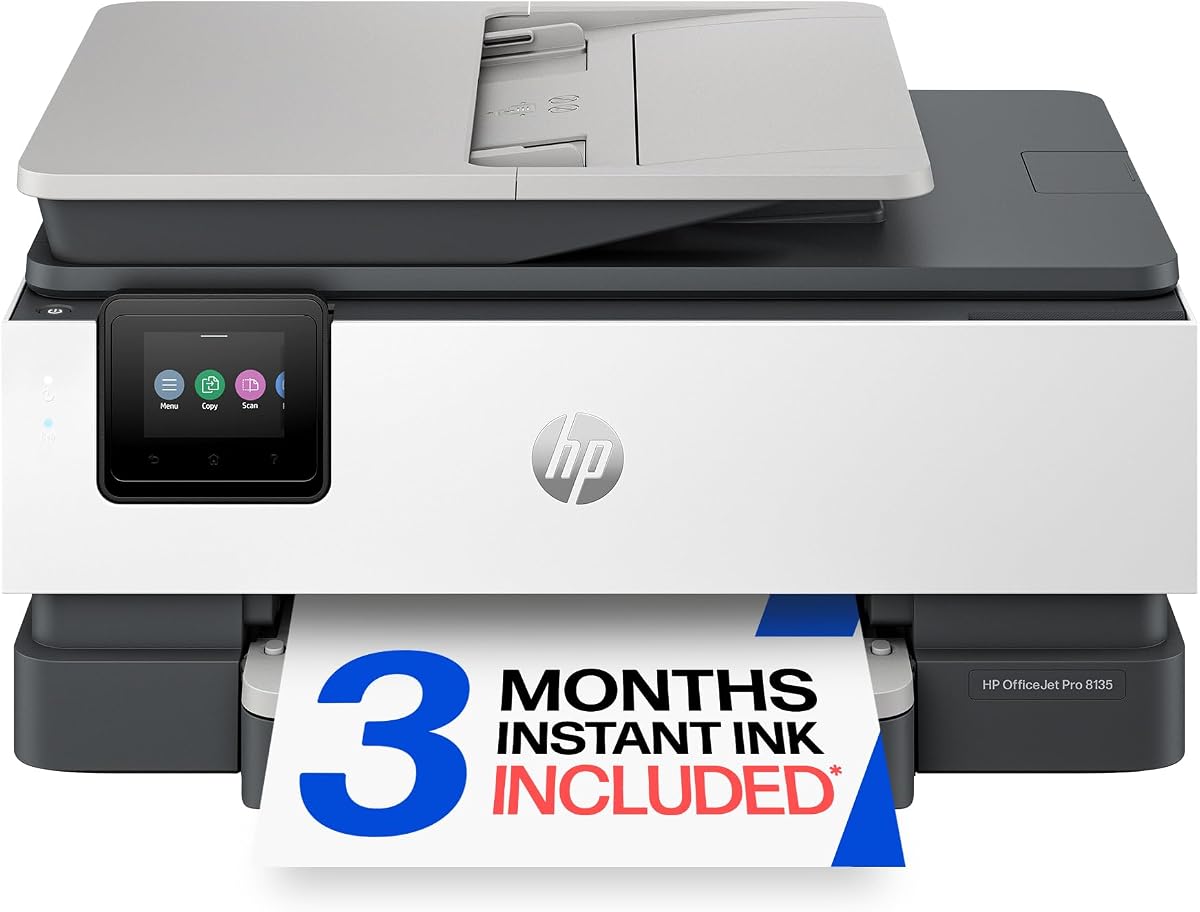
The HP OfficeJet Pro 8135 is designed specifically for home offices needing reliable all in one printer with fax functionality. It balances performance and cost effectively making it suitable for small business tasks. The inclusion of AI capabilities ensures high quality outputs for reports and presentations.
We may earn a commission when you buy through this link, at no additional cost to you.
This printer offers solid speeds up to 20 ppm for black documents and includes a 225-sheet input tray. The user interface is friendly with a 2.7-inch touchscreen that simplifies navigation. It also features HP Wolf Essential Security to keep your home network protected from potential threats.
The color speed is slightly lower than higher end models which might be a consideration for high volume color users. Additionally the reliance on original HP chips means limited flexibility with third-party inks. Despite this it remains a capable choice for standard home office demands.
For those working from home this model provides a streamlined workflow. It handles copying scanning and faxing with ease while maintaining a compact footprint. If you need a dependable printer for daily business documents this is a worthwhile investment.
Perfect for printing professional documents like business reports and flyers with consistent quality.
Dual-band Wi-Fi automatically detects and resolves connection issues for seamless printing.
We may earn a commission when you buy through this link, at no additional cost to you.
The Epson EcoTank ET-4800 offers a unique approach to printing with its cartridge-free design. It is an excellent choice for users prioritizing long-term cost savings over initial purchase price. The high-capacity ink tanks reduce waste significantly compared to traditional inkjet models.
We may earn a commission when you buy through this link, at no additional cost to you.
This printer uses Micro Piezo Heat-Free Technology to produce sharp text and vibrant color graphics. The refill system is designed to be easy and worry-free with included ink bottles. While it excels at printing it lacks the fax functionality found in other top picks.
The main drawback for fax buyers is the absence of built-in fax capabilities in this specific model. The upfront price is also higher than some competitors though it pays off over time. For users not needing fax this is a top choice for value.
Ideal for creative projects or heavy document printing this model provides reliability and efficiency. It is a sustainable option that reduces environmental impact. If fax is not a priority consider this model for its exceptional ink economy.
Reduces cartridge waste ending up in landfills with refillable ink tank system.
Produces sharp text and impressive color photos on virtually any paper type.
We may earn a commission when you buy through this link, at no additional cost to you.
The HP OfficeJet Pro 8125 provides essential all in one printer with fax features at an accessible price. It is tailored for home offices needing professional quality without the enterprise cost. The combination of fax scanning and copying makes it a complete solution.
We may earn a commission when you buy through this link, at no additional cost to you.
Features include 20 ppm black printing and a large color touchscreen for easy navigation. It supports HP AI to optimize print formatting reducing wasted pages. The dual-band Wi-Fi ensures stable connections which is vital for wireless tasks.
While security features are standard rather than premium they are adequate for home use. The paper capacity is modest but sufficient for typical home workloads. The reliance on HP chips may be a minor constraint for some users.
This model is perfect for freelancers or small home offices. It delivers consistent results for business documents and reports. If you need a reliable fax capable printer on a budget this is a solid option.
Optimizes web pages and emails to remove unwanted content and improve layout precision.
Automatically detects and resolves connection issues for reliable wireless printing.
We may earn a commission when you buy through this link, at no additional cost to you.
The HP Smart Tank 7603 combines fax capabilities with a long-lasting ink supply making it a smart investment. It is designed for high volume printing with up to 3 years of ink included right out of the box. This eliminates the frequent need to buy new cartridges.
We may earn a commission when you buy through this link, at no additional cost to you.
Its mess-free refill system simplifies maintenance and ensures reliability. The magic touch control panel adds a modern touch to the interface. With support for borderless prints it is also suitable for photos and creative projects.
The upfront cost is higher than cartridge printers but the savings on ink quickly justify the expense. It is an excellent choice for those who print frequently and need fax functionality. The AI capabilities further enhance print efficiency and quality.
Best for busy home offices this model ensures you rarely run out of ink. It supports mobile printing which is convenient for on-the-go tasks. If long-term value and fax are priorities this is a top recommendation.
Includes up to 3 years of ink so you print without frequent replacements.
Mess-free refill system lets you simply plug in bottles to let them drain.
We may earn a commission when you buy through this link, at no additional cost to you.
The HP OfficeJet Pro 9135 is the top premium choice for offices requiring speed and capacity. It stands out with 25 ppm black printing and single-pass duplex scanning for efficiency. This model delivers professional results for presentations and marketing materials.
We may earn a commission when you buy through this link, at no additional cost to you.
Its 4.3-inch touchscreen is the largest in this comparison offering intuitive navigation. Dual 250-sheet input trays reduce the need for frequent reloading which boosts productivity. Wolf Pro Security provides robust protection for business networks and sensitive data.
The higher price reflects its advanced features and enterprise-grade performance. While it relies on HP chips the security and speed advantages often justify the cost. It is built for environments where downtime is not an option.
Ideal for medium to large businesses this printer ensures high-volume reliability. It handles complex documents with ease while maintaining network security. If you need a powerful all in one printer with fax this is the best premium pick.
Dual trays holding 250 sheets each reduce interruptions during busy work days.
Wolf Pro Security bolsters protection against cyber threats in corporate networks.
We may earn a commission when you buy through this link, at no additional cost to you.
The Canon PIXMA TR4720 is an excellent budget-friendly option for home users needing fax capabilities. It offers essential functions at a low entry price making it accessible for many households. The compact design fits well in smaller spaces.
We may earn a commission when you buy through this link, at no additional cost to you.
Features include automatic two-sided printing and a 100-sheet tray. Alexa smart reorders ensure you never run out of ink which adds convenience. The wireless capabilities allow for easy mobile printing from smartphones.
Print speed is slower than office models but acceptable for casual use. The paper capacity is limited so frequent refills may be needed. Despite these limitations it remains a strong contender for budget conscious buyers.
This model is perfect for students or home offices with low volume needs. It provides reliable fax and scanning without breaking the bank. If price is your main concern this is the best budget choice.
Connect to Alexa for notifications and automatic reorders when ink runs low.
Saves space in small home offices while delivering reliable fax functionality.
We may earn a commission when you buy through this link, at no additional cost to you.
The Canon PIXMA TR8620a delivers advanced features for home offices needing fax and photo printing. It balances speed and capacity effectively with 15 ipm print speeds. The included Auto Document Feeder simplifies multi-page tasks.
We may earn a commission when you buy through this link, at no additional cost to you.
A Micro SD slot allows direct printing from camera cards which is great for photographers. Voice control with Alexa adds a modern layer of convenience. The energy efficiency certifications highlight its environmental considerations.
It is slightly more expensive than basic models but offers better throughput. The reliance on Alexa for smart reorders might limit usability for non-Alexa users. However for general use it is a robust choice.
Ideal for users needing photo and document versatility this model covers both bases. It is well suited for creative professionals working from home. If you want extra connectivity options consider this reliable option.
Micro SD slot allows easy photo printing directly from camera memory cards.
Works with Alexa to discover printers and manage tasks via voice commands.
We may earn a commission when you buy through this link, at no additional cost to you.
The HP OfficeJet Pro 8139 offers a distinct advantage with its one year Instant Ink trial. This makes it a highly cost-effective choice for home offices starting out. It includes fax and scanning capabilities alongside professional print quality.
We may earn a commission when you buy through this link, at no additional cost to you.
Performance is solid with 20 ppm black printing and a 225-sheet tray. The 2.7-inch touchscreen makes setup and operation straightforward. HP AI tools help optimize print layout to save paper and improve presentation.
The main consideration is the HP chip restriction which limits third-party cartridge use. After the trial ends monthly fees apply unless the service is cancelled. However for one year of savings this is a strong deal.
Perfect for those prioritizing initial cost savings this model covers all essentials. It provides the convenience of fax and reliable wireless printing. If you want a long trial period this is a recommended pick.
Includes a full year of Instant Ink trial to save money on supplies upfront.
HP AI optimizes layouts to remove unwanted content and reduce waste.
We may earn a commission when you buy through this link, at no additional cost to you.
The Brother MFC-L2820DW brings laser speed and reliability to the fax category. It is the fastest option on this list with 36 ppm black printing. Ideal for offices prioritizing text documents over color outputs.
We may earn a commission when you buy through this link, at no additional cost to you.
It includes a 50-page ADF and Ethernet connectivity for stable network use. The compact design fits well in tight spaces without sacrificing functionality. A Refresh Subscription trial helps manage toner supplies efficiently.
Since it is monochrome it lacks color printing which limits its use for graphics. For text heavy environments however it offers exceptional speed and efficiency. The touchscreen and mobile app support add modern convenience.
Best for businesses focusing on high volume text this model delivers durability. It supports essential fax tasks while maintaining high reliability. If you need speed and value without color this is the top laser choice.
Delivers 36 pages per minute for black documents ensuring fast workflow.
Built-in Ethernet and dual-band Wi-Fi ensure stable network connections.
We may earn a commission when you buy through this link, at no additional cost to you.
Selecting the right all in one printer with fax requires balancing speed capacity and cost. This guide outlines key factors to help you make an informed decision.
Print speed is measured in pages per minute and affects how quickly you get your documents. Faster speeds are vital for busy offices where time is money. Look for models offering at least 20 ppm for efficient daily operations.
Prioritize models with higher ppm to reduce wait times and keep workflows smooth.
Paper capacity determines how much reloading is needed during use. Larger trays reduce interruptions and are ideal for multi-page tasks. Consider both the main input tray and any additional slots.
Choose a model with sufficient capacity to match your daily print volume.
Fax capabilities vary by model so verify it supports digital and physical faxing. Advanced features like direct faxing and speed dial improve convenience. Ensure the machine connects easily to your phone line.
Confirm the fax function meets your communication needs before purchasing.
Modern printers should offer wireless and mobile printing capabilities. Dual-band Wi-Fi and Ethernet ensure stable connections across devices. Look for support for Apple AirPrint or Android apps.
Select a printer with flexible connectivity to match your office setup.
Inkjet printers are better for color documents while laser is ideal for text. Cost per page varies significantly between the two types. Consider how much you print and in what colors.
Laser is generally cheaper for high volume text ink is better for color.
Security features protect your network and sensitive documents from cyber threats. Look for built-in firewalls and secure print options. Enterprise models often include advanced protection suites.
Prioritize models with strong security protocols for business use.
An intuitive interface simplifies daily tasks and reduces errors. Touchscreens with large displays make navigation easier. User-friendly apps also improve the overall experience.
Choose a model with a clear interface to streamline your workflow.
Consider the cost of consumables and maintenance over time. Subscriptions like Instant Ink can save money on supplies. Factor in cartridge or toner prices when comparing models.
Evaluate long term costs to find the most economical choice for your needs.
To set up your printer connect it to your network using the touchscreen or HP Smart app. Ensure the phone line is connected to the fax port for sending and receiving documents. Follow the on-screen prompts to complete the wireless setup.
Maintain your device by using genuine supplies and performing regular cleaning cycles. Check for firmware updates via the settings menu to keep features optimized. Store ink or toner in a cool dry place when not in use.
Troubleshoot issues by restarting the device and checking connection status. Ensure all trays are fully inserted and paper guides are adjusted correctly. Refer to the user manual for specific error codes and resolution steps.
Yes most modern all in one printer with fax models allow sending faxes from your computer. You can install the printer software and use the print to fax option. This eliminates the need to print a document physically before faxing.
Most models support wireless printing and scanning via mobile apps. Ensure your device is on the same network or supports AirPrint and Android integration. This allows seamless document handling without cables.
These printers require a standard analog phone line for faxing. Simply plug the phone cable into the fax port on the back of the printer. No digital VoIP adapters are typically needed for basic fax use.
Using Instant Ink subscriptions or refillable tanks can significantly lower costs. Consider laser models for high volume black text to avoid color ink expenses. Regularly check printer settings to avoid unnecessary color printing.
It is generally safe but enabling sleep mode helps save energy. Modern printers are designed to enter low power states automatically. Ensure firmware is updated to maintain security during idle periods.
Yes most models support letter legal and A4 paper sizes. Adjustable paper trays allow you to configure for different dimensions easily. Check the specs to confirm support for your required paper types.
We highlighted top picks like the HP OfficeJet Pro 9135 for performance and the Canon PIXMA TR4720 for budget. Each model offers unique strengths suitable for varying office sizes and needs.
Prioritize speed and security for businesses while home users may value cost and ease of use. Consider whether you need color or laser technology based on your document types.
Prices and availability change so check the latest offers before buying. Use this guide to select a reliable fax capable printer that enhances your productivity.