
Redragon S101-3 PRO Gaming Keyboard and Mouse
4.5Editor score
Includes mouse combo
Full RGB customization
Budget friendly value
Discover the top keyboards for Fortnite players in October 2026. This guide compares speed, customization, durability, and value to help you dominate the
Finding the right keyboard for Fortnite can make a huge difference in your gameplay experience. Whether you are building quickly or aiming precisely, the right input device ensures your commands register instantly without delay or missed keystrokes during intense moments.
We analyzed ten top-rated keyboards based on performance, features, and user feedback to create this comprehensive guide. Our comparison covers mechanical switches, compact layouts, RGB lighting, and customization options to help you find the perfect match for your playstyle and budget.
Each pick highlights specific strengths like rapid trigger modes, macro keys, and ergonomic design. Please note that prices and availability change frequently so check current listings before purchasing to ensure you get the best deal for your gaming setup needs today.
4.5Editor score
4.5Editor score

4.6Editor score
This table provides a side-by-side overview of the ten best keyboards evaluated for Fortnite performance. Compare key features, switch types, layout sizes, and special capabilities to decide which model aligns best with your specific gaming requirements and desk space.






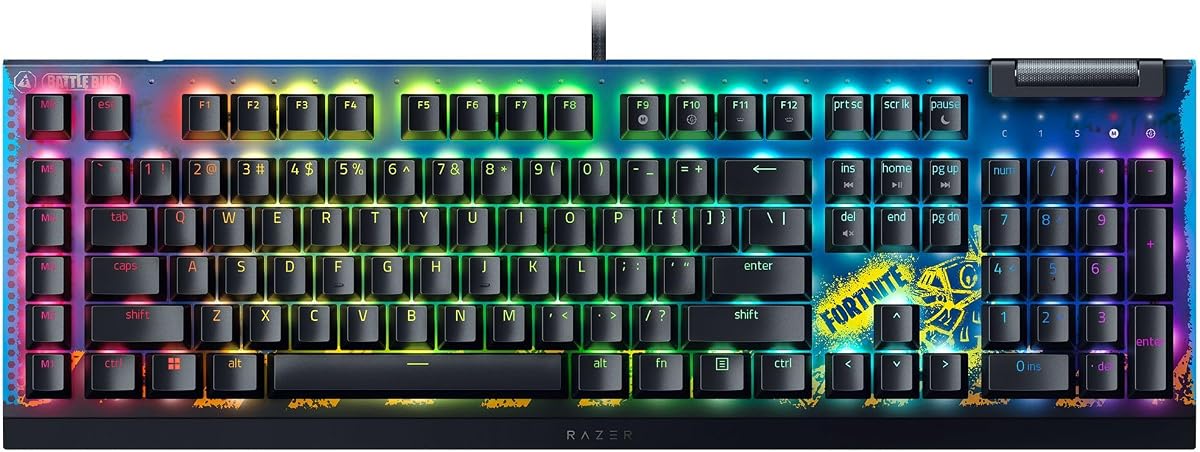
The Razer BlackWidow V4 X Fortnite Edition stands out as a top choice for players seeking precision and customization. With a solid 4.5 rating it delivers reliable performance for both competitive matches and casual play sessions.
We may earn a commission when you buy through this link, at no additional cost to you.
Its yellow linear mechanical switches offer instant actuation with minimal force which is crucial for rapid building and editing in Fortnite. The six dedicated macro keys allow you to program complex commands like weapon swaps or item use directly to your fingertips.
While the keyboard lacks an included wrist rest which some users might miss during long sessions the quiet switches prevent disturbing others nearby. The RGB lighting enhances visibility and style without being overly distracting during gameplay.
Competitive players who value speed and programmable features will find this keyboard an excellent investment. The build quality ensures longevity while the customizable macros give you a tactical edge in high-stakes matches.
The linear switches provide consistent and fast responses essential for quick edits and building in Fortnite.
Program frequently used commands to dedicated keys for smoother gameplay flow and reduced errors during fights.
We may earn a commission when you buy through this link, at no additional cost to you.
The SteelSeries Apex 3 offers robust protection against spills which is ideal for gamers who enjoy drinks nearby. Its whisper quiet switches ensure silent operation while maintaining responsive input for everyday Fortnite sessions.
We may earn a commission when you buy through this link, at no additional cost to you.
A premium magnetic wrist rest provides excellent comfort during extended play and the ten zone RGB illumination adds visual flair. Dedicated multimedia controls let you adjust volume without leaving the game interface.
While membrane switches may lack the tactile feedback of mechanical alternatives they are quiet and durable enough for most players. The water resistance adds peace of mind against accidental spills during intense moments.
Casual gamers and streamers who prioritize durability and comfort will appreciate this keyboard's features. It balances performance and practicality making it a reliable choice for various setups and environments.
IP32 water resistance safeguards against liquid damage ensuring your keyboard survives accidental spills during gaming.
The magnetic wrist rest reduces strain while media controls allow quick adjustments without interrupting gameplay.
We may earn a commission when you buy through this link, at no additional cost to you.
The Redragon S101-3 PRO offers exceptional value by combining a keyboard and mouse into one budget-friendly package. With a 4.5 rating it suits new gamers or those seeking reliable peripherals without high costs.
We may earn a commission when you buy through this link, at no additional cost to you.
Its fully customizable RGB lighting and independent macro record keys allow personalized setups. The quiet membrane keys suit shared spaces and the included wrist rest enhances comfort during long sessions.
While mechanical switches are preferred by pros this membrane keyboard delivers smooth and responsive input for most users. The combo saves money and simplifies setup for beginners entering the Fortnite scene.
Budget-conscious gamers or students will find this set ideal for starting out. It provides essential features like macro support and lighting to keep gameplay engaging and efficient.
This combo delivers premium features at a low cost making it perfect for first-time buyers or tight budgets.
Dedicated macro keys enable command recording for quicker access to essential in-game actions.
We may earn a commission when you buy through this link, at no additional cost to you.
The GEODMAER 65% Gaming Keyboard excels in saving desk space with its ultra-compact design. Ideal for small setups it maintains functionality while freeing room for mouse movement during intense Fortnite battles.
We may earn a commission when you buy through this link, at no additional cost to you.
Its anti-ghosting feature ensures every key press registers accurately even during rapid typing. The LED backlit modes enhance visibility in low light and the detachable Type-C cable aids portability.
While it lacks a number pad and uses membrane switches it remains reliable for gaming. The compact form factor suits players who prioritize efficiency and desk organization over full-size layouts.
Gamers with limited desk space or who travel often will appreciate this keyboard's size and performance. It balances portability with essential gaming features for a smooth experience.
The 65% layout reduces footprint significantly allowing more room for mouse movement and accessories.
Anti-ghosting technology ensures accurate key registration during complex inputs and rapid actions.
We may earn a commission when you buy through this link, at no additional cost to you.
The Aula WIN60 HE leverages magnetic switches to deliver ultra-fast response times with an 8000Hz polling rate. This technology eliminates physical wear and ensures precise actuation perfect for competitive Fortnite play.
We may earn a commission when you buy through this link, at no additional cost to you.
Its rapid trigger mode and adjustable actuation allow you to tailor keystrokes to your preferences. The compact 60% design saves space while the web-based driver simplifies customization without bulky software.
Although it lacks wireless connectivity the wired connection ensures stable low-latency performance. The magnetic switches offer a unique advantage over traditional mechanical types for speed-focused players.
Competitive gamers seeking cutting-edge technology will find this keyboard a game-changer. Its speed and customization options provide a distinct edge in fast-paced matches and tactical scenarios.
The 8000Hz polling rate and rapid trigger mode ensure instant response for competitive advantage.
Web-based driver allows easy adjustment of actuation and mappings without complex installation.
We may earn a commission when you buy through this link, at no additional cost to you.
The AULA F75 Pro combines premium wireless functionality with customizable mechanical switches. Its tri-mode connection supports Bluetooth and 2.4GHz wireless offering flexibility for multiple devices and setups.
We may earn a commission when you buy through this link, at no additional cost to you.
Hot-swappable switches let you personalize tactile feedback without soldering. The multi-function knob adjusts volume or brightness easily while side-printed PBT keycaps ensure durability and clarity during RGB lighting.
While priced higher than many options the build quality and battery life justify the investment. The thocky sound and smooth typing experience enhance both gaming and everyday use.
Enthusiasts and professionals seeking top-tier customization and convenience will appreciate this keyboard. It delivers versatility and performance suitable for varied environments and playstyles.
Tri-mode support enables seamless switching between devices for versatile and clutter-free setups.
Pre-lubed switches and PBT keycaps provide a satisfying typing feel and long-lasting durability.
We may earn a commission when you buy through this link, at no additional cost to you.
The AULA WIN68 HE features hall effect magnetic switches with adjustable actuation points for precise control. This allows users to customize key sensitivity to match their unique typing and gaming habits.
We may earn a commission when you buy through this link, at no additional cost to you.
Its 8000Hz polling rate and fast trigger mode ensure minimal latency for quick actions. The 60% layout saves space while retaining essential keys for streamlined gameplay and portability.
Though limited to Windows systems and wired connections the performance benefits are significant. The web driver simplifies configuration enabling easy adjustments without additional software burdens.
Players seeking granular control over keystrokes will find this keyboard highly rewarding. Its advanced features cater to those aiming for maximum responsiveness and accuracy.
Adjustable actuation points let you fine-tune key response for personalized gameplay preferences.
High polling rate and fast trigger mode ensure instant execution of commands during critical moments.
We may earn a commission when you buy through this link, at no additional cost to you.
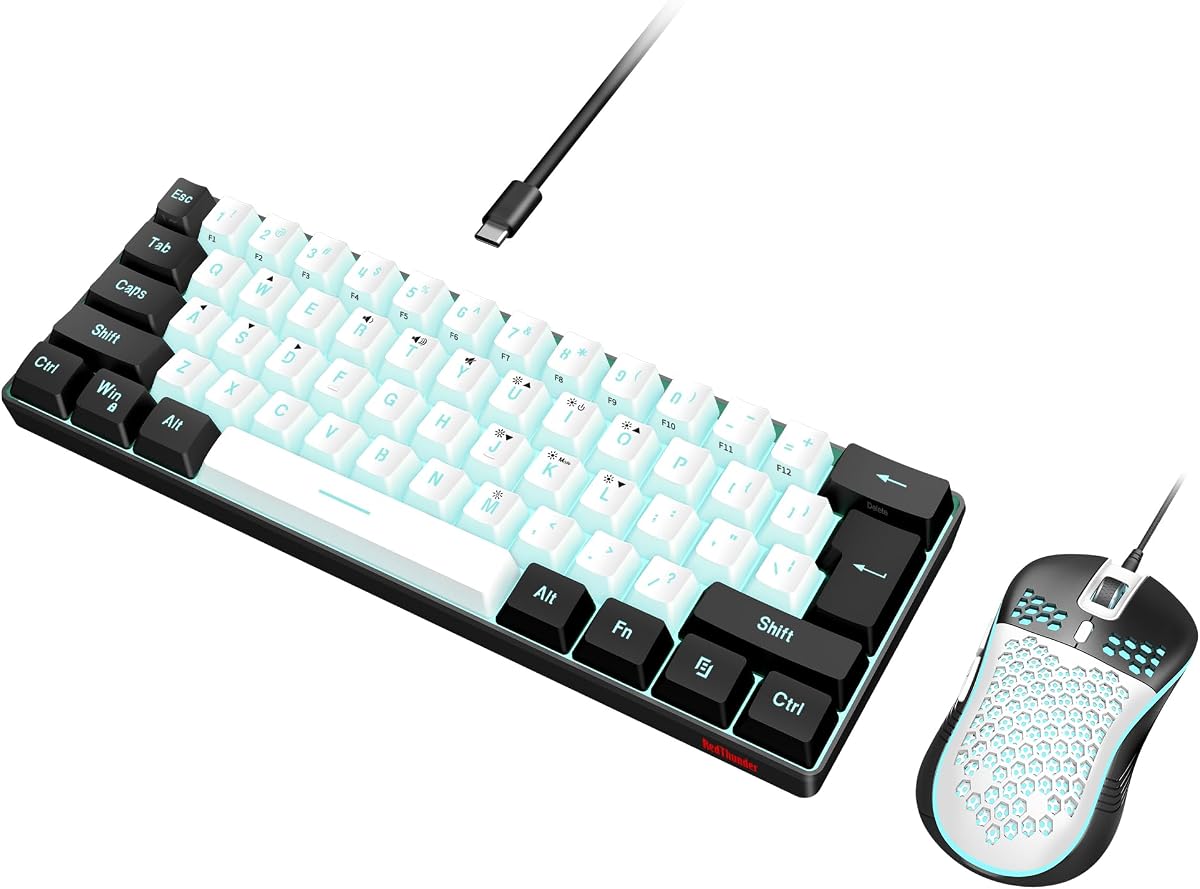
The RedThunder 60% Combo delivers a sleek portable setup with a compact keyboard and lightweight honeycomb mouse. This pairing suits gamers needing space-saving peripherals without sacrificing core performance.
We may earn a commission when you buy through this link, at no additional cost to you.
Its water-resistant keyboard design protects against spills while the mouse's high DPI ensures precise aiming. The RGB backlighting adds visual appeal and the braided cable enhances durability.
While the build quality is basic the combo offers solid value for entry-level users. The anti-interference technology ensures stable data transmission even during intense sessions.
Players with limited desk space or who travel frequently will find this set convenient. It provides essential gaming features in a compact form factor for efficient use.
The ultra-compact 60% layout and lightweight mouse maximize desk space for comfortable movement.
Water-resistant design and braided cables protect peripherals from common hazards during gaming.
We may earn a commission when you buy through this link, at no additional cost to you.
The Logitech G PRO TKL is designed for esports athletes seeking competition-level performance. Its tenkeyless design frees space for mouse movement while GX Blue clicky switches provide tactile feedback.
We may earn a commission when you buy through this link, at no additional cost to you.
LIGHTSYNC RGB allows static patterns stored in onboard memory for tournament systems without software. The detachable cable and compact size make it easy to transport and set up anywhere.
Though the clicky switches may be loud for some environments they offer satisfying confirmation of input. The build quality ensures durability under high-pressure gaming conditions.
Serious players who value feedback and portability will appreciate this keyboard. It balances professional features with practical design for consistent performance.
Onboard memory and detachable cable ensure reliable use across different gaming setups.
GX Blue switches deliver clear audible and tactile clicks for confident keypresses.
We may earn a commission when you buy through this link, at no additional cost to you.
The ATTACK SHARK X68 HE features advanced magnetic switches with rapid trigger functionality for ultra-fast key resets. This enables precise control over keystrokes beneficial for rhythm and FPS games.
We may earn a commission when you buy through this link, at no additional cost to you.
Its web driver supports extensive customization without software installation. PBT keycaps and a top-mounted structure enhance stability and durability while the ergonomic design reduces strain.
While initial setup may require web access the performance benefits are substantial. The rapid trigger ensures minimal latency giving players an edge in quick reactions.
Gamers prioritizing speed and customization will find this keyboard highly effective. It combines innovative technology with robust build quality for superior gaming experiences.
Rapid trigger technology allows faster key resets enabling quicker successive inputs and reactions.
PBT keycaps and top-mounted structure ensure long-lasting performance and reliable key feel.
We may earn a commission when you buy through this link, at no additional cost to you.
Selecting the ideal keyboard involves evaluating several key factors that impact performance comfort and longevity. This guide outlines essential considerations to help you choose a model suited to your specific needs.
Switch types determine tactile feel and response speed. Linear switches offer smooth fast keystrokes ideal for rapid actions while clicky switches provide audible feedback suited for typing enthusiasts.
Consider your preference for noise and feedback when choosing between mechanical and membrane switches.
Layout sizes vary from full-size to compact 60% models. Compact layouts free desk space for mouse movement which is crucial in FPS games like Fortnite.
Choose a size that balances essential keys and available desk space to maximize comfort and efficiency.
Wired connections ensure stable low-latency performance ideal for competitive gaming. Wireless options offer convenience but may introduce slight latency or require frequent charging.
Prioritize wired models if minimizing input lag is a top priority for your gameplay.
Customization features like programmable macros and RGB lighting allow personalization of your setup. Macros enable complex commands on single keys enhancing efficiency during matches.
Look for software or onboard memory options that support macro programming and lighting adjustments.
Durable materials such as ABS or PBT keycaps and reinforced frames extend keyboard lifespan. Water-resistant coatings protect against accidental spills during gaming sessions.
Invest in models with sturdy construction to withstand intensive use over time.
Ergonomic features like wrist rests and adjustable angles reduce strain during long sessions. Comfortable typing prevents fatigue and maintains performance during extended play.
Check for included accessories or adjustable stands that enhance physical comfort while gaming.
Budget ranges vary widely from affordable membrane models to premium mechanical keyboards. Determine which features matter most to you to find the best value within your spending limits.
Balance cost with essential performance features to avoid overspending on unnecessary extras.
Reputable brands often provide better warranty support and reliability. Research user reviews and community feedback to gauge long-term satisfaction and customer service quality.
Select brands with proven track records for quality and responsive support to ensure peace of mind.
Begin by connecting your keyboard securely to your PC via USB or pairing wireless models with a receiver. Install any necessary software to unlock macros RGB lighting and custom mappings.
Keep the keyboard clean by regularly wiping keys with a soft cloth to remove dust and debris. Avoid eating or drinking near the device to prevent spills and damage to internal components.
Adjust settings like actuation points or RGB effects according to your playstyle. Periodically test macros and mappings to ensure they function correctly before important matches or tournaments.
Linear mechanical switches are often preferred for Fortnite due to their smooth and fast response. They minimize resistance allowing quicker repetitive inputs essential for rapid building and editing without tactile bumps interrupting motion.
Macro keys can provide a competitive edge by assigning complex commands to single buttons. While not mandatory they streamline workflows for frequent actions like weapon swaps or healing items during intense fights.
Modern wireless keyboards with low-latency technology are increasingly viable for competitive play. However wired models still offer the most reliable connection with minimal input lag critical for high-stakes matches.
RGB lighting mainly adds aesthetic appeal and can help identify keys in dim environments. It does not impact performance directly but customizable lighting can enhance focus and personal comfort during long sessions.
Compact layouts like 60% or 65% remove number pads to save desk space. This allows more room for mouse movement which is advantageous in FPS games requiring wide sensor sweeps and fast aiming.
Use compressed air to dislodge dust between keys and a soft lint-free cloth dampened with mild cleaner for surface cleaning. Avoid harsh chemicals and remove keycaps periodically for deep cleaning if possible.
Yes many gaming keyboards function well for work tasks with responsive keys and comfortable typing experiences. Some models include switches optimized for both gaming and productivity ensuring versatility across different activities.
Mechanical keyboards can be louder especially clicky switch models but many offer quieter linear or silent options. Choose based on your environment as quiet switches help avoid disturbing others during late gaming sessions.
This guide reviewed ten standout keyboards ranging from budget-friendly combos to premium mechanical models each tailored for Fortnite performance. The Razer BlackWidow V4 X leads with macro versatility while the Aula WIN60 HE offers cutting-edge magnetic switch technology.
When selecting prioritize factors like switch type layout size and connectivity to match your playstyle and setup constraints. Customization options and build quality also play crucial roles in ensuring long-term satisfaction and reliable performance.
Remember to check current prices and availability as these details can change quickly. Investing in the right keyboard enhances responsiveness and comfort helping you achieve greater success in your Fortnite battles.