
Dell 24 Monitor SE2426H
4.7Editor score
144Hz refresh rate at low cost
IPS technology for wide viewing angles
TÜV certified eye comfort features
Finding a gaming monitor without PC needed is essential for travelers and console gamers seeking immersive experiences anywhere. These portable screens offer high refresh rates and crisp visuals without requiring a desktop setup, making them perfect for on-the-go entertainment and flexible workspaces.
We compared ten top-rated models based on display quality, connectivity options, and portability. Each product was evaluated for its ability to function independently or with consoles like Switch, PS5, and Xbox. Our analysis ensures you find a screen that matches your gaming needs and budget constraints effectively.
Each pick includes detailed specs, pros, cons, and expert insights to guide your decision. Prices may fluctuate due to demand and promotions, so verify current deals before purchasing. This list covers a range of sizes and features to suit diverse gaming preferences and environments.
4.7Editor score

4.4Editor score

4.4Editor score
As an Amazon Associate we earn from qualifying purchases.
This comparison table highlights key specifications across all ten products to help you quickly identify the best fit for your setup. We focus on resolution, refresh rate, panel type, and connectivity to ensure you make an informed choice for portable or standalone gaming.



This 2K 180Hz portable monitor stands out as a top choice for gamers who want a desktop-like experience on the go. With a 4.4 rating, it balances high performance and portability effectively. The 23.8-inch screen delivers sharp visuals without compromising mobility, making it ideal for both work and play.
We may earn a commission when you buy through this link, at no additional cost to you.
The 180Hz refresh rate ensures fluid motion, which is critical for competitive gaming. FreeSync technology minimizes tearing, while the IPS panel provides accurate colors. Connectivity is straightforward with Type-C and HDMI ports, allowing seamless integration with laptops, consoles, and phones without extra adapters.
While the built-in speakers add convenience, sound quality may not match dedicated audio gear. The monitor requires external power, which is a minor trade-off for its larger display. These factors are acceptable given the overall performance and versatility it offers for various gaming scenarios.
If you prioritize a large, high-resolution screen for gaming without a PC, this model is highly recommended. It suits travelers, remote workers, and console gamers alike. Always check current pricing to ensure you get the best value for its premium features.
The 2K QHD resolution provides crisp details that enhance visual immersion in games and media.
Multiple ports ensure compatibility with a wide range of devices for flexible use cases.
We may earn a commission when you buy through this link, at no additional cost to you.
The EVICIV 18.5-inch monitor is designed for users who value space efficiency without sacrificing gaming performance. Its 120Hz refresh rate and 1ms response time make it suitable for fast-paced games. The 125% sRGB coverage ensures vibrant colors that bring scenes to life.
We may earn a commission when you buy through this link, at no additional cost to you.
Portability is a key strength here, with a lightweight build and protective sleeve included. The VESA mount compatibility allows for flexible installation on desks or walls. This makes it a great option for dorms or shared spaces where desk real estate is limited.
The smaller screen size means less immersion compared to 23-inch models, but it offsets that with ease of transport. Some users might find the stand requires frequent tweaking. These drawbacks are minor given the competitive price and solid build quality.
Ideal for students or budget-conscious gamers needing a reliable second screen. It performs well with consoles like Switch or Xbox. Verify the current price before buying to maximize savings on this efficient display solution.
The included sleeve and compact form factor make it easy to carry anywhere.
Fast refresh rates and low latency ensure smooth interactions during competitive play.
We may earn a commission when you buy through this link, at no additional cost to you.
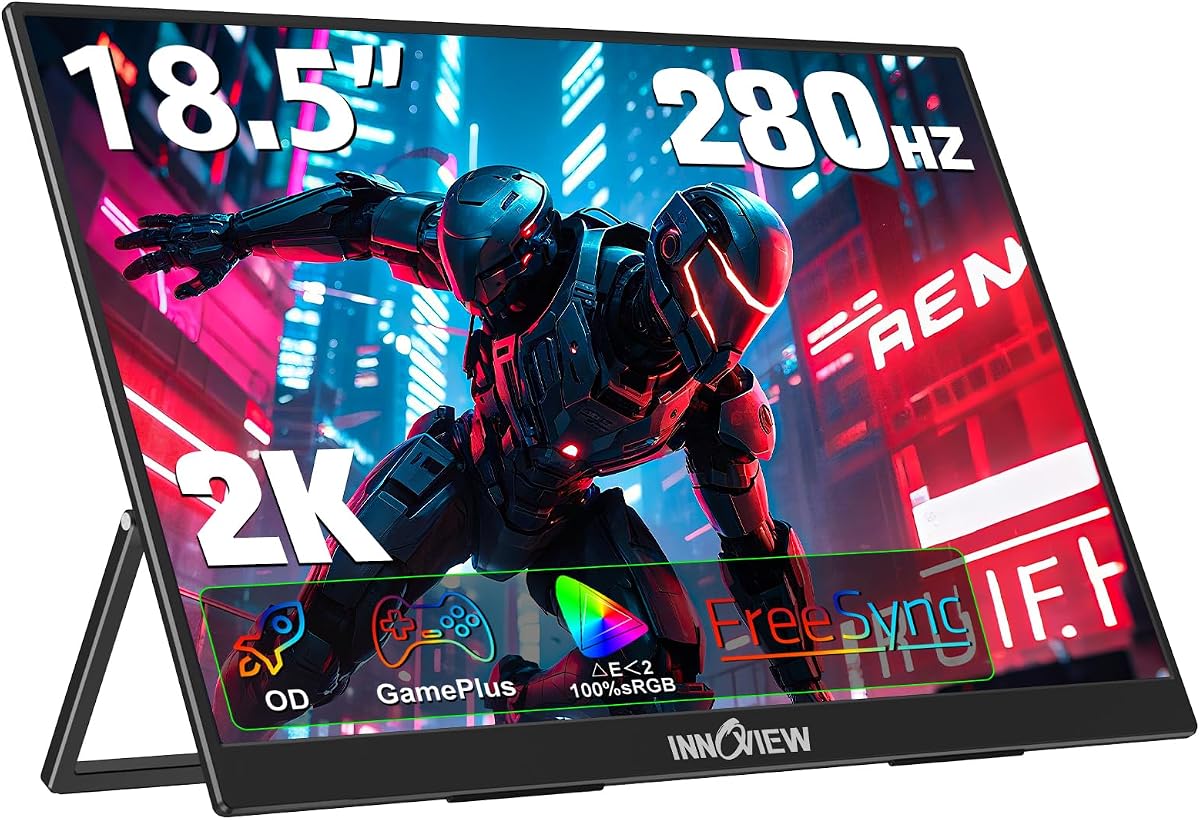
The InnoView 280Hz monitor pushes the boundaries of portable gaming with an industry-leading refresh rate. Its 2K QHD resolution in an 18.5-inch package offers impressive clarity. The 4.2 rating reflects its strong performance despite some compatibility nuances.
We may earn a commission when you buy through this link, at no additional cost to you.
For competitive gamers, the 280Hz rate reduces motion blur significantly. GamePlus modes like custom crosshairs add tactical advantages. The 100% sRGB gamut ensures colors are vivid, while HDR support boosts contrast for darker scenes.
Achieving the full 280Hz requires a capable GPU, which might limit some users. External power is also necessary, adding slight bulk to your setup. However, these are acceptable compromises for the speed and quality this monitor delivers.
Best suited for tech-savvy gamers who prioritize frame rates over pure portability. It works well with high-end consoles and laptops. Check device compatibility before purchasing to ensure you can utilize its full potential effectively.
The high refresh rate provides a measurable advantage in fast-paced gaming scenarios.
2K resolution ensures sharp text and detailed game assets are easily visible.
We may earn a commission when you buy through this link, at no additional cost to you.
The ViewSonic VX1654 is a compact powerhouse for those who travel frequently. Weighing only 1.5 pounds, it slips easily into any backpack. Its 144Hz refresh rate and IPS technology ensure smooth, consistent visuals for gaming and work tasks.
We may earn a commission when you buy through this link, at no additional cost to you.
The single-cable USB-C connection reduces clutter, allowing both power and video through one port. This is particularly useful for laptops with limited ports. The included cover adds an extra layer of protection during transit, extending the monitor's lifespan.
While the 16-inch size is great for portability, it offers less screen real estate for multitasking. The lack of speakers means you need headphones for audio. These are minor drawbacks given the overall convenience and build quality.
Ideal for business travelers and casual gamers needing a reliable secondary screen. Its simplicity and durability make it a strong contender. Verify current deals to find the best price for this efficient and portable display.
The lightweight design and protective cover make it perfect for daily commutes.
USB-C connectivity minimizes cables and setup time significantly.
We may earn a commission when you buy through this link, at no additional cost to you.
The ARZOPA 16.1-inch monitor offers excellent value for budget-conscious gamers. With a 4.4 rating, it delivers solid performance without breaking the bank. The 144Hz refresh rate ensures smooth visuals, making it suitable for casual and competitive play alike.
We may earn a commission when you buy through this link, at no additional cost to you.
Its 106% sRGB coverage provides vibrant colors that enhance gaming experiences. The kickstand is built-in for ease of use, though it offers limited angle adjustments. Connectivity is straightforward with USB-C and HDMI ports for versatile device support.
While it lacks advanced features like adaptive sync, the core performance remains strong. The compact size is great for small spaces or travel. These minor limitations are outweighed by its affordability and reliability for everyday use.
Perfect for students or first-time buyers looking for an affordable portable monitor. It pairs well with various consoles and laptops. Check current pricing to ensure you get the best deal available in the market today.
Delivers high refresh rates and vibrant colors at a competitive price point.
Plug-and-play functionality minimizes setup time and technical requirements.
We may earn a commission when you buy through this link, at no additional cost to you.
The SANSUI 32-inch monitor is designed for immersion rather than portability. Its 1500R curved screen envelops your field of vision, perfect for long gaming sessions. The 240Hz refresh rate ensures every movement is fluid and responsive.
We may earn a commission when you buy through this link, at no additional cost to you.
With FreeSync technology, screen tearing is minimized, leading to a smoother experience. The 1080p resolution is decent, but larger pixels may be noticeable up close. VESA compatibility allows mounting on arms or walls for versatile setups.
While not a travel monitor, it fits well in home offices or dedicated gaming rooms. The size may overwhelm smaller desks. These factors are acceptable given the immersive experience it provides for home-based users.
Ideal for gamers who want a console-like experience at home. It pairs well with PS5 or Xbox for a cinematic feel. Verify current pricing to ensure you get the best deal for this large-scale display.
The 1500R curve creates a natural and engaging viewing experience.
240Hz refresh rates ensure ultra-smooth gameplay with minimal lag.
We may earn a commission when you buy through this link, at no additional cost to you.
The SANSUI 24-inch curved monitor offers a balanced mix of size and performance. The 160Hz refresh rate keeps gameplay smooth, while the 1500R curve helps immersion. It is an excellent choice for home setups where portability isn't the priority.
We may earn a commission when you buy through this link, at no additional cost to you.
Multiple game modes allow customization based on genre, enhancing versatility. The VA panel provides good contrast, making dark scenes clearer. VESA mount compatibility ensures it can be adapted to various desk configurations easily.
While it lacks speakers and is not easily transportable, its performance is strong for the price. External power is needed, which is standard for this size. These trade-offs are acceptable for a dedicated gaming monitor.
Best for gamers seeking an affordable curved experience without premium costs. It fits well in living rooms or gaming nooks. Check current deals to secure the best value for this versatile display option.
Various game modes tailor the experience to different genres.
VESA compatibility allows for versatile mounting solutions.
We may earn a commission when you buy through this link, at no additional cost to you.
The UPERFECT 18-inch monitor stands out for its professional-grade color accuracy. Its 100% DCI-P3 coverage is rare in portable displays, making it ideal for creative work. The QLED technology ensures vibrant colors and true blacks.
We may earn a commission when you buy through this link, at no additional cost to you.
With HDR support and 400 nits brightness, it handles high-contrast scenes well. The slim design keeps it portable despite the advanced features. VESA mount options allow for versatile setups in different environments.
The higher cost is justified by its superior display quality and versatility. You may need a robust power adapter for optimal performance. These factors are minor compared to the benefits it offers for both gaming and creative tasks.
Best for professionals and gamers who demand top-tier visual performance. It serves well as a dual-purpose screen. Verify current pricing to ensure you get the best value for this premium portable display.
The DCI-P3 gamut ensures precise colors for design and editing work.
QLED technology and HDR provide a richer and deeper viewing experience.
We may earn a commission when you buy through this link, at no additional cost to you.
The Samsung 32-inch Odyssey G55C offers a truly immersive gaming experience. The 1000R curve matches the human eye's natural field of view, drawing you into the game. QHD resolution ensures crisp details across the large screen.
We may earn a commission when you buy through this link, at no additional cost to you.
Its 165Hz refresh rate and FreeSync support minimize lag and tearing. Eye saver mode reduces strain during long sessions, promoting comfort. The reliable brand quality ensures consistent performance over time.
While not portable, it excels as a primary display for consoles or PCs. It demands adequate desk space and power. These limitations are acceptable for a monitor focused on home immersion rather than transport.
Ideal for console gamers seeking a cinematic experience at home. It pairs exceptionally well with PS5 or Xbox. Check current deals to find the best value for this highly immersive display option.
The 1000R curve wraps around your vision for deep immersion.
Eye saver mode helps reduce strain during extended gaming sessions.
We may earn a commission when you buy through this link, at no additional cost to you.
The Dell 24 Monitor SE2426H is a top-rated budget choice for home use. Its 4.7 rating reflects solid build quality and reliable performance. The 144Hz refresh rate ensures smooth gameplay without breaking your budget.
We may earn a commission when you buy through this link, at no additional cost to you.
IPS technology provides consistent colors across angles, ideal for shared viewing. The TÜV certification ensures reduced blue light, protecting your eyes during long sessions. Thin bezels make the screen appear larger and more modern.
While not portable, it offers exceptional value for a dedicated home screen. It lacks advanced gaming-specific features. These trade-offs are acceptable for those seeking a dependable, affordable monitor for everyday use.
Perfect for budget-conscious buyers needing a reliable screen for work and games. It supports multiple devices easily. Verify current pricing to ensure you get the best deal on this high-quality display.
TÜV certification reduces blue light to protect your vision.
IPS technology ensures colors remain accurate from different angles.
We may earn a commission when you buy through this link, at no additional cost to you.
Selecting the right gaming monitor without PC needed involves balancing several key factors. This guide covers what to prioritize to ensure you get a display that fits your specific gaming needs and lifestyle.
Screen size determines immersion while resolution affects clarity. Portable monitors range from 16 to 32 inches. For travel, 15 to 18 inches offers a balance of detail and portability. Larger screens enhance home setups but reduce mobility. Aim for at least 1080p resolution for sharp visuals.
Choose a size that fits your intended use case whether mobile or stationary.
Higher refresh rates like 144Hz or 240Hz ensure smoother motion during gaming. Response time below 5ms prevents ghosting and blur. Competitive gamers should prioritize these specs for a tactical advantage. Casual players may find 60Hz sufficient for single-player games.
Focus on high refresh rates for fast-paced gaming experiences.
IPS panels offer wider viewing angles and better color accuracy than VA or TN. They are ideal for creative tasks alongside gaming. OLED or QLED panels provide deeper blacks but may cost more. Consider your content mix when selecting a panel type.
Select IPS for balanced performance or QLED for premium visuals.
Multiple ports like HDMI and USB-C ensure compatibility with various devices. USB-C is useful for charging laptops while displaying video. Check if the monitor supports power delivery to reduce cable clutter. Always verify port types match your console or laptop specs.
Prioritize versatile connectivity for flexible setup options.
Weight and thickness matter if you plan to travel with the monitor. Slimmer designs fit easier into bags. Look for protective cases or covers included in the package. Durable construction prevents damage during transit and daily use.
Choose a lightweight model if you plan to move frequently.
Features like adjustable stands, VESA mounts, or eye-care modes add value. Eye-care certifications reduce strain during long sessions. Adjustable stands allow better viewing angles. Built-in speakers simplify setup but may lack audio quality.
Look for ergonomic features that enhance long-term comfort.
Budgets vary widely based on features and size. High refresh rates and 2K resolution often come at a premium. Determine which features are essential versus optional for your use. Read reviews to ensure the price matches the performance offered.
Balance cost with essential features to maximize value.
Ensure the monitor supports the refresh rates required by your console or laptop. Some portable units may require specific USB-C standards. Check for FreeSync or G-Sync support if you use a PC. Compatibility ensures you can utilize the full potential of your hardware.
Confirm technical compatibility before purchase to avoid issues.
Connect your monitor using HDMI or USB-C cables depending on your device. Ensure you have the necessary power supply plugged in. Adjust the stand or mount to your preferred viewing height. Use your device settings to detect the new display for proper setup.
Clean the screen with a soft microfiber cloth to avoid scratches. Avoid using harsh chemicals that could damage the coating. Store the monitor in its protective case when traveling to prevent physical damage. Keep ports covered to avoid dust accumulation over time.
Regularly update firmware if available to improve performance. Check cable connections to ensure stable image output. Calibrate colors if needed for accurate visuals. Follow manufacturer guidelines to extend the lifespan of your display equipment.
Yes, many portable monitors work with consoles like PlayStation, Xbox, and Nintendo Switch. Ensure your device supports video output via HDMI or USB-C. Some monitors may require external power to function correctly with these devices.
For most users, 1080p is sufficient and balances performance with battery life. Higher resolutions like 2K offer sharper visuals but require more power. Choose based on your preference for detail versus portability.
Most portable monitors do need external power, especially larger or high-refresh models. Some smaller units can run solely on USB-C from a laptop. Always check the power requirements before traveling.
A 144Hz refresh rate is ideal for smooth gameplay on most consoles. Higher rates like 240Hz benefit competitive players with capable hardware. Select based on the games you play most often.
Yes, many models support smartphones with USB-C video output. This turns your phone into a handheld console or small desktop. Check your phone's specifications to confirm compatibility.
Use the included case or purchase a dedicated sleeve. Keep cables organized to prevent port damage. Avoid placing heavy items on top of the screen during transit for safety.
We highlighted ten excellent options ranging from portable screens to home-focused models. The 2K 180Hz monitor offers the best overall balance while Dell provides top budget value. Your choice depends on whether you prioritize size, portability, or performance.
Prioritize refresh rate and connectivity based on your primary use case. If you travel often, choose a lightweight design. For home setups, consider larger screens for immersion. Match the monitor to your specific hardware for optimal results.
Always verify current prices as deals change frequently. Review customer feedback to ensure reliability. With these insights you can confidently choose a monitor that enhances your gaming experience.