
Lian Li A3-mATX
4.8Editor score
Supports 415mm GPUs
Wood front panel design
360mm radiator support
Explore our expert comparison of the top Matx Case models for October 2026, evaluating airflow, build quality, and component support for your next PC build.
Selecting the right Matx Case is crucial for balancing performance and aesthetics. A good case ensures proper airflow, supports your hardware, and protects your investment from dust and damage while fitting your workspace needs.
We compared ten leading Matx Case models based on thermal performance, build quality, and feature sets. Our analysis focuses on real-world compatibility, cooling potential, and design versatility to help you find the perfect match.
Each pick highlights unique strengths tailored to different budgets and styles. Remember that availability and shipping terms change frequently, so verify current stock and delivery estimates before finalizing your purchase decision today.
4.8Editor score

4.7Editor score

4.5Editor score
This side-by-side comparison highlights key specifications and design philosophies across the top Matx Case options available this month to streamline your decision process.




The Cooler Master Q300L V1 stands out as a top value contender in the Matx Case market with a 4.5 rating. It prioritizes open thermal design and modular flexibility to suit various build needs.
We may earn a commission when you buy through this link, at no additional cost to you.
Its perforated design promotes optimal airflow while the modular I/O panel allows adjustment for front top or bottom placement. The transparent side panel showcases hardware effectively without compromising on cooling efficiency.
While it lacks pre-installed fans and uses simpler materials, these trade-offs keep costs low. The ample interior space and component clearance support future upgrades efficiently for budget-conscious builders.
This case is ideal for DIY enthusiasts seeking flexibility and thermal performance without premium pricing. It delivers strong foundational features for entry to mid-level PC builds easily.
Adjusting the I/O panel position allows customized access based on desk layout or airflow preferences.
Perforated sides and open design work together to ensure heat dissipates quickly during demanding tasks.
We may earn a commission when you buy through this link, at no additional cost to you.
The Lian Li A3-mATX earns a 4.8 rating for its exceptional balance of compact design and robust hardware support. It delivers premium build quality with distinct aesthetic choices for discerning users.
We may earn a commission when you buy through this link, at no additional cost to you.
With support for GPUs up to 415mm and 360mm radiators, this case offers rare capacity in a small form factor. Steel mesh panels ensure high airflow, while the walnut wood front adds unique style.
Flexible PSU installation options help maximize clearance and cable management within its 26.3L volume. The modular structure allows for clean minimalist builds despite accommodating high performance components.
This case suits builders wanting high end features without sacrificing desk space. Its design prioritizes performance and style making it a standout choice for premium custom PCs.
The walnut wood panel elevates the visual appeal offering a warm contrast to standard metal casings.
Supporting 360mm radiators ensures even demanding GPUs stay cool without needing external cooling solutions.
We may earn a commission when you buy through this link, at no additional cost to you.
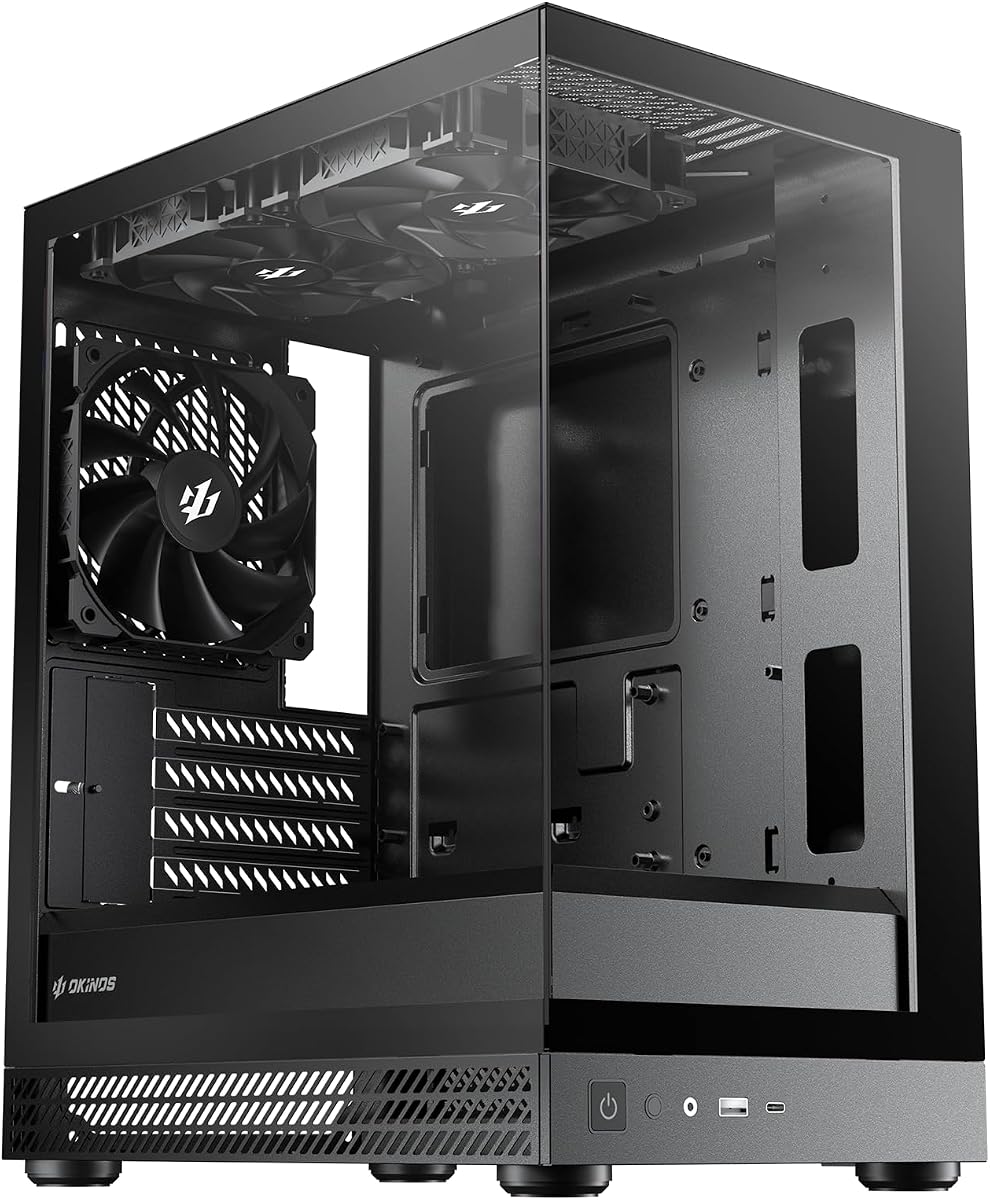
The Okinos Aqua 3 achieves a 4.7 rating by combining a stunning panoramic glass design with practical modern features. It focuses on visual impact while delivering solid performance for standard components.
We may earn a commission when you buy through this link, at no additional cost to you.
Its 270 degree wide angle view uses diamond cut angles for aesthetic appeal alongside vertical airflow design. Pre-installed ARGB fans and a controller allow immediate customization without extra purchases.
Features like Type-C 3.2 Gen 2 and quick-release glass panels enhance usability significantly. The magnetic dust filters and fine mesh help maintain cleanliness and thermal efficiency over time.
Ideal for gamers and creators prioritizing aesthetics, this case balances beauty with function. It offers a complete package that simplifies the build process with thoughtful user-focused touches.
Glass covers front and side panels offering a seamless 270 degree look at your hardware setup.
Quick-release mechanisms allow safe glass removal without tools reducing breakage risk during maintenance.
We may earn a commission when you buy through this link, at no additional cost to you.
The Okinos Cypress 3 Wood offers a 4.6 rating with its genuine walnut wood front panel complementing home decor. It balances style with functional cooling via three-sided mesh intake design.
We may earn a commission when you buy through this link, at no additional cost to you.
Pre-installed 4 x 120mm fans provide immediate cooling while Type-C 3.2 Gen 2 ports ensure fast connectivity. The mesh design maximizes airflow to keep internal components efficient during operation.
GPU compatibility reaches 320mm depending on fan placement while CPU coolers up to 164mm fit easily. Standoffs included ensure easy motherboard installation for a smooth build experience.
This case appeals to users wanting a unique look with solid specs. It blends natural materials with modern PC building requirements effectively for distinct setups.
Walnut wood provides a premium organic touch that stands out from typical synthetic case finishes.
Four fans pre-installed give a head start on cooling though non-PWM controls limit speed customization.
We may earn a commission when you buy through this link, at no additional cost to you.
The Zalman CUBIX provides a 4.5 rating focusing on compactness and durability for limited spaces. Its 17.1 liter volume supports standard components while keeping a minimal footprint.
We may earn a commission when you buy through this link, at no additional cost to you.
Constructed with 0.8T steel it ensures sturdiness despite its small size. The perforated front panel and pre-installed 80mm fan help maintain essential airflow for internal parts.
I/O options include USB 3.0 and audio jacks for basic connectivity needs. While GPU support is limited to 260mm it suits many mainstream setups without bulk.
Best for small office PCs or home theater builds, this case prioritizes space efficiency. It delivers a no-fuss reliable solution for users with strict size constraints.
The compact design fits on shelves or desks where larger towers would be intrusive or impossible.
Thick steel construction ensures protection against bumps and scratches during daily use.
We may earn a commission when you buy through this link, at no additional cost to you.
The TGDGAMER MATX earns a 4.0 rating as a budget slim option for Micro ATX boards. It emphasizes direct airflow through perforated front panels to cool components efficiently.
We may earn a commission when you buy through this link, at no additional cost to you.
Supporting standard ATX power supplies adds flexibility for upgrades. The compact interior fits specific fan configurations and radiators to enhance performance within a slim frame.
I/O ports include USB3.0 and USB2.0 for device connections. GPU length limits require checking card size before purchase to ensure compatibility with this slim chassis.
Ideal for tight spaces or budget builds, this case offers essential features without extra cost. It serves well for users prioritizing function over high-end aesthetics.
Perforated front design pulls cool air straight in to reduce heat build up effectively.
This model focuses on core functionality offering a cost effective entry into Matx builds.
We may earn a commission when you buy through this link, at no additional cost to you.
The Okinos Aqua UNO achieves a 4.7 rating for air cooling simplicity and modern connectivity. It supports GPUs up to 309mm without needing complex radiator setups or liquid cooling.
We may earn a commission when you buy through this link, at no additional cost to you.
Advanced quick-release panels allow tool-free glass removal reducing accidental breakage risks. Full-coverage dust filters on top side and bottom keep components cleaner for long-term performance.
Spacious cable routing and Velcro straps help organize wires for neat airflow. The Type-C 5Gbps port provides fast data transfer for modern peripherals and drives easily.
Best for users preferring straightforward air cooling, this case delivers on usability. It balances visual appeal with practical maintenance features for hassle-free ownership.
Tool-free panels and dust filters simplify cleaning and access for quick system checks.
Air-only design removes complexity making installation easier for those avoiding liquid loops.
We may earn a commission when you buy through this link, at no additional cost to you.
The LIAN LI Vector V100 MINI offers a 4.8 rating with immersive glass viewing and lighting included. It focuses on delivering a complete visual experience without requiring extra ARGB purchases.
We may earn a commission when you buy through this link, at no additional cost to you.
Supporting GPUs up to 415mm and including four ARGB PWM fans makes it versatile for powerful setups. Integrated light strips and a 270 degree glass view enhance aesthetics significantly.
Anti-sag brackets support heavy graphics cards while the compact platform fits standard M-ATX boards. Top radiator support allows further cooling expansion for demanding performance tasks.
This case suits users prioritizing looks and component support. It provides a polished package for enthusiasts wanting high performance and lighting out of the box.
Included fans and light strips remove the need for extra RGB purchases or controllers.
Anti-sag brackets ensure stable mounting even for lengthy heavy graphics cards.
We may earn a commission when you buy through this link, at no additional cost to you.
The Okinos Mirage 4 earns a 4.8 rating for optimizing vertical airflow and ease of installation. Its panoramic design enhances openness while ensuring heat rises efficiently from bottom to top.
We may earn a commission when you buy through this link, at no additional cost to you.
Supporting a 240mm radiator and offering 5 PCIe slots maximizes GPU cooling potential. Spacious cable management areas and magnetic dust filters keep the interior neat and efficient.
Tool-free tempered glass simplifies access without compromising protection. Pre-installed ARGB fans and a controller add lighting flexibility for a customized setup look.
This case fits builders wanting efficient cooling and clean builds. It balances airflow engineering with user-friendly design for a polished final result.
Vertical airflow path moves heat directly upward optimizing cooling for GPU heavy workloads.
Cable routing space and tool-free panels make assembly smoother for first time builders.
We may earn a commission when you buy through this link, at no additional cost to you.
The Lian Li B4-mATX offers a 4.5 rating with premium real wood finishes and flexible placement. It combines style with solid hardware support for both horizontal and vertical setups.
We may earn a commission when you buy through this link, at no additional cost to you.
Supporting GPUs up to 358mm and 360mm AIO coolers makes it versatile for high performance builds. Slim fans included provide initial cooling while allowing customization for better thermal results.
Available in black walnut or white beech it offers aesthetic versatility. Dual positioning allows adapting the case to specific desk or floor layouts comfortably.
This case suits users wanting elegance with standard performance. It blends natural materials and robust support for a distinctive custom PC appearance.
Horizontal or vertical placement lets the case blend into different room styles.
Real wood finishes provide a sophisticated look that stands out among metal alternatives.
We may earn a commission when you buy through this link, at no additional cost to you.
Choosing a Matx Case involves evaluating airflow, dimensions, and features to match your hardware and preferences.
Look for perforated panels or mesh designs to promote efficient air movement and heat dissipation for components.
Prioritize cases with dust filters and fan placements that support future cooling upgrades like radiators.
Verify maximum GPU length, CPU cooler height, and PSU dimensions to ensure your parts fit without modification.
Check supported motherboard form factors like Micro-ATX or Mini-ITX to avoid installation issues.
Steel thickness and frame rigidity protect internal parts and reduce noise vibration during operation.
Quality materials like tempered glass or wood panels enhance durability and aesthetic value over time.
Spacious routing areas and grommets help organize wires for improved airflow and cleaner interior appearance.
Features like Velcro straps or tie-down points simplify setup and future upgrades significantly.
Modern ports like USB 3.0 and Type-C ensure fast data transfer and compatibility with current peripherals.
Audio jacks and power switches positioned for easy access improve daily usability for your setup.
Tool-free panels and pre-installed standoffs reduce build time and risk of accidental damage during assembly.
Clear layouts with accessible screw holes make mounting components easier for first-time builders.
Choose between glass panels for views or solid panels for minimalism based on your visual goals.
Color schemes like black or natural wood finishes should match your room decor style and tone.
Balance essential features like airflow and durability with your spending limits for a cost-effective choice.
Avoid overspending on unnecessary elements if standard cooling and build quality meet your needs.
Place your Matx Case on a stable surface with enough ventilation to prevent heat buildup around the casing itself.
Clean dust filters regularly with a soft brush or compressed air to maintain optimal airflow efficiency.
Check and tighten standoffs or screws periodically to ensure components remain secure during operation.
Most Matx Case models support Micro-ATX and Mini-ITX motherboards, though some may offer flexibility for smaller boards. Always verify dimensions against your specific motherboard size.
Yes, many modern Matx cases accommodate GPUs up to 400mm or more, but verify exact lengths before purchasing to ensure compatibility.
Pre-installed fans often provide baseline cooling, but adding more may improve airflow and temperatures for demanding components.
Use compressed air to blow dust from vents and filters while wiping exterior surfaces with a soft dry cloth.
Some Matx cases support 240mm or 360mm radiators, but always check clearance limits before selecting a cooling system.
Yes, organized cables prevent airflow blockage and help heat dissipate efficiently from internal components.
Matx cases are smaller and lighter, optimized for Micro-ATX boards and space-saving builds compared to larger full ATX options.
Select a color that complements your room decor while considering dust visibility and personal style preferences.
The top picks like the Lian Li A3-mATX and Okinos Aqua 3 demonstrate excellent balance between cooling and design for varied needs.
Focus on airflow capacity and compatibility with your current hardware to ensure long-term satisfaction and ease of upgrades.
Always verify current availability and shipping options before ordering since stock levels fluctuate frequently across retailers.