
SteelSeries Apex 3
4.6Editor score
IP32 water resistant
Whisper quiet switches
Dedicated multimedia controls
Discover the top Mac gaming keyboards for 2026. We compare wireless, mechanical, and budget options to find the perfect fit for your setup.
Finding the right Mac gaming keyboard can transform your setup. You need compatibility with macOS, responsive keys, and durability for long sessions.
We evaluated ten top models based on build quality, switch type, connectivity, and value. Each pick balances performance with the unique needs of Mac users.
Every selection highlights key specs and real-world performance. Prices and availability change frequently, so verify details before purchasing your new gear.
4.6Editor score
4.3Editor score

4.0Editor score
This side-by-side comparison highlights the key differences across all ten selected keyboards to help you quickly identify the model that fits your workflow.


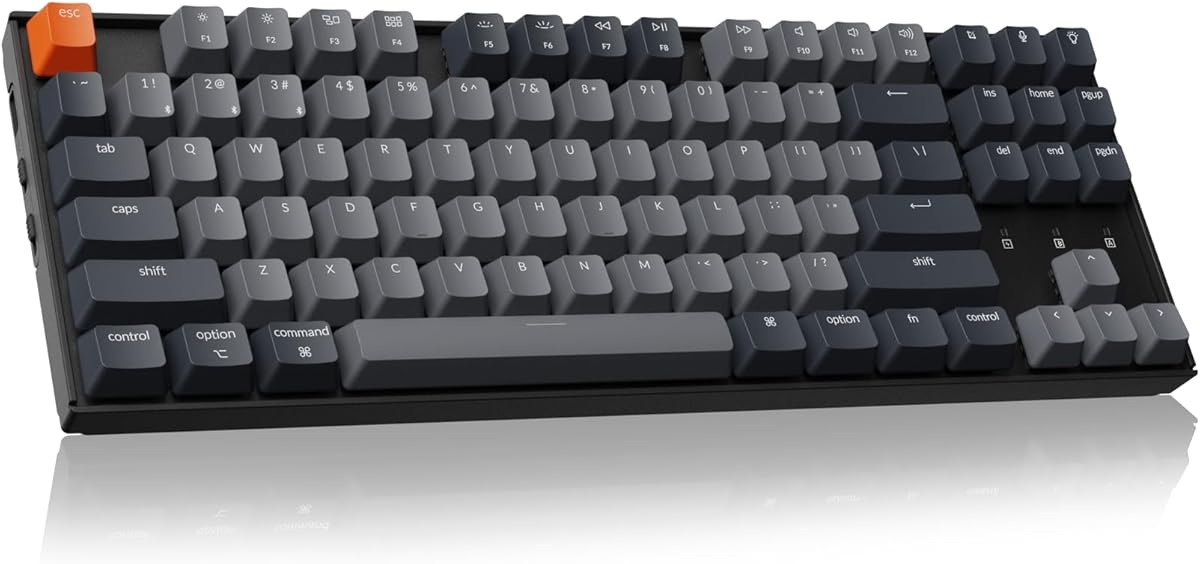
The Keychron K8 stands out as a top-tier option for Mac users seeking a wireless mechanical keyboard. With a 4.3 rating, it balances performance and usability effectively.
We may earn a commission when you buy through this link, at no additional cost to you.
Its Mac-optimized layout ensures every function key works correctly without complex remapping. The brown switches offer tactile feedback ideal for both typing and gaming.
While it lacks RGB lighting, the white backlight provides clear visibility in dim conditions. Some users note minor Bluetooth latency, but it rarely affects gameplay.
This keyboard is perfect for hybrid setups where you switch between Mac and Windows devices. It offers excellent value for those prioritizing functionality over flashy features.
The included keycaps and dedicated function keys make switching to macOS effortless without needing external software configuration.
With a massive 4000 mAh battery, this keyboard delivers up to 200 hours of use, reducing frequent charging interruptions significantly.
We may earn a commission when you buy through this link, at no additional cost to you.
The SteelSeries Apex 3 offers an entry point into gaming keyboards without breaking the bank. It receives a high 4.6 rating for its reliable performance and durability.
We may earn a commission when you buy through this link, at no additional cost to you.
Its IP32 water resistance adds peace of mind during intense gaming sessions. The quiet switches ensure it does not disturb others around you in shared spaces.
While membrane switches lack the click of mechanical keys, they remain smooth and responsive enough for most casual gamers. The included wrist rest enhances comfort during long use.
This is an excellent choice for students or budget-conscious gamers who need basic multimedia controls and durability over advanced programmability.
The IP32 rating ensures accidental spills do not immediately damage the internal circuitry, extending the keyboard’s lifespan in casual environments.
Whisper quiet switches make this ideal for dorms or shared offices where loud typing or clicking can be disruptive to others nearby.
We may earn a commission when you buy through this link, at no additional cost to you.
The Logitech G915 X delivers premium engineering for those who demand style and speed. Although it holds a 4.0 rating, its low-profile switches offer unique performance benefits.
We may earn a commission when you buy through this link, at no additional cost to you.
The 1.3 mm actuation point increases speed for competitive gaming while reducing finger fatigue. Sand-blasted aluminum tops and PBT keycaps ensure it looks and feels expensive.
However, the premium price might be prohibitive for casual users. Additionally, relying on a wired connection limits placement flexibility compared to wireless competitors.
Ideal for professional setups where aesthetics and input precision are paramount, this keyboard complements high-end monitors and peripherals effectively.
Low-profile mechanical switches reduce travel distance significantly, allowing for rapid input registration that benefits fast-paced competitive titles.
The aluminum top plate provides structural integrity, ensuring zero flex during aggressive keystrokes for a consistent typing experience over time.
We may earn a commission when you buy through this link, at no additional cost to you.
The EPOMAKER X Aula F75 MAX brings creativity to your desk with its integrated TFT screen. It rates highly at 4.6 for its innovative approach to customization.
We may earn a commission when you buy through this link, at no additional cost to you.
The gasket mount structure provides a bouncy, comfortable typing feel that many enthusiasts prefer. Hot-swappable switches let you change the sound without soldering tools.
Users might find the software settings complex initially, but the payoff is deep personalization. The compact 75% layout saves desk space while keeping essential arrow keys.
This keyboard is a standout for hobbyists and gamers who value unique visual features like GIFs on a screen alongside solid performance.
The built-in TFT screen allows users to display custom GIFs or system stats, adding a layer of visual flair rarely found in standard keyboards.
Factory-lubed switches combined with sound dampening foams create a rich, thocky sound profile that appeals to typing enthusiasts.
We may earn a commission when you buy through this link, at no additional cost to you.
The Logitech G413 TKL SE focuses on robust construction and reliable mechanical feedback. It earns a 4.6 rating for its straightforward, high-quality design.
We may earn a commission when you buy through this link, at no additional cost to you.
PBT keycaps resist shine and wear better than ABS alternatives, ensuring longevity. The aluminum-magnesium alloy top case provides a rigid, premium feel during use.
While it lacks RGB flair, the white LED backlight is sufficient for most environments. This keyboard is a no-nonsense option for those prioritizing function over form.
Gamers who prefer clean setups and consistent performance will find this TKL model offers excellent value and durability for daily tasks.
The use of aluminum and PBT materials ensures the keyboard withstands daily wear without developing the shiny keys typical of plastic models.
Minimal flex in the body means every keypress feels consistent, providing reliable feedback for competitive gaming scenarios.
We may earn a commission when you buy through this link, at no additional cost to you.
The Redragon K742 merges productivity and gaming with its compact 98% layout and robust feature set. It achieves a 4.6 rating for its versatile connectivity options.
We may earn a commission when you buy through this link, at no additional cost to you.
QMK and VIA support allow deep custom mapping for efficiency. The tri-mode connectivity ensures you can switch between devices quickly without interruption.
Some users may need time to adapt to the non-standard key layout. However, the savings in desk space are significant for smaller workstations.
This keyboard is ideal for users who want mechanical feel and advanced software control without sacrificing valuable desk real estate.
Full support for VIA software means you can remap keys and create macros without being tied to proprietary manufacturer software.
By condensing the numpad, this layout retains most functionality while freeing up space for mouse movement during gaming sessions.
We may earn a commission when you buy through this link, at no additional cost to you.
The Keychron K4 offers a complete solution with its 96% layout that includes arrow and number keys. It holds a 4.4 rating for its reliable performance.
We may earn a commission when you buy through this link, at no additional cost to you.
Mac users benefit from dedicated function keys that align perfectly with OS shortcuts. The 4000 mAh battery ensures it lasts weeks on a single charge.
The tight spacing between keys can feel crowded for users with large fingers, but it saves considerable desk space. The white backlight remains functional and clean.
This is a versatile choice for office workers and gamers who need a full layout in a footprint smaller than a traditional full-size board.
The 96% layout compresses the numpad and arrow keys into a single block, maximizing desk space without sacrificing essential number inputs.
Pre-configured Mac keycaps and switches ensure smooth operation with macOS functions like Mission Control and Spotlight out of the box.
We may earn a commission when you buy through this link, at no additional cost to you.
The Logitech MX Mechanical focuses on professional workflows with a low-profile design that reduces wrist strain. It holds a 4.2 rating for its build quality.
We may earn a commission when you buy through this link, at no additional cost to you.
Smart illumination saves battery by lighting up only when you approach the keyboard. The tactile switches provide quiet feedback suitable for open offices.
Gaming features are minimal compared to dedicated gaming boards, but typing performance is exceptional. The included plastic uses recycled materials for sustainability.
This keyboard is perfect for writers, coders, and office workers who want premium comfort and seamless cross-device control without distraction.
The proximity sensors automatically adjust backlight brightness based on ambient light, preserving battery life while maintaining visibility.
Recycled plastic components reduce environmental impact, appealing to conscious consumers looking for sustainable tech accessories.
We may earn a commission when you buy through this link, at no additional cost to you.
The GravaStar Mercury K1 stands out with its futuristic aluminum exoskeleton and custom switches. It earns a high 4.7 rating for aesthetic appeal.
We may earn a commission when you buy through this link, at no additional cost to you.
Five layers of sound-dampening foam create a quiet, solid typing experience. The dual RGB systems allow deep customization of your setup's lighting.
While the software is functional, it lacks the depth of competitors. The unique design may not suit minimalist desks but fits gaming rigs perfectly.
This keyboard is a statement piece for users who want their hardware to look as unique as the performance they expect from it.
Multi-layer foam padding eliminates echo, resulting in a soft, muted thud that feels and sounds premium during typing.
The gradient aluminum finish and flowing curves create a sculptural look that elevates the visual appeal of any gaming desk.
We may earn a commission when you buy through this link, at no additional cost to you.
The Logitech G213 Prodigy provides a reliable entry point for gamers needing durability. It rates 4.2 for its practical design and sturdy build.
We may earn a commission when you buy through this link, at no additional cost to you.
The integrated palm rest offers comfort during extended sessions. Spill resistance ensures that drinks can be cleaned up without ruining the device.
While keys are not mechanical, the feedback is responsive enough for casual gaming. The dedicated media keys add convenience without extra hardware.
This is an excellent starter keyboard for beginners who want a full-size layout and RGB lighting without a high price tag.
Built-in drainage channels and spill-resistant membranes protect internal components from liquid damage, extending the device's lifespan.
The integrated palm rest ensures wrist support during long gaming sessions, reducing strain without needing external accessories.
We may earn a commission when you buy through this link, at no additional cost to you.
Selecting the right Mac gaming keyboard requires balancing compatibility, switch type, and ergonomics to match your specific workflow.
Ensure the keyboard supports macOS natively with correct function keys for Command, Option, and Control. This prevents the need for complex remapping software.
Mechanical switches offer tactile feedback and longevity. Choose linear for speed, tactile for feedback, or quiet for office environments to suit your preference.
Decide between wired for zero latency or wireless for desk flexibility. Bluetooth allows seamless switching between multiple devices like tablets and laptops.
Full-size keyboards include a numpad for productivity. Tenkeyless models save space for mouse movement, essential for competitive gaming setups.
PBT keycaps resist shine and wear better than ABS. They feel textured and durable, making them ideal for long-term daily use.
Software support for macros and lighting effects enhances personalization. Some keyboards offer onboard memory for storing profiles directly on the device.
Look for adjustable feet or wrist rests to maintain a comfortable typing angle. Proper posture prevents strain during extended gaming or typing sessions.
Aluminum frames and water resistance add longevity to your investment. Consider how well the keyboard is sealed against dust and spills.
Connect your keyboard via Bluetooth or USB-C and ensure your Mac recognizes it. Adjust system preferences to match key functions if needed.
Clean regularly with compressed air and a soft cloth to prevent dust buildup in switches. Avoid harsh chemicals that might damage key legends.
Update firmware through official software to access new features and bug fixes. Proper maintenance ensures consistent performance over many years.
Yes, mechanical switches generally offer better responsiveness and durability. They provide tactile feedback that helps improve accuracy during fast gameplay.
Most models work out of the box, but software unlocks customization like macros. Check if the manufacturer provides compatible Mac apps before buying.
The Keychron K8 is a top choice for wireless performance. It supports multiple device switching and maintains solid latency for gaming.
Low-profile keyboards reduce finger travel, increasing speed. They are excellent for competitive gaming if you prefer a sleek, laptop-like typing experience.
Yes, but you may need to remap keys like Command and Control. Some keyboards come with extra Mac keycaps to simplify the transition.
RGB lighting significantly drains battery on wireless models. Turn off effects or use static colors to extend battery life during long sessions.
No, many gamers prefer tenkeyless layouts for more mouse room. However, a numpad helps if you frequently use numbers in games or productivity.
Look for actuation points under 2mm for faster inputs. Lower actuation means less finger movement to trigger a key, improving reaction times.
We reviewed ten standout keyboards ranging from budget-friendly to premium choices. The Keychron K8 and Logitech G915 X lead for overall performance and style.
Prioritize switch type and connectivity that fits your workflow. Whether you need a full numpad or compact design, there is a model to suit your desk.
Always verify current pricing and stock availability before purchasing. Technology evolves quickly, so keeping an eye on the latest updates ensures you get the best deal.