
Cudy Gigabit Multi-WAN Router
4.4Editor score
Connect up to 5 ISPs easily
Full OpenWRT support available
Complete VPN Gateway Suite built-in
This guide compares the top ten load balancing routers for 2026, analyzing features like multi-WAN support, security protocols, and enterprise-grade management
Finding the right load balancing router is essential for businesses that rely on continuous internet connectivity. These devices distribute traffic across multiple connections to prevent downtime and optimize bandwidth usage effectively.
We evaluated ten top-rated models based on port variety, VPN capabilities, and management features. Each selection offers unique strengths for different network sizes and technical requirements.
Every pick highlights key specifications and ideal use cases to help you decide. Please note that availability and pricing may vary by region and time of purchase.
4.4Editor score

4.7Editor score

4.0Editor score
The following table provides a side-by-side look at the core specifications and capabilities of each router to help you compare performance features easily.



The Cudy Gigabit Multi-WAN Router offers an affordable entry point into professional network balancing. It holds a strong rating of 4.4 stars from users who appreciate its flexibility and support for OpenWRT.
We may earn a commission when you buy through this link, at no additional cost to you.
This device allows you to connect up to five ISPs for seamless failover and load balancing. You can customize rules and VLAN segmentation using OpenWRT, which is rare at this price level.
While it lacks advanced enterprise management tools, the included VPN suite covers most small business needs. The main trade-off is a simpler interface compared to higher-end models.
Small offices and tech enthusiasts will find this router ideal for building a robust network without overspending. We recommend it for those seeking customization on a budget.
Connect multiple ISPs to ensure business continuity without breaking the bank.
Use OpenWRT to unlock VLANs and custom firewall rules.
We may earn a commission when you buy through this link, at no additional cost to you.
The Omada Fusion 2.5G Multi-WAN Router stands out with its 2.5G ports and touchscreen interface. With a high 4.7 rating, it delivers reliable performance and simple setup for small to medium networks.
We may earn a commission when you buy through this link, at no additional cost to you.
Its quad-core CPU ensures fast packet processing, while the built-in touchscreen provides instant traffic insights. You can manage the entire network via the Omada Cloud portal without extra licenses.
This router does not broadcast Wi-Fi, so you will need separate access points for wireless coverage. However, the speed and management features justify this limitation for wired-focused setups.
Network administrators seeking speed and ease of use should consider this router for their next deployment. It balances performance with usability better than most competitors in its class.
Five 2.5G ports deliver outstanding speed for modern bandwidth needs.
Use the touchscreen for quick troubleshooting without a laptop.
We may earn a commission when you buy through this link, at no additional cost to you.
The Alta Labs Route10 is a high-performance wired router designed for advanced networks. It features a Qualcomm quad-core processor and supports 10Gbps speeds to handle heavy workloads without bottlenecks.
We may earn a commission when you buy through this link, at no additional cost to you.
With integrated PoE+ output, you can power access points directly through the router. The real-time stats give administrators deep visibility into bandwidth usage and connected devices.
This device comes with a premium price tag, making it best for large enterprises or demanding home labs. The lack of Wi-Fi means you must pair it with separate access points.
If you need enterprise-grade throughput and advanced segmentation features, this router is a top choice. It provides consistent multi-gigabit performance for critical business operations.
Route10 handles high-bandwidth workloads without performance issues.
PoE+ ports reduce the need for extra power adapters.
We may earn a commission when you buy through this link, at no additional cost to you.
The TP-Link ER7206 is a professional router that supports up to 150,000 client devices. It integrates seamlessly into the Omada SDN platform for centralized control across multiple sites.
We may earn a commission when you buy through this link, at no additional cost to you.
It features flexible port configuration with SFP and WAN/LAN options. This makes it highly adaptable for various network layouts and growth needs.
While it requires some setup to utilize full SDN features, the cloud management is worth it for remote monitoring. The VPN support is robust with up to 100 connections.
Businesses needing scalable and secure network management should consider this model. It offers a balance of capacity and advanced features.
Supports up to 150,000 associated devices for large networks.
Integrates with switches and access points for unified control.
We may earn a commission when you buy through this link, at no additional cost to you.
The Omada ER7412-M2 offers extensive port options including two 2.5G WAN/LAN ports. It allows load balancing across up to 11 WAN ports to maximize internet utilization.
We may earn a commission when you buy through this link, at no additional cost to you.
This model supports high-security protocols like SSL, IPSec, and WireGuard. Security features include DoS/DDoS protection and DPI for enhanced network safety.
Due to its high port count, it is ideal for large offices or ISPs. The setup might be too complex for typical home users without enterprise experience.
Organizations needing extensive connectivity and multi-line broadband optimization should find this router valuable. It is built for high-performance environments.
Multiple ports allow connections for large-scale deployments.
Load balancing increases utilization rates of multi-line connections.
We may earn a commission when you buy through this link, at no additional cost to you.
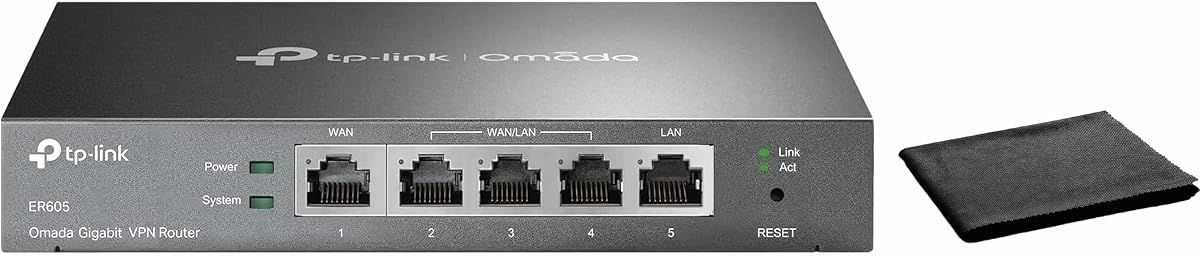
The TP-Link ER605 is a reliable wired router with five gigabit ports for versatile connectivity. It supports up to three WAN ports for optimizing bandwidth usage efficiently.
We may earn a commission when you buy through this link, at no additional cost to you.
Security is a strong point with advanced firewall policies and DoS defense. It also supports mobile broadband via USB for flexible WAN backup options.
While the web interface is straightforward, it may lack some advanced customization found in premium models. The VPN support is robust for remote access needs.
This router is suitable for small to medium businesses needing dependable performance without high costs. It delivers solid value for general office networks.
Five ports optimize bandwidth usage through one device effectively.
USB WAN port supports 4G/3G modems for backup.
We may earn a commission when you buy through this link, at no additional cost to you.
The TP-Link ER-605 offers seamless load balancing with dual WAN ports for reliable internet. It focuses on high-speed connectivity and robust security features for small businesses.
We may earn a commission when you buy through this link, at no additional cost to you.
Intuitive management tools simplify setup and maintenance significantly. The cloud monitoring capability allows you to check network status remotely with ease.
It provides bandwidth optimization for critical applications which helps maintain performance. The compact design makes it versatile for various installation environments.
Small offices and remote work setups will appreciate its reliability and ease of use. It is a solid choice for basic load balancing needs.
Dual WAN ports ensure seamless load balancing for performance.
Cloud monitoring allows real-time status checks anywhere.
We may earn a commission when you buy through this link, at no additional cost to you.
The TP-Link TL-R470T+ provides four WAN ports equipped with advanced load balance functions. It is a compact and cost-effective solution for small offices or internet cafes.
We may earn a commission when you buy through this link, at no additional cost to you.
Client account and network management are extensive with PPPoE server support. This allows marshaling bandwidth resources to specific clients based on unique environments.
The device is smaller in case size but offers powerful DoS protection. While speeds are limited to 10/100M, it remains a reliable backup choice.
Budget-conscious networks needing multiple WAN failover capabilities will find it useful. It offers robust security at a low price point.
Smaller case design suits small office or cafe networks.
Provides extensive account management for administrators.
We may earn a commission when you buy through this link, at no additional cost to you.
The TP-Link TL-R480T+ is a five-port load balance router with flexible configuration. It offers three configurable WAN/LAN ports to suit different network setups.
We may earn a commission when you buy through this link, at no additional cost to you.
It supports one LAN and one WAN port with additional options for balancing. The basic design makes it accessible for users needing straightforward connectivity.
While it lacks advanced features of newer models, it is affordable and functional. It serves well for simple failover needs without complexity.
Small businesses on a tight budget can use this for basic internet redundancy. It is a legacy option that still gets the job done.
Three configurable WAN/LAN ports adapt to your needs.
Provides simple load balance for cost-effective internet backup.
We may earn a commission when you buy through this link, at no additional cost to you.
The Ubiquiti EdgeRouter 4 features three gigabit Ethernet ports and an SFP slot. It is a fanless unit designed for low power consumption and rack mounting.
We may earn a commission when you buy through this link, at no additional cost to you.
Its high rating reflects reliability and performance in edge network scenarios. The SFP port provides flexibility for fiber connections or uplinks.
Setup can be complex for new users compared to simpler routers. However, power users appreciate the control and professional build quality.
Small to mid-sized enterprises needing a reliable edge device should consider this. It balances performance with a compact and silent design.
Fanless design ensures silent operation in quiet environments.
SFP port supports flexible fiber uplink options.
We may earn a commission when you buy through this link, at no additional cost to you.
Selecting the right router requires understanding your bandwidth needs and security requirements.
The number of WAN ports determines how many internet connections you can use simultaneously. More ports allow for better redundancy and distribution of traffic across ISPs.
Look for at least three WAN ports if you need robust failover and load balancing capabilities.
Ensure the router supports gigabit or faster speeds to match your internet plan. Modern routers should handle multi-gigabit throughput without dropping packets.
Prioritize models with 2.5G or 10G ports if you have high-speed internet.
Built-in VPN support is essential for secure remote access and site-to-site tunnels. Check for protocols like OpenVPN and WireGuard.
Choose a router that supports multiple simultaneous VPN connections.
A user-friendly web or cloud interface simplifies daily maintenance. Cloud management is useful for remote sites.
Look for intuitive dashboards and mobile app support.
Firewall, DoS defense, and filtering are critical to protect your network. Advanced features like IDS or IPS add extra layers of security.
Ensure the router offers robust security policies out of the box.
Power over Ethernet (PoE) support allows you to power access points directly from the router. This reduces the need for extra power adapters.
Consider PoE+ support if you have network devices needing power.
Choose a router that can grow with your business. Models with SDN integration allow for easy expansion and centralized control.
Check client limits to ensure they support your device count.
Determine your budget early to narrow down options. Basic models are affordable but may lack advanced features.
Invest in a router that matches your performance needs.
Connect your internet cables to the designated WAN ports and configure the interface using the provided login details. Ensure your ISP settings are correct to establish initial connectivity.
Regularly update the firmware to maintain security and performance. Monitor network traffic through the dashboard to identify any unusual patterns.
Keep the router in a cool, dry location to prevent overheating. Dust the vents periodically to ensure proper airflow and longevity.
Load balancing distributes internet traffic across multiple connections to maximize throughput. It ensures that no single connection is overloaded while others remain idle.
You need multiple active internet subscriptions from ISPs to utilize load balancing fully. Ensure each line has distinct bandwidth capabilities for optimal results.
Yes, you can use two home internet lines. However, you must have separate service accounts for each line to enable proper traffic distribution.
Load balancing can sometimes introduce latency. It is best suited for scenarios where uptime is more critical than single-stream speed.
Automatic failover instantly routes all traffic to the remaining active connections. This minimizes downtime and keeps critical services running.
Multiple WANs increase attack surface. Ensure firewalls and VPN protocols are configured to secure each entry point effectively.
We reviewed ten excellent routers ranging from budget-friendly options to high-performance enterprise solutions. Each offers unique strengths for different user requirements.
Prioritize port count and speed to match your internet speed. Security and management features should also factor heavily into your decision.
Always verify the current availability before purchasing to ensure you get the best deal. Prices may fluctuate based on market demand.