
Logitech G305 Lightspeed Wireless Gaming Mouse – Black
4.6Editor score
HERO sensor up to 12000 DPI
LIGHTSPEED wireless 1 ms response
250 hours battery on one AA
This guide compares the top ten lightweight mice for gaming and productivity, featuring models from Logitech, Redragon, and more to help you choose the right
Finding a lightweight mouse can transform your computing experience by reducing wrist strain and improving precision. Whether you game or work, a lighter device enhances control and speed without sacrificing durability or comfort during extended sessions.
We evaluated ten leading models based on sensor accuracy, battery life, build quality, and ergonomic design. Our analysis focuses on real-world performance metrics and user feedback to ensure each recommendation delivers genuine value for diverse needs.
Each pick highlights key strengths and ideal use cases so you can match a device to your specific workflow. Please note that prices and availability change frequently, so verify current details before making your final purchase decision today.
4.6Editor score

4.5Editor score

4.6Editor score
The following table provides a side-by-side overview of all ten models reviewed in this guide. It highlights essential specifications and key features to help you quickly identify the right device for your needs.





The Logitech G305 Lightspeed Wireless Gaming Mouse stands out as an exceptional entry point for those seeking a lightweight gaming peripheral. With a rating of 4.6 stars, it is praised for its efficient design and reliable wireless connection that eliminates lag during intense sessions.
We may earn a commission when you buy through this link, at no additional cost to you.
At the core of its performance is the HERO optical sensor, which delivers up to 12,000 DPI sensitivity and 400 IPS tracking accuracy. The LIGHTSPEED technology ensures a 1 millisecond report rate, making it feel as responsive as a wired device. Weighing only 3.4 ounces, the mouse is designed for high maneuverability without sacrificing durability.
Battery life is a significant advantage here, offering up to 250 hours of continuous gameplay on a single AA battery. Users can extend this to nine months using Endurance mode. While it lacks USB-C charging, the convenience of long battery life often outweighs this drawback for many gamers.
This mouse is ideal for gamers and travelers who prioritize portability and battery efficiency. If you need a reliable, lightweight device for competitive play without breaking the bank, the G305 offers professional-grade features at a budget-friendly price.
The efficient power management allows up to 250 hours of play on one AA battery, ensuring uninterrupted gaming sessions without frequent recharging.
Built-in nano receiver storage and a small footprint make this mouse perfect for on-the-go gaming and laptop setups.
We may earn a commission when you buy through this link, at no additional cost to you.
This white variant of the Logitech G305 offers the same high-performance features as its black counterpart but with a different aesthetic appeal. Maintaining a 4.6-star rating, it appeals to users who prefer a lighter visual style for their gaming or work setup.
We may earn a commission when you buy through this link, at no additional cost to you.
The specifications remain identical to the black version, featuring the next-generation 12,000 DPI HERO sensor and LIGHTSPEED wireless technology for a 1 millisecond response time. The mechanical design ensures maximum maneuverability, while the classic shape provides comfort during extended use.
Battery performance is consistent, delivering up to 250 hours of continuous gaming on a single AA battery. The compact design includes convenient storage for the USB wireless receiver, making it easy to transport between locations.
Ideal for those who want the proven performance of the G305 in a white finish, this model suits both gaming and general productivity. It is a solid choice for anyone looking to match their device color to a minimalist desk setup.
White and black models share the same sensor, wireless tech, and battery life, ensuring consistent performance across color options.
The white finish complements modern desktop setups and offers a distinct look compared to traditional dark gaming peripherals.
We may earn a commission when you buy through this link, at no additional cost to you.
The Logitech G PRO X Superlight 2 Wireless Gaming Mouse earns our Editor's Choice award for its cutting-edge technology and championship-winning design. With a 4.5-star rating, it is engineered in collaboration with esports pros to deliver faster and more precise performance.
We may earn a commission when you buy through this link, at no additional cost to you.
This model features the HERO 2 optical sensor, capable of tracking over 888 IPS with up to 44,000 DPI sensitivity. Zero smoothing and filtering ensure true-to-life movement. The 8 kHz polling rate and LIGHTFORCE hybrid switches provide unmatched precision and reliability for competitive gaming.
Weighing just 60 grams, this mouse reduces fatigue during marathon sessions. The battery lasts up to 95 hours on a single charge via USB-C. Additionally, POWERPLAY compatibility allows for endless wireless play without charging interruptions if you have the compatible pad.
For serious gamers and professionals who demand the highest performance, the Superlight 2 is a top-tier investment. Its balance of weight, sensor accuracy, and wireless speed makes it one of the best options available today.
At only 60 grams, the mouse minimizes wrist strain and allows for rapid flicks and precise aiming in fast-paced games.
The HERO 2 sensor offers industry-leading tracking precision with zero acceleration, ensuring accurate cursor movement on all surfaces.
We may earn a commission when you buy through this link, at no additional cost to you.
The Logitech G PRO X2 SUPERSTRIKE represents the pinnacle of wireless gaming mouse innovation with its unique Haptic Inductive Trigger System. Rated 4.6 stars, it is designed alongside top esports athletes to deliver industry-leading speed and immersive feedback.
We may earn a commission when you buy through this link, at no additional cost to you.
Its HERO 2 sensor tracks over 888 IPS and up to 44,000 DPI for pinpoint accuracy. The HITS system provides real-time feedback for an immersive experience, while rapid trigger resets and customizable actuation points allow deep optimization for every play style.
Battery life ranges from 60 to 90 hours on a single charge via USB-C. The ultra-durable thin-wall case ensures lightweight portability. However, advanced features require the Logitech G HUB Software, and POWERPLAY must be purchased separately.
This mouse is for elite players seeking the absolute best in speed and customization. If you want a futuristic device that adapts to your gameplay style with haptic feedback, the SUPERSTRIKE offers unmatched premium performance.
The HITS system delivers real-time tactile feedback that enhances immersion and provides immediate information during gameplay.
Ten actuation points and five reset levels allow users to tailor click behavior to their exact preferences.
We may earn a commission when you buy through this link, at no additional cost to you.
The Redragon M612 Wired RGB Optical Gaming Mouse offers an excellent value for users seeking a feature-rich wired device. With a 4.6-star rating, it stands out for its high DPI and extensive programmability at a budget-friendly cost.
We may earn a commission when you buy through this link, at no additional cost to you.
This mouse includes 11 programmable buttons, allowing for complex keybinds and macros essential for gaming or work. The 8000 DPI optical sensor ensures precision tracking. Dynamic RGB backlighting adds a personalized touch to your desktop environment.
Designed for comfort, the skin-friendly frosted coating and ergonomic claw-grip shape reduce fatigue during long sessions. The rubber texture on the left side enhances control. Although it is wired, the flexibility and features make it a strong competitor.
Ideal for gamers on a tight budget, the M612 delivers high performance without requiring batteries or wireless charging. If you prefer a wired connection and want extensive customization options, this mouse is a reliable choice.
With 11 programmable buttons including macros, users can tailor inputs to specific game or work needs effectively.
The frosted coating provides a fingerprint-free tactile feel that ensures secure handling during intense activities.
We may earn a commission when you buy through this link, at no additional cost to you.
The Logitech G502 Hero Wired Gaming Mouse is renowned for its versatility and customizable weight options. Rated 4.6 stars, it appeals to users who want full control over their device's balance and feel for personalized gaming or work sessions.
We may earn a commission when you buy through this link, at no additional cost to you.
Its HERO sensor tracks up to 25,600 DPI with zero smoothing or acceleration. The mouse includes 11 programmable buttons and a dual-mode hyper-fast scroll wheel. Mechanical switch button tensioning ensures a crisp, clean click feel with rapid feedback.
Up to five weights can be arranged to match your preferred weight configuration. Although not as light as other models, the G502 is built for durability. LIGHTSYNC RGB technology allows synchronization with your gaming environment.
This mouse is perfect for gamers who prefer heavier devices or want to tailor the weight themselves. If you need a reliable wired mouse with excellent customization and sensor accuracy, the G502 remains a top contender.
Users can add up to five weights to achieve their ideal balance and feel for specific game genres.
The scroll wheel offers both precise clicking and hyper-fast free scrolling for navigating long documents quickly.
We may earn a commission when you buy through this link, at no additional cost to you.
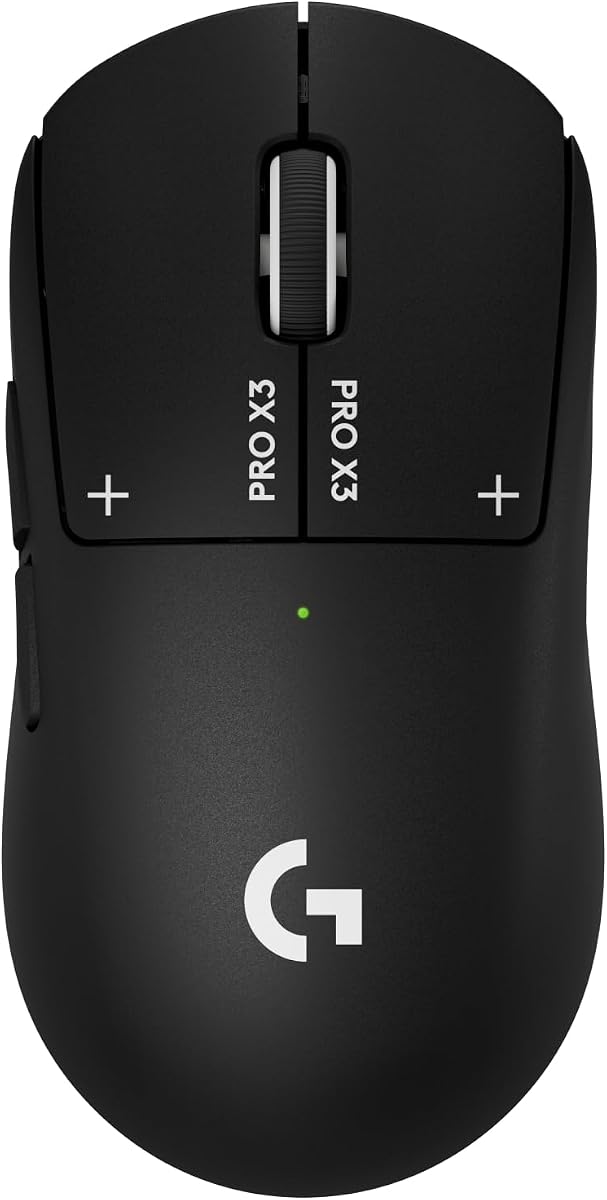
The Logitech G PRO X3 SUPERSTRIKE Gaming Mouse continues the legacy of its predecessors with enhanced battery life and sensor capabilities. With a 4.3-star rating, it is designed for elite performance with the fastest customizable clicks available.
We may earn a commission when you buy through this link, at no additional cost to you.
Its HERO 2 sensor tracks over 930 IPS and up to 48,000 DPI for unmatched precision. The Haptic Inductive Trigger system replaces standard switches with an electromagnetic field, offering 10 actuation points. LIGHTSPEED wireless technology provides 8 kHz polling for a responsive connection.
Battery life is a standout feature, offering up to 135 hours on a single charge. USB-C charging ensures quick power-ups. The thin-wall case and UHMWPE feet ensure smooth gliding during marathon sessions.
This model is ideal for competitive players needing top-tier precision and battery endurance. If you want a wireless mouse that supports high-stakes matches without charging interruptions, the PRO X3 is a premium choice.
Up to 135 hours of continuous play allows for extended gaming sessions without frequent recharging needs.
8 kHz polling rate ensures ultra-low latency and tournament-grade responsiveness for competitive setups.
We may earn a commission when you buy through this link, at no additional cost to you.
The Logitech M185 Compact Ambidextrous Wireless Mouse is designed for portability and ease of use in office environments. Rated 4.4 stars, it offers a reliable connection that outperforms a standard touchpad significantly.
We may earn a commission when you buy through this link, at no additional cost to you.
With up to one year of battery life thanks to smart sleep mode, this mouse reduces maintenance. The compact ambidextrous shape fits both right and left hands comfortably. It works with Windows, Mac, or Linux via a tiny nano receiver.
It is suitable for small hands and tight workspaces. The recycled plastic parts demonstrate a commitment to sustainability. While not a gaming mouse, it provides smooth cursor control for productivity tasks.
Ideal for travelers and office workers needing a simple, reliable wireless mouse, the M185 offers great value. If you prioritize battery life and portability over gaming features, this mouse delivers consistent performance.
Smart sleep mode enables up to one year of battery life on a single AA battery for low maintenance use.
The contoured shape works for both left and right-handed users, making it a versatile shared office device.
We may earn a commission when you buy through this link, at no additional cost to you.
The Logitech M330 Silent Plus Full Size Wireless Mouse is specifically crafted for environments where noise reduction is key. With a 4.5-star rating, it reduces clicking sounds by over 90 percent without compromising performance.
We may earn a commission when you buy through this link, at no additional cost to you.
Its contoured shape provides natural grip comfort for right-handed users. The wireless range extends up to 33 feet, and it works on most surfaces. The battery lasts up to 18 months, minimizing interruptions from changes.
This mouse is perfect for offices, libraries, or shared workspaces where click noise can be distracting. While it lacks gaming-focused features, its focus on comfort and quiet operation makes it an excellent productivity tool.
Ideal for professionals working in quiet spaces, the M330 balances comfort with silent functionality. If you value a noise-free environment and long battery life, this mouse is a reliable choice for daily tasks.
Clicking sounds are reduced by over 90 percent, ensuring a quieter environment for shared workspaces.
Up to 18 months of battery life reduces the need for frequent battery changes and downtime.
We may earn a commission when you buy through this link, at no additional cost to you.
The Logitech MX Master 4 Ergonomic Wireless Mouse is designed for advanced productivity workflows with unique haptic feedback features. With a 4.2-star rating, it offers customizable actions and powerful connectivity for complex tasks.
We may earn a commission when you buy through this link, at no additional cost to you.
Its MagSpeed scroll wheel allows scrolling 1,000 lines per second or stopping on a pixel. The Haptic Sense Panel adds customizable feedback for notifications or shortcuts. Connectivity is robust with both USB-C and Bluetooth options available.
This mouse reduces hand stress with an ergonomic tilt and thumb wheel. Quiet clicks ensure distraction-free work. While heavier than gaming models, it prioritizes comfort and flow for creative professionals and power users.
Ideal for designers and multitaskers needing precision and comfort, the MX Master 4 is a top productivity tool. If you want a device that enhances workflow efficiency through haptics and ergonomics, it is worth the investment.
Scroll thousands of lines per second and stop precisely on a pixel for efficient navigation in large files.
Customizable haptic feedback on specific actions enhances productivity by providing tactile cues for shortcuts.
We may earn a commission when you buy through this link, at no additional cost to you.
Choosing the right lightweight mouse depends on several factors including sensor technology, connectivity, and ergonomic needs. This guide breaks down the key elements to consider for your specific workflow.
The optical sensor determines tracking accuracy and responsiveness. For gaming, look for high DPI settings above 12,000 and high IPS tracking speed to ensure precise movements without acceleration or smoothing.
Prioritize sensors with zero smoothing and acceleration for raw input accuracy.
Weight affects fatigue during long sessions. Aim for mice under 70 grams for rapid movements, but ensure the shape fits your hand size and grip style to avoid strain.
Check the dimensions to ensure it supports your preferred grip style like palm or claw.
Wireless mice offer freedom but require charging or batteries. Choose 2.4 GHz wireless for gaming to reduce latency, or Bluetooth for office use to save USB ports.
Verify the reported polling rate is at least 1250 Hz for smooth cursor movement.
Long battery life reduces interruptions. AA batteries are easy to replace, but USB-C rechargeable models offer convenience. Consider power-saving modes if you plan to use the device frequently.
Look for at least 30 hours of continuous usage for daily work or gaming.
Mechanical switches provide a distinct tactile click, while optical switches offer faster actuation. Haptic feedback adds immersion but may not suit everyone.
Select a switch based on your preference for click sound and travel distance.
Advanced features require companion software to customize buttons, lighting, and profiles. Ensure the software is user-friendly and supports your operating system.
Check if the software supports creating profiles for different applications.
Thin-wall cases reduce weight but must be durable to withstand clicks. Look for reinforced materials and quality feet to ensure longevity.
Verify warranty terms to protect your investment against early wear.
Prices vary from budget-friendly to premium. Balance features against your needs; basic models suffice for work while pro gear suits competitive gaming.
Consider long-term value based on durability and warranty coverage.
Always clean your mouse surface with a soft cloth to maintain grip. Dust or residue can affect sensor performance or cause slipping during fast movements.
For wireless models, charge regularly or replace batteries as recommended to avoid unexpected disconnection during tasks.
Store your mouse in a protective case if traveling to prevent physical damage to the buttons or sensor window.
Lightweight mice reduce wrist strain and allow for faster movements in competitive games. However, personal preference plays a big role, as some gamers prefer heavier devices for stability.
Use a soft, lint-free cloth to wipe the exterior. For the sensor, gently use a cotton swab to remove dust. Avoid spraying water or cleaner directly on the device.
Battery life varies by model but ranges from 30 hours to over a year. Rechargeable models usually offer 30 to 90 hours, while AA-powered models can last months.
Lighter mice can reduce hand fatigue during long sessions, potentially lowering the risk of repetitive strain injuries. Ergonomics and posture are still critical factors for health.
Yes, gaming mice offer high precision and programmable buttons that can boost productivity. However, they may be overkill for basic tasks and have louder clicks.
Higher DPI settings allow for faster movement on screen but may reduce control. Start around 800 to 1600 DPI for most tasks and adjust based on comfort.
Our guide reviewed ten standout models ranging from the budget-friendly Logitech G305 to the premium Logitech G PRO X3 SUPERSTRIKE. Each offers unique strengths tailored to different users.
Prioritize sensor performance and ergonomics over flashy features if you seek consistent reliability. Ensure the device matches your budget and specific workflow needs.
Prices and stock levels fluctuate regularly so verify current details before buying to ensure you get the best deal for your new device.