
LaCie Rugged Mini 2TB
4.6Editor score
USB 3.0 connectivity
Includes protective case
Password protection built in
This guide compares the top ten Lacie Rugged External Hard Drive models for durability speed and compatibility helping professionals choose the best portable
Finding reliable storage is crucial for professionals who work in demanding environments. The Lacie Rugged External Hard Drive series offers robust protection against drops and environmental hazards while maintaining high-speed data transfer capabilities.
We analyzed ten distinct models based on capacity connectivity options and durability ratings. Each product was evaluated for its ability to handle tough conditions and its compatibility with various operating systems including Mac and PC.
Every pick highlights specific strengths such as speed or ruggedness for different needs. Please note that availability and pricing can change frequently so check the latest details before purchasing.
4.6Editor score

4.4Editor score

4.5Editor score
The following table provides a side-by-side comparison of all ten models to help you quickly identify the right storage capacity and interface for your workflow needs.
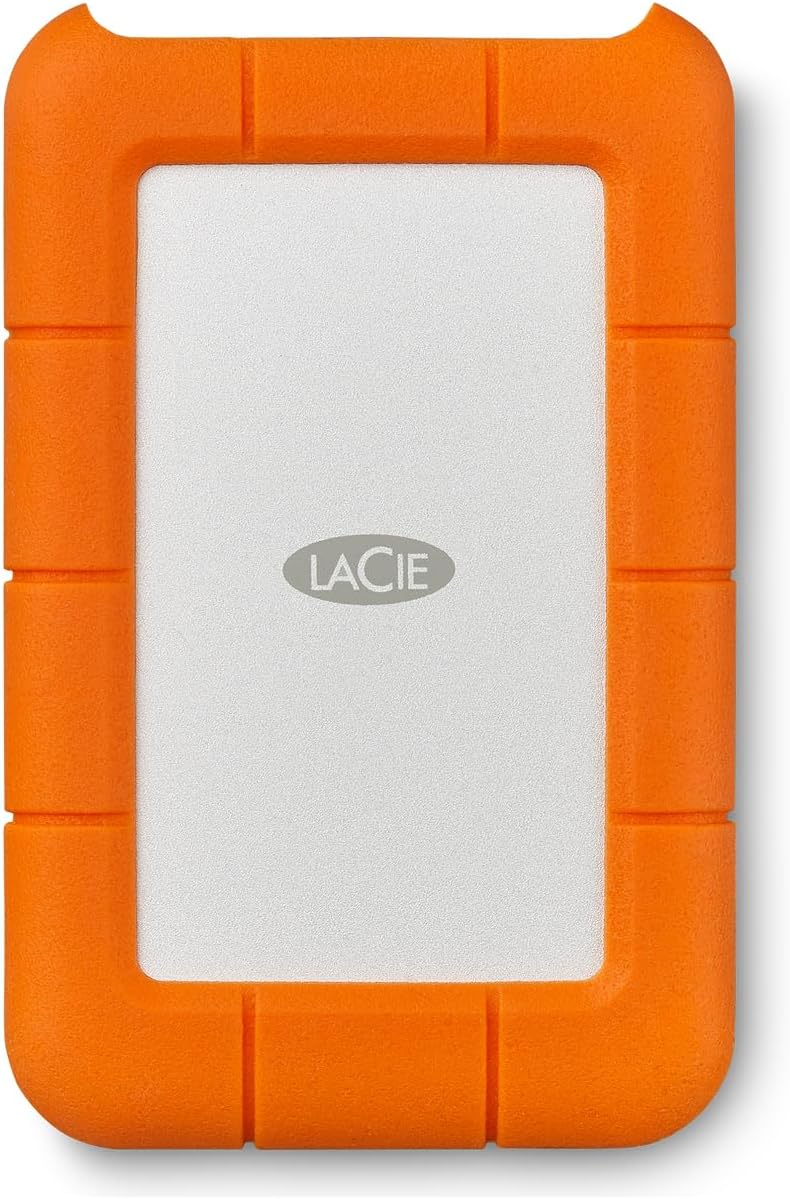


This drive stands out as a top choice for users needing reliable storage on the go. With a strong rating of 4.4 stars it delivers consistent performance across various tasks.
We may earn a commission when you buy through this link, at no additional cost to you.
The 4TB capacity ensures you have ample room for large media files and project archives. Its USB-C connectivity facilitates fast data transfers which is essential for modern workflows.
While the rubber bumper adds weight it provides necessary protection against drops and shocks in tough environments. This trade-off is acceptable for users who prioritize durability over portability.
It is highly recommended for professionals who need a dependable storage solution for both Mac and PC systems.
The orange rubber sleeve shields the drive from drops up to 122 centimeters ensuring data safety in unpredictable conditions.
USB-C support allows for high-speed data transfers compatible with the latest laptops and desktop systems.
We may earn a commission when you buy through this link, at no additional cost to you.
This model offers exceptional value for users seeking durable storage without breaking the bank. Its high rating reflects strong satisfaction among users who rely on it daily.
We may earn a commission when you buy through this link, at no additional cost to you.
The inclusion of a separate Logic case provides an extra layer of security for your data. Password protection features help keep sensitive files secure from unauthorized access.
Some users may need to reformat the drive for optimal Mac compatibility which can be a minor hurdle. However the speed and protection make it a worthy compromise.
It is an excellent choice for students or creatives needing secure and affordable portable storage solutions.
Built-in password protection ensures that only authorized users can access the sensitive data stored on the drive.
The bundled Logic hard drive case adds an extra layer of physical protection for your investment on the go.
We may earn a commission when you buy through this link, at no additional cost to you.
This premium drive is built for users who need the fastest speeds and maximum reliability for professional work. Its high rating confirms its status as a top-tier storage solution.
We may earn a commission when you buy through this link, at no additional cost to you.
The integrated Thunderbolt cable wraps around the enclosure providing convenience and reducing the risk of losing accessories. Transfer speeds of up to 130MB/s ensure rapid file access.
The higher cost is justified by the performance and the included three-year warranty with data rescue services. This peace of mind is valuable for critical project data.
It is ideal for video editors and photographers who need high-speed access to large media libraries.
Thunderbolt connectivity delivers up to 130MB/s transfer speeds for rapid access to large video files and projects.
The included Thunderbolt cable wraps neatly around the enclosure keeping everything organized and preventing cable loss.
We may earn a commission when you buy through this link, at no additional cost to you.
This compact drive offers significant storage in a small package making it perfect for mobile professionals. Its high rating indicates strong reliability and user satisfaction.
We may earn a commission when you buy through this link, at no additional cost to you.
The Data Rescue Service plan adds value by helping recover lost files if the drive fails unexpectedly. Its compatibility with iOS devices allows for versatile backup options.
While it lacks Thunderbolt speeds it delivers sufficient performance for most standard data storage needs. The small footprint makes it easy to carry in any bag or pocket.
It is a great choice for users who prioritize portability and broad device compatibility.
Works seamlessly with PC Mac iPad and iPhone ensuring versatile usage across all your personal and work devices.
Includes a Data Rescue Service plan to help recover lost files providing peace of mind for important projects.
We may earn a commission when you buy through this link, at no additional cost to you.
This drive is designed for users who need massive storage without sacrificing durability. It provides a robust solution for archiving large video projects and photo libraries.
We may earn a commission when you buy through this link, at no additional cost to you.
The USB-C interface ensures fast and reliable data transfers on modern systems. Its compact and lightweight design makes it easier to carry despite the high capacity.
While it is resistant to rain and dust it may not have the same drop protection as the Rugged Mini models. This is a reasonable trade-off for the increased storage density.
It is best suited for professionals managing large datasets who need reliable and extensive storage capacity.
Offers five terabytes of capacity to store large files videos and backups without needing additional external drives.
Uses a USB-C interface for fast data transfers and compatibility with the latest Mac and PC systems.
We may earn a commission when you buy through this link, at no additional cost to you.
This drive provides advanced storage options for users who need redundancy or speed through RAID configurations. Its unique flat design makes it easy to pack in gear bags.
We may earn a commission when you buy through this link, at no additional cost to you.
Users can configure RAID 0 for performance or RAID 1 for data redundancy using the built-in wizard. The self-encrypting password system adds a layer of security for sensitive data.
Setting up RAID requires some technical knowledge which might be challenging for casual users. However the control and capacity it offers are significant benefits for professional workflows.
It is recommended for advanced users and teams needing robust data management on a budget.
Easily configure RAID 0 for speed or RAID 1 for redundancy using the step-by-step built-in configuration wizard.
Protect projects from unauthorized access with the built-in self-encrypting password system for data security.
We may earn a commission when you buy through this link, at no additional cost to you.
This model is unique for its support of older FireWire interfaces which is essential for legacy systems. It serves as a bridge for users needing to access older Mac Pro systems.
We may earn a commission when you buy through this link, at no additional cost to you.
The dual FireWire ports allow for daisy chaining multiple drives to expand your setup easily. USB 3.0 support ensures decent transfer speeds when connected to newer computers.
While the capacity is lower than modern drives it is sufficient for specific archival or legacy project needs. The rugged design ensures it withstands the demands of field work.
It is a niche but vital option for owners of legacy equipment who need reliable portable storage.
Supports FireWire 800 and USB 3.0 making it compatible with both older workstations and newer systems.
Dual FireWire ports allow you to daisy chain drives for an expanded storage setup without extra cables.
We may earn a commission when you buy through this link, at no additional cost to you.
This drive combines speed and portability in a compact package. The Thunderbolt interface ensures fast data transfers which is crucial for video editing tasks.
We may earn a commission when you buy through this link, at no additional cost to you.
The integrated cable wraps around the enclosure keeping everything organized and preventing loss. Its water resistant build protects against unexpected weather during field work.
While the 1TB capacity is lower than larger models it is perfect for quick backups or specific project needs. The compact size makes it easy to carry in any pocket or bag.
It is an excellent choice for professionals needing fast reliable storage on a budget.
Transfer files with up to 130MB/s using Thunderbolt technology for efficient handling of large media files.
The included Thunderbolt cable wraps around the enclosure for convenient storage and easy access.
We may earn a commission when you buy through this link, at no additional cost to you.
This drive offers a balanced mix of connectivity options and storage capacity. It supports both Thunderbolt and USB 3.0 making it versatile for different computer setups.
We may earn a commission when you buy through this link, at no additional cost to you.
The ability to configure RAID provides flexibility for performance or redundancy depending on your needs. Its rugged design ensures durability in challenging environments.
The price is higher due to the advanced features but it justifies the investment for professional use. The RAID setup might require some initial configuration time.
It is best suited for users needing a reliable solution for high-performance tasks and data security.
Compatible with Thunderbolt and USB 3.0 ports ensuring connectivity across a wide range of systems.
Users can configure RAID settings to optimize for speed or data redundancy based on their workflow.
We may earn a commission when you buy through this link, at no additional cost to you.
This SSD model offers top-tier performance with read speeds up to 950MB/s for rapid data access. It is designed for users who need maximum speed and durability in a small form factor.
We may earn a commission when you buy through this link, at no additional cost to you.
The 3-meter drop resistance ensures it can withstand accidental falls from significant heights. Its compact and lightweight design makes it easy to carry during travel.
While the cost per terabyte is higher than HDDs the speed and reliability justify the investment for critical tasks. The capacity is smaller but sufficient for active project files.
It is the ultimate choice for professionals needing the fastest possible external storage solution.
Achieve read speeds of 950MB/s for near-instant access to files and seamless editing directly from the drive.
Built to withstand drops from 3 meters and exposure to water ensuring data safety in the harshest conditions.
We may earn a commission when you buy through this link, at no additional cost to you.
Selecting the right storage solution involves considering capacity speed and interface requirements for your specific workflow.
Consider how much data you need to store regularly. For large video files and photo archives choose models with 4TB or more capacity.
Higher capacity drives offer long-term value and reduce the need for frequent data management.
Ensure your computer has the necessary ports for the drive. USB-C and Thunderbolt interfaces offer faster speeds compared to older standards.
Match the interface speed to your computer's capabilities for optimal performance during transfers.
Look for drives with rubber bumpers and water resistance if you work outdoors or in tough conditions.
These features protect your valuable data from physical damage and environmental hazards.
Check if the drive includes data recovery services like Rescue Data Recovery.
These services provide peace of mind in case of accidental deletion or drive failure.
Verify that the drive works seamlessly with your operating system whether Mac or PC.
Cross-platform compatibility ensures you can share files across different devices without issues.
Consider extra features such as password protection or bundled Adobe Creative Cloud memberships.
These features add value and enhance security for your stored data.
Check the duration and terms of the warranty provided with the drive.
A longer warranty period indicates manufacturer confidence and protects your investment.
Balance your budget with the features you need most. Higher capacity and speed usually come with higher prices.
Choose a model that offers the best value for your specific usage requirements.
Connect the drive to your computer using the appropriate cable ensuring a secure connection for stable performance.
Regularly back up important files to prevent data loss and organize your data into logical folders.
Keep the drive in a protective case when not in use to prevent scratches and accidental damage to the casing.
Yes most Lacie Rugged drives work seamlessly with Mac. However some may require reformatting to APFS or HFS+ for optimal compatibility.
With proper care a Lacie Rugged drive can last several years. Durability depends on usage frequency and environmental conditions.
There is no hard limit to the number of files but performance may slow down with millions of tiny files due to file system overhead.
Yes these drives are suitable for video editing especially the Thunderbolt models. Ensure you have enough capacity and speed for your projects.
Most models come with a two-year limited warranty while some premium models include a three-year limited warranty.
No special software is required to use the drive as it functions like a standard external storage device.
The top picks include the USB-C 4TB for reliability the 2TB Mini for value and the Thunderbolt 5TB for speed.
Prioritize compatibility and speed needs based on your workflow to ensure a seamless user experience.
Always verify current pricing and availability before purchasing to ensure the best deal is available.