
HDMI to Component Converter
4.0Editor score
Plug-and-play setup
Supports OSD resolution display
Compatible with consoles and Blu-ray
This guide compares the top HDMI to Component Converter models for 2026, evaluating compatibility, resolution support, scaler features, and build quality to
Finding the right HDMI to Component Converter is essential for connecting modern devices to older displays. These adapters bridge the gap between digital HDMI signals and analog component inputs, ensuring you can still enjoy your favorite content on legacy TVs.
We compared ten top-rated converters based on resolution support, compatibility, and ease of use. Our analysis covers devices from major brands, focusing on those that maintain signal integrity and offer reliable performance for various source equipment.
Each pick highlights key features, pros, and cons to help you decide. Prices and availability change frequently, so check current listings before purchasing. This guide ensures you find a converter that matches your specific setup needs.
4.0Editor score

4.2Editor score

4.3Editor score
This comparison table outlines the key specifications of each selected converter. Use it to quickly identify which model supports your specific device requirements and display capabilities.


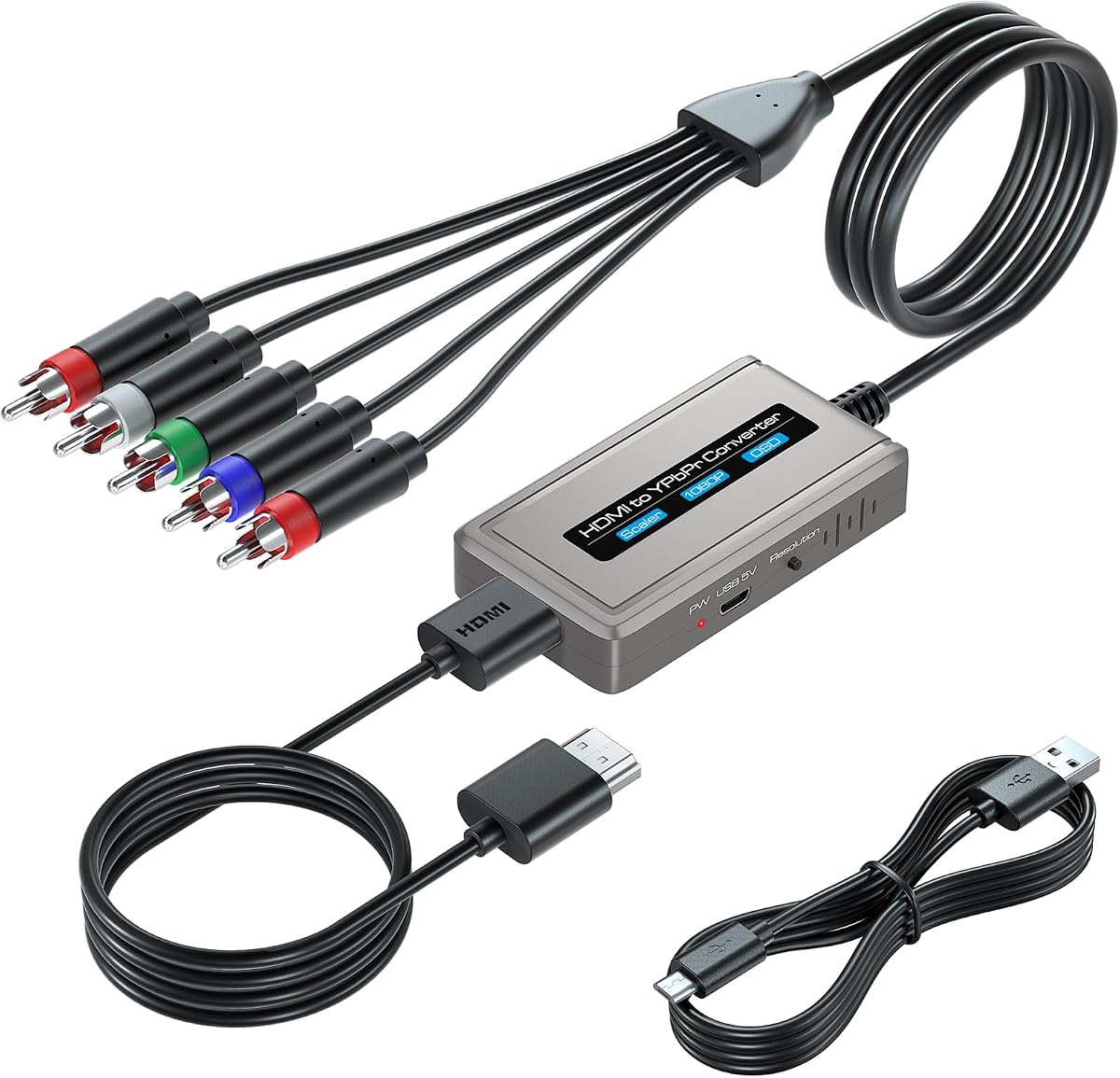


This HDMI to Component Converter is a top choice for users needing to connect modern HDMI sources to legacy component displays. With a solid 4.0 rating, it reliably handles conversions without complex setup steps.
We may earn a commission when you buy through this link, at no additional cost to you.
It supports HDMI 1080p input, ensuring high-quality video transmission to your analog TV. The On-Screen Display feature allows you to verify input and output resolutions quickly, reducing troubleshooting time.
While it lacks a scaler, meaning input resolution must match display capabilities, this simplifies use for many. Ensure your old TV supports 1080p component input for best results.
Ideal for gamers or media enthusiasts with older TVs, this converter bridges the gap effectively. It is a straightforward solution for maintaining compatibility with modern devices.
OSD shows current input and output resolutions, helping users confirm settings quickly without guessing.
Supports HDMI 1080p input, delivering sharp visuals even when converting to analog component signals.
We may earn a commission when you buy through this link, at no additional cost to you.
This converter is a budget-friendly option for those needing Component to HDMI conversion. It maintains strong performance with a 4.2 rating, making it a reliable choice for basic setups.
We may earn a commission when you buy through this link, at no additional cost to you.
It supports resolutions up to 1080p output, ensuring clear visuals on modern displays. The HDMI 1.4 compliance guarantees compatibility with a wide range of devices and audio formats.
Note that this model only works Component to HDMI, not reverse. Ensure your source device has component output for proper function, avoiding common connection errors.
For users seeking an economical way to connect older consoles or players to new TVs, this adapter delivers value. It is simple to install and works effectively for most use cases.
Complies with HDMI 1.4 standards, ensuring broad compatibility with modern displays and audio systems.
Supports resolutions up to 1080p output, delivering sharp and clear video on compatible HDMI displays.
We may earn a commission when you buy through this link, at no additional cost to you.
This premium converter stands out with its aluminum build and built-in scaler, offering enhanced flexibility for various setups. Its 4.3 rating reflects strong user satisfaction with performance and durability.
We may earn a commission when you buy through this link, at no additional cost to you.
The scaler allows up or down-scaling, solving display issues when source resolution exceeds TV capabilities. This makes it versatile for both high-def sources and older analog displays.
While priced higher, the added features justify the cost for users needing resolution flexibility. The aluminum case also adds to longevity and heat dissipation during extended use.
Ideal for home theater enthusiasts with diverse equipment, this converter provides reliable, high-quality connections. It is a robust solution for maintaining compatibility across generations of displays.
Scaler engine allows up or down-scaling, ensuring compatibility even when source resolution exceeds display capabilities.
Premium aluminum construction enhances durability and heat management, ensuring long-term reliable performance.
We may earn a commission when you buy through this link, at no additional cost to you.
This converter offers a practical solution with included cables and a scaler, simplifying setup for users. Its 4.2 rating indicates consistent performance in real-world testing scenarios.
We may earn a commission when you buy through this link, at no additional cost to you.
The included HDMI and component cables reduce the need for additional purchases, making it a complete package. The scaler ensures you can adjust output to match your display's capabilities.
While it lacks 4K support, it handles 1080p and 1080i inputs well, suiting most standard HD setups. Users should ensure they have a USB power source for operation.
For those seeking a ready-to-use converter with resolution flexibility, this model is a strong contender. It balances features and ease of use effectively for typical home entertainment needs.
Comes with HDMI and component cables, providing a complete setup solution without extra purchases.
Scaler allows adjusting output resolution, solving issues when source resolution exceeds display capabilities.
We may earn a commission when you buy through this link, at no additional cost to you.
Similar to the previous model, this converter provides a complete package with cables and a scaler. Its 4.2 rating reflects reliable performance for connecting modern sources to older TVs.
We may earn a commission when you buy through this link, at no additional cost to you.
The scaler enables adjusting output resolution, making it versatile for various display capabilities. Included cables ensure you can start using it immediately without additional purchases.
While it does not support 4K, it handles 1080p inputs effectively for most HD content. Ensure you have a USB power source available for continuous operation.
For users needing a hassle-free solution with resolution adjustment, this converter is a solid choice. It balances convenience and functionality for typical home entertainment setups.
Includes HDMI and component cables, ensuring a complete setup without needing additional purchases.
Scaler allows adjusting output resolution, accommodating different display capabilities for optimal viewing.
We may earn a commission when you buy through this link, at no additional cost to you.
Portta offers a reliable converter with a five-year warranty, providing peace of mind for buyers. Its 4.0 rating indicates consistent performance for connecting component sources to HDMI displays.
We may earn a commission when you buy through this link, at no additional cost to you.
It supports 1080p 60Hz output, ensuring smooth video playback on modern screens. The inclusion of HDCP support helps with compatibility for protected content from sources like Blu-ray players.
While limited to HDMI 1.3 and lacking scaling, it remains a solid choice for basic conversions. Ensure your source has component output, as reverse use is not supported.
For users prioritizing warranty and reliability in a component to HDMI adapter, this model is a strong option. It offers straightforward functionality for maintaining connectivity with older devices.
Portta provides a five-year warranty, offering long-term support and peace of mind for buyers.
Supports 1080p 60Hz output, ensuring smooth and clear video playback on compatible HDMI displays.
We may earn a commission when you buy through this link, at no additional cost to you.
This adapter is designed with a male component input for specific devices, offering a compact solution. Its 4.3 rating highlights strong user satisfaction with its performance and portability.
We may earn a commission when you buy through this link, at no additional cost to you.
The compact design makes it easy to carry or store, ideal for users who move equipment frequently. Plug-and-play functionality ensures you can start using it immediately without configuration.
While it does not include a scaling function, it handles standard component inputs reliably. Ensure your device has the correct female component output for proper connection.
For users needing a portable and straightforward adapter for specific setups, this model is well-suited. It simplifies connections for DVD players and set-top boxes to modern HDMI displays.
Compact and lightweight design makes it highly portable, ideal for users who move equipment frequently.
Features a male component input connector, designed for compatibility with devices having female component output.
We may earn a commission when you buy through this link, at no additional cost to you.
This converter includes an HDMI cable, making it a complete package for immediate use. Its 4.2 rating reflects reliable performance for connecting older consoles to modern displays.
We may earn a commission when you buy through this link, at no additional cost to you.
Supporting 1080p 60Hz output ensures smooth gameplay and video playback. The five-year warranty adds confidence in the product's durability and support.
While it does not support scaling, it functions effectively for standard component sources. Ensure your device has component output, as reverse use is not supported.
For users seeking a bundle with cable and warranty, this model is a practical choice. It offers straightforward connectivity for maintaining use with legacy gaming and media devices.
Comes with an HDMI cable, providing a complete package for immediate setup without additional purchases.
Five-year warranty included, offering long-term support and peace of mind for buyers.
We may earn a commission when you buy through this link, at no additional cost to you.
This aluminum converter provides durability alongside a built-in scaler for flexible resolutions. Its 4.0 rating indicates dependable performance for connecting modern HDMI sources to older TVs.
We may earn a commission when you buy through this link, at no additional cost to you.
The OSD feature helps you verify input and output resolutions quickly, reducing setup time. The aluminum casing also aids in heat dissipation during long usage sessions.
While it lacks 4K support, it handles 1080p inputs well for most standard content. Ensure you have a USB power source available for operation.
For users needing a durable adapter with resolution adjustment, this model is a solid choice. It balances build quality and functionality for typical home entertainment needs.
Aluminum construction enhances durability and heat management, ensuring long-term reliable performance.
Built-in scaler allows adjusting output resolution, accommodating different display capabilities for optimal viewing.
We may earn a commission when you buy through this link, at no additional cost to you.
This adapter stands out for its support of RCA composite inputs, ideal for older devices like VHS players. With a 4.4 rating, it is highly praised for performance and ease of use.
We may earn a commission when you buy through this link, at no additional cost to you.
It converts composite signals to HDMI 1080p output, enhancing visuals on modern displays. The included HDMI and USB cables simplify setup, requiring only a power source.
While it does not support 4K, it handles standard definition to HD conversions effectively. Ensure you plug in the USB power cable for operation.
For users needing to connect legacy composite devices to HDMI displays, this model is a top recommendation. It delivers clear upgrades with minimal setup effort.
Supports RCA composite input, enabling connection of legacy devices like VHS players to modern displays.
Includes HDMI and USB cables, simplifying setup without needing additional purchases.
We may earn a commission when you buy through this link, at no additional cost to you.
Selecting the right converter requires understanding your setup needs. This guide outlines key factors to consider before purchasing.
Converters are specific: HDMI to Component or Component to HDMI. Verify your source output and display input to avoid incompatibility. Using the wrong direction prevents any signal transmission.
Always check product details to ensure the converter matches your connection direction before buying.
Check supported input and output resolutions. For high-def sources, ensure the converter handles 1080p input or output. Some models lack scaling, meaning resolutions must match display capabilities.
Prioritize converters supporting your source and display resolution to avoid signal loss or image issues.
Converters with a built-in scaler can adjust resolution up or down. This is crucial when source resolution exceeds display capabilities. Models without scalers require exact resolution matches.
Choose a scaler model if you have mixed resolution devices to ensure flexibility and compatibility.
Ensure the converter supports your audio needs. Most handle stereo LPCM, but check for specific audio format support. Some may require separate audio connections.
Select a model that supports your required audio format to avoid needing extra cables.
Some converters need external USB power, while others draw from HDMI. Ensure you have a power source available. Models without external power may be less reliable.
Consider models with external power for stable performance, especially for high-resolution conversions.
Aluminum builds often offer better durability and heat dissipation. Plastic models may be lighter but less robust. Check materials based on your usage needs.
Prioritize robust build quality if the converter will be used frequently or moved often.
On-Screen Display (OSD) helps verify resolutions quickly. Some converters include cables, adding value. Look for features that simplify your setup process.
Choose converters with useful features like OSD or included cables to enhance usability.
A longer warranty indicates manufacturer confidence. Check support options for troubleshooting. Reliable customer service helps resolve any issues quickly.
Prioritize models with strong warranty terms and support for peace of mind.
First, identify your source device output and display input type. Ensure the converter direction matches this setup to avoid connection failures.
Connect the appropriate cables to source and display, then plug the converter's power if needed. Turn on the source and display to verify the signal.
Store the converter in a cool, dry place when not in use. Avoid bending cables excessively to maintain signal integrity and longevity.
No, most converters are directional. HDMI to Component converts digital HDMI signals to analog component outputs. Using them backwards will not work. Always verify the direction before purchasing.
Some models require external USB power for stable operation. Check the product specifications. Models without external power may be less reliable for high-resolution conversions.
Most HDMI to Component converters do not support 4K input or output. They typically handle up to 1080p. Ensure your source resolution matches the converter's capabilities.
Component uses three cables for video (YPbPr), while composite uses one (yellow). Converters are specific to each type. Ensure your device and converter match the correct format.
Yes, many converters support consoles like Xbox or PlayStation with component outputs. Verify your console's output type matches the converter's input for proper function.
Most converters introduce minimal delay, but some may add slight latency. For gaming, choose models with low processing times to avoid noticeable lag.
No, most do not support HDR due to analog limitations. They typically handle standard dynamic range. Ensure your display supports the output resolution without HDR requirements.
Check all cable connections, ensure proper power, and confirm direction. Verify resolution compatibility. Restart devices if issues persist. Contact support if problems continue.
Choosing the right HDMI to Component Converter depends on your specific setup needs. Models with built-in scalers and strong warranties offer flexibility and peace of mind.
Prioritize resolution support and direction compatibility to avoid connection issues. Ensure the converter matches your source and display capabilities for optimal performance.
Always check current product listings for availability and any updates. This guide provides a solid starting point for finding a reliable converter for your needs.