
Netgate 1100 pfSense+ Security Gateway
4.1Editor score
Pre-loaded with pfSense software
Compact silent operation
Includes hardware warranty
This guide compares the top hardware firewalls for businesses and homes, evaluating security features, throughput, and management tools to help you choose the
Hardware firewalls provide essential network security by filtering traffic before it reaches your devices. They offer robust protection against threats that software solutions might miss.
We evaluated ten top models based on performance, features, and ease of use. Our analysis covers small business to enterprise-grade options available in the current market.
Each pick highlights specific strengths for different needs and budgets. Prices and availability change frequently, so verify details on the product page before purchasing.
4.1Editor score
4.2Editor score

4.7Editor score
The following table offers a side-by-side view of key specifications and features for each model to help you quickly identify the best fit for your network requirements.


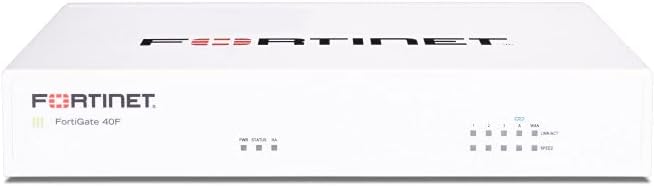
The FortiGate-40F stands out as a leading choice for small businesses seeking enterprise-grade security. Its compact design belies its powerful capabilities, offering a robust solution for securing network traffic efficiently.
We may earn a commission when you buy through this link, at no additional cost to you.
This appliance delivers up to 1 Gbps IPS throughput, ensuring that security checks do not bottleneck your internet speed. The built-in FortiGuard Labs integration provides AI-driven threat detection to block both known and unknown attacks in real time.
While it requires a separate subscription for full service coverage, the hardware performance is exceptional for its class. The fanless design ensures silent operation, making it suitable for office environments where noise is a concern.
IT administrators will appreciate the user-friendly management console that simplifies deployment and ongoing visibility. For small to mid-sized businesses, this unit offers a balanced mix of speed, security, and ease of use.
Integrated FortiGuard Labs identify and mitigate threats before they compromise your network integrity.
Fanless design minimizes noise and space usage while maintaining high performance levels.
We may earn a commission when you buy through this link, at no additional cost to you.
The Netgate 1100 offers an excellent entry point for those seeking open-source firewall capabilities without high costs. It ships with pfSense software pre-loaded, allowing you to deploy quickly and start customizing your edge immediately.
We may earn a commission when you buy through this link, at no additional cost to you.
Despite its budget-friendly nature, the unit delivers solid performance with over 650 Mbps firewall throughput. The dual-core ARM processor handles common traffic efficiently, making it ideal for home labs or small offices with moderate needs.
One drawback is the limited port count compared to other models on this list. However, the flexibility of configuring WAN, LAN, and OPT ports provides enough adaptability for many standard network setups without requiring extra switches.
With included lifetime software updates and one year hardware warranty, this appliance ensures long-term value. Technical support is readily available through the Netgate TAC, adding peace of mind for users new to network security.
pfSense Plus software allows deep customization to meet unique security and routing requirements.
Free software updates for the product lifetime ensure your system stays current without recurring fees.
We may earn a commission when you buy through this link, at no additional cost to you.
The Zyxel USGFLEX100H brings powerful security features to mid-sized environments with a focus on flexibility and cloud management. Its SPI throughput of 4,000 Mbps ensures that heavy traffic loads do not slow down your network operations.
We may earn a commission when you buy through this link, at no additional cost to you.
Configurable ports allow you to assign WAN or LAN roles as needed, supporting features like link aggregation and VLANs. The Nebula portal offers centralized control, enabling you to sync policies and manage VPN settings from anywhere.
Offline updates are a standout feature for secure environments that cannot rely on constant internet access. You can update firmware via FTP on the local network while maintaining full web interface access after each update cycle.
While the Entry Defense Pack provides basic protection, the optional Gold Security Pack unlocks advanced anti-malware and sandboxing capabilities. For businesses needing scalable security with robust cloud oversight, this model is a strong contender.
Eight assignable 1G RJ45 ports provide versatile connectivity options for diverse network layouts.
Nebula management syncs policies across devices for consistent security enforcement without local complexity.
We may earn a commission when you buy through this link, at no additional cost to you.
The SonicWall TZ280 delivers high-end performance suited for businesses that need more speed than standard firewalls can offer. Its Reassembly-Free Deep Packet Inspection engine ensures that deep inspection does not compromise throughput efficiency.
We may earn a commission when you buy through this link, at no additional cost to you.
With 2.5 Gbps firewall inspection capability, this appliance keeps pace with modern broadband speeds without sacrificing security depth. The mix of Ethernet and SFP ports allows for flexible WAN and LAN configurations to suit different physical setups.
Management is streamlined through zero-touch deployment options or the cloud-based Network Security Manager. This feature helps IT teams deploy units quickly across multiple sites while maintaining consistent policy enforcement and visibility.
While the unit is sold without a subscription, the available services include intrusion prevention and sandboxing. For small businesses or branch offices needing reliable and fast protection, this model stands out as a premium choice.
Patented engine processes packets without reassembly to reduce latency during deep inspection.
Secure SD-WAN and Zero-Trust access features keep remote workers and distributed sites protected.
We may earn a commission when you buy through this link, at no additional cost to you.
The FortiGate-70G is designed for environments that demand maximum throughput and extensive connectivity options. With ten 10 Gigabit Ethernet ports, it supports high-speed internet links and internal LAN traffic without bottlenecking.
We may earn a commission when you buy through this link, at no additional cost to you.
Its secure SD-WAN capabilities improve cloud and SaaS performance while maintaining consistent security policies across locations. Deep visibility features allow administrators to govern encrypted traffic effectively without hindering user productivity.
Seamless integration with FortiSwitch and FortiAP ensures that your wired and wireless networks share the same security logic. This unified approach reduces complexity and helps maintain a coherent protection strategy across all endpoints.
Although it is a higher investment, the performance and management capabilities justify the cost for growing businesses. If you need reliable branch protection with future-ready bandwidth, this appliance is an excellent fit.
Ten RJ45 ports enable future-proof network scaling for high-speed data transfer needs.
Integration with FortiSwitch and FortiAP simplifies overall network security architecture and oversight.
We may earn a commission when you buy through this link, at no additional cost to you.
The Sophos XGS 128 offers massive throughput potential for larger offices that require extensive port density and speed. Its nine 2.5 Gigabit Ethernet ports plus one SFP fiber port provide ample flexibility for complex network architectures.
We may earn a commission when you buy through this link, at no additional cost to you.
With up to 19.1 Gbps firewall throughput, this appliance can handle heavy multi-gigabit traffic without slowdowns. The SD-WAN optimization feature intelligently routes traffic across multiple connections to ensure reliability and performance.
Designed as a purpose-built next-generation firewall, it focuses on high performance and visibility for business networks. VPN ready architecture supports secure site-to-site networking and encrypted access for remote employees seamlessly.
While the subscription model is necessary for full threat defense, the hardware foundation is solid. For businesses planning for growth and needing robust multi-port capabilities, this unit is a strong investment for future needs.
Multiple 2.5GE copper ports allow direct high-speed connections to servers and storage systems.
Intelligent traffic routing ensures optimal performance across multiple WAN links for better uptime.
We may earn a commission when you buy through this link, at no additional cost to you.
The Zyxel USGFLEX700 is a powerful option for mid-size offices needing comprehensive security services from the start. It comes with a one-year UTM security pack, which includes anti-malware, web filtering, and application control services.
We may earn a commission when you buy through this link, at no additional cost to you.
With a maximum SPI throughput of 5400 Mbps, it handles high internet speeds smoothly. The twelve configurable GbE ports and two SFP fiber ports provide the versatility needed for diverse connection requirements in larger spaces.
The Nebula Cloud Management solution stands out as an award-winning tool for easy monitoring and configuration. You can manage policies and network devices remotely, making it ideal for distributed teams or those without dedicated IT staff.
After the first year, you may need to renew services to maintain full protection features. For businesses up to 500 users looking for a complete security bundle and cloud oversight, this appliance is a solid choice.
Included services cover anti-malware and ransomware blocking without extra setup costs.
Two SFP ports enable fiber connections for high-speed uplinks or secure WAN links.
We may earn a commission when you buy through this link, at no additional cost to you.
The SonicWall TZ680 targets high-end small businesses needing significant inspection speed and modern security features. With up to 5 Gbps firewall inspection, it ensures that deep packet inspection does not slow down high-speed internet links.
We may earn a commission when you buy through this link, at no additional cost to you.
Its connectivity mix includes 1GbE ports alongside 5G SFP+ and 10G SFP ports, allowing for flexible WAN aggregation. This design supports resilient connections and ensures your internal network can handle heavy data loads efficiently.
Zero-Trust Network Access capabilities help protect distributed sites and remote workers by verifying users before granting access. The cloud Network Security Manager allows for easy on-box or remote management without adding extra infrastructure.
This model is sold without a service subscription, so you must purchase one to activate full threat protection features. For SMBs that require enterprise-level throughput and Zero Trust features, this appliance provides a robust foundation.
Cloud Secure Edge features protect remote workers and distributed sites with advanced access controls.
Variety of 1G, 5G, and 10G ports ensures future-proof connectivity for various network needs.
We may earn a commission when you buy through this link, at no additional cost to you.
The FortiGate 60F UTP bundle combines solid hardware with three years of unified threat protection services. This package simplifies deployment by ensuring that all necessary security subscriptions are active from day one.
We may earn a commission when you buy through this link, at no additional cost to you.
Tailored for medium-sized businesses, it offers advanced filtering technologies to safeguard against sophisticated online threats. The unified threat protection includes web filtering and anti-botnet technologies to secure endpoints effectively.
FortiCare Premium ensures high-quality support and service continuity for your organization. This reliability is crucial for businesses that cannot afford downtime or delays in resolving security issues.
If you prefer a turnkey solution that includes hardware and services, this bundle provides excellent value. The long-term security coverage helps maintain consistent protection over time without requiring immediate renewals.
Comprehensive anti-botnet and web filtering protect against complex threats without extra setup.
FortiCare Premium offers dedicated service continuity to help resolve issues quickly when they occur.
We may earn a commission when you buy through this link, at no additional cost to you.
The Cisco ASA5525-X Renewed edition offers a cost-effective way to deploy enterprise-class firewall hardware. This unit is part of a well-known family of security appliances known for reliability and robust feature sets.
We may earn a commission when you buy through this link, at no additional cost to you.
Eight gigabit Ethernet ports provide ample connectivity for standard office networks without requiring external switches. The compact form factor fits easily on a desktop or in a rack, saving space while delivering essential security functions.
While it is a renewed device, it retains the core architecture that Cisco is known for. This makes it a good fit for labs, small businesses, or secondary security needs where budget is a primary concern.
For organizations familiar with Cisco CLI or software interfaces, transitioning to this device is straightforward. If you need proven hardware at a lower cost, this renewal option is worth considering for basic firewall duties.
Renewed hardware allows access to enterprise features at a significantly lower price point.
The ASA series has a long track record of stability and reliability in diverse network environments.
We may earn a commission when you buy through this link, at no additional cost to you.
Selecting the right hardware firewall requires understanding your network size, traffic volume, and security goals. This guide breaks down the key factors to consider before making a decision.
Throughput refers to how much data the firewall can inspect per second. If your internet connection is fast, ensure the firewall can handle that speed without slowing down your network performance.
Always choose a model with throughput exceeding your current internet speed to avoid bottlenecks when security scanning is active.
The number and type of ports determine how many devices and connections you can attach directly. Look for enough Ethernet ports to connect your modem, switches, and critical servers without needing extra hardware.
Consider models with SFP ports if you need fiber connections or higher-speed WAN links for future expansion.
Modern firewalls offer intrusion prevention, antivirus, and web filtering. Decide which services you need based on your risk profile and budget, as some models require separate subscriptions for these functions.
Prioritize models that include essential security services upfront if you want immediate protection without extra setup costs.
A user-friendly console helps administrators configure policies and monitor traffic efficiently. Cloud management options are valuable if you manage multiple sites or prefer remote access to settings.
Test the management interface if possible or read reviews to ensure it matches your team's technical skill level.
Your firewall should accommodate future growth in users and bandwidth. Choosing a model with extra capacity or modular options allows for easier upgrades as your network expands.
Avoid buying the absolute minimum spec if you plan to add more devices or increase internet speeds in the near future.
Reliable support ensures you can resolve hardware or software issues quickly. Check the warranty duration and whether technical support is included with your purchase.
Long-term warranties or service agreements help protect your investment and reduce downtime during critical incidents.
Begin by installing the appliance between your modem and router to intercept all incoming traffic. Configure basic WAN settings and create LAN policies to allow legitimate traffic while blocking threats.
Keep the firmware updated regularly through the admin interface. Updates patch security vulnerabilities and often improve performance features over time.
Monitor logs frequently to identify unusual activity. Regular checks help detect potential intrusions early and maintain the integrity of your network security.
Hardware firewalls protect your network perimeter but do not replace antivirus on individual devices. You should use both for comprehensive security against external threats and internal malware infections.
Most hardware firewalls offer basic filtering without a subscription, but advanced features like intrusion prevention often require one. Always check what services are included before purchasing to avoid extra costs.
Cloud-based management consoles allow you to control firewalls at different sites from a single dashboard. This approach simplifies policy enforcement and monitoring across distributed networks.
Zero Trust Network Access verifies every user and device before granting network access. It adds a layer of security beyond the traditional firewall model to reduce insider threats.
Yes, many models include SFP or SFP+ ports to connect directly to fiber lines. If your unit only has Ethernet ports, you will need a media converter to link with your ISP's fiber modem.
If the firewall has sufficient throughput, it should not noticeably slow down your internet. However, enabling heavy features like deep packet inspection may reduce speeds on lower-end models.
Check for updates monthly or enable automatic updates if supported. Staying current ensures you have the latest security patches and feature improvements.
Renewed appliances from trusted vendors are often reliable and cost-effective. However, they may lack warranty coverage or support options compared to new models.
The FortiGate-40F and Netgate 1100 stand out for their balance of performance and value. For higher speeds, the SonicWall TZ280 offers excellent enterprise capabilities.
Prioritize throughput that matches your internet plan and features that fit your security needs. Cloud management and port flexibility are key for scaling effectively.
Always verify the latest pricing and availability on the product pages before purchasing to ensure you get the best deal for your organization.