
Womier DK75 75% Wireless Gaming Keyboard
4.5Editor score
Triple-mode connectivity
Quiet membrane switches
Long-lasting battery life
Discover the top green backlit gaming keyboards of October 2026. We compare features, build quality, and performance to help you find the perfect match.
Finding a green backlit gaming keyboard can elevate your setup with vibrant visuals and responsive typing. These keyboards offer unique aesthetics combined with functional designs tailored for gamers and professionals alike.
We evaluated ten top models based on connectivity, layout, lighting effects, and build durability. Our comparison focuses on real-world performance, user comfort, and customization options available today.
Each pick highlights specific strengths like hot-swappable switches or wireless freedom. Prices and availability change frequently, so verify details before purchasing to ensure you get the best value for your needs.
4.5Editor score
4.6Editor score
4.8Editor score
This side-by-side comparison highlights key specifications across all ten models. We focus on layout size, connection types, switch mechanisms, and unique features to help you decide quickly.


The AULA F75 stands out as a top contender for those seeking a versatile green backlit gaming keyboard. With a 4.6 rating from users, it delivers on both aesthetics and performance. Its hot-swappable design allows for easy customization without soldering, making it ideal for enthusiasts.
We may earn a commission when you buy through this link, at no additional cost to you.
This keyboard features tri-mode connectivity, supporting Bluetooth 5.0, 2.4GHz wireless, and USB-C wired connections. You can switch between five devices seamlessly, which is perfect for multitasking. The LEOBOG reaper switches provide a smooth, low sound experience that reduces fatigue during long sessions.
While the driver software is limited to Windows systems in wired mode, the hardware itself is robust. The 16.8 million RGB color options allow for extensive personalization. The gasket structure ensures a soft, elastic feel that dampens noise effectively.
If you value flexibility and sound quality, this keyboard is a strong choice. It balances premium features with a reasonable price point. The 4000mAh battery ensures you won’t be tethered to a power source often. We recommend it for gamers and professionals alike.
Hot-swappable sockets let you experiment with different switches to match your typing preference.
Switch between Bluetooth and wireless modes instantly to connect multiple devices like tablets and PCs.
We may earn a commission when you buy through this link, at no additional cost to you.
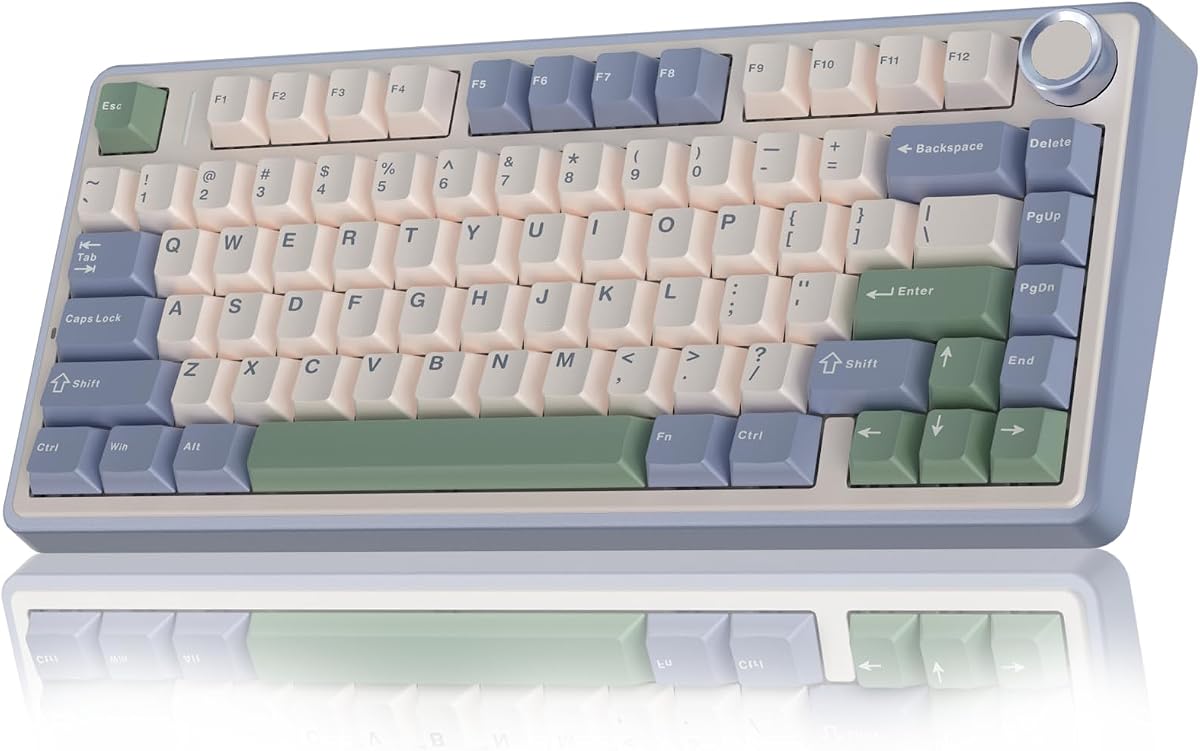
The Womier DK75 offers an impressive value proposition for budget-conscious gamers. With a 4.5 rating, it proves you don't need to spend a fortune for quality. The membrane switches are designed to be silent, making it suitable for shared spaces like offices or dorms.
We may earn a commission when you buy through this link, at no additional cost to you.
Its 75% layout saves desk space while retaining essential arrow keys. The PBT keycaps resist oil and wear, ensuring longevity even after months of heavy use. The 15 dynamic RGB effects add a vibrant touch to your setup without requiring complex software.
While it lacks hot-swappable mechanical switches, the typing experience is smooth and cushioned. The rotary knob offers quick access to volume and lighting adjustments. The massive 4000mAh battery ensures days of use on a single charge.
If you prioritize cost and quiet operation, this model is a top pick. It adapts well to various workflows, from gaming to writing. The triple-mode connectivity adds flexibility for multi-device users. We recommend it as an entry-level option with high-end features.
Silent membrane switches minimize noise, perfect for late-night use without disturbing others.
High-quality PBT keycaps maintain texture and appearance over time, resisting shine and fading.
We may earn a commission when you buy through this link, at no additional cost to you.
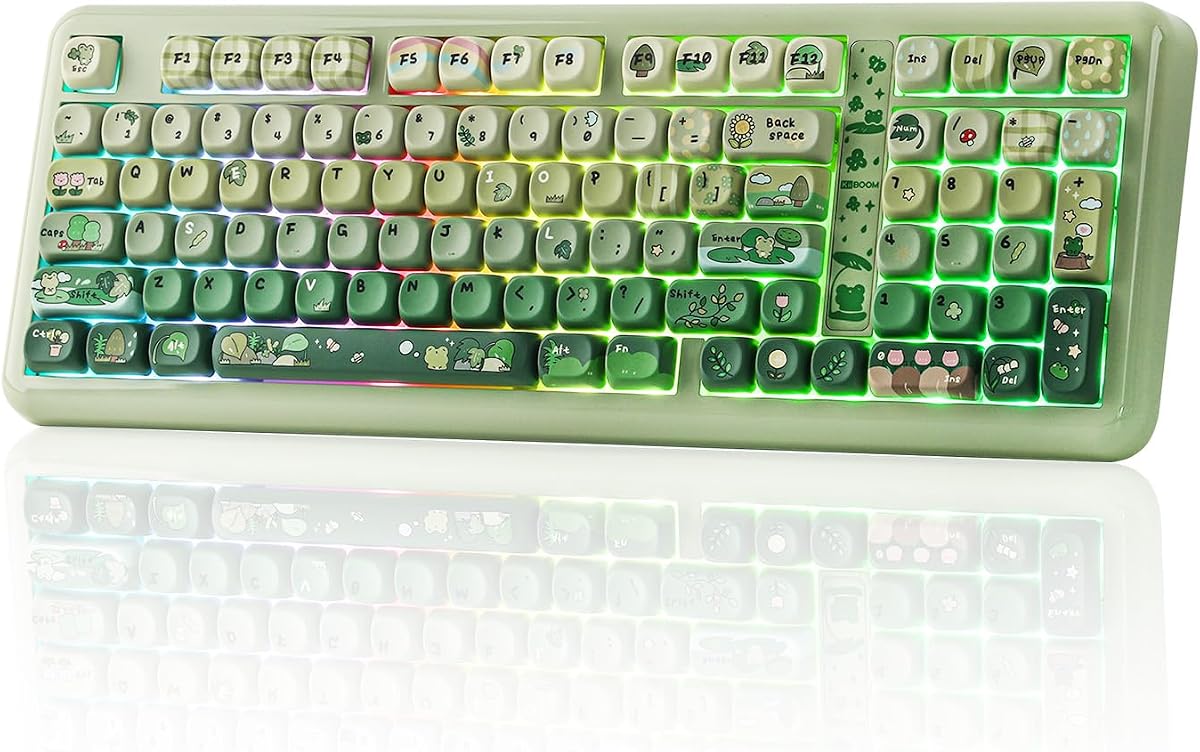
The KiiBoom Phantom98 Lite earns a 4.8 rating for its premium build and advanced features. This keyboard is designed for enthusiasts who want complete control over their typing experience. The gasket-mounted structure delivers a creamy, thocky sound that rivals custom builds.
We may earn a commission when you buy through this link, at no additional cost to you.
VIA compatibility allows for deep customization of keys and macros without proprietary software. The 96% layout packs all essential keys into a compact footprint, ideal for cramped desks. The 8000mAh battery is massive, supporting long trips without charging.
While it is more expensive than standard options, the sound-enhancing dampening materials justify the cost. Pre-lubed switches ensure smooth keystrokes out of the box. The south-facing RGB lighting enhances the aesthetic without interfering with keycaps.
If you seek a high-end solution for typing and gaming, this is the ultimate choice. It combines durability with personalization options that few competitors match. The seamless multi-device support adds practical utility. We recommend it for serious users.
Open-source software lets you map any key or macro to suit your specific workflow needs.
Multiple layers of foam and silicone reduce noise for a satisfying and immersive typing experience.
We may earn a commission when you buy through this link, at no additional cost to you.
The Womier SK80 distinguishes itself with a vibrant color multimedia screen. This feature allows you to display custom GIFs, system status, and more. With a 4.6 rating, users appreciate the unique visual flair it adds to any setup.
We may earn a commission when you buy through this link, at no additional cost to you.
The Frog Green theme offers a cohesive and charming look. Its gasket mount design reduces typing noise and enhances stability. The hot-swappable sockets let you change switches easily, tailoring the feel to your preference.
While the software for customizing the screen is limited to Windows, the hardware supports both Mac and Win. The 19 lighting effects and 9 colors provide extensive RGB options. The detachable Type-C cable adds flexibility for portable use.
If you want a keyboard that stands out visually, this is a strong contender. It balances fun features with practical functionality. The build quality ensures longevity for daily use. We recommend it for those who love personalization.
The multimedia screen displays custom GIFs and icons, adding a unique touch to your desk.
Gasket mount design minimizes noise, creating a quieter environment for shared spaces.
We may earn a commission when you buy through this link, at no additional cost to you.
The Keymatic Gaming Keyboard offers a versatile solution for multimedia control. With a 4.4 rating, it provides a balance of aesthetics and utility. The media knob allows quick volume adjustments, enhancing your workflow during gaming or work.
We may earn a commission when you buy through this link, at no additional cost to you.
Its 98-key layout includes a full number pad, making it suitable for data entry tasks. The silver paste membrane technology offers a tactile feel reminiscent of mechanical keyboards. The status display screen keeps you informed of battery and connection status.
While it uses membrane switches, the typing experience is responsive and quiet. The 4000mAh battery ensures long-lasting use. The tri-mode connectivity supports seamless switching between devices. The build includes an iron plate for stability.
If you need a compact keyboard with multimedia controls, this is a solid pick. It bridges the gap between functionality and cute aesthetics. The RGB lighting adds a vibrant touch to your setup. We recommend it for daily office or gaming use.
The dedicated knob allows instant volume and media playback control without leaving your game.
A full numeric keypad ensures efficient data entry for work or spreadsheet tasks.
We may earn a commission when you buy through this link, at no additional cost to you.
The Owpkeenthy Full Size Keyboard brings traditional full functionality with a green aesthetic. With a 4.5 rating, it serves well for office and gaming. The linear red switches offer a quiet, smooth typing experience without tactile bumps.
We may earn a commission when you buy through this link, at no additional cost to you.
Its 100% anti-ghosting technology ensures all keys register simultaneously, vital for gaming. The XDA profile keycaps provide uniform height, reducing finger fatigue. The 18 RGB backlight modes add color without distractions.
While it is wired only, this ensures zero latency during intense sessions. The ergonomic kickstands adjust the angle for wrist comfort. The build feels solid and reliable for long-term use. It is a practical choice for those needing numpads.
If you prefer a classic layout with mechanical feel, this is a great option. It balances performance with cost effectively. The uniform keycaps are easy to clean. We recommend it for workspaces and competitive gaming.
The 104-key layout supports essential tasks like data entry and spreadsheets effortlessly.
Wired connectivity ensures fast response times for competitive gaming and typing.
We may earn a commission when you buy through this link, at no additional cost to you.
The Aula Nova75 delivers a premium experience with its TFT smart display. With a 4.7 rating, it offers high-end features like GIF display and 8000mAh battery. The gasket mount provides a stable, quiet typing foundation.
We may earn a commission when you buy through this link, at no additional cost to you.
Its tri-mode connectivity supports five devices simultaneously. The dedicated volume knob and smart display enhance daily productivity. The linear switches are pre-lubed for a smooth, consistent sound across all keys.
While the software requires a download for full customization, it is safe and comprehensive. The 20 RGB lighting effects sync with your mood. The dual-color injection-molded PBT keycaps look stylish and durable.
If you want a high-end keyboard with visual flair, this is a top choice. It balances battery life with advanced controls effectively. The build quality is impressive. We recommend it for power users and streamers.
The TFT screen shows connection modes and battery status for easy monitoring.
The massive 8000mAh battery keeps the keyboard powered for weeks between charges.
We may earn a commission when you buy through this link, at no additional cost to you.
The Aula F75 earns a 4.8 rating for its compact yet efficient design. This 75% wireless keyboard balances space-saving with essential functionality. The gasket structure ensures a creamy, thocky sound that enthusiasts love.
We may earn a commission when you buy through this link, at no additional cost to you.
Its 5 sound-absorbing layers eliminate cavity noise for a refined experience. The hot-swappable base allows easy switch changes without soldering. The PBT Manga keycaps provide robustness and a stylish design.
While the driver support is limited to Windows, the hardware is versatile. The smart power management activates auto-sleep to save battery. The 4000mAh battery supports long sessions without interruptions.
If you value sound quality and compactness, this keyboard is ideal. It delivers mechanical performance in a small footprint. The full-key macro programming enhances productivity. We recommend it for enthusiasts and gamers.
Five layers of dampening material counteract noise for a pure, satisfying sound.
The 75% layout saves desk space while keeping arrow keys and essentials accessible.
We may earn a commission when you buy through this link, at no additional cost to you.
The Redragon K742 stands out for its open-source programmability. With a 4.6 rating, it offers QMK/VIA support for deep customization. The 5-layer sound-absorbing padding ensures a quiet, thocky sound.
We may earn a commission when you buy through this link, at no additional cost to you.
Its 98% compact layout saves space without sacrificing functionality. The tri-mode connectivity supports up to three devices. The 4000mAh battery supports over 16 hours with backlight on. The 2-stage adjustable feet provide ergonomic comfort.
While the software setup can be technical, the flexibility is unmatched. The hot-swappable sockets allow you to swap switches easily. The OEM-profile keycaps ensure long-lasting texture and comfort.
If you seek maximum control and personalization, this is the ideal choice. It serves well as a productivity tool and gaming controller. The build quality is durable and reliable. We recommend it for advanced users.
Open-source support lets you remap any key or macro for unique workflows.
Five layers of padding dampen sound for a quiet and smooth typing experience.
We may earn a commission when you buy through this link, at no additional cost to you.
The AULA S99 combines vintage aesthetics with modern efficiency. With a 4.2 rating, it appeals to those seeking retro looks. The 96% layout keeps the numeric keypad while freeing up space.
We may earn a commission when you buy through this link, at no additional cost to you.
Its dual-mode rotary knob allows easy adjustment of volume and lighting. The membrane keys support macro customization for complex actions. The foldable two-stage stand adjusts the angle for wrist comfort.
While it uses membrane switches, the build offers a reliable typing experience. The Bluetooth and wireless modes support seamless switching between devices. The 1-year after-sales service provides peace of mind.
If you love retro designs with modern features, this is a unique option. It offers good value for casual users. The macro support helps streamline workflows. We recommend it for office and home setups.
The vintage aesthetic adds character to your setup while maintaining modern features.
Programmable macros allow you to automate complex commands efficiently.
We may earn a commission when you buy through this link, at no additional cost to you.
Choosing the right keyboard requires understanding your needs. This guide breaks down key factors like layout, switches, and connectivity to help you make an informed decision.
Layout size affects desk space and key availability. Full-size (104 keys) includes a numpad for data entry, while compact (60% or 75%) saves space but may require function layers for arrows.
Choose a layout that fits your desk and workflow needs.
Switches determine the feel and sound. Linear switches are smooth and quiet, while tactile ones provide a bump. Consider if you prefer membrane for budget or mechanical for performance.
Select switches that match your tolerance for sound and touch feedback.
Wireless offers freedom from cables, while wired ensures zero latency. Tri-mode (Bluetooth, 2.4GHz, USB) provides maximum flexibility for multi-device users.
Pick a connection method that suits your device ecosystem.
RGB backlighting enhances visuals. Look for customizable effects, brightness control, and per-key customization if you want personalization.
Ensure the lighting matches your setup aesthetic and usability needs.
Wireless keyboards need reliable batteries. Larger capacities like 4000mAh or 8000mAh support longer usage between charges.
Check battery specs to avoid frequent recharging interruptions.
Build quality impacts longevity. PBT keycaps resist wear, and gasket mounts enhance stability. Check materials to ensure longevity.
Invest in robust materials for a lasting typing experience.
Hot-swappable sockets and macro support add flexibility. Software compatibility for customization may vary by OS.
Verify software options align with your operating system and needs.
Prices vary widely. Determine your spending limit while balancing features like wireless support and switch quality.
Set a budget and prioritize features you value most.
Proper setup ensures optimal performance. Connect the keyboard via USB, Bluetooth, or wireless dongle. Install drivers if required for macro or RGB customization.
Cleaning extends longevity. Use compressed air to remove dust from keycaps and switches. Avoid liquid cleaners to prevent internal damage.
For wireless models, recharge regularly. Store the keyboard in a dry place and avoid exposure to extreme temperatures for best results.
Membrane switches use rubber domes for a quiet, budget-friendly feel. Mechanical switches use individual actuators for a tactile, responsive experience. Mechanical options often offer better durability and hot-swappability.
The green backlighting itself does not affect performance. However, wireless models with low latency are essential. Wired options ensure consistent response times for competitive gaming.
Many models listed support both Mac and Windows. Check product descriptions for OS compatibility. Some software features may require Windows-specific drivers.
Most models use software drivers or FN key combinations. You can select colors, brightness, and patterns through these tools. Verify software availability for your OS before purchase.
Battery life varies by capacity and usage. Models with 4000mAh to 8000mAh offer days to weeks of use. Disabling RGB can significantly extend battery life.
Full-size or 96% layouts offer more key spacing, suitable for large hands. Compact layouts like 75% may require adaptation. Check key cap sizes for comfort.
Choosing a green backlit gaming keyboard involves balancing aesthetics and performance. Our top picks like the AULA F75 and KiiBoom Phantom98 Lite offer diverse solutions for different needs.
Prioritize connectivity and switch type based on your workflow. Wireless freedom is valuable, but wired ensures reliability during intense sessions.
Remember that prices and availability fluctuate. Check current offers to secure the best deal for your chosen model. Happy typing and gaming.