
GIGABYTE B550 Gaming X V2
4.5Editor score
Affordable AM4 Socket Support
Solid PCIe 4.0 Connectivity
Easy BIOS Flash Features
This guide compares the top Gigabyte Motherboard models for AMD and Intel systems covering power delivery, connectivity, thermal design, and value for every
Choosing the right Gigabyte Motherboard is essential for building a stable and high-performing computer system. These boards support the latest processors and memory standards while offering robust features for gaming and productivity workloads.
We evaluated ten leading models based on socket compatibility, power phase design, thermal management, and connectivity options. Our analysis focuses on real-world performance capabilities and build quality to help you find the perfect match.
Each pick highlights unique strengths such as premium VRM solutions or advanced wireless networking. Prices and availability change frequently so please verify current details before making your final purchase decision for your build.
4.5Editor score

4.4Editor score

4.2Editor score
This side-by-side comparison highlights the key specifications and features of our top ten selections to help you quickly identify the best match for your specific processor and build requirements.


The Gigabyte B650 AORUS Elite AX stands out as a top choice for AMD AM5 builders seeking reliable performance. It scores highly for its balanced feature set and solid build quality suitable for daily workloads.
We may earn a commission when you buy through this link, at no additional cost to you.
Its 14+2+1 phase power design ensures stable voltage delivery for Ryzen processors. The inclusion of PCIe 5.0 M.2 slots prepares your system for future storage speeds without requiring immediate upgrades.
While it lacks USB4 connectivity, the standard USB-C and Wi-Fi 6E offer ample bandwidth for most users. The thermal design effectively keeps VRM temperatures in check even under heavy multi-core loads.
We recommend this board for enthusiasts who want a future-proof platform without paying flagship premiums. Its combination of power stability and modern I/O makes it a standout pick in this category.
The digital VRM solution provides consistent power to high-core-count CPUs ensuring stable boosts and efficient energy use during intense tasks.
PCIe 5.0 support ensures your storage and expansion cards remain relevant as next-generation hardware standards evolve over the coming years.
We may earn a commission when you buy through this link, at no additional cost to you.
The X870 AORUS Elite WIFI7 delivers cutting-edge connectivity and power for high-end AM5 builds. It leads the pack with next-gen wireless and USB4 integration for ultimate throughput.
We may earn a commission when you buy through this link, at no additional cost to you.
Its 16+2+2 power design handles flagship CPUs with ease ensuring optimal performance for rendering or gaming. The four M.2 slots provide extensive storage expansion without needing adapters.
Users might find the price steep but the five-year warranty and advanced features justify the investment for professionals needing reliable connectivity. The board also includes robust thermal guards for all M.2 drives.
This is the ideal choice for those who need maximum bandwidth and wireless speed. If you want the latest tech without compromise this board offers the premium experience you deserve.
Wi-Fi 7 ensures ultra-low latency and high throughput for wireless gaming and large file transfers over modern networks.
Dual USB4 ports support high-speed data and display output making this board perfect for multi-monitor setups and fast storage.
We may earn a commission when you buy through this link, at no additional cost to you.
The B550 Gaming X V2 is the clear winner for budget-conscious builders still on the AM4 platform. It offers incredible value with essential features like PCIe 4.0 and a strong VRM design.
We may earn a commission when you buy through this link, at no additional cost to you.
Its 10+3 power phases handle most Ryzen 5000 series CPUs comfortably. The Q-Flash Plus feature allows BIOS updates without a CPU installed which is a lifesaver for upgrades.
While it lacks wireless connectivity the wired network is stable and fast. The build quality is surprisingly robust for the price point ensuring longevity for your system.
Choose this board if you want to maximize performance per dollar on a limited budget. It remains a top pick for entry-level gaming builds that need reliability and basic modern features.
Q-Flash Plus lets you update firmware with just a power supply and flash drive removing the need for a working processor.
This board delivers high-end features like RGB and PCIe 4.0 at a price point accessible to almost any builder.
We may earn a commission when you buy through this link, at no additional cost to you.
The X870E AORUS PRO ICE is a visual masterpiece designed for white-themed builds. It matches the performance of other high-end boards while offering a distinct and clean look.
We may earn a commission when you buy through this link, at no additional cost to you.
Its power delivery and thermal systems are top-tier ensuring that performance never suffers due to heat. The white PCB and shrouds create a cohesive look that stands out in any case.
While the color theme limits component matching for some users the aesthetic value is high. The board includes all necessary modern features like USB4 and Wi-Fi 7.
This board is perfect for those who prioritize visuals alongside high performance. If you want a build that looks as powerful as it performs this model delivers both.
The fully white PCB and shrouds provide a sleek uniform look that complements white cases and components beautifully.
Despite its focus on looks the board does not compromise on power delivery or connectivity for modern high-end systems.
We may earn a commission when you buy through this link, at no additional cost to you.
The Z890 AORUS Master is built for users who need the absolute best in Intel connectivity. It supports the latest Ultra Series 2 CPUs with robust power delivery.
We may earn a commission when you buy through this link, at no additional cost to you.
The inclusion of Thunderbolt 4 and 10GbE LAN makes it ideal for creative workflows. It handles large data transfers and peripheral connections with unmatched speed and efficiency.
Its high price reflects its professional-grade features. Most casual gamers may not need this level of bandwidth but power users will appreciate the extensive options available.
We recommend this board for workstation builds where data speed is critical. If you need maximum I/O bandwidth and support for the latest Intel chips this is the top choice.
Dual Thunderbolt 4 ports support high speed peripherals and multiple displays for professional workstation workflows.
The 10GbE network port provides server-grade speeds for fast file sharing and network storage access.
We may earn a commission when you buy through this link, at no additional cost to you.
The B650 Eagle AX offers a balanced set of features for mid-range AM5 builds. It provides strong stability and connectivity without the cost of higher-end models.
We may earn a commission when you buy through this link, at no additional cost to you.
Its triple M.2 setup allows for significant storage expansion which is rare at this price point. The power design is sufficient for most Ryzen processors including higher-end chips.
While the network card is standard it remains reliable and fast enough for most users. The board avoids unnecessary features to keep costs down for budget builders.
Choose this board for a solid foundation without premium costs. It is an excellent choice for those who need reliable performance and storage flexibility on a moderate budget.
Three M.2 slots allow you to install multiple fast NVMe drives without using external adapters or SATA ports.
The VRM design ensures stable power delivery for daily tasks and gaming without overheating under load.
We may earn a commission when you buy through this link, at no additional cost to you.
The B550 AORUS Elite AX V2 is a top contender for users sticking with AM4 systems. It provides modern wireless connectivity and strong power delivery for Ryzen 5000 series processors.
We may earn a commission when you buy through this link, at no additional cost to you.
Its 12+2 power phases ensure stable performance even with high-end CPUs. The integrated Wi-Fi 6 adds convenience for those without wired Ethernet connections in their build space.
While DDR4 memory is older it remains highly cost-effective. The board bridges the gap between legacy systems and modern features well for those who value stability.
Select this board for a reliable AM4 upgrade path. It is ideal for users who want Wi-Fi and RGB without moving to a new expensive platform.
Integrated Wi-Fi 6 provides stable and fast wireless networking eliminating the need for separate cards or adapters.
The digital VRM solution ensures consistent power to the CPU maintaining stability during gaming and rendering tasks.
We may earn a commission when you buy through this link, at no additional cost to you.
The Z790 Eagle AX is a strong choice for Intel users seeking DDR5 compatibility. It offers essential features without the cost of top-tier models.
We may earn a commission when you buy through this link, at no additional cost to you.
Its power design handles mainstream Core processors well ensuring stable operation. The inclusion of PCIe 5.0 ensures future readiness for next-generation GPUs and storage.
While it lacks some premium features it covers all the basics needed for gaming and productivity. The build quality is solid and the EZ-Latch makes installation easier.
Choose this board for a balanced Z790 experience. It is ideal for those who want modern features and DDR5 support at a moderate price point.
Support for DDR5 memory allows for higher bandwidth and future compatibility with new processor generations.
PCIe 5.0 readiness ensures your system remains compatible with the latest high-speed expansion cards.
We may earn a commission when you buy through this link, at no additional cost to you.
The Z790 AORUS Elite AX provides robust power and storage options for high-end Intel builds. Its 16+1+2 VRM handles overclocking and heavy loads with ease.
We may earn a commission when you buy through this link, at no additional cost to you.
Four M.2 slots offer extensive storage options for those who need multiple fast drives. The thermal design ensures these drives run cool and maintain peak performance over time.
Its feature set is comparable to higher-end boards but at a competitive price. The Wi-Fi 6E and USB-C connectivity ensure the system remains connected and modern.
Recommend this for users needing multiple drives and strong power. It is an excellent choice for workstations or gaming rigs requiring maximum storage flexibility.
The advanced VRM design ensures stable power delivery for high-core-count processors under heavy load.
Four M.2 slots allow for multiple high-speed NVMe drives providing vast storage capacity in a single build.
We may earn a commission when you buy through this link, at no additional cost to you.
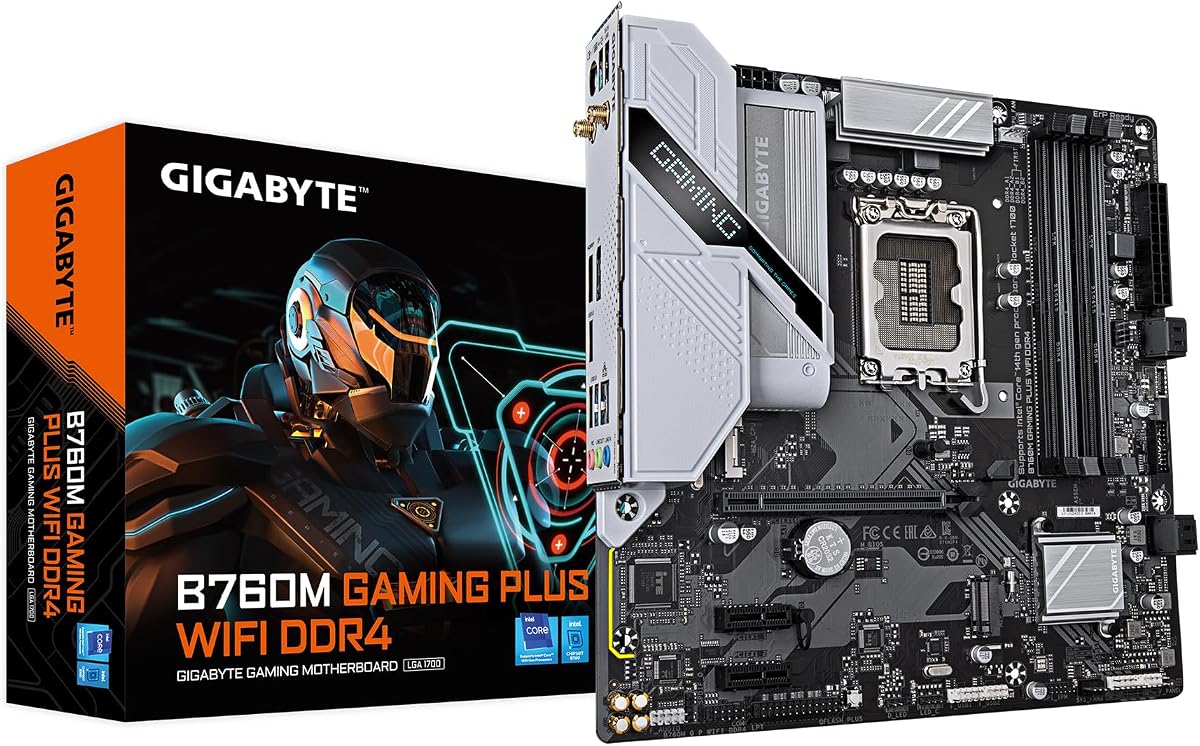
The B760M Gaming Plus WiFi is perfect for compact builds needing modern features. Its small size fits into smaller cases while maintaining essential capabilities.
We may earn a commission when you buy through this link, at no additional cost to you.
It supports DDR4 memory which keeps costs low while delivering strong performance. The Wi-Fi module ensures you stay connected without needing Ethernet cables for your system.
While expansion is limited the board covers all essential needs for gaming and daily tasks. The price point makes it accessible for those building budget-friendly PCs.
Choose this board for small form factor builds. It is the best choice for users who want Intel compatibility and wireless connectivity in a compact package.
The Micro ATX form factor fits easily into smaller cases ideal for portable gaming setups.
Integrated Wi-Fi eliminates the need for extra network cards keeping the build simple and clean.
We may earn a commission when you buy through this link, at no additional cost to you.
Selecting the right Gigabyte Motherboard depends on matching socket type features and budget to your specific build goals.
Ensure the motherboard supports your current or intended CPU processor. AM5 is required for newest Ryzen 9000 series while LGA1700 works with 14th Gen Intel.
Always verify socket match before purchasing to avoid incompatibility issues during assembly.
Look for digital VRM phases with higher amperage ratings for stable CPU performance. Enthusiast boards usually feature 12+ phases for better voltage regulation.
Stronger power delivery ensures your CPU runs at optimal speeds without throttling during intensive tasks.
Check if the board supports DDR4 or DDR5 memory as this impacts speed and cost. DDR5 is required for new platforms like AM5 and LGA1851.
Choosing DDR5 offers future-proofing while DDR4 provides immediate cost savings for older platforms.
Count the M.2 slots available for SSDs and check if they support PCIe 4.0 or 5.0. Most builds benefit from at least three slots for OS and games.
More slots allow for larger storage setups without relying on slower SATA connections.
Verify USB port types and speeds including USB-C availability for modern peripherals. High-end boards often include Thunderbolt or USB4 for maximum bandwidth.
Front USB-C ports are essential for cases that support them and front panel connections.
If you do not use Ethernet confirm the board includes Wi-Fi 6 or 6E. This ensures wireless connectivity without buying separate internal cards.
Wi-Fi 7 is available on newer boards but may not be necessary for most users yet.
Choose ATX for standard cases or Micro ATX for compact builds. Ensure your case supports the board size you select for proper fit.
Smaller boards offer less expansion options but save space in tight builds.
Look for MOSFET heatsinks and M.2 thermal guards to manage heat effectively. Overheating can lead to performance drops during long gaming sessions.
Robust cooling keeps temperatures stable and extends the lifespan of critical components.
When installing your new motherboard secure it properly using standoffs to prevent short circuits. Connect the CPU power cables first to ensure stable voltage during initial boot.
Update the BIOS immediately to support newer processors. Use the Q-Flash Plus feature if available for updates without a CPU installed.
Keep the interior of your PC clean to maintain thermal efficiency. Dust buildup on VRM heatsinks can reduce cooling performance over time.
Many Gigabyte motherboards come with built-in Wi-Fi especially those with AX in the name. However some budget models require separate wireless cards if you need connectivity.
AORUS series boards feature premium components advanced cooling and more features like RGB. Eagle series offers essential features at lower price points for budget builds.
No DDR4 and DDR5 memory are physically different and not compatible. You must use DDR5 on boards specifically designed for DDR5 memory.
Use the Q-Flash utility in BIOS to update with a USB drive. Some boards support Q-Flash Plus for updating without CPU or RAM installed.
The B650 AORUS Elite AX is the top pick for most AM5 builds due to its balance of power delivery and features.
Most AORUS boards support RGB Fusion 2.0 allowing control of connected LED strips. Eagle series boards may have limited RGB headers.
Most Gigabyte motherboards come with a standard 5-year warranty. Check specific product details to confirm warranty terms before purchase.
PCIe 5.0 doubles bandwidth compared to PCIe 4.0 offering faster speeds for future GPUs and SSDs. Not all Gigabyte boards include this feature yet.
Our top picks highlight the best options across budget and performance tiers. The B650 AORUS Elite AX leads for AM5 while the B550 Gaming X V2 wins for budget AM4 builds.
Prioritize socket compatibility and power delivery to ensure long-term stability. High-end features like Wi-Fi 7 are nice but focus on what matters for your specific use case.
Remember that prices fluctuate frequently so always check current availability before buying. Verify specs match your case and CPU requirements to avoid unnecessary returns.