
Logitech G305 Lightspeed Wireless Gaming Mouse
4.6Editor score
HERO sensor up to 12000 DPI
LIGHTSPEED wireless 1ms report rate
250 hours battery life on one AA
This guide compares the top ten gaming mouse for Xbox Series X models featuring wireless options ergonomic designs and high DPI sensors for console and PC
Finding the right gaming mouse for Xbox Series X can elevate your console experience to new heights. Modern peripherals offer wireless connectivity and precise sensors that match the power of next gen hardware for immersive gameplay.
We evaluated ten top rated models based on sensor accuracy wireless latency ergonomic design and build quality. Our comparison focuses on how each mouse performs during extended sessions and supports versatile gaming needs.
Each pick highlights unique strengths such as battery life weight distribution or programmable controls. Prices and availability change frequently so verify current details before purchasing to ensure you get the best value.
4.6Editor score

4.6Editor score

4.6Editor score
This side by side comparison highlights key specifications across ten leading gaming mice. Use this table to quickly identify which model fits your grip style and feature requirements.



The Logitech G305 Lightspeed is a top contender for budget conscious gamers seeking wireless freedom. It delivers impressive performance with a HERO sensor and LIGHTSPEED technology that minimizes lag effectively.
We may earn a commission when you buy through this link, at no additional cost to you.
Its standout quality is the battery life which offers up to 250 hours on one AA cell. The sensor provides precise tracking up to 12000 DPI ensuring accuracy during fast-paced gameplay sessions.
While it lacks advanced features like RGB or many programmable buttons the core functionality remains solid. The lightweight build makes it easy to maneuver without fatigue over long periods of use.
This mouse is ideal for players who prioritize reliability and portability over extra bells and whistles. It serves well as a travel companion or secondary device for console and laptop setups.
The LIGHTSPEED wireless tech ensures a stable connection comparable to wired options for seamless control.
Endurance mode and efficient power management extend gameplay time significantly between battery changes.
We may earn a commission when you buy through this link, at no additional cost to you.
The Logitech G502 Hero stands out as a versatile workhorse for diverse gaming styles. Its HERO sensor tracks movement with exceptional accuracy while the weight system allows personalized balance.
We may earn a commission when you buy through this link, at no additional cost to you.
Key strengths include the eleven programmable buttons that support macros and complex commands. The mechanical switch tensioning provides a crisp tactile feel for reliable input during competitive matches.
Some users may find the weight higher than modern ultralight mice which can affect speed. The lack of wireless connectivity might not suit setups prioritizing cable free desk space entirely.
Choose this model if you value customization and precision in a sturdy wired frame. It fits well for those who prefer adjustable ergonomics over lightweight portability.
Adjustable weights and eleven buttons let you tailor the mouse to your specific grip and game needs.
Zero smoothing and filtering ensure pixel perfect tracking for accurate aiming in any scenario.
We may earn a commission when you buy through this link, at no additional cost to you.
The Razer Basilisk V3 combines ergonomic comfort with high end features for serious gamers. Its Focus Plus sensor delivers top tier accuracy while the optical switches ensure rapid actuation.
We may earn a commission when you buy through this link, at no additional cost to you.
Strengths include the HyperScroll tilt wheel that switches between free spin and tactile modes. The eleven RGB zones integrate with Chroma enabled games for dynamic visual immersion during play.
While the ergonomic shape suits right handed users well it may not fit smaller hands perfectly. The premium price reflects the advanced materials and lighting tech which may not be essential for all.
Opt for this mouse if you want a feature rich wired option with outstanding comfort and aesthetics. It is an excellent upgrade for those seeking a blend of style and performance.
The thumb rest and contour reduce strain during extended sessions ensuring a natural hand position.
Sixteen point eight million colors allow unique lighting profiles that match your gaming setup theme.
We may earn a commission when you buy through this link, at no additional cost to you.
The SteelSeries Rival 3 Gen 2 focuses on delivering speed and reliability without unnecessary bulk. It features a TrueMove Core sensor that provides accurate tracking for precise aiming and movement.
We may earn a commission when you buy through this link, at no additional cost to you.
Its durability is highlighted by switches rated for 60 million clicks ensuring long term use. The lightweight construction reduces fatigue and helps maintain agility during competitive gaming sessions.
The RGB lighting adds visual flair though the sensor maximum DPI may not suit high speed shooters. Button options are standard which limits macro capabilities compared to more complex models.
Buy this mouse if you need a fast durable and lightweight device at a reasonable cost. It works well for gamers seeking essential performance without premium features or prices.
Near instant click latency ensures your inputs register quickly for better reaction times in games.
Tough switches and a reinforced build mean the mouse withstands intense daily use over time.
We may earn a commission when you buy through this link, at no additional cost to you.
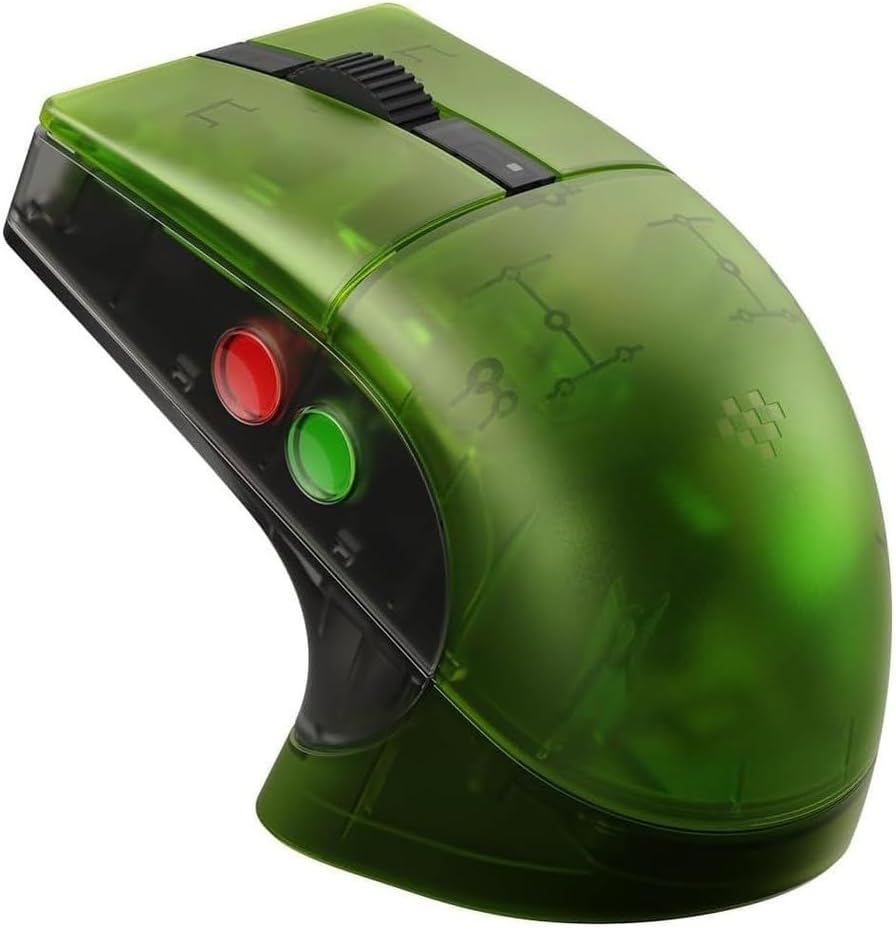
The 8Bitdo Mouse offers a unique blend of connectivity options for multi device users. It supports Bluetooth 2.4G wireless and wired USB-C to adapt to different setups easily.
We may earn a commission when you buy through this link, at no additional cost to you.
Equipped with the PAW 3395 sensor it provides precise tracking suitable for varied gaming tasks. The Kailh switches promise high endurance ensuring consistent feedback over many clicks.
Charging dock doubles as a signal extender which improves wireless range but adds to the setup. The price reflects these advanced features which may not be necessary for all gamers.
Select this if you need flexibility across consoles and PCs with high quality sensor tech. It suits users who value connection diversity and a dock for power management.
Switch between Bluetooth wireless or cable to match your current gaming environment and needs.
The dock extends signal reach reducing interference for stable wireless performance in larger rooms.
We may earn a commission when you buy through this link, at no additional cost to you.
The Razer Basilisk V3 X HyperSpeed brings wireless convenience to the popular Basilisk shape. It features Razer HyperSpeed technology for low latency performance alongside Bluetooth for extended battery use.
We may earn a commission when you buy through this link, at no additional cost to you.
Key benefits include up to 285 hours of battery life allowing long sessions without charging. The ergonomic design supports comfortable grips while the 18K sensor ensures precise aiming.
While it has fewer buttons than its wired counterpart it still offers ample control for most. The higher cost is justified by wireless tech and extended power compared to standard options.
Choose this for a wireless experience that balances comfort and control without compromising on feel. It is a solid pick for those who want mobility with trusted ergonomics.
Bluetooth mode enables hundreds of hours of use reducing the need for frequent recharging or cables.
Zero spinouts tracking guarantees reliable movement capture even during rapid flicks or turns.
We may earn a commission when you buy through this link, at no additional cost to you.
The Logitech G502 X Lightspeed reimagines a classic design with modern wireless capabilities. Its LIGHTFORCE switches deliver speed and reliability while the HERO 25K sensor tracks with zero smoothing.
We may earn a commission when you buy through this link, at no additional cost to you.
Wireless performance benefits from an updated protocol offering faster response rates than previous gens. The reversible DPI shift button allows customization based on grip preference for enhanced comfort.
Premium features like PowerPlay compatibility add cost but enable continuous charging without cables. The advanced engineering ensures high precision but may be too complex for casual users.
Invest in this model if you seek a top tier wireless option with legacy comfort and innovation. It suits enthusiasts who want the latest tech in a trusted ergonomic form.
A faster protocol ensures minimal lag keeping input responsive in competitive scenarios.
Hybrid switches merge optical speed with mechanical feel for crisp accurate clicks every time.
We may earn a commission when you buy through this link, at no additional cost to you.
The SteelSeries Aerox 5 prioritizes speed with an ultra lightweight holey shell. Its TrueMove Air sensor offers high DPI tracking while the IP54 rating protects against water splashes and dust.
We may earn a commission when you buy through this link, at no additional cost to you.
Weighing only 59 grams it reduces strain and increases agility for rapid movements. The nine buttons provide ample programmability for macros without adding excessive bulk to the frame.
The open design helps with cooling but can gather dust over time if not cleaned. Higher price reflects the specialized build and sensor quality which may not suit casual gamers.
Pick this mouse if you need a lightweight and durable option for intense gaming sessions. It is ideal for players who value speed and protection in their peripheral choice.
The holey shell reduces mass enabling faster movements and less fatigue during long sessions.
IP54 rating ensures internal components stay safe from accidental spills and debris.
We may earn a commission when you buy through this link, at no additional cost to you.
The Redragon M810 PRO offers wireless functionality at an affordable price point. Its PAW3325 sensor supports adjustable DPI levels up to 10000 for adaptable precision in various games.
We may earn a commission when you buy through this link, at no additional cost to you.
Eight programmable buttons allow for tactical keybinds while rechargeable batteries remove the need for disposables. RGB effects add style and you can tailor the mouse look to your room.
Battery life tops at 45 hours which is shorter than some high end models but sufficient. The sensor limits may affect very high speed shooters compared to 25K options.
Choose this for a budget friendly wireless experience with decent performance and features. It serves well for casual players wanting wireless tech without a large investment.
Remappable keys and macros help execute complex actions quickly without needing a keyboard.
Rechargeable design ensures consistent operation and reduces ongoing battery costs.
We may earn a commission when you buy through this link, at no additional cost to you.
The ASUS ROG Spatha X targets MMO and MOBA gamers with twelve programmable buttons. It features dual mode connectivity and hot swappable switches for customizable click feel and longevity.
We may earn a commission when you buy through this link, at no additional cost to you.
The large shape suits right handed users who need extensive controls for complex games. A magnetic dock simplifies charging and the DPI on scroll feature allows quick adjustments without software.
Its weight may be a drawback for fast paced FPS players seeking ultra light options. The specialized layout ensures optimal button access for MMOs but might feel bulky elsewhere.
Buy this for a button rich wireless solution tailored to strategy and MMO gaming needs. It fits players who prioritize control count and durability over lightweight ergonomics.
Twelve buttons enable complex macro sets essential for dominating MMO titles.
Hot swappable sockets let you change switches to alter click force and extend lifespan.
We may earn a commission when you buy through this link, at no additional cost to you.
Selecting the right gaming mouse involves evaluating sensor performance connectivity options and ergonomics to match your play style and setup.
The sensor is the heart of any gaming mouse determining how accurately movements are tracked. Higher DPI ranges allow for more flexible sensitivity adjustments suited to different game genres and monitor sizes. Look for optical sensors that offer zero smoothing or acceleration to ensure pixel perfect tracking during critical moments.
Prioritize a sensor with a DPI range that accommodates both slow precision aiming and fast flicks.
Decide between wired and wireless models based on your preference for lag free performance versus cable management. Wireless tech has advanced significantly with low latency protocols that rival wired connections in speed. If you choose wireless check battery life to ensure it supports your typical session lengths without interruption.
Wired mice offer consistent power and zero latency while wireless provides greater freedom and desk space.
The shape of the mouse should complement your hand size and grip style for comfortable extended use. Palm grips benefit from larger contoured designs while claw or fingertip users often prefer smaller lighter units. An ergonomic design reduces strain and increases accuracy by keeping your hand in a natural position.
Test the shape or read hand size reviews to avoid discomfort during marathon gaming sessions.
Weight impacts how quickly you can maneuver the mouse across your surface during gameplay. Lighter mice under 80 grams are popular for competitive shooters while heavier ones provide stability for strategic play. Build materials like high grade plastics or metal switches ensure durability against daily wear and tear.
Select a weight that feels balanced and sturdy without causing fatigue or instability.
Additional buttons allow for macros and quick access to tools enhancing your gameplay efficiency. Check if software is available for remapping and if the layout suits your game requirements. Features like adjustable DPI or customizable RGB can add value depending on your personal preferences.
More buttons suit MMO players while simpler layouts work best for fast action genres.
Wireless mice vary widely in battery performance ranging from hours to months per charge. Look for models with sleep modes or efficient power management to minimize recharging interruptions. Some include docks or fast charging which can offset the inconvenience of frequent top ups.
Ensure battery capacity aligns with your play habits to avoid unexpected downtime during games.
RGB lighting adds personalization and can sync with game events for immersive effects. Software compatibility determines how deeply you can customize lighting and button assignments across games. Choose models with intuitive apps that support your operating system and offer reliable firmware updates.
Software quality should be seamless to avoid frustrating configuration issues during setup.
Prices vary significantly across gaming mice so set a budget that balances features with necessity. High end models offer premium build and tech but mid range options often provide core performance. Focus on essential traits like sensor and ergonomics over aesthetic extras if value is your main goal.
A well chosen mid tier mouse can outperform expensive models in key areas for most players.
Connect your mouse to the Xbox Series X via USB or compatible wireless receiver. Install any required software on a PC to configure buttons and DPI settings before linking to the console.
Clean the mouse regularly with a soft cloth to remove dust and oils from the surface. Use compressed air to clear debris from the sensor area to maintain tracking accuracy.
Store the mouse in a cool dry place when not in use to protect the electronics. If using wireless keep it in a charging dock to ensure it is ready for your next session.
Yes many USB and wireless gaming mice are compatible with Xbox Series X when connected via USB port or receiver. Ensure the device supports basic HID functions for cursor control and gameplay.
For most console gamers a DPI between 800 and 1600 offers balanced control. Higher DPI can be useful for larger screens but lower DPI may provide better precision for aiming.
Modern wireless mice use low latency protocols that minimize delay. However for competitive titles a wired connection may still provide the absolute most responsive experience.
Some mice allow button remapping via their own software on PC before use. Xbox console options are limited to system settings unless the mouse supports custom profiles directly.
Gaming mice typically last several years depending on build quality and usage intensity. Mechanical switches rated for 50 to 100 million clicks are common in reliable models.
Poor tracking often stems from dirty sensor glass or incompatible surface textures. Clean the sensor and use a consistent mouse pad to improve performance.
Yes ergonomic shapes reduce hand strain and fatigue during extended play. Choosing the right size and contour helps maintain comfort and accuracy over time.
Most basic functions work without software but customization features require PC apps. Check if the brand offers a console compatible solution for profile management.
We explored ten top models ranging from budget wireless options to premium ergonomic designs. Each offers unique strengths in sensor accuracy connectivity and build to suit different player preferences.
Prioritize ergonomics and sensor performance to ensure comfort and precision during your favorite games. Match connectivity to your setup needs and consider battery life if selecting wireless.
Remember that prices and availability shift frequently so review current details before purchasing. This guide aims to help you make an informed choice for an enhanced gaming experience.