
Ubiquiti Unifi Security Appliance
4.5Editor score
Seamless Unifi Controller Integration
VLAN and QoS Support
Compact Desktop Design
This guide compares the top firewall appliances for home and business networks, evaluating performance, security features, and ease of use to help you secure
Choosing the right firewall appliance is crucial for protecting your network from modern cyber threats. These devices act as a barrier between your internal systems and the internet, filtering traffic to prevent unauthorized access and malicious activity.
We have analyzed ten top-rated models based on performance, connectivity options, and security capabilities. Our comparison includes enterprise-grade solutions and compact units designed for small offices, ensuring you find the right fit for your specific needs.
Each pick in this list highlights unique strengths and potential limitations to help you make an informed decision. Keep in mind that hardware specifications and availability can change, so verify the latest details before purchasing to ensure compatibility.
4.5Editor score

4.4Editor score

4.6Editor score
The following table provides a side-by-side comparison of all ten selected firewall appliances. It highlights key specifications such as port configurations, throughput capabilities, and form factors to help you quickly identify the model that best matches your network requirements.


The FortiGate-60F stands out as a top-tier firewall appliance for businesses needing robust security and connectivity. With a rating of 4.4, it offers a balance of performance and ease of use that appeals to network administrators.
We may earn a commission when you buy through this link, at no additional cost to you.
Its 10 Gigabit Ethernet ports provide exceptional flexibility for connecting various network segments without needing additional switches. The hardware acceleration ensures high-speed inspection of traffic, maintaining security without compromising network latency.
While the device is powerful, it requires a subscription to activate full threat protection features like FortiGuard Labs. This ongoing cost is a consideration for budget-conscious buyers, though the security benefits often justify the expense.
For medium-sized businesses or branch offices, this appliance delivers enterprise-grade protection in a compact form. It is a reliable choice for those prioritizing security performance and scalable connectivity options.
The extensive port layout allows for direct connections to multiple devices, simplifying network topology and reducing hardware dependencies.
Powered by FortiGuard Labs, it leverages AI to identify and block both known and emerging threats across all network traffic.
We may earn a commission when you buy through this link, at no additional cost to you.
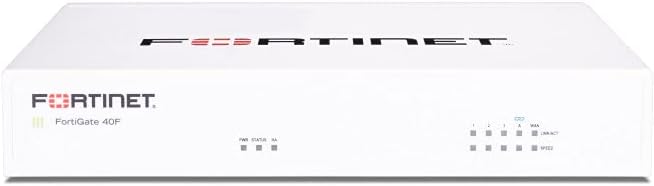
The FortiGate-40F is engineered for small to mid-sized businesses that need enterprise-level security without the bulk of larger units. Its compact and efficient design ensures quiet operation, making it ideal for office environments.
We may earn a commission when you buy through this link, at no additional cost to you.
With 5 Gigabit Ethernet ports, it provides essential connectivity for standard small business setups. The built-in security processor delivers strong protection for encrypted traffic, ensuring data integrity across the network.
Although it lacks the port density of higher models, its performance-to-size ratio is impressive. The Zero Touch Integration simplifies setup, allowing IT staff to deploy it quickly with minimal configuration.
This appliance is an excellent choice for branch offices or small teams. It offers a reliable security layer that scales with the business needs without overwhelming complexity or physical space requirements.
The fanless form factor minimizes noise, allowing the device to run silently on a desk without disrupting a workspace.
Specialized processing ensures that even encrypted traffic is inspected effectively, preventing threats from bypassing security checks.
We may earn a commission when you buy through this link, at no additional cost to you.
The Ubiquiti Unifi Security Appliance offers a cost-effective solution for those already invested in the Unifi ecosystem. With a solid 4.5 rating, it provides essential firewall capabilities at a budget-friendly price point.
We may earn a commission when you buy through this link, at no additional cost to you.
Integration with the Unifi Controller streamlines network management, allowing for a unified interface to monitor traffic and enforce policies. This simplicity is a major benefit for users who prioritize ease of use over granular control.
While it may not match the raw throughput of enterprise models, it handles typical home and small business traffic efficiently. The inclusion of QoS ensures that voice and video calls remain clear even during heavy network usage.
For users seeking a reliable and affordable entry point into dedicated hardware firewalls, this is a strong candidate. It balances functionality and cost well for environments where basic protection and management are key.
By leveraging the Unifi Controller, users can manage routing and switching alongside firewall rules from a single dashboard.
Quality of Service settings help prioritize voice traffic, ensuring clear communication lines in busy network environments.
We may earn a commission when you buy through this link, at no additional cost to you.
The Protectli Vault FW4B is a versatile mini PC designed specifically for running firewall software like pfSense or OPNsense. Its high rating reflects its reliability and performance as a dedicated networking appliance.
We may earn a commission when you buy through this link, at no additional cost to you.
Equipped with an Intel Quad Core processor and AES-NI support, it handles encryption and decryption tasks efficiently. This ensures that security checks do not significantly slow down network speeds, even under load.
Users must install the operating system themselves, which may be a hurdle for those preferring plug-and-play solutions. However, this flexibility allows for tailored configurations that meet specific network requirements and preferences.
For DIY enthusiasts or IT professionals who want full control over their security stack, this is an ideal choice. It offers a robust platform for building a custom firewall without paying for bundled software licenses.
Support for various open-source operating systems lets you choose the interface and feature set that best fits your needs.
Dedicated hardware support for encryption ensures that secure traffic processing remains fast and efficient.
We may earn a commission when you buy through this link, at no additional cost to you.
The SonicWall TZ280 delivers impressive inspection speeds with its patented Reassembly-Free Deep Packet Inspection engine. It is built to secure small businesses and branches against sophisticated online threats efficiently.
We may earn a commission when you buy through this link, at no additional cost to you.
With up to 2.5 Gbps firewall inspection, it handles high-bandwidth traffic without bottlenecks. This makes it suitable for environments where speed and security are both critical priorities for daily operations.
The device supports cloud management via Network Security Manager, simplifying remote oversight. However, full security services like sandboxing require a separate subscription, which adds to the total cost of ownership.
For those needing a powerful yet manageable solution for distributed sites, this appliance is a strong contender. It balances performance and security features well for modern network environments.
Network Security Manager allows IT teams to oversee and update security policies from a centralized dashboard anywhere.
Built-in SD-WAN capabilities enable secure and efficient connectivity across different office locations and remote workers.
We may earn a commission when you buy through this link, at no additional cost to you.
The Netgate 1100 offers a ready-to-go solution for users who want pfSense+ software out of the box. It simplifies setup significantly, allowing you to focus on configuration rather than installation.
We may earn a commission when you buy through this link, at no additional cost to you.
It comes with technical support and warranty, which is a significant advantage for businesses that lack dedicated IT staff. The hardware is optimized to run the software efficiently in a low-power footprint.
While its throughput is sufficient for many scenarios, it may not handle enterprise-level traffic as well as higher-end models. It is best suited for home labs or small office environments requiring reliable routing.
This appliance is ideal for those committed to the pfSense ecosystem. It provides a stable and supported platform for advanced firewall features without the need for technical setup expertise.
Starting with pfSense+ pre-installed saves time and reduces the risk of configuration errors during initial deployment.
Access to technical assistance ensures that issues can be resolved quickly, minimizing downtime for critical operations.
We may earn a commission when you buy through this link, at no additional cost to you.
The FortiGate-100E is designed to provide deep visibility into network applications and traffic patterns. Its robust security features help organizations maintain control over how their network is used.
We may earn a commission when you buy through this link, at no additional cost to you.
It excels at identifying and blocking known exploits and malicious websites, ensuring a safe browsing environment for users. This level of protection is essential for businesses handling sensitive data or client information.
Setup and management can be complex without proper training, as it offers granular control over many aspects of traffic. It is best suited for organizations with dedicated security teams to manage its advanced capabilities.
For those seeking a powerful tool to enforce application policies, this appliance delivers. It provides the depth required to manage complex network environments effectively.
Detailed identification of applications allows administrators to restrict or allow specific types of traffic precisely.
Continuous updates to threat definitions ensure protection against the latest vulnerabilities and attack vectors.
We may earn a commission when you buy through this link, at no additional cost to you.
Palo Alto networks are known for advanced security technologies, and the PA-220 brings this capability to a smaller form factor. It aims to provide next-generation protection for smaller enterprises or remote sites.
We may earn a commission when you buy through this link, at no additional cost to you.
Its architecture supports deep inspection and threat prevention, focusing on identifying malicious activity based on behavior and context. This approach is effective against zero-day threats that traditional signature-based systems might miss.
Users should be aware that the value depends heavily on the licensing model chosen. The hardware alone does not provide the full suite of features without the associated software services.
For organizations already in the Palo Alto ecosystem, this device ensures consistency and advanced protection across the network. It is a solid choice for those prioritizing security intelligence over budget constraints.
Modern security models focus on context and behavior to detect threats that bypass traditional static security rules.
Integration with cloud platforms simplifies policy management for distributed networks and remote offices.
We may earn a commission when you buy through this link, at no additional cost to you.
The Protectli Vault FW4C improves on previous models by including 2.5 Gigabit Ethernet ports, offering faster connection speeds for modern networks. This is a significant advantage for users with high-speed internet plans.
We may earn a commission when you buy through this link, at no additional cost to you.
Its compact and silent design makes it perfect for home labs or small offices where space and noise are concerns. The hardware is tested with popular open-source firewalls, ensuring broad compatibility.
However, the limited RAM and storage may constrain complex rule sets or logging capabilities. For basic routing and firewall tasks, it performs well, but power users may need to upgrade components later.
This is an excellent option for those looking to future-proof their home network with faster connectivity. It balances performance and cost effectively for enthusiasts who want speed without bulk.
2.5G ports allow for faster data transfers, supporting modern internet speeds and local network requirements.
The small physical size allows placement in tight spaces without generating heat or noise during operation.
We may earn a commission when you buy through this link, at no additional cost to you.
This bundle combines the FortiGate-60F hardware with a year of essential security services, providing a complete solution for medium-sized businesses. It simplifies purchasing by including necessary updates and support upfront.
We may earn a commission when you buy through this link, at no additional cost to you.
Unified Threat Protection ensures protection against advanced online threats through comprehensive web filtering and anti-botnet technologies. This level of protection is crucial for maintaining operational continuity.
FortiCare Premium support adds value by offering high-quality assistance when issues arise. This peace of mind is valuable for businesses that cannot afford prolonged downtime due to security or network failures.
For organizations looking for a hassle-free start to securing their network, this bundle is an optimal choice. It removes the complexity of separate service contracts and ensures full feature utilization from day one.
The bundle ensures that the device is fully armed against threats immediately without waiting for service activation.
Premium support channels ensure that technical problems are addressed quickly by knowledgeable professionals.
We may earn a commission when you buy through this link, at no additional cost to you.
Selecting the right firewall appliance involves evaluating several critical factors that affect your network's security and performance. Consider your business size, bandwidth needs, and technical requirements before making a purchase.
Throughput determines how fast your firewall can process traffic without slowing down your internet connection. For high-speed internet plans, look for appliances with IPS throughput rates that match your network's capacity.
Ensure the device can handle your peak traffic loads to maintain consistent performance during busy periods.
The number and type of ports affect how you connect devices to your network. Choose an appliance with enough Ethernet ports to connect your routers, switches, and critical servers directly.
Consider models with SFP or 2.5G ports if you plan to expand your network in the future.
Some appliances come with proprietary software, while others allow you to install open-source options like pfSense or OPNsense. Decide if you prefer a plug-and-play experience or the flexibility of custom software.
Open-source options often provide more control but require technical skills to set up and maintain.
Modern firewalls offer features like intrusion prevention, URL filtering, and anti-malware. These are essential for blocking threats that traditional firewalls might miss.
Check if these features require separate subscriptions, as ongoing costs can add up over time.
An intuitive management interface simplifies the process of configuring rules and monitoring traffic. Look for tools that offer dashboards and reports to keep you informed of network health.
Cloud management options are useful if you need to oversee multiple locations from a single interface.
Physical design matters for placement within your office or home. Desktop units are easy to access but take up space, while rack-mountable units fit neatly into server cabinets.
Fanless designs are quieter and better for environments where noise reduction is a priority.
Reliable support ensures that you get help if issues arise. Check the warranty terms and whether the manufacturer offers technical assistance for configuration or troubleshooting.
A longer warranty period can provide peace of mind against hardware failures.
As your business grows, your network needs will change. Choose an appliance that allows for easy upgrades or expansion to avoid replacing hardware too soon.
Modular designs or cloud-managed systems often offer better long-term scalability.
Set up your firewall appliance by connecting your modem to the WAN port and your router or switch to a LAN port. Ensure that you access the management interface using the default IP and credentials provided in the manual.
Update the firmware regularly to keep security features current. Configure rules that match your organization's traffic patterns, allowing necessary business applications while blocking suspicious activity.
Keep the device in a well-ventilated area to prevent overheating, especially if it is fanless. Regularly back up your configuration settings to restore them quickly in case of hardware failure.
Most modems do not include advanced firewall features, leaving your network vulnerable. A dedicated firewall appliance adds a critical layer of security that protects against unauthorized access and malware.
A router directs traffic between networks, while a firewall monitors and filters that traffic based on security rules. Using both ensures your network is managed securely and efficiently.
Not all require subscriptions for basic routing. However, advanced security features like threat protection and updates often need a service plan to function effectively.
Some appliances like Protectli allow you to install your own OS. Others come locked with proprietary software. Check the compatibility details before purchasing.
IPS throughput refers to the speed at which the firewall can inspect traffic for threats. Higher numbers indicate better performance when security features are active.
Yes, many models are compact and quiet enough for home use. Choose one that matches your internet speed and security needs to protect your personal devices.
We reviewed ten top firewall appliances, ranging from budget-friendly options to enterprise-grade security. The FortiGate-60F leads the pack with robust performance and connectivity, while the Ubiquiti Unifi offers a budget-friendly entry point for small networks.
When choosing a model, prioritize features that align with your security needs and technical skills. Look for appliances with sufficient throughput and port configurations to support your current and future network demands.
Prices and availability can change, so check the latest offers and specifications before buying. Investing in a quality firewall now can prevent costly security issues later, ensuring your network remains safe and reliable.