
Micca 4K Ultra-HD USB and microSD Media Player
4.1Editor score
Supports 4K Ultra-HD playback
Dual USB and MicroSD reader
Simple digital signage features
This guide compares the top external hard drive media players for 2026, evaluating playback quality, storage compatibility, and ease of use for home and
Finding the right external hard drive media player can transform your entertainment experience by allowing you to play high-definition videos directly from storage devices. These devices bridge the gap between traditional TVs and modern digital storage, offering flexibility without streaming fees.
We compared ten top-rated models based on video resolution support, file format compatibility, and storage connectivity options. Our analysis focuses on real-world performance, ease of setup, and value for money to help you choose the best fit for your specific setup.
Each pick in this list highlights key strengths and potential limitations so you can make an informed decision. Keep in mind that prices and availability may change over time, so check current listings before purchasing your preferred model today.
4.1Editor score

4.7Editor score

5.0Editor score
This side-by-side comparison highlights the key specifications and capabilities of each model to help you quickly identify which device meets your storage and playback requirements.



The Micca 4K Ultra-HD Media Player stands out as a budget-friendly option that delivers solid performance for local media playback. With a rating of 4.1 stars, it appeals to users seeking simplicity without sacrificing 4K support.
We may earn a commission when you buy through this link, at no additional cost to you.
This device handles videos up to 4096×2304 resolution smoothly via HDMI. It connects easily to USB drives and microSD cards, supporting FAT, exFAT, and NTFS formats. Users can play movies, music, and slideshows without complex settings.
While it lacks modern smart TV apps, the focus on offline playback ensures reliability. The compact size allows it to fit behind TVs discreetly. The included remote offers basic navigation but may require line of sight.
This player is ideal for home entertainment or digital signage in small spaces. It suits those who want to convert older TVs into media hubs without high costs. Its straightforward interface makes it accessible for all ages.
The player automatically starts media upon power-on and supports looping and resume features for continuous content display without user intervention.
Support for both USB and microSD inputs provides flexibility for various storage types, while analog AV output ensures compatibility with older TVs.
We may earn a commission when you buy through this link, at no additional cost to you.
This Black Mini 1080p Media Player is designed for users who prioritize portability and reliable HD playback. It fits in the palm of your hand and is made from durable aluminum alloy to withstand travel use.
We may earn a commission when you buy through this link, at no additional cost to you.
It supports most video formats including AVI, MKV, and MP4 at 1080p resolution. The player connects via HDMI for sharp digital output or AV for analog TVs. USB drives up to 8TB are supported for extensive storage.
While it lacks 4K capabilities, it handles HD content smoothly. The included remote and file management features allow for basic navigation. It is suitable for office work or home entertainment where 4K is not essential.
Travelers or those with limited space will appreciate its compact form. It is a practical choice for displaying videos on older TVs or projectors. Ensure you use the correct file system for optimal compatibility.
The aluminum alloy material protects the device from damage during carrying, making it a perfect partner for short trips or temporary setups.
Compatibility with RM, DIVX, and FLV files ensures you can play various media types without needing prior conversion on your computer.
We may earn a commission when you buy through this link, at no additional cost to you.
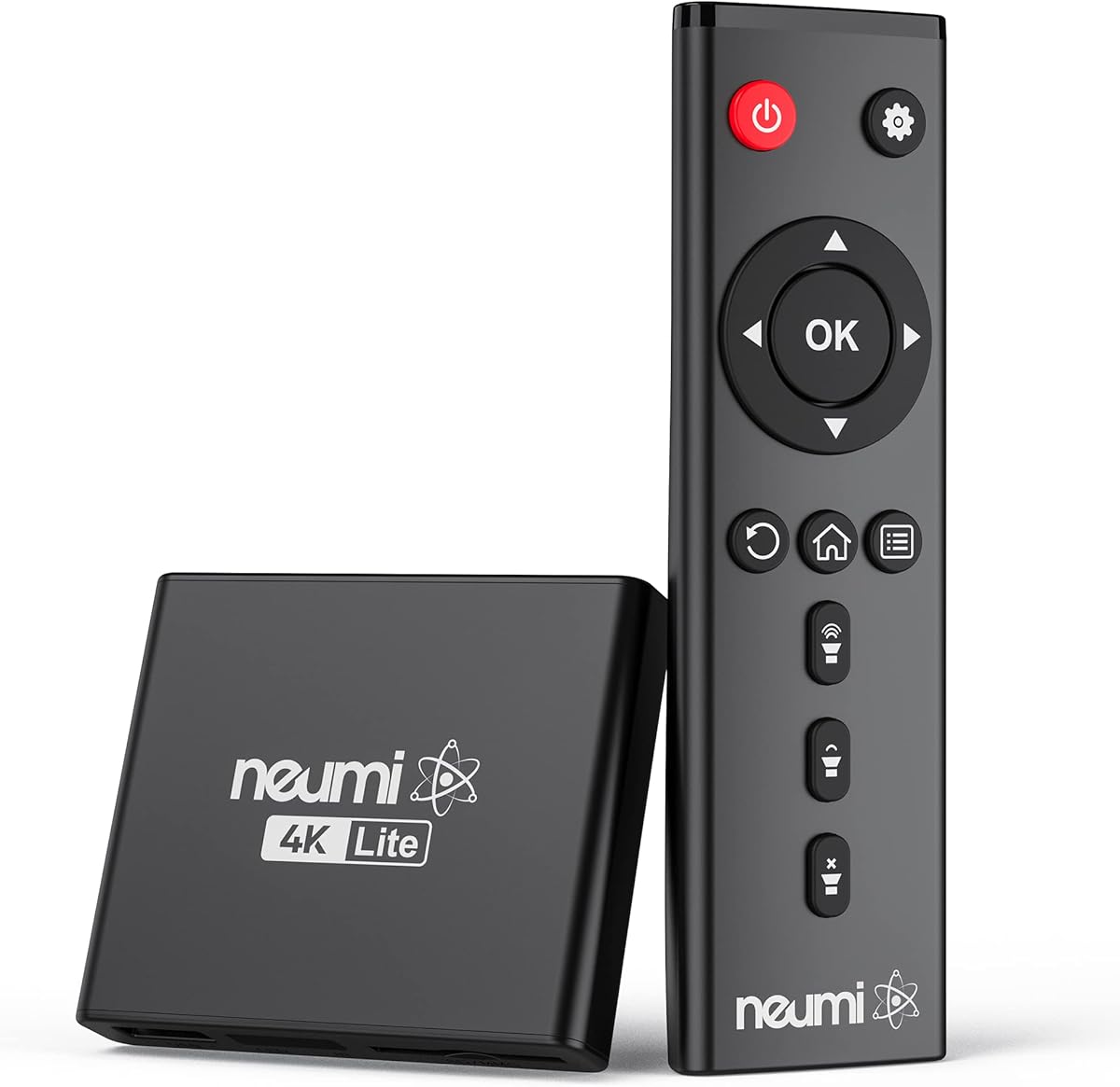
The NEUMI Atom 4K Lite Media Player combines a compact size with powerful features like trigger sensor input and H.265 decoding. With a 4.3-star rating, it is highly regarded for its ease of use and 4K output.
We may earn a commission when you buy through this link, at no additional cost to you.
This device plays videos up to 2160p/60Hz and supports digital surround sound for a cinema-like experience. It reads USB and SD cards with automatic playback and looping. The trigger feature allows for interactive signage setups.
While sensors are sold separately, the hardware ready to support them. The player is smaller than a deck of cards, making it ideal for hidden installations. It supports FAT32, exFAT, and NTFS file systems.
Art galleries, museums, or special effects setups benefit from its interactive capabilities. Home users can enjoy smooth 4K playback without complex menus. The AV output ensures compatibility with older audio systems.
Push-button or motion sensors can trigger specific videos, making it perfect for interactive digital signage or custom museum displays.
Support for H.265/HEVC and 10-bit color delivers stunning visuals and efficient file compression without compromising playback quality.
We may earn a commission when you buy through this link, at no additional cost to you.
The ACEMAX 4K@60Hz Offline Media Player offers a unique 2-in-1 design with an HDD enclosure. While it has a 3.5-star rating, it provides excellent value for users needing local playback with integrated storage options.
We may earn a commission when you buy through this link, at no additional cost to you.
It supports 4K@60Hz H.265/HEVC playback and includes a metal housing for heat dissipation. You can install a 2.5-inch SATA drive directly or use USB/MicroSD. Auto play and loop features are ideal for displays.
Some users note that HDDs require specific formatting to be recognized. The remote requires line of sight but allows easy navigation. Playback compatibility depends on file container and codec specifications.
Retail displays and menu boards benefit from its loop and resume capabilities. It suits those wanting an all-in-one solution for digital signage. Ensure you format drives correctly before installing for optimal performance.
The unit accepts 2.5-inch SATA HDDs or SSDs directly, combining media playback and storage enclosure in a single compact device.
Aluminum housing helps dissipate heat during extended playback, ensuring reliability for continuous signage applications in various environments.
We may earn a commission when you buy through this link, at no additional cost to you.
This 4K@30hz Media Player emphasizes audio-visual quality with HDMI up to 7.1 surround sound. With a 4.0 rating, it is a solid choice for home entertainment systems that need robust audio and video handling.
We may earn a commission when you buy through this link, at no additional cost to you.
It supports H.265 decoding and dual USB ports, though only one device is read at a time. You can connect a mouse or keyboard for navigation. Vertical screen support makes it unique for specific display needs.
The aluminum alloy construction provides durability. It supports large files on NTFS, overcoming FAT32 limits. Optical and AV outputs allow flexible speaker connections. PPT documents are also readable.
Ideal for movie nights or professional presentations needing vertical alignment. The remote and file navigation options are straightforward. Ensure your display supports 4K@30Hz for the best experience.
HDMI up to 7.1 surround sound delivers immersive audio experiences, perfect for home theater setups or large room presentations.
Two USB ports allow you to connect a storage device and input peripherals like a mouse or keyboard simultaneously for easier control.
We may earn a commission when you buy through this link, at no additional cost to you.
The HDMI Media Player 4K Ultra HD is a robust solution for advertising and multimedia playback. With a 4.2 rating, it handles various formats and resolutions efficiently for commercial or home use.
We may earn a commission when you buy through this link, at no additional cost to you.
It supports 4K@30Hz output and H.265 decoding with a bit rate up to 20000. Video, SD, and USB drive inputs allow flexible content sources. Fiber optic and AV outputs offer diverse audio connection options.
Subtitle files like SRT and SSA are supported for accessibility. It reads embedded and external subtitles seamlessly. The HUB connectivity allows additional input devices if needed. AV cables are included for convenience.
This player is suitable for retail promotions and digital signage. Ensure your media files are within supported resolution and bit rate limits. Regular formatting helps maintain smooth playback performance.
HDMI provides high-definition video while optical and AV outputs enable flexible audio routing to separate speaker systems.
Designed for advertising and multimedia playback, it supports loop playback and handles diverse file types without needing streaming services.
We may earn a commission when you buy through this link, at no additional cost to you.
The WD 2TB Elements Portable External Hard Drive is the Editor's Choice for reliable storage that works with media players. With a 4.7 rating, it offers high capacity in a small, lightweight enclosure.
We may earn a commission when you buy through this link, at no additional cost to you.
It supports plug-and-play expandability with SuperSpeed USB 3.2 Gen 1 speeds. Available in capacities up to 6TB, it stores extensive media libraries. Its design is ideal for consumers on the go needing reliable backup.
This drive pairs well with the media players in this guide. It is compatible with Windows and Mac systems easily. The robust build ensures data safety during transport. No drivers are needed.
Ideal for storing large video files or music libraries. Use it with a media player for offline access. Ensure you maintain backups to protect important data from unexpected hardware failure.
SuperSpeed USB 3.2 Gen 1 provides up to 5Gbps transfer speeds, making it easy to move large video files quickly.
No software installation is needed to get started, ensuring compatibility across various devices and operating systems immediately.
We may earn a commission when you buy through this link, at no additional cost to you.
The 4K@60Hz H.265 Ultra HD Digital Media Player is a top premium choice with a perfect 5.0 rating. It offers a 2-in-1 design combining media playback and HDD enclosure for advanced users.
We may earn a commission when you buy through this link, at no additional cost to you.
It supports H.265/HEVC decoding and 4K@60Hz output. You can read USB, Type-C, and SD card storage. Includes shuffle and auto loop modes for varied playback needs. Mac formatted drives are also supported.
The Type-C cable allows easy data transfer to laptops. It is suitable for home theater and commercial signage. Continuous slide shows and random play features add versatility. The device handles various formats like MKV and MP4.
Ideal for users needing high-speed playback and flexible storage options. Its premium build ensures stability for commercial environments. Ensure you install a SATA drive for the best enclosure performance.
This multifunction design works as both a media player and HDD enclosure, reducing device clutter and improving setup efficiency.
Mainstream formats like MP4, MKV, and AVI are fully supported, ensuring most media files play without conversion.
We may earn a commission when you buy through this link, at no additional cost to you.
This Ultra HD 4K@60Hz Digital Media Player features an internal HDD enclosure and a one-year warranty. With a 3.8 rating, it offers solid features for those needing flexible storage and high resolution playback.
We may earn a commission when you buy through this link, at no additional cost to you.
It supports H.265/HEVC decoding and smooth 4K@60Hz playback. Type-C, USB, and SD card inputs allow varied media sources. Auto-play and resume functions make it convenient for unattended displays.
The remote requires AA batteries which are not included. The Type-C cable enables data transmission to laptops. It is suitable for home theaters and digital signage. Ensure your drives are properly formatted.
Ideal for small businesses needing reliable menu boards or lobby content. The warranty provides added peace of mind. Check battery requirements before setup to avoid delays.
A one-year warranty offers protection against defects, ensuring reliable service for business or personal usage scenarios.
Type-C, USB, and SD card inputs provide broad storage flexibility for different media files and formats.
We may earn a commission when you buy through this link, at no additional cost to you.
The 4K Ultra HD Media Player is designed for digital signage with configurable video rotation and auto playback. With a 3.0 rating, it offers specific business features but may require careful setup.
We may earn a commission when you buy through this link, at no additional cost to you.
It supports 4096×2304 resolution and various codecs. Auto playback and resume features are useful for unattended displays. USB drives and MicroSD cards are supported. Video rotation allows flexible mounting options.
The remote and user-friendly design simplify navigation. It is suitable for museums and restaurants. Ensure your drives are formatted correctly. AV output allows use with older analog systems.
Ideal for small commercial displays needing customization. The affordable price makes it accessible. Test compatibility with your media files before deployment to ensure smooth operations.
Video output can be rotated 90/180/270 degrees for flexible installation orientations in various display environments.
Auto playback and resume features allow continuous operation without user intervention, perfect for digital signage applications.
We may earn a commission when you buy through this link, at no additional cost to you.
Selecting the right media player involves evaluating resolution support, file compatibility, and storage connectivity to match your specific needs.
Ensure the player supports 4K or 1080p depending on your TV capabilities. Look for HDMI output that matches your display standards for sharp visuals.
Higher resolution support like 4K@60Hz provides smoother playback for modern TVs.
Check if the device supports common codecs like H.265, MKV, MP4, and AVI. Some players may require specific file types for smooth playback.
Broad codec support ensures you can play most media files without prior conversion.
Evaluate USB, MicroSD, and HDD enclosure options based on your storage needs. Some players support drives up to 8TB for extensive content libraries.
Choose a model that fits your storage capacity requirements for convenience.
Look for HDMI, AV, and optical outputs to connect to TVs and audio systems. Multiple ports increase flexibility for older and newer devices.
AV and optical ports ensure compatibility with legacy equipment.
Auto play, loop, and resume functions are critical for signage. Random play and shuffle modes add variety for home entertainment.
Feature-rich players offer better control over content presentation.
Compact and durable designs are ideal for hidden setups. Metal housings help dissipate heat during long playback sessions.
Good build quality ensures long-term reliability and stable operation.
Intuitive menus and remote controls simplify navigation. Some players require line of sight for the remote which may affect placement.
A user-friendly interface reduces setup time and effort.
Balance cost with features like 4K support and storage capacity. Budget models may lack advanced connectivity but offer good value.
Invest in features that match your usage scenario for the best return.
Connect the player to your TV using an HDMI cable and plug the power adapter into a nearby outlet. Ensure your storage devices are formatted correctly to avoid errors.
Use the included remote to navigate through your media files and select videos, music, or photos. Adjust settings like looping or playback speed as needed for your content.
Keep the device in a well-ventilated area to prevent overheating during long sessions. Regularly check for firmware updates to maintain performance and security.
Most of these players focus on offline playback from local storage. Streaming apps like Netflix or YouTube are not supported on these devices unless specified.
Supported file systems typically include FAT32, exFAT, and NTFS. Check the manual for your specific player to ensure your drive format is recognized.
Yes, 4K players can usually downscale video to work on 1080p TVs. You will still enjoy smooth playback but without the full 4K resolution.
No, these players work offline and do not require Wi-Fi. Internet is only needed if firmware updates or specific online features are supported.
Use your computer's disk utility to format the drive to FAT32 or NTFS. Backup data before formatting to avoid accidental loss of important files.
Ensure the drive is formatted correctly and within the supported capacity limit. Try reformatting the drive or testing it on another device first.
We reviewed ten top models including the Micca 4K, NEUMI Atom 4K Lite, and WD 2TB Elements for performance and value. Each offers unique strengths suited for home entertainment or commercial signage needs.
Prioritize video resolution support and storage connectivity when selecting a player. Choose a device that matches your display capabilities and file format requirements for smooth playback.
Prices and availability may change so verify current listings before purchasing. Consider warranty terms and customer support options to ensure a reliable experience.