
Cooling Fan for Nintendo Switch 1/2
4.6Editor score
Adjustable speed control
LED temperature display
Micro USB power
This guide compares the top ten external cooling fan solutions for Nintendo Switch docks to help you prevent overheating and extend console lifespan during
Gaming enthusiasts often face overheating issues when using their Nintendo Switch for long sessions. External cooling fans provide a reliable solution to maintain optimal performance and protect your hardware from thermal stress effectively.
We evaluated ten leading cooling accessories based on fan speed, noise levels, compatibility, and build quality. Our analysis focuses on real-world performance metrics and user feedback to ensure you make an informed decision.
Each pick highlights specific strengths like LED displays or auto on features for different needs. Prices and availability can shift rapidly so check current listings before purchasing to secure the best deal today.
4.6Editor score
4.4Editor score

4.8Editor score
The following comparison table breaks down key specifications and features across all ten models to help you visualize differences in performance and design quickly.


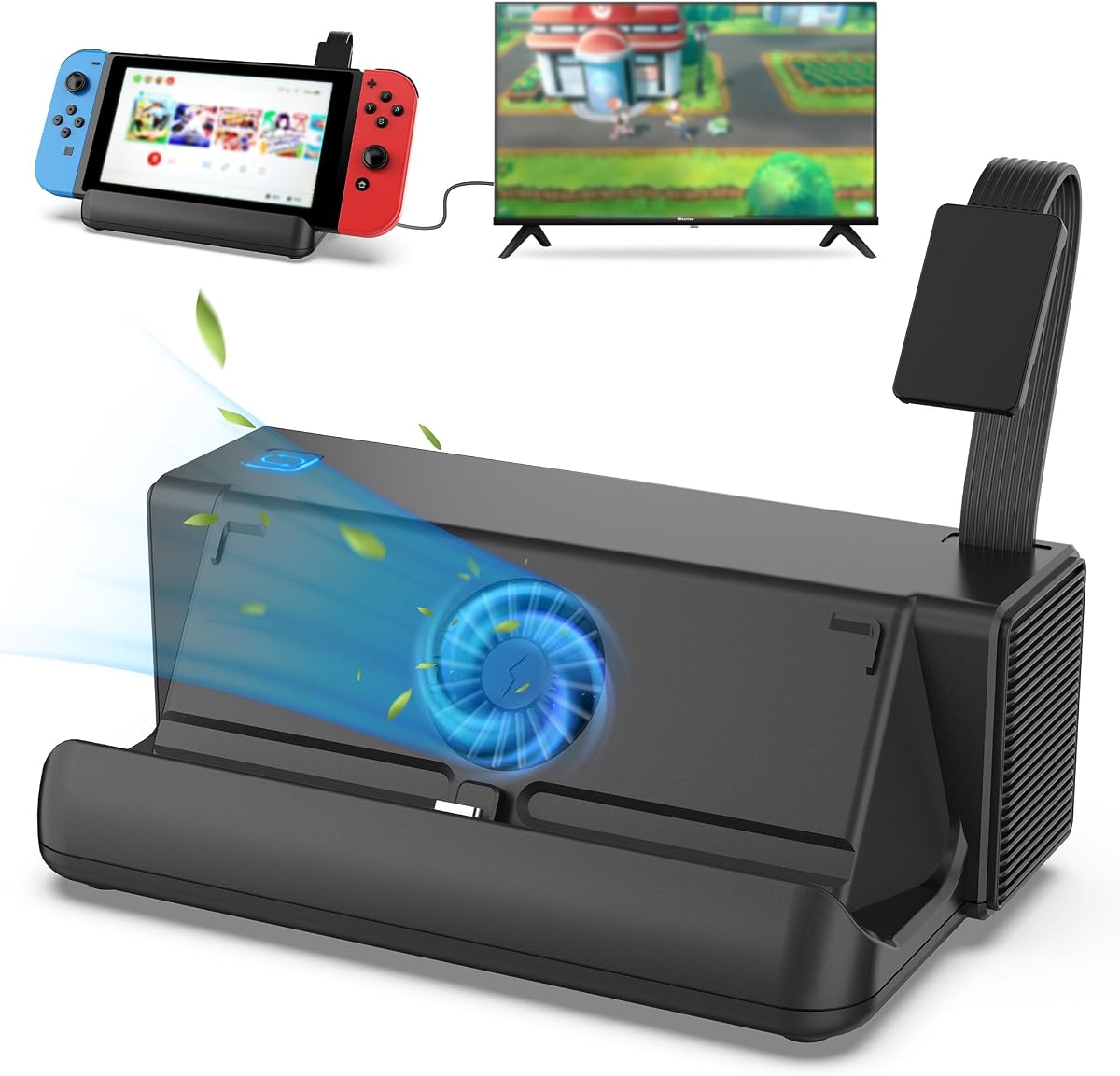
This cooling fan replacement kit delivers strong performance for a low cost making it ideal for budget-conscious gamers. It includes an LED display to monitor fan speed and exit temperature ensuring transparency during gameplay sessions.
We may earn a commission when you buy through this link, at no additional cost to you.
The adjustable fan speed ranges from 510 rpm to 6000 rpm allowing you to balance noise and cooling power as needed. Users report it prevents overheating effectively so you can play multiple hours without system pauses due to thermal throttling.
While it works well the Micro USB cable can create clutter when plugged into the dock back. Noise becomes noticeable at top speeds though it remains quiet under 2400 rpm which covers most casual gaming needs.
Buy this if you need reliable cooling without spending much. The included joystick caps and fixed pad add value making it a complete solution for standard Switch dock stations.
The digital display shows current fan rpm and exhaust temperature in Celsius giving you real-time feedback on thermal conditions.
Below 2400 rpm the fan operates nearly silently ensuring uninterrupted audio experiences during quiet game moments.
We may earn a commission when you buy through this link, at no additional cost to you.
Designed specifically for the original Nintendo Switch dock this unit integrates three fans for strong airflow. It is straightforward to install requiring no tools and uses the dock USB port for power.
We may earn a commission when you buy through this link, at no additional cost to you.
The turbo and normal options let you pick cooling intensity based on the task. Its compact profile saves space on entertainment units and prevents overheating during long gaming sessions effectively.
Some users find it less refined than newer models with fewer features like displays. Still it offers solid performance for those who prioritize function over extras.
Select this if you want basic effective cooling for the original dock. It is simple to use and keeps the system running smoothly.
Three built-in fans work together to lower console temperature quickly and maintain consistent airflow.
The precise dimensions allow it to sit comfortably behind the dock without blocking other ports.
We may earn a commission when you buy through this link, at no additional cost to you.
This dual-fan stand targets Switch 2 users with automatic cooling activation when connected to the dock. It offers multiple levels and RGB lighting to match your setup aesthetic.
We may earn a commission when you buy through this link, at no additional cost to you.
Beyond cooling it provides USB-A and USB-C expansion ports for charging controllers or headsets. Six game card slots help organize your collection without extra accessories.
The feature set adds value but may be overkill for simple cooling needs. It is best for those who want an all-in-one station with style.
Choose this if you own a Switch 2 and want extra connectivity. The auto feature ensures cooling never gets overlooked during gameplay.
Additional USB ports allow you to charge peripherals directly from the cooling station.
Nine RGB modes let you set a mood that fits any game genre.
We may earn a commission when you buy through this link, at no additional cost to you.
This bracket style cooler uses three internal fans to dissipate heat and keeps the console cool. It is small and easy to set up without tools.
We may earn a commission when you buy through this link, at no additional cost to you.
You can adjust speed between turbo and normal modes via a side switch. Superior materials ensure durability while maintaining an attractive look.
It lacks advanced displays or lights but delivers reliable cooling performance for the price. Ideal for minimalists who want function.
Buy this for straightforward cooling. It fits well in tight spaces and prevents overheating effectively.
Made from strong materials it withstands daily use without wear or tear.
The small footprint ensures it does not clutter your entertainment cabinet.
We may earn a commission when you buy through this link, at no additional cost to you.
This dock combines cooling card switching and ports in one compact unit. It prevents overheating with a built-in fan and supports 1080p HDMI output.
We may earn a commission when you buy through this link, at no additional cost to you.
One key switching allows rapid card changes without physical swapping. Independent switches let you disable unused features to save energy and reduce noise.
It is more expensive than simple fans but replaces multiple accessories. Perfect for home and travel use with Switch or OLED models.
Choose this for a complete dock upgrade. The card tech alone makes it worth the investment.
Switch between four active cards instantly with a single button press.
Use desktop mode for portable play or TV mode for home entertainment.
We may earn a commission when you buy through this link, at no additional cost to you.
Designed for the 2021 OLED dock this fan fits perfectly and dissipates heat fast with super turbo fans. It includes 14 card slots for easy game access.
We may earn a commission when you buy through this link, at no additional cost to you.
The blue light effect matches the dock aesthetic while the ABS material keeps it light yet durable. Installation is simple with a Type-C cable.
It maintains system cool even during charging. The light cannot be customized but it looks nice.
Buy this for OLED owners seeking a direct upgrade. The capacity for game cards is unmatched.
Designed for the HEG-007 dock it integrates without gaps or wobbles.
Fourteen slots let you store all your favorite titles in one place.
We may earn a commission when you buy through this link, at no additional cost to you.
This product is made for the OLED model base and increases air circulation quietly. It features a blue LED light synced with the fan.
We may earn a commission when you buy through this link, at no additional cost to you.
You simply connect the adapter to the base and press a switch to turn it on. It reduces heat dissipation risks without noise distraction.
Though it has one fan it performs well for standard sessions. Best for those who value silence.
Choose this if noise is your main concern. It is a clean solution for OLED users.
The high speed fan circulates air efficiently while staying unobtrusive.
The blue light turns on when the fan does for a unified look.
We may earn a commission when you buy through this link, at no additional cost to you.
This fan starts and stops automatically with your Switch 2 so you never forget it. It offers 3 customizable speeds from 4000 to 6000 RPM.
We may earn a commission when you buy through this link, at no additional cost to you.
The vertical air duct aligns with the console inlet for maximum efficiency. A wide base and residue-free tape ensure it stays in place.
It balances performance and noise well. Good for hands-free use.
Buy this for convenience. The auto on off is a great quality of life feature.
No manual operation is needed as the fan syncs with the console.
Aligns perfectly to direct airflow exactly where it is needed.
We may earn a commission when you buy through this link, at no additional cost to you.
This acrylic mount uses an elevated hollowed-out structure to boost airflow around the dock without any fans. It ensures a snug fit that does not block vents.
We may earn a commission when you buy through this link, at no additional cost to you.
It is totally silent and needs no power. The non-slip silicone pads protect your dock from scratches while keeping it stable.
It is best for those who want to reduce heat without adding noise or cables. A premium accessory for a clean setup.
Choose this for a minimalist approach. It reduces overheating risks with zero effort.
With no fans involved there is absolutely no sound during operation.
Black acrylic with silicone pads gives a high-end look and feel.
We may earn a commission when you buy through this link, at no additional cost to you.
This versatile fan fits original dock stations and other devices like Steam Deck. It features LED displays to show real-time fan speed and temperature.
We may earn a commission when you buy through this link, at no additional cost to you.
Speed adjustment from 510 to 6000 RPM lets you match airflow to needs. The sponge pad prevents slipping and scratches.
It is designed for long gaming sessions and includes accessories. It helps avoid unexpected pauses due to overheating.
Choose this if you want one fan for multiple devices. It is a reliable tool for any gamer.
Works with both Switch OLED and Steam Deck for broad utility.
LED display keeps you informed of exhaust temp at all times.
We may earn a commission when you buy through this link, at no additional cost to you.
When selecting a cooling solution consider these factors to find the model that best matches your gaming habits and setup needs.
Higher RPMs generally remove heat faster but may create more noise. If you play in a quiet room look for fans that offer adjustable speeds so you can use low settings when needed.
Focus on models that balance performance and quiet operation to avoid distraction during audio-sensitive games.
Most fans are USB powered and plug into the dock or a wall adapter. Ensure you have the right cables available or included in the package.
Choose a model that fits your existing power setup to avoid clutter.
Verify the fan is designed for your exact dock model whether standard OLED or Switch 2. Some options are universal while others are tailored.
Check dimensions and connector types to ensure a perfect fit without blocking other ports.
Look for LED displays to monitor temperature or extra slots for game cards. These add convenience and value to your purchase.
Select features that enhance your workflow rather than adding complexity.
Durable materials like ABS or acrylic ensure longevity. Check for non-slip pads to protect your console from scratches.
A sturdy build is worth the investment for daily use.
Simple installation without tools saves time. Most units fit directly behind or under the dock.
Prioritize designs that allow for quick setup and removal if needed.
A good warranty covers defects and shows manufacturer confidence. Look for at least a year of support.
Customer service responsiveness matters if issues arise.
Compare features against cost to find the best deal. High prices do not always mean better cooling.
Choose the model that offers the right balance for your needs.
First connect the fan to your dock using the included power cable ensuring it is secure. For USB models plug into the dock port rather than a wall adapter.
Next turn on the fan before starting your game and adjust the speed as needed. Listen for any unusual sounds that might indicate a problem.
Regularly dust the fan vents with a soft cloth to maintain airflow. Clean the base and pads to prevent debris buildup.
No when installed correctly these fans are safe. They are designed to fit specific dock models without causing pressure or blockage. Follow the instructions to avoid issues.
Most products include the necessary Micro USB or Type-C cables. Check the package contents before buying. If not included verify compatibility with your power sources.
Many models offer quiet modes below certain speeds. Turbo or max settings may be louder. Choose adjustable fans to keep noise low when needed.
Some fans are universal while others target specific docks. Verify the listing to ensure OLED compatibility. The GLDRAM and Dobe models are built for OLED.
Dust buildup reduces performance so clean it once a month. Use compressed air or a soft brush to clear vents and blades.
Ensure vents are not blocked by walls or furniture. Use the fan on a flat surface and check for proper placement.
This guide covered ten top options from budget to premium. The best picks offer reliable cooling and useful features like displays or card slots.
Prioritize fit and noise levels since these impact daily use. A good fan protects your console and extends your play sessions.
Prices and availability change frequently so review current listings before buying. You will find a solution that fits your needs perfectly.