
Digital Calendar 10.1 Inch Wall Plan Touch Screen WiFi
4.2Editor score
Affordable 10.1 inch display
Real-time sync with major calendars
Built-in grocery list generator
Finding the right digital meal planning calendar can transform how your household manages daily routines and nutrition. These devices combine scheduling tools with interactive features to keep everyone on the same page regarding meals and activities.
We evaluated ten leading models based on screen quality, synchronization capabilities, and built-in organizational tools like chore trackers. Our analysis focuses on usability, family-friendly features, and value for money across different price points.
Each product selection highlights unique strengths tailored to various household needs, from compact displays to large command centers. Please note that pricing and availability may fluctuate, so check current listings before making a purchase decision.
4.2Editor score

4.7Editor score

4.6Editor score
As an Amazon Associate we earn from qualifying purchases.
The following table provides a side-by-side comparison of all ten selected models, highlighting key specifications and unique capabilities to help you quickly identify the best fit for your home.




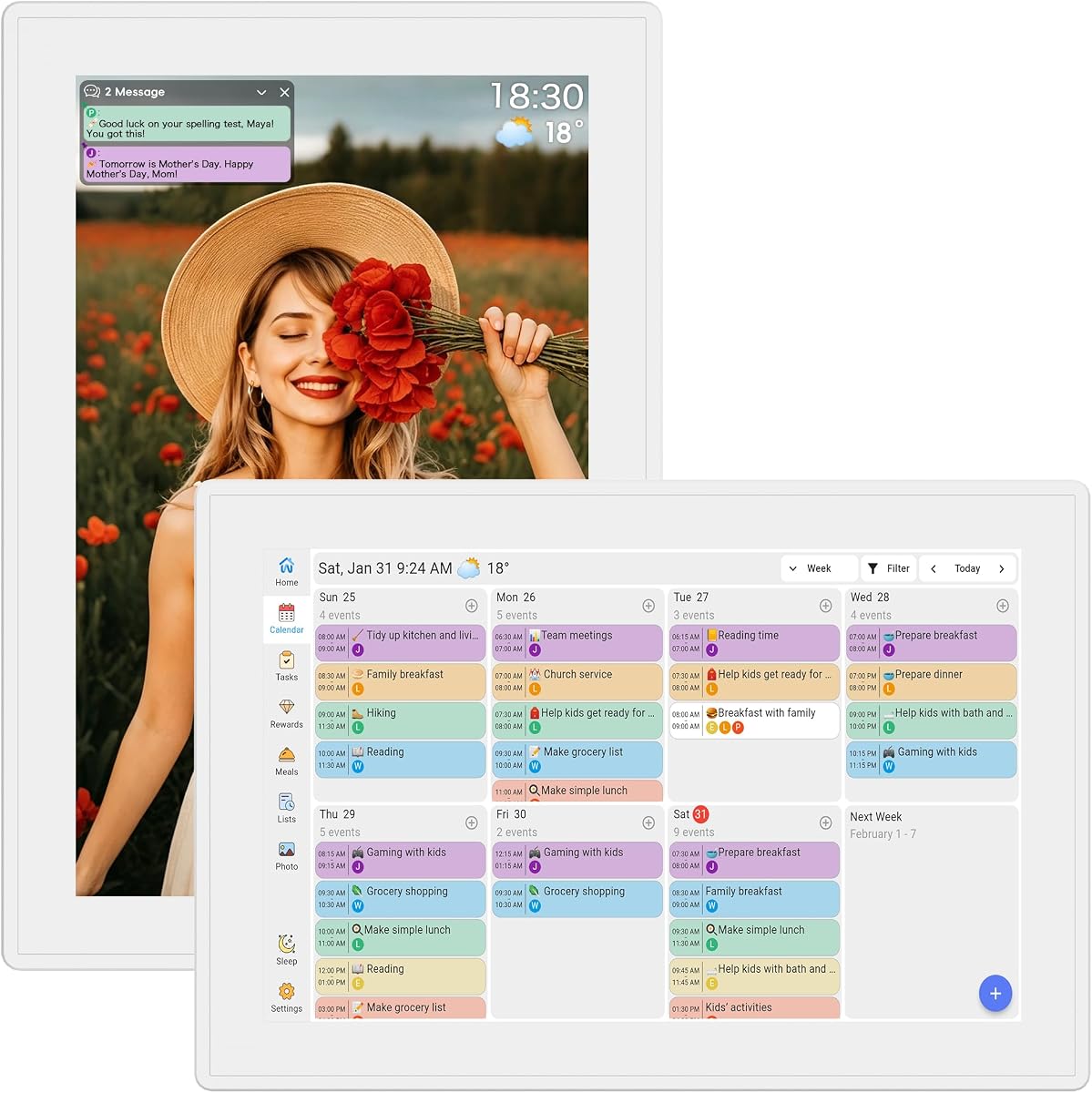

This model stands out as the top choice for families seeking a comprehensive command center. With a 15.6-inch Full HD touchscreen, it offers ample space to view schedules, meal plans, and chore charts simultaneously without clutter.
We may earn a commission when you buy through this link, at no additional cost to you.
The Whale Framely app ensures seamless synchronization across devices without demanding monthly subscriptions. Users can easily assign color-coded profiles to family members, making it simple to track individual schedules and reduce conflicts.
While the initial investment is higher than budget models, the long-term value is significant due to the lack of recurring fees. The interface is intuitive, though some users might find the setup process slightly technical compared to simpler plug-and-play options.
Ideal for households needing a central hub for organization, this calendar balances functionality with ease of use. It is highly recommended for families prioritizing reliable syncing and a premium viewing experience.
The integration with major calendar services ensures all family appointments are updated instantly on the main display.
Kids can track tasks and earn rewards directly on the screen, promoting responsibility and engagement.
We may earn a commission when you buy through this link, at no additional cost to you.
This budget-friendly option provides essential digital planning features without breaking the bank. Its 10.1-inch screen is compact enough for smaller kitchens while still displaying clear text and images.
We may earn a commission when you buy through this link, at no additional cost to you.
Users appreciate the ability to sync schedules with Google and Outlook easily. The built-in grocery list feature helps streamline shopping trips, reducing the mental load of tracking items manually.
While it lacks some advanced features like AI suggestions, it fulfills the core purpose of organizing family life effectively. The auto-sleep mode helps conserve energy when the device is not actively in use.
For families looking to upgrade from paper planners without overspending, this model is an excellent starting point. It balances cost and functionality well for basic scheduling needs.
The smaller footprint allows placement on countertops without overwhelming limited space.
When idle, the screen displays cherished family photos, adding a personal touch to the device.
We may earn a commission when you buy through this link, at no additional cost to you.
This model focuses on speed and simplicity, making it ideal for families who prioritize instant updates. The dual-band Wi-Fi ensures that changes made on phones reflect immediately on the wall display.
We may earn a commission when you buy through this link, at no additional cost to you.
Color-coded profiles allow each family member to have a distinct schedule, preventing overlaps in appointments. The meal planner is straightforward, helping users map out weekly menus and grocery needs efficiently.
While it does not offer extensive customization like Android widgets, it excels in its core function of keeping everyone organized. The included stand provides flexibility for desktop placement alongside wall mounting options.
It is a reliable choice for those seeking a hassle-free digital organization tool. The responsive touchscreen ensures that interaction is smooth, even for younger children checking their chores.
Real-time synchronization ensures no family member misses an updated appointment or event.
The included stand allows versatile placement on desks or counters without wall drilling.
We may earn a commission when you buy through this link, at no additional cost to you.
This device is designed with children in mind, featuring interactive elements that make chores engaging. The reward system motivates kids to complete tasks independently, fostering responsibility.
We may earn a commission when you buy through this link, at no additional cost to you.
Beyond chores, it serves as a robust family command center, consolidating schedules and lists. The transition to a photo frame when idle adds warmth to the kitchen environment.
While the design is straightforward, it focuses on utility over flashy features. This simplicity makes it accessible for all ages, ensuring everyone can contribute to household organization without confusion.
Families with younger children will find the interactive aspects particularly beneficial. It successfully combines practical planning tools with elements that keep kids engaged and motivated.
Interactive rewards turn mundane chores into fun challenges for children.
Automatic photo rotation keeps the device feeling personal and inviting.
We may earn a commission when you buy through this link, at no additional cost to you.
The Skylight Calendar offers a premium aesthetic that blends seamlessly into modern home decor. Its 15.4-inch screen provides excellent visibility for schedules and meal plans alike.
We may earn a commission when you buy through this link, at no additional cost to you.
The optional Plus Plan unlocks additional features like Disney mode, which appeals to younger families. However, the core functionality remains robust even without the subscription, offering solid organization tools.
Users appreciate the intuitive interface and the ease of connecting with major calendar services. The design is minimalist yet functional, making it a stylish addition to any kitchen wall.
While the price is higher, the quality of build and user experience justify the investment for many. It is ideal for those who value design and premium features in their household tech.
Exclusive Disney characters and animations make the device fun for children.
High-quality materials ensure durability and a sleek appearance in any room.
We may earn a commission when you buy through this link, at no additional cost to you.
This model prioritizes simplicity and cost-effectiveness with zero hidden fees. The smart weekly meal manager simplifies the process of planning dinners and tracking inventory.
We may earn a commission when you buy through this link, at no additional cost to you.
Automatic grocery list generation ensures that needed items are never forgotten during shopping trips. The interface is clean, focusing on essential functions like scheduling and reminders without clutter.
While it lacks advanced voice control, it performs reliably for basic household management. The auto-sleep feature helps maintain energy efficiency throughout the day.
For users who want a no-nonsense tool that handles meals and schedules efficiently, this is a great option. It reduces daily stress by keeping tasks and meals organized in one place.
Meal plans automatically generate grocery lists, streamlining shopping trips.
All features are unlocked without requiring monthly subscriptions or hidden charges.
We may earn a commission when you buy through this link, at no additional cost to you.
This premium model redefines what a digital calendar can do with its massive 21.5-inch display. It acts as a full command center, integrating fridge management with standard scheduling tools.
We may earn a commission when you buy through this link, at no additional cost to you.
The AI fridge inventory tracking allows users to monitor food items and expiration dates efficiently. Recipe suggestions are generated based on available ingredients, reducing food waste and meal stress.
With built-in streaming apps like Netflix, the device serves as an entertainment hub in the kitchen. However, the high cost and large physical footprint mean it suits larger homes with ample wall space.
For tech-savvy families wanting a comprehensive smart home hub, this device offers unmatched versatility. It transforms meal planning into a highly interactive and efficient experience.
Track food inventory and expiration dates with advanced AI tools.
Get tailored recipe suggestions based on what you already have.
We may earn a commission when you buy through this link, at no additional cost to you.
This planner distinguishes itself with Magic Import, allowing users to add events via voice or photo. The wood-grain design adds a natural aesthetic that fits well in traditional kitchens.
We may earn a commission when you buy through this link, at no additional cost to you.
Real-time weather updates and smart reminders ensure that daily life runs smoothly without manual input. The interface supports color-coded schedules, helping families visualize busy days clearly.
While the design is attractive, the device relies on an app for full synchronization features. This dependency ensures remote access but may require extra setup for some users.
It is an excellent choice for those who appreciate unique design elements and convenient import tools. The focus on reducing friction in scheduling makes it a practical addition to busy homes.
Add events instantly using voice commands or by snapping a photo.
Aesthetic design elements help the device blend into home decor.
We may earn a commission when you buy through this link, at no additional cost to you.
This model shines in its ability to engage children with customizable reward charts and task tracking. The kids' activity planner helps manage extracurricular schedules and daily routines effectively.
We may earn a commission when you buy through this link, at no additional cost to you.
Smart weather updates keep the family prepared for outdoor activities or weather-related schedule changes. The interface supports personalized checklists, allowing users to tailor tasks to specific needs.
While the app interface is basic, it is functional enough for daily planning. The focus on behavioral reinforcement makes it a standout choice for families with children.
It provides a practical way to build habits and reduce nagging in household management. The detailed activity planning features ensure that every child's schedule is tracked accurately.
Motivate children with a reward system tailored to family goals.
Create custom lists for holidays, travel, and everyday tasks.
We may earn a commission when you buy through this link, at no additional cost to you.
Unique among digital calendars, this model supports a full Android mode for app installation. This feature allows users to download apps from Google Play to customize the device extensively.
We may earn a commission when you buy through this link, at no additional cost to you.
The Gemini voice assistant offers hands-free control for tasks like checking schedules or managing home devices. Customizable widgets enable a personalized dashboard that reflects specific family needs.
While the Android mode offers flexibility, it may be complex for users seeking simplicity. However, for tech enthusiasts, it provides unmatched versatility beyond standard planning tools.
It bridges the gap between a dedicated planner and a general smart display. Families wanting maximum customization will find this Android support highly valuable.
Install apps from Google Play to tailor the device to your needs.
Control the calendar and smart home devices using voice commands.
We may earn a commission when you buy through this link, at no additional cost to you.
Selecting the right digital calendar requires evaluating specific features to match your household's size and technical comfort.
Screen size dictates how much information you can view at once. Larger screens like 21.5 inches are great for command centers but require wall space. Smaller 10-inch screens fit compact areas but may show fewer details.
Prioritize Full HD resolution for readability from across the room.
Real-time synchronization with services like Google Calendar and Outlook is essential. Ensure the device supports the calendar platforms your family already uses to avoid duplicate entries.
Check if sync works seamlessly with mobile devices for remote updates.
Look for integrated tools that generate grocery lists automatically from meal plans. Some models offer recipe suggestions, which can save time during the weekly planning phase.
Ensure the interface makes it easy to input and edit daily menus.
Interactive chore charts with reward systems are valuable for families with children. The ability to assign tasks to specific users helps clarify responsibilities.
A responsive touchscreen is necessary for easy task tracking.
Some devices require monthly subscriptions for advanced features. If you prefer a one-time purchase, verify which features are locked behind paywalls before buying.
Models with no subscription fees offer better long-term value.
Wi-Fi connectivity is standard but dual-band support ensures faster updates. Voice assistant integration can add convenience for hands-free interaction in the kitchen.
Check compatibility with smart home ecosystems if you have connected devices.
A plug-and-play setup saves time and frustration. Look for intuitive interfaces that are easy for all family members to navigate without extensive training.
Consider mounting options to ensure the device is placed at a convenient height.
Prices range significantly from budget models to premium ones. Determine which features are non-negotiable for your household to find the best balance of cost and utility.
Invest in higher-end models only if specific features like AI inventory management are needed.
Start by connecting the device to your home Wi-Fi network and syncing your existing calendar accounts. This ensures all family members can access the schedule immediately from their own devices.
Once connected, assign specific colors to each family member to differentiate schedules visually. Use the meal planning tool to input weekly menus and generate grocery lists automatically.
Regularly clean the touchscreen with a microfiber cloth to avoid scratches and maintain clarity. Check for software updates periodically to ensure you have the latest features and security patches.
Most models require Wi-Fi for syncing and app features. Some basic functions like viewing a locally stored calendar might work offline, but full functionality depends on an internet connection for updates.
Some advanced models support voice assistants and smart home integration. Always check the product description to confirm compatibility with your specific smart lights or locks.
Many models offer free basic features, but some advanced tools may require a subscription. Review the pricing details carefully to avoid unexpected costs after purchase.
Use a dry microfiber cloth for daily cleaning. Avoid chemical cleaners or abrasive materials that could damage the screen surface or protective coating.
Yes, most devices support simultaneous editing via the synced app. Changes made on one device reflect on the main display in real-time for all family members.
If internet access is lost, synced events may not update until reconnected. Local changes made directly on the screen are usually saved but may not sync until Wi-Fi is restored.
We reviewed ten top models ranging from budget options to premium command centers. The 15.6-inch Full HD calendar stood out for its balance of features and value, offering robust tools without hidden fees.
When selecting a device, prioritize screen size and sync capabilities to ensure it fits your home's workflow. Families with kids should look for interactive chore features to encourage engagement and responsibility.
Remember to check current pricing and availability before purchasing as deals change frequently. Investing in the right digital planner can significantly streamline your daily household management routine.