
Fractal Design Node 804
4.7Editor score
Dual chamber layout
High airflow support
Modular interior design
Discover the top cube shaped PC case options for 2026. We compare design, cooling, and compatibility to help you choose the perfect compact gaming chassis.
Cube shaped PC cases offer a unique aesthetic that transforms your desktop into a visual centerpiece. These compact chassis balance style with functionality, providing excellent visibility for your components while maintaining a small footprint. Whether you prioritize airflow, RGB lighting, or sheer portability, the right cube case can elevate your entire build.
We evaluated ten leading models based on build quality, thermal performance, and component compatibility. Our analysis focused on real-world usability, ensuring each recommendation supports modern hardware without compromising on design. From budget-friendly options to premium modular designs, this guide covers the spectrum of what is available today.
Each pick highlights specific strengths like panoramic glass views, flexible orientation, or extensive drive bays. We also note potential trade-offs such as cable management quirks or fan limitations. Prices and availability change frequently, so verify current details before purchasing to ensure you get the best value for your specific needs.
4.7Editor score

4.4Editor score

4.5Editor score
This side-by-side comparison highlights the key specifications and unique features of each cube shaped PC case. Review the table below to quickly identify which model best fits your hardware requirements and aesthetic preferences.
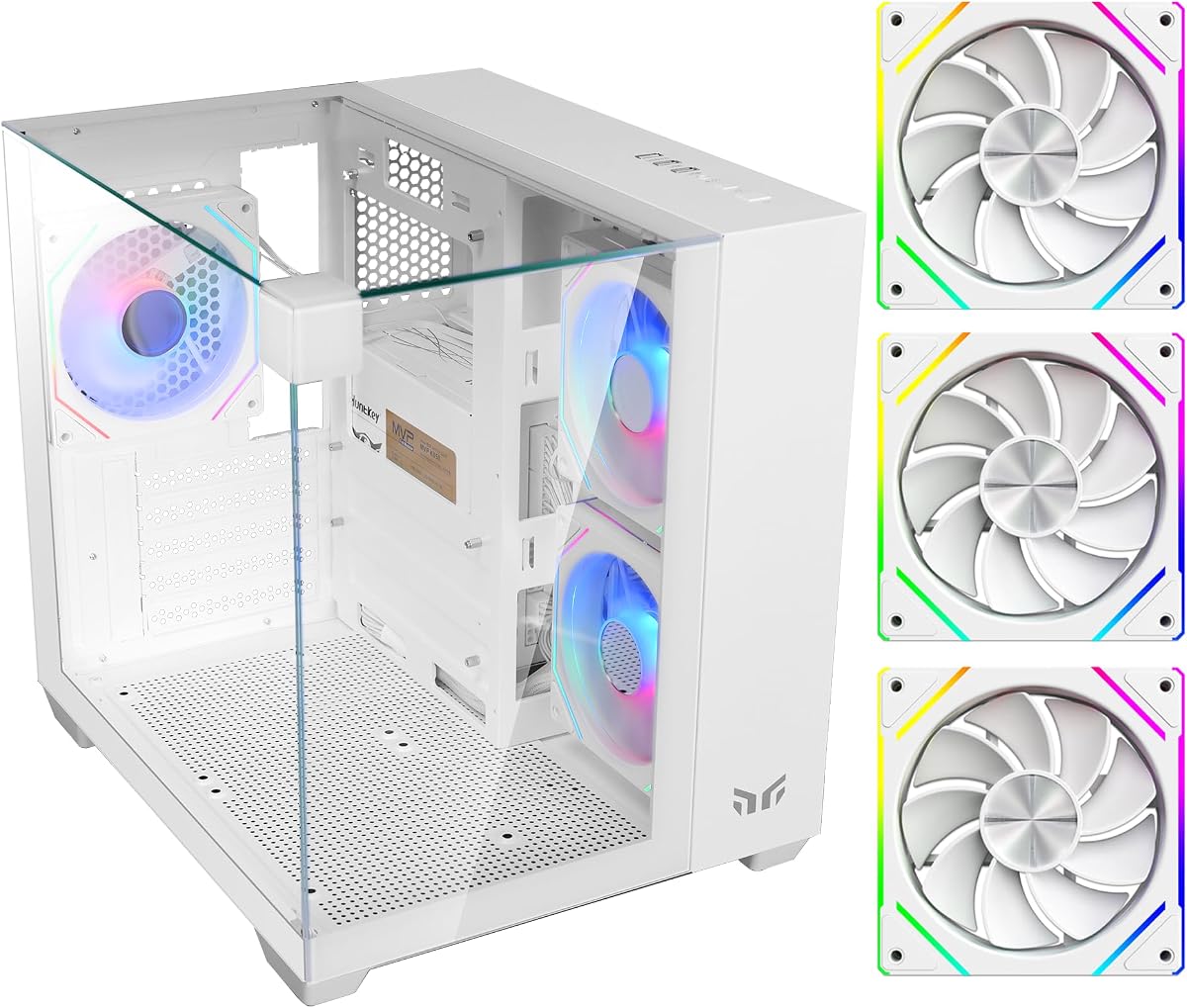



The Yeah Magic Cube stands out with its 270-degree panoramic glass design that turns any desktop into a showcase. It holds a strong 4.7 rating from users who appreciate the aesthetic appeal combined with a compact footprint. This case is ideal for builders who want to display their components without sacrificing too much desk space.
We may earn a commission when you buy through this link, at no additional cost to you.
Inside, the layout supports Micro-ATX and Mini-ITX motherboards, allowing for powerful builds in a small volume. The pre-installed 120mm ARGB fans provide immediate airflow while the dedicated cable routing keeps the interior tidy. The pillar-less design ensures that your hardware remains the focal point from almost any angle.
However, the compact nature means you are limited to graphics cards up to 325mm. While this covers many mid-range options, high-end ultra-wide cards might not fit. The glass construction also adds weight, so ensure your desk can handle the load before finalizing your setup.
If you prioritize visual impact and a clean modern look, this cube is a top contender. It balances style and function well for small form factor gaming rigs. Just verify your component dimensions before ordering to ensure a perfect fit within the compact constraints.
The triple tempered glass panels eliminate visual obstructions, offering a clear view of your system from multiple angles.
Despite its small size, the case accommodates essential high-performance hardware while maintaining a manageable footprint.
We may earn a commission when you buy through this link, at no additional cost to you.
The Cooler Master QUBE 540 offers unique flexibility by allowing the case to be positioned horizontally or vertically. This design choice lets you adapt to your desk layout while maintaining strong thermal performance. It is a robust option for users who need high-end component support without compromising on style.
We may earn a commission when you buy through this link, at no additional cost to you.
With support for full-size graphics cards up to 415mm and large E-ATX motherboards, this case handles demanding builds easily. The full front mesh panel ensures superior airflow, keeping temperatures in check during intense sessions. The inclusion of USB Type-C on the front adds modern convenience for peripheral connectivity.
One trade-off is the physical size, which may dominate smaller desks. The sturdy build adds weight, making relocation slightly difficult once set up. However, the ability to move handles and adjust the I/O panel provides significant usability benefits for daily access.
This case is perfect for gamers who want a versatile chassis that adapts to their environment. The combination of airflow and expansion space makes it a strong premium pick. Consider your available surface area before committing to this larger cube design.
The reversible I/O and movable handles let you customize the orientation to suit your specific workspace needs.
Mesh optimization and ample internal space ensure efficient cooling even under heavy gaming or creative workloads.
We may earn a commission when you buy through this link, at no additional cost to you.
The Zalman CUBIX M-ATX is an excellent entry point for those seeking a cube shaped PC case without breaking the bank. With a total volume of just 17.1 liters, it saves significant desk space while supporting standard ATX PSUs. Its 4.5 rating reflects solid performance for budget-conscious builders.
We may earn a commission when you buy through this link, at no additional cost to you.
Constructed from durable 0.8T steel, this case feels robust despite its small size. The perforated front panel aids airflow for the pre-installed 80mm fan. It accommodates GPUs up to 260mm, covering most mainstream options. USB 3.0 and USB 2.0 ports ensure you can connect devices quickly.
The main limitation is the smaller fan size which may struggle with high heat output compared to larger 120mm options. I/O is basic, lacking modern Type-C ports which some users might prefer. However, for basic office or light gaming setups, it remains a reliable choice.
If space and budget are your primary concerns, this model delivers good value. It provides a clean look and essential features without unnecessary complexity. Verify your GPU length fits the 260mm limit before purchasing to avoid compatibility issues.
Its ultra-compact dimensions make it ideal for desks with limited space or shared workstations.
The steel frame ensures durability and stability, making it a sturdy option for daily use.
We may earn a commission when you buy through this link, at no additional cost to you.
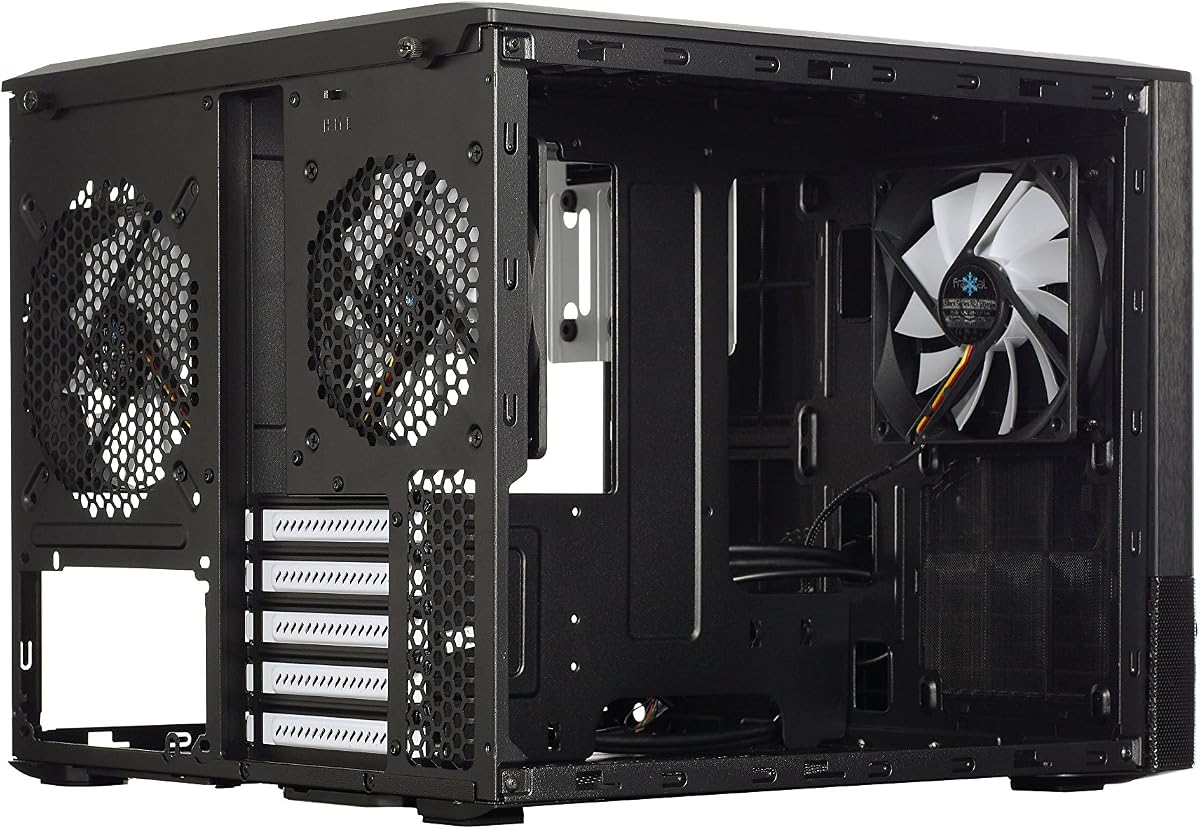
The Fractal Design Node 804 is renowned for its dual chamber layout that separates the PSU from the main build area. This design maximizes cooling efficiency and creates a cleaner internal environment. It holds a high 4.7 rating for users who value premium build quality and modularity.
We may earn a commission when you buy through this link, at no additional cost to you.
Inside, you can fit up to ten hard drives, making it a powerhouse for storage enthusiasts. The space supports up to four radiators simultaneously for extensive liquid cooling setups. The brushed aluminum front panel adds a touch of elegance to the Scandinavian design aesthetic.
The size is substantial and may not fit smaller desks. The higher price point reflects the quality and features but might be steep for budget builds. Dust filters on all intakes help maintain a clean interior, reducing maintenance needs over time.
Ideal for users needing extensive storage and cooling flexibility, this case stands out for functionality. The brand reputation ensures reliable support and durability. If you need a workhorse that balances style with serious technical capabilities, this is a strong choice.
Separating hot and cold air zones improves thermal performance and keeps components running cooler.
The flexible drive bay system supports massive storage needs, ideal for media centers or servers.
We may earn a commission when you buy through this link, at no additional cost to you.
The Apevia Prism-Elite-BK delivers an immersive lighting experience with seven pre-installed ARGB PWM fans. It supports graphics cards up to 400mm and various water cooling setups. This case is perfect for users who prioritize visual flair and high-end hardware support.
We may earn a commission when you buy through this link, at no additional cost to you.
The dual tempered glass panels offer clear visibility of the RGB effects and internal components. It features a dual chamber design to hide cables and separate heat sources. The magnetic dust filter on top makes cleaning easy, ensuring long-term performance without hassle.
However, cable management can be tricky due to the high number of fans. Build quality may vary, with some users reporting minor fitting issues. The price is higher than budget options, but the included lighting reduces extra accessory costs.
For enthusiasts who want a fully lit system out of the box, this is a great pick. It balances aesthetics with performance. Ensure your motherboard supports ARGB sync to fully utilize the included lighting capabilities.
Seven RGB fans with multiple modes provide a vibrant visual experience without extra cost.
Supports large GPUs and multiple radiator setups for advanced custom liquid cooling configurations.
We may earn a commission when you buy through this link, at no additional cost to you.
The Apevia Prism-WH is designed specifically for Micro-ATX builds with a focus on visibility. It includes five ARGB PWM fans that create a dynamic lighting environment. This case fits nicely on smaller desks while still offering substantial component support.
We may earn a commission when you buy through this link, at no additional cost to you.
Graphics cards up to 340mm fit comfortably, allowing for good performance without bulk. The dual chamber layout helps hide cables on the back side. Magnetic dust filters are included to protect internal components from debris accumulation.
The limitation is the Micro-ATX constraint which excludes larger boards. Fan control might require manual switching if you want motherboard sync. It is a solid value for users looking for RGB style without a large footprint.
If you need a compact case that still looks powerful, this model works well. The included accessories reduce the need for additional purchases. Check your motherboard compatibility to ensure the ARGB sync features work as expected.
The Micro-ATX support ensures you get powerful performance in a space-saving footprint.
Dual glass panels and five RGB fans make this case stand out visually.
We may earn a commission when you buy through this link, at no additional cost to you.
The Zalman CUBIX-G offers a stylish panda-themed design in a compact Micro-ATX form factor. It is an affordable option that includes three FRGB fans for some visual appeal. The inclusion of USB Type-C on the front panel adds a modern touch rarely found at this price point.
We may earn a commission when you buy through this link, at no additional cost to you.
It supports GPUs up to 280mm, which covers most mid-range cards. The build feels sturdy enough for daily use. The compact dimensions help clear desk space for other peripherals. It is a great choice for entry-level gaming rigs.
Airflow is standard and may need upgrades for high heat components. The front I/O lacks traditional USB 3.0 ports. Overall, it balances cost and features effectively for basic setups.
For users on a tight budget who still want a bit of style, this case is a smart buy. Verify your GPU size and I/O needs before purchasing. It is a practical solution for small desktops.
An affordable solution that brings essential modern features like USB Type-C to budget builds.
The unique panda theme adds character to a standard compact chassis.
We may earn a commission when you buy through this link, at no additional cost to you.
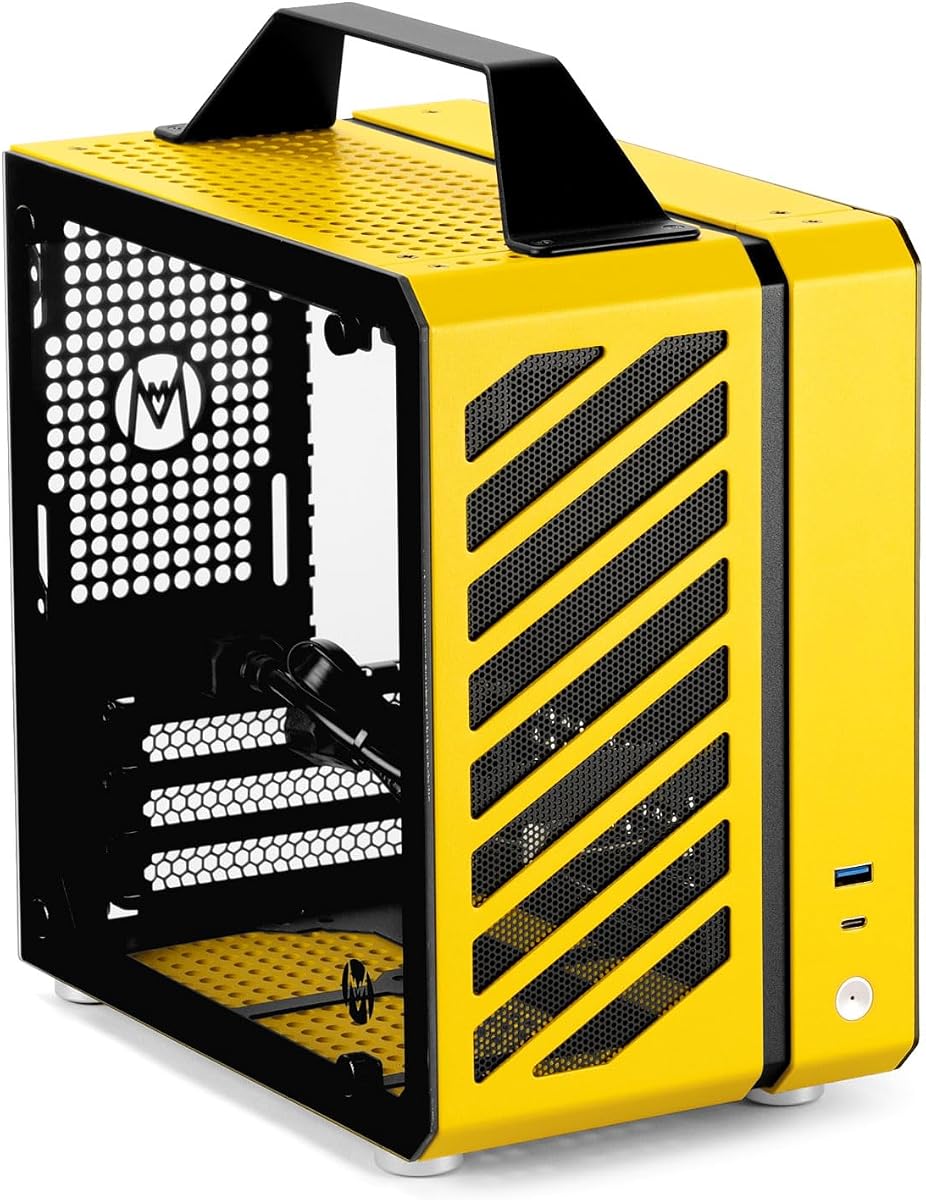
The Mechanic Master C24 is designed for ultimate portability with an ultra-small 9.9L volume. It features an integrated handle for easy transport, making it perfect for LAN parties. The aluminum steel hybrid frame offers premium durability despite the tiny size.
We may earn a commission when you buy through this link, at no additional cost to you.
It supports Mini-ITX and DTX motherboards along with SFX power supplies. GPU compatibility is limited to 135mm length for standard setups. The tool-free installation simplifies assembly for DIY enthusiasts. Dust filters are pre-installed to protect sensitive parts.
The main trade-off is the strict limit on hardware size. High-end GPUs or liquid cooling may not fit. The price reflects the specialized engineering and materials used. It is a high-end choice for portable needs.
If you need a truly portable cube for travel, this is the top option. It balances build quality and size well. Ensure your components fit the strict dimensions before investing in this specialized chassis.
The built-in handle and small volume make moving your PC effortless.
Hybrid aluminum and steel materials provide durability without adding unnecessary weight.
We may earn a commission when you buy through this link, at no additional cost to you.
The Fractal Design Node 804 without PSU offers a clean base for your own power selection. It maintains the high-quality construction of the standard model. This version is ideal for users who prefer custom PSU choices or have existing units.
We may earn a commission when you buy through this link, at no additional cost to you.
It supports MicroATX and Mini-ITX boards with storage flexibility for up to ten drives. The steel and aluminum construction ensures longevity. The dual chamber design remains for effective heat separation. It is a solid foundation for custom builds.
You must source your own power supply which adds to the total cost. The size is large and requires a significant desk area. However, the flexibility often outweighs the cost of buying separately.
For those needing total control over components, this model is excellent. It is a reliable chassis for storage or cooling focused builds. Verify your PSU dimensions match the case before finalizing.
Excluding the PSU allows you to choose a power unit that fits your exact needs and budget.
Massive drive bay capacity makes this case perfect for media or data storage servers.
We may earn a commission when you buy through this link, at no additional cost to you.
The Cooler Master Qube 540 Moonstone offers a distinctive color option for those seeking a unique look. It retains the same airflow and orientation features as the standard model. It is a solid ATX case with a twist for visual variety.
We may earn a commission when you buy through this link, at no additional cost to you.
The tempered glass side panel allows for clear visibility of internal components. It supports standard ATX motherboards with high GPU clearance. The Moonstone finish helps it stand out from typical black builds. Airflow is maintained via the optimized mesh front.
Fingerprints may show more on lighter finishes. The color choice is limited compared to standard options. It is a specific choice for users who prioritize aesthetics alongside function.
If you want a different color without sacrificing performance, this is a good pick. Check the finish durability before committing. It offers a nice balance of looks and utility for custom builds.
The unique finish gives your PC a fresh look that stands out on any desk.
Despite the color change, it maintains all the functional benefits of the original model.
We may earn a commission when you buy through this link, at no additional cost to you.
Choosing the right cube shaped PC case requires balancing form with function. Consider these factors to ensure your build fits perfectly.
Check whether the case supports ATX, Micro-ATX, or Mini-ITX boards. Cube cases often favor smaller boards to maintain compact dimensions. Ensure your motherboard size aligns with the case specifications before buying to avoid fit issues.
Always verify the supported form factor listed in the product details.
GPU clearance is critical in compact cases. Standard cards may not fit in tighter spaces. Measure your GPU length and compare it against the maximum supported length to ensure compatibility.
Look for cases that support at least 300mm for future proofing.
Airflow is vital for thermal stability. Mesh panels improve ventilation. Ensure the case allows for enough fans or liquid cooling radiators to handle your CPU and GPU heat.
Prioritize models with front mesh designs for better intake.
Cube cases vary in drive bay availability. Some offer extensive storage options while others limit to SSDs. Determine how many drives you need and select a case with enough mounts.
Check internal space for both 3.5 and 2.5 inch drives.
Front panel connectivity impacts daily use. Look for USB 3.0 or Type-C ports for faster data transfer. Ensure audio jacks are included for headset connection.
Modern cases often include Type-C for better device support.
Materials like steel and aluminum offer strength and stability. Glass panels look good but add weight. Check the steel thickness to ensure a solid structure that resists flexing.
Prioritize high-quality materials for long-term durability.
Clean interiors look better and improve airflow. Look for dedicated routing holes and cable covers. Effective management reduces clutter and maintenance time.
Choose models with clear routing paths behind the motherboard tray.
RGB lighting and glass panels enhance visual appeal. Decide how much lighting you need. Some cases include fans while others require purchases.
Match the design to your room's lighting and style.
Install your motherboard carefully ensuring all screws are tightened securely. Connect cables to the designated headers on the I/O panel. Route power and data cables through the rear channels to keep the front clear.
Clean dust filters regularly to maintain airflow. Use a vacuum or soft brush to remove debris. This simple step prevents overheating and extends hardware life.
Adjust lighting settings using the provided software or controller. Sync fans and RGB to match your theme. Keep firmware updated for compatibility with new motherboards.
Yes they are excellent if thermal performance is prioritized. Look for mesh front panels and multiple fan mounts to ensure stable temps during gaming sessions.
Some models support ATX while others limit to Micro-ATX. Always check the compatibility list to confirm your board size fits the case dimensions.
Many come with pre-installed fans but some do not. Check the product details to see if fans are included before purchasing.
Use a microfiber cloth with glass cleaner to avoid scratches. Wipe gently to remove fingerprints and smudges.
It can be tight due to compact size. Plan your routing carefully and use zip ties to keep wires organized.
Standard ATX PSUs work in most but check length limits. Some compact cases may require SFX power supplies.
The Fractal Design Node 804 stands out for modularity while the Yeah Magic Cube leads in visual design. The Zalman CUBIX offers great value for those needing a compact solution.
Prioritize your specific needs like GPU length and airflow. A case that fits your hardware perfectly will deliver better performance.
Prices fluctuate so check current listings before ordering. Ensure you select a model that aligns with your build goals.