
Logitech G F310 Wired Gamepad Controller Console – Blue/Black
4.4Editor score
Simple plug-and-play USB connection
Familiar Xbox 360 layout
Broad game support for old and new
This guide compares the top ten controllers for retro console gaming to help you find the perfect pad for classic titles and modern emulation setups.
Finding the right controller for retro console gaming can transform your nostalgic experience into something truly immersive. Whether you prefer wired reliability or wireless freedom, the market offers diverse options tailored to classic styles.
We evaluated ten top-rated models based on build quality, compatibility, and ergonomic design. Our analysis covers everything from budget-friendly USB pads to premium wireless controllers with advanced features like Hall Effect technology.
Each pick highlights specific strengths and ideal use cases for different gamers. Please note that availability and pricing fluctuate frequently, so verify current details before making your final purchasing decision today.
4.4Editor score

4.6Editor score
3.8Editor score
This side-by-side comparison outlines the key specifications of each model to help you quickly identify which controller fits your specific gaming needs and platform requirements.


The 8Bitdo SN30 Pro stands out as a top contender for retro gaming enthusiasts seeking modern reliability. With a strong rating of 4.6 stars, this controller combines nostalgic design with cutting-edge technology. It offers a complete button set and wireless freedom that appeals to diverse gaming setups.
We may earn a commission when you buy through this link, at no additional cost to you.
Its standout features include Hall Effect joysticks, which ensure long-lasting precision without drift. The controller supports motion controls and rumble vibration, adding depth to gameplay experiences. It works seamlessly with Switch, PC, and mobile devices, making it an incredibly versatile choice for any gamer.
While it is an excellent choice, users should note that firmware updates are sometimes required for full compatibility. The price is higher than basic wired options, but the added functionality and build quality justify the investment for serious players who value performance.
This controller is ideal for those who want a premium retro experience across multiple systems. Whether you are playing indie titles or classic emulators, the SN30 Pro delivers responsive inputs and a satisfying feel. It remains our top recommendation for the best overall retro controller.
Hall Effect joysticks use magnetic fields to detect movement, eliminating physical contact wear and preventing stick drift over time.
From Nintendo Switch to PC and Raspberry Pi, the SN30 Pro adapts to your needs through simple mode switching and Bluetooth pairing.
We may earn a commission when you buy through this link, at no additional cost to you.
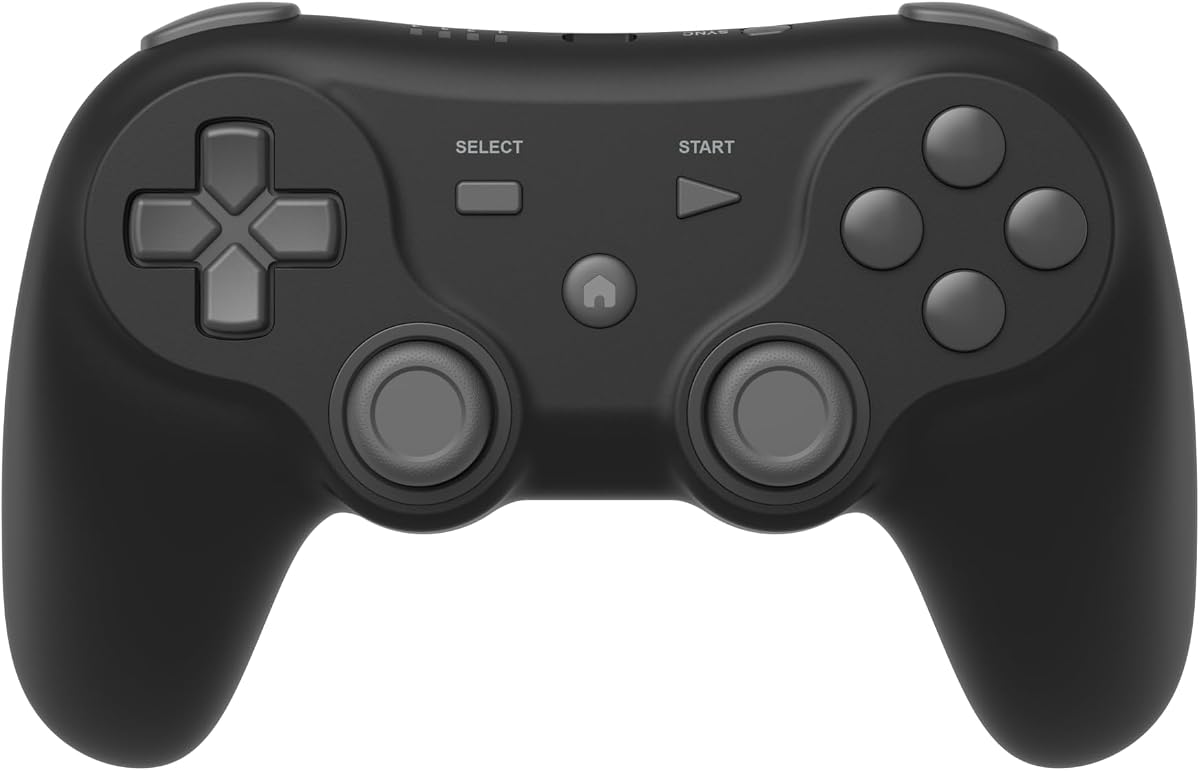
The Logitech G F310 is a solid entry-level option for gamers on a budget. It offers a familiar layout that mimics the Xbox 360 controller, making it easy to adapt to. Its 4.4 rating reflects satisfaction among users who need a reliable pad for PC gaming and emulation.
We may earn a commission when you buy through this link, at no additional cost to you.
This controller shines with its broad game support and customizable software features. You can program keys to perform keyboard commands, which is useful for older games lacking native controller support. The six-foot cord provides enough room to sit back comfortably while playing.
However, it lacks wireless functionality and uses a basic plastic design. While durable enough for regular use, it does not offer the premium feel of higher-end models. For casual players, these trade-offs are acceptable given the low cost and solid functionality.
If you prioritize value over high-end features, the F310 is an excellent choice. It serves well for emulation stations or casual gaming setups where budget is a primary concern. We recommend it for anyone needing a no-fuss, affordable controller for PC use.
The plug-and-play USB connection means you can start playing immediately without needing to install complex drivers or configure settings manually.
The included profiler software lets you map buttons to keyboard keys, expanding compatibility with older PC titles that were not designed for gamepads.
We may earn a commission when you buy through this link, at no additional cost to you.
This 2-pack set offers great value for households wanting to play retro games together. Designed to resemble the classic SNES controller, it features multi-color keys that evoke nostalgia. The wireless connection ensures freedom from cables while maintaining stable performance during gameplay.
We may earn a commission when you buy through this link, at no additional cost to you.
The controllers use a 2.4GHz wireless adapter for zero-lag performance up to ten meters. They are rechargeable and work well with Windows PC and macOS systems. However, compatibility is limited as they do not support the Nintendo Switch due to button configuration issues.
Users should note that these are not suitable for all modern platforms. The battery life is decent for short sessions but may require frequent charging during extended play. For dedicated retro PC setups, this pack is an affordable solution for multiplayer fun.
We recommend this pack for gamers who already have a PC or Mac setup and want to play classic titles with friends. The classic design and wireless feature make it a fun addition to any retro gaming collection. It is best suited for local multiplayer sessions.
The button arrangement mirrors the original SNES design, allowing fans to enjoy their favorite retro games with authentic comfort and familiarity.
With a ten-meter wireless range, you can sit comfortably on a couch or chair without being tethered to the console or PC.
We may earn a commission when you buy through this link, at no additional cost to you.
This controller is specifically designed for AV classic consoles like the HD 620 and 821 models. With a rating of 4.8 stars, it is a favorite among users looking for simple, plug-and-play solutions. The design ensures compatibility with specific retro hardware found in many households.
We may earn a commission when you buy through this link, at no additional cost to you.
It features a continuous fire button which adds an advantage for action games requiring rapid input. The nine-pin plug ensures a secure connection without drivers or configuration. You get two controllers in the pack, making it perfect for family gaming nights.
The main limitation is its specificity; it will not work with modern PC or console setups. It is strictly an accessory for retro gaming devices with nine-pin ports. Users must confirm their console model before purchasing to avoid compatibility issues.
We recommend this controller for owners of classic AV consoles who need reliable replacements. The build quality and functional design offer excellent value for money. It brings back the simple joy of gaming with minimal technical fuss and setup.
Just insert the plug into your console and start playing immediately. There are no drivers or software configurations required to get started.
The built-in continuous fire button gives you an edge in arcade shooters by automatically repeating button presses as long as you hold it down.
We may earn a commission when you buy through this link, at no additional cost to you.
The Retro-Bit Legacy 16 captures the essence of 16-bit gaming with a modern USB interface. It is particularly useful for Nintendo Switch users who want a classic feel for retro emulation. The 10-foot cable allows flexibility in seating arrangements.
We may earn a commission when you buy through this link, at no additional cost to you.
It includes dedicated Home and Screenshot buttons, which are crucial for managing the Switch interface. The ergonomic design mimics older controllers while providing necessary modern features for convenience. It works well for arcade classics and indie games on PC too.
The trade-off is the wired connection and somewhat hard buttons compared to premium wireless options. Some users may find the tactile feedback a bit stiff after extended sessions. However, the durability and classic look make up for these minor drawbacks.
We suggest this controller for Switch owners looking to enhance their retro library. It is also a solid option for PC gamers who prefer wired reliability. The combination of nostalgia and utility makes it a strong contender in the retro controller market.
The generous ten-foot cable lets you play from a comfortable distance without needing to sit directly next to your console or PC.
Beyond the Switch, this controller works with PC, Mac, and RetroPie, offering versatility for various retro gaming setups.
We may earn a commission when you buy through this link, at no additional cost to you.
Designed specifically for the Analogue 3D, this controller provides a tailored experience for N64 enthusiasts. It also supports Switch and PC, making it versatile beyond just one system. The 4.6 rating highlights strong performance and build quality across supported platforms.
We may earn a commission when you buy through this link, at no additional cost to you.
The controller offers both Bluetooth and wired USB connections for flexibility. It includes a turbo function for rapid input and vibration support on select systems. The design faithfully recreates the classic N64 look with modern internal components for reliability.
Users should ensure their firmware is updated for full compatibility with newer systems like Switch 2. While excellent for specific retro setups, it may not be the best choice for general PC gaming. The specialized design is its strongest asset.
We recommend this for owners of the Analogue 3D who want a high-quality input device. It bridges the gap between nostalgia and modern connectivity effectively. If you love N64 games, this controller is an essential upgrade for your collection.
Choose between wireless Bluetooth freedom or a stable wired USB connection depending on your preference and battery availability.
The iconic tri-lobed design brings back memories of the original console while utilizing modern sensors for accurate control.
We may earn a commission when you buy through this link, at no additional cost to you.
The Defender Pro brings premium features like Hall Effect sticks to retro gaming. It is designed to work with PlayStation systems and Switch, offering a versatile solution for mixed setups. Although fewer reviews exist, the technology promises superior durability and precision.
We may earn a commission when you buy through this link, at no additional cost to you.
Its pressure-sensitive buttons and customizable triggers allow for nuanced gameplay in retro titles. The wireless modes provide freedom from cables while maintaining a stable connection. This controller targets serious gamers who want high-end performance in a retro form factor.
The price is higher than standard options, which might be a barrier for casual users. Also, compatibility with older PS systems varies by region and firmware. Users should verify support for their specific console models before investing in this high-end option.
We suggest this for gamers who value anti-drift technology and build quality. It is a solid choice for those willing to pay a premium for modern features on classic games. It stands out as a top contender for high-performance retro gaming.
Hall Effect sensors detect joystick position using magnets, eliminating physical contact and preventing the common issue of stick drift over time.
Toggle between analog and digital trigger stops to match your playstyle, offering more control over how inputs are registered.
We may earn a commission when you buy through this link, at no additional cost to you.
The Tegenaria Lite focuses on speed and precision, ideal for competitive retro gaming. With a 1000Hz polling rate, inputs are registered almost instantly. It features Hall Effect sticks to ensure longevity and accuracy, combining modern tech with a 90s aesthetic.
We may earn a commission when you buy through this link, at no additional cost to you.
Its dual rumble motors provide subtle vibration feedback, enhancing immersion. The two mappable back buttons allow for quick access to functions without taking thumbs off the sticks. This makes it suitable for fast-paced platformers and fighting games.
The wired connection ensures stable latency, which is crucial for competitive play. However, some users might prefer wireless options for mobility. The budget-friendly price point is appealing, though the trigger mechanism is simple compared to pro models.
We recommend this for competitive gamers who need reliable speed and accuracy. It offers high-end features at an affordable price. Whether playing on PC or Switch, the low latency ensures a smooth and responsive gaming experience.
The wired connection ensures no signal delay, providing a direct link between your input and the game screen for precise timing.
Customize gameplay with two programmable back buttons, allowing quick access to actions without shifting your grip or thumb position.
We may earn a commission when you buy through this link, at no additional cost to you.
This 2-pack provides an affordable wireless solution for PC retro gaming. With a 4.0 rating, it offers basic functionality for emulation. The turbo function allows rapid firing, which is handy for arcade classics. You get two controllers to play with a friend instantly.
We may earn a commission when you buy through this link, at no additional cost to you.
Setup requires a USB wireless adapter and sometimes software configuration. The rechargeable battery lasts around 100 hours, reducing frequent charging needs. It supports Windows, Mac, and Linux, covering most common PC platforms for emulation.
Users must check manual guidelines to cancel accidental turbo activation. The build is functional but not premium, so it may not last years under heavy use. For casual PC gamers, this value pack is a practical choice.
We suggest this for budget-conscious users needing multiple controllers for local multiplayer. The long battery life and turbo features make it a strong contender in its price range. It is best for PC emulation setups where cost matters.
The built-in rechargeable battery supports around 100 hours of playtime, meaning you can game for weeks on a single charge.
Set rapid button presses with the turbo function to make repetitive actions easier in arcade games, enhancing your gameplay efficiency.
We may earn a commission when you buy through this link, at no additional cost to you.
The Hyperkin Trooper 2 brings a premium retro feel to modern PC gaming. It features durable materials and soft rubber grips for comfort. The design mimics classic Atari controllers, offering nostalgia while maintaining modern functionality through mappable buttons.
We may earn a commission when you buy through this link, at no additional cost to you.
A generous 10-foot USB cable ensures you can sit back comfortably. The construction focuses on longevity with a solid base and quality cord. It is ideal for users who want a no-nonsense controller for emulation without extra wireless tech.
While it lacks modern bells and whistles, its focus on simplicity is its strength. Some users may prefer wireless options for modern setups. However, for a dedicated PC retro station, the reliability and build quality are impressive.
We recommend this for users who prefer traditional, reliable controllers. It is a great addition for enthusiasts who appreciate classic design and sturdy construction. The mappable buttons add versatility to the nostalgic form factor.
The design captures the tactile feel of vintage gamepads, offering a nostalgic experience that appeals to long-time gamers.
Solid materials and a quality cord ensure long life, making it a reliable choice for frequent gaming sessions.
We may earn a commission when you buy through this link, at no additional cost to you.
Choosing the right controller depends on your setup, budget, and preferred playing style. Here are key factors to consider when shopping for retro gaming hardware.
Wired controllers offer stable connections and no battery worries, making them ideal for stationary PC setups. Wireless options provide freedom of movement but require charging and may introduce slight latency.
Choose wired for reliability and wireless for convenience. Your setup location should dictate your choice to ensure optimal performance.
Ensure the controller supports your specific system. Some work well with Switch and PC but fail on older consoles due to port differences. Always verify compatibility lists before purchasing.
Check your system requirements carefully. Mismatched connections can render a controller unusable regardless of its quality.
High-quality materials like reinforced buttons and durable cables extend the life of the controller. Look for models with metal components or reinforced joysticks for long-term use.
Investing in better build quality saves money in the long run. A sturdy controller withstands regular use without wear issues.
The controller should fit comfortably in your hands to prevent fatigue during long sessions. Ergonomic designs with soft grips enhance the overall experience.
Try to test the shape before buying. Comfort is crucial for extended play without hand strain.
Features like Hall Effect sticks, turbo buttons, and vibration add value. Turbo assists with rapid inputs while Hall Effect sticks prevent drift.
Decide which features matter most. Extra functionality can enhance gameplay but adds to the cost.
Budget options offer basic functionality while premium models add advanced tech. Determine what features justify the price increase for your needs.
Balance cost with desired features. A mid-range controller often provides the best value for most users.
Some controllers come with software to remap keys for better compatibility. This is useful for older PC games that do not recognize gamepads.
Check if drivers or software are required. Easy setup ensures you spend time playing rather than configuring.
For wireless models, battery life varies significantly. Look for rechargeable options with long-lasting performance to avoid interruptions.
Check battery specifications. Frequent charging can disrupt gameplay sessions unnecessarily.
Start by connecting your controller using the appropriate method. For wired models, plug the USB into your system. For wireless, ensure you have the adapter installed or Bluetooth enabled.
Clean your controller regularly with a soft dry cloth to remove dust and oils. Avoid using liquids directly on buttons or joysticks to prevent damage.
Store your controller in a cool, dry place when not in use. Proper storage prolongs battery life and protects buttons from accidental wear.
Many modern retro controllers are designed with versatility in mind, offering compatibility with PC, Switch, and mobile devices. However, some older-specific controllers require adapters or may not work with certain systems. Always check the product description for compatibility details before buying.
Most modern retro controllers work plug-and-play via USB or Bluetooth. Some advanced models may require software for remapping buttons. Check product requirements to ensure you have the necessary drivers installed for full functionality.
Wired controllers provide stable connections without battery concerns but restrict movement. Wireless controllers offer mobility and convenience but require charging. Choose based on your setup preference and gaming habits for best results.
Rechargeable batteries in wireless retro controllers usually last between 10 to 20 hours per charge. Usage varies by intensity and features used. Always check battery specifications to plan your gaming sessions effectively.
Many retro controllers support modern indie games and emulation. However, compatibility depends on button layout and input support. Check specific game requirements and controller support lists for the best experience.
Hall Effect sticks prevent drift and wear, offering better longevity and precision. While more expensive, they provide a reliable gaming experience. If you play frequently, investing in this technology can save money on repairs later.
Drifting can be caused by worn sensors or debris. Try cleaning the joystick area or updating firmware. If the issue persists, consider replacing the controller or contacting support for warranty assistance.
Replacement parts are available through manufacturer websites and specialized retro gaming stores. Check compatibility before purchasing to ensure the parts fit your specific model. Proper maintenance keeps your controller functional for years.
We covered ten top-rated controllers offering a range of features from wireless freedom to classic durability. Each model caters to different needs, ensuring there is a perfect fit for every gamer.
Prioritize compatibility and build quality when making your choice. Consider if you value wireless convenience or wired reliability for your specific setup.
Remember that prices and availability may change. Check current details to ensure you get the best deal on your chosen controller today.