
Learning Resources Code & Go Robot Mouse
4.5Editor score
Designed for ages four plus
Physical coding cards included
Buildable maze grids
Explore our expert comparison of the top coding toys for kids in October 2026, covering screen-free robots, app-based learning kits, and STEM education tools.
Coding toys have revolutionized how children learn programming fundamentals. These interactive gadgets transform abstract logic into tangible play, fostering problem-solving skills through hands-on exploration and creative engineering challenges.
We evaluated leading models based on educational value, ease of use, and engagement. Our analysis compares screen-free options with app-driven robots to help parents find the perfect fit for their child's age and learning style.
Each selection highlights unique strengths from assembly kits to pre-built companions. While ratings reflect user feedback, specific availability and pricing may fluctuate. Always check current listings before purchasing to ensure the best value.
4.5Editor score

4.1Editor score

4.6Editor score
The following table provides a side-by-side overview of each kit's core capabilities, target age range, and primary coding method to streamline your selection process.






This robotic chameleon offers a unique blend of engineering and coding without screens. Rated highly for its realistic movements, it engages children through physical card programming.
We may earn a commission when you buy through this link, at no additional cost to you.
The kit includes articulated joints and color sensors that allow for complex interaction patterns. Kids build the reptile and learn how nature inspires robotic design through comprehensive instructions.
While assembly can be intricate for younger builders, the reward is a highly interactive pet. The lack of digital dependency ensures focused play and reduces distractions during learning sessions.
Ideal for children aged eight and up who enjoy tactile exploration. It stands out for combining STEM building with playful pet interaction effectively.
Program the robot using colored action cards to teach sequences and logic without needing a tablet or phone.
The 15-inch model features eyes and leg joints that simulate natural movements like a real chameleon.
We may earn a commission when you buy through this link, at no additional cost to you.
The mBot serves as an excellent entry point for kids ready to move beyond simple buttons. It supports both block-based coding and Arduino for deeper learning.
We may earn a commission when you buy through this link, at no additional cost to you.
With clear instructions, assembly takes about fifteen minutes, allowing children to focus quickly on programming tasks. The metal chassis ensures durability during active play.
While the initial setup requires batteries that aren't included, the longevity of the device justifies the investment. Add-on packs expand functionality significantly for older users.
Best for ages eight to twelve seeking a balance between building and software. It grows with the child as skills advance from drag-and-drop to text-based coding.
Start with graphical blocks and transition to text code as confidence builds within the same hardware platform.
Connect with over one hundred electronic modules to customize the robot for specific projects or challenges.
We may earn a commission when you buy through this link, at no additional cost to you.
Packaging powerful sensors into a tiny ball, the Sphero Mini is perfect for coding on the go. It connects easily to smartphones for immediate play.
We may earn a commission when you buy through this link, at no additional cost to you.
Users can code using JavaScript or drag-and-drop blocks to navigate obstacle courses made with the included cones and pins. It also doubles as a game controller.
While battery life is limited to about an hour of continuous use, the fun factor remains high. The compact size makes it easy to store when not in use.
Suitable for tech-savvy kids aged eight and up. It bridges the gap between simple toys and advanced robotics through intuitive app integration.
Use the free Sphero Edu app to create custom games and learn coding syntax in a visual environment.
Accelerometers and gyroscopes allow the ball to react to tilts and movements, adding physical feedback to code.
We may earn a commission when you buy through this link, at no additional cost to you.
Designed for young learners, this mouse robot teaches sequencing through physical buttons. It is affordable and easy to use, making it ideal for early education.
We may earn a commission when you buy through this link, at no additional cost to you.
Children can build custom mazes using the included grids and walls. The mouse navigates obstacles independently, rewarding successful coding attempts with movement.
While the movement is basic compared to advanced robots, it effectively demonstrates cause and effect. It remains a strong choice for schools or home classrooms.
Perfect for kids aged four and up starting their coding journey. It provides a foundational understanding of logic without digital distractions.
Build confidence with simple button presses that teach the basics of algorithmic thinking.
Construct mazes up to twenty by twenty inches using the included grids and walls.
We may earn a commission when you buy through this link, at no additional cost to you.
The Mech-5 focuses on the mechanical side of robotics. It is a build kit rather than a pre-assembled toy, offering deep engagement for older children.
We may earn a commission when you buy through this link, at no additional cost to you.
Kids snap buttons onto a coding wheel to control actions like lifting or drawing. The project takes multiple hours to assemble, teaching patience and precision.
While it is not a mobile robot, its mechanical functions are impressive. It appeals to children interested in gears and engineering over digital programming.
Recommended for ages ten and up who enjoy detailed projects. It provides a true STEM experience by combining construction with programming logic.
The robot can perform complex physical actions like lifting and kicking based on coded instructions.
Follow detailed instructions to build the robot from scratch, ensuring proper alignment of all parts.
We may earn a commission when you buy through this link, at no additional cost to you.
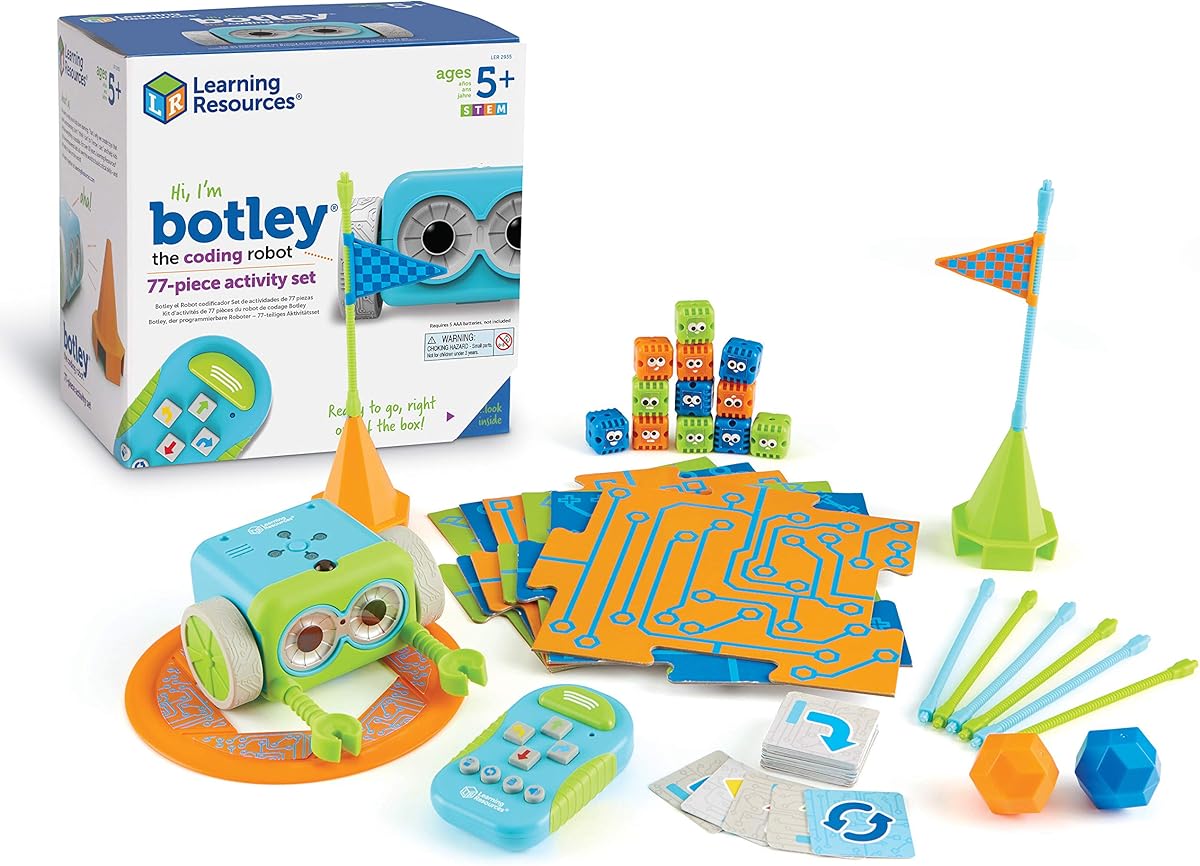
Botley is ready to code right out of the box, requiring no tablets or screens. It uses a remote programmer to send commands to the robot.
We may earn a commission when you buy through this link, at no additional cost to you.
The set includes plenty of accessories for creating obstacle courses. Botley can detect objects and loop commands, adding layers of complexity for young coders.
While it operates on simpler logic than app-based robots, its screen-free nature is a major benefit. It keeps children focused on the robot's movement rather than a screen.
Ideal for ages five and up needing a distraction-free tool. It encourages critical thinking through tangible interactions and coding challenges.
Use the included remote programmer to design command sequences that the robot follows.
Botley can detect objects in front of him and adjust his path to avoid collisions.
We may earn a commission when you buy through this link, at no additional cost to you.
The Ozobot Evo kit is designed for both home and classroom use. It combines screen-free color coding with online tools for a flexible learning experience.
We may earn a commission when you buy through this link, at no additional cost to you.
Educators get access to hundreds of lessons covering various subjects. The robot follows color-coded lines on paper, making coding visible and interactive.
While the initial cost is higher, the educational resources justify the investment. It grows with children from beginner to master coding levels effectively.
Best for schools or families seeking a long-term STEM tool. It supports diverse learning styles with both physical and digital coding options.
Draw colored lines with markers that the robot reads to execute commands.
Access Blockly software for more complex coding projects beyond simple line following.
We may earn a commission when you buy through this link, at no additional cost to you.
An upgraded version of the original, Botley 2.0 introduces multi-step coding and object-sensing. It retains the screen-free design while adding new challenges.
We may earn a commission when you buy through this link, at no additional cost to you.
The robot can handle complex routes and reacts to objects in its path. Secret code combinations offer hidden features that keep older kids interested.
While the battery requirements are consistent with previous versions, the added features enhance play value. It is a solid choice for growing coding skills.
Perfect for ages five and up ready for more complexity. It builds confidence by offering incremental challenges through coding tasks.
Robot can sense objects and stop to avoid them.
Unlock hidden features by entering secret code combinations.
We may earn a commission when you buy through this link, at no additional cost to you.
Dash is a friendly robot that can sing, dance, and respond to voice commands. It is pre-assembled and ready to use immediately upon unboxing.
We may earn a commission when you buy through this link, at no additional cost to you.
With five compatible apps, children can explore coding concepts like variables and algorithms. It is widely used in schools to teach STEM fundamentals.
While it relies on apps for full functionality, the robot itself is durable and responsive. It offers a long play time of up to five hours on a single charge.
Suitable for ages six to eleven seeking social interaction. It is an excellent choice for collaborative coding in classrooms or at home.
Use apps like Blockly to create complex tasks and behaviors for Dash.
Dash can interact with users through voice responses and expressive movements.
We may earn a commission when you buy through this link, at no additional cost to you.
TaleBot Pro is designed for children aged three to five. It focuses on storytelling and language skills alongside basic coding concepts.
We may earn a commission when you buy through this link, at no additional cost to you.
Children can record their voices and play them back through the interactive map. It supports ten languages, making it accessible for diverse households.
While the coding is basic, the storytelling aspect makes it engaging for toddlers. It is also noted for being a safe and educational tool for children with autism.
Perfect for preschoolers starting early programming. It develops critical thinking skills through play and interactive story creation.
Use the map to tell stories and move the robot to different locations.
Children can record voice commands to bring their imaginative tales to life.
We may earn a commission when you buy through this link, at no additional cost to you.
Selecting the right toy depends on age, learning style, and available resources.
Ensure the toy matches your child's developmental stage. Younger children benefit from simpler button-based coding, while older kids may prefer app-driven or text-based options.
Choose a model that grows with them to maximize long-term value.
Decide whether you want a digital or analog experience. Screen-free options reduce eye strain and distractions, while apps offer more complex coding opportunities.
Balance screen time with physical interaction based on family preferences.
Some kits require significant build time, which is educational but demands patience. Others are pre-assembled and ready to play immediately.
Consider if you have time for building or need instant engagement.
Look for toys that support block-based coding first. This visual method makes concepts easier to grasp before transitioning to text-based languages like JavaScript.
Check if the platform allows progression as skills improve.
Coding toys often involve active play. Metal or sturdy plastic constructions ensure the device survives drops and rough handling.
Prioritize durability if multiple children will be using the kit.
Check whether batteries are included and how long they last. Rechargeable options reduce long-term costs but require regular charging.
Ensure the power source fits your family's routine.
Look for kits with comprehensive guides or lesson plans. Resources that explain concepts clearly help parents support learning effectively.
Supplemental materials enhance the educational value of the toy.
Choose robots compatible with add-ons or other building sets. Expandability keeps the toy interesting as children master basic functions.
Modular designs offer more flexibility for creative projects.
Start by reading the manual carefully to understand assembly steps. Proper construction ensures sensors and moving parts work correctly.
Keep batteries installed only when in use to prevent leakage. For rechargeable units, store in a cool, dry place when not charging.
Regularly wipe sensors with a soft cloth to maintain accuracy. Clean the robot's wheels and joints to prevent debris from affecting movement.
Yes, many coding toys are designed specifically for beginners. They often use visual blocks or physical buttons to introduce concepts without requiring prior knowledge.
Not all of them. Some models work entirely offline with physical cards. Others require an app that may need internet access for updates or lessons.
Absolutely. They reinforce math, logic, and critical thinking skills. Many schools use these kits to teach computer science fundamentals effectively.
Depends on usage frequency. For active daily play, expect to replace alkaline batteries every few weeks or use rechargeable options to save costs.
It varies. Simple kits take minutes, while complex ones take hours. Younger children benefit from adult assistance during assembly to understand mechanics.
Yes. Collaborative play is encouraged. Children can take turns coding or work together on group projects to learn teamwork.
This guide highlights ten top-rated options ranging from affordable mice to advanced programmable robots. Each offers unique benefits to support STEM development.
Prioritize tools that match your child's current skill level while leaving room for growth. Engaging toys ensure that coding remains fun and educational.
Remember that specifications may vary. Always check current product details and user reviews before making your final purchase decision.