
VGA Extender Over Cat5e/6
4.2Editor score
Extends up to 60m
No external power required
Metal body construction
Compare top Cat5 to VGA converters for long video runs. This guide reviews ten reliable extenders and adapters to help you choose the right model for your
Finding a reliable Cat5 to VGA converter is essential for extending video signals over long distances without losing quality. These devices allow you to use standard Ethernet cables instead of bulky VGA wires, making installation cleaner and more flexible for offices and homes.
We evaluated ten top-rated products based on signal clarity, build quality, and ease of setup. Our analysis covers budget-friendly adapters, professional-grade kits, and everything in between. Each option was scrutinized for performance consistency and user feedback from verified buyers.
Every selection below highlights key strengths and potential limitations to help you make an informed decision. Please note that availability and pricing can fluctuate frequently, so check current listings before purchasing to ensure you get the best deal available today.
4.2Editor score

4.3Editor score

4.7Editor score
This table provides a side-by-side overview of all ten selected products, highlighting their core capabilities and intended use cases to help you quickly identify the best fit for your specific needs.




This VGA Cat5e Cat6 Extender offers a reliable solution for transmitting video signals over long distances using Ethernet cables. With a 4.3 rating, it stands out for its ability to extend signals up to 328 feet while maintaining high fidelity image quality.
We may earn a commission when you buy through this link, at no additional cost to you.
The unit features imported chips that ensure the output matches the input exactly, reducing ghosting and noise. Its galvanized alloy shell provides protection against dust and static, making it suitable for 24-hour operation in professional environments.
While the performance is strong, users must ensure they use pure copper Cat5e or Cat6 cables for optimal results. Compatibility issues may arise with older systems or inferior cables, which could lead to display problems.
This extender is ideal for offices and educational settings where reliable long-distance connectivity is required. We recommend it for anyone needing a robust solution that balances range and quality effectively.
The 328-foot range allows you to place displays far from source devices without signal degradation.
High fidelity chips ensure the transmitted video remains clear and sharp throughout the distance.
We may earn a commission when you buy through this link, at no additional cost to you.
This VGA Extender Over Cat5e/6 is a cost-effective choice for users needing short to medium range video extension. It holds a solid 4.2 rating thanks to its metal body and ability to run signals up to 196 feet.
We may earn a commission when you buy through this link, at no additional cost to you.
The built-in chip eliminates noise and ghosting, ensuring a clear image. Its small size makes it easy to install in tight spaces, and the metal construction adds a layer of protection against physical wear.
One limitation is the lack of audio transmission, which means separate audio cables are necessary. Additionally, you must buy the TX and RX units separately or as a kit, adding to setup complexity.
For budget-conscious buyers prioritizing video clarity over audio, this is a strong option. It works well for home theater setups or small offices where audio can be handled independently.
This model offers a great entry point for those needing basic VGA extension without high costs.
The metal body ensures the adapter can withstand regular use in various environments.
We may earn a commission when you buy through this link, at no additional cost to you.
The QVS VB-C5 100-Meter Kit is a top-tier option for professional installations requiring certified reliability. Its 4.7 rating reflects exceptional performance, featuring sync-filter technology and compliance with FCC and CE standards.
We may earn a commission when you buy through this link, at no additional cost to you.
This kit supports up to 1600×1200 resolution at 60Hz for up to 50 meters, delivering crisp images suitable for high-end displays. The equalization ensures signal level adjustments are handled efficiently over the network cable.
However, the cost is higher compared to consumer-grade adapters, which might not be justified for home use. Users should also note the specific resolution limits at different distances to avoid unexpected drops in quality.
We recommend this for corporate boardrooms or medical imaging where signal integrity and compliance are critical. It is a premium choice for those who value certified performance above all else.
Certified by FCC and CE, this kit ensures safe and regulatory compliant operation in professional settings.
The sync filter provides precise signal adjustments to maintain image quality over long cables.
We may earn a commission when you buy through this link, at no additional cost to you.
This Jaremite VGA Over Ethernet extender is designed for users needing extended range and audio support. It holds a 4.2 rating and uses imported chips to ensure high-fidelity signal transmission up to 328 feet.
We may earn a commission when you buy through this link, at no additional cost to you.
The unit includes a galvanized alloy shell for durability and rapid cooling, allowing for continuous 24-hour operation. It supports video formats like VGA, SVGA, and XGA, making it compatible with various legacy devices.
Users must connect both sender and receiver to power sources, which adds cabling complexity. Proper installation of shielded Ethernet cables is crucial to prevent flickering or signal loss during operation.
This extender is suitable for entertainment centers or KTV setups where audio and video are both important. It offers a balanced performance for mixed media environments.
Imported chips ensure the output signal matches the input exactly for a clear viewing experience.
The alloy shell protects internal components from dust and static while aiding in cooling.
We may earn a commission when you buy through this link, at no additional cost to you.
These RJ45 to VGA cables are designed for short-distance connections where space is limited. With a 4.3 rating, they are perfect for setups where the device is within 15 meters of the display.
We may earn a commission when you buy through this link, at no additional cost to you.
The pack includes two adapters, a VGA female to RJ45 female and a VGA male to RJ45 female, making it ready for immediate use. They require no external power, keeping the setup clean and simple.
However, they are not suitable for long-distance transmission, as signal degradation can occur beyond 15 meters. They work best for console connections or short runs in a single room.
We recommend this for users needing quick and simple connections without extra power cables. It is an efficient solution for local multimedia setups.
The 15cm size ensures these adapters fit neatly behind devices without adding bulk.
Because they draw no power, they eliminate the need for extra outlets near your devices.
We may earn a commission when you buy through this link, at no additional cost to you.
This chenyang 2 Pack Adapter offers a simple solution for extending VGA signals using thin network cables. While the rating is lower at 3.7, it remains a popular choice due to its affordability and simplicity.
We may earn a commission when you buy through this link, at no additional cost to you.
It works with Cat5 and Cat6 cables to extend signals up to 10 meters, making it useful for desktop setups where a long cable is inconvenient. The thin RJ45 cables are much easier to manage than standard VGA cords.
Performance may vary based on cable quality, and the range is strictly limited to short distances. Users should ensure they use high-quality Cat6 cables to minimize signal loss.
We suggest this for budget users who need to connect a PC to a monitor nearby. It is a functional tool for local extension tasks.
The use of thin RJ45 cables significantly reduces clutter compared to bulky VGA wires.
Simple plug-and-play functionality makes installation straightforward without technical skills.
We may earn a commission when you buy through this link, at no additional cost to you.
The StarTech VGA Over Cat5 Extender is a professional-grade kit designed for demanding industrial environments. It holds a strong 4.5 rating and offers support for resolutions up to 1920×1200 at 150 feet.
We may earn a commission when you buy through this link, at no additional cost to you.
This kit includes local and remote units, a VGA cable, and mounting brackets, ensuring everything needed for installation is in the box. Its hardware-based design means no drivers are required, simplifying setup.
The 250-foot range makes it suitable for large conference halls or warehouses. However, the higher price might be prohibitive for casual home users seeking basic functionality.
We recommend this for businesses requiring reliable long-range video distribution. It is a robust solution that prioritizes stability and performance.
Included mounting brackets and cables make this a ready-to-deploy solution for any setup.
Advanced technology ensures high-resolution images remain crisp even over long distances.
We may earn a commission when you buy through this link, at no additional cost to you.
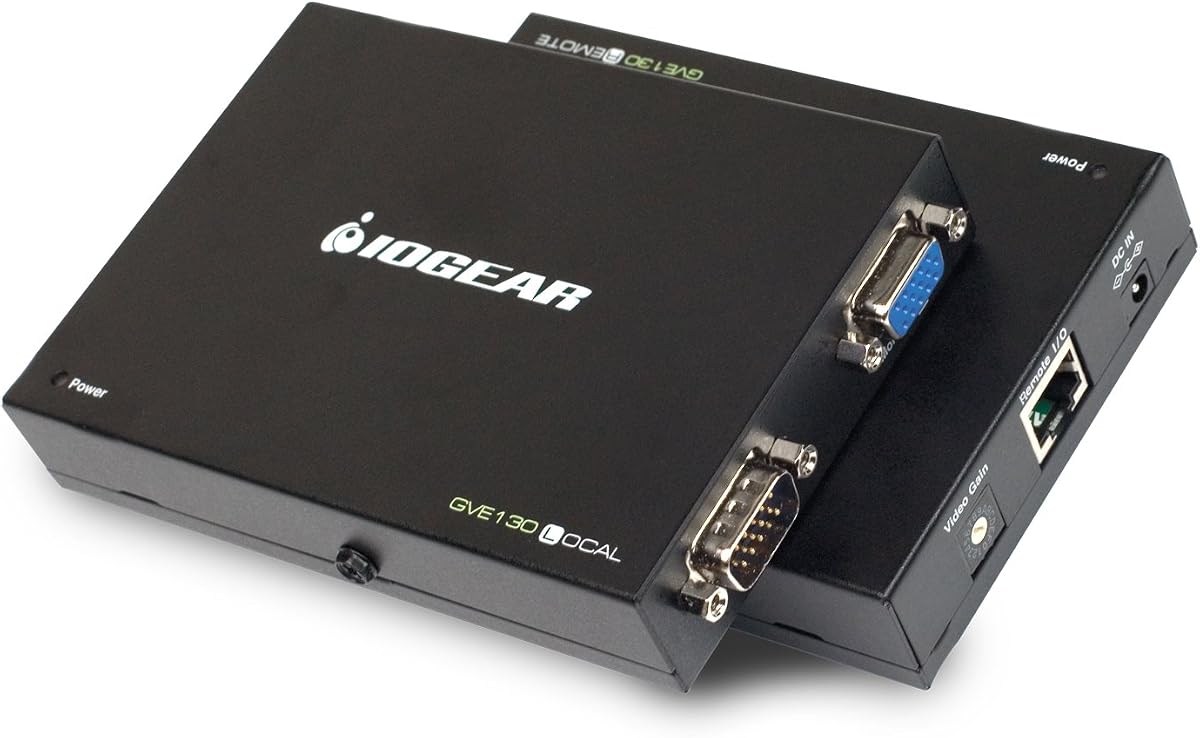
The IOGEAR VGA CAT5e/6 Extender Kit supports a wide range of platforms, including Mac, PC, and Linux systems. Its 4.0 rating reflects its versatility and ability to handle long distances up to 500 feet.
We may earn a commission when you buy through this link, at no additional cost to you.
It features 16 position adjustable video gain control, allowing precise tuning for different monitors. DDC support ensures compatibility with the local monitor for seamless integration.
Because it supports high resolutions and different operating systems, it is highly versatile. However, the need to adjust gain might be challenging for users unfamiliar with technical setups.
This kit is recommended for IT professionals managing diverse hardware environments. It provides flexibility and control for custom installations.
Works seamlessly across Windows, Mac, and Linux systems for broad integration.
Fine-tune the signal to match specific monitor requirements for optimal display.
We may earn a commission when you buy through this link, at no additional cost to you.
This Halokny VGA Extender Adapter is perfect for connecting media centers and gaming consoles to nearby displays. With a 4.2 rating, it supports transmission up to 100 feet, making it versatile for living rooms.
We may earn a commission when you buy through this link, at no additional cost to you.
It transmits signals over Cat5 and Cat6 network cables, simplifying wiring for multimedia setups. The 2-pack ensures you have both ends ready for connection to a monitor or TV.
While effective for short to medium runs, it does not support audio, which may require separate cabling for a full setup. Its focus on simplicity makes it a practical choice for casual use.
We recommend this for gamers or home users connecting devices to wall-mounted TVs. It offers a convenient way to clean up cables while maintaining signal quality.
Ideal for DVRs and game consoles, it simplifies connections for home entertainment.
The VGA male to RJ45 female design is easy to use and universally compatible.
We may earn a commission when you buy through this link, at no additional cost to you.
This VGA Extender Over CAT5e/6 offers an impressive 394-foot range with zero latency performance, making it suitable for live monitoring and gaming. It holds a high 4.7 rating due to its uncompressed transmission quality.
We may earn a commission when you buy through this link, at no additional cost to you.
Integrated audio support allows independent transmission to remote speakers, eliminating extra cables. The aluminum housing ensures durability and heat dissipation for continuous 24/7 operation.
For the best results at full range, solid copper Cat6 cables are required, which may increase setup costs. However, the performance gains justify this requirement for professional environments.
We recommend this for control rooms or auditorium projections where distance and sync are critical. It provides a comprehensive solution for high-stakes installations.
Built-in stereo audio ports allow you to send sound to remote speakers without additional wiring.
Uncompressed real-time transmission ensures perfect synchronization with no perceptible delay.
We may earn a commission when you buy through this link, at no additional cost to you.
Selecting the right converter requires understanding your distance needs, resolution requirements, and whether you need audio support.
The maximum distance your converter can support is critical. Some extenders handle up to 100 feet, while others reach 300 feet or more. Ensure the model you choose matches the distance between your source and display.
Choose a range that slightly exceeds your actual needs to maintain signal stability without needing repeaters.
Different converters support different resolutions. Most support up to 1920×1080, but professional models may go higher. Verify that your display and computer output match the supported resolution.
For high-definition displays, prioritize models with higher resolution support to avoid blurry images.
Some extenders transmit audio through the Ethernet cable, while others only send video. If you need sound, choose a model with built-in audio jacks to avoid running separate cables.
If audio is handled separately, a video-only extender may be sufficient and cheaper.
The quality of the Ethernet cable matters. Pure copper Cat5e or Cat6 cables are often required for long-range transmission. Copper-clad aluminum cables may cause signal loss over distance.
Invest in quality cables to ensure the extender performs as advertised without flickering or loss.
Some adapters require external DC power, while others draw power from the source device. Check if your setup can provide power or if an adapter is included in the package.
Self-powered units are generally more reliable and avoid voltage drops over long distances.
Metal housing offers better durability and heat dissipation than plastic. For 24/7 operation, look for alloy shells or industrial-grade enclosures to ensure longevity.
Durable materials protect internal chips from dust, static, and physical damage over time.
Most converters are designed to be plug and play without drivers. However, some may require tuning or specific configurations. Check user feedback for installation ease.
Models with zero configuration requirements save time and reduce setup errors for non-technical users.
Established brands often provide better warranties and customer support. Reading reviews can help identify models with consistent performance and reliable after-sales service.
A strong brand reputation suggests higher quality control and better compatibility with various devices.
Connect the transmitter unit to your video source using a standard VGA cable, and plug the receiver unit into your display. Ensure both units are powered via their DC adapters if required.
Run a Cat5e or Cat6 Ethernet cable between the two units to bridge the connection. Secure the connections to prevent accidental dislodging, especially in high-traffic areas.
Keep the units in a well-ventilated space to prevent overheating during extended use. Regularly check cables for damage and replace them if you notice signal flickering or degradation.
Generally, these converters maintain high-quality video if used within their rated range. However, signal loss may occur with poor-quality cables or if the distance exceeds the limit. Always use pure copper cables to ensure clarity.
Yes, but look for models labeled as zero latency or uncompressed transmission. Gaming requires high refresh rates and minimal delay, so check the product specs for gaming compatibility before purchasing.
Most standard VGA extenders do not support 4K. They typically max out at 1080p or similar. For 4K, you will need HDMI or DisplayPort extenders instead of VGA models.
Check your power connections and cable integrity. Ensure the correct cable type (Cat5e/Cat6) is used. Reboot both the source device and the display to reset the handshake between them.
Most converters work with Mac systems, but you may need a VGA adapter or dongle if your Mac lacks a native VGA port. Confirm compatibility with your specific Mac model before buying.
Cat6 offers better shielding and higher bandwidth compared to Cat5e. For longer distances, Cat6 is recommended to minimize interference and maintain signal integrity.
We highlighted top picks like the VGA Cat5e Cat6 Extender for overall value and the QVS kit for professional needs. Each model offers distinct advantages depending on your budget and performance requirements.
Prioritize range and cable quality to ensure reliable performance. Avoid cheap plastic models if you need long-term reliability in a commercial environment.
Prices change frequently, so verify current listings before finalizing your purchase. Keep an eye on deals to get the best value for your specific setup.