
US Online Passport photo prints 2×2 inch
4.7Editor score
Professional review service
Fast 24 hour delivery
No equipment needed
Getting a passport photo from home can save time and money if you choose the right tools. Whether you need a printer system or a online service, the goal is always a compliant image that meets strict government standards without leaving your house.
We have evaluated ten different solutions ranging from dedicated hardware kits to convenient online print services. Our comparison focuses on ease of use, output quality, and the ability to meet US passport specifications consistently across different setups and user skill levels.
Each pick highlights a specific strength such as portability, speed, or professional finishing. Prices and availability can change frequently so be sure to check current listings before purchasing to ensure you get the best deal for your specific needs and location.
4.7Editor score

4.6Editor score

3.1Editor score
As an Amazon Associate we earn from qualifying purchases.
The following table provides a side-by-side comparison of all ten solutions including their core capabilities and intended use cases to help you decide which fits your workflow best.




This dedicated system stands out as the top choice for those wanting a complete hardware solution. With a strong rating and pre-programmed settings it removes the guesswork from getting compliant passport images at home.
We may earn a commission when you buy through this link, at no additional cost to you.
The inclusion of a dedicated cutter and dye sub printer ensures professional results without needing extra tools. You can transfer images via SD card or USB which streamlines the workflow from capture to print.
While the initial investment is higher than software options the convenience and quality justify the expense for frequent travelers. The only minor drawback is that cables for transfer are not included in the package.
Buy this if you need reliable on demand passport photos and value a streamlined hardware setup. It is an ideal choice for families or small offices that process documents regularly.
The dye sub technology ensures smooth color transitions and durability that matches commercial photo lab standards.
Pre-programmed settings mean you do not need to manually adjust dimensions or layout for every new photo.
We may earn a commission when you buy through this link, at no additional cost to you.
This service offers an incredibly affordable way to get compliant photos without buying any equipment. Users upload a photo from their phone and receive professionally edited prints delivered to their door.
We may earn a commission when you buy through this link, at no additional cost to you.
The service includes strict guidelines on lighting and background to ensure the submitted image is usable. The team reviews every submission to correct issues before printing which minimizes rejection risks.
While you must wait for delivery and follow specific upload rules the cost savings are significant compared to store visits. It is perfect for occasional users who do not need instant results.
Choose this if you want a low effort and low cost option for a single passport application. It works well for anyone comfortable with basic photo upload processes.
Every photo is manually checked against current US passport guidelines to ensure compliance before printing.
Prints are shipped quickly and cut to exact size so they are ready to use upon arrival.
We may earn a commission when you buy through this link, at no additional cost to you.
This high end system is designed for those who need maximum flexibility and professional capabilities. It includes a camera and wireless console that allow for quick adjustments and multiple output sizes.
We may earn a commission when you buy through this link, at no additional cost to you.
The software manages a gallery of images so you can reprint or change templates without recapturing photos. This is particularly useful for offices that handle various ID requirements beyond just US passports.
The main downside is the significant cost and complexity compared to simpler home printers. It might be overkill for casual users but is powerful for those needing diverse photo outputs regularly.
Invest in this if you run a small business or need to support many different ID photo standards. The versatility makes it a strong premium choice for specific professional needs.
Access a vast selection of foreign and domestic passport sizes to handle international travel documents.
The wireless LCD console allows for easy operation without being tethered to the printer or PC.
We may earn a commission when you buy through this link, at no additional cost to you.
This system bridges the gap between smartphone photography and professional printing by using your existing mobile device. It is preprogrammed to handle passport sizing so you can print directly from your phone.
We may earn a commission when you buy through this link, at no additional cost to you.
Wireless connectivity makes it easy to send images from your device to the printer without cables. The package includes enough paper and ink for over a hundred prints which is a strong value.
While you do not get a camera the integration with iOS and Android is seamless for most users. The main challenge is setting up the network connection which may take a few minutes.
Buy this if you already own a good smartphone and want a dedicated printer for ID photos. It balances modern convenience with professional output quality effectively.
Compatible with both iPhone and Android devices making it accessible to a wide range of users.
Includes essential consumables like paper and ink so you can start printing immediately.
We may earn a commission when you buy through this link, at no additional cost to you.
Similar to the top pick this system offers a complete package for producing compliant US passport photos at home. It comes preconfigured so you can focus on taking the photo rather than adjusting settings.
We may earn a commission when you buy through this link, at no additional cost to you.
The kit includes a camera and printer which ensures compatibility and consistent quality. The dye sub printing method is known for producing professional looking images that are water resistant.
It ranks slightly lower due to some variability in customer experience but remains a solid choice for most users. The lack of included cables for transfer is a minor inconvenience to consider.
Choose this if you want a straightforward solution without extra peripherals. It is effective for individuals who need occasional passport prints without professional overhead.
Everything needed to capture and print is included in the box for immediate deployment.
Pre-programmed settings align with US passport requirements to reduce manual correction needs.
We may earn a commission when you buy through this link, at no additional cost to you.
This service focuses on convenience by allowing you to upload a photo and receive four prints by mail. The photos are professionally prepared to meet strict specifications so you avoid common errors.
We may earn a commission when you buy through this link, at no additional cost to you.
Each order includes glossy high quality prints that are cut and inspected before shipping. The packaging is designed to protect the photos during transit ensuring they arrive in perfect condition.
While the lack of a public rating makes it hard to gauge consistent quality the process is straightforward. It is suitable for those who want a quick service without printing equipment at home.
Use this if you need a simple mail in service for passport needs. It saves time compared to visiting a physical store.
Uploaded images are reviewed and adjusted to meet official US passport requirements before printing.
Prints arrive cut and inspected so they are ready for submission immediately upon receipt.
We may earn a commission when you buy through this link, at no additional cost to you.
This option provides flexibility by letting you choose between digital files or physical prints from a local drugstore. It aims to simplify the process so high quality photos are available quickly.
We may earn a commission when you buy through this link, at no additional cost to you.
You can get a sheet for self printing which allows you to make unlimited copies at home. The same day pickup option is ideal for last minute travel or application deadlines.
The service is effective but relies on local store availability which may vary. For many users the ability to choose how many photos to add makes it a versatile solution.
Select this if you want local availability and the option to print more copies later. It works well for those who need photos fast.
Same day pickup options make it possible to get photos quickly without shipping delays.
Get a sheet for self printing to avoid paying extra for additional copies later.
We may earn a commission when you buy through this link, at no additional cost to you.
This service allows you to order multiple prints including eight or twenty photos depending on your needs. It is designed to support various applications from visas to citizenship documents.
We may earn a commission when you buy through this link, at no additional cost to you.
You upload your photo and the team prepares it for printing to meet strict requirements. The process is streamlined to ensure that you receive high quality results in a timely manner.
The ability to get multiple photos in one order is cost effective for families. It is best for those who need several copies for different agencies or applications.
Use this if you need a batch of photos for a single application. It is efficient for handling large requirements easily.
Order multiple copies in one go to save time and ensure consistency across your documents.
The prints are suitable for visas citizenship and other immigration related needs.
We may earn a commission when you buy through this link, at no additional cost to you.
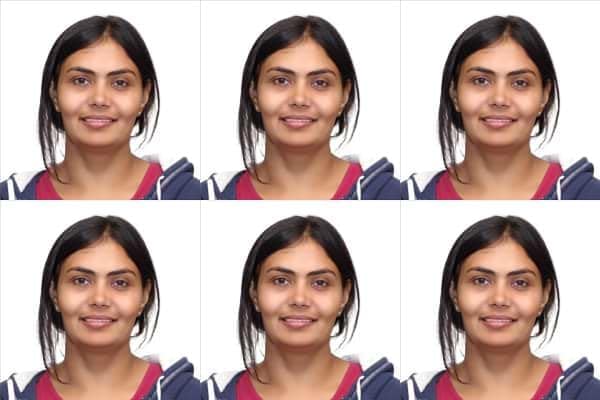
This service offers a high quality result with same day shipping for urgent needs. It provides six prints which is often the exact number required for a standard passport application.
We may earn a commission when you buy through this link, at no additional cost to you.
The process involves uploading a photo that is checked for quality before printing. The speed and accuracy make it a reliable choice for those on tight deadlines.
While the quantity is fixed for this option you can request different counts if needed. The perfect rating suggests consistent quality and customer satisfaction across orders.
Choose this if you need a fast reliable service for six high quality prints. It is ideal for last minute passport renewals.
Same day shipping ensures you receive your photos quickly when time is critical.
Photos are prepared carefully to meet ID and immigration standards accurately.
We may earn a commission when you buy through this link, at no additional cost to you.
While not a dedicated passport printer this light box helps you capture compliant photos at home. It provides even lighting and clean backdrops to reduce shadows on the face.
We may earn a commission when you buy through this link, at no additional cost to you.
The dimmable LED lights allow you to adjust brightness for your environment. The included backdrops help meet plain background requirements for passport standards without extra props.
This is a supportive tool rather than a full solution but it improves image quality significantly. It is useful when used with a smartphone or camera and online print service.
Buy this if you want to improve your DIY photo lighting. It is an affordable way to get professional looking shots at home.
120 LED lights and reflective walls minimize shadows for a uniform background.
Includes multiple backdrops that can be adjusted to meet plain background requirements.
We may earn a commission when you buy through this link, at no additional cost to you.
Selecting the right passport photo solution depends on your budget and how often you need them. This guide covers key factors to help you choose the best fit.
Consider whether you need a dedicated dye sub printer for instant physical copies or if online services are sufficient. Printers offer speed but online services often provide expert editing.
Choose printers for frequent use and online services for occasional needs to save space and cost.
Look for systems that are pre-configured to reduce technical adjustments. Pre-programmed settings save time and ensure compliance without manual input.
Prioritize ready-out-of-box solutions to minimize setup time and avoid errors.
Check if the device supports wireless or cable connections like USB or SD card. Wireless is convenient for mobile devices while cables ensure stable transfers.
Select the connection type that matches your primary device for seamless workflow.
Some solutions include professional review to ensure compliance. This is critical for avoiding rejection due to lighting or background issues.
Choose services with manual review if you are unsure about photo standards.
Estimate how many photos you typically need at one time. Some systems or services offer bundles for multiple copies which can be cost effective.
Opt for higher volume options if you have family members traveling.
Dye sub printers generally produce higher quality and water resistant prints than standard inkjets. Look for high-resolution outputs to meet government requirements.
Invest in higher quality output to ensure durability and acceptance.
Ensure the solution helps you capture images with a plain background. Light boxes or software tools can assist in achieving the required uniform backdrop.
Use tools that simplify background compliance to avoid photo rejection.
Compare the upfront cost of hardware against the per-print cost of online services. Hardware is better for high volume while services are better for low volume.
Select the model that aligns with your frequency of use.
Always check current government guidelines before capturing your photo. Requirements for size and expression can change so staying updated prevents errors in your submission.
Keep your printer or light box in a dust free area. Regular cleaning of lenses and sensors ensures consistent image quality over time.
Store photo paper and ink cartridges in cool dry places to prevent degradation. Proper storage extends the life of consumables and maintains print quality.
Yes many dedicated systems like those with dye sub printing are pre-configured to meet US standards. However you should always verify that the dimensions and color output align with current requirements.
Online services offer same day shipping or instant digital delivery which is faster than shipping hardware. If you have the hardware a dedicated printer system offers instant physical prints.
You can use a smartphone as long as you follow lighting and background rules. Online services and apps help crop and validate the image for compliance easily.
Clean your printer head every few months or when print quality drops. Dust can cause streaks so regular maintenance is key for high quality outputs.
A plain white or off-white background is required. Light grey is sometimes accepted but white is safest to avoid rejection from immigration authorities.
Most reputable services guarantee compliance and offer free reprints if their edits cause rejection. Check terms before ordering to confirm their guarantee policy.
The best solution depends on whether you prioritize speed or cost. Printers are ideal for frequent users while online services suit occasional needs.
Prioritize systems that include professional review or preset standards to avoid common errors. This saves time and ensures acceptance on your first try.
Remember to check current prices and availability as these can vary. Selecting the right tool ensures you get compliant photos without the stress of a visit.