
Nektar SE49
4.5Editor score
Affordable price point
DAW integration included
Lightweight design
This guide compares the top 49 Key MIDI Keyboards for 2026, evaluating features like keybeds, DAW integration, and software bundles to help you choose.
Choosing the right 49 Key MIDI Keyboard can transform your music production workflow. These controllers offer a perfect balance between portability and functionality, giving you enough keys for chords and melodies without taking up excessive desk space.
We analyzed ten top-rated models based on build quality, key feel, software inclusion, and integration capabilities. Our evaluation focuses on how well each unit works with popular digital audio workstations and what value they bring to producers.
Each pick below highlights specific strengths like budget friendliness or premium features. Keep in mind that availability and pricing fluctuate, so check current listings before making your final decision to ensure you get the best deal available.
4.5Editor score

4.7Editor score

4.4Editor score
This table provides a side-by-side comparison of the ten selected MIDI controllers, highlighting their key specifications and unique selling points to help you quickly identify the best fit for your studio.




The Novation Launchkey 49 MK4 stands out as a top choice for producers seeking a professional control surface. With its high-quality keybed and responsive pads, it delivers an experience that rivals much more expensive units.
We may earn a commission when you buy through this link, at no additional cost to you.
Its seamless integration with major DAWs allows you to control mixing and arrangement tools without touching the mouse. The inclusion of NKS support also ensures you can browse and load presets from Native Instruments instantly.
While the price is higher than entry-level options, the build quality and feature set justify the investment. The only minor drawback is the initial time required to map and understand all the available controls.
If you are serious about music production and need a controller that grows with your skills, this is the model to choose. It balances performance and usability better than any other option on this list.
The keys feel responsive and natural, allowing for expressive performances whether you are playing synth leads or piano parts.
Scale Mode and Chord Mode help you avoid wrong notes, making composition faster and more intuitive for beginners and pros alike.
We may earn a commission when you buy through this link, at no additional cost to you.
The M-AUDIO Keystation 49 MK3 offers a straightforward solution for musicians who want a reliable controller without complexity. Its design focuses on simplicity, making it easy to start playing immediately after connecting to your computer.
We may earn a commission when you buy through this link, at no additional cost to you.
The velocity-sensitive keys capture performance nuances well, and the inclusion of transport buttons allows for basic control of your recording software. You also get a solid package of production software included in the box.
While it lacks assignable knobs for tweaking sounds, the dedicated octave and sustain inputs handle most basic needs. The plastic build is functional and sturdy enough for home use, though it may not survive heavy touring.
This keyboard is ideal for beginners or those on a budget who need a solid foundation for their studio setup. It removes friction from the creative process, letting you focus on making music instead of configuring settings.
No drivers are required, so you can plug it in and start recording right away on both Mac and PC systems.
Included apps like Ableton Live Lite and MPC Beats provide a complete starting point for new producers.
We may earn a commission when you buy through this link, at no additional cost to you.
For those just starting out, the Nektar SE49 provides an entry point into MIDI production that does not break the bank. It offers essential features and mapping that make it usable right out of the box.
We may earn a commission when you buy through this link, at no additional cost to you.
Its DAW integration works with most popular software, allowing you to control transport and volume without extra configuration. The design is clean and simple, fitting easily on even the smallest desk space.
The keys are functional but not weighted, which is expected at this price point. It may lack the finesse of premium units, but it gets the job done for practice and basic composition tasks effectively.
If you are working with a tight budget, this controller is a smart investment that lets you learn the basics of MIDI without financial stress. It serves as a reliable tool while you develop your skills.
Pre-configured integration means you can use your DAW buttons directly from the controller without setting up mappings manually.
Its smaller footprint makes it a great choice for laptop users or those with limited room in their home studio.
We may earn a commission when you buy through this link, at no additional cost to you.
The M-AUDIO Oxygen 49 MKV brings a high level of control and creativity to the mid-range market. Its smart features like Scale and Chord modes help you experiment with harmonies even if you are not a theory expert.
We may earn a commission when you buy through this link, at no additional cost to you.
You get plenty of physical controls with knobs and faders that map automatically to your DAW. This hands-on approach speeds up your workflow, allowing you to adjust parameters without stopping your flow.
The NKS integration is a significant plus for users of Native Instruments products, letting you browse sounds directly on the hardware. The included software covers most production needs, giving you a complete package.
This unit is perfect for producers who want more control than a simple keyboard offers without jumping to a high-end model. It balances creative tools with practical usability effectively.
The auto-mapping feature assigns knobs to common DAW parameters automatically, saving you setup time and effort.
Smart Chord and Scale modes allow you to play harmonically correct music with simple finger movements.
We may earn a commission when you buy through this link, at no additional cost to you.
Arturia is known for high-quality software, and this bundle reflects that reputation. The included Analog Lab V gives you access to thousands of presets that sound professional and polished right away.
We may earn a commission when you buy through this link, at no additional cost to you.
The physical design is striking with its bright screen and RGB pads. The interface is designed to help you find sounds quickly and tweak them in real time without digging through menus.
While the keyboard is excellent, you will need to install the software to get the most out of it. This setup process takes time, but the result is a very powerful sound source for your projects.
If you care deeply about sound quality and want a controller that inspires you with great presets, this is an excellent choice. It offers a premium experience at a competitive price point.
The bright LCD screen shows you exactly what is happening with your sound and controls in real time.
Analog Lab V includes a massive library of sounds ranging from vintage synths to modern orchestral textures.
We may earn a commission when you buy through this link, at no additional cost to you.
This generic option is designed for those who need a very basic MIDI interface without extra features. It serves a simple function of converting key presses to MIDI data for your computer.
We may earn a commission when you buy through this link, at no additional cost to you.
The build uses ABS material which is durable and practical for home use. Its compact dimensions make it easy to store or move around a room when you are not using it.
Lack of brand support means you might not get dedicated software or drivers, but for basic testing it works fine. It is a utilitarian device that gets the job done without flair.
If you just need something to plug in and test your DAW, this could suffice. However, for serious production, you will likely want something with better keys and controls.
This controller focuses on the basics of input without adding complex features that might overwhelm a beginner.
The ABS casing ensures the unit is robust and resistant to daily handling in a home environment.
We may earn a commission when you buy through this link, at no additional cost to you.
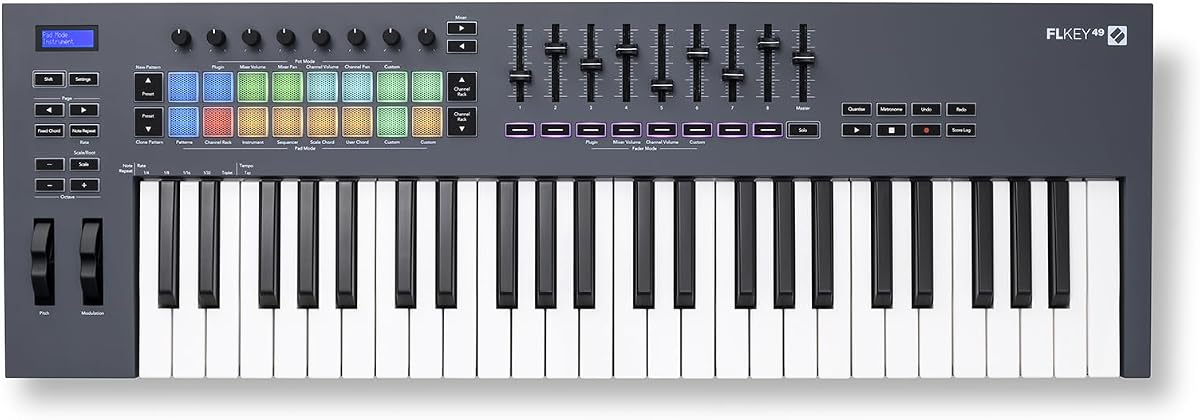
For FL Studio users, the FLkey 49 offers unmatched integration that streamlines the production process. It brings mixer and channel controls directly into the hardware, reducing reliance on the mouse.
We may earn a commission when you buy through this link, at no additional cost to you.
The pads map directly to the step sequencer, making beat programming fast and intuitive. You can trigger and edit patterns without reaching for the screen, keeping you in the creative flow.
While it works with other DAWs, its full potential is realized within FL Studio. The dedicated controls for that specific software make it a specialized tool rather than a general purpose controller.
If you use FL Studio as your main DAW, this keyboard simplifies your workflow significantly. It removes friction and lets you focus on arranging your tracks and tweaking your sound.
The pad mapping lets you program rhythms directly on the hardware, making the beat making process much faster.
Adjusting volume and pan for your tracks can be done via the dedicated knobs on the keyboard itself.
We may earn a commission when you buy through this link, at no additional cost to you.
The Oxygen Pro 49 takes the series to a premium level with aftertouch and semi-weighted keys. These features allow for more expressive playing, letting you modulate sounds while holding down keys.
We may earn a commission when you buy through this link, at no additional cost to you.
It also includes traditional MIDI output, which is great for connecting to external gear without relying solely on USB. The build quality is solid, ensuring it can handle regular use over time.
You get the same smart modes as the cheaper models but with better controls and more robust hardware. The included software is comprehensive, offering everything you need to start producing music immediately.
If you need the expressiveness of aftertouch and the reliability of traditional MIDI, this is the right choice. It is a professional tool designed for serious production environments.
The aftertouch feature lets you add vibrato or filter changes by pressing harder while playing notes.
The 5-pin MIDI out allows you to connect to other synthesizers or gear using standard MIDI cables.
We may earn a commission when you buy through this link, at no additional cost to you.
The midiplus AK490 is a straightforward option that bridges USB and traditional MIDI connections. It is a good choice for those who still use hardware synthesizers alongside their computer setup.
We may earn a commission when you buy through this link, at no additional cost to you.
Its simplicity makes it easy to set up without confusion. It lacks advanced mapping or software, but it delivers reliable signal conversion for recording basic MIDI data.
The keybed is decent for the price, though not as responsive as higher-end units. It serves its purpose well for inputting notes without adding unnecessary features to clutter your desk.
If you just need a simple tool to record notes and connect to other gear, this works well. It is a practical solution for basic recording tasks.
You can connect to your computer via USB and to other gear via the MIDI DIN output simultaneously.
The sustain pedal input allows you to add expression to your performances just like a real piano.
We may earn a commission when you buy through this link, at no additional cost to you.
The Arturia KeyLab mk3 is a premium model that offers extensive control for professional users. It features a high number of encoders which allows you to map almost any parameter you need to tweak.
We may earn a commission when you buy through this link, at no additional cost to you.
The build is solid and feels substantial on your desk. The white color option gives it a clean look that stands out in most studio environments and adds a touch of modern design.
Its USB-C port ensures compatibility with newer computers without adapters. The aftertouch and pressure-sensitive pads add layers of expression that are essential for professional sound design.
For studios that need maximum control and reliability, this is an excellent investment. It is built to last and offers a level of customization that few other keyboards can match.
With nine encoders and twelve pads, you can map a wide range of DAW controls without needing extra hardware.
The USB-C power connection ensures you can use the latest computer standards without needing extra adapters or cables.
We may earn a commission when you buy through this link, at no additional cost to you.
Selecting the right controller involves understanding what features matter most for your specific workflow and budget. This guide breaks down the key factors you should evaluate.
The type of keybed determines how the keyboard feels. Weighted keys simulate a piano while semi-weighted keys are easier to use for synths. Velocity sensitivity is standard on all options and ensures dynamics are captured.
Choose a keybed that matches your playing style and instrument needs.
Seamless integration allows you to control transport and mixing without using the mouse. Check if the keyboard has pre-built scripts for your specific software to save setup time and effort.
Always verify compatibility with your digital audio workstation before buying.
Knobs faders and pads add a tactile layer to production. The more controls you have the easier it is to tweak parameters and launch clips. Assignability is key to making these useful.
Look for enough knobs and faders to handle your most common adjustments.
Aftertouch allows you to modulate sounds by pressing keys harder. This is a critical feature for expressive performances and sound design. Most budget models lack it but pro units include it.
Prioritize aftertouch if you plan to use virtual instruments deeply.
Included software can add significant value to the purchase. Many brands include DAWs and instrument plugins to get you started immediately. Ensure these apps are relevant to your style.
Assess the value of included software when comparing prices between models.
Durability is important for long-term use. Sturdy materials ensure the controls stay tight and the keys respond consistently. Consider if you will move it around or keep it fixed.
Invest in a robust build if you plan to use it heavily.
USB is standard but having MIDI DIN output allows connection to external hardware. Some units also support class-compliant audio interfaces which can simplify your setup. Check what you need for your gear.
Ensure the connectivity matches your existing studio equipment.
Prices vary widely based on features and brand. Entry-level models are cheap but lack advanced tools while pro models offer more control. Set a limit but consider long-term value.
Balance cost with the features you actually need.
Start by connecting the keyboard to your computer via USB. Ensure you have the latest drivers installed and configure your DAW to recognize the device as an input source.
Take time to learn the key combinations for transport and octave controls. Most manuals provide a quick guide to assigning knobs and faders to your preferred software parameters.
Keep your keyboard clean by dusting it regularly with a soft cloth. Avoid direct sunlight and extreme temperatures to preserve the build quality and electronic components over time.
Most modern 49 key MIDI keyboards are class-compliant and do not require drivers. However some advanced features might need specific software to work fully. Always check the manual for your specific model.
Nearly all modern 49 key MIDI keyboards offer velocity sensitivity to capture dynamics. It is a standard feature that allows your software to respond to how hard you press the keys.
Velocity measures how hard a key is pressed initially. Aftertouch measures pressure applied while the key is held down. Both allow for expressive control but work at different times during a note.
Yes many 49 key MIDI keyboards work with iPads if they are bus powered. You may need an adapter to connect the USB cable to the device port depending on your model.
Forty nine keys offer a balance between playability and desk space. They allow you to play chords comfortably without taking up as much room as larger keyboards in small studios.
No most controllers do not produce sound themselves. They send data to your computer which plays the audio. You will need speakers or headphones connected to your computer or audio interface.
Factory reset procedures vary by brand. Usually holding specific key combinations while powering on restores defaults. Refer to the manual for exact instructions for your specific model.
We have reviewed the top ten options ranging from budget picks to professional units. Each offers a unique set of features designed to meet different production needs and skill levels.
Consider your primary use case and DAW when deciding which model fits best. Prioritize features like aftertouch and integration if you want maximum control over your sound.
Remember to check current listings for pricing and bundle details before buying. The best deal often includes extra software or accessories that add value to your purchase.