
Dell 1100W EPP 80+ Platinum PSU (CMPGM)
5.0Editor score
High efficiency platinum rating
Modular cable management
Cost-effective renewed option
This guide compares the top 1100W PSU options for high-end gaming and workstations, evaluating efficiency, reliability, and features to help you choose the
Choosing the right power supply is crucial for system stability and performance. A 1100W PSU provides ample headroom for high-end GPUs and future upgrades.
We compared ten top-rated units based on efficiency certifications, modularity, connector types, and customer feedback. Our analysis highlights the best options for various needs.
Each pick includes detailed specs and pros to help you decide. Prices and availability change frequently, so verify details before purchasing your next power supply.
5.0Editor score

4.7Editor score

4.7Editor score
Below is a detailed side-by-side comparison of all ten power supplies evaluated in this guide. Each entry highlights key specifications to help you quickly identify the unit that best fits your system requirements and budget constraints.




This Dell unit offers a robust 1100W output ideal for server or high-power workstation builds. It carries an 80+ Platinum rating for efficient energy use.
We may earn a commission when you buy through this link, at no additional cost to you.
Built for enterprise environments, it delivers stable power under heavy loads. The fixed cable design is typical for rack-mounted systems but less flexible for home use.
While effective for specific setups, the lack of modularity makes cable management harder in standard PC cases. It is best suited for those needing server-grade reliability.
Consider this if you require high wattage from a trusted brand. Check compatibility with your case and motherboard before purchasing this specialized power supply unit.
Designed for PowerEdge servers, this unit ensures consistent performance under 24/7 operation conditions.
The Platinum certification minimizes energy waste and reduces heat output during intensive computing tasks.
We may earn a commission when you buy through this link, at no additional cost to you.
This renewed Dell power supply offers an incredible value for builders needing massive wattage. It features modular cables and an 80+ Platinum efficiency rating.
We may earn a commission when you buy through this link, at no additional cost to you.
Users report reliable performance even after refurbishment. The modular design simplifies cable management significantly compared to fixed-cable enterprise units.
Since it is renewed, warranty terms may vary. Ensure you buy from a reputable seller to guarantee proper testing and functionality upon arrival.
Perfect for budget-conscious builders needing high power. Verify the seller's return policy to secure your investment in this cost-effective unit.
Achieve high-end power capabilities without the premium price tag associated with new consumer units.
Connect only necessary cables to reduce clutter and improve airflow inside your computer chassis.
We may earn a commission when you buy through this link, at no additional cost to you.
The RM1000e brings the latest ATX 3.1 standard to your build ensuring compatibility with next gen GPUs. It runs quietly thanks to its optimized fan curve.
We may earn a commission when you buy through this link, at no additional cost to you.
Fully modular cabling helps keep your system neat while the 120mm rifle bearing fan ensures low noise levels under load. Capacitors rated for high heat ensure longevity.
While it falls slightly short of 1100W, it handles transient spikes well due to Intel certification. This makes it a great balance for modern high performance PCs.
Ideal for builders planning future upgrades. The native support for new connectors means you won't need adapters for the latest graphics cards.
Meets the latest power standards to safely handle the increased transient power demands of modern graphics cards.
The specialized fan curve keeps noise levels low even when the system is under heavy gaming load.
We may earn a commission when you buy through this link, at no additional cost to you.
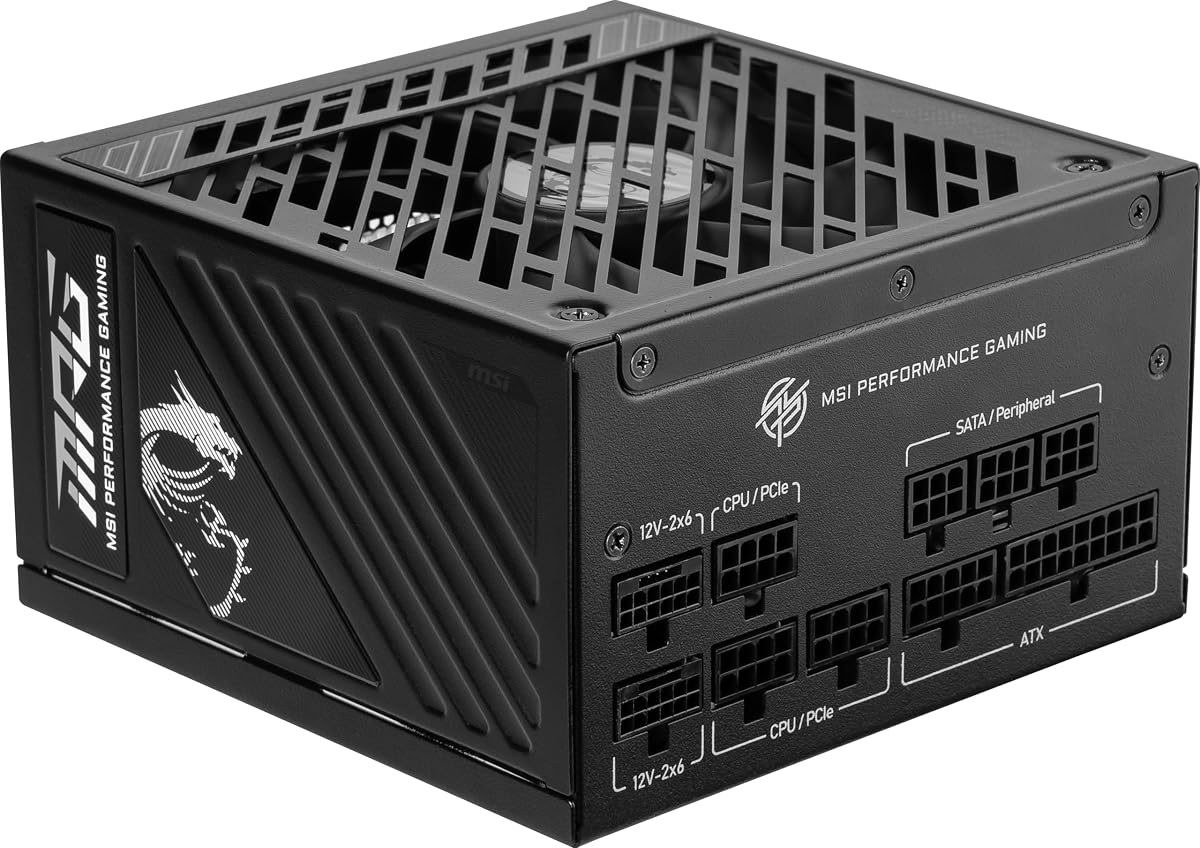
This unit features a native 12V-2×6 connector for direct GPU power without needing an adapter. The embossed cables are flexible for easier routing.
We may earn a commission when you buy through this link, at no additional cost to you.
Cybenetics Gold certification ensures high efficiency while keeping temperatures low. The fan stays quiet during normal usage thanks to its low noise design.
The slightly higher price reflects the premium build and connector convenience. If you want a clean setup without adapters, this is a strong option.
Best for users prioritizing cable management and future proofing. The direct connection reduces potential points of failure for your graphics card.
Eliminates the need for dongles by providing a native power cable for the latest PCIe 5.1 graphics cards.
Embossed cables with low profile combs improve airflow and aesthetics inside your computer case.
We may earn a commission when you buy through this link, at no additional cost to you.
The GF A3 offers a 1050W output with a massive ten year warranty for peace of mind. It supports the latest 12V-2×6 standards natively.
We may earn a commission when you buy through this link, at no additional cost to you.
Fully modular flat cables help maintain good airflow inside your case. The Gold efficiency rating ensures minimal energy loss during operation.
Some users find the cables less flexible than competitors. However the robust build quality and extended warranty make it a solid long term choice.
Perfect for builders wanting strong warranty support and modern connectors. Its capacity handles even the most power hungry components with ease.
A decade of coverage shows the manufacturer's confidence in the product's durability and longevity.
With 1050W output this unit supports multi GPU setups and high performance workloads easily.
We may earn a commission when you buy through this link, at no additional cost to you.
This unit stands out with its white aesthetic and advanced GaN MOSFET tech for higher efficiency. The intelligent voltage stabilizer enhances GPU delivery.
We may earn a commission when you buy through this link, at no additional cost to you.
ROG heatsinks and dual ball bearings ensure it runs cool and quiet. The white cables match the case for a premium look.
It is priced higher than standard units but offers distinct features. If you want performance and style this is a top tier option.
Ideal for custom builds prioritizing looks. The technology ensures your components receive stable power even during intense gaming sessions.
Patented stabilizer technology optimizes power delivery to your graphics card for smoother gameplay.
A sleek white design with quality components for a high end look in visible setups.
We may earn a commission when you buy through this link, at no additional cost to you.
Another solid option from Corsair featuring the latest ATX 3.1 standards. It includes native 12V-2×6 connectivity for current gen GPUs.
We may earn a commission when you buy through this link, at no additional cost to you.
The fully modular design and Cybenetics Gold rating provide good value. Its low noise profile makes it suitable for quiet environments.
It lacks some premium features of higher end units but remains reliable. A great middle ground for most gamers and content creators.
Best for standard builds needing reliable power. It handles modern component demands efficiently without excessive cost.
Supports the latest power standards ensuring you are ready for next generation hardware releases.
Offers a mix of efficiency and features that meets the needs of most modern PC builds.
We may earn a commission when you buy through this link, at no additional cost to you.
This unit includes dual native 12V-2×6 cables for convenient GPU power. It uses server grade capacitors for better longevity and performance.
We may earn a commission when you buy through this link, at no additional cost to you.
The low noise fan keeps things quiet during use. With two GPU cables you can power high end cards without extra adapters.
Some users report average efficiency compared to peers but it remains a strong choice. The warranty adds significant value for gamers.
Best for dual GPU setups or high draw systems. The extra cable support is a great convenience for complex builds.
Includes two native cables for next gen power standards simplifying multi card configurations.
Server grade capacitors ensure stable power delivery and longer lifespan for your power supply.
We may earn a commission when you buy through this link, at no additional cost to you.
True to its name, this unit focuses on silent operation with Zero RPM fan technology. The 140mm fan provides efficient cooling with minimal noise.
We may earn a commission when you buy through this link, at no additional cost to you.
Platinum efficiency ensures low power consumption while keeping temperatures down. It supports ATX 3.1 for modern GPU needs.
The high cost is balanced by the noise reduction and build quality. If silence is a priority this unit stands out among peers.
Best for quiet home studios or living room PCs. It delivers clean power without adding distracting noise to your environment.
The fan stops at low loads ensuring your PC remains silent during everyday tasks.
A bigger fan allows for lower RPMs while maintaining effective thermal management for components.
We may earn a commission when you buy through this link, at no additional cost to you.
The C1000 Gold Core offers a clean look with fully modular embossed cables. It includes Zero RPM mode for silence under light loads.
We may earn a commission when you buy through this link, at no additional cost to you.
Cybenetics Platinum efficiency certification indicates high energy performance. It supports next gen GPUs with the native 12V-2×6 connector.
It lacks premium extras but delivers solid core performance. Good for builders wanting reliable power without extra cost.
Best for clean builds needing modern standards. It provides efficient power delivery that supports the latest component requirements effectively.
The fan remains off during low usage to ensure complete silence for quiet setups.
ATX 3.1 and PCIe 5.1 support ensure your system is ready for the latest graphics cards.
We may earn a commission when you buy through this link, at no additional cost to you.
Selecting the right power supply involves considering several factors beyond just wattage. This guide outlines the most important aspects to evaluate before making a purchase decision for your system.
Ensure the unit provides enough power for your GPU and CPU combined with extra room for spikes. High wattage prevents throttling and instability during intense loads.
Always aim for 20 percent more wattage than your calculated system needs for safety.
Look for 80+ Gold or Platinum ratings to reduce energy waste and heat. Higher efficiency means lower electricity bills and cooler operation inside your case.
Platinum units are best for systems running long hours to save on energy costs.
Check for native 12V-2×6 connectors to support modern GPUs without adapters. Adapters can be unsafe or prone to overheating if not managed correctly.
Native connectors are the safest choice for the latest generation graphics cards.
Fully modular units allow you to connect only necessary cables improving airflow and reducing clutter. Non modular units often have too many unused wires.
Choose fully modular for the best cable management and cleaner builds possible.
Consider fan bearing types and size as larger fans generally run quieter at lower speeds. Zero RPM modes help during idle states for silent operation.
Prioritize large fans and quality bearings for a quiet listening experience.
A longer warranty period reflects the manufacturer's confidence in the unit's quality. Look for brands that offer at least five to ten years of coverage.
Ten year warranties are standard for high end power supplies to ensure longevity.
Check for features like Japanese capacitors and robust internal layouts. High quality components prevent failures and ensure stable voltage delivery over time.
Solid internal components are essential for a power supply that lasts for years.
Balance cost with features since high wattage units can vary significantly in price. Determine which features you need most for your specific use case.
Invest in quality features you need rather than paying for extras you will not use.
Install the PSU firmly in the case using all four screws to ensure it does not vibrate excessively. Proper mounting prevents long term stress on the unit's casing and fan.
Connect cables firmly to avoid loose contacts that can cause power drops or damage. Ensure the 12V-2×6 connector clicks into place securely for GPU stability.
Dust your power supply regularly using compressed air to maintain cooling efficiency. Clean intake filters help prevent overheating and extend the life of internal components.
Yes, 1100W provides sufficient power for most RTX 50 series setups. It allows room for transient spikes and additional components like fans or storage.
The main difference is extra headroom for power spikes and future upgrades. A 1100W unit runs cooler and more efficiently under similar loads compared to a 1000W model.
Not if you buy a unit with a native 12V-2×6 connector. Adapters can introduce risks and should be avoided when possible for safety reasons.
Modular units allow better cable management and airflow. Non modular units have extra cables that can clutter the case and reduce efficiency.
A quality PSU can last many years if kept clean and not overheated. Replace it if you notice strange noises or system instability during high load.
It depends on the connector type and physical fit. Some server units like the Dell options work but often lack standard PC connectors.
We explored ten powerful units ranging from budget server finds to premium gaming solutions. Each offers unique strengths for different build requirements and budgets.
Prioritize native connectors and modularity for the best experience. Ensure you choose a reputable brand with a solid warranty for long term peace of mind.
Check current prices and stock before buying as availability fluctuates. The right power supply is the foundation for a stable high performance PC build.