
HP OfficeJet Pro 8125
3.9Editor score
Affordable entry price
Compact home office design
Wireless connectivity options
Explore the top AI printers for 2026. Our guide compares features, performance, and value to help you choose the right smart printing solution for your needs.
AI printers are transforming how we handle documents by integrating smart features that optimize formatting and reduce waste. These devices use advanced algorithms to ensure your prints look professional every time. Choosing the right one depends on your specific printing volume and quality requirements.
We evaluated ten leading models based on their AI capabilities, print speed, connectivity options, and overall reliability. Each product was assessed for its ability to streamline workflows and deliver consistent results for home or office use. Our comparisons highlight the unique strengths of each option.
Each pick below details key specifications, pros, and cons to help you make an informed decision. We include links to verified retailers so you can explore current offers directly. Please note that prices and availability may change frequently, so check the latest details before purchasing.
3.9Editor score

4.0Editor score

4.7Editor score
This side-by-side comparison highlights the key differences between the top AI printers available this year. Reviewing these specs helps you identify which model aligns best with your workflow and budget constraints.




The HP OfficeJet Pro 9135 stands out as a top choice for professional environments needing reliable AI capabilities. With a rating of 4.0, it delivers high-speed color printing up to 25 ppm black. Its large 4.3-inch touchscreen makes navigation intuitive for daily tasks.
We may earn a commission when you buy through this link, at no additional cost to you.
Key strengths include HP AI features that optimize print formatting to remove unwanted content from web pages. This reduces waste and ensures professional layouts without manual adjustments. The device also supports single-pass duplex scanning and includes robust security measures via HP Wolf Pro Security.
Trade-offs involve the higher initial investment compared to home models. Additionally, the Instant Ink trial converts to a monthly fee after three months unless cancelled. These costs are offset by the productivity gains and consistent quality for busy offices.
This printer is ideal for small to medium offices handling high volumes of documents. Its combination of speed, security, and smart formatting tools makes it a strong recommendation for businesses prioritizing efficiency and professional output.
HP AI intelligently removes unnecessary elements from web pages and emails before printing, ensuring clean and professional results without manual formatting work.
Built-in HP Wolf Pro Security helps protect your network from cyber threats, providing peace of mind when printing sensitive business documents.
We may earn a commission when you buy through this link, at no additional cost to you.
The HP OfficeJet Pro 8125 offers an affordable entry point for home offices needing AI capabilities. Rated at 3.9, it supports speeds up to 20 ppm black with reliable wireless connectivity. Its compact footprint fits well in smaller spaces.
We may earn a commission when you buy through this link, at no additional cost to you.
Strengths include HP AI tools that streamline document layout by removing unwanted content automatically. The device features a 2.7-inch touchscreen and supports the HP app for convenient mobile management. It also uses over 45% recycled plastic in its design.
Users should note that color printing is slower at 10 ppm compared to black. Cartridge restrictions may limit third-party ink options, requiring original HP chips for operation. These factors are manageable for light to moderate usage.
This model is best for home users or freelancers needing professional-quality prints without a high cost. Its balance of features and price makes it a top budget recommendation for AI-enabled home office setups.
The compact size and smart layout allow this printer to fit easily into home office desks without sacrificing essential all-in-one functionality.
Print, scan, copy, or fax directly from your smartphone using the easy-to-use HP app for seamless remote management.
We may earn a commission when you buy through this link, at no additional cost to you.
The Bambu Lab P2S Combo represents the pinnacle of AI integration in 3D printing. With a high 4.7 rating, it delivers speeds up to 600 mm per second while maintaining exceptional accuracy. Setup is quick, taking just 15 minutes to start printing.
We may earn a commission when you buy through this link, at no additional cost to you.
Strengths include AI failure detection that prevents wasted prints by identifying issues early. The AMS 2 Pro enables seamless multi-color printing with built-in filament drying to ensure material quality. Adaptive airflow adjusts cooling automatically for various filament types.
This printer is specialized for 3D modeling rather than traditional documents, which may limit general office use. The price is higher than standard inkjet printers, but the precision and speed justify the cost for makers and engineers.
Ideal for creators needing professional-grade 3D prints, this model offers limitless creativity with a unified workflow. Its AI features significantly reduce downtime and improve success rates for complex projects.
Smart sensors monitor the printing process to detect and halt failures immediately, saving time and material on long print jobs.
The AMS 2 Pro system handles multiple colors seamlessly, allowing for intricate designs without manual filament changes.
We may earn a commission when you buy through this link, at no additional cost to you.
The HP Envy 6155 is tailored for homes requiring high-quality photo printing alongside documents. Rated 4.2, it features True-to-Screen technology for vibrant results matching your display. The 2.4-inch touchscreen ensures smooth navigation for daily tasks.
We may earn a commission when you buy through this link, at no additional cost to you.
Strengths include HP AI optimization that removes unwanted content from web pages effortlessly. It supports borderless prints and wireless mobile printing via the HP app. Over 60% recycled plastic content makes it environmentally friendly.
Trade-offs involve slower printing speeds at 10 ppm black and a smaller 100-sheet input tray. These limitations are suitable for casual home use but less ideal for high-volume office tasks.
Best for families or hobbyists prioritizing photo quality and ease of use. Its reliable features and smart AI tools make it a strong candidate for home printing needs.
Ensures printed photos match the vibrant colors on your screen for accurate and professional-looking results.
Constructed with at least 60% recycled plastic, this printer supports eco-friendly practices without compromising performance.
We may earn a commission when you buy through this link, at no additional cost to you.
The HP Smart Tank 5003 is designed for households needing high-volume, low-cost printing. With a 4.1 rating, it includes up to 3 years of ink right out of the box. This model eliminates cartridges, reducing waste and recurring expenses.
We may earn a commission when you buy through this link, at no additional cost to you.
Strengths include a mess-free refill system that allows easy access to bottles without spills. It delivers up to 6,000 color pages and supports borderless printing for photos. The wireless capabilities ensure seamless connection to multiple devices.
Trade-offs involve a slightly bulkier footprint than standard printers and initial setup that may take more time. However, the long-term savings on ink make these minor inconveniences worthwhile for frequent users.
Ideal for families or small businesses with heavy printing demands. Its reliable performance and cost-effective design make it a top choice for long-term value.
Simply plug in ink bottles and let them drain naturally to avoid spills or squeezing during refilling.
Get up to 3 years of ink included, significantly lowering the cost per page compared to traditional cartridges.
We may earn a commission when you buy through this link, at no additional cost to you.
The HP Smart Tank 7603 brings fax capabilities and high-volume printing to home offices. Rated 3.9, it includes up to 3 years of ink and supports fax, scan, and copy tasks. The magic touch control panel simplifies operation.
We may earn a commission when you buy through this link, at no additional cost to you.
Strengths include an auto document feeder for batch scanning and high capacity ink bottles saving up to 8,000 color pages. Refilling remains mess-free and straightforward. Mobile printing ensures you can print from anywhere.
Trade-offs involve a higher price point than basic models and reliance on Wi-Fi for many features. However, these are acceptable given the added functionality and long-term ink savings.
Best for home offices requiring faxing and heavy usage. Its combination of convenience and cost-effectiveness makes it a strong choice for professional needs.
Intuitive control panel that makes navigating settings and tasks straightforward for all users.
Integrated fax functionality allows you to send documents without needing a separate machine.
We may earn a commission when you buy through this link, at no additional cost to you.
The HP OfficeJet Pro 8139 offers a unique benefit with a 1-year Instant Ink trial instead of the usual three months. Rated 4.0, it is perfect for home offices needing fax and printing. AI tools optimize formatting to reduce waste.
We may earn a commission when you buy through this link, at no additional cost to you.
Strengths include reliable dual-band Wi-Fi and a 2.7-inch touchscreen for easy navigation. Security features protect data from cyber threats. Mobile printing via the HP app adds convenience for on-the-go tasks.
Trade-offs involve the standard 20 ppm speed and eventual subscription fees after the trial. Despite this, the extended trial period offers significant value for early adopters.
Ideal for users needing fax and long-term ink savings upfront. Its professional features and extended support make it a smart investment for home offices.
Get a full year of Instant Ink trial to enjoy convenience and savings before committing to the service.
HP Wolf Essential Security bolsters protection to keep your network safe from potential cyber threats.
We may earn a commission when you buy through this link, at no additional cost to you.
The HP Smart Tank 7603 is another variation tailored for high-volume needs with fax capabilities. Rated 4.0, it includes up to 3 years of ink and features a magic touch control panel. It supports borderless prints for versatile use.
We may earn a commission when you buy through this link, at no additional cost to you.
Strengths include mess-free refilling and auto document feeder capabilities for efficient workflow. Wireless printing ensures easy access from phones and tablets. The AI-capable features help optimize document layout.
Trade-offs involve the physical size and occasional maintenance requirements. However, the ink savings and functionality justify the footprint for active workspaces.
Best for busy home offices needing fax and volume. Its reliability and long-term support make it a dependable tool for daily tasks.
Tank system delivers up to 3 years of ink, reducing waste and cost per page significantly.
Features like auto document feeder and borderless printing streamline your daily printing tasks.
We may earn a commission when you buy through this link, at no additional cost to you.
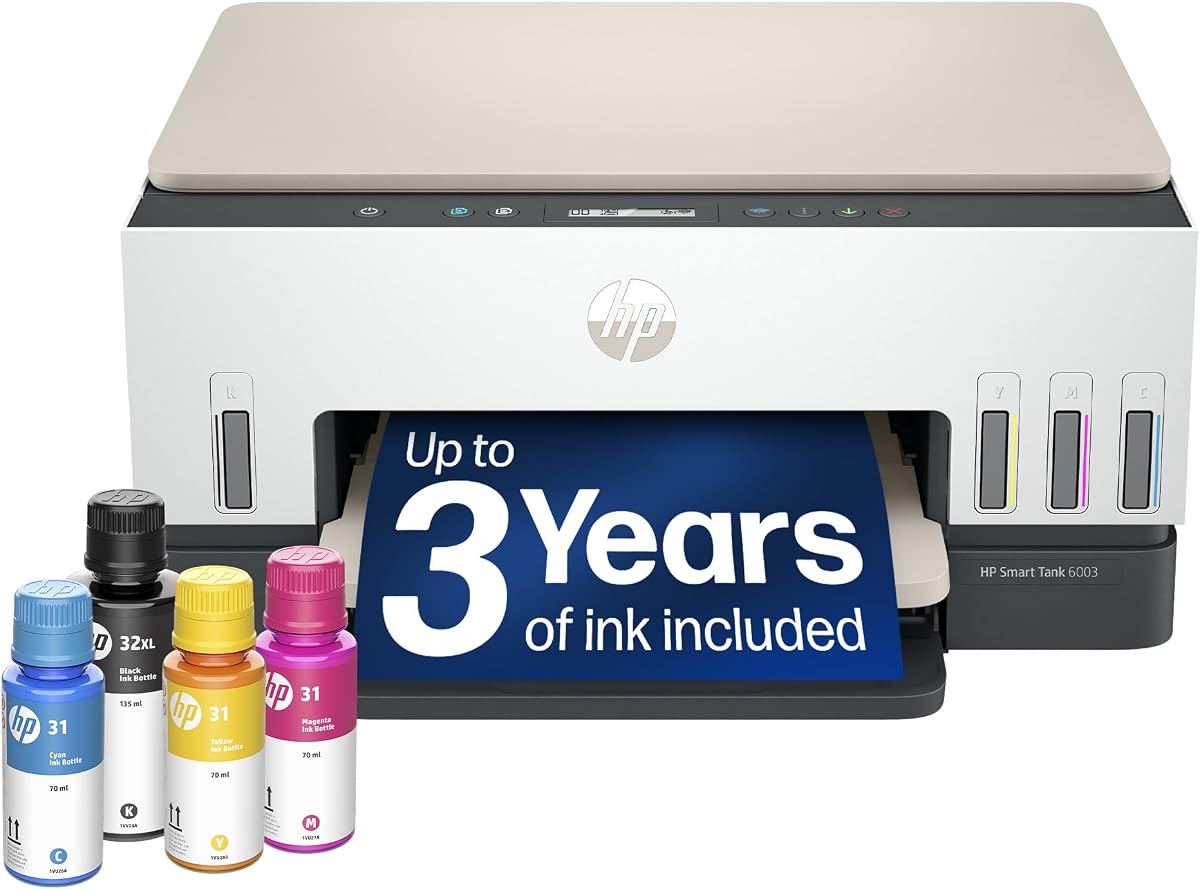
The HP Smart Tank 6003 provides an affordable entry into tank printing systems. Rated 3.8, it supports up to 3 years of ink with cartridge-free refilling. It is excellent for home users needing reliable scanning and copying.
We may earn a commission when you buy through this link, at no additional cost to you.
Strengths include mess-free refilling and support for borderless prints to enhance photo quality. Wireless printing ensures flexibility for printing from anywhere. AI features assist with layout optimization.
Trade-offs include the lack of fax functionality and slower speeds compared to office models. However, for general home needs, these are acceptable compromises.
Best for cost-conscious households needing reliable printing. Its value proposition and ease of use make it a solid pick for everyday tasks.
Refilling is simple and mess-free, making it easy to keep your printer stocked without hassle.
Tank design lowers overall cost of ownership compared to traditional cartridge-based models.
We may earn a commission when you buy through this link, at no additional cost to you.
The Liene PixCut S1 is specialized for DIY enthusiasts needing custom stickers. Rated 4.2, it combines thermal dye-sublimation printing with precise AI auto-cutting. This all-in-one device simplifies creating custom labels and gifts.
We may earn a commission when you buy through this link, at no additional cost to you.
Strengths include AI image extraction that removes backgrounds automatically for perfect stickers. The 300 DPI resolution ensures vibrant and true-to-life colors. No subscription is required, offering free templates and elements.
Trade-offs involve a specialized function limited to sticker creation rather than general documents. Also, the print size is smaller than standard printers. These are ideal for crafters.
Best for hobbyists needing professional sticker quality. Its smart features and durability make it a perfect tool for personalized creative projects.
Automatically recognizes and extracts subjects from photos to simplify sticker creation instantly.
Unlock thousands of free images and templates without hidden fees or paywalls for pure creativity.
We may earn a commission when you buy through this link, at no additional cost to you.
Choosing the right AI printer depends on specific needs like volume, quality, and smart features. Below are key factors to consider before purchasing.
Print speed is critical for efficiency, especially in office environments. Look for models with higher pages per minute (ppm) ratings for black and color to keep up with demand.
Prioritize speed when you handle high-volume daily printing.
AI features can optimize formatting, detect errors, and streamline workflows. Evaluate if the printer removes unwanted content or supports smart scanning improvements.
Ensure AI tools match your workflow needs for maximum value.
Decide between cartridges and ink tank systems based on long-term usage. Tank systems often cost less per page but require higher upfront investment.
Calculate total cost of ownership to avoid unexpected expenses.
Modern printers must offer reliable wireless options like dual-band Wi-Fi and mobile apps. This ensures seamless printing from various devices without cables.
Check compatibility with your existing network for smooth operation.
Input and output tray capacities affect how often you need to refill paper. Auto document feeders are essential for scanning multiple pages quickly.
Select capacity based on your typical document batch sizes.
For businesses, security is vital. Look for printers with built-in protection against cyber threats to safeguard sensitive data.
Security features protect your network and documents effectively.
Physical footprint matters for home offices. Ensure the printer fits your desk space while maintaining functionality and ease of use.
Choose a design that balances features with space requirements.
To start using your printer, follow the setup guide to connect it to your Wi-Fi network. Download the companion app to manage settings and print documents remotely.
Regularly update firmware to maintain AI features and security patches. Clean the print heads and rollers to prevent jams and ensure consistent quality.
Keep ink levels monitored and refill tanks carefully to avoid spills. Store paper in a dry place to prevent moisture damage that affects print clarity.
AI-capable printers use software algorithms to automate tasks like formatting, error detection, and optimization. This reduces manual adjustments and improves print quality without user intervention.
Yes, most AI features require an internet connection to access cloud processing and updates. However, basic printing functions usually work offline if Wi-Fi is unavailable.
Prices vary widely from budget home models to premium office systems. However, long-term savings on ink and efficiency often offset the initial higher costs.
Yes, AI tools optimize layouts to remove unnecessary content, reducing ink usage and waste. Smart management systems also help monitor levels efficiently.
Modern models include advanced security features to protect data during transmission. Look for options with encryption and network protection to safeguard sensitive files.
The transition is simple with mess-free refill systems. Initial setup takes a few minutes but offers significant long-term convenience and savings.
The HP OfficeJet Pro 9135 and Bambu Lab P2S Combo stand out for professional needs. Budget options like the HP OfficeJet Pro 8125 offer strong value for home use.
Prioritize factors like AI capabilities, ink system, and connectivity to match your workflow. Consider long-term costs and security features for a sustainable choice.
Always check current prices and availability before purchasing as deals change frequently. Select the model that best fits your specific requirements today.