
New IR Remote Control Replecement for Dish Network 20.1
3.7Editor score
Affordable IR replacement option
Fits 20.1 receivers
Includes setup manual
This guide compares the top rated Dish Network replacement remotes including voice search models and universal options to help you choose the best fit.
Finding a reliable replacement for your lost or broken Dish remote can be frustrating. You need a device that pairs easily and offers essential controls for your receiver and TV.
We evaluated ten highly rated remotes based on compatibility features user feedback and ease of setup. Our list covers voice enabled models infrared options and universal solutions for various receiver generations.
Each pick highlights key strengths potential drawbacks and pairing instructions. Prices fluctuate so check the links for current offers before making your final decision today.
3.7Editor score

4.6Editor score

4.6Editor score
This table provides a side by side overview of all ten remotes. It highlights their key specifications to help you quickly identify the right match for your specific receiver model and needs.


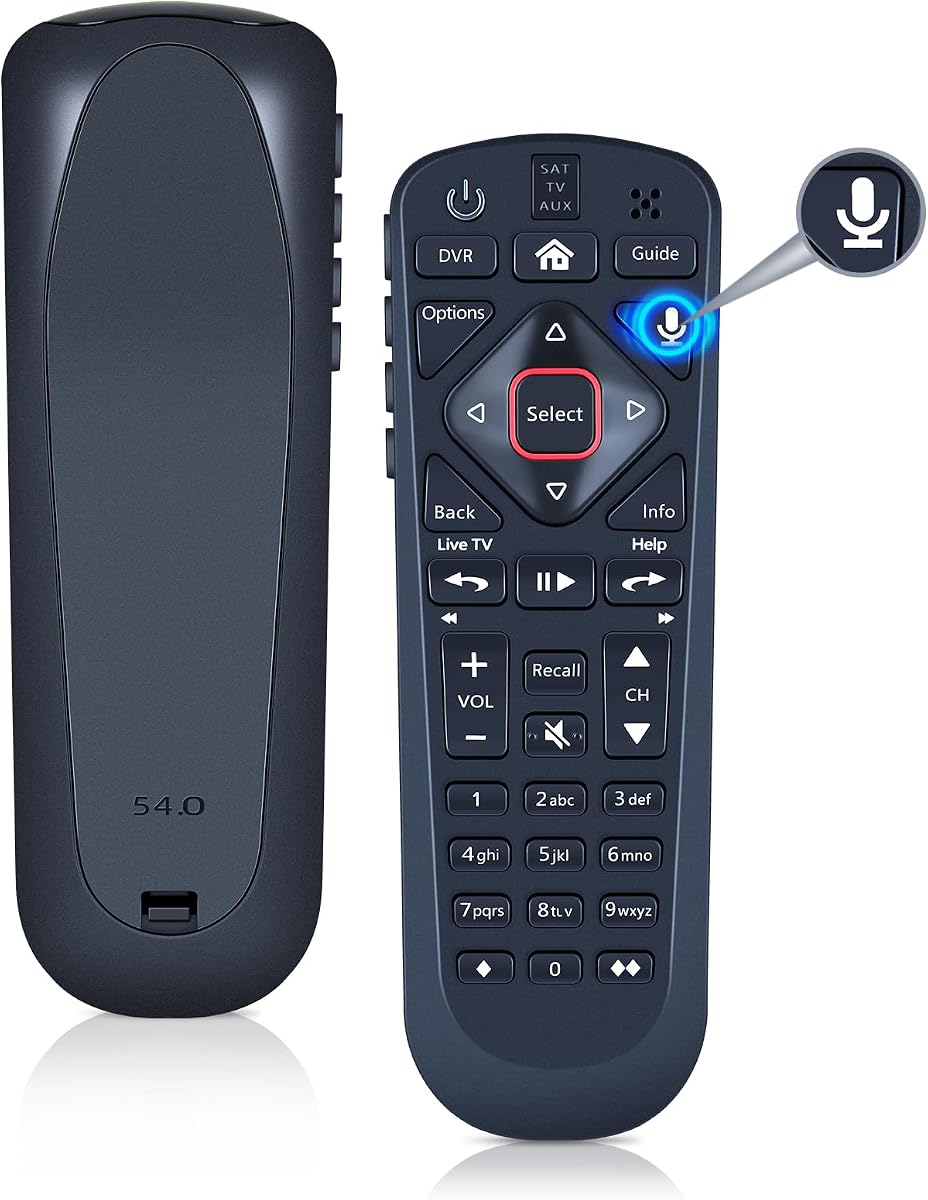


This Dish 54.0 remote stands out as the Editor's Choice due to its seamless integration with the Hopper family of receivers. It maintains a 4.6 rating from users who value convenience and reliability in their daily viewing experience.
We may earn a commission when you buy through this link, at no additional cost to you.
The backlit keys ensure you can navigate menus easily in low light without fumbling for controls. Additionally the remote locator feature lets you find a misplaced unit quickly with a simple button press on your DVR.
While it offers robust personalization options like programmable hot keys the need for internet connectivity for full search functionality can be a limitation for some users. The price point is also higher than third party alternatives.
Buyers seeking an authentic replacement that mirrors the original experience should prioritize this model. It is ideal for households that rely heavily on the Hopper ecosystem and want consistent performance without compromises.
The automatic backlighting activates when you pick up the remote ensuring keys are visible in dark living rooms without draining excessive battery power.
Pushing a button on the DVR triggers the remote to beep and blink making it easy to locate if it has slipped behind a couch cushion.
We may earn a commission when you buy through this link, at no additional cost to you.
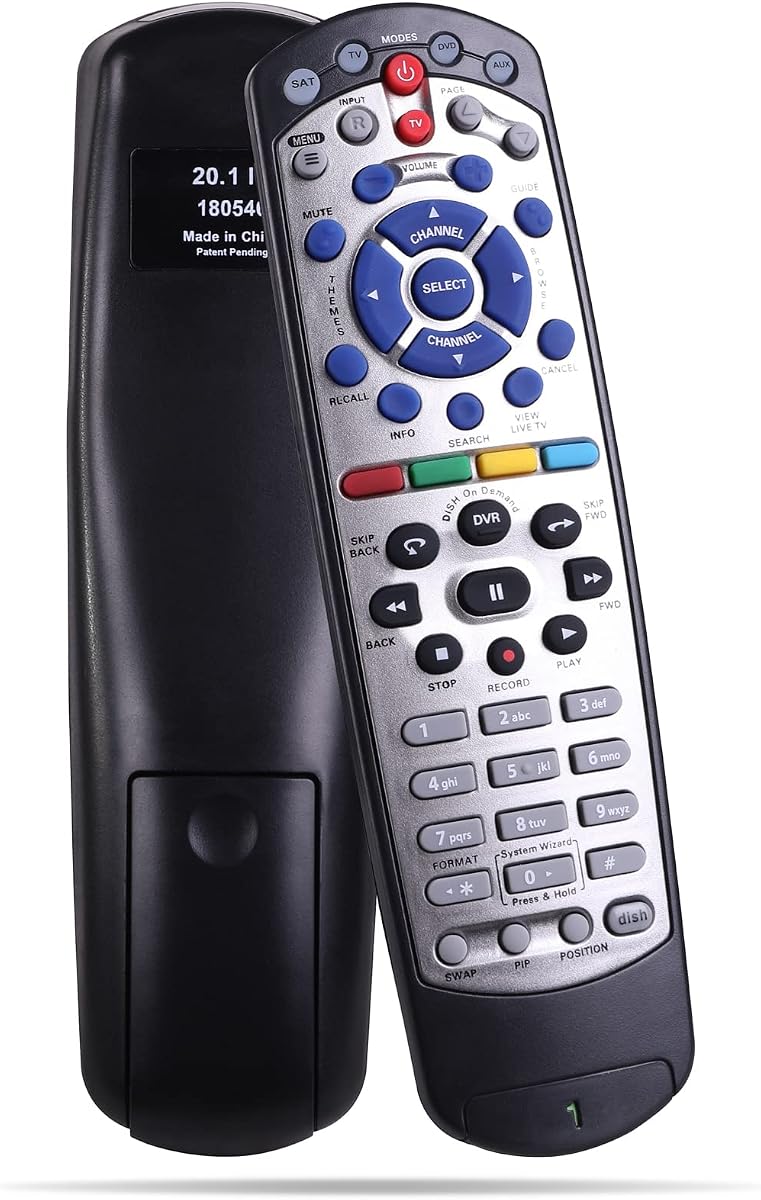
If you are on a tight budget this IR remote offers a basic but functional solution for Dish Network 20.1 receivers. It holds a 3.7 rating which reflects its limited feature set compared to more advanced units.
We may earn a commission when you buy through this link, at no additional cost to you.
It does not include learning or Bluetooth capabilities so it is strictly designed to replace the original IR remote for specific receiver models. The setup requires manual programming to select the correct code for your TV brand.
The lack of voice search and premium materials means it is not for power users but it gets the job done for essential controls. The one year warranty provides a layer of protection against early failures.
This option is best for secondary TVs or users who only need standard channel changing functionality. It is a cost effective choice when original remotes are unavailable or too expensive.
Designed for affordability this remote covers essential functions without expensive features like voice control or advanced connectivity options.
Setup involves selecting the correct TV code from the manual ensuring basic compatibility with common television brands without complex syncing.
We may earn a commission when you buy through this link, at no additional cost to you.
The Dish Network 52.0 remote represents a premium option with robust features like a remote finder and backlit keys. It earns a 4.6 rating for its ability to work across the full range of Hopper Joeys and Wally receivers.
We may earn a commission when you buy through this link, at no additional cost to you.
Programming hot keys to launch specific apps like Netflix saves time and adds a personalized touch to your viewing setup. The remote finder function ensures you never lose control even in a cluttered entertainment center.
Users may find the price higher than generic alternatives but the durability and feature set justify the investment for many households. Battery life is standard and may require periodic replacements with heavy use.
Ideal for main living room setups this remote delivers a polished experience that closely matches the original hardware. It is a reliable long term solution for those who value convenience and reliability.
Programable hot keys allow quick launch of favorite services without navigating through multiple menu layers for faster content access.
The automatic backlighting ensures all buttons are clearly visible during evening viewing sessions enhancing usability without extra effort.
We may earn a commission when you buy through this link, at no additional cost to you.
This replacement remote supports voice search and is designed for the Dish Upgraded Network 54 series receivers. With a 4.5 rating users appreciate the convenience of voice commands and reliable UHF wireless performance.
We may earn a commission when you buy through this link, at no additional cost to you.
The pairing process involves pressing the SYS INFO button on the receiver and then using the SAT button on the remote to establish a connection. Once paired it offers consistent control over your receiver and auxiliary devices.
While the setup requires following specific steps the reliability of the connection makes it worthwhile for daily use. It is important to note this remote is not compatible with the Hopper 3 receiver.
Buyers looking for voice functionality at a reasonable price should consider this model. It bridges the gap between older models and newer voice enabled technology without requiring expensive upgrades.
Built in voice search allows you to find shows and channels quickly by speaking instead of typing with arrow keys.
UHF technology provides a stronger more reliable signal than infrared allowing control even when the remote is not pointed directly at the receiver.
We may earn a commission when you buy through this link, at no additional cost to you.
Another option for the 54 series this remote offers voice search functionality and UHF wireless connectivity. It holds a 3.7 rating which suggests mixed user experiences regarding long term durability or setup ease.
We may earn a commission when you buy through this link, at no additional cost to you.
The device pairs using the standard SAT button method and includes a guide to help with configuration. It supports pairing with auxiliary devices like Blu ray players expanding its utility beyond just the receiver.
While voice search is a strong feature the compatibility limitations mean it cannot be used with Hopper 3 receivers. Users must ensure their model matches the supported series before purchasing.
This is a viable choice for those needing voice control on a budget for specific receiver models. It is recommended to check compatibility carefully to avoid return hassles.
Beyond the receiver you can pair this remote with auxiliary devices such as stereo systems for unified control.
Voice search speeds up content discovery reducing the time spent typing channel names or navigating menus manually.
We may earn a commission when you buy through this link, at no additional cost to you.
The WDZP branded replacement remote offers voice search capabilities and pairs well with the Dish Upgraded 54 series. It maintains a 4.2 rating reflecting solid performance and value for the price point.
We may earn a commission when you buy through this link, at no additional cost to you.
Users can utilize the built in microphone to find shows faster without typing. The pairing process is straightforward using the standard menu steps found on Dish receivers.
While it does not include batteries in the package the setup is simple enough for most users to complete quickly. The warranty is limited to six months which is shorter than some competitors.
For households seeking an affordable voice remote this model delivers reliable performance. It is best suited for users who prioritize voice search over long term warranty coverage.
The integrated microphone enables accurate voice commands allowing you to search for content by name or description effortlessly.
Pairing follows the standard Dish menu workflow making it intuitive for users already familiar with their receiver settings.
We may earn a commission when you buy through this link, at no additional cost to you.
This universal remote is designed to support both TV1 and TV2 locations on Dish receivers. It holds a 4.4 rating for its consistent performance and ability to function across different zones.
We may earn a commission when you buy through this link, at no additional cost to you.
It combines infrared and UHF technologies to ensure signals reach the receiver effectively. The setup is generally straightforward making it a reliable choice for multi room installations.
While it lacks modern features like voice search it covers the essential functions needed for daily use. The design is robust and suitable for households requiring a secondary or backup remote.
This model is ideal for older setups where compatibility with specific IR and UHF signals is key. It provides a stable solution for users prioritizing functionality over flashy new features.
Support for TV1 and TV2 locations makes this remote versatile for households with multiple receivers in different rooms.
The combination of infrared and UHF ensures reliable transmission even if the line of sight is occasionally blocked.
We may earn a commission when you buy through this link, at no additional cost to you.
This remote offers a plug and play experience for Dish Network 20.1 receivers. It boasts a 4.1 rating for its user friendly design and ability to store settings between receiver and remote.
We may earn a commission when you buy through this link, at no additional cost to you.
Unlike some models it requires no complex pairing process so you can install batteries and start using it immediately. The keys are designed to be sensitive for quick and responsive control.
It supports a wide range of VIP models including 622 722 and others ensuring compatibility across various receiver generations. The build quality is noted as comfortable to hold for extended viewing.
Ideal for users who want a quick replacement without technical setup this remote delivers reliable performance. It is a strong contender for those needing a straightforward IR replacement solution.
No programming or pairing is needed allowing you to begin using the remote immediately after inserting batteries.
The design is comfortable to hold with sensitive keys that reduce the effort needed to register commands during use.
We may earn a commission when you buy through this link, at no additional cost to you.
This value pack includes two new Dish remotes designed for the 20.1 IR receiver. With a 4.3 rating users appreciate having a spare remote readily available for different rooms or backups.
We may earn a commission when you buy through this link, at no additional cost to you.
Each unit is rigorously tested to ensure it operates just like an original remote. The compact size makes it easy to handle without adding bulk to your hands or couch cushions.
Instructions are simple to follow ensuring setup is straightforward for most users. While batteries are not included the two pack provides excellent value for the price.
Households with multiple TVs or those needing a backup will find this pack particularly useful. It offers convenience and redundancy at a reasonable cost.
Having two remotes allows you to place one in a central location and keep another as a spare for convenience.
Each unit undergoes inspection before shipment ensuring that both remotes work perfectly out of the box.
We may earn a commission when you buy through this link, at no additional cost to you.
This standard IR remote provides a direct replacement for Dish Network 20.1 receivers. It holds a 4.0 rating for basic functionality and ease of use for essential controls.
We may earn a commission when you buy through this link, at no additional cost to you.
You will need to pair the remote and choose the correct TV code before use. The one year warranty adds a sense of security against potential early failures or defects.
While it lacks advanced features it performs the same basic functions as the original remote. The manual included helps guide you through the setup process efficiently.
This is a solid choice for users who need a no frills replacement for daily TV viewing. It is reliable and cost effective for standard household needs.
The included one year warranty covers the remote against manufacturing defects providing peace of mind for buyers.
It replicates the core functions of the original remote ensuring you can control all essential features without extra costs.
We may earn a commission when you buy through this link, at no additional cost to you.
Choosing the right replacement remote depends on your specific receiver model and desired features. This guide outlines key factors to consider for making an informed decision.
Ensure the remote matches your receiver model such as the 54 series or 20.1. Mismatched models may not pair or function correctly.
Check the product description for exact compatibility details before purchasing.
Decide between infrared IR and UHF options. UHF remotes offer better range and do not require a direct line of sight.
UHF is generally more convenient but may cost slightly more than IR options.
If you prefer speaking commands look for remotes with a built in microphone. This feature speeds up finding shows and navigating menus.
Voice search often requires internet connectivity on the receiver to function properly.
Remotes with backlit keys are essential for viewing in low light conditions. This feature prevents fumbling and improves usability.
Not all replacement models include backlighting so verify this feature if needed.
Check the battery requirements and expected life. Most remotes use AAA batteries but power consumption varies.
Remotes with efficient power management will require fewer battery changes.
Look for remotes that offer a warranty such as one year or six months. This protects your purchase against defects.
Third party remotes may have shorter warranties compared to official manufacturer units.
Some remotes require complex pairing codes while others pair automatically. Consider your technical comfort level when choosing.
Remotes with clear manuals simplify the setup process significantly.
Balance the cost with the features you actually need. Voice search and premium finishes increase price but may not be necessary for everyone.
Budget options are sufficient for basic TV changing tasks.
To pair your new remote open the front panel of your receiver and press the SYS INFO button. Then press the SAT button on the side of the remote until you hear three beeps indicating successful pairing.
If you need to unpair the remote press and hold the SAT button for three seconds until the indicator light flashes. You can also unpair using the Home and Guide buttons together depending on the model.
Keep the remote clean and store it in a dry place to extend its life. Avoid exposing it to direct sunlight or moisture which can damage the internal electronics.
Most replacement remotes require a setup process to pair with the receiver. This involves pressing specific button sequences to sync the remote. Some models allow additional programming for TVs or auxiliary devices.
Remotes are generally model specific. Using a remote designed for a different series may result in pairing issues or limited functionality. Always check compatibility before purchasing.
Most Dish remotes use standard AAA batteries. Always check the specific model requirements as some may use different battery types or sizes for operation.
If your remote does not work verify the batteries are inserted correctly. You may also need to unpair and re pair the remote or reset your receiver settings.
Some third party remotes include voice search capabilities. Look for features like a built in microphone and UHF connectivity to confirm voice functionality.
No the remote locator feature is typically found on premium models or official Dish remotes. Many third party replacements may not include this convenience feature.
Our top picks include the Dish 54.0 for reliability and the WDZP remote for budget friendly voice search. Each option offers unique benefits depending on your needs.
Prioritize compatibility with your receiver model and decide if features like voice search or backlit keys are necessary for your daily use.
Remember that prices change regularly so verify current offers before purchasing to ensure you get the best value available today.