
ASUS Pro WS W890E-SAGE SE
5.0Editor score
Ready for Intel Xeon 600 Workstation
NitroPath DRAM technology for ECC memory
Advanced AI PC connectivity features
This guide compares ten top ASUS server motherboards for workstations and data centers, evaluating features like PCIe slots, ECC memory support, and remote
ASUS server motherboards deliver the reliability and performance needed for demanding enterprise workloads. These boards support advanced processors, high-speed memory, and robust networking to keep your infrastructure running smoothly around the clock.
We evaluated ten leading models based on their socket compatibility, expansion capabilities, thermal design, and management features. Each product was assessed for its ability to handle intensive computing tasks while maintaining stability and efficiency in professional environments.
Every pick highlights key specifications and real-world strengths to help you find the right fit for your needs. Prices and availability change frequently, so check the linked stores for the most current offers before making your final decision.
5.0Editor score

3.7Editor score
4.3Editor score
The following table provides a side-by-side overview of all ten ASUS server motherboards featured in this guide. Compare their socket types, expansion options, memory support, and connectivity features to identify the model that aligns best with your specific server or workstation requirements.


This motherboard stands out as a top choice for professional workstations requiring extreme expandability and processing power. With a 3.7 rating, it offers a balanced mix of high-end features and reliability for demanding tasks like AI training or 3D rendering.
We may earn a commission when you buy through this link, at no additional cost to you.
Its seven PCIe 5.0 x16 slots provide unmatched bandwidth for multiple GPUs or high-speed storage arrays. The 32 power stages ensure stable voltage delivery to AMD Ryzen Threadripper PRO 7000 WX-Series CPUs, supporting up to 96 cores without throttling during intensive loads.
While the cost is significant, the investment pays off in systems where uptime and scalability are critical. The dedicated IPMI LAN port and BMC controller allow administrators to manage servers remotely, ensuring quick troubleshooting without physical access.
Ideal for data centers and engineering firms, this board excels in environments needing maximum I/O throughput. It is a strong recommendation for users building high-performance clusters or workstations that must handle diverse, concurrent workloads efficiently.
Seven PCIe 5.0 x16 slots allow multiple accelerators or storage controllers to run simultaneously without bandwidth bottlenecks.
Integrated IPMI with a dedicated LAN port enables out-of-band management for monitoring health and updates remotely.
We may earn a commission when you buy through this link, at no additional cost to you.
Boasting a flawless 5.0 rating, this motherboard is engineered for the next generation of AI PCs and workstation computing. It supports Intel Xeon 600 processors and delivers exceptional stability for applications that demand consistent high performance under heavy load.
We may earn a commission when you buy through this link, at no additional cost to you.
The NitroPath DRAM technology specifically targets memory efficiency, improving the performance of ECC R-DIMM DDR5 modules. This is critical for data integrity in scientific computing and virtualization where even minor latency can impact overall system throughput and reliability.
While expensive, the board justifies its cost through superior build quality and feature set. Active cooling for VRM and chipset components ensures thermal headroom remains ample, preventing throttling during sustained multi-day rendering or training sessions common in professional workflows.
Recommended for AI researchers and developers, this platform offers the bandwidth and connectivity needed for complex pipelines. Its robust IPMI integration and dual 10Gb LAN ports make it a standout choice for hybrid cloud or on-premise AI infrastructure.
Designed specifically for future AI computing with power and connectivity tailored to demanding applications.
Exclusive NitroPath DRAM technology boosts ECC memory speeds for faster data processing and lower latency.
We may earn a commission when you buy through this link, at no additional cost to you.
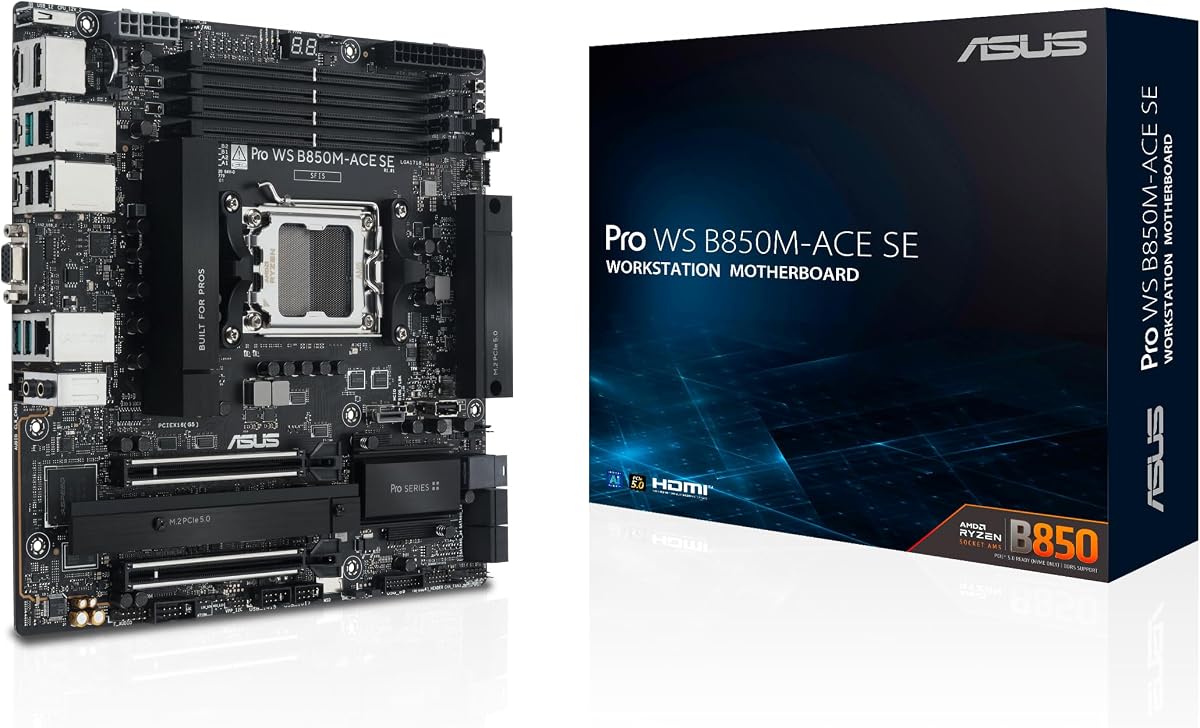
This MicroATX board brings server-grade reliability to smaller form factors at an accessible price. With a 4.3 rating, it balances cost and performance effectively, making it ideal for small businesses needing robust infrastructure without the cost of full-sized enterprise boards.
We may earn a commission when you buy through this link, at no additional cost to you.
It supports AMD Ryzen 9000/8000/7000 Series processors, providing strong single-core and multi-core performance for varied workloads. The inclusion of onboard BMC ensures you can manage the system remotely, a feature often reserved for much more expensive server platforms.
While expansion is more limited than full EEB boards, the two PCIe 5.0 x16 slots are sufficient for most standard applications. The 10G and 2.5G LAN combination offers flexible networking options, allowing high-speed data transfers while maintaining compatibility with existing infrastructure.
Best suited for edge computing or small offices, this model delivers essential server functionality in a compact design. It is a smart choice for those prioritizing space efficiency and budget without sacrificing critical reliability or management capabilities.
MicroATX form factor fits smaller cases while still supporting next-gen AI and business workloads.
Onboard BMC and Control Center Express provide remote monitoring usually found on pricier server boards.
We may earn a commission when you buy through this link, at no additional cost to you.
This model differentiates itself with integrated WiFi 7, offering cutting-edge wireless connectivity for mobile workstations. It supports AMD Ryzen Threadripper PRO 7000 WX-Series processors, delivering heavy-duty performance for 3D modeling, video editing, or server-side development tasks.
We may earn a commission when you buy through this link, at no additional cost to you.
The 36 power stages provide robust power delivery, essential for maintaining clock speeds during sustained loads. Support for up to 1TB of ECC R-DIMM DDR5 memory ensures data integrity and ample capacity for large datasets or virtual machine environments.
While its rating is modest, the feature set is compelling for users needing wireless convenience alongside workstation power. The PCIe 5.0 M.2 and SlimSAS options allow for extremely fast local storage, reducing load times for large project files or database operations.
Ideal for creative professionals who need both power and mobility, this board bridges the gap between desktop and server capabilities. It is a strong contender for anyone building a high-end workstation that might need to function as a lightweight server node.
Integrated WiFi 7 provides ultra-fast wireless speeds and lower latency for seamless remote workflows.
Support for up to 1TB ECC R-DIMM DDR5 ensures reliable performance for memory-intensive applications.
We may earn a commission when you buy through this link, at no additional cost to you.
This board is built for stable, high-performance workstation use with a focus on connectivity and thermal management. The 4.0 rating indicates solid reliability, making it a dependable choice for engineering firms or researchers needing consistent output over long periods.
We may earn a commission when you buy through this link, at no additional cost to you.
Dual USB4 ports at 40Gbps enable rapid data transfer to external storage or docking stations. This is particularly useful for professionals working with large media files who need to quickly offload or access assets without slowing down the main system.
While it has slightly fewer power stages than other TRX50 models, it still handles demanding CPUs effectively. The active cooling ensures that VRM and chipset temperatures remain low, contributing to overall system stability during extended rendering or computational tasks.
Best for users seeking a balance of performance and connectivity, this board meets most professional workstation needs. Its support for extensive PCIe expansion and strong LAN options makes it versatile for various server or high-end desktop applications.
Dual USB4 ports provide 40Gbps bandwidth for ultra-fast external storage and peripheral support.
Robust thermal design keeps components cool during sustained high loads, ensuring reliable 24/7 operation.
We may earn a commission when you buy through this link, at no additional cost to you.
This ATX motherboard is designed for workstation users who need server-grade manageability with mainstream Intel CPUs. The 4.4 rating highlights its popularity among professionals who value stability and features like ECC memory and remote management in an ATX form factor.
We may earn a commission when you buy through this link, at no additional cost to you.
The included IPMI expansion card allows for remote server-like control without needing a separate server board. This is a significant advantage for small businesses or labs that need to manage hardware remotely but do not want to invest in full rack-mounted infrastructure.
Thunderbolt 4 headers offer future-proof connectivity for high-speed peripherals, adding versatility beyond standard USB. The dual PCIe 5.0 x16 slots provide ample room for GPU acceleration or fast storage cards, ensuring the system remains relevant for years.
Ideal for hybrid workloads combining creative production and light server duties, this board is highly recommended. Its strong feature set makes it a top choice for IT professionals managing mixed environments with diverse hardware requirements.
IPMI support allows for enterprise remote management in a standard desktop case format.
Thunderbolt 4 headers enable ultra-fast data transfer for external displays and storage devices.
We may earn a commission when you buy through this link, at no additional cost to you.
This server board is a solid choice for those needing compact, reliable hardware for basic server tasks. While specific ratings are not listed, its design focuses on practicality, supporting Intel Xeon E-2300 processors and essential connectivity for small office networks.
We may earn a commission when you buy through this link, at no additional cost to you.
The dual 10G Ethernet ports are a standout feature, enabling fast network throughput for file servers or virtualization. This ensures that data moves quickly between the server and clients, which is crucial for performance in multi-user environments.
Although it uses an older socket, the Intel C252 chipset provides proven stability for entry-level deployments. Its Micro ATX size makes it easy to fit into small tower cases, allowing for flexible placement in offices or home server closets.
Best for small businesses or home labs, this model offers essential server capabilities without unnecessary complexity. It is a pragmatic choice for users who prioritize network performance and reliability over cutting-edge expansion features.
Micro ATX design fits easily into small spaces while delivering essential server functionality.
Dual 10G Ethernet ports enable rapid data transfers for file servers and virtualized workloads.
We may earn a commission when you buy through this link, at no additional cost to you.
This motherboard is built for heavy-duty server applications requiring dual processors and massive memory capacity. With a focus on performance and reliability, it supports up to 4TB of DDR5 RAM, making it suitable for large database servers or virtualization hosts.
We may earn a commission when you buy through this link, at no additional cost to you.
The dual 10Gbps Ethernet ports ensure high-speed connectivity for data-intensive workloads. This is essential for clustering or high-throughput environments where network latency can become a bottleneck for overall system performance and user experience.
While the board is large and power-hungry, its capabilities justify the footprint in professional server racks. The ASMB11-iKVM management allows for remote administration, ensuring that IT staff can monitor and maintain hardware without physical presence.
Recommended for enterprise data centers, this board handles the most demanding tasks efficiently. Its robust design and extensive RAM support make it a powerful choice for businesses that need to scale workloads without hardware limitations.
Support for up to 4TB DDR5 RAM allows for extensive virtualization and large dataset processing.
Dual CPU sockets provide additional cores for parallel processing and high-performance computing tasks.
We may earn a commission when you buy through this link, at no additional cost to you.
This board offers server features like IPMI support at a lower price point, making it attractive for budget-conscious buyers. While its rating is lower, it provides essential workstation capabilities, including DDR5 memory and PCIe 5.0 support for modern components.
We may earn a commission when you buy through this link, at no additional cost to you.
The inclusion of an IPMI expansion card is a major benefit, enabling remote management that is usually an extra cost. For small teams needing to manage multiple systems, this feature alone can save significant time and operational costs over the long term.
Three M.2 slots provide flexibility for fast storage and system redundancy. Users can install OS, apps, and data on separate drives to improve performance and backup strategies without needing external controllers or complex RAID setups.
Best for small offices needing manageability on a budget, this board delivers core features without the premium price. It is a practical choice for users who need basic server capabilities and are willing to navigate potential setup quirks.
IPMI expansion card bundled allows for essential remote monitoring and management at a budget price.
Three M.2 slots allow for multi-drive setups, improving performance and data safety for workstations.
We may earn a commission when you buy through this link, at no additional cost to you.
This motherboard serves well in business environments where versatility and manageability are key. Its multiple display outputs allow for diverse connectivity needs, useful for workstations that need to drive multiple monitors or legacy displays simultaneously.
We may earn a commission when you buy through this link, at no additional cost to you.
IPMI support ensures that IT can maintain the system remotely, which is critical for businesses managing hardware off-site or after hours. This functionality adds enterprise-grade value without requiring a dedicated server room for every system in use.
While the LAN speed is standard for mid-range boards, the PCIe 5.0 and DDR5 support keep the platform future-ready. Users can leverage newer CPUs and storage technologies to maintain performance longevity as software demands increase over time.
Recommended for small to medium businesses, this board balances legacy and modern features effectively. It is a good fit for those who need flexible I/O and remote management without transitioning to a full server chassis setup.
Multiple HDMI, DisplayPort, and VGA outputs ensure compatibility with a wide range of monitors.
IPMI support ensures systems can be managed remotely, reducing downtime and support costs.
We may earn a commission when you buy through this link, at no additional cost to you.
Selecting the right server motherboard involves balancing performance, expansion needs, and budget. This section explores the most important factors to help you make an informed decision.
Ensure the motherboard supports your intended CPU generation. Options range from Intel LGA 1700 and 4677 to AMD AM5 and sTR5 sockets, each supporting specific processor families.
Match your processor choice to the socket to guarantee compatibility and performance optimization.
Server boards come in ATX, E-ATX, and MicroATX sizes. Larger boards like EEB or E-ATX offer more slots but require bigger cases and proper airflow management.
Choose a form factor that fits your physical space while accommodating necessary expansion components.
Server environments often require ECC memory to prevent data corruption. Verify if the motherboard supports ECC R-DIMM or RDIMM types and how much RAM capacity it can handle.
Prioritize models with sufficient ECC support if data integrity is critical for your workloads.
Consider how many PCIe slots you need for GPUs or storage cards. Modern boards offer PCIe 5.0 for maximum bandwidth, which is essential for high-performance computing tasks.
Ensure enough slots and bandwidth exist to support your future expansion plans without bottlenecks.
Fast networking is vital for servers. Look for 10Gb Ethernet ports or multiple 2.5Gb options to handle heavy data traffic efficiently.
Choose models with adequate LAN ports to match your network infrastructure speed requirements.
IPMI or BMC headers allow you to manage the server remotely. This is crucial for maintaining uptime when the hardware is located off-site.
Select boards with dedicated management controllers or expansion slots for IPMI cards.
Robust power stages and cooling are necessary to maintain stability under load. Look for adequate VRM heatsinks and fan headers to prevent overheating.
Ensure the board has strong thermal management to sustain long-term performance without throttling.
Fast local storage improves performance for operating systems and databases. Check the number of M.2 slots and support for PCIe 5.0 or SlimSAS interfaces.
Verify enough fast storage connections are available for your boot drives and primary data volumes.
Install the motherboard in a compatible chassis ensuring proper grounding and cable management to prevent shorts or interference.
Configure BIOS settings to enable ECC memory and optimize power management for server workloads rather than consumer gaming.
Regularly update firmware through ASUS Control Center to maintain security and improve hardware stability over time.
Most models in this list support ECC R-DIMM or RDIMM memory, but specific support depends on the CPU and socket. Always verify the QVL list for confirmed ECC memory compatibility before purchasing.
EEB boards are typically larger and designed for specialized workstations, while E-ATX is a standard enterprise form factor. Both support multiple CPUs and extensive expansion, but chassis compatibility varies.
Yes, but they are optimized for stability and remote management rather than gaming features. You might find consumer boards offer better price-to-performance for pure gaming use.
Some boards include IPMI expansion cards, while others have BMC headers. Check the product description for bundled cards and follow the setup guide for configuring remote access settings.
Yes, especially models like the B850M-ACE SE which are compact and affordable. Larger boards might be overkill unless you need significant expansion or dual CPU support.
ASUS usually provides a 3-year warranty for most server products, but policies may vary by region. Verify the warranty terms with the retailer at purchase.
The ASUS Pro WS WRX90E-SAGE SE stands out for professionals needing maximum PCIe bandwidth and expandability. Its robust power delivery and management features make it ideal for heavy workstation tasks.
Budget buyers should consider the B850M-ACE SE for its compact size and server-grade management at a lower cost. It delivers reliable performance without breaking the bank for small businesses.
Prices and stock fluctuate frequently, so verify current availability on retailer links. Choosing the right board depends on your specific hardware needs, budget, and future growth plans.