
8 Bay NAS Case
5.0Editor score
Eight hot-swappable drive slots
Dual-chamber design for airflow
Supports ATX power supplies
This guide compares the top ten ATX NAS computer cases for storage capacity cooling airflow and motherboard compatibility to help you choose the right server
Building a reliable network attached storage system requires a chassis designed for continuous operation and high drive density. An ATX NAS computer case offers the room needed for multiple hard drives and robust cooling to keep data safe.
We evaluated ten leading models based on drive bay count airflow design and build quality. Each entry was chosen for its ability to support ATX motherboards and maintain thermal stability during heavy read write cycles.
Every pick highlights key strengths and potential trade-offs for home or office use. Please note that prices and availability change frequently so check the current listings before purchasing your next server build.
5.0Editor score

4.7Editor score

4.6Editor score
The following table provides a side-by-side overview of all ten models selected for this roundup. Use it to quickly compare drive capacity cooling options and motherboard compatibility across the lineup.

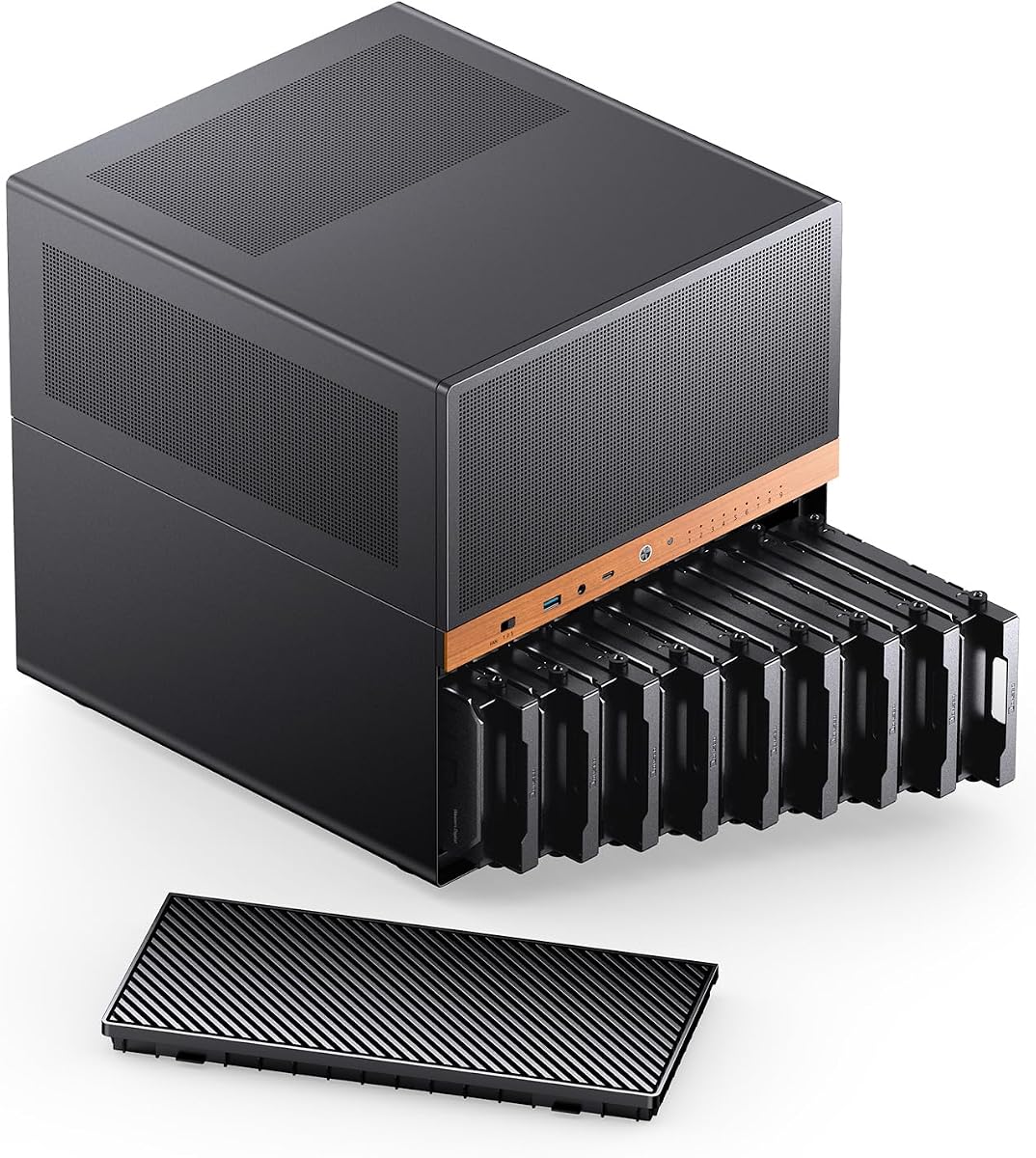


The JONSBO N5 stands out as a top choice for serious home lab enthusiasts needing massive storage. It holds up to twelve 3.5 inch drives plus four SSDs while supporting E-ATX motherboards for advanced computing tasks. This case blends industrial durability with a refined walnut veneer finish that looks great in any office.
We may earn a commission when you buy through this link, at no additional cost to you.
Its front panel allows quick access to hot-swappable drives which is essential for maintenance or upgrades. The internal layout separates power and drive zones to improve cooling efficiency and reduce noise during operation. Multiple GPU mounting options make it versatile beyond pure storage if you need computing power.
While the size is substantial it fits well on a dedicated server rack or sturdy desk. The included fans provide adequate airflow but you may want to add more for heavy workloads. Build materials are sturdy steel and aluminum ensuring long term stability for your data.
If you need maximum drive density with professional aesthetics this model is hard to beat. It suits users who want a reliable NAS that doubles as a visual centerpiece. Check current availability before purchasing as stock levels can vary.
Supporting twelve 3.5 drives and four SSDs this case allows room for expansion without needing multiple units.
The North American black walnut veneer adds a unique touch rarely seen in standard server chassis.
We may earn a commission when you buy through this link, at no additional cost to you.
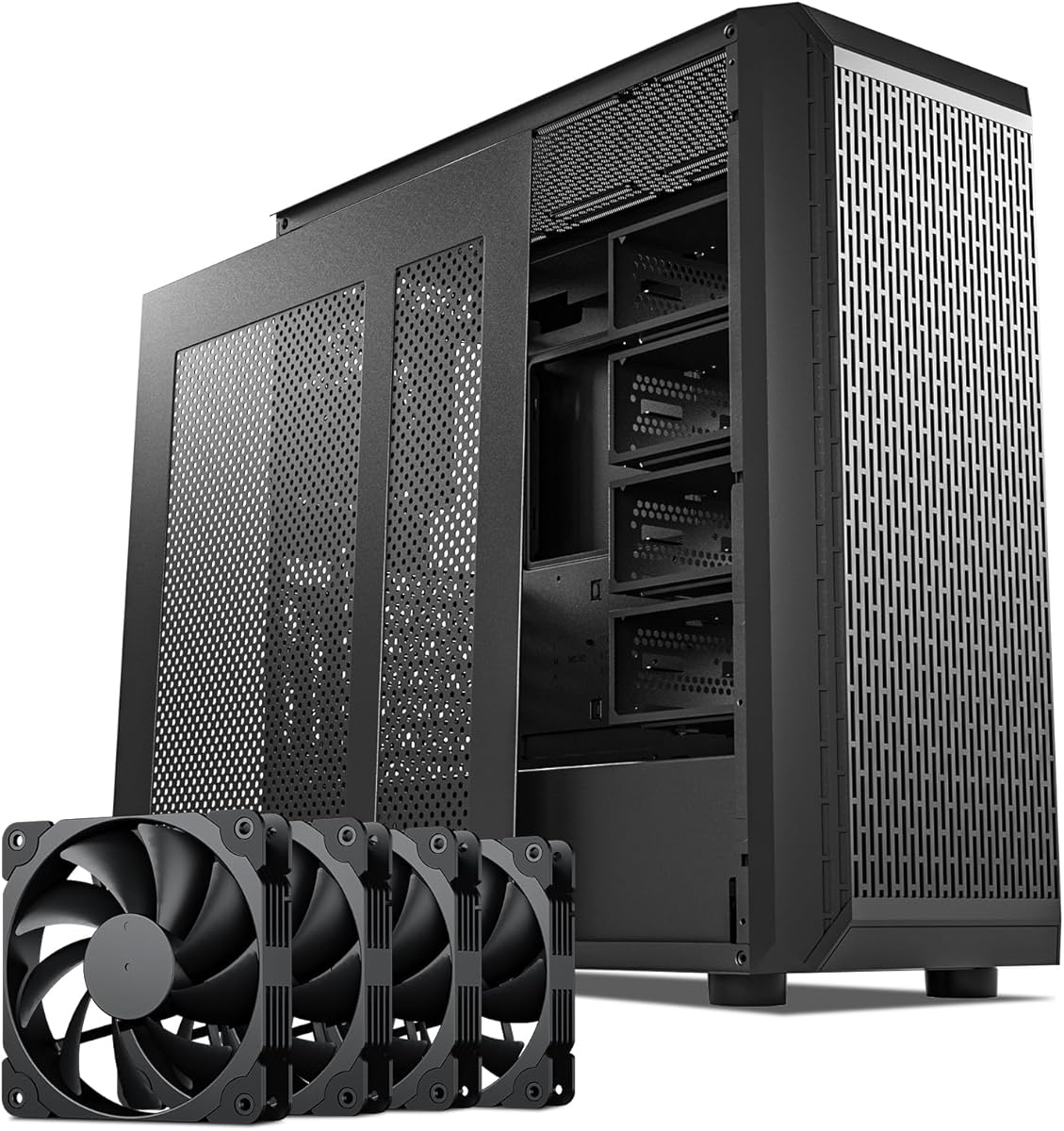
This 8-bay case delivers outstanding performance per dollar for budget conscious builders. It supports eight hot-swappable 3.5 drives and two SSDs making it ideal for media servers or backup stations. The dual-chamber layout keeps heat away from drives which is key for data integrity.
We may earn a commission when you buy through this link, at no additional cost to you.
Construction uses galvanized steel for durability without adding unnecessary weight. Magnetic front panels allow quick access to bays without tools. It fits ATX power supplies as well as smaller options providing flexibility for different power needs.
The main limitation is motherboard compatibility since it only supports Micro-ATX and ITX boards. This restricts expansion slots but suffices for most NAS builds. If you plan to add multiple GPUs or PCIe cards look elsewhere.
For users prioritizing storage efficiency and cost this unit is a strong contender. It works well in home labs or small offices where space is limited. Verify dimensions before installation to ensure a proper fit.
Priced affordably it offers hot-swap functionality usually reserved for more expensive enterprise units.
Its small size allows placement on desks or shelves without dominating the workspace.
We may earn a commission when you buy through this link, at no additional cost to you.
For enterprise level storage needs this tower offers up to fifteen hot-swappable drives in one unit. It supports redundant power supplies to ensure uptime which is critical for business servers. The chassis is built with thick steel to handle the weight of fully loaded drives.
We may earn a commission when you buy through this link, at no additional cost to you.
Expansion slots allow for network cards or other peripherals without sacrificing drive space. USB ports and LED indicators on the front provide easy monitoring of system status. Its size is substantial so plan for adequate floor space or a dedicated server rack.
Shipping times can be lengthy as noted in the product details so order well in advance. The weight makes moving difficult once assembled so place it permanently. It is designed for stability and longevity in 24/7 environments.
If you need maximum density and reliability this case meets professional standards. It suits data centers or serious home labs where downtime is not an option. Check shipping estimates before committing to your purchase.
Accommodating CRPS power supplies ensures your data remains safe even if one power unit fails.
With fifteen bays you can create large RAID arrays without needing multiple separate systems.
We may earn a commission when you buy through this link, at no additional cost to you.
This case prioritizes airflow to keep components cool during heavy loads. It supports thirteen hard drives making it a strong option for large media libraries. Mesh panels on front and sides ensure fresh air reaches all internal parts efficiently.
We may earn a commission when you buy through this link, at no additional cost to you.
A vertical GPU mount helps prevent sagging and improves cooling around the graphics card. The case also accommodates large 360mm radiators for users planning liquid cooling solutions. This flexibility makes it suitable for NAS plus gaming or rendering builds.
While drive trays are supported specific details on hot-swap features are less clear. Dust filters may be needed due to mesh exposure. Overall it balances storage needs with performance cooling effectively.
Users seeking a cool running system with ample room for drives will appreciate this model. It fits mixed use scenarios where storage and graphics power are both priorities. Review specifications closely before assembly.
Extensive mesh areas allow unrestricted airflow to maintain safe temperatures for all components.
Vertical mounting options enhance cooling efficiency and visual appeal in open chassis designs.
We may earn a commission when you buy through this link, at no additional cost to you.
The Helium NAS Duo offers a solid mid tower solution for eight hard drives. It includes four 140mm PWM fans that provide strong cooling without excessive noise. Support for USB 3.2 Type-C on the front adds modern connectivity for fast external transfers.
We may earn a commission when you buy through this link, at no additional cost to you.
It supports ATX Micro-ATX and Mini-ITX motherboards giving you flexibility in component choice. Liquid cooling support up to 360mm makes it viable for high performance servers needing extra thermal headroom. The mesh panel helps maintain consistent airflow throughout the chassis.
Some users report issues with build quality or ease of assembly. Check reviews carefully before purchasing to ensure it meets your expectations. It remains a decent option for standard home NAS projects.
If you need a versatile case with good cooling and connectivity this model is worth considering. It is best suited for users who prioritize airflow and modern ports over premium materials. Verify compatibility with your specific hardware before ordering.
Front USB 3.2 Type-C ensures fast data transfer for external drives and devices.
Compatibility with multiple board sizes allows you to choose the best fit for your needs.
We may earn a commission when you buy through this link, at no additional cost to you.
This Micro ATX case offers nine drive bays with hot-swap capability for flexible storage. It allows installation of ATX or SFX power supplies in three positions to suit different setups. The wood veneer front adds a premium look to a functional design.
We may earn a commission when you buy through this link, at no additional cost to you.
Cooling options are flexible with multiple fan mounting spots for customized airflow. It supports GPUs up to 305mm and liquid cooling up to 240mm which covers most standard configurations. The top cover is removable for easy access during installation.
Power supply considerations are important since drive startup current can vary. Connecting multiple power interfaces ensures stability especially with enterprise drives. Check your power plan before finalizing your build.
Ideal for compact servers needing significant storage capacity this case is reliable and stylish. It fits well in home offices or small server racks. Ensure your power components match the case requirements for best results.
Multiple PSU mounting positions allow customization based on your specific power supply type.
Drive bays allow hot-swapping which simplifies maintenance and expansion without shutting down.
We may earn a commission when you buy through this link, at no additional cost to you.
The KM7B Full Tower packs thirteen hard drive bays into a compact frame for high density storage. It supports E-ATX motherboards which is rare for cases of this size. Magnetic front panels allow easy access to internals without removing panels.
We may earn a commission when you buy through this link, at no additional cost to you.
Liquid cooling support up to 360mm makes it suitable for thermally demanding builds. The design prioritizes airflow to manage heat from numerous drives. It is ideal for users needing extensive storage in a limited footprint.
As a newer model there are fewer user reviews available. Verify specifications with the manufacturer before purchase to confirm compatibility. Build quality seems sturdy based on available details.
If you need a high density tower with modern cooling options this is a promising choice. It works well for home labs requiring both storage and computing power. Check current stock levels as availability may vary.
Thirteen drive bays in a compact tower allow maximum storage in minimal space.
Magnetic access simplifies maintenance and drive swaps during server operation.
We may earn a commission when you buy through this link, at no additional cost to you.
This classic model features a thick aluminum front panel for durability and style. Positive pressure design helps reduce dust accumulation inside the case over time. It includes a built-in drive cooler which aids in maintaining safe operating temperatures.
We may earn a commission when you buy through this link, at no additional cost to you.
Support for SSI-CEB motherboards makes it suitable for workstation grade components. The case accommodates long graphics cards and offers ample cable routing. It is a premium option for users valuing build quality over cutting edge features.
The price point is higher than many modern alternatives so ensure it fits your budget. It may lack some modern conveniences like USB Type-C on the front. However it remains a reliable choice for long term use.
Ideal for users seeking a proven design with premium materials this case delivers quality. It is best for quiet office environments where dust reduction is critical. Check dimensions to confirm fit with your components.
Positive pressure design keeps dust from settling inside the case for easier maintenance.
Integrated drive cooler ensures hard drives remain within safe temperature ranges during operation.
We may earn a commission when you buy through this link, at no additional cost to you.
The N4 combines functionality with a walnut wood front that looks great in living spaces. It supports six 3.5 drives with four being hot-swappable for convenient maintenance. USB 3.2 Gen 2 Type-C on the front enables fast data transfers.
We may earn a commission when you buy through this link, at no additional cost to you.
Its compact Micro ATX form factor saves desk space while still offering solid performance. The built-in fan helps maintain airflow though additional fans may be needed for heavy loads. It is well suited for home media servers.
Drive capacity is lower than larger towers which may limit future expansion. If you need more than six drives consider a larger model. However its aesthetics make it a strong choice for visible setups.
For users wanting a server that blends with home decor this model is excellent. It balances style and practicality for small scale storage needs. Verify drive requirements before purchasing.
Walnut wood paneling makes the case look like furniture rather than industrial equipment.
Front USB 3.2 Gen 2 Type-C offers quick data transfer for external storage devices.
We may earn a commission when you buy through this link, at no additional cost to you.
This chassis is designed for professional storage needing SAS and SATA drive compatibility. It features eight hot-swappable trays with LED indicators for quick status monitoring. Front USB Type-C provides modern connectivity for external devices.
We may earn a commission when you buy through this link, at no additional cost to you.
The case supports Micro-ATX and Mini-ITX motherboards for a compact yet powerful build. Liquid cooling support up to 280mm helps maintain low temperatures during heavy workloads. It is built for reliability in 24/7 environments.
Price is higher due to enterprise features like SAS compatibility. It suits users needing robust storage solutions over consumer grade options. Ensure your motherboard supports the necessary SAS controller.
Ideal for small business or advanced home labs this model offers reliability. Its compact size allows placement under desks or on shelves. Review technical details to confirm compatibility with your drives.
Compatibility with SAS drives ensures enterprise grade performance and reliability for data storage.
LED indicators on each tray allow quick visual checks of drive status without opening the case.
We may earn a commission when you buy through this link, at no additional cost to you.
Selecting the right ATX NAS computer case depends on several key factors including drive capacity airflow design and compatibility with your chosen components.
Determine how many hard drives you need now and how many you might add later. Some cases support up to fifteen drives while others cap at six or eight. Ensure hot-swap bays are available if you plan regular maintenance.
Choose a case with enough bays to meet your storage goals without needing a second unit soon.
Verify the case supports your motherboard size whether it is Micro-ATX ATX or E-ATX. Larger boards need more room for expansion slots and cooling components. Check rear panel clearance for I/O shielding.
Match the case size to your motherboard to avoid installation issues or wasted space.
Efficient airflow is critical for NAS builds running continuously. Look for mesh panels pre-installed fans and support for large radiators. Proper cooling prevents hard drives from overheating during high load operations.
Prioritize cases with open fronts and fan mounts to ensure consistent cooling performance.
Check if the case fits your preferred power supply type such as ATX SFX or redundant units. Drive bays and PSU length must not overlap. Some cases offer multiple mounting positions for flexibility.
Ensure your power supply dimensions match the case specifications for proper fit and function.
Steel and aluminum panels provide better rigidity and protection than thinner plastics. Look for cold-rolled steel or galvanized frames for longevity. Premium cases may include wood veneers for aesthetics.
Select sturdy materials that can support the weight of multiple drives safely.
Front panel ports like USB 3.2 Type-C simplify external data transfers. Audio jacks may be useful for systems connected to speakers. LED indicators on drives help monitor status quickly.
Choose cases with modern ports that match your peripheral needs for convenience.
Consider how many PCIe slots you need for network cards GPUs or capture devices. Full height slots offer more versatility than low profile options. Check clearance behind the motherboard tray.
Ensure the case provides enough vertical space for all necessary expansion hardware.
Measure your available space before buying especially for full towers. Larger cases offer more drive capacity but take up more floor area. Compact cases save space but limit drive counts.
Confirm the case dimensions fit your intended location including height width and depth.
Install your motherboard and power supply first before adding drives. This gives you better access to mounting points and cables. Route cables neatly to avoid blocking airflow inside the chassis.
Regularly check dust filters and clean them every few months. Dust buildup can restrict airflow and cause components to overheat. Use compressed air to clear fans and heat sinks efficiently.
Monitor drive temperatures during operation using software tools. If temps rise check fan orientation or add more cooling. Proper maintenance ensures long life for your hardware investments.
Not all cases include hot-swap bays. Many budget models require you to shut down the system before adding or removing drives. Check the specifications for hot-swap trays if you need frequent access.
Most models listed support standard ATX power supplies but some allow SFX or redundant units. Verify the maximum PSU length supported before purchasing. Check internal space for proper cable routing.
Many cases support Micro-ATX ATX and Mini-ITX boards. Some premium models also fit E-ATX for advanced builds. Always check the manual for specific supported dimensions.
Aim for at least three to four fans depending on drive count. More fans help maintain low temperatures during continuous operation. Ensure balanced intake and exhaust for best results.
Wooden veneers on cases like the JONSBO N5 and N4 are durable if handled carefully. They are surface layers over metal frames so they resist scratches well. Keep them away from moisture to preserve appearance.
Most modern ATX NAS cases support liquid cooling radiators up to 240mm or 360mm. This is useful if you plan to add GPUs to your NAS build. Check front and top mounting points for radiator sizes.
The 8 Bay NAS Case offers excellent value for money with hot-swap bays and solid airflow. It balances price with functionality making it ideal for home users. Verify dimensions before purchase.
Use a soft brush or compressed air to gently remove dust from the mesh panels. Avoid using water or liquids directly on the mesh to prevent damage. Clean regularly to maintain optimal airflow.
The JONSBO N5 8 Bay NAS Case and ZhenLoong Full Tower offer standout performance for different needs. Each provides unique advantages depending on your storage and cooling requirements.
Prioritize drive capacity and airflow when making your choice. These factors directly impact data safety and system longevity over time.
Remember to check current prices and availability before buying. Deals may change frequently so act when you find a suitable option for your build.