
NIMO 15.6'' AI Ready Laptop
4.8Editor score
256GB SSD Storage
Full-Stack I/O Ports
Lightweight 3.7 lbs Design
Finding the right laptop for karaoke gear is essential for smooth performances. You need reliable connectivity, strong audio processing, and enough screen space to manage tracks effectively.
We evaluated ten top models based on their hardware specs, port variety, and overall usability. Each option offers unique strengths for handling audio software and external microphone inputs seamlessly.
This list showcases diverse choices ranging from budget-friendly to premium setups. Keep in mind that stock and pricing fluctuate often, so check current availability before making your final decision.
4.8Editor score

4.5Editor score

4.5Editor score
As an Amazon Associate we earn from qualifying purchases.
Below is a side-by-side comparison of all ten products to help you evaluate key specifications and features quickly for your karaoke setup needs.






This HP 17-inch laptop earns Editor's Choice for its balance of screen size and performance. It scores well for handling karaoke software alongside audio processing tasks without lag.
We may earn a commission when you buy through this link, at no additional cost to you.
The AMD Ryzen 5 CPU and 16GB RAM allow you to run multiple applications like streaming tools and track editors simultaneously. The 17.3-inch FHD display provides ample space to view lyrics and audio levels clearly.
While it lacks dedicated graphics cards found in gaming laptops, it integrates well with external audio interfaces. The long battery life ensures you can set up early without constantly hunting for power outlets during a party.
Ideal for home DJs and karaoke hosts who need a reliable desktop replacement. Its spacious keyboard with a numeric keypad also helps when managing file names or playlists quickly during live sets.
The 17.3-inch display reduces eye strain when scrolling through massive music libraries or adjusting visual equalizers during performances.
Extended battery life allows for setup and teardown in locations without easy access to power, ensuring uninterrupted music playback.
We may earn a commission when you buy through this link, at no additional cost to you.
The Dell Pro 15.6 offers solid performance with DDR5 memory that handles data streaming smoothly. It is a practical choice for those who prioritize speed over storage capacity.
We may earn a commission when you buy through this link, at no additional cost to you.
With 16GB of DDR5 RAM, switching between karaoke software and browsers remains fluid. The 120Hz refresh rate ensures that any visualizers or video backgrounds play without stuttering on the FHD display.
The carbon black chassis is durable and lightweight, making it easy to transport to venues. However, the storage is limited compared to others, so you may need external drives for large music collections.
Best for users who need a portable workstation that can handle audio tasks efficiently. The SD card slot is a bonus for quickly loading files from cameras or USB adapters without dongles.
DDR5 memory provides higher bandwidth, which helps when loading large audio files or streaming video content for a karaoke night.
The lightweight design and manageable weight make it easy to carry in a backpack during travel to different client locations.
We may earn a commission when you buy through this link, at no additional cost to you.
This HP OmniBook 3 stands out with premium features like advanced AI noise reduction that ensures clean audio capture during recording. It combines a large display with efficient energy management for long sessions.
We may earn a commission when you buy through this link, at no additional cost to you.
The Ryzen 3 30 processor handles everyday tasks well while the Radeon 610M graphics supports basic video needs. The 14-hour battery life is a significant asset for all-day events where power might be scarce.
Although 8GB of RAM might limit extreme multitasking, it suffices for standard karaoke software. The HDR camera helps when live streaming performances to social media platforms during your parties.
Perfect for tech-savvy users who want smart features like AI assistance built-in. The fast charge capability means you can top up quickly between sets without significant downtime.
The AI Personal Mode filters out background noise automatically, keeping your voice recordings clean even in noisy environments.
With over 14 hours of battery life, this laptop can run through multiple parties or work sessions without needing a recharge.
We may earn a commission when you buy through this link, at no additional cost to you.
The NIMO laptop offers exceptional value with silent operation ideal for recording or quiet venues. It includes a robust port selection that simplifies connecting various audio gear without adapters.
We may earn a commission when you buy through this link, at no additional cost to you.
Its Intel N150 processor is energy-efficient and runs cool, which is crucial for long hours of continuous use. The 180-degree hinge allows easy screen sharing with friends sitting nearby.
With no dongles needed, you get HDMI and USB-C directly on the chassis. The physical webcam shutter adds a layer of privacy when not streaming or video calling during breaks.
Best for budget-conscious buyers who need a reliable machine with good warranty coverage. The lightweight build makes it easy to slip into a bag for impromptu singing sessions.
The energy-efficient processor keeps fan noise low, ensuring your audio recordings stay clear during vocal practice.
Multiple USB ports and HDMI allow you to connect microphones, speakers, and displays directly without carrying extra cables.
We may earn a commission when you buy through this link, at no additional cost to you.
This 14-inch ultrabook is compact yet powerful with 16GB of RAM. It is suitable for users who need portability above all else for moving between home and events.
We may earn a commission when you buy through this link, at no additional cost to you.
The storage bundle includes 128GB internal plus 500GB external, offering a unique solution for storing large media libraries. Lifetime Office access is a strong value add for business or student users.
While the 14-inch screen is less ideal for complex layouts, it remains sharp enough for basic tasks. The anti-glare coating helps when working in bright indoor settings without reflections.
Ideal for travelers or students who also enjoy karaoke. Its small size fits easily into cramped spaces or small bags where larger laptops might not fit comfortably.
The included external drive offers significant space for songs and videos without needing immediate cloud subscriptions.
The lightweight form factor makes it easy to carry daily without weighing down your luggage or backpack significantly.
We may earn a commission when you buy through this link, at no additional cost to you.
The HP 255 G10 balances performance and mobility with 16GB of RAM. It is a dependable option for general productivity and casual karaoke software usage.
We may earn a commission when you buy through this link, at no additional cost to you.
The Ryzen 3 7330U processor handles multitasking well. The display delivers crisp visuals which are helpful when viewing lyrics on a full HD screen.
While expandable storage is a nice feature for future needs, the base 256GB SSD is standard. The thin profile makes it easy to transport for events at schools or community centers.
Best for users who need a reliable workhorse without heavy gaming specs. The AMD Radeon graphics support basic multimedia tasks smoothly.
Upgradability allows you to increase storage later to accommodate more music files as your collection grows over time.
The Full HD LED display provides clear text and images, making it easy to read lyrics in various lighting conditions.
We may earn a commission when you buy through this link, at no additional cost to you.
This model adds a 2K touchscreen which enhances interaction with touch-based audio software. The AI noise reduction again stands out as a premium feature for clean recording sessions.
We may earn a commission when you buy through this link, at no additional cost to you.
The 16-inch size strikes a balance between portability and screen real estate. The battery life is consistent with other HP OmniBooks, offering around 14 hours of use.
Touchscreens are useful for navigating playlist apps directly. The integrated Copilot key gives quick access to help or summaries during setup.
Best for those who want a responsive screen for modern interfaces. It is a versatile machine for both work and entertainment needs.
A touchscreen allows direct control over touch-enabled apps, making it easier to skip tracks or adjust volume quickly.
The dedicated key offers instant AI assistance, helping you manage tasks or search for software tips rapidly.
We may earn a commission when you buy through this link, at no additional cost to you.
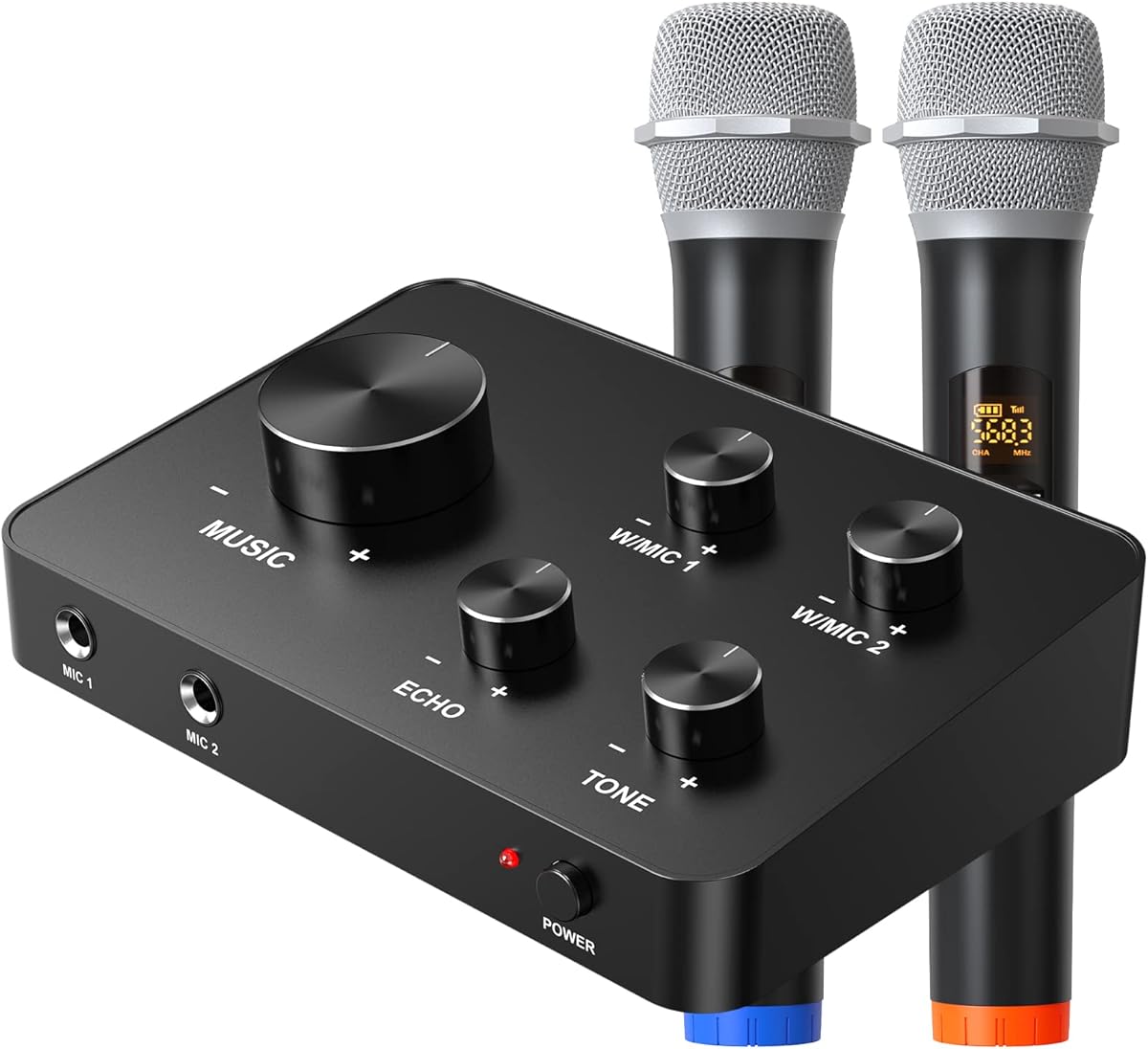
This mixer system offers dual wireless mics for duets and a simple interface for connecting to laptops. It is a practical addition to any computer-based karaoke setup.
We may earn a commission when you buy through this link, at no additional cost to you.
With HDMI and AUX outputs, you can route audio directly to your laptop or speakers. The 100ft wireless range allows singers to move freely around the room.
Separate volume controls for music and mic help balance sound levels easily. The 5 dials provide basic EQ adjustments for echo and tone without needing complex software.
Best for home users who want a ready-to-use mic system. It integrates well with laptops for a complete singing experience.
The 100ft range allows users to dance and move across the room without being tethered to a cable.
Volume dials allow quick adjustments during a song, helping you fix imbalances instantly.
We may earn a commission when you buy through this link, at no additional cost to you.
This mixer brings advanced features like HD ARC and Optical inputs that offer high-quality audio routing. It is a step up for users seeking better sound fidelity.
We may earn a commission when you buy through this link, at no additional cost to you.
With 16 frequency selections and independent controls, you can tailor sound levels precisely. Bluetooth connectivity allows for streaming music from other devices to the mixer.
Setup can be more involved than simpler models but offers better flexibility. The optical input ensures cleaner audio signals to your laptop.
Best for enthusiasts who want precise control over audio paths. It complements a laptop setup by handling external audio processing.
HD ARC ensures you get high-fidelity audio from your smart TV sources to your mixer for better sound.
Multiple input types like Optical and Bluetooth allow you to connect a wide range of media sources easily.
We may earn a commission when you buy through this link, at no additional cost to you.
This portable mic is a fun accessory that can connect to laptops for casual use. It adds visual flair with dynamic lights and playful voice effects for entertainment.
We may earn a commission when you buy through this link, at no additional cost to you.
With 6 sound effects and a 10-hour battery, it is ready for long parties. The Bluetooth connection ensures compatibility with most modern devices and laptops.
Ideal for kids or impromptu sessions where a full mixer is not needed. It is a gift-friendly option that encourages singing and fun.
Best for lightweight entertainment. It pairs well with a laptop for a simple, wireless setup without extra cables.
Dynamic lights engage the crowd and add a festive atmosphere to any singing session instantly.
Voice effects like alien or chipmunk add humor and variety to performances for all ages.
We may earn a commission when you buy through this link, at no additional cost to you.
Selecting the right laptop involves balancing processing power, ports, and battery life. Use these factors to match a device to your specific karaoke needs.
For smooth operation of karaoke software, look for at least a quad-core processor. Modern CPUs like AMD Ryzen or Intel Core U-series handle audio processing efficiently.
Prioritize newer generations of processors to ensure longevity and smooth performance over time.
Aim for 16GB of RAM to manage multiple apps like browsers and audio editors simultaneously. While 8GB works for light tasks, 16GB prevents lag during heavy use.
More RAM ensures that your system remains responsive when switching between tracks and effects.
Solid State Drives (SSD) are essential for fast boot times and quick loading of large music files. Avoid older hard disk drives as they are slower and less reliable.
Ensure at least 256GB of SSD space or have an option to connect external storage for your library.
A screen of 15 inches or larger helps you view lyrics and software interfaces clearly. Larger displays reduce eye strain during long sessions.
Full HD resolution (1920×1080) is the minimum standard to ensure text is legible and clear.
Check for USB-C and USB-A ports to connect audio interfaces and wireless microphone receivers. HDMI output is useful if you want to project lyrics on a large TV.
Ensure your laptop supports the specific connectors your audio gear uses to avoid buying extra adapters.
Look for laptops offering 8 hours or more of battery life to avoid power issues during events. Fast charging features are a bonus for quick top-ups.
A long-lasting battery is crucial when venues lack accessible power outlets for continuous use.
While built-in speakers are limited, look for laptops with high-quality audio jacks. Some models offer noise reduction which is helpful for clean recording sessions.
External audio interfaces often work best with laptops that have stable USB support for drivers.
Choose durable materials that can withstand regular transport. Lightweight designs are preferable for users who travel with their setup often.
A sturdy chassis protects internal components during movement and ensures longevity of your investment.
Connect your microphone receiver to a USB port and install necessary drivers if required. Verify that your audio settings route output to the correct speakers or interface.
Keep your laptop cool by using it on a hard surface or cooling pad. Overheating can throttle performance during long karaoke sessions.
Regularly update your operating system and audio software to maintain compatibility. Clean the screen and keyboard gently to remove dust that may affect usability.
No, a standard laptop with good RAM and storage is sufficient. Gaming laptops offer better graphics but are often unnecessary for audio playback and playlist management.
Yes, most wireless mics come with USB dongles that work with standard USB ports. Ensure your laptop has enough free USB-A ports for receivers.
8GB is adequate for basic playback and lyrics, but 16GB is safer if you run multiple apps. It prevents slowdowns when managing large file libraries.
A screen size of 15 inches or larger is recommended for clear visibility. Full HD resolution ensures text is sharp and easy to read in any room.
Use the headphone jack or connect via Bluetooth if your speakers support it. Some laptops also allow output via HDMI if you are connecting to a soundbar.
Yes, especially if you host events in areas with few outlets. A long battery life ensures uninterrupted music without worrying about power interruptions during the show.
Yes, many tablets can run karaoke apps but may lack robust ports. Laptops offer better compatibility with physical audio interfaces and external storage drives.
Windows is widely supported by most karaoke software and audio drivers. It offers a secure environment and good tool integration for managing media files efficiently.
We highlighted the HP 17 inch Business Laptop as the top choice for its screen size and performance. The NIMO 15.6 AI Ready Laptop offers a budget-friendly alternative with great value.
Prioritize storage and connectivity when making your decision. Ensure your chosen model supports the audio gear you own to avoid compatibility issues during your events.
Remember to verify current availability and check for updates on features before purchasing. The market changes often so confirming specs is always a smart move.