
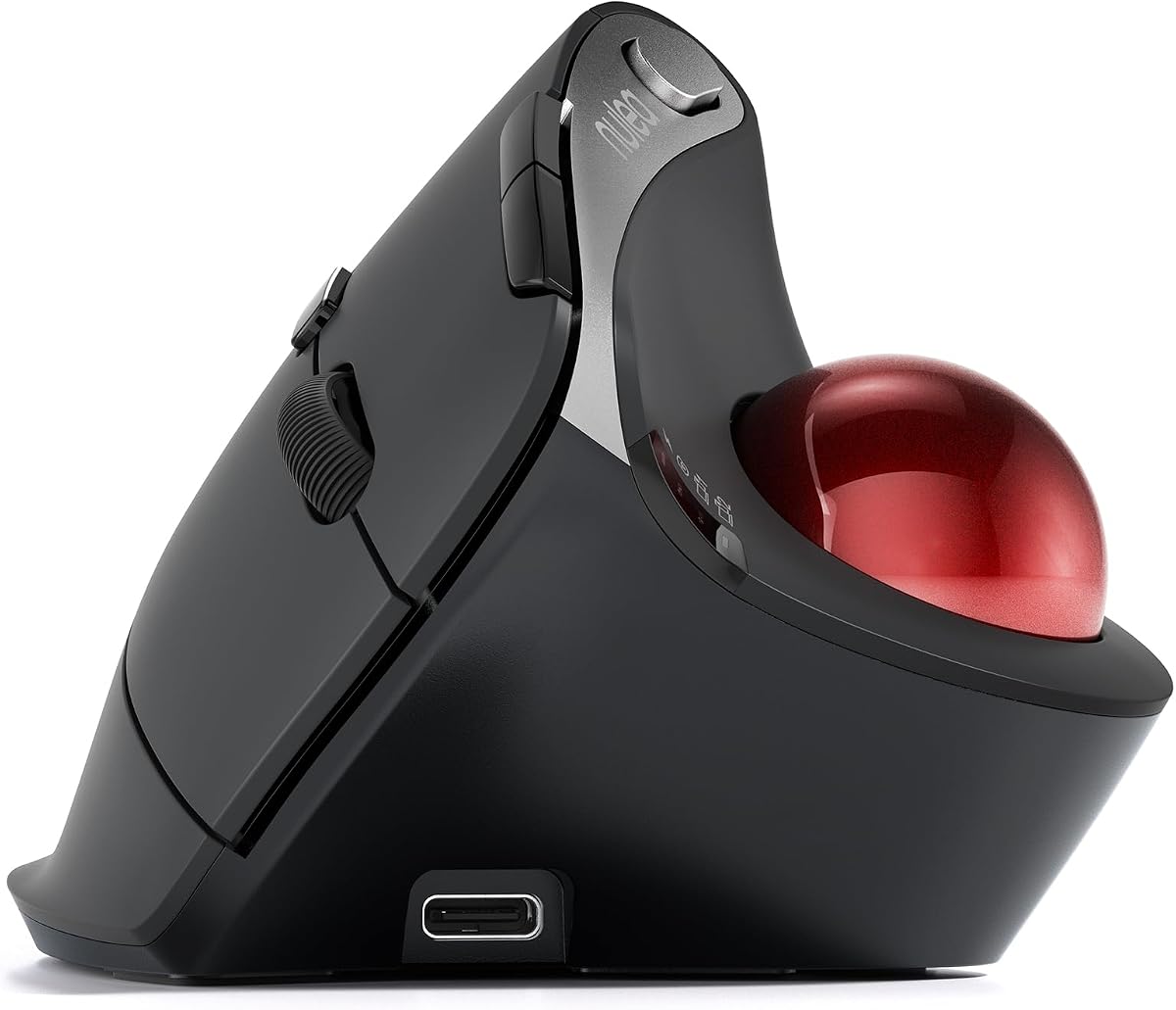
Nulea M501 Wireless Trackball Mouse
4.4Editor score
Smooth thumb control
Adjustable DPI levels
Rechargeable battery
Compare the top ergonomic trackball mice for comfort and precision in October 2026. Find the best wireless option to reduce strain and boost productivity today.
Finding the right ergonomic trackball mouse can transform your daily computing experience by reducing wrist strain and improving precision. These devices allow you to navigate your screen using a thumb-controlled ball instead of moving your entire arm, making them ideal for limited desk spaces.
We compared ten top-rated models based on comfort, connectivity, battery life, and design features. Our analysis covers wireless options from leading brands like Logitech and Nulea, ensuring you find a mouse that fits your hand size and workflow needs perfectly.
Each pick highlights specific strengths such as adjustable DPI, rechargeable batteries, or quiet clicks. Please note that prices and availability change frequently, so check the latest offers before making your final decision to ensure you get the best value.
4.4Editor score
4.5Editor score

4.4Editor score
This side-by-side comparison helps you evaluate the key specifications and features of the top ten ergonomic trackball mice available today.




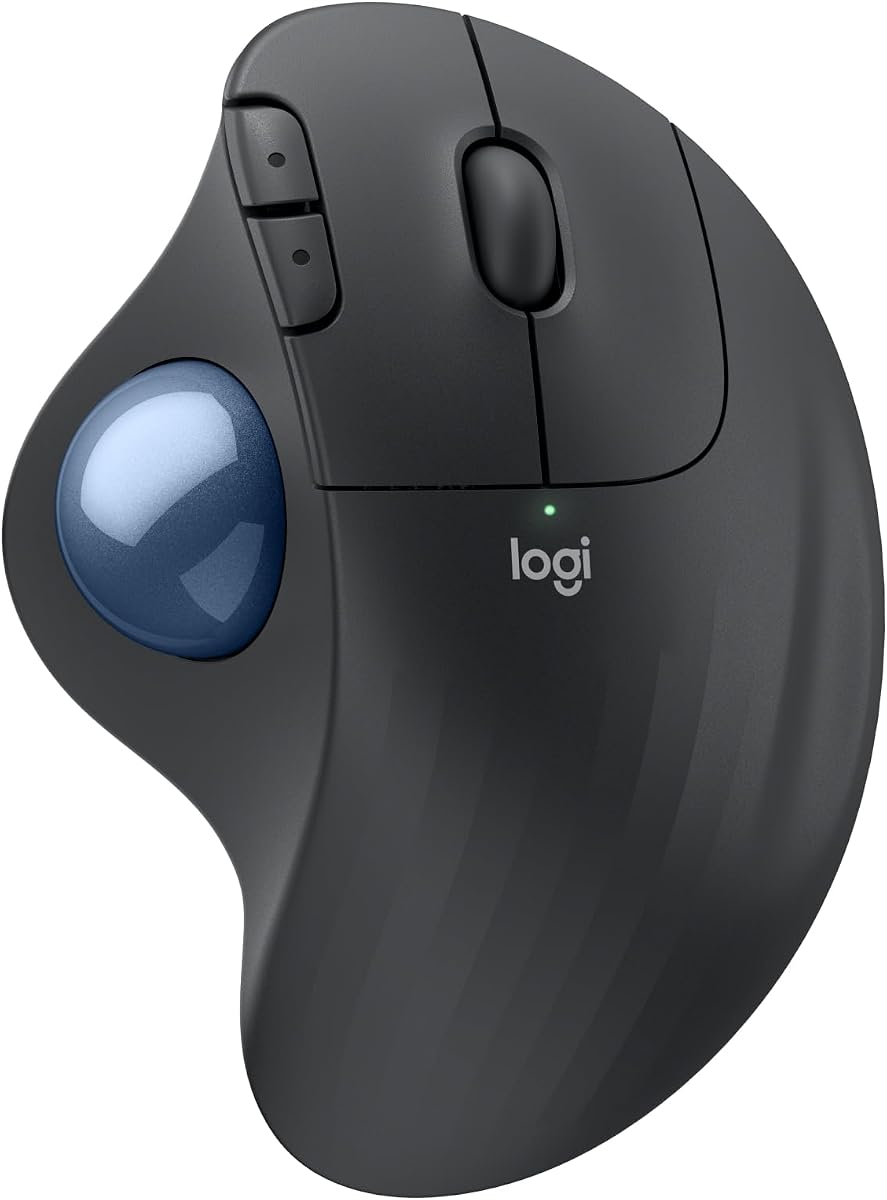
The Logitech Ergo M575S stands out as a top choice for users seeking comfort and precision. With a 4.5 star rating, it offers a sculpted shape that keeps your hand relaxed during extended work sessions. Its thumb control trackball ensures smooth tracking without moving your entire arm.
We may earn a commission when you buy through this link, at no additional cost to you.
This model reduces muscle strain by 25% compared to traditional mice. The ergonomic design realigns your forearm into a better posture throughout the day. It features quiet clicks that minimize noise in shared workspaces. You can customize buttons using the Logi Options plus App for enhanced productivity.
While it uses an AA battery instead of rechargeable, the 18 month life is impressive. The fixed tilt might not suit everyone but fits most hand sizes well. These trade-offs are acceptable given the overall comfort and reliability it provides daily.
Ideal for office workers and anyone experiencing wrist fatigue. It pairs well with ergonomic keyboards for a complete setup. We recommend this model for those prioritizing comfort and long-term use over rechargeable convenience.
The ergonomic shape supports your hand and realigns your forearm into a better posture throughout the day.
Enjoy smooth precise tracking with thumb control now featuring quiet clicks for noise free operation.
We may earn a commission when you buy through this link, at no additional cost to you.
The Nulea M501 offers excellent value for budget conscious shoppers. Rated 4.4 stars, it features a smooth trackball that reduces muscle stress by keeping your palm in a natural position. The adjustable DPI levels ensure precise cursor movement on almost any surface.
We may earn a commission when you buy through this link, at no additional cost to you.
It connects via Bluetooth or USB dongle to up to three devices. The built-in rechargeable battery eliminates the need for disposable cells. You can switch between devices easily using the button on the bottom. This wireless freedom makes it great for multi setup workflows.
While buttons are not programmable limiting some customization, the six buttons offer high performance. It does not support USB-C charging requiring careful charging practices. These are minor drawbacks for the price and overall functionality provided.
Best for students or home office users needing a reliable ergonomic mouse. It saves space and works on various surfaces. Consider this if you want ergonomic benefits without a premium price tag.
The optimal angle of the trackball mouse allows you to keep your palm in a natural position for all-day comfort.
Connect up to 3 devices by either bluetooth or USB dongle and switch easily between them to improve your efficiency.
We may earn a commission when you buy through this link, at no additional cost to you.
This variant of the M575S focuses on improved forearm posture and simplicity. With a 4.6 rating, it maintains the same benefits as the standard model with a different color finish. The ergonomic shape supports your hand and realigns your forearm into a better posture throughout the day.
We may earn a commission when you buy through this link, at no additional cost to you.
It features a thumb control trackball that saves space by allowing cursor movement without moving your hand. The battery life is long lasting ensuring you can work for up to 18 months on a single AA battery. Connectivity is easy via Bluetooth or the included Logi Bolt USB receiver.
While it lacks advanced software features like Smart Actions found in other models, it delivers core ergonomic comfort reliably. The design is best for most hand sizes and supports quiet clicks for a noise free environment. These factors make it a solid straightforward choice.
Recommended for users who want essential ergonomic features without complexity. It pairs well with other Logitech products for a cohesive setup. Consider this if you prefer a no-frills approach to ergonomic computing.
The ergonomic shape of the ERGO M575S supports your hand and realigns your forearm into a better posture throughout the day.
With thumb control you can move your cursor without moving your hand making it ideal for small or space-saving setups.
We may earn a commission when you buy through this link, at no additional cost to you.
The Logitech MX Ergo S is a premium option designed for advanced users. Rated 4.4 stars, it features a 20-degree tilt angle to improve forearm posture and reduce muscle strain by 27%. The advanced thumb control gives more control with less movement at the tap of a button.
We may earn a commission when you buy through this link, at no additional cost to you.
It offers 80% quieter clicks for a peaceful workspace experience. The USB-C charging allows up to 24 hours of use from a 1 minute charge. You can customize buttons and shortcuts using the Logi Options+ App to enhance productivity. The design is sculpted for medium to large sized hands.
While the price is higher than basic models, the features justify the cost. The tilt angle might take adjustment but significantly reduces strain. These trade-offs are acceptable for professionals seeking top-tier ergonomic performance and durability.
Ideal for power users and creatives needing precision and comfort. It supports dual wireless connectivity for seamless workflow. Consider this model if you want the best features in an ergonomic trackball mouse.
A wireless ergonomic mouse with a tilt angle for better forearm posture reducing muscle strain by 27%.
Enjoy up to 24h of use from a 1 min charge or up to 120 days with a full charge via USB-C.
We may earn a commission when you buy through this link, at no additional cost to you.
The TECKNET Wireless Trackball is specifically designed for medium to large hand sizes. With a 4.5 rating, it features a 16 degree vertical angle that promotes better forearm posture and reduces muscle strain by up to 50%. Its precise tracking allows you to navigate documents with ease.
We may earn a commission when you buy through this link, at no additional cost to you.
It charges quickly with 15 minutes powering a full day of use. The silent mouse design ensures noise free operation for shared spaces. You can adjust DPI levels to switch between precision and speed. The triple device connection supports seamless workflow across PCs and tablets.
While users may need 1 to 2 weeks to get familiar with the vertical design, the comfort benefits are significant. The fixed angle might not suit everyone but reduces wrist strain effectively. These trade-offs are acceptable for those needing ergonomic support.
Best for users with larger hands seeking a reliable wireless trackball. It combines comfort with modern connectivity features. Consider this if you need a mouse that fits comfortably for long-term use.
Featuring a unique 16 degree vertical angle this ergonomic wireless mouse promotes better forearm posture and reduces muscle strain.
Built with a 500mAh rechargeable battery this wireless mouse charges quickly just 15 minutes powers a full day of use.
We may earn a commission when you buy through this link, at no additional cost to you.
The Nulea M506 stands out with its 54 degree vertical ergonomic design. Rated 4.7 stars, it keeps wrists and forearms in natural relaxed positions for all-day comfort. The contoured shell offers a comfortable grip for steady cursor movement during office and design work.
We may earn a commission when you buy through this link, at no additional cost to you.
It includes a detachable trackball for easy cleaning without tools. The rechargeable battery runs continuously for up to 21 days after a single full charge. You can adjust DPI levels to switch between precision and speed for various tasks. Multi device connection supports seamless switching between PCs and Macs.
While the design is slightly larger, the vertical relief significantly reduces wrist burden. The battery life exceeds expectations ensuring reliable long-duration daily usage. These features make it a strong choice for ergonomic focus.
Ideal for users experiencing wrist discomfort during long working hours. It offers practical features like easy cleaning and long battery life. Consider this model if you want a vertical trackball that prioritizes wrist health.
The 54 degree vertical structure keeps your wrists and forearms in natural relaxed positions with a contoured shell.
The trackball is removable for easy cleaning to clear dust and dirt ensuring precise cursor control all the time.
We may earn a commission when you buy through this link, at no additional cost to you.
The Nulea Wireless Ergonomic Vertical Trackball Mouse features a 65 degree comfort design. Rated 4.3 stars, it keeps your wrist and arm naturally relaxed with a wave-textured surface. Navigate with ease using your thumb reducing hand and arm movement significantly.
We may earn a commission when you buy through this link, at no additional cost to you.
It includes a smart infinite scroll wheel switching between precise and fast modes based on speed. True silent control ensures noise-free operation for shared spaces. You can pair with up to 3 devices and switch instantly for a seamless workflow. This supports PC Mac laptops and phones.
While the scroll wheel is smart, it might not suit everyone's preferences. The 65-degree angle is significant and might need adjustment. These trade-offs are acceptable for those prioritizing relaxation and quiet work.
Best for office workers needing silent operation and vertical relief. It combines comfort with modern multi-device features. Consider this if you value quiet operation and natural wrist positioning.
The vertical mouse features a perfect 65 degree ergonomic angle that keeps your wrist and arm naturally relaxed.
Features an advanced infinite scroll wheel that automatically switches between precise and fast modes based on scrolling speed.
We may earn a commission when you buy through this link, at no additional cost to you.
The Nulea Wireless Trackball Mouse features a 21.7 degree tilt stand for a more natural wrist position. Rated 4.4 stars, it reduces hand and arm movement helping to minimize strain and fatigue. The tilted elevated design fits your palm precisely for a comfortable grip.
We may earn a commission when you buy through this link, at no additional cost to you.
It offers true silent control for noise-free operation perfect for late-night work. You can choose from 4 sensitivity levels to precise control or faster movement. The 6 button high performance design adds back and forward buttons for productivity. It supports multi-device connection via Bluetooth or USB receiver.
While buttons are not programmable, the six buttons offer useful controls. It lacks USB-C charging limiting charging options. These trade-offs are acceptable given the unique tilt stand and comfort features provided.
Ideal for users seeking an elevated design to relieve wrist strain. It combines tilt ergonomics with silent operation. Consider this if you want a unique tilt feature for better posture.
The ergonomic wireless mouse comes with a 21.7 degree tilt stand for a more natural wrist position.
Experience a completely noise-free operation with this cordless mouse perfect for shared spaces or late-night work.
We may earn a commission when you buy through this link, at no additional cost to you.
The Logitech Ergo M575 for Business offers enterprise-grade wireless features. Rated 4.4 stars, it is designed with Logi Ergo Lab experts and certified by US Ergonomics. Less movement and more comfort reduce muscle activity by 25% promoting better forearm posture.
We may earn a commission when you buy through this link, at no additional cost to you.
It supports remote deployment and monitoring with Logitech Sync for large organizations. The trackball ensures smooth precise tracking on any surface. You can personalize buttons with shortcuts in the Logi Options+ app. With up to 18 months of use from a single AA battery, it is ideal for deployment.
While targeted to businesses, the comfort features benefit any user. The focus on sustainability includes 52% post consumer recycled plastic. These features make it reliable for long-term professional use.
Best for IT teams deploying ergonomic mice across teams. It offers reliable comfort and sustainability. Consider this if you need a mouse validated for all-day professional use.
Enterprise-grade wireless trackball mouse is ideal to deploy at scale and remotely deploy and monitor with Logitech Sync.
Designed for sustainability the plastic parts in ERGO M575 Trackball include 52% post consumer recycled plastic.
We may earn a commission when you buy through this link, at no additional cost to you.
The Logitech MX Ergo S Rechargeable provides long battery life and fast charging. Rated 4.5 stars, it offers advanced thumb control and a 20-degree tilt angle for better forearm posture. The USB-C charging delivers up to 24 hours of use from a 1 minute charge.
We may earn a commission when you buy through this link, at no additional cost to you.
You can customize buttons using the Logi Options+ app for enhanced productivity. The encrypted dongle ensures secure wireless connectivity. It features 80% quieter clicks and a sculpted ergonomic design. This makes it a top choice for productivity and comfort.
While the price is premium, the features justify the investment for power users. The tilt angle might need adjustment but reduces strain significantly. These trade-offs are acceptable for those needing advanced features and reliability.
Ideal for professionals needing secure and customizable ergonomic tools. It supports advanced workflows with programmable buttons. Consider this model if you want the best rechargeable trackball available.
Enjoy up to 24 hours of use from a 1 min charge or up to 120 days with full charge via USB-C.
Experience enhanced control in your daily tasks with 6 customisable buttons time-saving shortcuts and smart actions.
We may earn a commission when you buy through this link, at no additional cost to you.
Choosing the right ergonomic trackball mouse requires understanding your specific needs and workspace constraints.
Look for a mouse that supports your hand in a natural position to reduce wrist strain. Models with vertical angles or tilts align your forearm better.
Choose a design that reduces muscle activity by at least 25% for long-term comfort.
Thumb-controlled trackballs minimize hand and arm movement which helps prevent fatigue. Ensure the ball rolls smoothly for precise cursor movement.
A good trackball offers control on any surface without moving your hand.
Consider whether you need Bluetooth USB dongle or multi-device pairing. Switching between devices should be seamless for productivity.
Choose a mouse with reliable wireless connectivity up to 34 feet for freedom of movement.
Check if the mouse uses AA batteries or is rechargeable. Rechargeable models save money and reduce waste over time.
Look for a battery life that lasts at least 20 days on a single charge for reliability.
Programmable buttons and software support enhance workflow efficiency. Ensure the mouse supports app-based customization for shortcuts.
Choose a model with customizable buttons to save time on daily tasks.
Look for materials like recycled plastic for sustainability and durability. Soft rubber grips improve comfort during long sessions.
A solid build ensures the mouse withstands daily use without failure.
Adjustable DPI settings let you switch between precision and speed. Ensure there are at least four levels for flexibility.
Choose a mouse with sufficient DPI to handle different tasks like design or browsing.
Quiet clicks are essential for shared workspaces or late-night work. Check if the trackball and buttons operate silently.
Select a mouse with silent features to maintain focus and comfort.
To start using your ergonomic trackball mouse, connect it via Bluetooth or USB receiver. Allow your hand to rest naturally without moving your wrist.
Clean the trackball regularly by ejecting it from the cage to remove dust. This ensures smooth tracking and precise cursor movement at all times.
Charge the mouse before first use if rechargeable. Use the provided cable or standard USB port to maintain battery health.
Yes, ergonomic trackball mice are designed to reduce wrist strain by keeping your hand stationary. They align your forearm naturally to minimize muscle activity. Most models reduce strain by up to 50% for all-day comfort.
You can clean the trackball by ejecting it from the ball cage. Take it off quickly without tools to clear dust and dirt. This keeps it rolling smoothly for precise cursor control.
Most trackball mice allow you to navigate without moving the device on any surface. You can use them on desks couches or small boards for precise tracking. The trackball ensures smooth control regardless of the surface.
Battery life varies by model ranging from 18 months for AA to over 20 days for rechargeable. Check specs for details on usage time before replacement is needed.
Some models allow button customization via apps like Logi Options+. Others have fixed buttons for basic functions. Check the product details for programmable options.
Vertical mice tilt the hand but trackballs allow cursor movement without arm motion. Both reduce strain so choose based on your comfort needs.
We reviewed ten top ergonomic trackball mice suitable for various needs and budgets. Our top picks highlight comfort precision and advanced features like quiet clicks.
Prioritize models with adjustable DPI and reliable connectivity to match your workflow. Choose a design that fits your hand size and reduces muscle strain significantly.
Remember to check current prices before buying as deals change frequently. Finding the right mouse can transform your daily computing experience for the better.