
APEVIA VENUS500W
3.9Editor score
Affordable 500W Output
120mm Auto Controlled Fan
Comprehensive Protection Suite
Explore our expert guide on the best low power PSU options for efficient builds. We compare top models for efficiency, noise, and reliability.
Finding the right power supply for compact or energy efficient builds requires careful consideration. A good low power PSU ensures stable delivery while minimizing waste and heat generation.
We compared ten top models based on efficiency ratings, connector types, cooling solutions, and overall build quality. This list covers options for ITX, TFX, and standard ATX form factors.
Each pick highlights key strengths and potential trade-offs to help you decide. Note that availability and costs change frequently so verify details before purchasing.
3.9Editor score

4.7Editor score

5.0Editor score
The following table offers a side by side comparison of all ten models listed. Use this to quickly assess form factors, efficiency levels, and key connector types.




The MSI MAG A650BE stands out as a reliable choice for builders seeking efficiency and quiet operation. It holds a high rating from users and delivers consistent performance across various loads.
We may earn a commission when you buy through this link, at no additional cost to you.
Its semi modular design allows you to connect only necessary cables improving airflow inside the case. The 80 Plus Bronze certification ensures decent efficiency while the low noise fan keeps acoustic levels down.
While not fully modular the fixed cables are well length for most standard ATX cases. Some users may find the cable stiffness slightly challenging during tight routing scenarios.
This unit is ideal for mid range builds where space and noise matter. We recommend it for those who prioritize reliability and a solid warranty without overspending.
The Bronze certification and low noise fan work together to keep heat and sound low during daily use.
Industrial level protections like OVP and OCP safeguard components while the five year warranty offers long term peace of mind.
We may earn a commission when you buy through this link, at no additional cost to you.
The APEVIA VENUS500W offers a straightforward solution for those needing a reliable 500W unit without breaking the bank. It provides essential connectors and protections for standard desktops.
We may earn a commission when you buy through this link, at no additional cost to you.
Its 120mm fan adjusts speed based on temperature helping to maintain airflow without excessive noise. The voltage regulation stays within five percent tolerance ensuring stable power to components.
Build quality is basic compared to higher end units which might limit longevity under heavy daily use. It is best suited for light workloads or budget constrained systems.
We suggest this model for simple office PCs or secondary machines. It delivers core functionality at a minimal cost making it a practical budget pick.
This PSU meets basic power needs for standard office or home PCs without requiring advanced features or premium pricing.
The auto thermally controlled fan helps manage heat effectively without complex user intervention or constant high speed operation.
We may earn a commission when you buy through this link, at no additional cost to you.
This 600W Flex ATX PSU represents a top tier choice for small form factor enthusiasts seeking maximum efficiency and flexibility. It scores perfectly in user ratings due to its performance.
We may earn a commission when you buy through this link, at no additional cost to you.
The fully modular design allows for clean builds with minimal cable clutter inside compact cases. Its over 92 percent efficiency reduces heat output while the silent fan ensures near silent operation.
A standout feature is the inclusion of a standard 16 pin connector supporting modern high performance GPUs. This future proofs the unit for upcoming hardware standards in small chassis.
We recommend this model for NAS systems or high end mini PCs. It is the premium choice for those who value efficiency and quiet operation above all else.
The 16 pin connector supports the latest GPU power standards ensuring compatibility with high end graphics cards in small cases.
With over 92 percent efficiency the unit generates less heat reducing the need for aggressive cooling in tight spaces.
We may earn a commission when you buy through this link, at no additional cost to you.
The Apevia ITX-PFC500W is a fully modular unit designed specifically for Mini ITX builds. It offers solid performance and versatility with a wide voltage input range.
We may earn a commission when you buy through this link, at no additional cost to you.
Its modular cables help reduce clutter in tight cases while the Active PFC ensures efficient power factor correction. The double ball bearing fan is built for durability over time.
One trade off is the small 40mm fan which might run at higher speeds to cool the unit effectively. This can lead to increased noise in silent focused builds.
We suggest this PSU for users needing a modular ITX solution at a moderate price. It balances features and cost well for standard small form factor systems.
Fully modular cables allow you to use only what you need improving airflow and reducing cable management headaches in small cases.
Active PFC ensures the PSU works efficiently across a wide range of input voltages providing stable power globally.
We may earn a commission when you buy through this link, at no additional cost to you.
This 300W unit is designed for standard Mini ITX and Flex ATX cases making it a great entry point for simple builds. It includes separable connectors for legacy and modern boards.
We may earn a commission when you buy through this link, at no additional cost to you.
The manual voltage switch allows use in different regions but requires attention to avoid damage. Users must ensure the switch matches their local outlet voltage before powering on.
With only 300W output this model is best for low power CPUs and integrated graphics. It will not support high end GPUs or heavy multi drive configurations.
We recommend it for HTPCs or basic office systems. It offers a simple reliable solution for small form factor needs without unnecessary complexity.
The manual switch allows users to adapt the unit for use in North America or international regions with proper settings.
Separable main and CPU connectors support both modern 24pin and legacy 20pin motherboards ensuring broader compatibility.
We may earn a commission when you buy through this link, at no additional cost to you.
The Thermaltake Smart 500W is a dependable standard ATX unit known for quiet operation and basic efficiency. It is well suited for typical home and office desktops.
We may earn a commission when you buy through this link, at no additional cost to you.
Its 120mm fan provides effective cooling while remaining quiet during normal use. The Active PFC helps maintain efficiency though it only meets White certification levels.
Users will find the fixed cables sufficient for standard builds but less flexible than modular options. The five year warranty adds confidence in long term reliability.
We suggest this PSU for general purpose PCs where noise is a concern. It delivers stable power without advanced features at a fair value point.
The 120mm ultra quiet fan helps maintain low noise levels making this PSU suitable for quiet home entertainment systems.
A five year warranty provides long term protection ensuring users can rely on the unit for extended periods without worry.
We may earn a commission when you buy through this link, at no additional cost to you.
This unit features a distinct design that emphasizes cooling efficiency with a specialized misting approach. It holds Bronze certification and a solid warranty for peace of mind.
We may earn a commission when you buy through this link, at no additional cost to you.
The low noise operation is a key benefit for quiet builds. Its specialized design might appeal to users looking for alternative thermal management solutions in standard cases.
However availability and support might be less common than major brands. Users should check case compatibility carefully due to potential form factor differences.
We recommend this for unique builds where thermal performance is critical. It offers a specialized solution for users willing to explore alternative cooling technologies.
Bronze certification ensures the unit operates efficiently under typical loads reducing overall energy consumption and heat output.
A five year limited warranty offers long term reliability assurance for users investing in this specialized power supply model.
We may earn a commission when you buy through this link, at no additional cost to you.
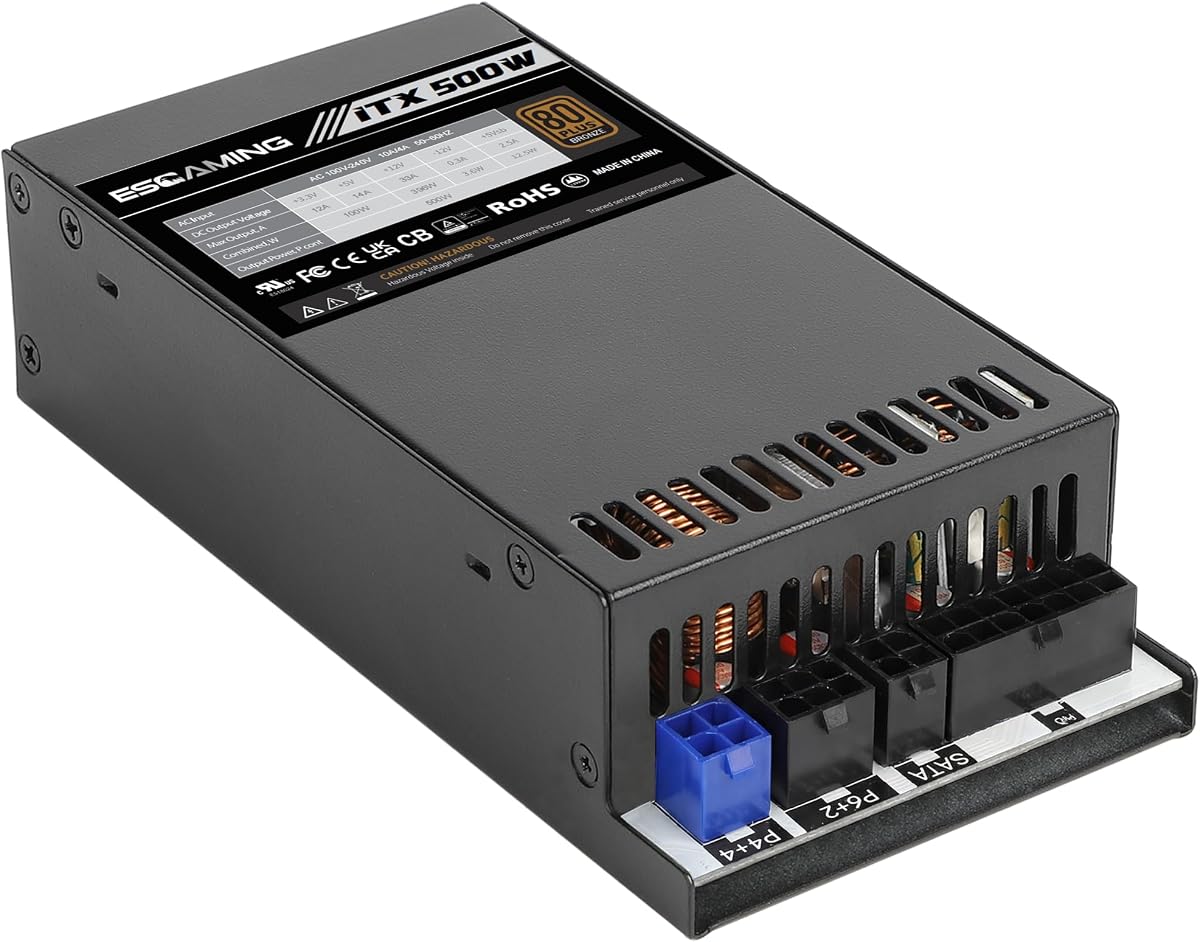
The ESGAMING Fully Modular unit delivers convenience through its cable system making it ideal for compact 1U chassis. It maintains stable performance with Active PFC technology.
We may earn a commission when you buy through this link, at no additional cost to you.
Modular cables reduce clutter significantly which improves airflow inside small cases. This can help lower internal temperatures for components in tight spaces.
While a solid choice the brand may not have the same support infrastructure as larger manufacturers. Users should verify local service options if needed.
We suggest this for budget focused builds needing modularity. It offers a practical balance of features for compact systems without full premium pricing.
Fully modular cables allow users to connect only what is needed improving airflow and reducing clutter inside compact cases.
Active PFC ensures the power supply handles voltage fluctuations efficiently delivering clean consistent output to system components.
We may earn a commission when you buy through this link, at no additional cost to you.
This 500W PSU is designed for Small Form Factor cases using the TFX shape. It features automatic power switching and a fan that starts only when needed.
We may earn a commission when you buy through this link, at no additional cost to you.
Auto switching eliminates manual voltage toggles reducing risk of user error. The silent start fan stays still at low loads keeping noise levels minimal.
Fixed cables limit customization but ensure all necessary connectors are included. This suits users who prefer simplicity over modular flexibility.
We recommend this for TFX case owners needing reliable power. It offers a balanced solution for compact builds without manual voltage setup steps.
Full range Active PFC automatically detects and adjusts to input voltage preventing accidental damage from incorrect voltage settings.
Silent start technology ensures the fan remains stationary during low loads reducing noise and improving comfort in quiet rooms.
We may earn a commission when you buy through this link, at no additional cost to you.
The Smart W3 Series follows the new ATX v3.1 specification making it a forward looking choice for modern builds. It uses DC to DC design for improved power delivery.
We may earn a commission when you buy through this link, at no additional cost to you.
Its 120mm FDB fan ensures quiet operation during use. The 80 Plus certification confirms efficient energy usage while flat cables aid in routing.
As a newer spec unit compatibility with very old systems might require verification. However it offers solid future proofing for current and upcoming hardware.
We recommend this for those wanting the latest standards. It balances modern specs with a decent warranty and reliable construction at a competitive point.
Compatible with ATX v3.1 this unit meets current specifications ensuring it handles modern component power requirements effectively.
A 120mm FDB fan provides quiet efficient cooling maintaining stable temperatures without unnecessary noise in standard cases.
We may earn a commission when you buy through this link, at no additional cost to you.
Selecting the right power supply requires looking at several key factors. This guide explains what to prioritize when shopping for low power units.
Determine your system total power draw to choose an appropriate wattage. Low power builds often need 300W to 500W depending on CPU and GPU.
Always leave headroom for stability so avoid running at full capacity constantly.
Look for 80 PLUS certification like Bronze or Gold to ensure lower energy waste. This reduces heat and costs over time.
Higher efficiency means less heat which is critical in small cases.
Check your case type such as ATX, TFX, or ITX to find a fitting unit. Dimensions vary significantly between models.
Ensure the unit physically fits before purchasing to avoid installation issues.
Fully modular PSUs allow you to use only needed cables reducing clutter. Semi modular units save some main cables.
Modularity improves airflow in compact builds and helps with cable management.
Verify available connectors like PCIe and CPU power match your components. Some units lack modern 16 pin ports.
Ensure compatibility with your motherboard and graphics card before buying.
Look for larger fans like 120mm or silent tech to reduce noise. Small fans often spin faster and create more sound.
Quiet operation is essential for home theater or office environments.
Ensure the unit includes OVP, OCP, and SCP protections to safeguard components. These prevent damage from surges or overloads.
Basic protection is necessary for safe system operation in any build.
A longer warranty such as five years indicates manufacturer confidence. Check terms to understand what is covered.
Prioritize units with solid warranties to protect your investment long term.
Install the power supply in a well ventilated area with space around the fan intake and exhaust.
Connect all necessary cables securely ensuring no pins are bent or left loose during assembly.
Clean dust from the fan and vents regularly using compressed air to maintain proper cooling.
A low power PSU generally delivers 300W to 600W of output. These units are designed for compact builds or systems without high end graphics cards that consume excessive energy.
Yes it confirms the unit meets efficiency standards reducing energy waste and heat. Higher ratings like Bronze or Gold indicate better performance than White certified models.
No form factors have specific dimensions and mounting points. Using a TFX unit in a standard ATX case usually requires adapters or specific case compatibility.
Check your motherboard and graphics card requirements. Most modern boards need 24pin and 8pin CPU power while GPUs need 6 or 8 pin PCIe connectors.
Modular PSUs allow you to connect only the cables you use. This reduces clutter and improves airflow inside the case especially in small builds.
Active PFC helps improve efficiency and voltage stability. It is standard in most modern units and helps the PSU handle different voltage inputs effectively.
We reviewed ten options ranging from budget friendly to premium models. The MSI MAG A650BE stands out as our top pick for its balance of efficiency and features.
Prioritize wattage and form factor first then consider noise and modularity. A unit that fits your case and power needs will ensure system stability.
Always check current availability and warranty details before finalizing your choice. Prices and stock fluctuate so verify specifications on the retailer page.