
Lenovo Smartcard Wired Keyboard II
4.4Editor score
Full-size layout with numeric keypad
Plug-and-play USB connectivity
Compact footprint for desk space
This guide compares ten top keyboard with smart card reader models for secure authentication, featuring detailed specs, pros, cons, and expert insights for
In today's digital landscape, securing access to sensitive systems is paramount. A keyboard with smart card reader combines everyday typing functionality with robust authentication tools, streamlining login processes while maintaining high security standards for businesses and government entities.
We evaluated ten leading models based on compatibility, build quality, reader standards, and user experience. Each product was assessed for its ability to integrate smoothly with existing infrastructure, ensuring reliable performance across Windows, Linux, and macOS environments without compromising on essential security protocols.
Every pick highlights specific strengths like TAA compliance, mechanical switches, or ergonomic designs to match diverse workplace needs. Note that availability and pricing fluctuate regularly, so verify current details before purchasing to ensure you get the best value for your specific security requirements.
4.4Editor score

4.6Editor score

4.6Editor score
The following table provides a side-by-side overview of all ten selected keyboards. Compare key specifications like connectivity type, smart card protocols, and physical design features to identify which model best suits your organizational security and usability needs.
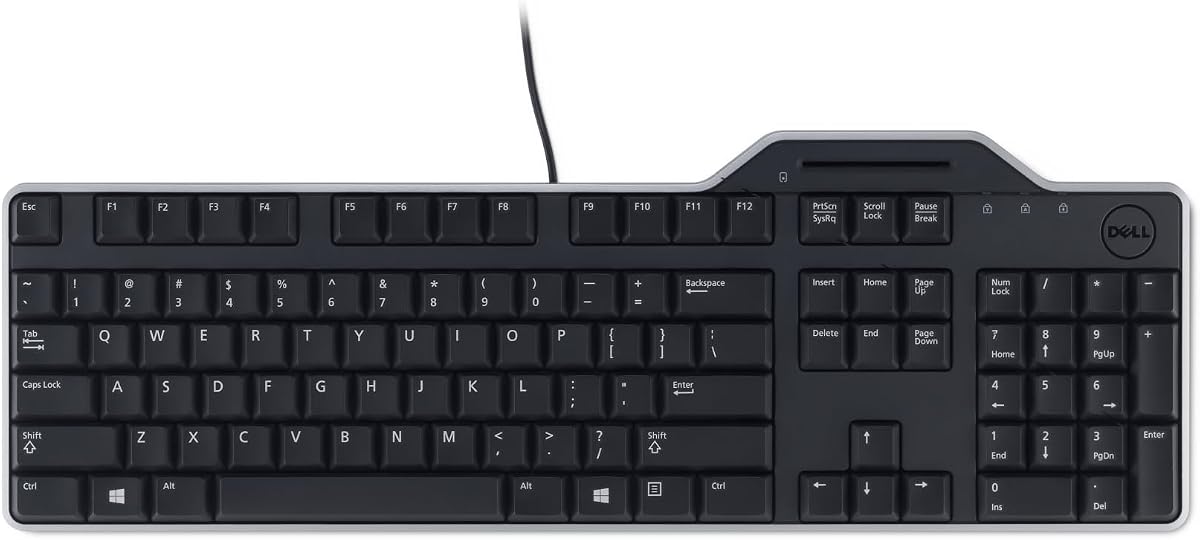


The Dell KB813 stands out as a reliable solution for environments requiring secure login processes. With a 4.6 rating, users appreciate its blend of functionality and protection. The integrated smartcard reader ensures secure authentication without needing extra peripherals.
We may earn a commission when you buy through this link, at no additional cost to you.
Its spill-resistant design is a major advantage in busy offices where liquids can pose risks. The ergonomic features include low-profile keys and a detachable palm rest, promoting comfort during long shifts. Wired USB connectivity guarantees stable data transfers without battery concerns.
While it lacks wireless options, the stability of the wired connection often outweighs this trade-off for secure setups. Detaching the palm rest might be cumbersome for some, but it aids cleaning and storage. These factors make it a practical choice for standard business needs.
Organizations prioritizing security and reliability should consider this model. It balances cost and features effectively, making it a strong candidate for bulk procurement. Ensure your systems support its specific smartcard protocols before deployment.
The built-in reader streamlines secure web applications and logon processes efficiently.
Low-profile keys and ergonomic design reduce strain during extended typing sessions.
We may earn a commission when you buy through this link, at no additional cost to you.
This keyboard is specifically tailored for entities needing TAA compliance, making it vital for federal contracts. It meets strict trade agreements while delivering strong security features. The smartcard reader supports ISO standards for broad compatibility across systems.
We may earn a commission when you buy through this link, at no additional cost to you.
The split ergonomic design encourages natural hand positioning, reducing strain over time. Users benefit from 13 hotkeys that simplify internet access and multimedia control. Membrane keys offer a quiet typing experience suitable for shared workspaces.
The added security might be unnecessary for personal use, but for agencies, it is essential. The higher cost reflects specialized certifications required for procurement. Ensure your procurement team validates compatibility with existing hardware standards.
Government suppliers and vendors will find this device aligns well with strict mandates. It offers peace of mind regarding regulatory adherence. Check current availability before initiating large orders.
TAA compliance ensures eligibility for US government sales and vendor contracts easily.
Split zones and sloped shapes help prevent repetitive strain injuries effectively.
We may earn a commission when you buy through this link, at no additional cost to you.
Security professionals favor this model due to its FIPS and EMV certifications. It ensures secure PIN entry and data protection during transactions. The smartcard module is designed for thin, low-profile integration into existing workstations.
We may earn a commission when you buy through this link, at no additional cost to you.
Protocols like T=0 and T=1 ensure compatibility with various card standards globally. Driver support extends across Windows, Linux, and macOS, offering flexibility for IT admins. One-handed operation allows quick authentication without interrupting workflow.
While not aimed at casual users, it meets rigorous requirements for high-security environments. The specialized nature means it might lack multimedia features found elsewhere. Verify specific protocol needs before purchasing.
Ideal for secure government or banking sectors, this device minimizes vulnerabilities. Its certification status is a key selling point for compliance audits. Confirm OS compatibility with your current setup.
Supports diverse smartcard protocols ensuring worldwide interoperability for agencies.
Drivers available for major OS platforms simplify deployment across mixed networks.
We may earn a commission when you buy through this link, at no additional cost to you.
This model merges mechanical keyboard benefits with enterprise security features. Red switches provide tactile feedback rated for millions of keystrokes. Secure authentication handles banking and logon processes effectively without external dongles.
We may earn a commission when you buy through this link, at no additional cost to you.
A dedicated Copilot AI key allows quick access to assistant tools directly from the keyboard. Large print keycaps improve visibility in low-light or for users needing higher contrast. Full-size layout includes standard internet and multimedia hotkeys.
The premium build quality justifies the price for intensive daily use. AI integration is a modern touch that streamlines workflows. However, it may not suit those preferring standard-sized caps or quieter membrane switches.
IT managers looking for a modern, durable secure keyboard will value these features. It caters to both security needs and productivity enhancements. Check if AI features align with your security policies.
AI hotkey integration reduces time spent searching for assistant tools.
Mechanical switches ensure durability for high-volume typing environments.
We may earn a commission when you buy through this link, at no additional cost to you.
With a 4.7 rating, this keyboard represents a solid standard for corporate environments. It prioritizes reliability and user comfort without unnecessary complexity. The spill-resistant safeguard protects against accidental beverage spills effectively.
We may earn a commission when you buy through this link, at no additional cost to you.
Quiet low-profile keys reduce distractions in shared workspaces. The detachable palm rest aids in maintaining proper posture. Wired USB ensures consistent performance without the hassle of charging or batteries.
Though it lacks advanced mechanical features, its simplicity and reliability appeal to many. The focus is on secure smartcard authentication and basic usability. Ideal for offices needing straightforward, dependable hardware.
Organizations seeking cost-effective security solutions often select this model. It balances protection with everyday usability well. Verify specific smartcard standards match your authentication systems.
Spill-resistant design protects valuable assets from common liquid accidents.
Quiet keys support focus in quiet office environments effectively.
We may earn a commission when you buy through this link, at no additional cost to you.
Kensington targets federal institutions with this TAA compliant model. It supports CAC authentication for secure access and data protection. The quiet-click mechanism maintains productivity without disturbing nearby colleagues.
We may earn a commission when you buy through this link, at no additional cost to you.
Certified for PIV and ISO standards, it ensures robust regulatory compliance. Installation is simple as it requires no software setup. The 3-year limited warranty offers added peace of mind for buyers.
Despite the lower rating, it meets specific government needs that others might not. The focus on compliance makes it a niche choice. Users seeking general home use might find it lacking in extra features.
Public sector organizations needing strict adherence to security standards should consider it. It simplifies procurement for federal requirements. Check specific CAC compatibility before purchase.
TAA status ensures eligibility for US federal procurement processes.
Extended warranty protects against hardware failures during standard use.
We may earn a commission when you buy through this link, at no additional cost to you.
This Lenovo option provides essential functionality for secure workstations. It features a standard US layout and lightweight construction for ease of use. The wired connection ensures stable data transfer without battery dependency.
We may earn a commission when you buy through this link, at no additional cost to you.
Its simplicity appeals to those needing straightforward hardware without advanced ergonomics. The package dimensions are compact, making it easy to ship. Users report reliable performance for daily tasks and smartcard authentication.
While it lacks the premium build of other models, it serves basic needs well. The cost point is attractive for budget-conscious departments. Verify specific smartcard reader requirements before deployment.
Ideal for temporary setups or cost-sensitive environments, it delivers on basics. It is a practical choice for standard office configurations. Confirm driver availability for your operating system.
Lightweight design simplifies shipping and temporary deployment.
US English layout ensures familiarity for most users.
We may earn a commission when you buy through this link, at no additional cost to you.
HP focuses on space efficiency with this slim profile keyboard. It includes a built-in spill drain to mitigate liquid damage risks. Membrane keyswitches provide quiet typing suitable for open offices.
We may earn a commission when you buy through this link, at no additional cost to you.
LED indicators help users track key status easily. The slim design fits well in tight workspaces. Reliable cable connectivity ensures secure data transmission without extra drivers.
The lack of a palm rest may reduce comfort for some users. However, the spill drain adds practical value in shared environments. It is a cost-effective choice for basic business needs.
Organizations with limited desk space will appreciate the slim form factor. It balances protection with efficiency. Verify smartcard reader compatibility with your authentication setup.
Slim profile maximizes available desk space effectively.
Built-in drain protects internal components from spills.
We may earn a commission when you buy through this link, at no additional cost to you.
Cherry emphasizes high-security needs with this board. It includes secure mode encryption, ideal for thin clients. The RF/NFC interface supports additional card types beyond standard smartcards.
We may earn a commission when you buy through this link, at no additional cost to you.
GS Approval certification ensures compliance with strict standards. Protocols like ISO 14443 support broader authentication methods. Wired connection maintains reliability in secure environments.
The specialized features make it costly for general use. It is best suited for high-security government or financial sectors. Confirm your infrastructure supports NFC interfaces before purchase.
Security teams requiring encrypted authentication will find this valuable. It offers robust protection against unauthorized access. Check if it supports your specific card tags.
RF/NFC interface expands compatible card types for versatile access.
Secure mode encryption simplifies thin client security setups.
We may earn a commission when you buy through this link, at no additional cost to you.
This OEM unit offers a straightforward replacement option for existing setups. It is new and unopened, ensuring full functionality. The standard English layout fits most business needs comfortably.
We may earn a commission when you buy through this link, at no additional cost to you.
Integration with Dell systems is seamless due to matching architecture. The integrated card reader maintains secure authentication workflows. Cost-effective pricing makes it suitable for bulk refreshes.
Packaging might be basic compared to retail versions. This does not affect performance but could impact presentation. Verify specific model compatibility with your current hardware.
IT teams looking for direct replacements will find this practical. It restores security functionality quickly. Confirm current stock levels before ordering.
OEM units offer seamless integration with existing Dell hardware.
Integrated reader maintains secure login processes without extra steps.
We may earn a commission when you buy through this link, at no additional cost to you.
Selecting the right keyboard requires balancing security standards, ergonomics, and compatibility with your existing systems. This guide covers key factors to ensure your choice meets both organizational compliance and user comfort requirements.
Ensure the keyboard supports required protocols like FIPS 201, EMV, or ISO standards. High-security environments often mandate specific certifications that standard keyboards may lack. Without proper compliance, you may face issues with government audits or financial transaction regulations.
Always verify protocol matches with your authentication server before purchase.
Check if drivers are available for your specific OS environment. Most support Windows, but some offer Linux or macOS options. Incompatible drivers can render the smartcard reader useless or cause system instability.
Prioritize models with cross-platform support for mixed hardware environments.
Look for features like split key zones or detachable palm rests to prevent strain. Comfort impacts long-term productivity, especially for data entry roles. Poor ergonomics can lead to discomfort and reduced efficiency over time.
Choose designs that support natural wrist positioning for daily use.
Mechanical switches generally last longer than membrane switches in high-use scenarios. Built-in spill protection or drainage adds resilience in office settings. Durable construction ensures your investment lasts longer without frequent replacements.
Evaluate lifecycle ratings if your team types intensively.
Wired USB provides stable data transfers without battery worries. Wireless options exist but may raise security concerns in sensitive environments. Ensure the connection type aligns with your security policies regarding external devices.
Wired connections are typically preferred for maximum security stability.
Government agencies must adhere to TAA compliance for sourcing. This ensures products meet trade agreement requirements. Ignoring this can lead to rejected procurement bids or legal complications.
Check TAA status if you are buying for federal or military use.
Multimedia hotkeys and large print caps improve accessibility and workflow. Some models include AI hotkeys for enhanced productivity. Extra features depend on your team's daily tasks and needs.
Balance advanced features with core security needs based on usage.
Longer warranties offer protection against manufacturing defects. Corporate buyers often prefer vendors with responsive support channels. This reduces downtime if a unit fails unexpectedly.
Confirm warranty duration and service terms before finalizing the purchase.
Connect the keyboard to your computer via the USB port before inserting any smartcard. Ensure your operating system recognizes the device by checking device manager or hardware settings. Install any necessary drivers provided by the manufacturer if automatic detection fails.
Insert the smartcard into the reader slot carefully, following the direction indicated on the keyboard. Use the dedicated hotkeys or software prompts to authenticate secure logons. Regularly clean the card reader slot with compressed air to prevent dust buildup.
Protect your keyboard from liquids by using spill-resistant models and avoiding drinks nearby. If a spill occurs, disconnect the device immediately and let it dry thoroughly before reconnecting. Proper care extends the lifespan and ensures continued security functionality.
Many models support macOS but require specific drivers or configuration. Check product descriptions for Mac compatibility notes. Some keyboards function as standard HID devices without extra setup.
FIPS 201 is a federal standard for personal identity verification. Keyboards with this approval ensure secure authentication for government systems. It verifies that the device meets rigorous cryptographic requirements.
While some wireless models exist, wired options are preferred for security. Wireless transmission may introduce risks for sensitive data. Check if wireless models support encryption for safe card reads.
No, these keyboards have built-in readers. This integration simplifies setup by removing the need for extra hardware. It reduces clutter and potential connection points for security risks.
Mechanical switches offer longer lifespan and tactile feedback. Membrane keys are quieter and often cheaper. The choice depends on whether you prioritize durability or noise levels.
Visit the manufacturer's support site for the latest drivers. Ensure your OS version matches the driver requirements. Regular updates fix bugs and maintain compatibility with security protocols.
The top picks like the Cherry KC 1000 and Dell KB813 balance security with usability. Each model serves different needs, from government compliance to office productivity. Select based on your required protocol and workspace conditions.
Prioritize certifications like FIPS or TAA if you are in regulated industries. Ergonomics matter for teams using these keyboards daily. A comfortable device reduces strain and boosts overall performance.
Prices and stock fluctuate often, so verify current listings before buying. Ensure the selected model matches your hardware infrastructure. This approach guarantees a smooth integration with your security systems.