
ASUS ROG Raikiri II Pro PC Controller
4.0Editor score
8K Sampling Rate Support
Hot-Swappable Joysticks
Full Color Display Screen
This guide compares the top ASUS ROG Ally controllers to help you find the best accessory for PC and Xbox gaming performance and comfort.
Finding the right controller for your gaming setup is crucial for comfort and performance. ASUS offers a range of options designed to enhance your experience across PC and Xbox platforms with advanced features.
We have evaluated ten top-rated controllers based on connectivity, build quality, and customization options. This list covers everything from budget-friendly mobile options to high-end PC gaming controllers with OLED displays.
Each pick highlights key strengths and ideal use cases for different gamers. Please note that prices and availability can change frequently, so check current listings before making your final purchase decision today.
4.0Editor score

3.9Editor score

4.1Editor score
Explore our detailed side-by-side comparison of the top ten controllers designed for compatibility with the ASUS ROG Ally and related gaming ecosystems.


The ASUS ROG Raikiri II stands out as a top choice for gamers seeking reliable performance across multiple platforms. With a rating of 3.9 stars, it offers versatile tri-mode connectivity that ensures you stay connected whether you are on PC or Xbox.
We may earn a commission when you buy through this link, at no additional cost to you.
Its standout qualities include the anti-drift TMR joysticks which provide superior accuracy compared to traditional Hall Effect options. The 1000Hz polling rate ensures ultra-low latency, making it ideal for competitive gaming sessions where timing is critical.
While the price is on the higher end, the included accessories like the protective case and charging stand add significant value. The trade-off is the complexity of features which might overwhelm casual users but power users will appreciate the depth of customization.
This controller is best suited for dedicated gamers who demand precision and flexibility. We recommend it for anyone looking to upgrade their setup with a robust and feature-rich peripheral.
The TMR joysticks consume less power while providing exceptional anti-drift performance for longer play sessions.
Enjoy at least 30 hours of wireless play on a single charge when RGB lighting and vibration are turned off.
We may earn a commission when you buy through this link, at no additional cost to you.
For competitive gamers, the ASUS ROG Raikiri II Pro offers an unmatched level of responsiveness and customization. It holds a rating of 4.0 stars and features an 8K sampling rate that promises extremely responsive control during intense gaming moments.
We may earn a commission when you buy through this link, at no additional cost to you.
The hot-swappable TMR joysticks allow you to replace components easily without needing extra tools. A full color display lets you customize key features such as profiles and calibration directly on the controller for quick adjustments on the fly.
While the price is significant, the extended battery life of up to 79 hours ensures you can game for days without interruption. The complexity of the buttons might take time to learn but offers powerful in-game command capabilities once mastered.
We recommend this controller for serious players who want the best possible hardware edge. It is an investment in performance that pays off in reduced latency and greater control precision.
The 8K sampling rate with ROG SpeedNova technology delivers low latency for improved gaming performance in wired and wireless modes.
Use the full color display to manage profiles and joystick calibration without navigating through software menus.
We may earn a commission when you buy through this link, at no additional cost to you.
The ASUS ROG Tessen is an excellent choice for mobile gamers who want console-level control on the go. With a strong rating of 4.1 stars, it features a foldable design that makes it incredibly easy to carry in your pocket.
We may earn a commission when you buy through this link, at no additional cost to you.
Its standout qualities include console-grade sticks with a 22-degree range of movement for unmatched accuracy. The zero-latency wired USB-C connection ensures uninterrupted power and responsiveness which is crucial for competitive mobile titles.
While it is limited to Android phones and wired connections, the secure fit and ergonomic handles make up for the lack of wireless freedom. The packaging converts into a stand which is a nice eco-friendly touch that adds utility.
This controller is best suited for mobile gamers who prioritize performance over wireless convenience. We recommend it for fans of games like Call of Duty: Warzone Mobile and Roblox looking for a serious upgrade.
Rubber support pads and an extended USB-C connector safeguard your phone and most protective cases during gameplay.
Outward-extended ergonomic handles allow for comfortable extended gameplay sessions without hand fatigue.
We may earn a commission when you buy through this link, at no additional cost to you.
The ASUS ROG Raikiri Pro OLED brings a unique visual element to gaming controllers with its built-in display. Rated at 3.9 stars, it allows you to create a unique look with customizable animations and view status indicators easily.
We may earn a commission when you buy through this link, at no additional cost to you.
Key strengths include the tri-mode connectivity which offers flexible options for PC and Xbox users. The step and linear triggers provide selectable modes for precise control, while the ESS DAC ensures immersive audio through the 3.5mm jack.
The extensive customization via Armoury Crate is a major benefit though it requires software installation. While the price is higher, the unique features and audio quality make it a strong contender for those who value personalization.
This controller is best for gamers who want to customize every aspect of their setup. We recommend it if you enjoy tweaking settings and want a controller that stands out visually.
The OLED display lets you switch profiles on the fly and view status indicators without checking your PC screen.
Built-in ESS DAC delivers premium sound for games and music directly through your headphones.
We may earn a commission when you buy through this link, at no additional cost to you.
The ASUS ROG Raikiri Pro offers a compelling mix of OLED display features and tri-mode connectivity. It holds a rating of 3.4 stars and provides up to 48 hours of battery life for nonstop gaming sessions.
We may earn a commission when you buy through this link, at no additional cost to you.
Its standout qualities include the OLED display for customizable animations and the versatility of wired and wireless connections. The intuitive rear controls allow you to map commands or adjust joystick sensitivity quickly during gameplay.
While the rating is slightly lower, the feature set remains robust for those seeking customization. The trade-off is the price which is higher than standard controllers, but the OLED screen justifies the cost for many users.
This controller is best suited for PC gamers who value visual feedback and long play sessions. We recommend it if you want a premium feel without needing the full Pro version features.
Up to 48-hour battery life enables extended use without frequent recharging interruptions.
Use the OLED screen to switch profiles on the fly for different game modes easily.
We may earn a commission when you buy through this link, at no additional cost to you.
The ASUS ROG Raikiri Pro Renewed offers a budget-friendly way to access premium OLED controller features. As a renewed product it is tested to look and work like new with limited to no signs of wear.
We may earn a commission when you buy through this link, at no additional cost to you.
It retains all the key features of the original model including the OLED display and tri-mode connectivity. The refurbishing process ensures functionality testing and the product comes with a 90-day warranty for peace of mind.
While it is certified renewed, the value proposition is strong for those willing to accept minor cosmetic imperfections. The trade-off is the limited warranty compared to new items but the cost savings are significant.
This option is best for cost-conscious gamers who still want high-end features. We recommend it if you want the OLED experience without the full price tag.
The refurbishing process includes functionality testing and inspection to ensure reliable performance.
Comes with a 90-day warranty covering basic functionality issues after purchase.
We may earn a commission when you buy through this link, at no additional cost to you.
The ASUS ROG Xbox Ally combines a powerful handheld with integrated controls rated at 4.3 stars. It features a 7-inch 120Hz display and the AMD Ryzen Z2 A processor for console-caliber performance anywhere.
We may earn a commission when you buy through this link, at no additional cost to you.
Its standout qualities include boot straight into the Xbox experience and access to your full PC game library. The contoured grips are inspired by Xbox Wireless Controllers ensuring comfort during extended gameplay sessions.
While the price is high, it replaces the need for separate controllers and PCs for many users. The trade-off is the weight and bulk which is typical for high-performance handhelds but manageable for most.
This device is best for gamers who want a single solution for all their titles. We recommend it if you value portability and want a premium integrated gaming experience.
Powered by ultra-efficient AMD Ryzen Z2 A processor that delivers hours of gaming away from a wall outlet.
Includes 3 months of Xbox Game Pass Premium giving you access to 200+ games right away.
We may earn a commission when you buy through this link, at no additional cost to you.
The ASUS ROG Raikiri II Renewed offers the same features as the new model at a reduced cost. It is tested and certified to look and work like new with the essential travel case included.
We may earn a commission when you buy through this link, at no additional cost to you.
It supports 2.4GHz and Bluetooth connectivity with a battery life of up to 50 hours. The web-based config allows easy setup without needing additional software installed on your PC.
While it is renewed, the savings make it an attractive option for budget-conscious buyers. The trade-off is potential cosmetic wear but functionality remains intact for reliable gaming sessions.
This option is best for those seeking performance without the premium price tag. We recommend it if you want a versatile controller for PC and Xbox on a budget.
Use web-based configuration to manage settings without needing extra software installed.
Includes a travel case to protect the controller during transport or storage.
We may earn a commission when you buy through this link, at no additional cost to you.
The CRKD NEO S is a wireless controller designed for collectibility and broad platform support. With a rating of 4.3 stars it features Hall Effect thumbsticks to prevent stick drift during gaming.
We may earn a commission when you buy through this link, at no additional cost to you.
Its standout qualities include collectible designs that can be paired with a mobile app to reveal product rarity. Re-mappable back buttons add speed and versatility to your control scheme for faster in-game commands.
While it is not branded specifically for ASUS, it works well with the Ally and other devices. The trade-off is that customization is limited compared to ASUS branded options but the collectible value is unique.
This controller is best for collectors who also want reliable wireless performance. We recommend it if you value unique designs and Hall Effect stick technology.
Pair with the mobile app to reveal unique product numbers and rarity ranks via tap.
Hall Effect thumbsticks guarantee precise and responsive control without drift.
We may earn a commission when you buy through this link, at no additional cost to you.
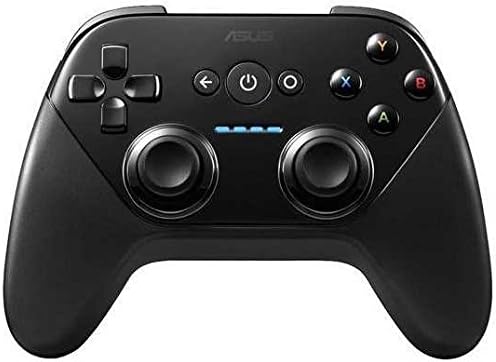
The ASUS TV500BG is a versatile wireless controller for Android TV and PC gaming. With a rating of 4.2 stars it is engineered for accurate control in Android TV games.
We may earn a commission when you buy through this link, at no additional cost to you.
Its standout qualities include Google Play Games integration which lets you track progress across phone tablet and TV. The wireless design removes cables making it convenient for couch gaming sessions.
While it is an older model with fewer features, it remains a reliable choice for basic gaming. The trade-off is the lack of advanced customization but it serves well for casual users.
This controller is best for those gaming on Android TV. We recommend it if you need a simple wireless solution for family entertainment.
Track your progress and earn achievements across your phone tablet and TV.
Engineered for accurate control in Android TV games.
We may earn a commission when you buy through this link, at no additional cost to you.
Selecting the right controller involves considering compatibility connectivity and ergonomic factors to match your gaming style and platform.
Ensure the controller supports your specific device whether it is PC Xbox or Android. Most ROG models support PC and Xbox while mobile options are limited to Android.
Check for USB-C certification to guarantee seamless connectivity with the ROG Xbox Ally and other Windows devices.
Choose between wired USB-C for zero latency or wireless options like 2.4GHz and Bluetooth for convenience. Wired is best for competitive play while wireless offers flexibility.
Tri-mode connectivity gives you the most versatility for switching between different gaming setups.
Look for TMR or Hall Effect joysticks which provide better anti-drift performance compared to traditional sensors. This ensures long-term accuracy and reliability.
Hot-swappable modules are a premium feature that allows for easy replacement without buying a new controller.
Programmable rear buttons and triggers allow you to map complex commands for better in-game performance. Software support like Armoury Crate is essential for deep customization.
Adjustable sensitivity and trigger modes let you tailor the controller to specific games or genres.
For wireless controllers check the battery life ratings to ensure they last through long sessions. Some models offer up to 79 hours of use per charge.
Fast charging and pass-through capabilities can reduce downtime during intensive gaming marathons.
Controllers with OLED displays offer visual customization but add to the cost. Consider if you value animations and status indicators over a lower price.
Built-in audio jacks with DACs improve sound quality for immersive gaming experiences on PC and Xbox.
Look for ergonomic grips and balanced weight distribution to prevent hand fatigue during extended play. Contoured handles and textured materials improve comfort.
Foldable designs are essential for mobile gamers who need portability over a large desktop setup.
Balance your budget with the features you need. High-end models offer premium features while renewed options provide value at a lower cost.
Consider accessories like cases and charging stands included in the price when comparing total value.
Always charge the controller before first use and use a high-quality USB-C cable for best performance. Avoid using damaged cables that could affect charging speed or data transfer.
Connect via the desired mode using Bluetooth for mobile or the 2.4GHz dongle for PC. If using wired USB-C ensure your device supports the data connection properly.
Use Armoury Crate or web-based config to customize buttons and adjust joystick sensitivity. Clean the surface regularly with a soft cloth and avoid exposing it to moisture.
Most ASUS ROG controllers like the Raikiri II are certified for Xbox via USB-C connection. Always check the product details for specific Xbox compatibility before purchasing.
TMR sticks use magnetic resistance for accurate movement while Hall Effect uses magnetic sensors. Both offer anti-drift benefits but TMR is optimized for power efficiency.
Battery life varies from 30 to 79 hours depending on usage and settings like RGB lighting. Higher usage modes may reduce battery duration.
Some models like the Tessen are designed for Android phones only while others support Bluetooth for mobile. Check compatibility lists to ensure your device is supported.
Many controllers work out of the box but Armoury Crate or web-based config provides advanced customization. This software is available for Windows users.
Yes renewed models like the Raikiri II Renewed offer the same features at a lower price. They are tested and certified for functionality.
The ASUS ROG Raikiri II stands out as the top choice for most gamers with its versatile connectivity and anti-drift TMR sticks. It balances performance and features effectively for both PC and Xbox users.
Prioritize battery life and customization options based on your gaming needs. Competitive players should look at Pro models while casual gamers may prefer standard versions for comfort.
Remember to check current prices and availability before buying as offers can change frequently. Choose the model that best fits your specific platform and budget for optimal enjoyment.