
Digital Calendar 10.1" Touchscreen
4.4Editor score
Affordable entry price
Full meal planning
Zero subscription fees
Digital touchscreen organizers are transforming how modern households manage daily schedules, chores, and memories. These smart devices combine calendar syncing, task management, and photo display into one sleek interface, replacing cluttered paper planners with a centralized digital hub for the whole family.
We evaluated ten leading models based on screen quality, sync reliability, user interface intuitiveness, and value for money. Our analysis focused on real-world usability for busy families, ensuring each pick offers robust features like calendar integration, chore tracking, and seamless photo sharing without hidden subscription costs.
Each review highlights specific strengths, potential limitations, and ideal use cases to guide your decision. While we strive for accuracy, product availability and pricing fluctuate frequently, so please verify current details before purchasing to ensure you get the best deal available today.
4.4Editor score

4.4Editor score

4.6Editor score
As an Amazon Associate we earn from qualifying purchases.
This side-by-side comparison breaks down the key specifications and capabilities of each top-rated digital touchscreen organizer to help you find the perfect fit for your home.


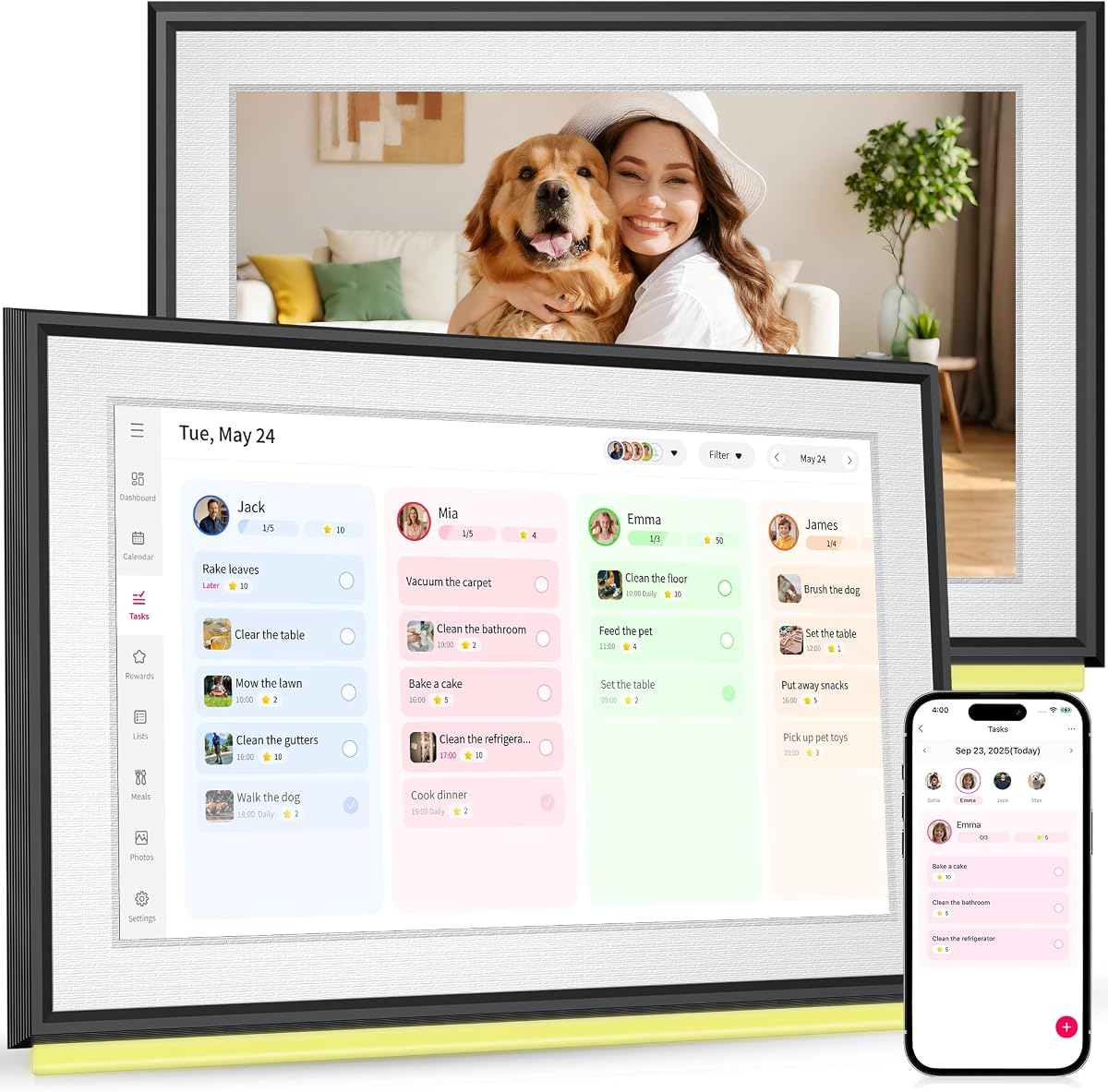

This 15.6-inch digital calendar stands out as a comprehensive command center for busy households. With a 4.4 rating, it balances high-quality display technology with practical family management features effectively. Its ability to merge scheduling, chores, and memories makes it a versatile centerpiece for modern homes.
We may earn a commission when you buy through this link, at no additional cost to you.
The real-time sync with major platforms like Google and Outlook ensures everyone stays aligned without manual updates. Parents appreciate the gamified chore system that motivates children through points and rewards. The AI-enhanced photo restoration adds a premium touch to the idle screen mode.
While the device requires patience during initial setup, the lack of ongoing fees offsets the effort. Users note that the power adapter is sold separately which can be surprising. However, once configured, the interface remains intuitive and responsive for all age groups.
Ideal for families seeking a permanent wall display that doubles as a photo frame, this model delivers strong value. It is best for those who want robust organization tools without hidden costs. We recommend it for households needing reliable coordination and memory sharing.
Connects instantly to cloud calendars ensuring all events appear automatically across devices for complete household alignment.
Builds responsibility in kids by turning daily tasks into a reward-based game that reduces parental nagging significantly.
We may earn a commission when you buy through this link, at no additional cost to you.
The Skylight Calendar offers a sleek design that fits beautifully in any kitchen or hallway. It focuses on user experience with customizable themes and robust sync options. The Disney Mode adds a unique engagement layer for children, making routine tasks more exciting.
We may earn a commission when you buy through this link, at no additional cost to you.
Its ability to connect with platforms like Cozi and Yahoo broadens its compatibility beyond standard email calendars. The HD smart display ensures text remains readable from across the room. Family members can add events directly on the device or remotely via the app.
While the base model is functional, access to advanced features like Magic Import requires a subscription. This may deter users seeking a strictly no-cost solution. However, the build quality and design justify the investment for many premium buyers.
This device is ideal for families who value aesthetics and want a polished look. It suits users comfortable with optional subscription features for enhanced utility. We recommend it for those prioritizing design and unique family engagement tools.
Allows users to adjust colors and layouts to match their home decor and personal preferences seamlessly.
Uses iconic characters to create animations and avatars that encourage kids to stay engaged with daily schedules.
We may earn a commission when you buy through this link, at no additional cost to you.
Offering a full feature set at an entry-level price, this 10.1-inch organizer is perfect for budget-conscious households. It includes meal planning and chore tracking without requiring paid upgrades. The interface is straightforward, making it accessible for seniors and children alike.
We may earn a commission when you buy through this link, at no additional cost to you.
Sync capabilities cover major platforms ensuring your schedule stays current wherever you are. The automatic sleep mode helps conserve energy while the device sits idle. Parents find the meal manager particularly useful for reducing dinner-time stress.
The compact size means it might get lost in a large kitchen compared to bigger models. Additionally, the plastic build feels less premium than costlier alternatives. Despite this, it delivers high functionality for a fraction of the cost.
This model is best for small families or those new to digital planners. It suits buyers who want essential tools without financial commitment. We recommend it for anyone seeking an affordable entry point into smart family organization.
Displays weekly menus clearly and generates grocery lists to streamline shopping and cooking preparation efficiently.
Auto-wakes and sleeps automatically to save power while keeping the device ready whenever you need it.
We may earn a commission when you buy through this link, at no additional cost to you.
This model brings high-definition clarity to the compact 10.1-inch form factor. Its AI-powered imports simplify data entry from other sources saving users time. The flexible mounting allows it to serve as a desk gadget or wall art effectively.
We may earn a commission when you buy through this link, at no additional cost to you.
Weather updates appear directly on the main screen providing constant practical utility without extra clicks. The reward system encourages children to complete tasks consistently. It serves as a reliable hub for organizing both daily tasks and long-term plans.
Some users report minor fan noise during intensive operations which can be distracting. The interface lacks some polish compared to premium competitors but remains functional. These issues do not significantly impact core performance for most families.
Ideal for households needing a versatile device for multiple rooms this calendar is solid. It is suitable for those who value clarity and flexible placement. We recommend it for families needing reliable performance at a moderate price.
Uses artificial intelligence to streamline importing tasks and events from existing digital sources quickly.
Comes with hardware for both wall mounting and desk placement to suit different room layouts.
We may earn a commission when you buy through this link, at no additional cost to you.
With a perfect 5.0 rating this planner excels in user satisfaction and reliability. The interface is designed for simplicity making it accessible to everyone in the family. Color-coded tasks provide instant visual clarity for complex schedules.
We may earn a commission when you buy through this link, at no additional cost to you.
The free companion app offers significant control over the device without extra costs. Users can create custom lists for travel or holidays easily. The sleep mode helps preserve screen life while keeping the display ready when needed.
Some customers noted shipping delays which can delay setup. The included mounting hardware may be minimal for heavy wall installations. Despite these minor issues the user experience remains consistently positive.
Best for families prioritizing ease of use this device is a top choice. It is ideal for those who want customization without fees. We recommend it for households seeking a highly rated and reliable organizer.
Uses distinct colors to differentiate tasks instantly helping family members spot priorities at a glance.
Provides full remote access via smartphone without requiring a premium subscription or hidden costs.
We may earn a commission when you buy through this link, at no additional cost to you.
This device brings a professional color classification system to household management. It helps parents organize complex schedules without confusion through visual cues. The recipe storage feature turns the calendar into a full kitchen utility.
We may earn a commission when you buy through this link, at no additional cost to you.
Remote photo sharing allows grandparents to view grandkids' growth instantly from anywhere. This strengthens family bonds by keeping loved ones connected visually. The warranty support ensures reliability for long-term daily use.
The companion app has a steeper learning curve for non-tech users. The smaller screen limits how much data is visible at once. However, the robust features compensate for these minor inconveniences for many.
Ideal for those focused on visual clarity this model is a strong contender. It suits grandparents wanting remote access to family life. We recommend it for households valuing visual organization and remote connectivity.
Uses a professional color system to differentiate tasks and plans scientifically for better family management.
Lets you save and access favorite recipes directly on the display simplifying meal prep and shopping.
We may earn a commission when you buy through this link, at no additional cost to you.
At 21.5 inches this device provides unmatched visibility for complex schedules. The dual mode lets you switch between calendar view and full Android apps easily. It integrates deeply with smart home devices for total room control.
We may earn a commission when you buy through this link, at no additional cost to you.
Voice control allows hands-free management ideal for busy kitchens. The anti-glare screen ensures clarity even in bright lighting. Users love the flexibility to install apps for weather and music.
Power consumption is higher than smaller models due to the large screen. Wall mounting is recommended which requires proper tools. These constraints are minor given the premium functionality and screen quality.
Best for large homes this planner offers a professional-grade experience. It suits users who want app versatility without a separate tablet. We recommend it for those needing a massive interactive display.
Enables full Google Play support so you can install custom apps directly on the device screen.
Uses built-in voice technology to check schedules and control lights hands-free for convenience.
We may earn a commission when you buy through this link, at no additional cost to you.
This model offers the same dual mode power as larger units in a manageable size. The included stand makes it perfect for countertop use without drilling holes. It balances features and portability for various household zones.
We may earn a commission when you buy through this link, at no additional cost to you.
You can personalize the dashboard with widgets for quick access to clocks or weather. The navigation remains smooth even with multiple apps active. It serves as an effective command center for daily tasks.
The stand is lightweight and may tip if bumped easily. Customization options are fewer than on the full Android version. These minor drawbacks are offset by its ease of setup and use.
Ideal for apartments or desktop setups this unit is practical and robust. It suits those wanting Android features without a large wall footprint. We recommend it for flexible home office or desk use.
Includes a sturdy stand so you can place it on any table without needing wall mounting hardware.
Lets you add quick access widgets for weather and tasks to streamline daily interactions quickly.
We may earn a commission when you buy through this link, at no additional cost to you.
Recent software updates have enhanced the features on this model significantly. It focuses on desk placement with a sleek design that fits modern aesthetics. The free app keeps the device connected for remote updates efficiently.
We may earn a commission when you buy through this link, at no additional cost to you.
Color-coded tasks help visualize the daily workload effectively. Photo sharing is seamless allowing families to display memories easily. It serves as a functional organizer for smaller households.
The desktop-only limit restricts it from wall display. Initial setup requires careful steps to update software. However performance remains steady once configured properly.
Best for desk use this calendar is a solid tool. It suits those wanting updates without cost. We recommend it for users comfortable with desktop placement.
Regular releases add new features to ensure the device evolves with your family's changing needs.
Built specifically to sit on tables providing a stable base without need for wall drilling.
We may earn a commission when you buy through this link, at no additional cost to you.
This large unit prioritizes clarity with a crisp IPS display. It is designed to be easily readable for grandparents from any angle. The customization options let you match the device to your decor style.
We may earn a commission when you buy through this link, at no additional cost to you.
Chore rewards build positive habits for children consistently. Mounting hardware is included for immediate wall installation. It acts as a central hub for family information.
Software features are less extensive than Android-based rivals. You cannot install third-party apps which limits flexibility. For standard use however the interface remains smooth.
Best for seniors and large spaces this calendar is practical. It suits those prioritizing visibility and simplicity over advanced tech. We recommend it for households needing clear and easy display.
Uses 1920x1080P IPS panels to ensure colors remain accurate and text readable from afar.
Large fonts and high contrast settings make the device accessible for older family members.
We may earn a commission when you buy through this link, at no additional cost to you.
Selecting the right digital organizer requires balancing size, functionality, and cost. This guide breaks down the essential factors to ensure your choice supports your family's unique scheduling needs.
Screen size dictates how much information you can see at once. Larger screens like 21.5 inches offer better visibility from a distance which is ideal for kitchens. Smaller 10.1 inch models are better for desks or smaller rooms where space is tight.
Look for at least 1080p resolution to ensure text is crisp and photos look vibrant. A high-resolution screen makes reading daily tasks easier without squinting.
Seamless syncing is the heart of any digital organizer. Ensure the device connects to the platforms your family already uses such as Google Calendar or iCloud. Real-time updates prevent conflicts between work schedules and school events.
Prioritize models that allow remote editing so you can update plans from your phone instantly. Avoid devices that rely solely on manual entry which defeats the purpose of a smart hub.
Many digital calendars offer basic features for free but lock premium tools behind subscriptions. Check if features like meal planning or unlimited photo storage require monthly fees. Ideally look for models that offer full functionality without recurring costs.
Calculate the long-term cost to ensure the device remains affordable. A device with no subscription fees often provides better value over time compared to cheaper upfront options with hidden costs.
For families with children built-in chore management can be a game changer. Look for color coding or point systems that make tasks engaging for kids. This turns routine housework into a fun activity rather than a chore.
Verify that the reward system is customizable so you can set goals that match your parenting style. A robust system reduces parental stress and encourages independence in children effectively.
When not displaying schedules these devices often serve as digital photo frames. Check the storage capacity to see how many photos you can keep on the device. Some models offer cloud syncing to keep memories up to date automatically.
Consider if the device supports video playback to bring memories to life. A versatile photo mode ensures the screen adds value even when not in active use.
Decide if you want a wall-mounted display or a desk unit. Wall mounts provide a permanent command center but require installation. Desk units are portable but take up surface space in busy areas.
Ensure the product includes the necessary hardware for your preferred placement. Some models offer both stand and mount options giving you flexibility to move the device later.
Advanced models may include smart home controls or voice assistants. These features can let you check weather or control lights through the calendar. Consider if you need this extra functionality before paying a premium.
Basic Wi-Fi connectivity is sufficient for most scheduling needs. Evaluate your home automation setup to decide if these advanced features are truly necessary for your routine.
Reliable customer support is crucial for electronic devices that see daily use. Check the warranty duration and whether it covers accidental damage. Some brands offer 24/7 support which can help troubleshoot setup issues quickly.
Longer warranties indicate confidence in product quality. Look for brands with positive customer service reviews to ensure peace of mind over the device's lifespan.
Start by connecting your device to your home Wi-Fi network. Download the companion app on your smartphone and create an account. Sync your main calendar accounts like Google or Outlook so data appears on the screen automatically.
Customize the settings to match your household needs. Assign colors to each family member to distinguish their tasks easily. Set up recurring chores and meal plans so you do not have to input them manually every week.
Maintain the device by keeping the screen clean with a soft microfiber cloth. Avoid using harsh chemicals that might damage the touchscreen coating. Regular software updates ensure the device runs smoothly and securely for years to come.
Most models in this guide offer core features like calendar syncing and basic task management for free. However some brands lock advanced features like AI photo restoration or unlimited storage behind a premium subscription. Always check the product details before purchasing to confirm the fee structure.
Yes many models allow you to manage all settings directly on the touchscreen without a phone. While the mobile app provides convenience it is not always mandatory for basic operation. Check the specific setup guide to see which features require app access.
Navigate to the settings menu on the device and select the sync option. Choose Google Calendar and sign in with your email address to authorize access. Once connected events will appear automatically and update in real time as changes occur.
The device will display cached data until the connection is restored. You can still view previously synced events but new remote updates will not appear until online. Some models offer local offline mode for viewing basic tasks without internet access.
Some models allow you to link Instagram or Facebook accounts to show recent posts. Others rely on uploading photos directly via email or USB. Check the device's supported integration list to see which platforms it connects with directly.
Yes the touch interfaces are designed to be intuitive and safe for kids. Parental controls allow you to limit access to sensitive settings while keeping the chore section open. This ensures children can interact safely without changing critical system settings.
These devices generally consume between 10 to 30 watts depending on screen brightness. Larger models use more power but many include sleep modes to reduce usage when not in use. Overall they are energy efficient compared to leaving a standard TV on.
Only models with Android mode allow you to download third-party apps from the Play Store. Standard calendar-only models are restricted to the built-in features provided by the manufacturer. Check the specifications to see if your unit supports an open app system.
The right digital organizer transforms chaotic schedules into streamlined routines. Our top picks offer a range of sizes and features to suit any family size. Whether you need a massive wall display or a compact desk unit there is a model that fits your space.
Prioritize devices that integrate smoothly with your existing digital habits. Free syncing and robust chore tools provide the most value over time. Avoid models that restrict basic features behind paywalls unless you truly need those premium tools.
Always check the latest pricing and availability before buying since offers change often. A digital organizer is a long-term investment in your home's peace of mind. Choose wisely to ensure it becomes a seamless part of your daily life.