
Omada Gigabit SFP to RJ45 Media Converter(MC220L)
4.7Editor score
Plug and play setup
Compatible with SMF and MMF
Auto-negotiation RJ45 port
This guide compares the top Ethernet Fiber Media Converter models for extending networks over fiber optic cables with reliable gigabit performance and long
Ethernet Fiber Media Converter devices allow you to bridge the gap between copper networking cables and fiber optic infrastructure. They are essential for extending network distances beyond the standard hundred meter limit while maintaining high speed data transfer rates for modern businesses.
We have analyzed ten top rated models based on their build quality, supported fiber types, and ease of installation. Each product was evaluated for its compatibility with existing network equipment and its ability to handle demanding traffic loads without signal degradation or latency issues.
Each pick in this list highlights specific strengths such as budget friendly pricing or premium enterprise features. Please note that prices and availability can change frequently so you should verify the current details before making your final purchasing decision online.
4.7Editor score

4.8Editor score

5.0Editor score
This side-by-side comparison highlights the key specifications and capabilities of each selected model to help you find the right fit for your network infrastructure needs.
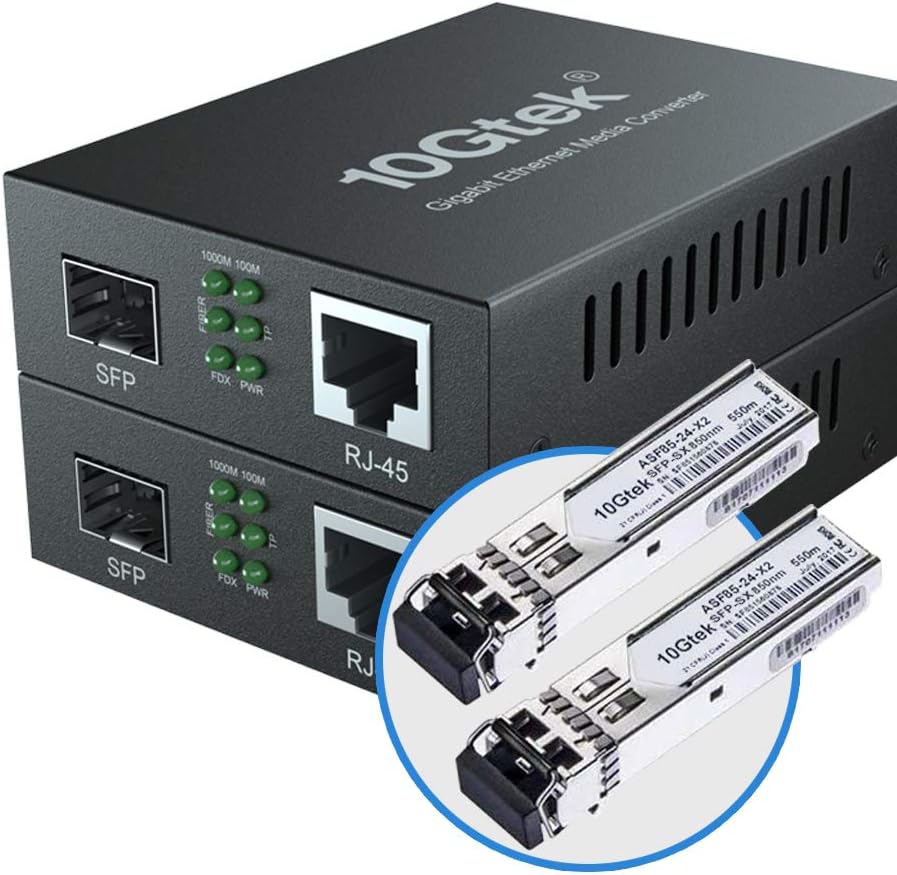


This model offers a complete two pack solution that saves you from buying pairs separately. It carries a solid rating and provides the flexibility needed for most office network extensions over short distances using multimode fiber.
We may earn a commission when you buy through this link, at no additional cost to you.
The included SFP transceiver operates at 850nm which is standard for multimode fiber installations. The RJ45 port supports full auto-negotiation allowing it to work seamlessly with legacy and modern network equipment without manual configuration steps.
The main trade-off is the limited range of 550 meters compared to single mode options. However for most indoor campus buildings or data centers this distance is more than sufficient to connect separate buildings or floors efficiently.
Anyone needing a quick reliable upgrade for existing multimode fiber plants should consider this unit. It balances cost and performance well making it a top choice for small to medium businesses looking to extend their copper networks.
Buying a pair ensures you have matching units for both ends of the link without worrying about compatibility issues between different manufacturers.
The UL certification on the power supply ensures that the device meets strict safety standards reducing risks associated with electrical faults or overheating in server rooms.
We may earn a commission when you buy through this link, at no additional cost to you.
This unit stands out for its incredibly low price point while still offering essential gigabit performance. It is rated highly by users who need a reliable converter for extending networks without breaking the budget.
We may earn a commission when you buy through this link, at no additional cost to you.
The open SFP slot allows you to use various single or multi mode modules depending on your specific fiber infrastructure. This versatility makes it a great choice for scenarios where you might need to upgrade distance capabilities later.
While it lacks detailed diagnostic LEDs the basic functionality is robust. The auto-negotiation feature ensures it works with older devices but it may lack advanced management features found in higher end units.
It is ideal for home labs small offices or temporary setups where cost is the primary driver. If you already have the fiber modules you can plug this in and start using it immediately.
The hot-swappable feature means you can change the transmission distance or fiber type by swapping the module without powering down the device.
At this price point it is difficult to find a unit that supports both single and multi mode fiber as effectively as this one does.
We may earn a commission when you buy through this link, at no additional cost to you.
This converter is specifically designed for BiDirectional fiber applications which allow data transmission over a single strand of fiber. It comes with two BiDi SFP modules making it ready for deployment right out of the box.
We may earn a commission when you buy through this link, at no additional cost to you.
It supports jumbo frames which is a critical feature for storage networks or environments with large file transfers. The wide voltage range ensures it can operate reliably in different geographic locations with varying power standards.
The use of BiDi technology means you need specific transceivers which might be harder to source later if you need replacements. However for existing BiDi infrastructure this unit integrates seamlessly with minimal setup.
It is best suited for network administrators who need to utilize single strand fiber to save on cable costs. The included power supplies add to the value of the package for small office deployments.
Using BiDi modules allows you to run two signals over one fiber strand effectively doubling the capacity of your existing cabling infrastructure.
Support for 9K byte jumbo frames helps reduce CPU overhead during large data transfers improving performance for backup and storage applications.
We may earn a commission when you buy through this link, at no additional cost to you.
This is a high performance unit designed to handle 10 Gigabit Ethernet traffic which is essential for modern data centers and server rooms. It bridges the gap between copper and fiber at much higher speeds than standard gigabit models.
We may earn a commission when you buy through this link, at no additional cost to you.
The RJ45 port is incredibly versatile as it auto-adapts to 100M up to 10G connections. This flexibility means it can work with older switches or modern servers depending on your current network equipment capabilities.
The cost of 10G transceivers is generally higher than gigabit ones so you should factor that into your total budget. However the speed and reliability this unit offers justify the investment for bandwidth intensive applications.
It is the right choice for enterprises needing to upgrade to 10G without replacing all their copper cabling immediately. The 3-year warranty provides additional peace of mind for such an investment.
The multi-speed capability ensures this device remains useful even if you upgrade your network speed incrementally over the next few years.
LED indicators make it easier to troubleshoot connection issues quickly without needing to log into network management software or use external tools.
We may earn a commission when you buy through this link, at no additional cost to you.
This unit is specifically built for single mode fiber which allows for significantly longer transmission distances up to 20 kilometers. It is a top rated choice for connecting buildings across a campus or city.
We may earn a commission when you buy through this link, at no additional cost to you.
The SC connectors are a robust standard often found in older or industrial fiber installations. The inclusion of two units in the pack makes it easy to set up a full link immediately without additional purchases.
While SC is older than LC it is still very common in many established infrastructure projects. This unit ensures you can utilize existing cabling without needing to replace expensive cables for the connection points.
It is perfect for IT managers looking to connect remote facilities with reliable gigabit speeds. The UL certification on the power supply adds a layer of safety that is important for unattended deployments.
The 20km range allows you to connect buildings that are far apart without suffering from signal loss which is common with copper Ethernet limits.
UL certification ensures the power supply meets strict safety standards which is crucial for equipment running 24/7 in potentially unmonitored locations.
We may earn a commission when you buy through this link, at no additional cost to you.
This product comes with two complete units including pre-installed LC modules which are smaller and more modern than SC connectors. It has a very high user rating indicating strong satisfaction among installers and network admins.
We may earn a commission when you buy through this link, at no additional cost to you.
The U.S. based technical support is a significant advantage for businesses that need reliable help during implementation. The support is available during business hours which covers most work day troubleshooting needs.
The modules are fixed to the 20km single mode specification so you cannot change the distance later without replacing the unit. However for standard campus distances this range is ideal and reliable.
It is a great choice for offices that prefer LC connectors and need long distance single mode capabilities. The high rating suggests that the build quality is more robust than the plastic price suggests.
LC connectors are smaller and more secure than SC connectors making them the preferred choice for modern data centers with high density fiber patch panels.
Having technical support available in your time zone helps reduce downtime and speeds up the resolution of any configuration or compatibility issues.
We may earn a commission when you buy through this link, at no additional cost to you.
This converter includes DIP switches that allow you to customize speed and link fault settings easily. It comes with the SFP module pre-installed so you do not need to source it separately for a standard single mode link.
We may earn a commission when you buy through this link, at no additional cost to you.
The Link Fault Pass-Through feature is valuable for keeping the network stable by signaling issues down the line. This helps prevent network loops or dead ports from causing problems in your wider infrastructure.
It is designed for desktop use but includes wall mount ears which offers flexibility for mounting near a router or switch. The fanless design ensures it runs quietly in an office environment without noise.
IT professionals who need specific link fault control will appreciate the DIP switch options. It offers a good balance of features without the complexity of managed enterprise gear.
Link Fault Pass-Through drops the copper link when the fiber link fails helping downstream devices recognize the outage immediately for faster troubleshooting.
The compact size and included mounting hardware allow this unit to fit easily in tight spaces like server racks or under a desk.
We may earn a commission when you buy through this link, at no additional cost to you.
StarTech is known for reliability and this model meets TAA compliance which is required for many government and public sector projects. It is designed for professional deployments where uptime and standards are critical.
We may earn a commission when you buy through this link, at no additional cost to you.
The open SFP slot allows you to choose the exact fiber module you need for your environment. This flexibility is useful for projects where specific distance or fiber type needs might change over time.
VLAN pass-through ensures that your network segmentation is maintained across the fiber link without requiring reconfiguration at the endpoints. This is essential for secure environments needing strict network separation.
It is the best choice for enterprises needing a vendor that supports industry standards. The lifetime technical assistance also provides long term value for IT teams relying on consistent support.
TAA compliance means this device meets trade agreements act requirements which is necessary for sales to US government agencies and federal entities.
The ability to mount in a chassis makes it easier to manage multiple converters in a professional rack environment rather than having individual units scattered around.
We may earn a commission when you buy through this link, at no additional cost to you.
This unit supports QinQ VLANs which allows for stacking VLAN tags to maintain network segmentation over the fiber link. It comes with the SX module pre-installed ready for immediate multimode use.
We may earn a commission when you buy through this link, at no additional cost to you.
The DIP switches allow for control over broadcast storm control and forced speed settings. This gives administrators the ability to tailor the behavior to their network without deep technical knowledge.
The fanless design is excellent for quiet office environments where noise can be a distraction. It runs cool and silent which makes it suitable for desktop use in open workspaces.
It is ideal for networks that need to pass VLAN tags across a building link. The included dust caps for the fiber port help protect the interface when the unit is not in use.
QinQ support allows the link to pass stacked VLAN tags which is vital for complex networks requiring layered segmentation across different physical locations.
A fanless design ensures the device does not produce noise which is important for office settings where quiet working conditions are preferred.
We may earn a commission when you buy through this link, at no additional cost to you.
This model has a perfect rating and is designed for enterprise environments where reliability is non-negotiable. It is TAA compliant and offers advanced features like remote monitor status for better network oversight.
We may earn a commission when you buy through this link, at no additional cost to you.
Link loss forwarding helps ensure that failures are detected quickly across the network. This feature helps maintain high availability which is critical for mission critical business applications.
While it is more expensive than the other units the build quality and support justify the cost. It is a long term investment for networks that need to stay up without interruption.
IT directors managing large networks will appreciate the advanced diagnostics and compliance. It is the top choice for those who prioritize reliability over initial cost savings.
Remote monitor status allows network administrators to check link health remotely which saves time and reduces the need for physical inspections of the hardware.
The build quality and lifetime support backing this unit make it a reliable choice for large organizations that need consistent performance over many years.
We may earn a commission when you buy through this link, at no additional cost to you.
Choosing the right converter depends on your network distance needs fiber types and future expansion plans.
You must determine if you are using single mode or multimode fiber as converters are often specific to one type. Single mode is for long distances while multimode is for shorter indoor campus runs.
Check the distance rating of the converter to ensure it covers the length of your fiber run. Some units support up to 20km while others are limited to 550 meters.
Match the connector type on the converter to your fiber patch cables. LC and SC are the most common styles and mismatching them will prevent a physical connection.
Ensure the converter supports the speed of your network devices such as 100M 1000M or 10G. Auto-negotiation helps adapt to different speeds but you should confirm the max speed.
Look for units with UL or CE certified power supplies to ensure safety and reliability. This is especially important for devices running in server rooms or unattended locations.
Units with an open SFP slot give you more flexibility to upgrade modules later. However ensure the unit is compatible with the MSA standard you intend to use.
Consider whether you need a desktop unit or one that can be mounted on a wall or in a chassis. Rack mountability is key for professional data center deployments.
Verify that the manufacturer offers technical support especially if you are implementing the network in a business setting. Local support can save time during complex troubleshooting.
To install the device simply connect one end of your Ethernet cable to the RJ45 port and the other end to your switch or router. Then plug in the fiber cable to the SFP or fiber port and ensure it is clicked into place securely.
Power on the device and observe the LED indicators to confirm that both the link and activity lights are solid. If the link light does not come on check the fiber cable alignment and clean the connectors if necessary to remove dust or debris.
Keep the unit in a well ventilated area to prevent overheating and avoid bending the fiber cables excessively. Regularly inspect the cables and connectors for damage and replace them if you notice any cracks or fraying in the outer jacket.
The main purpose is to bridge the gap between copper Ethernet cabling and fiber optic infrastructure allowing you to extend network distances beyond 100 meters. It converts electrical signals to optical signals and back again to maintain high speed data transmission.
It depends on the product. Some units come with the SFP module pre-installed which makes them ready to use out of the box. Others have an open SFP slot meaning you must purchase a compatible module separately.
No you should not mix single mode and multimode fiber in the same link as this will result in signal loss and connection failure. You must match the converter type to the fiber type you are using.
Link Fault Pass-Through is a feature that drops the copper link when the fiber link fails. This helps downstream devices recognize the outage immediately rather than showing a false link up status.
Most gigabit multimode converters reach up to 550 meters while single mode models can reach up to 20 kilometers. High end 10G units may have different distance limits depending on the SFP+ module used.
Standard media converters do not support Power over Ethernet or PoE on the copper side. If you need to power devices like cameras you will need to use a PoE switch injector before the converter.
We have reviewed ten excellent models ranging from budget friendly pairs to premium enterprise grade units that meet strict compliance standards. The best choice depends on your specific fiber type distance needs and whether you need TAA compliance.
For most small businesses the 10Gtek or Omada units offer the best value with reliable performance. Larger enterprises should consider the StarTech options for their advanced diagnostics and support features.
Remember to check the current pricing and availability before purchasing as these details change frequently. Ensure your fiber cables and modules are compatible with the unit you select to guarantee a smooth installation.