
VEVOR 60W CO2 Laser Engraver
5.0Editor score
Large 24×16 inch bed
Four-way pass-through design
Compatible with multiple software
Choosing the right 60W laser engraver can transform your creative projects into professional-grade products. These powerful machines offer the versatility needed for cutting wood, acrylic, leather, and even some metals with remarkable precision. Whether you are a hobbyist or a small business owner, finding a model that balances power, safety, and ease of use is essential for long-term satisfaction.
We evaluated ten leading 60W laser engravers based on their cutting speed, safety features, software compatibility, and overall build quality. Our analysis focuses on real-world performance metrics like engraving speed, material compatibility, and user feedback to ensure you get an accurate picture of what each machine delivers. This list covers a range of technologies including diode, CO2, and fiber lasers to suit different needs.
Each pick in this guide highlights specific strengths, from budget-friendly options to industrial-grade performers. You will see detailed breakdowns of features, pros, and cons to help you make an informed decision. Please note that prices and availability can change frequently, so verify the latest details on the product pages before purchasing to ensure you get the best value available today.
5.0Editor score

4.8Editor score

4.2Editor score
As an Amazon Associate we earn from qualifying purchases.
This table provides a side-by-side overview of the top 60W laser engravers available today. It highlights key specifications such as laser type, work area, safety class, and unique features to help you quickly identify the model that best fits your specific requirements and budget constraints.




The Creality Falcon2 Pro 60W Laser Engraver & Cutter stands out as a top choice for serious makers and businesses. It combines a powerful 60W laser with safety features like a fully enclosed Class 1 design. The integrated HD camera streamlines positioning, making it ideal for batch production and detailed work on materials like wood, acrylic, and leather.
We may earn a commission when you buy through this link, at no additional cost to you.
This machine delivers commercial-grade performance with adjustable power settings of 60W, 40W, and 22W to suit different tasks. The dual laser system includes a 1.6W module for precision positioning and fine engraving alongside the main cutting laser. This flexibility allows you to switch between heavy-duty cuts and delicate detailing without needing extra tools.
While it offers excellent performance, the price point is higher than entry-level models. You also need to ensure proper ventilation even with the enclosed design to manage smoke effectively. These trade-offs are acceptable given the professional quality and safety standards it provides for consistent output.
Buy this if you need a reliable machine for a growing business or advanced hobby projects. It is perfect for those who value safety and precision without sacrificing power. The LightBurn compatibility ensures you can integrate it into existing professional workflows easily.
The fully enclosed structure minimizes laser exposure and contains smoke, creating a safer workspace for everyone including children or pets nearby.
The built-in HD camera allows for accurate material positioning and live preview, reducing setup time and ensuring your design lands exactly where you want it.
We may earn a commission when you buy through this link, at no additional cost to you.
This version of the Falcon2 Pro is designed for rapid mass production with speeds exceeding 500mm/s. It features a native 60W output and an integrated enclosure for safety. The built-in camera simplifies positioning significantly, allowing you to focus on production rather than manual measurements. It is ideal for sole traders needing reliable batch processing capabilities.
We may earn a commission when you buy through this link, at no additional cost to you.
The machine cuts through 0.3mm stainless steel and thick acrylic in single passes, reducing overall processing time. Safety features like flame detectors and emergency stops ensure a secure environment. The drawer system helps organize debris, making cleanup quick and less frequent which is perfect for small studio operations.
Despite its speed, users may find the price steep for casual use. Installation is quick but ensuring all safety locks are properly engaged is crucial for safe operation. These factors are manageable for professionals who prioritize efficiency and safety in their daily workflow.
Choose this if you need high-volume production capabilities with strong safety standards. It suits users who want a machine that can handle tough materials like metal and thick acrylic efficiently. The camera focus feature adds significant value for reducing setup errors.
With engraving speeds over 500mm/s you can complete projects much faster than lower-powered machines, reducing processing time significantly for batch orders.
Multiple protections including flame detectors and safety locks ensure a secure workspace, giving you peace of mind during long production runs.
We may earn a commission when you buy through this link, at no additional cost to you.
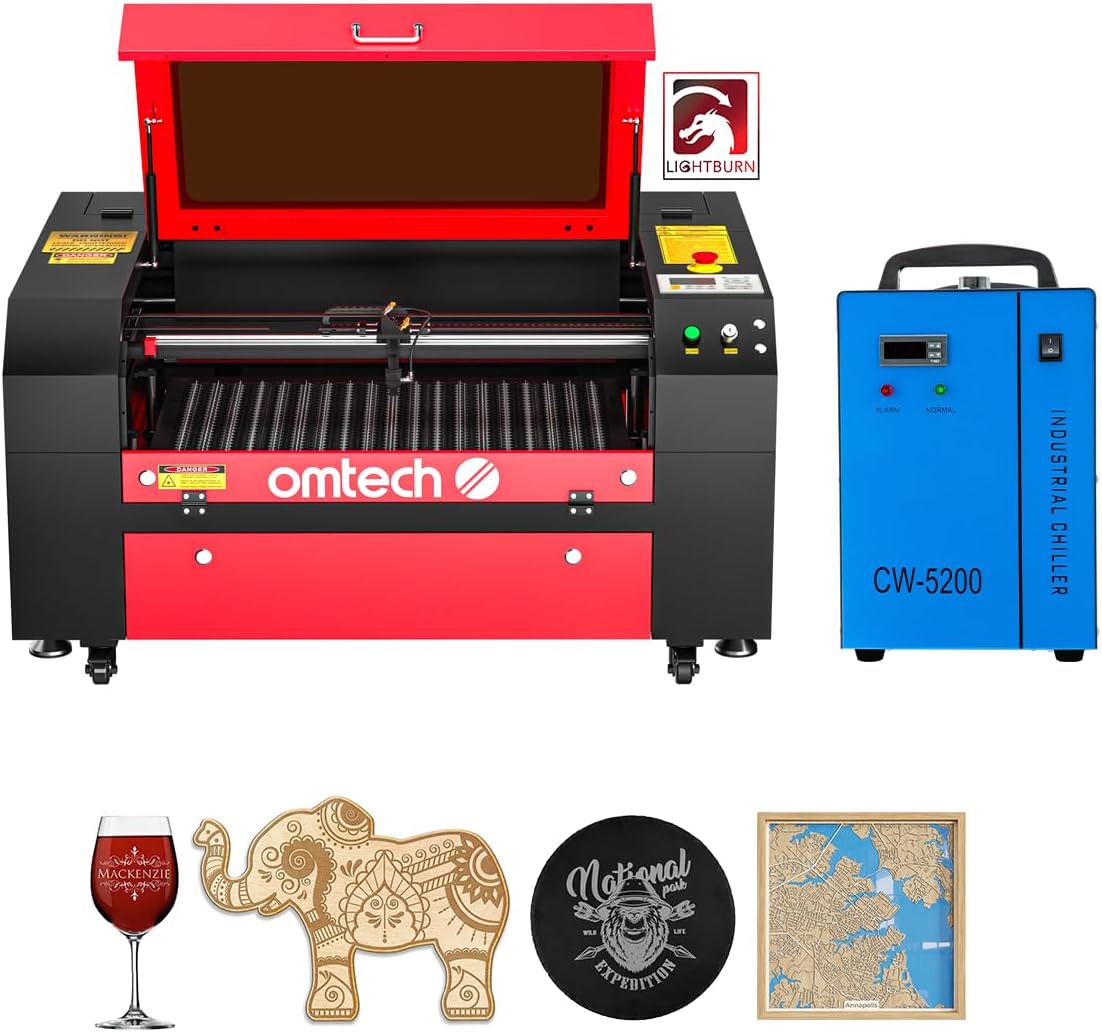
The OMTech Maker 60W CO2 Laser Engraver is an excellent choice for users who prefer CO2 technology for non-metal materials. It comes with a water chiller and LightBurn software to provide consistent performance. The autofocus feature eliminates manual adjustments, making it accessible for beginners while maintaining professional quality results on wood and acrylic.
We may earn a commission when you buy through this link, at no additional cost to you.
The 20×28 inch work area accommodates large projects easily, and the four-way pass-through doors allow for longer items without restriction. The air assist system keeps lenses clean and ensures precise cutting. This setup is ideal for hobbyists or small businesses needing a reliable machine for large-scale engraving projects.
CO2 lasers require more maintenance than diodes, including tube replacement and water cooling management. The initial setup is slightly more complex due to the chiller connection. However, these are standard trade-offs for the smooth cuts and larger area this machine offers.
Buy this if you need a large work area and prefer CO2 precision. It is perfect for engraving signs, home décor, or personalized gifts. The included software and autofocus make it a convenient option for those new to laser engraving.
The autofocus system automatically finds the right focal distance, saving time and reducing guesswork during setup for consistent engraving depth.
With a 20×28 inch area and pass-through doors you can handle oversized items like full size signs or boards with ease.
We may earn a commission when you buy through this link, at no additional cost to you.
The Falcon 2 Pro is certified Class 1, prioritizing safety for beginners to professionals. It features a fire-resistant metal enclosure and an integrated auto-stop function that halts work if the enclosure is opened. The built-in HD camera visualizes operations, making batch engraving and cutting more efficient when connected to LightBurn software.
We may earn a commission when you buy through this link, at no additional cost to you.
This machine cuts through 20mm wood and 30mm dark opaque acrylic in single passes, saving significant time. The air assist system filters smoke and dust effectively, eliminating the need for protective glasses during operation. It comes with free professional design software and lifetime technical support for added convenience.
Users must connect to LightBurn for camera features, which may limit offline use. The price is higher than basic models but justified by the safety and camera features. These are acceptable trade-offs for those who value security and visual precision in their workflow.
Choose this if you want a safe and easy-to-use machine for small business needs. It suits beginners who need clear guidance and safety assurance. The professional support and software options ensure you have resources for long-term success.
Auto-stop functions and fire-resistant enclosures ensure safe operation even if accidents happen during work reducing risk for all users.
The HD camera extracts patterns from surfaces and scans drawings reducing the need for separate software alignment tasks.
We may earn a commission when you buy through this link, at no additional cost to you.
The xTool F2 Ultra is a powerhouse combining a 60W MOPA fiber laser and a 40W diode laser. It masters all materials including metals, wood, and acrylic with vibrant color engraving capabilities. The AI-powered cameras increase positioning accuracy and enable one-click focus for flawless results on complex jobs.
We may earn a commission when you buy through this link, at no additional cost to you.
It can cut up to 2mm metal and 23mm wood, delivering consistent colors on metals with over 100 options. Operating speeds reach 15,000mm/s, reducing 3D embossing time by up to 80% compared to older models. This makes it ideal for industrial-grade productivity in a desktop form.
The high cost limits it to professionals or advanced businesses with large budgets. Setup requires careful attention to both laser systems and safety protocols. These factors are acceptable given the unmatched versatility and speed it offers for high-end production.
Buy this if you need metal engraving and color marking capabilities. It is perfect for industrial-grade jobs requiring precision and speed. The dual laser system ensures you handle diverse materials without switching machines.
The 60W MOPA laser handles metals like gold and stainless steel, supporting color engraving and deep engraving without extra tools.
Dual 48MP AI cameras boost positioning accuracy to 0.2mm, ensuring consistent results and reducing setup time significantly.
We may earn a commission when you buy through this link, at no additional cost to you.
Monport offers a brand new integrated mini fiber laser with high performance and a 100,000-hour lifespan. It is optimized for metal marking with 0.01mm accuracy and speeds up to 10,000mm/s. The compact design allows for precise engraving on all metals including gold, silver, and stainless steel. This model is specifically tailored for marking tasks.
We may earn a commission when you buy through this link, at no additional cost to you.
The customized galvanometer system ensures consistent quality even at edges. It comes with LightBurn software compatibility and free backup parameters on a USB drive. This setup is perfect for businesses focusing on jewelry or industrial parts where precision is paramount.
The 150x150mm work area is small for general projects but ideal for metal marking. Speeds are high but require proper focus for deep engraving. These limitations are acceptable for users targeting metal-specific applications needing high speed.
Choose this if you focus on metal marking and etching. It suits businesses needing a portable machine for high accuracy work. The long lifespan and software compatibility ensure reliable performance.
Designed for metals like titanium and copper this machine offers 0.01mm accuracy essential for jewelry and industrial parts.
With speeds reaching 10,000mm/s you can complete metal marking tasks quickly increasing throughput for high volume orders.
We may earn a commission when you buy through this link, at no additional cost to you.
The VEVOR 60W CO2 Laser Engraver offers a large 24×16 inch work area at an affordable price. It features a four-way pass-through design for longer materials and includes a honeycomb and aluminum blade bed. The air assist system clears smoke effectively, and the pull-out waste tray simplifies cleanup. This machine is ideal for budget-conscious users needing large cutting capability.
We may earn a commission when you buy through this link, at no additional cost to you.
It reaches speeds up to 600mm/s and handles wood and acrylic well. Manual focusing is guided by a scale, ensuring accuracy. The machine supports Windows, macOS, and Linux with compatibility for LightBurn and RDWorks. This broad compatibility makes it a versatile choice for diverse software users.
Users must manually focus the laser head, which adds time to setup. As a Class 4 laser, safety glasses and ventilation are required. These are standard for CO2 lasers and acceptable given the value and work area size.
Buy this if you need a large work area on a budget. It suits hobbyists and small businesses looking for versatile cutting. The software compatibility ensures you can integrate it easily into your workflow.
The 24×16 inch bed accommodates large décor and leather goods, making it versatile for big projects without extra space.
Manual focusing via knob and scale ensures precision without complex automated systems reducing cost while maintaining quality.
We may earn a commission when you buy through this link, at no additional cost to you.
OMTech's commercial bundle comes with a water chiller and LightBurn software. It features motorized workbeds for easy height adjustments at the touch of a button. The 20×28 inch work area and four-way pass-through doors accommodate large projects. The high-performance DC tube delivers 60W power for consistent engraving up to 10mm deep.
We may earn a commission when you buy through this link, at no additional cost to you.
Speeds up to 23.6 ips ensure quick processing for artistic visions. The air assist keeps lenses clean and dust free. This machine is designed for commercial use with stable and secure operation features. It transforms artistic visions into reality with consistent quality.
Water cooling requires regular maintenance and ventilation is necessary to manage fumes. The size is large, requiring ample workspace. These factors are acceptable for commercial users needing high volume output.
Choose this if you need commercial-level reliability and speed. It suits businesses needing large area cutting with precise depth control. The included software and chiller provide a complete solution.
Autolift workbeds allow easy up and down adjustments, simplifying setup and reducing manual effort for frequent users.
The high-performance DC tube provides 60W power, enabling deep engraving and quick cuts on nonmetallic materials.
We may earn a commission when you buy through this link, at no additional cost to you.
Aliencell X1 Lite offers industrial-level speed with 20,000 mm/s² acceleration. It features a 20kHZ frequency for clean results and <5% deviation preview. The massive 26×21 inch bed is ideal for batch production. Intelligent auto-focus locks onto material instantly. It includes software and US-based technical support for ease of use.
We may earn a commission when you buy through this link, at no additional cost to you.
The True-to-Result preview reduces guesswork by simulating engraving on textures. It supports Lightburn for professional design control. Class 1 enclosed safety with flame sensors ensures maximum protection. This machine balances speed and precision for high-volume projects.
Users may need time to learn the Space software. The price is higher than entry models but justified by the preview and speed. These are acceptable for those needing reliable photo-quality results.
Buy this if you need photo-quality engraving on large surfaces. It suits businesses needing batch processing with less waste. The safety and preview features add significant value.
Space simulates engraving with <5% deviation, showing exact depth and contrast before processing to reduce trial and error waste.
Class 1 enclosed design with 10+ global safety certifications and flame sensors guarantees maximum protection during operation.
We may earn a commission when you buy through this link, at no additional cost to you.
Cloudray offers a 60W JPT MOPA laser with JPT and GSOBK galvo scanner head. It supports over 100 color markings and reaches 10,000mm/s speed. Two working areas of 4.3×4.3 and 7.9×7.9 inches are available with adjustable height. The package includes safety goggles and positioning bar. It is portable with a gross weight of 43 lbs.
We may earn a commission when you buy through this link, at no additional cost to you.
It provides consistent marking quality with 0.01mm accuracy for intricate designs. The machine is ideal for rings or metal rods. Certification reports ensure reliability. This setup suits users needing precise metal engraving in a portable unit.
The working area is limited by the lens choice. Software learning curves exist for MOPA settings. These are acceptable for portable metal marking needs.
Choose this if you need portable color marking. It suits jewelry or industrial marking needing high accuracy. The speed and color capability enhance workflow efficiency.
JPT MOPA laser engraving supports 100+ color markings on metal, enhancing customization for jewelry and industrial branding.
Two F-Theta lenses and adjustable height blocks support varied working areas for different precision and size needs.
We may earn a commission when you buy through this link, at no additional cost to you.
Selecting the right 60W laser engraver involves understanding various technical aspects and safety features. This section breaks down the key factors to consider before making a purchase.
60W laser engravers come in diode, CO2, and fiber types. Diodes are versatile for non-metals, CO2 offers smooth cuts for acrylic, and fiber excels at metal marking. Choose based on the primary material you work with.
Decide on the technology that best fits your material needs for optimal results.
Look for Class 1 enclosures, emergency stops, and flame detectors. These features protect your workspace and users from laser exposure and fire risks. Safety should be a top priority.
Ensure the machine includes robust safety mechanisms for peace of mind.
The workbed dimensions determine the size of projects you can handle. Larger areas accommodate signs and boards while smaller ones fit jewelry. Consider your typical project sizes.
Select a bed size that matches your common project dimensions.
Software like LightBurn is standard for professional use. Check if the machine supports your preferred design tools or includes its own app. Ease of use matters.
Verify software support to integrate smoothly with your design workflow.
Faster speeds reduce processing time while high accuracy ensures crisp details. Machines with AI cameras often offer better precision. Balance speed with quality.
Prioritize models that deliver both fast and precise results.
Proper smoke and dust removal is essential for health and lens protection. Air assist and exhaust fans are common features. Check ventilation requirements.
Ensure the system includes effective exhaust options for clean operation.
Prices vary from entry-level to industrial. Higher costs often bring better safety and speed. Evaluate if extra features justify the price.
Compare features against your budget to find the best value.
Lifetime technical support and warranty periods reduce risk. Reputable brands offer clear documentation and customer service. Check service availability.
Choose a brand with reliable after-sales support for long-term use.
Before starting any engraving project, ensure the machine is placed on a stable surface with adequate ventilation. Check that safety guards are closed and air assist is connected properly. Review your material settings in the software to prevent damage.
Regular cleaning of the lens and mirrors is crucial for maintaining precision. Use a soft cloth and appropriate cleaner to remove dust or residue. Wipe the bed to remove debris after each session to ensure consistent focus.
Store the machine in a dry environment to protect electronic components. Update software regularly to access new features and security patches. Monitor the laser tube or source for signs of wear and schedule maintenance as needed.
A 60W laser engraver can cut wood, acrylic, leather, and fabric effectively. Diode and CO2 versions handle non-metals well. Fiber versions focus on metals. Always check the manufacturer guide for safe materials.
Yes if it has Class 1 safety and proper enclosure. Safety features prevent accidental exposure. Follow all safety instructions and use ventilation to manage fumes. Wear goggles for added protection if required.
Laser tubes typically last 2,000 to 10,000 hours depending on type and usage. CO2 tubes require more maintenance. Fiber sources last longer. Regular care extends lifespan and performance.
Most modern 60W engravers support LightBurn for design and control. It is a powerful and widely used software. Check compatibility before purchasing. Some models include free software alternatives too.
Yes CO2 tubes need cooling to prevent overheating. Water chillers maintain the correct temperature for consistent performance. Air cooling is not enough for higher power. It ensures stable operation and tube life.
Fiber lasers excel at marking metals with high speed. Diode lasers are versatile for non-metals like wood and acrylic. They use different wavelengths. Choose based on whether you need metal or general engraving.
Clean the lens gently with a soft cloth and lens cleaner. Remove dust or debris to maintain focus quality. Avoid touching with bare hands. Regular maintenance ensures consistent cuts and prevents damage.
Yes many models are built for commercial use with batch capabilities. Speed and safety features support production needs. Consider work area and software for business workflows. They offer professional quality results.
The top picks in this guide offer strong options for various needs and budgets. The Creality Falcon2 Pro excels in safety and camera features. VEVOR provides large area value while xTool offers premium metal capabilities.
When choosing prioritize safety and speed for professional results. Ensure ventilation and software fit your workflow. Consider the primary materials you plan to cut or engrave for best efficiency.
Always verify current prices and availability before purchase. Specifications and software updates may change. Visit the product pages for the latest details on warranty and support options today.