
10Gb PCIe NIC Network Card, Intel 82599EN SFP+, X520-DA1 Compatible
4.5Editor score
Genuine Intel 82599EN silicon
No vendor lock on SFP+ cage
Plug and play on Proxmox
This guide compares the top Fiber Optic Network Interface Card models for speed and reliability, helping you choose the right NIC for your server or desktop
Fiber optic network interface cards enable high-speed data transmission over long distances with minimal signal loss. They are essential for modern data centers, servers, and high-performance computing environments requiring reliable connectivity.
We evaluated ten leading Fiber Optic Network Interface Card options based on chipset performance, compatibility, and feature sets. Our analysis covers both 10 Gigabit and 25 Gigabit solutions for diverse network infrastructures.
Each pick highlights key specifications and ideal use cases to simplify your decision-making process. Please note that pricing and availability may vary over time, so verify current details before purchasing.
4.5Editor score

4.9Editor score

5.0Editor score
The following table provides a side-by-side comparison of all ten Fiber Optic Network Interface Card models evaluated in this guide to help you identify the best match for your specific networking requirements.


This dual-port adapter stands out as the top choice for demanding virtualization and storage environments. With its Mellanox ConnectX-4 Lx controller and 25GbE speeds, it delivers exceptional throughput that outperforms standard 10 Gigabit solutions.
We may earn a commission when you buy through this link, at no additional cost to you.
The RDMA over RoCE support allows applications to access memory directly across the network, drastically reducing latency. Features like NVGRE and VXLAN overlay network support make it ideal for complex cloud data centers.
While powerful, the need for specific SFP28 transceivers and higher power requirements are trade-offs. However, for users needing maximum performance and scalability, these are acceptable compromises.
This card is perfect for enterprise servers, high-performance computing, or storage systems where bandwidth is critical. We strongly recommend it for users prioritizing future-proof connectivity and low latency.
Dual 25GbE ports provide 50Gbps total bandwidth, enabling massive data transfer speeds essential for modern enterprise workloads.
By offloading network processing to hardware, RDMA frees up CPU resources for applications, enhancing overall system efficiency.
We may earn a commission when you buy through this link, at no additional cost to you.
This adapter offers reliable 10GbE connectivity for NAS and desktop PCs at a competitive price point. Based on the trusted Intel 82599ES controller, it delivers solid throughput for gaming and 4K streaming.
We may earn a commission when you buy through this link, at no additional cost to you.
It supports extensive virtualization technologies and storage protocols like iSCSI and FCoE. The inclusion of both full-height and low-profile brackets ensures flexible installation across various chassis types.
However, users may need to manually install drivers on certain Windows versions. Additionally, as a single-port device, it is less suitable for systems requiring redundancy or dual uplinks.
Ideal for home lab enthusiasts and small offices, this card balances performance and affordability. It is a strong choice for upgrading legacy servers to 10 Gigabit speeds.
Supports Windows Server 2022, Linux, and VMware ESXi, ensuring seamless integration with existing hardware and virtualization platforms.
Built-in QoS and SR-IOV support help optimize network traffic flow, improving performance for virtualized environments.
We may earn a commission when you buy through this link, at no additional cost to you.
StarTech delivers a robust solution for organizations needing reliable dual-port Gigabit connectivity. The Intel I350-AM2 chipset ensures stable performance and efficient offloading capabilities.
We may earn a commission when you buy through this link, at no additional cost to you.
The unlocked SFP slots accept any MSA-compliant module, providing flexibility to choose cost-effective optics. Its compact design fits easily into standard or low-profile server chassis.
While limited to 1Gbps, the card's reliability and manageability features make it a premium choice for core network switches or servers where uptime is paramount.
Perfect for businesses seeking long-term durability and vendor-neutral options. This card is recommended for those prioritizing quality over raw speed in a stable environment.
Works with any Singlemode/Multimode SFP module, allowing you to use preferred brand optics without compatibility issues.
Features PXE boot, VLAN tagging, and Intel Virtualization Technology for streamlined network management and deployment.
We may earn a commission when you buy through this link, at no additional cost to you.
The Asus XG-C100F combines performance with aesthetic design, featuring a distinctive aluminum heatsink for effective thermal management. It delivers blazing fast 10Gbps speeds ideal for heavy data transfers.
We may earn a commission when you buy through this link, at no additional cost to you.
Its SFP+ cage supports both fiber optic and Direct-Attach copper connections, offering great flexibility. QoS technology ensures important traffic receives prioritized bandwidth automatically.
The heatsink design keeps the card cool during intense tasks, but driver support may vary on some operating systems. Users should check compatibility lists before buying.
This card suits enthusiasts and professionals needing reliable 10GbE connectivity. It is a great fit for gaming rigs or small servers where thermal performance matters.
The aluminum heatsink efficiently dissipates heat, maintaining optimal operating temperatures even under heavy load conditions.
Compatible with fiber optics and copper DAC cables, providing versatile connection options for different networking needs.
We may earn a commission when you buy through this link, at no additional cost to you.
This card provides reliable 10G connectivity using a genuine Intel 82599EN controller, ensuring server stability. It is designed for environments requiring consistent performance and robust networking.
We may earn a commission when you buy through this link, at no additional cost to you.
It includes both full and low profile brackets, making installation easy in small form factor cases. The 3-year warranty adds confidence for long-term deployments.
The lack of hot swapping is a limitation for mission-critical systems. Additionally, it supports only 10G speeds, so upgrade paths require new hardware.
Budget-conscious admins and home users will appreciate its value and reliability. It is a practical option for NAS systems needing stable 10GbE links.
The original Intel controller ensures high-quality performance and compatibility with virtualization and storage protocols.
A 3-year warranty and lifetime technology support provide peace of mind for business and personal use.
We may earn a commission when you buy through this link, at no additional cost to you.
Offering a budget-friendly entry into 10G networking, this Realtek-based card delivers solid speeds for most applications. The PCIe Gen4 x1 design ensures wide compatibility with modern motherboards.
We may earn a commission when you buy through this link, at no additional cost to you.
RealWoW technology enhances data transmission stability, and the QR code makes driver installation straightforward. It supports Windows 10/11 and various Linux kernels effectively.
While it lacks some advanced enterprise features, its price-to-performance ratio is excellent. Users should verify specific OS compatibility as it does not support FreeBSD or ESXi.
This card is ideal for home labs, small offices, or budget builds needing high speed. We recommend it for anyone seeking an affordable 10GbE upgrade.
Simply scan the QR code on the NIC to quickly download and install drivers, minimizing setup time.
Supports VLAN tagging, Jumbo Frames, and PXE boot, meeting diverse network requirements efficiently.
We may earn a commission when you buy through this link, at no additional cost to you.
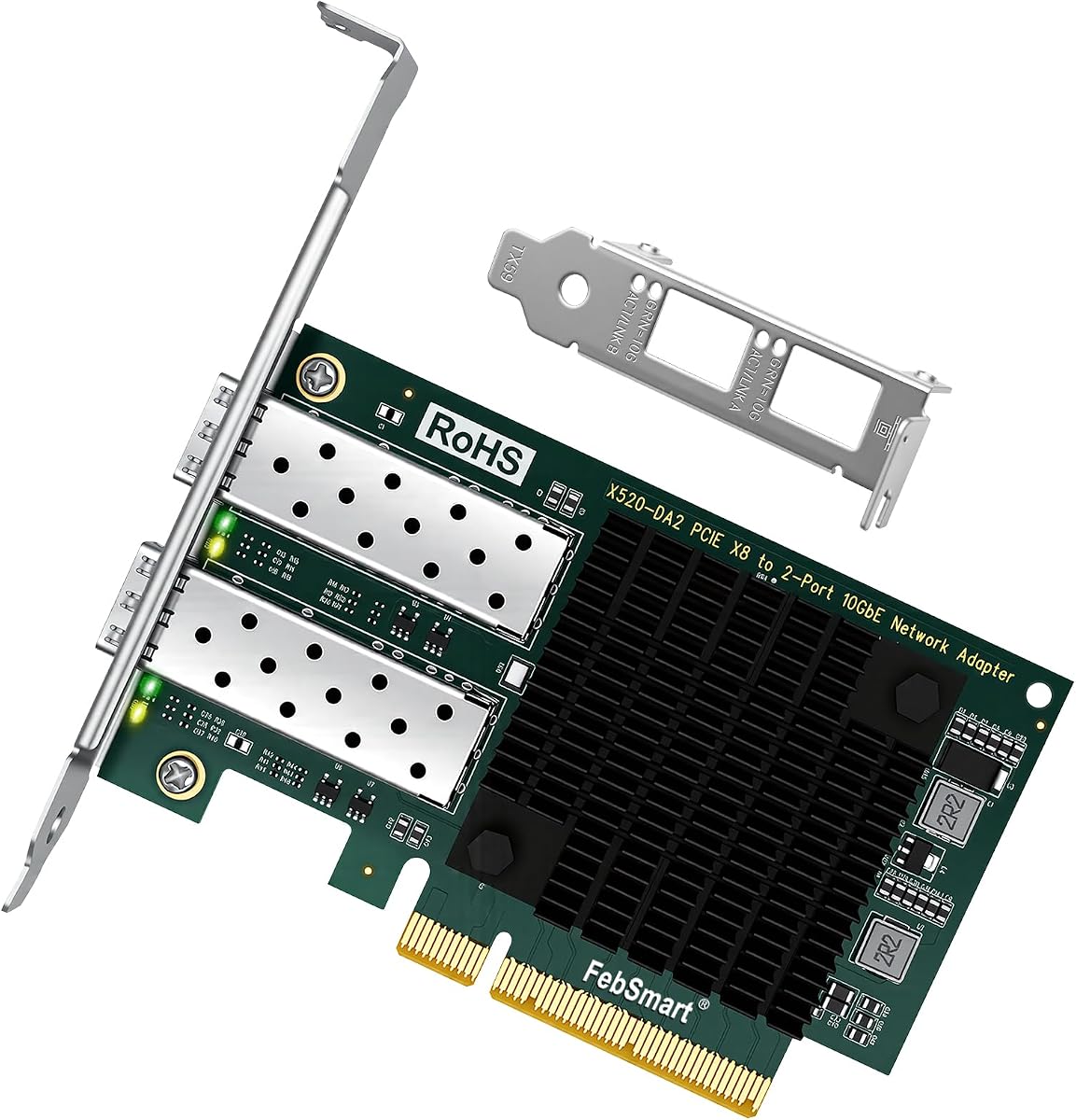
This card stands out for its open approach, allowing use with third-party DAC or fiber optics without vendor locks. It runs plug and play on popular hypervisors like Proxmox and TrueNAS.
We may earn a commission when you buy through this link, at no additional cost to you.
The Intel 82599EN ensures reliable performance, and hardware checksum offload keeps CPU usage low. It includes both full-height and low-profile brackets for versatile mounting.
The passive heatsink may require additional airflow to avoid overheating in silent builds. Despite this, its compatibility and cost-effectiveness make it a top choice for homelabs.
Perfect for open-source users and NAS enthusiasts, this card balances performance and freedom. It is our favorite pick for budget-friendly 10GbE upgrades.
Accepts third-party optics freely, saving you money on SFP+ modules compared to branded solutions.
Detected by QNAP, Synology, Ubuntu, and CentOS without driver installation, streamlining setup.
We may earn a commission when you buy through this link, at no additional cost to you.
As a second premium entry, this Mellanox-based card offers similar capabilities with strong RDMA support. It is an excellent alternative for users wanting dual high-speed ports.
We may earn a commission when you buy through this link, at no additional cost to you.
The PCIe 3.0 x8 interface provides ample bandwidth for simultaneous 25GbE operations. Support for overlay networks like NVGRE makes it suitable for cloud-scale deployments.
Setup can be complex due to the advanced features and specific hardware requirements. Users should ensure their switch infrastructure supports 25GbE and RDMA.
This card is ideal for high-end data centers or research institutions. It is recommended for those needing maximum throughput and flexibility in networking.
Enables direct memory access for storage and compute tasks, reducing latency significantly.
Advanced VXLAN and GENEVE support allows for robust network virtualization and segmentation.
We may earn a commission when you buy through this link, at no additional cost to you.
This adapter simplifies setup by including a multimode optical module, reducing initial costs. It uses the trusted Intel 82599EN chip for stable performance in various systems.
We may earn a commission when you buy through this link, at no additional cost to you.
The gold-plate fingers protect against oxidation, ensuring reliable electrical contacts over time. Auto-adaptive transmission rates allow flexibility when connecting to different switch speeds.
Without a clear vendor rating, compatibility might vary slightly across systems. Users should verify OS support before purchasing to ensure a smooth experience.
Ideal for users needing a ready-to-use solution with bundled optics. It is a good choice for small offices or home labs requiring multimode fiber links.
Comes with a multimode optical module, saving you the hassle of sourcing compatible optics separately.
Gold-plate fingers ensure durable contact, reducing hardware faults and extending the card's service life.
We may earn a commission when you buy through this link, at no additional cost to you.
This dual-port adapter delivers reliable 10GbE connectivity using two Intel 82599ES controllers, ideal for NAS and virtualization. It ensures stable LAN and SAN connections for intensive environments.
We may earn a commission when you buy through this link, at no additional cost to you.
Support for various protocols like FCoE and Intel Virtualization Technology makes it versatile. The included brackets fit both standard and low-profile PC cases comfortably.
It requires an x8 PCIe slot, which may limit availability on smaller boards. However, its robust feature set and broad compatibility make it a strong contender.
Perfect for users needing redundancy or dual uplinks. We recommend it for small business servers or gaming PCs requiring high-speed networking.
Two independent 10GbE ports provide redundancy and increased bandwidth for critical applications.
Supports storage over Ethernet and virtualization features, meeting enterprise-class requirements at a budget price.
We may earn a commission when you buy through this link, at no additional cost to you.
Selecting the right Fiber Optic Network Interface Card involves considering several factors to ensure it meets your specific performance and compatibility requirements.
Determine the bandwidth your network needs. Options range from 1 Gigabit to 25 Gigabit. Higher speeds are essential for data centers and large file transfers.
Always match the NIC speed with your switch capabilities to avoid bottlenecks.
Check the port type. SFP ports handle up to 1Gbps, while SFP+ supports 10Gbps and above. Ensure the NIC matches your fiber module type.
SFP+ ports often support 1Gbps modules via auto-negotiation.
The chipset impacts performance and driver stability. Intel and Mellanox controllers are industry standards known for reliability.
Avoid unknown chipsets unless you have verified compatibility.
Verify the NIC is supported by your OS. Most cards support Windows Server, Linux, and VMware, but check specific kernel versions.
Linux users should ensure the card uses open-source drivers.
Ensure the card includes a bracket suitable for your case. Full-height and low-profile brackets are common inclusions.
Small form factor PCs require low-profile brackets for proper installation.
Look for features like SR-IOV and VLAN tagging. These enable efficient virtualized environments and network segmentation.
Advanced virtualization is crucial for cloud and container workloads.
Consider the cost of SFP transceivers and cables. Some cards support vendor-neutral optics, saving money on transceivers.
Always buy compatible multimode or single-mode fiber modules.
Check the warranty period and manufacturer support. A good warranty protects your investment in critical hardware.
Select brands with a reputation for responsive customer service.
Power down your system and unplug it. Locate an available PCIe slot on your motherboard and carefully insert the NIC card until it clicks into place.
Secure the bracket to the case using screws. If the card comes with brackets, choose the appropriate one for your chassis size.
Install necessary drivers and configure the network settings. Use the switch to link the fiber or DAC cable and monitor connection status via LED indicators.
It is an expansion card that allows computers to connect to fiber optic networks. These cards convert electrical signals into light for high-speed data transmission.
Yes, Fiber NICs use specific cables like LC fiber or DAC twinax. You need compatible modules that match the fiber type (single-mode or multimode).
Most modern NICs auto-negotiate speed. A 10Gb NIC can connect to a 1Gb switch at 1Gb speed, but you need compatible modules and cables.
Not always. Vendor-locked cards may reject third-party modules. Look for unlocked cages if you want flexibility in buying optics.
High-speed NICs can run warm. Ensure your PC case has adequate airflow or add a fan directed at the card to prevent overheating.
RDMA reduces latency by transferring data directly between memory. It is ideal for storage and high-performance computing workloads.
We hope this guide helped you understand the options available for Fiber Optic Network Interface Cards. Our top picks offer a mix of speed and reliability for various needs.
Prioritize the chipset and OS support when selecting. Compatibility ensures smooth installation and long-term stability for your network.
Always check current pricing before buying. Availability can change, so comparing retailers ensures you get the best deal.