
Dell OptiPlex 3060 Micro
4.2Editor score
8GB DDR4 Memory Config
128GB Solid State Drive
Windows 11 Pro Included
This guide compares the top Intel Core i3 Mini PC models for performance and value. We analyze features specs and reliability to help you choose the right
Mini PCs have revolutionized how we approach desktop computing by offering powerful performance in incredibly small form factors. The Intel Core i3 Mini PC category stands out for balancing cost efficiency with capable processing power for daily tasks.
We evaluated ten leading models based on processor generations, memory configurations, storage options, and connectivity features. Our analysis focuses on real-world usability for office work, media consumption, and light productivity scenarios.
Each pick highlights specific strengths like thermal management or expansion capabilities. Note that prices and availability fluctuate frequently so verify current details before purchasing your next compact computing solution.
4.2Editor score

4.4Editor score
4.8Editor score
This side-by-side comparison outlines the key specifications and unique attributes of each model to help you make an informed decision based on your specific workflow requirements and budget constraints.



The GMKtec G3 PRO earns our top spot for its robust combination of memory and connectivity. It scores well for general office work due to its 16GB DDR4 RAM configuration.
We may earn a commission when you buy through this link, at no additional cost to you.
Its Core i3-10110U processor provides reliable speed for browser-based tasks. The dual-channel RAM architecture enhances throughput for multitasking environments.
While the fan might produce some noise under load it remains acceptable for most office settings. Thermal management is decent for a device of this footprint.
Buyers seeking a reliable home office server will appreciate the network features. The 2.5GbE port ensures fast local transfers when needed.
The 16GB DDR4 RAM runs in dual channel mode to improve data throughput for simultaneous applications.
Multiple ports including USB 3.2 and HDMI allow flexible peripheral setup for workstations.
We may earn a commission when you buy through this link, at no additional cost to you.
This model stands out for media enthusiasts who want smooth 4K streaming. The Iris Plus 655 graphics deliver solid performance without a dedicated GPU.
We may earn a commission when you buy through this link, at no additional cost to you.
Its 28W TDP allows for sustained speeds that beat lower wattage competitors. This makes it ideal for tasks that require consistent responsiveness.
The ability to add a second SSD up to 4TB provides future growth. This flexibility is rare in compact mini PC designs.
It is a great choice for home theater setups or light workloads. Users will enjoy the stable performance for daily digital tasks.
Iris Plus 655 graphics with eDRAM support smooth media playback and light gaming.
Dual SSD slots allow you to expand storage easily without replacing the unit.
We may earn a commission when you buy through this link, at no additional cost to you.
The C3 Mini PC is engineered for continuous operation in digital signage or kiosks. Its cooling fan is optimized to maintain quiet performance over long periods.
We may earn a commission when you buy through this link, at no additional cost to you.
A 3-year warranty adds peace of mind for commercial deployments. This level of support is valuable for business environments.
Although the processor is older it remains stable for basic office tasks. The 512GB SSD offers ample space for typical documents and media.
Buyers needing a reliable thin client or media server will find it suitable. Just ensure the port limitations match your peripherals.
A 3-year warranty covers defects and ensures professional support for commercial use.
Under 1kg weight and optimized fan make it quiet and easy to mount.
We may earn a commission when you buy through this link, at no additional cost to you.
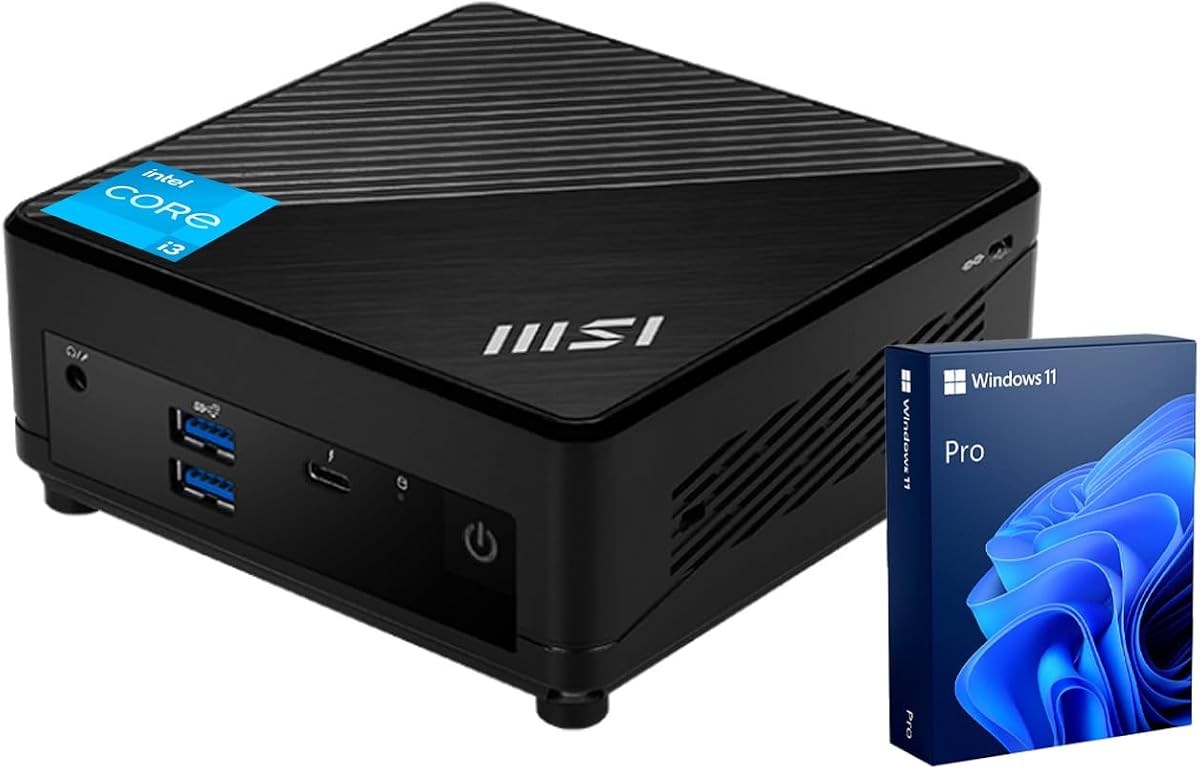
The msi Cubi 5 Professional brings premium features like Thunderbolt 4 and Windows 11 Pro to the table. It is designed for professionals who need secure management tools.
We may earn a commission when you buy through this link, at no additional cost to you.
Its 6-core processor handles multitasking with ease. The high cache size improves speed for demanding workflows.
The three monitor support enables complex trading or design setups. This level of display versatility is hard to find elsewhere.
It is a solid investment for hybrid work environments. BitLocker encryption and remote desktop features ensure business readiness.
Windows 11 Pro offers BitLocker and remote tools essential for secure office work.
Support for three 4K monitors allows extensive workspace management for pros.
We may earn a commission when you buy through this link, at no additional cost to you.
For tight budgets this Dell Micro offers a reliable entry point. The 8GB RAM and 128GB SSD handle basic office tasks adequately.
We may earn a commission when you buy through this link, at no additional cost to you.
Windows 11 Pro is a significant plus for business users needing security features. It comes ready for deployment without extra OS costs.
Storage may feel limited for heavy files but expansion is possible. The ports provide solid connectivity for peripherals.
It is an excellent choice for students or basic home offices. Just be prepared to manage storage carefully.
At a low price point it includes Pro OS features that are often extra.
Six USB 3.0 ports offer ample connectivity for legacy peripherals.
We may earn a commission when you buy through this link, at no additional cost to you.
The PRO DP21 includes a wired keyboard and mouse right out of the box. This makes it ideal for office setups needing immediate readiness.
We may earn a commission when you buy through this link, at no additional cost to you.
Its 13th Gen processor delivers strong performance for modern tasks. The RAM bandwidth ensures smooth application switching.
Windows 11 Pro aids in team collaboration features. This model is perfect for shared workspace environments.
Buyers saving time on peripheral selection will appreciate the bundle. It provides a complete solution for professional use.
Included wired mouse and keyboard mean no extra purchase is needed for setup.
13th Gen architecture handles modern workloads with high efficiency.
We may earn a commission when you buy through this link, at no additional cost to you.
Compliance and security are top priorities for enterprise clients. This unit meets TAA standards and includes a Kensington lock slot for physical security.
We may earn a commission when you buy through this link, at no additional cost to you.
Its 14th Gen processor ensures future-proof performance. Dynamic tuning helps maintain optimal performance under various loads.
Business buyers will value the 3-year warranty coverage. It simplifies procurement with trusted brand support.
It is a safe choice for corporate deployments. Just confirm specific RAM requirements before purchasing.
TAA compliance and Kensington slot ensure it meets government and enterprise standards.
WiFi 6 Gig+ ensures fast wireless speeds for modern network demands.
We may earn a commission when you buy through this link, at no additional cost to you.
The 1L form factor of the Neo 50q is incredibly space-efficient. It stands only 1.4 inches tall making it discreet for any desk.
We may earn a commission when you buy through this link, at no additional cost to you.
Its ENERGY STAR certification supports green initiatives. The 12th Gen processor provides solid performance for modern apps.
Dual 4K display support boosts productivity for creatives. It is well-suited for modern workspaces requiring clean setups.
Buyers wanting eco-friendly tech will appreciate the recycled packaging. It balances design with practical performance.
At 1L volume it fits easily under monitors or on small shelves.
ENERGY STAR certification helps reduce power costs and environmental impact.
We may earn a commission when you buy through this link, at no additional cost to you.
This unit excels with 32GB of DDR5 RAM and 1TB storage. It handles heavy multitasking like virtual machines or large data sets.
We may earn a commission when you buy through this link, at no additional cost to you.
WiFi 6E ensures the fastest wireless speeds available. The 14th Gen processor supports complex enterprise workloads.
Booting under ten seconds boosts productivity immediately. Users benefit from the ample storage for local files.
It is a powerhouse for power users needing a small footprint. Buyers should budget for the higher price tag.
DDR5 RAM provides next-generation speeds for intensive tasks and multitasking.
1TB SSD removes the need for frequent file cleanup or external drives.
We may earn a commission when you buy through this link, at no additional cost to you.
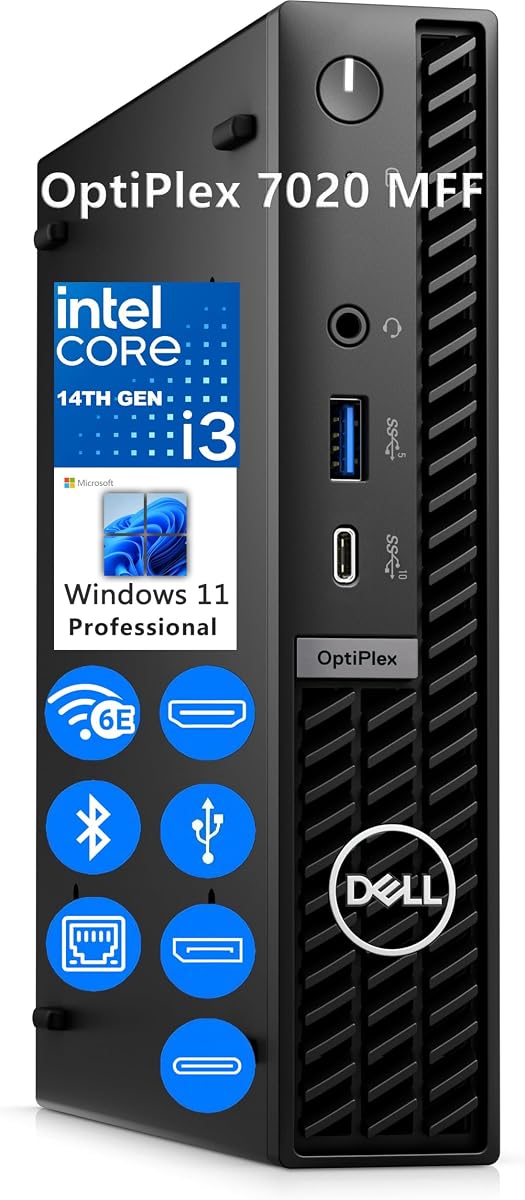
For business users this model brings DDR5 and 14th Gen tech. It ensures longevity and standard performance for daily tasks.
We may earn a commission when you buy through this link, at no additional cost to you.
Windows 11 Professional supports security and remote management. The chassis fits in tight spaces like cubicles or retail counters.
Port options include smart power features for charging. It supports up to three displays for versatile setups.
It is a solid standard for enterprise procurement. Consider upgrading memory for heavier workloads.
DDR5 and 14th Gen CPU ensure compatibility with future software requirements.
Support for three displays via HDMI and DisplayPort increases productivity.
We may earn a commission when you buy through this link, at no additional cost to you.
Selecting the right mini PC involves balancing processing power, memory, and connectivity needs for your specific workflow.
Newer generations like 14th Gen offer better efficiency and support for modern instruction sets. Always check the specific model number to ensure it aligns with performance expectations.
Choose the latest generation available to future-proof your investment against software demands.
At least 16GB of RAM is recommended for smooth multitasking in modern browsers. Look for dual-channel support to maximize bandwidth.
Ensure the memory is upgradeable if you anticipate heavier usage over time.
NVMe SSDs provide significantly faster boot times compared to SATA options. Aim for 512GB minimum to store essential files locally.
Check if additional expansion slots are available to increase storage later.
Dual HDMI or HDMI and DisplayPort combinations allow for multi-monitor setups. Ensure ports support the resolution your work requires.
Look for 4K support if you need high-resolution visuals for design tasks.
WiFi 6 and Bluetooth 5.2 are standard for stable wireless connections. Ethernet ports should support at least Gigabit speeds.
Consider models with Thunderbolt if you need high-speed external storage options.
Windows 11 Pro offers enterprise features like BitLocker and Remote Desktop. Home versions are sufficient for casual users.
Verify that the OS license is included in the purchase price.
Silent fans are essential for office environments. Check reviews for noise levels under sustained load.
Good thermal paste and airflow design prevent performance throttling over time.
Business units often come with longer warranties than consumer models. A 3-year warranty reduces long-term risk.
Choose brands with reliable customer support channels for hardware issues.
Place the mini PC in a well-ventilated area to ensure proper airflow. Avoid placing it inside enclosed cabinets where heat can build up quickly.
Use a surge protector to safeguard internal components from power fluctuations. This extends the lifespan of the motherboard and power supply.
Perform regular OS updates and clean temporary files to maintain performance. Clear browser caches and uninstall unused apps to keep the system responsive.
Yes, most modern Core i3 models with Intel UHD Graphics support 4K playback at 60Hz. Ensure you have an HDMI 2.0 port or later for the best experience. Some models offer AV1 decoding which helps with efficient streaming.
They are ideal for tasks like spreadsheets, email, and web browsing. The combination of SSD storage and sufficient RAM ensures smooth multitasking. Look for models with Windows 11 Pro for better security features.
Most models support dual monitors via HDMI or DisplayPort. Check the specifications for max resolution support per port. High-end units may even support three displays for expanded workflows.
Windows 11 Pro includes BitLocker encryption and Remote Desktop access. These are crucial for business environments needing secure data handling. Home versions lack some of these enterprise management tools.
Many models allow SSD expansion, but RAM is often soldered. Check the product description for accessible slots before buying. Upgradeability varies significantly between manufacturers.
They handle older titles or casual games effectively. Dedicated GPUs are not present so do not expect high-end performance. For basic gaming, models with Iris Plus graphics are preferred.
Our top picks highlight models like the GMKtec G3 PRO and msi Cubi 5 for their balance of features. Each offers unique strengths depending on whether you prioritize connectivity or build quality.
Prioritize RAM and storage based on your daily workload to ensure longevity. A higher base configuration often prevents the need for replacements sooner.
Always check current availability and prices as stock fluctuates frequently. Verifying the latest details ensures you get the best value for your budget.