
WD 2TB My Passport
4.6Editor score
Password protection and hardware encryption
Slim durable design for portability
Included backup software with ransomware defense
This guide compares the top encrypted secure external hard drives for 2026, evaluating hardware encryption, FIPS validation, durability, and performance for
Securing your digital assets requires more than just a standard storage solution. You need an encrypted secure external hard drive that offers robust hardware-based protection against unauthorized access and physical theft. These devices ensure your sensitive files remain safe whether you are traveling or storing data at home.
We have evaluated the leading models on the market to bring you this comprehensive list. Our analysis focuses on encryption standards, build quality, ease of use, and compatibility across different operating systems. This selection helps you find the right balance between security features and practical performance for your needs.
Each pick in this guide highlights specific strengths tailored to different user requirements. From budget-friendly options to high-performance solid state drives, there is something for everyone. Please note that availability and costs may vary over time, so check current listings before making your final decision.
4.6Editor score

4.5Editor score

4.8Editor score
The following table provides a side-by-side comparison of all ten products included in this guide. It highlights key specifications and features to help you quickly identify which model best fits your security and storage requirements.



The Apricorn 1TB Aegis Padlock stands out as a top contender for secure storage. It features military-grade FIPS PUB 197 validated encryption ensuring your data remains protected against sophisticated threats. With a 4.5 rating, users appreciate its robust build and reliable performance in various environments.
We may earn a commission when you buy through this link, at no additional cost to you.
This drive operates without needing software installation, making it compatible across different systems effortlessly. The sealed epoxy coating protects against physical tampering while the brute force self-destruct feature adds an extra layer of security. These features make it ideal for professionals handling sensitive information on the go.
While the device offers excellent security, the need to enter a PIN every time can be slightly inconvenient compared to software solutions. Additionally, the price is higher than non-encrypted alternatives. However, the peace of mind provided by hardware encryption outweighs these minor drawbacks for most security-conscious users.
If you require a portable solution that prioritizes data safety without compromising on speed, this is an excellent choice. It is particularly suitable for business users, government contractors, or anyone needing to transport confidential files securely. We recommend this drive for those who value verified encryption standards.
Hardware encryption ensures data is protected independently of the host computer, preventing malware from accessing files even if the system is compromised.
The rugged design and epoxy coating prevent unauthorized physical access attempts, ensuring the drive remains secure even if lost or stolen.
We may earn a commission when you buy through this link, at no additional cost to you.
The Apricorn 2TB Aegis Padlock Fortress is designed for users who need verified security compliance. With FIPS 140-2 Level 2 validation, it meets strict government and enterprise security requirements. The 4.4 rating reflects its reliability and strong performance in protecting sensitive data during transit or storage.
We may earn a commission when you buy through this link, at no additional cost to you.
This model includes a built-in PIN access system that ensures only authorized users can access the data. The integrated USB cable adds convenience by reducing the risk of losing separate cables. Its brute force self-destruct feature protects against unauthorized access attempts effectively.
The device is slightly heavier than typical portable drives due to its reinforced build. While the PIN entry ensures security, it may slow down frequent access. However, for organizations requiring validated security, these trade-offs are necessary and acceptable given the level of protection offered.
This drive is ideal for government agencies, healthcare providers, and corporate IT departments. It ensures that data remains secure even if the device is compromised. We recommend it for users who must adhere to strict regulatory standards while maintaining portable storage capabilities.
FIPS validation confirms the drive meets rigorous security standards, which is essential for compliance with government and industry regulations.
Having a built-in cable reduces clutter and the risk of losing connectivity components, making travel and daily use more convenient.
We may earn a commission when you buy through this link, at no additional cost to you.
The Apricorn 5TB Aegis Fortress L3 offers the highest level of security validation available on this list. Its FIPS 140-2 Level 3 validation ensures it withstands physical tampering attempts. With a 4.3 rating, it is trusted by users who need maximum protection for large amounts of sensitive data.
We may earn a commission when you buy through this link, at no additional cost to you.
This drive features separate admin and user modes allowing for controlled access levels. The 5TB capacity is suitable for storing extensive datasets securely. Two read-only modes provide flexibility in how data can be accessed and shared across different environments securely.
The complexity of setting up admin and user modes might be challenging for non-technical users. Additionally, the high price reflects the premium security features included. However, for organizations handling classified or highly sensitive information, this level of security is indispensable and worth the investment.
We recommend this drive for government contractors, military personnel, and high-security corporate environments. It provides peace of mind with its advanced security protocols. Ensure you review the setup guide carefully to maximize the benefits of its robust security features.
Level 3 validation means the drive can detect and respond to physical tampering attempts, self-destructing to protect data integrity.
Combining 5TB of storage with top-tier encryption ensures you can keep all your critical files secure without needing multiple devices.
We may earn a commission when you buy through this link, at no additional cost to you.
The WD 2TB My Passport is an excellent choice for those seeking secure storage without a high price tag. It features password protection and hardware encryption to keep your files safe. With a 4.6 rating, it is popular for its ease of use and reliable performance for everyday backup needs.
We may earn a commission when you buy through this link, at no additional cost to you.
This drive comes with device management software that includes defense against ransomware. Its slim design makes it easy to carry in a bag or pocket. The USB 3.1 compatibility ensures fast data transfer speeds for efficient backups and file transfers.
While it offers good security, it relies more on software compared to dedicated hardware encryption devices. It may not meet strict government compliance standards. However, for general users and small businesses, it offers a balanced mix of security and affordability that is hard to beat.
We recommend this drive for personal use, students, and small business owners who need basic protection. It is great for backing up photos and documents securely. If you need advanced features, consider other models, but for budget-friendly security, this is a top pick.
The included software provides an extra layer of protection against ransomware attacks, which are a growing threat to personal computers.
Its slim design makes it perfect for travel, fitting easily into bags without adding bulk or weight to your daily carry.
We may earn a commission when you buy through this link, at no additional cost to you.
The WD 5TB My Passport offers a significant increase in storage capacity while maintaining the same user-friendly features. It includes password protection and hardware encryption to safeguard your files. With a 4.5 rating, it is highly regarded for its value and performance in storing large amounts of data securely.
We may earn a commission when you buy through this link, at no additional cost to you.
This model is ideal for users who need to store photos, videos, and large project files. The included software provides ransomware defense ensuring your backups are safe from malicious attacks. Its USB 3.1 compatibility allows for quick access to your stored data.
The security features are software-based which may not be sufficient for high-security enterprise needs. Also, the drive is not designed for rough physical handling. Despite these limitations, it offers excellent value for users who need substantial storage with basic security protection.
We recommend this drive for content creators and photographers who need to store large files securely. It is a great balance between capacity and cost. For general backup and personal use, this drive provides reliable protection and ample space for your growing data needs.
With 5TB of space, you can store thousands of high-resolution photos and hours of video without worrying about running out of room.
The included backup software helps protect your files from ransomware attacks ensuring your data remains accessible even if your computer is compromised.
We may earn a commission when you buy through this link, at no additional cost to you.
The Apricorn 2TB Aegis Padlock DT provides flexible access control with separate admin and user modes. It uses 256-bit encryption to ensure data security. With a 4.3 rating, users appreciate its customizable security settings that allow for different levels of access within an organization.
We may earn a commission when you buy through this link, at no additional cost to you.
This model includes data recovery PINs which help prevent permanent data loss if passwords are forgotten. The brute-force defense mechanism stops unauthorized access attempts effectively. Its hardware encryption ensures data is protected even if the drive is connected to a compromised computer.
The setup process for admin and user modes may require careful reading of instructions. The higher cost is due to these advanced security features. However, for teams needing different access levels, this flexibility makes it a practical choice for secure collaboration.
We recommend this drive for small businesses and IT administrators who need controlled access. It balances security with usability for shared environments. Ensure you document recovery PINs securely to avoid data loss while utilizing its advanced access control features effectively.
Separate modes allow administrators to set policies for users ensuring that data access is managed securely according to organizational needs.
Recovery PINs prevent permanent data loss if passwords are forgotten ensuring you can always regain access to your stored files securely.
We may earn a commission when you buy through this link, at no additional cost to you.
The Apricorn 2TB Aegis Desktop Padlock is designed for stationary use in offices or data centers. It features FIPS 140-2 validation ensuring high security standards. With a 4.4 rating, it is trusted for protecting desktop data with robust hardware encryption and physical protection.
We may earn a commission when you buy through this link, at no additional cost to you.
This drive includes a secure PIN number access system to prevent unauthorized access. The solid aluminum enclosure protects against physical damage and tampering. It is compatible with any operating system making it versatile for different computing environments.
Its desktop form factor is less portable than compact drives. It may also require an external power source depending on setup. However, for office use, its reliability and high security levels make it a strong choice for stationary data storage needs.
We recommend this drive for office environments and businesses needing fixed secure storage. It ensures data remains protected from unauthorized access. Its durability and compliance features make it ideal for professional settings where security and reliability are top priorities.
Designed for stationary use, this drive offers stable performance and security for office computers where portability is not a priority.
The solid aluminum enclosure protects the drive from physical damage ensuring long-term reliability in office or data center environments.
We may earn a commission when you buy through this link, at no additional cost to you.
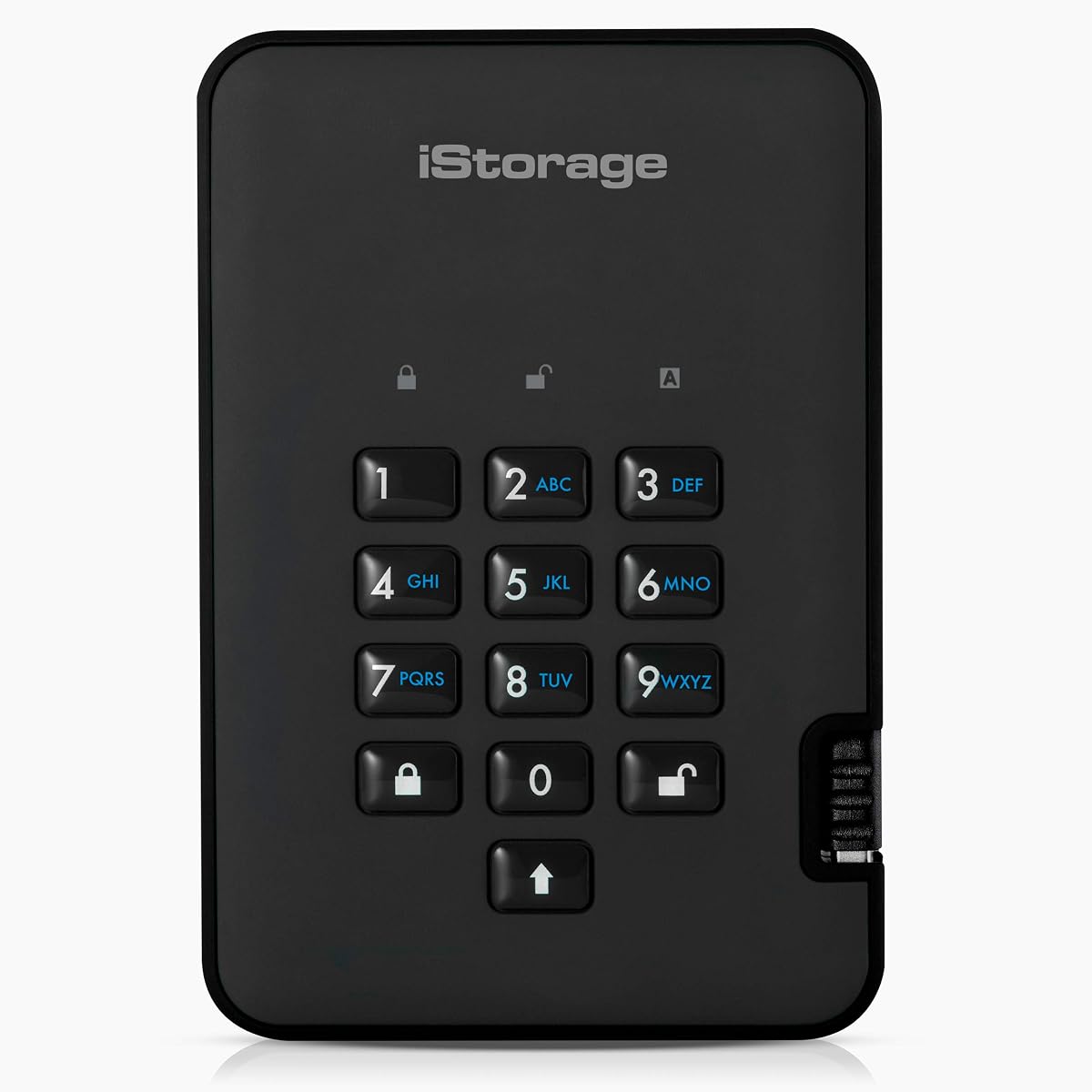
The iStorage diskAshur2 HDD is built to withstand tough conditions with IP56 certification. It uses hardware encryption to protect data securely. With a 4.0 rating, it is appreciated for its rugged build and reliability in environments where standard drives might fail.
We may earn a commission when you buy through this link, at no additional cost to you.
This drive features PIN authentication ensuring only authorized users can access data. It works across multiple operating systems including Windows and macOS. Its certified security microprocessor provides protection against unauthorized access even if the drive is lost or stolen.
The PIN entry process is slower than software-based solutions which may impact frequent access. The rating is slightly lower due to user interface complexities. However, for outdoor use or rough conditions, its durability and security features make it a valuable tool for professionals.
We recommend this drive for field workers, outdoor enthusiasts, and travelers. Its resistance to dust and water ensures data stays safe in various environments. If you need a rugged secure drive that works everywhere, this model is a solid choice for challenging conditions.
IP56 certification means the drive is dust and water resistant ensuring it can survive harsh outdoor conditions without data loss.
Hardware encryption ensures data is protected independent of the host computer providing robust security even if your system is compromised.
We may earn a commission when you buy through this link, at no additional cost to you.
The DataLocker DL4 FE 2TB is a modern SSD with a touchscreen interface for easy setup. It features the latest FIPS 140-3 validation ensuring top security standards. Although rated N/A due to new release, its features promise high performance and strong protection for sensitive data.
We may earn a commission when you buy through this link, at no additional cost to you.
This drive uses a screen-guided setup making configuration easier than traditional keypad entry. It is dust and water resistant providing durability. The TAA compliance makes it suitable for government procurement and regulated environments requiring strict adherence to standards.
The price is higher due to the advanced features and SSD technology. The screen interface may require care to avoid damage. However, its ease of use and compliance readiness make it an excellent choice for those needing a user-friendly secure drive.
We recommend this drive for IT professionals and government users. Its compliance features simplify procurement and deployment. If you want a secure drive that is easy to set up and manage, this modern SSD offers a great balance of technology and protection.
This latest validation level ensures the drive meets modern security requirements providing protection against advanced threats.
The touchscreen makes setup and password management easier reducing errors and improving the user experience for non technical users.
We may earn a commission when you buy through this link, at no additional cost to you.
The Apricorn 4TB Aegis Padlock SSD is the fastest option available with speeds up to 350 mBPS. It features separate admin and user modes for secure access. With a 4.8 rating, it is highly trusted by users who need top performance and robust security for large data sets.
We may earn a commission when you buy through this link, at no additional cost to you.
This drive offers the highest speed available ensuring quick backups and data transfers. Its hardware encryption ensures data remains protected against unauthorized access. The brute-force defense mechanism stops access attempts protecting sensitive information effectively and reliably.
The price is the highest among the compared models reflecting the premium features. Its weight may make it less convenient for daily travel. However, for those who need speed and security for large files, this drive offers unmatched performance and reliability in the market.
We recommend this drive for professionals handling large video or data files. It is perfect for secure, fast transfers. If speed and security are your top priorities and budget is flexible, this drive is the ultimate choice for high-performance encrypted storage needs.
SSD technology provides significantly faster read and write speeds allowing for quick access and transfer of large secure files.
Combining 4TB of storage with top-tier security ensures you can keep all your critical files secure without compromising on capacity.
We may earn a commission when you buy through this link, at no additional cost to you.
Selecting the right encrypted secure external hard drive requires considering several key factors that affect both security and usability. This guide breaks down the most important aspects to help you make an informed decision tailored to your specific needs.
Look for drives that offer hardware-based encryption with standards like AES 256-bit. Hardware encryption ensures data is protected independently of the host computer, reducing the risk of software-based malware attacks compromising your files.
Prioritize models with military-grade or industry-validated encryption for the highest level of protection against unauthorized access.
FIPS validation certifies that the encryption meets specific government and industry security standards. FIPS 140-2 Level 2 or Level 3 validated drives are required for many government and enterprise applications to ensure data integrity and security.
If you work in regulated industries, choose a drive that clearly states FIPS compliance to meet legal and organizational requirements.
The physical build of the drive matters especially if you travel often. Look for rugged designs with shock-resistant features and protective coatings to prevent damage from drops or environmental exposure during daily use.
A durable enclosure ensures the drive lasts longer and protects data even in less-than-ideal physical conditions.
USB 3.0 and higher interfaces provide faster data transfer speeds essential for large files. Check if the drive is compatible with your computer's ports to ensure optimal performance without unnecessary bottlenecks during transfers.
Select a drive with speeds that match your workflow needs to avoid delays when backing up or accessing encrypted data.
Consider how you will access the drive. Some require PIN entry while others use software. A balance between strong security and ease of use ensures you can access your files quickly without compromising safety.
Choose a setup that aligns with your tech proficiency and security requirements for daily efficiency.
Determine how much storage you need based on your files. Drives range from 1TB to 5TB or more. Ensure the capacity is sufficient to store all your data securely without needing multiple drives unnecessarily.
Balance capacity with budget to find a drive that stores all your data securely without paying for unused space.
Ensure the drive works with your operating system such as Windows, macOS, or Linux. Some drives require specific software which may not be available on all systems, so check compatibility before purchasing.
Select a drive that supports all the systems you use to ensure seamless access and protection everywhere.
Features like brute-force protection, admin modes, and auto-lock add extra layers of security. Look for these features if you need more control over access or need to share the drive securely among multiple users.
Extra features enhance protection but may add complexity so choose based on your actual security needs.
Start by setting a strong, unique PIN or password during the initial setup process. Avoid using easily guessable combinations and store your recovery information securely to prevent lockout and permanent data loss if the drive is lost.
Always use the provided software or built-in tools to encrypt files before copying them to the drive. Regularly backup your data to multiple locations to ensure redundancy in case the drive fails or is lost unexpectedly during transit.
Store the drive in a protective case to prevent physical damage. Avoid exposing it to extreme temperatures, moisture, or dust which can affect performance and security. Disconnect the drive safely using the eject option before unplugging to prevent data corruption.
Hardware encryption processes data on the drive itself making it independent of the computer's security. Software encryption relies on the host computer which can be vulnerable to malware. Hardware encryption is generally more secure for sensitive data.
While not strictly necessary for personal use, FIPS validated drives offer higher security levels. If you handle sensitive personal information like financial or health data, these drives provide extra peace of mind against sophisticated cyber threats.
Many encrypted drives are compatible with both Mac and PC but some may require specific software. Always check product compatibility details to ensure seamless use across different operating systems and devices.
Most drives offer recovery PINs or administrative options to reset access. However, these must be set up in advance. Without recovery options, lost passwords may lead to permanent data loss since encryption is designed to protect data from unauthorized access.
Encryption adds minimal overhead especially with modern hardware-encrypted drives. High-end models maintain near-native speeds even with encryption enabled. Look for drives with fast USB interfaces to ensure efficient data transfers.
Yes, encrypted drives can be used alongside cloud backup services for additional security layers. Ensure your cloud provider supports encryption if you want end-to-end protection for all stored data.
Selecting the right encrypted secure external hard drive depends on your specific needs for speed, capacity, and security compliance. Whether you choose the rugged Apricorn models for enterprise protection or the budget-friendly WD options for personal use, prioritize hardware encryption for safety.
For those requiring high compliance, FIPS validated drives like the Apricorn Aegis Padlock Fortress are the top choice. For speed and capacity, the Apricorn 4TB SSD offers unmatched performance. Always balance these features with your budget constraints.
Remember to check current availability and ensure you have the right accessories like cables or recovery tools. Proper care and setup will maximize the drive's security and longevity. Protect your data wisely with the right choice today.