
FINEDAY Keyboard 2.0 Plus
4.2Editor score
5000mAh long life battery
Aluminum le and volume wheels
Integrated stand for devices
True retro typewriter layout
This guide compares the top keyboards that sound like a typewriter, evaluating switches, build quality, and design for writers and enthusiasts seeking
Typing on a keyboard that sounds like a vintage typewriter offers a unique blend of nostalgia and modern functionality. These devices feature clicky switches and round keycaps to replicate the classic mechanical feel beloved by writers and programmers.
We compared ten top-rated models based on switch type, connectivity, build quality, and aesthetic design. Each product was evaluated for its ability to deliver authentic acoustic feedback while maintaining reliable performance for daily tasks.
Each pick highlights key features like hot-swap capabilities, wireless connectivity, and ergonomic design. Prices and availability change frequently, so verify current details on the retailer site before purchasing your preferred model today.
4.2Editor score

4.5Editor score

4.3Editor score
The following table provides a side-by-side comparison of the top typewriter style keyboards available in November 2026. We highlight key specifications to help you find the perfect match for your setup and typing needs.




This Retro Typewriter Wireless Mechanical Gaming Keyboard delivers an authentic vintage typing experience with its clicky blue switches and round keycaps. It holds a solid 4.3 rating from users who appreciate its unique design and tactile feedback.
We may earn a commission when you buy through this link, at no additional cost to you.
The keyboard features a compact 83-key layout that saves desk space while maintaining essential functionality. Its hot-swappable design allows easy customization without tools, and the dual-mode connectivity supports seamless switching between PC, Mac, and mobile devices.
While the lack of a numeric keypad may inconvenience data entry tasks, the ergonomic build ensures comfort during long sessions. The adjustable backlighting and volume knobs add convenience, though Bluetooth setup might take a moment for new users.
Writers and mobile professionals seeking a stylish, portable typing solution should consider this model. It balances nostalgia with modern connectivity, making it a versatile choice for daily writing tasks.
The blue switches provide a rhythmic clack reminiscent of classic machines, enhancing the sensory satisfaction of typing.
Hot-swappable sockets let you change switches or keycaps instantly to match your preferred sound or aesthetic.
We may earn a commission when you buy through this link, at no additional cost to you.
The YUNZII QL75 stands out with its retro typewriter aesthetics and robust customization features. With a 4.4 rating, it appeals to enthusiasts who want both style and advanced functionality in a compact wireless keyboard.
We may earn a commission when you buy through this link, at no additional cost to you.
Its tri-mode connectivity and support for 3-pin and 5-pin switches offer immense flexibility. The QMK/VIA support allows deep key remapping, while the integrated stand adds practical utility for multi-device setups.
The high capacity battery ensures long wireless sessions, but the advanced features may overwhelm casual users. The ergonomic key row design improves comfort, though the cost reflects its premium build quality and software capabilities.
Tech-savvy typists seeking a high-performance retro keyboard will find this model rewarding. It excels in customization and connectivity, bridging the gap between vintage charm and modern productivity.
QMK/VIA support enables complex macros and key layouts, transforming the keyboard into a highly efficient tool.
The large battery and multi-device switching keep your workflow uninterrupted across tablets, phones, and computers.
We may earn a commission when you buy through this link, at no additional cost to you.
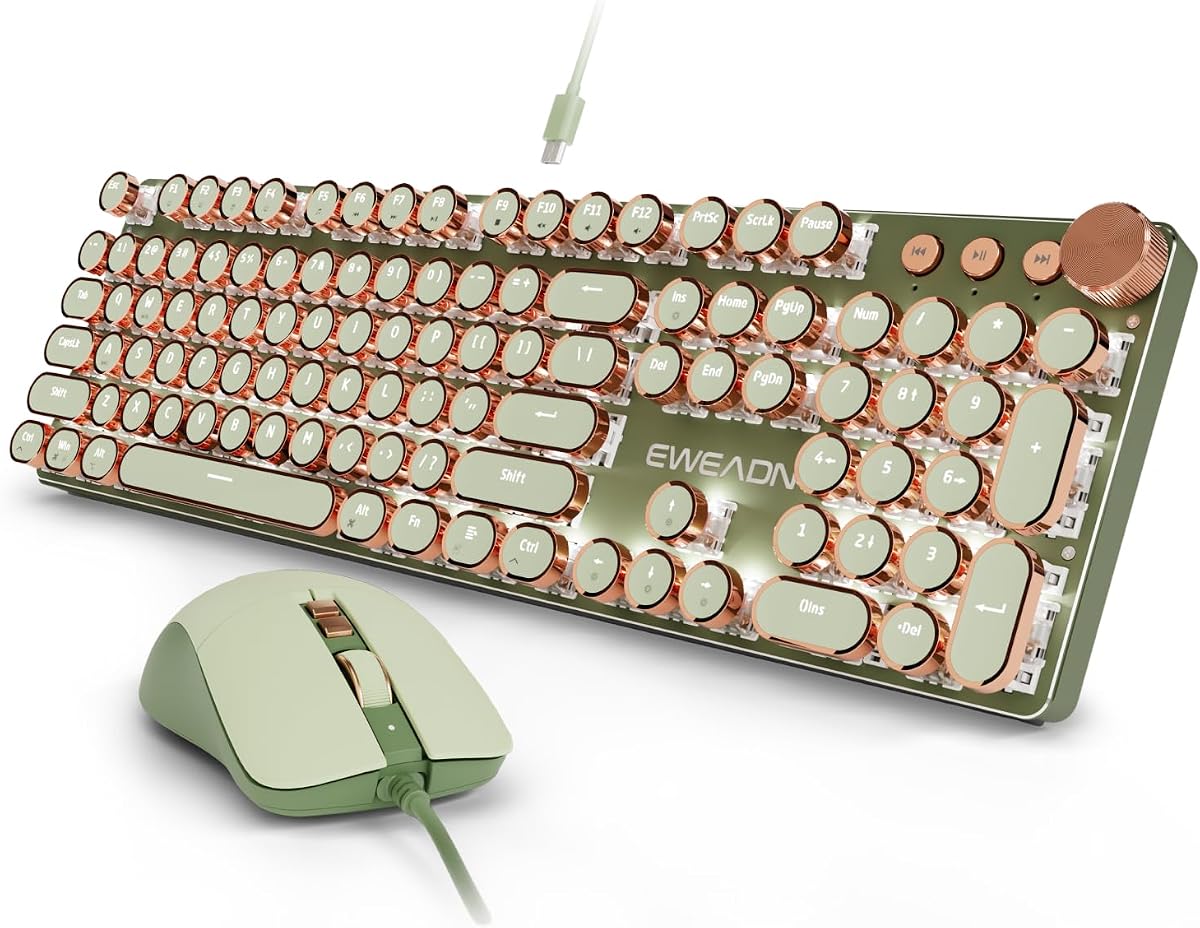
This wired combo offers a striking green design with soft clack switches that balance noise and feedback. Rated 4.4, it serves well for users wanting a complete desk upgrade without investing in separate peripherals.
We may earn a commission when you buy through this link, at no additional cost to you.
The integrated multimedia knob simplifies volume control, and the scientific key spacing aids typing accuracy. The matching mouse supports adjustable DPI, providing reliable navigation alongside the keyboard's comfortable layout.
The lack of wireless capability limits flexibility, but the plug-and-play setup ensures immediate use. The low noise switches make it suitable for shared offices, though some users might prefer tactile feedback over linear smoothness.
Home office workers needing a ready-to-use set will appreciate this combo. It combines aesthetic appeal with functional design, making it an accessible entry point for retro-style typing.
Pink switches dampen harsh noise, delivering a gentle pop that minimizes distraction in shared spaces.
The metal rotary knob provides precise volume adjustment, enhancing convenience during media consumption.
We may earn a commission when you buy through this link, at no additional cost to you.
Rated 4.5, this full-size keyboard combines retro charm with practical features like hot-swappable switches and a metal frame. It is our top pick for users needing a complete layout without compromising on style.
We may earn a commission when you buy through this link, at no additional cost to you.
The Onyx Gray switches are pre-lubed for a smooth yet satisfying click, and the shine-through keycaps ensure visibility in dark environments. The robust metal construction provides stability during intense typing or gaming sessions.
While the wired connection limits portability, it ensures reliable performance without battery concerns. The adjustable footrest adds ergonomic comfort, though the weight might make it less ideal for travel.
Professionals and gamers needing a full-size retro keyboard should choose this model. It balances build quality, customization, and aesthetic appeal better than most competitors in this category.
The metal panel prevents flex, ensuring consistent key performance and durability over years of daily use.
Hot-swap support allows you to experiment with different switch types without soldering or permanent modification.
We may earn a commission when you buy through this link, at no additional cost to you.
This keyboard offers a classic typewriter aesthetic at a budget-friendly price. With a 3.9 rating, it appeals to users prioritizing cost over premium features while still delivering a functional full-size layout.
We may earn a commission when you buy through this link, at no additional cost to you.
The linear custom switches provide smooth typing without a tactile bump, which may suit those preferring quiet operation. The detachable cable and volume knob add convenience, though the build materials are standard for the price.
While some users note inconsistencies in switch feel, the anti-ghosting ensures reliable input during gaming. The adjustable tilt feet allow ergonomic positioning, making it a practical choice for daily office tasks.
Budget-conscious buyers needing a full retro-looking keyboard will find this option sufficient. It sacrifices some premium features for affordability, making it accessible for casual typists.
Priced lower than premium models, it delivers essential retro aesthetics without advanced customization features.
Tilt feet let you adjust the angle for wrist comfort during extended writing or gaming sessions.
We may earn a commission when you buy through this link, at no additional cost to you.
With a strong 4.7 rating, this pink keyboard excels in battery performance and wireless reliability. Its blue switches deliver the classic clicky sound, while the massive battery ensures weeks of use between charges.
We may earn a commission when you buy through this link, at no additional cost to you.
The tri-mode connectivity allows seamless switching across five devices, making it ideal for multitasking users. The premium metal panel adds durability, and the ergonomic curved layout supports natural finger placement for comfort.
The bright white backlight complements the pink theme, though the color might not appeal to all office environments. Wireless setup is straightforward, but users should ensure their devices support the connection modes.
Users prioritizing long wireless uptime and tactile feedback should choose this model. It combines style, battery life, and connectivity to offer a standout solution for modern typing needs.
The 5000mAh cell supports extended wireless sessions, reducing interruptions from frequent recharging.
Switch between phones, tablets, and PCs instantly, keeping your workflow fluid across different platforms.
We may earn a commission when you buy through this link, at no additional cost to you.
This set combines a retro keyboard with ergonomic accessories like a magnetic wrist rest and phone holder. Rated 4.4, it suits users seeking a complete desk solution that prioritizes comfort and convenience.
We may earn a commission when you buy through this link, at no additional cost to you.
The wrist rest is easily removable and soft, providing relief during long typing sessions. The phone holder adds utility for multitaskers, and the USB-C rechargeable batteries ensure long-term usability without disposable cells.
While the wrist rest might shift slightly on smooth desks, the overall build is practical for home offices. The 7-color backlight adds visual appeal, though advanced lighting effects are limited compared to gaming models.
Users needing ergonomic support and a tidy workspace will appreciate this package. It balances retro style with functional accessories, making daily work more comfortable and organized.
The magnetic wrist rest supports natural alignment, reducing strain during extended typing or working periods.
A built-in phone holder keeps devices accessible, freeing up desk space for other essentials.
We may earn a commission when you buy through this link, at no additional cost to you.
Offering the lowest price point with strong performance, this keyboard provides essential retro features without extra fluff. Rated 4.3, it appeals to budget buyers needing reliable input and aesthetic appeal.
We may earn a commission when you buy through this link, at no additional cost to you.
The aluminum alloy panel adds durability, and the blue switches deliver satisfying acoustic feedback. RGB lighting offers several modes, enhancing the visual experience, while full N-key rollover ensures accurate input during gaming.
While it lacks wireless or hot-swap options, it covers core needs effectively. The setup is simple plug-and-play, though the limited customization may disappoint advanced users seeking deeper personalization.
Students or casual gamers wanting a retro look on a budget should consider this model. It delivers key functionality and style at an accessible cost, making it a practical entry point.
Priced lower than competitors, it includes durable metal construction and essential mechanical features.
RGB lighting modes allow you to match the keyboard's look with your personal desk theme.
We may earn a commission when you buy through this link, at no additional cost to you.
This keyboard captures the true essence of old typewriters with its lever-based enter key and premium aluminum controls. Rated 4.2, it offers a nostalgic experience refined with modern wireless technology and battery efficiency.
We may earn a commission when you buy through this link, at no additional cost to you.
The 5000mAh battery ensures extended use, and the dual aluminum wheels manage brightness and volume precisely. The ergonomic angle and integrated stand support comfortable posture, making long writing sessions less taxing.
The unique lever might require adaptation for some users, but it delivers unmatched authenticity. The cost reflects its premium materials, though it suits purists seeking a genuine vintage typing feel.
Design-focused typists willing to invest in a unique typing tool will love this model. It merges historical aesthetics with practical modern features, creating a truly one-of-a-kind writing experience.
The solid aluminum lever and wheels mimic classic typewriters, offering tactile control and historical charm.
The 9.22-degree angle and stand reduce neck strain, keeping you comfortable during long writing sessions.
We may earn a commission when you buy through this link, at no additional cost to you.
The Redragon K710 combines full-size utility with wireless flexibility, earning a 4.5 rating for performance. Its metal panel ensures stability, while the tri-mode connection keeps it compatible with diverse devices.
We may earn a commission when you buy through this link, at no additional cost to you.
The blue switches deliver satisfying click feedback, and the RGB groovy lighting adds a dynamic look. Professional software support enables detailed customization, letting you tailor macros and lighting to your workflow.
Setup involves downloading drivers for full features, which can delay initial use. The weight provides stability but reduces portability, making it best suited for permanent desk use rather than travel.
Professionals needing a full-size wireless retro keyboard will find this reliable and versatile. It balances durability, connectivity, and customizability to support demanding daily tasks effectively.
Tri-mode connectivity lets you connect via USB, 2.4G, or Bluetooth, adapting to your specific device needs.
Downloadable software allows deep customization of lighting and macros, enhancing workflow efficiency.
We may earn a commission when you buy through this link, at no additional cost to you.
Selecting the right typewriter-style keyboard involves evaluating several technical and aesthetic factors. We outline key considerations to help you find a model that fits your workflow and desk setup.
Clicky blue switches are the hallmark of typewriter keyboards, offering audible feedback that mimics vintage machines. Linear switches provide smoother, quieter typing but lack the rhythmic clack many users seek for nostalgia.
Prioritize clicky switches if authentic sound matters to you. Consider noise levels if you work in shared spaces.
Round keycaps are essential for the typewriter look. Ensure they are made of durable materials like ABS or PBT to resist shine and wear over time.
Look for double-shot or molded legends to maintain legibility with backlighting.
Wireless models offer portability and reduced cable clutter, while wired versions ensure consistent latency and eliminate battery concerns. Check for Bluetooth and USB compatibility with your devices.
Decide between wireless flexibility and wired reliability based on your primary use case.
Full-size models include numeric keypads crucial for data entry. Compact layouts save space but may require function layer usage for numbers or navigation.
Choose a layout that matches your daily input needs.
Hot-swappable keyboards allow easy switch changes without soldering. Programmable software enables custom macros and lighting effects for advanced users.
If you plan to modify your setup later, prioritize hot-swap compatibility.
Metal frames and panels provide stability and durability. Lightweight plastic builds may feel cheap or wobble during intense typing sessions.
Invest in solid materials for long-term reliability.
Wireless keyboards vary widely in battery capacity. Models with larger batteries reduce frequent recharging interruptions. USB-C charging is the modern standard for convenience.
Check battery specs if you use your keyboard heavily throughout the day.
Features like adjustable tilt, wrist rests, and curved layouts help prevent strain. Consider models with integrated stands for multi-device setups.
Prioritize ergonomic design to maintain comfort during long typing sessions.
Begin by connecting the keyboard via the recommended method, whether USB, Bluetooth, or 2.4G wireless. Install any necessary drivers or software to unlock full customization features for lighting and macros.
Keep the keyboard clean by gently wiping keycaps with a soft, dry cloth. Avoid harsh chemicals that could damage the finish or printed legends. Remove dust regularly to ensure switches function smoothly.
For wireless models, recharge the battery before it fully drains to maintain optimal performance. Store the keyboard in a cool, dry place when not in use to protect internal electronics and battery health.
Yes, typewriter keyboards typically use clicky blue switches that produce louder, more distinct sounds. This acoustic feedback is part of the vintage experience but may disturb others in quiet offices.
Most modern typewriter keyboards are compatible with both macOS and Windows systems. Check the product specs for OS compatibility, as some models require specific key mappings.
Many models offer hot-swappable sockets allowing easy switch replacement. Non-hot-swappable boards require soldering for changes, so verify the product's customization features.
Round keycaps mimic vintage typewriters and are standard for this category. Square keycaps offer a modern look but lack the classic aesthetic and ergonomic contours.
Battery life varies by capacity and usage, typically ranging from days to weeks on a single charge. Higher mAh ratings provide longer intervals between recharges.
Many typewriter-style keyboards support gaming features like anti-ghosting and high polling rates. Check for N-key rollover to ensure all keystrokes register accurately during gameplay.
Some premium models include wrist rests, phone stands, or adjustable feet for ergonomic support. Others may require purchasing accessories separately for maximum comfort.
Customization often uses proprietary software or open-source tools like QMK/VIA. Refer to the manufacturer's documentation for download links and feature guides.
We reviewed ten exceptional typewriter-style keyboards ranging from budget-friendly wired units to premium wireless options. Our top picks highlight balance features like build quality, customization, and authentic sound.
Prioritize switch type, connectivity, and layout size to match your daily workflow. A model with hot-swap support offers future flexibility, while a sturdy metal frame ensures lasting durability.
Prices and availability change often, so verify current details on the retailer site before purchasing. With the right choice, you can enjoy a nostalgic typing experience tailored to your needs.