
VOYEE PC Controller
4.3Editor score
Wired Xbox 360 compatibility
Ergonomic grip design
Rumble vibration feedback
Explore our expert guide comparing the top joysticks for Windows 11, covering flight sims, racing, and general gaming with detailed specs and real user
Finding the right joystick for Windows 11 can transform your gaming experience, especially for flight simulations and precision control tasks. A good joystick offers ergonomic design, responsive inputs, and reliable compatibility with modern operating systems to ensure smooth gameplay.
We evaluated ten top-rated joysticks based on compatibility, build quality, features like vibration and programmable buttons, and user feedback. Our comparison focuses on models that work seamlessly with Windows 11 to help you find the perfect controller for your setup.
Each pick below highlights key strengths and trade-offs to guide your decision. Note that prices and availability may change over time, so check current listings before purchasing to ensure you get the best value for your needs.
4.3Editor score

4.4Editor score

4.0Editor score
This side-by-side comparison reviews all ten selected joysticks to highlight their unique features, compatibility, and strengths for Windows 11 users seeking precise control.






The Thrustmaster T.16000M FCS stands out with its advanced H.E.A.R.T technology, delivering unmatched accuracy for flight simulations on Windows 11. Its ergonomic design ensures comfort during long gaming sessions while providing reliable input recognition.
We may earn a commission when you buy through this link, at no additional cost to you.
Key strengths include 16 action buttons with Braille-style identification and an 8-way hat switch for intuitive controls. The joystick supports ambidextrous use through removable components, making it accessible for all players.
Trade-offs involve the lack of an integrated throttle and the need for specific software for profile management. However, these are acceptable given the exceptional precision and build quality offered at this price point.
This joystick is ideal for serious flight sim enthusiasts who value precision and customization. We recommend it for users seeking a reliable, high-performance controller for Windows 11 setups.
The proprietary H.E.A.R.T technology uses magnetic sensors to ensure smooth, precise movement without wear over time.
Use T.A.R.G.E.T software to create detailed mapping profiles for each game, maximizing efficiency and comfort.
We may earn a commission when you buy through this link, at no additional cost to you.
The Logitech G X56 H.O.T.A.S delivers military-grade precision with 189 programmable controls, making it the ultimate choice for complex flight simulation scenarios on Windows 11. Its twin throttles and joystick provide full aircraft control in one package.
We may earn a commission when you buy through this link, at no additional cost to you.
Key strengths include adjustable stick force via a spring system and RGB backlighting for customization. The mini analog stick adds extra control surfaces, enhancing immersion in space and flight sims.
Trade-offs include the need for two USB ports and a higher cost compared to single-stick options. These are reasonable considering the comprehensive control set and build quality tailored for professionals.
This system is perfect for enthusiasts building a full flight deck or VR cockpit. We recommend it for users seeking the highest level of customization and performance.
Includes both throttle and joystick with friction adjusters for realistic aircraft control without separate purchases.
RGB lighting can be synced with other peripherals, while software maps every control for tailored experiences.
We may earn a commission when you buy through this link, at no additional cost to you.
The VOYEE PC Controller offers excellent value for Windows 11 users seeking a reliable wired gamepad. It features ergonomic grips and responsive buttons, providing a solid gaming experience without the high cost of specialized joysticks.
We may earn a commission when you buy through this link, at no additional cost to you.
Key strengths include wide compatibility with Windows systems and Xbox 360 consoles, plus automatic vibration feedback. The long cord allows flexibility in seating arrangements during gameplay.
Trade-offs involve its limitation as a gamepad rather than a flight stick and lack of wireless support. These are acceptable for casual gamers prioritizing comfort and affordability.
This controller is ideal for general gaming on PC where flight simulation is not a priority. We recommend it for budget-conscious users needing a dependable input device.
Contoured grips reduce hand fatigue during extended play sessions, ensuring comfort for all users.
Connect directly via USB to Windows 11 and start playing immediately without driver installations or setup.
We may earn a commission when you buy through this link, at no additional cost to you.
The PXN 2113PRO is an entry-level flight stick designed for Windows 11 users wanting basic simulation control at a low price. It includes 12 buttons, a hat switch, and vibration for immersive gameplay.
We may earn a commission when you buy through this link, at no additional cost to you.
Key strengths are its affordability and suction cup base that keeps it stable on smooth surfaces. Users can customize mappings via software for various flight games.
Trade-offs include inconsistent driver support and limited compatibility with some titles. These issues may affect usability but are manageable for casual enthusiasts.
This joystick suits beginners exploring flight sims without major investment. We recommend it for those testing the hobby before upgrading.
Four suction cups secure the joystick firmly to desks, preventing movement during intense gameplay.
Software allows remapping buttons and axes to match specific game requirements for better efficiency.
We may earn a commission when you buy through this link, at no additional cost to you.
The Thrustmaster T-Flight Hotas One combines a flight stick and throttle in a compact design compatible with Windows 11 and Xbox. Its detachable components allow flexible setup for desk or lap use.
We may earn a commission when you buy through this link, at no additional cost to you.
Key strengths include adjustable resistance and multi-function buttons for smooth aircraft control. The plug and play feature simplifies setup for immediate use.
Trade-offs involve a smaller throttle unit and basic functionality compared to premium models. These are acceptable for casual gamers seeking affordability.
This controller is ideal for pilots wanting a balanced entry-level HOTAS. We recommend it for users prioritizing portability and dual-platform support.
Separate throttle and stick allow for versatile setups, whether space is limited or you want lap gaming.
Modify stick tension to match your preference for different aircraft types, enhancing realism.
We may earn a commission when you buy through this link, at no additional cost to you.
The Thrustmaster T.16000M FCS continues to impress with its durable build and precise H.E.A.R.T technology. It offers 16 buttons and a twist rudder for comprehensive control without separate pedals.
We may earn a commission when you buy through this link, at no additional cost to you.
Key strengths include ambidextrous design and no signal degradation over time. This makes it reliable for long-term use across various flight titles.
Trade-offs involve lacking a throttle and being primarily PC-focused. These are minor given the overall quality and performance.
This joystick is suitable for users wanting a reliable, long-lasting controller. We recommend it for serious pilots seeking precision and durability.
Rotate the stick to control rudder, eliminating the need for separate pedals in many games.
Magnetic sensors ensure consistent performance without wear, maintaining accuracy over years.
We may earn a commission when you buy through this link, at no additional cost to you.
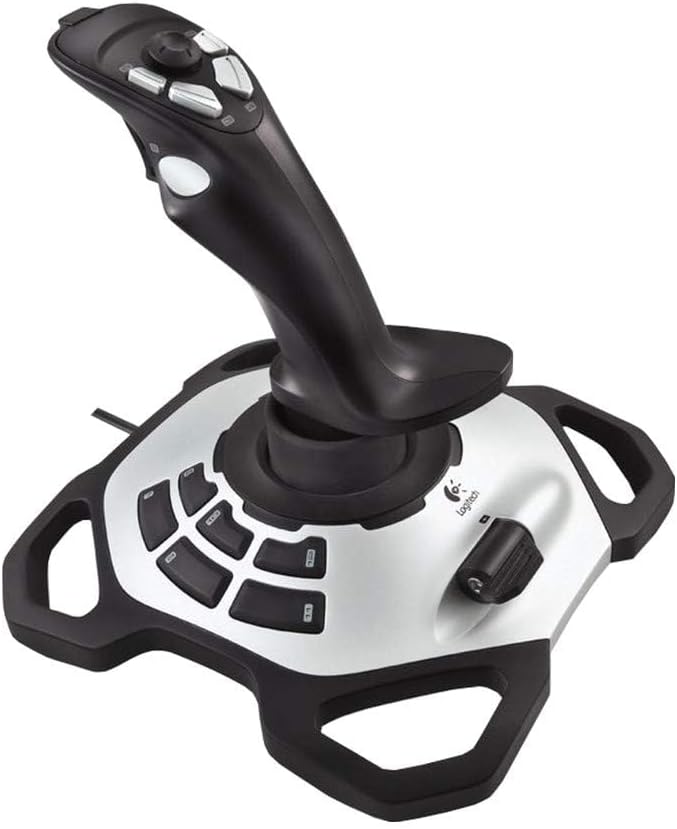
The Logitech Extreme 3D Pro offers a classic fightstick design with an integrated throttle and D-pad for broad flight simulation support on Windows 11. It provides solid precision and ease of use.
We may earn a commission when you buy through this link, at no additional cost to you.
Key strengths include familiar Logitech reliability and intuitive layout for beginners. The throttle and D-pad enhance versatility across game types.
Trade-offs involve fewer advanced features compared to modern competitors. These are acceptable for users seeking a straightforward, effective controller.
This joystick fits general aviation enthusiasts wanting simplicity. We recommend it for those starting flight sims without complex setups.
A single unit combines stick and throttle, saving space while offering full control.
The D-pad allows quick adjustments for menus or aircraft systems during flight.
We may earn a commission when you buy through this link, at no additional cost to you.
The Thrustmaster USB Joystick provides a basic but effective control solution for Windows 11 users. Its POV button and ergonomic handle make it easy to use for casual flight gameplay.
We may earn a commission when you buy through this link, at no additional cost to you.
Key strengths include simplicity and comfort with minimal setup needed. It serves well for learning basic flight controls.
Trade-offs involve limited buttons and features that may restrict advanced gameplay. These are minor for entry-level needs.
This joystick is ideal for casual gamers or newcomers. We recommend it for those wanting a simple start to flight sims.
A dedicated point of view button lets you adjust camera angles instantly during flight.
The ergonomic handle ensures comfort during short to medium gaming sessions.
We may earn a commission when you buy through this link, at no additional cost to you.
The Microsoft Sidewinder Precision 2 features a rotating handle for precise rudder control, which is rare in modern joysticks. It offers 16 programmable functions and a 146-degree throttle.
We may earn a commission when you buy through this link, at no additional cost to you.
Key strengths include its unique rudder mechanism and comfortable grip for extended use. Programmable profiles add customization for specific games.
Trade-offs involve an older design that lacks some modern features like advanced buttons. These are acceptable for users valuing the rudder control.
This joystick suits pilots needing independent rudder control. We recommend it for enthusiasts who prefer this specific functionality.
Twist the handle to control rudder independently without extra pedals for better immersion.
Store game-specific command profiles for quick adjustments between different flight titles.
We may earn a commission when you buy through this link, at no additional cost to you.
The V-one Wired USB Controller supports PC, Android, and Steam with multiple modes for flexible gameplay on Windows 11. It offers vibration and multi-mode compatibility for various devices.
We may earn a commission when you buy through this link, at no additional cost to you.
Key strengths include broad platform support and ease of use without drivers. This makes it versatile for different gaming setups.
Trade-offs involve its gamepad format limiting specialized flight control. These are minor for users valuing cross-platform utility.
This controller is ideal for gamers using multiple devices. We recommend it for those needing a simple, versatile input tool.
Works with Android devices via OTG, expanding usage beyond PC for mobile gaming.
Integrates directly with Steam for easy controller mapping in supported games.
We may earn a commission when you buy through this link, at no additional cost to you.
Selecting the right joystick involves considering your gaming needs, compatibility, and desired features to ensure optimal performance.
Ensure the joystick explicitly supports Windows 11 to avoid driver issues or recognition problems. Check the product details for listed OS support.
Look for models that plug and play with minimal setup for immediate use.
Choose a flight stick for aviation games and a general gamepad for broader titles. Specialized controllers offer better immersion for specific genres.
Assess if you need a throttle or rudder pedals for advanced simulation.
More buttons allow customization for complex game controls and macros. This is crucial for flight sims with many aircraft systems.
Check software support for easy remapping and profile storage.
Durable materials and quality sensors ensure longevity and precision. Avoid cheap models that may wear out quickly.
Look for features like magnetic sensors or metal components for better durability.
Comfortable grips reduce hand fatigue during long sessions. Consider ambidextrous designs if needed.
Adjustable resistance can enhance realism and control.
USB wired connections provide reliability without battery concerns. Wireless options offer flexibility but may introduce latency.
Ensure your system has enough USB ports for multi-device setups.
Set a budget that matches your needs without overspending on unnecessary features. Entry-level options suffice for casual play.
Premium models offer advanced features but cost more.
Connect the joystick to a USB port before launching games and ensure it is recognized in Windows Device Manager. Calibrate the device using system tools or manufacturer software for accurate response.
Regularly clean the joystick surfaces and buttons to prevent dust buildup that may affect performance. Store in a dry place when not in use to extend its lifespan.
Update drivers periodically through the manufacturer's website to maintain compatibility with new games and Windows updates. Adjust sensitivity settings in-game to match your preferred control style.
Most listed joysticks support Windows 11 with plug and play functionality. However, some may require specific drivers or software for advanced features. Always check the product details for OS compatibility.
Yes, gamepads can be used for basic flight games but lack the precision and dedicated axes of specialized joysticks. For immersive experiences, a flight stick is recommended.
A throttle provides more control over speed and aircraft systems, enhancing realism. While optional for beginners, it becomes important for complex simulations.
Go to Control Panel > Devices and Printers, right-click your joystick, and select Game Controller Settings. Use the Properties tab to calibrate axes and test buttons.
Wireless joysticks offer convenience but may have latency or battery issues. Wired models provide more reliable connection crucial for precise flight control.
Ensure it is connected before launching the game and check if drivers are installed. Use the Windows game controller test tool to verify functionality.
We explored ten joysticks suited for Windows 11, ranging from budget gamepads to premium flight sim systems. The Thrustmaster T.16000M FCS offers exceptional precision, while the Logitech G X56 provides full HOTAS capabilities.
Prioritize your specific gaming needs and budget when selecting a model. Consider factors like programmable buttons, ergonomics, and connectivity to find the best fit.
Always verify current pricing and availability as they may change. Check the provided links for the latest deals before making your purchase.