
AOC 27" Q27G41ZE
4.6Editor score
240Hz refresh rate
QHD IPS panel
Adaptive-Sync support
Finding the right display for competitive gaming requires a balance of speed and clarity. A 1440p gaming monitor at 240Hz offers sharp visuals paired with ultra-smooth motion, making it ideal for fast-paced titles where every frame counts.
We evaluated ten leading models based on panel technology, response times, and connectivity options. Our comparison focuses on real-world performance metrics like input lag, color gamut coverage, and ergonomic adjustability to ensure a comfortable setup for long sessions.
Each pick highlights specific strengths ranging from budget-friendly IPS panels to high-end OLED options. Prices and availability change frequently, so check the linked product pages for the most current deals before making your final decision on a new monitor.
4.6Editor score

4.4Editor score

4.6Editor score
As an Amazon Associate we earn from qualifying purchases.
The following table provides a side-by-side overview of all ten models selected for this guide. It highlights key specifications such as panel type, refresh rate capabilities, and special features to help you quickly identify the monitor that fits your specific gaming needs.


The LG 27GR83Q-B stands out as a top contender for competitive gamers seeking high refresh rates without sacrificing color quality. It holds a strong rating from users who appreciate its balance of speed and visual fidelity across various gaming scenarios.
We may earn a commission when you buy through this link, at no additional cost to you.
Its Fast IPS panel delivers vibrant colors covering up to 95 percent of the DCI-P3 gamut while maintaining a fast 1ms response time. The 240Hz refresh rate ensures fluid motion, making it ideal for shooters and racing games where tracking targets is critical.
While the HDR400 certification offers some dynamic contrast, it is not as impactful as higher-end HDR implementations. However, for SDR gaming which remains the standard for most esports titles, the brightness and contrast levels are sufficient for a clear picture.
This monitor is best suited for players who want a reliable all-rounder that performs well in both casual and competitive environments. Its ergonomic stand and comprehensive connectivity options make it a versatile choice for modern gaming setups.
The wide color gamut ensures games look vivid and true to life, enhancing immersion without needing extensive manual calibration.
Support for both NVIDIA G-SYNC and AMD FreeSync Premium eliminates screen tearing and stuttering across different graphics card brands.
We may earn a commission when you buy through this link, at no additional cost to you.
The AOC 27G41ZE offers an impressive entry point for gamers wanting 240Hz performance without breaking the bank. It is highly rated for delivering smooth gameplay that feels responsive and fluid even in demanding competitive titles.
We may earn a commission when you buy through this link, at no additional cost to you.
With a 0.3ms MPRT response time and 240Hz refresh rate, motion blur is kept to a minimum allowing for sharper visuals during fast movement. The IPS panel provides decent color reproduction and viewing angles which helps maintain image quality from different seating positions.
Adjustability is somewhat limited with tilt being the primary ergonomic option. This may require a separate monitor arm for those who need height or swivel adjustments to achieve their ideal viewing posture during long gaming sessions.
It is an excellent choice for budget-conscious gamers who prioritize speed and visual smoothness over advanced features. The frameless design also adds a modern touch that blends well with other peripherals on a desk.
Achieving 240Hz at this price point makes high-speed competitive gaming accessible to a much wider audience than premium monitors.
The rapid response time ensures that your on-screen actions match your inputs with minimal delay or ghosting artifacts.
We may earn a commission when you buy through this link, at no additional cost to you.
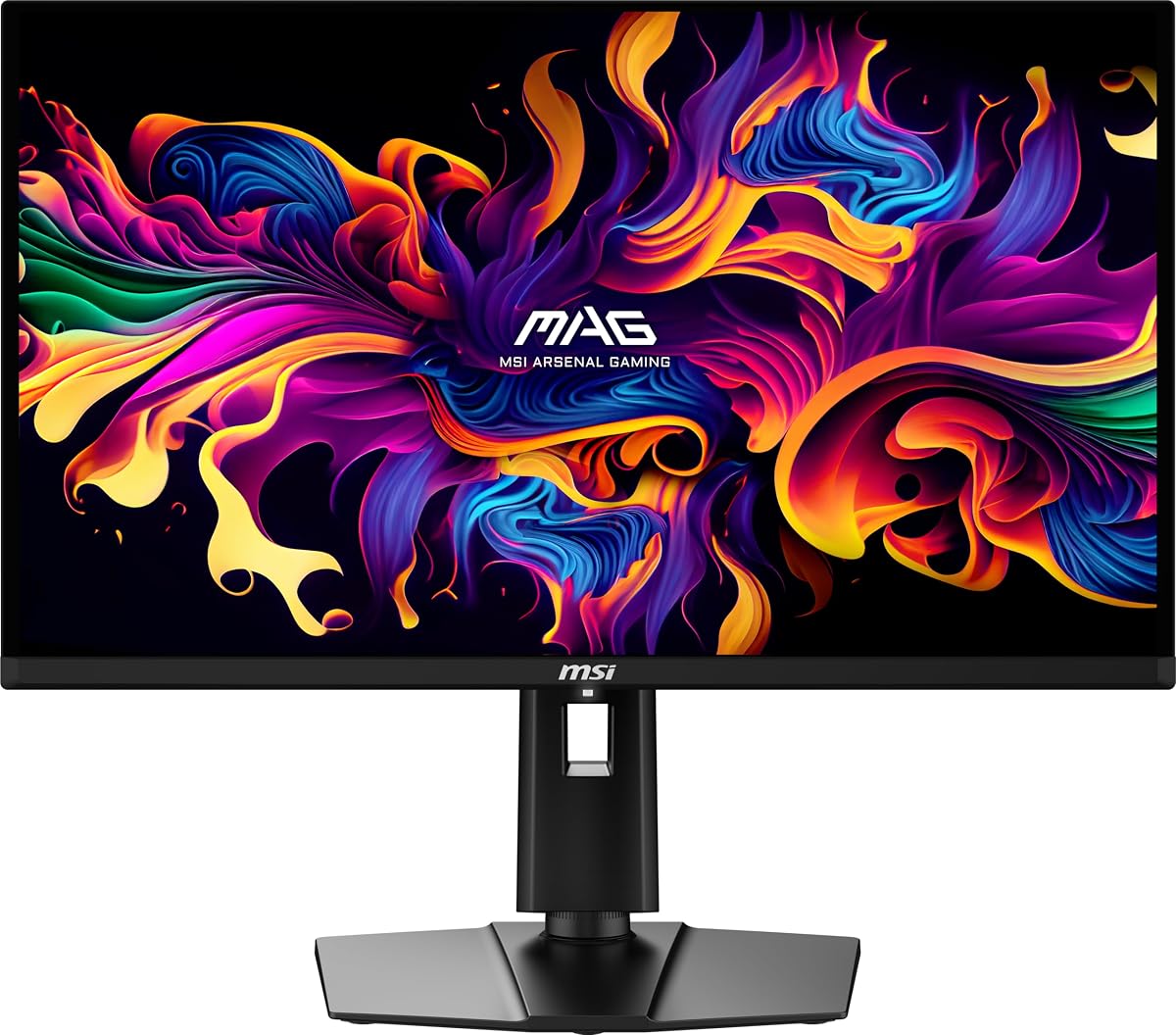
The MSI MAG 274QP QD-OLED represents the pinnacle of display technology for gamers who want the absolute best visual experience. Its unique panel technology combines the benefits of OLED with Quantum Dots to deliver unmatched color and contrast performance.
We may earn a commission when you buy through this link, at no additional cost to you.
With a 0.03ms response time and infinite contrast ratio, images appear incredibly sharp and deep. Dark scenes in games look rich with detail while bright elements pop vividly against the background providing a cinematic feel during gameplay.
While the risk of burn-in is lower with modern protective features, it remains a consideration for users who leave static images on screen for hours. The built-in cooling system helps maintain performance without fans ensuring silent operation during intense sessions.
This monitor is ideal for enthusiasts who demand top-tier image quality and are willing to invest in premium hardware. It offers a significant upgrade over traditional LCD panels in terms of both motion clarity and visual depth.
The integration of Quantum Dots expands the color gamut significantly allowing for more realistic and saturated visuals in supported titles.
Self-emissive pixels allow for perfect blacks and high dynamic contrast which enhances the perception of depth in games.
We may earn a commission when you buy through this link, at no additional cost to you.
The Acer Predator X27U brings QD-OLED technology to a competitive gaming form factor with its 26.5-inch display. It is well regarded for its ability to deliver stunning visuals that rival high-end televisions in color depth and contrast.
We may earn a commission when you buy through this link, at no additional cost to you.
Gaming on this monitor feels instantaneous thanks to the incredibly fast response time of the OLED panel. The 240Hz refresh rate ensures that fast-paced action remains clear and fluid which is critical for competitive shooters and sports titles.
The fixed stand height means you may need a VESA mount to adjust the monitor to eye level. This lack of ergonomic adjustment could be an issue for users who prefer to tilt or rotate their screen frequently during play.
This model is perfect for gamers who prioritize visual fidelity and want a compact setup that maximizes desk space. Its ZeroFrame design enhances immersion by minimizing bezels so you can focus entirely on the game world.
The nearly bezel-less frame reduces distractions and makes the screen feel larger and more engaging during gameplay.
The near instant pixel transition eliminates motion blur providing a level of clarity that LCD panels struggle to match.
We may earn a commission when you buy through this link, at no additional cost to you.
The KTC H27E6S is a strong contender for those looking for high refresh rates at a competitive price. It offers a native 240Hz rate that can be overclocked to 275Hz providing extra smoothness for ultra-fast gaming scenarios.
We may earn a commission when you buy through this link, at no additional cost to you.
Color performance is highlighted by a wide sRGB coverage which makes games look vibrant and engaging. The white finish adds a unique aesthetic appeal that allows it to stand out from typical black gaming monitors on the market.
While it includes modern connectivity options the HDR400 support is standard and does not deliver significant luminance improvements. Users should expect great SDR performance but not a transformative HDR experience in this price range.
This monitor appeals to gamers who want a distinct look and high speed without paying a premium. Its ergonomic stand allows for adjustments that can help reduce strain during extended gaming sessions.
The white design allows for creative PC build themes that differ from the standard dark aesthetic of most gaming gear.
The ability to push the refresh rate higher gives competitive players an edge in reaction time and motion clarity.
We may earn a commission when you buy through this link, at no additional cost to you.
The ASUS ROG XG27ACMG pushes the boundaries with a 270Hz overclocked refresh rate that targets the fastest competitive players. It is designed for professionals who need every advantage in terms of motion fluidity and input latency.
We may earn a commission when you buy through this link, at no additional cost to you.
A key feature is the USB-C connectivity with DP Alt mode allowing for a cleaner setup with laptops or modern workstations. This versatility makes it a strong dual-use monitor for both gaming and productivity tasks alike.
The software suite provides advanced tuning options but relies on having the software installed to unlock full functionality. Some users may prefer a more plug-and-play experience without needing to configure additional tools on their system.
It is an excellent choice for gamers who demand the highest refresh rates and appreciate the added convenience of modern connectivity. The included cloud subscription also adds value for creators or streamers using the monitor.
ELMB SYNC allows simultaneous use of motion blur reduction and adaptive sync for a sharper image during high-speed gameplay.
Connecting laptops via a single cable for video and power simplifies the desk setup for travelers and hybrid workers.
We may earn a commission when you buy through this link, at no additional cost to you.
The MSI MAG 271QPX continues the legacy of high-performance OLED monitors with refined care technologies. It delivers the deep blacks and vibrant colors that OLED is famous for while aiming to mitigate longevity concerns.
We may earn a commission when you buy through this link, at no additional cost to you.
The fanless cooling design ensures the monitor runs silently which is great for immersive gaming environments. Combined with the fast response time this creates a very smooth visual experience that is highly responsive to user inputs.
Managing an OLED panel requires some awareness of static elements to prevent burn-in over time. MSI includes features to help manage this but users should still be mindful of how they use the screen when not gaming.
This monitor is ideal for gamers who want top-tier visual quality and value the silent operation of a fanless design. It represents a strong balance between raw performance and practical usability in a daily setup.
Eliminating the fan removes noise entirely ensuring that sound during gaming comes only from your speakers or headset.
Built-in tools help manage pixel brightness and shift patterns to extend the useful life of the OLED display over time.
We may earn a commission when you buy through this link, at no additional cost to you.
The Alienware AW2723DF is a premium option known for its robust build quality and comprehensive stand adjustability. It offers a reliable 240Hz experience with official G-SYNC certification ensuring smooth visuals with NVIDIA graphics cards.
We may earn a commission when you buy through this link, at no additional cost to you.
Its Lunar Light design and customizable lighting create a cohesive ecosystem for users already invested in the Alienware brand. The full ergonomic stand allows for significant height and tilt adjustments which helps in finding a comfortable viewing position.
The monitor consumes more power than some slimmer alternatives due to its features and brightness levels. This can lead to slightly higher heat output requiring proper airflow around the device to maintain consistent performance over long periods.
It is a great choice for gamers who value build quality and want a complete ergonomic solution without needing an external arm. The lighting features also add a personalized touch to any gaming station setup.
The stand offers tilt swivel pivot and height adjustments providing a perfect fit for different desk heights and user preferences.
Syncing with other Alienware devices creates a unified lighting experience that enhances the aesthetic of the entire desk.
We may earn a commission when you buy through this link, at no additional cost to you.
The Acer Nitro KG271U focuses on delivering accurate colors and high refresh rates at an accessible price. It is a strong choice for mixed-use setups where gaming is complemented by creative work or general productivity.
We may earn a commission when you buy through this link, at no additional cost to you.
With 99 percent sRGB coverage this monitor ensures that colors remain consistent and true for designers and editors. The 240Hz refresh rate maintains its gaming capabilities ensuring smooth performance when switching to competitive titles.
The stand design is basic with limited adjustability which might require a separate mount for optimal positioning. This trade-off helps keep the cost down for users who do not need extensive ergonomic adjustments for their setup.
It is an excellent value for gamers who want high performance without paying for premium features they might not need. The zero-frame design also makes it a good choice for dual monitor configurations.
High sRGB coverage ensures that visuals are rendered with correct saturation making it useful for design tasks too.
The bezel-less design reduces visual barriers when placing two units side by side for an expanded field of view.
We may earn a commission when you buy through this link, at no additional cost to you.
The Acer Nitro XV272U offers a complete package with its combination of high refresh rates and a fully adjustable stand. It is well received for providing a comfortable gaming experience with ample features for the price point.
We may earn a commission when you buy through this link, at no additional cost to you.
Built-in speakers offer convenience for quick sessions though audiophiles will likely prefer external headphones. The display options allow for flexible integration into setups using laptops or multiple devices simultaneously.
While the HDR performance is functional it does not reach the levels of premium HDR panels. For gamers who primarily play in SDR this limitation does not impact the overall quality of the visual output significantly.
This model is perfect for users who want an all-in-one solution with high adjustability and solid performance. It remains a reliable workhorse for daily gaming and general media consumption tasks.
The stand allows for height tilt swivel and pivot adjustments ensuring you can find a comfortable angle easily.
Built-in speakers save desk space for casual listening although they are best used as a secondary audio source.
We may earn a commission when you buy through this link, at no additional cost to you.
Selecting the right gaming monitor involves understanding several key factors that impact performance and comfort. This section breaks down the essential specs and technologies to consider before making a purchase.
The type of panel determines color accuracy, contrast, and response speed. IPS panels are popular for their wide viewing angles and accurate colors while OLED panels offer perfect blacks and faster response times at a higher cost. TN panels are fast but lack color vibrancy making them less common in modern 240Hz monitors.
For most gamers, an IPS or OLED panel offers the best balance of visual quality and speed.
A 240Hz refresh rate means the screen updates 240 times per second providing incredibly smooth motion. This is crucial for competitive gaming where split-second reactions determine the outcome of a match. Ensure your graphics card can output enough frames to take advantage of this rate.
Always check if the monitor achieves 240Hz via DisplayPort as HDMI may sometimes be limited to lower rates.
Response time measures how quickly a pixel changes color. A lower number like 1ms or less reduces ghosting and blurring during fast movement. Look for GtG (gray-to-gray) times as these are more indicative of real-world performance than MPRT figures.
Shorter response times lead to sharper images during rapid motion which is essential for shooters and racing games.
Adaptive Sync technologies like G-SYNC and FreeSync match the monitor's refresh rate to your GPU's frame rate. This eliminates screen tearing and stuttering providing a seamless visual experience. Ideally choose a monitor compatible with your specific graphics card brand.
FreeSync works with both AMD and NVIDIA cards so it offers broader compatibility for most users.
A good stand should allow you to adjust height tilt and swivel to reduce neck strain. Many budget models only offer tilt which can lead to discomfort during long sessions. Consider if you need a monitor arm if the included stand lacks adjustability.
Proper positioning helps maintain good posture and prevents eye fatigue over time.
Ensure the monitor has the ports you need for your devices. DisplayPort is usually required for high refresh rates at 1440p while HDMI is standard for consoles. USB-C can be a bonus for laptop users needing a single-cable setup.
Check which ports support the maximum refresh rate to avoid bandwidth bottlenecks.
Wide color gamuts like DCI-P3 ensure that games look vibrant and realistic. If you do creative work on the side look for models with high sRGB or DCI-P3 coverage. Accurate colors also help in competitive games where visibility of enemies depends on contrast.
Better color accuracy enhances immersion and ensures you do not miss details in dark or bright areas.
High Dynamic Range adds depth to images by improving contrast between dark and bright areas. However true HDR requires high brightness levels which are rare on 1440p gaming monitors. Treat HDR support on these displays as a nice-to-have feature rather than a necessity.
Focus on SDR performance first as most games do not utilize HDR heavily at this price point.
Start by connecting your computer via DisplayPort to ensure you get the full 240Hz refresh rate. Set the refresh rate in your operating system settings to match the monitor's capabilities for optimal performance. Adjusting the settings correctly is the first step to experiencing smooth gameplay.
Clean the screen regularly with a microfiber cloth to prevent dust buildup that can scratch the surface. Avoid using harsh chemicals that can damage the anti-glare coating on the panel. Gentle cleaning maintains image clarity and extends the lifespan of your monitor.
Enable adaptive sync features in your graphics driver to reduce screen tearing and stuttering. Calibrate your brightness and contrast settings to match your room lighting for the best visual experience. Proper setup ensures you get the most out of the monitor's advanced features.
Yes, to fully utilize a 240Hz monitor your PC must be able to generate enough frames to match the refresh rate. If your system cannot reach 240fps the benefits of smooth motion will be limited. Lower settings or a better GPU can help achieve higher frame rates.
While the difference is less drastic than moving to 144Hz from 60Hz many competitive players still notice the extra smoothness. It offers a slight edge in tracking fast objects and reducing motion blur. The upgrade is worth it for those seeking the absolute best performance.
DisplayPort 1.4 is typically required to run a 240Hz refresh rate at 1440p resolution. HDMI 2.1 can support it but HDMI 2.0 is often limited to lower refresh rates. Always check the monitor specifications for cable requirements.
Yes, most of these monitors support HDMI inputs suitable for modern consoles. However, not all support the full refresh rates that next-gen consoles can output. Check the HDMI version compatibility to ensure you get the best console experience.
Use features like pixel shifting and screen savers to move static elements around the screen. Avoid leaving the same static image on screen for extended periods without variation. Following the manufacturer's guidelines for care significantly reduces burn-in risks.
OLED offers faster response times and better contrast but IPS panels are more durable against burn-in. IPS also tends to be more affordable and brighter in SDR content. Choose based on your priority between visual depth and long-term usage patterns.
Most modern monitors work with Macs via DisplayPort or HDMI with some supporting USB-C for power and video. Check your specific Mac model for port compatibility to ensure seamless connection. Drivers are usually not needed as macOS handles displays natively.
A 27-inch screen is the sweet spot for 1440p resolution offering sharpness without needing to move your eyes too much. Smaller screens like 24 inches may show pixels too sharply at this resolution while larger ones might require scaling. This size balances immersion and performance well.
The LG 27GR83Q-B leads our list for its exceptional balance of speed and color accuracy. Gamers looking for premium quality should consider the MSI OLED options for their stunning contrast. Budget seekers will find the AOC and Acer models offering excellent value without compromising on refresh rate.
Prioritize your specific needs such as color accuracy or motion clarity when making your choice. Ensure your system is capable of driving the refresh rates these monitors offer to get the full benefit. A good monitor enhances performance but also complements your overall gaming setup.
Prices and availability fluctuate frequently so verify the latest deals before purchasing. Check for seasonal sales or bundles that might offer better value than the standard list price. Taking the time to find the right deal ensures you get the best equipment for your gaming journey.