
Surface Docking Station Triple Displays
4.1Editor score
Triple display output
12-in-1 port selection
72W power supply
Compare the top docking stations for Surface Pro devices to find the perfect hub for connectivity displays and power in our comprehensive October 2026 expert
Choosing the right docking station for your Surface Pro can transform your mobile tablet into a powerful desktop workstation. With various ports and connection types available, finding the ideal match requires careful consideration of your specific workflow needs.
We have evaluated ten leading options based on connectivity features build quality and compatibility with the Surface ecosystem. Each product offers unique advantages ranging from Thunderbolt speeds to versatile triple display setups.
Our picks highlight standout features and potential trade-offs to help you make an informed decision. Note that product availability and pricing may fluctuate so always verify current details before purchasing your ideal docking solution.
4.1Editor score

4.4Editor score

4.5Editor score
This side-by-side comparison highlights the key specifications of all ten reviewed docking stations to help you quickly identify which model best fits your professional or creative workflow requirements.




This Microsoft Surface Thunderbolt 4 Docking Station stands out as a premium choice for power users who demand speed and reliability. With a solid 4.4 rating from verified buyers it delivers exceptional performance for both work and entertainment.
We may earn a commission when you buy through this link, at no additional cost to you.
The standout feature is its Thunderbolt 4 connectivity which enables lightning-fast data transfers and high-speed media streaming. You can connect up to two 4K monitors effortlessly and charge your laptop in just 2.5 hours thanks to rapid charging technology.
While the price is higher than standard hubs the build quality and sustainability efforts justify the investment. The raised tactile indicators on each port ensure you never fumble for the right connection in a dimly lit room.
If you value efficiency and premium materials this dock is the top recommendation for your Surface Pro setup. It bridges the gap between a mobile tablet and a full desktop workstation without compromise.
Thunderbolt 4 technology ensures you get maximum speed for data and video while maintaining stable connections for all peripherals.
Made with 20% recycled ocean-bound plastic and featuring tactile port markers this dock combines environmental responsibility with everyday usability.
We may earn a commission when you buy through this link, at no additional cost to you.
The original Microsoft Surface Dock remains a reliable option for those with older Surface devices like the Pro 3 through 6 or Surface Go. It has earned a strong 4.5 rating by providing stable connectivity for essential peripherals.
We may earn a commission when you buy through this link, at no additional cost to you.
This dock offers four USB 3.0 ports and dual Mini DisplayPort outputs making it easy to connect legacy displays and accessories. The magnetic surface connect cable transforms your device into a desktop PC instantly with external power supply.
Though it lacks Thunderbolt speeds it serves well for standard office tasks requiring multiple USB connections and a stable network link. The simplicity of plug and play functionality ensures you spend less time setting up and more time working.
Buy this if you need basic expansion for an older Surface model without breaking the budget. It is a straightforward tool that gets the job done without unnecessary complexity or extra ports.
Compatible with Surface Go and multiple Pro models this dock ensures your older devices can still function as a desktop workstation.
The magnetic surface connect cable makes plugging in and unplugging quick and easy while maintaining a secure power and data link.
We may earn a commission when you buy through this link, at no additional cost to you.
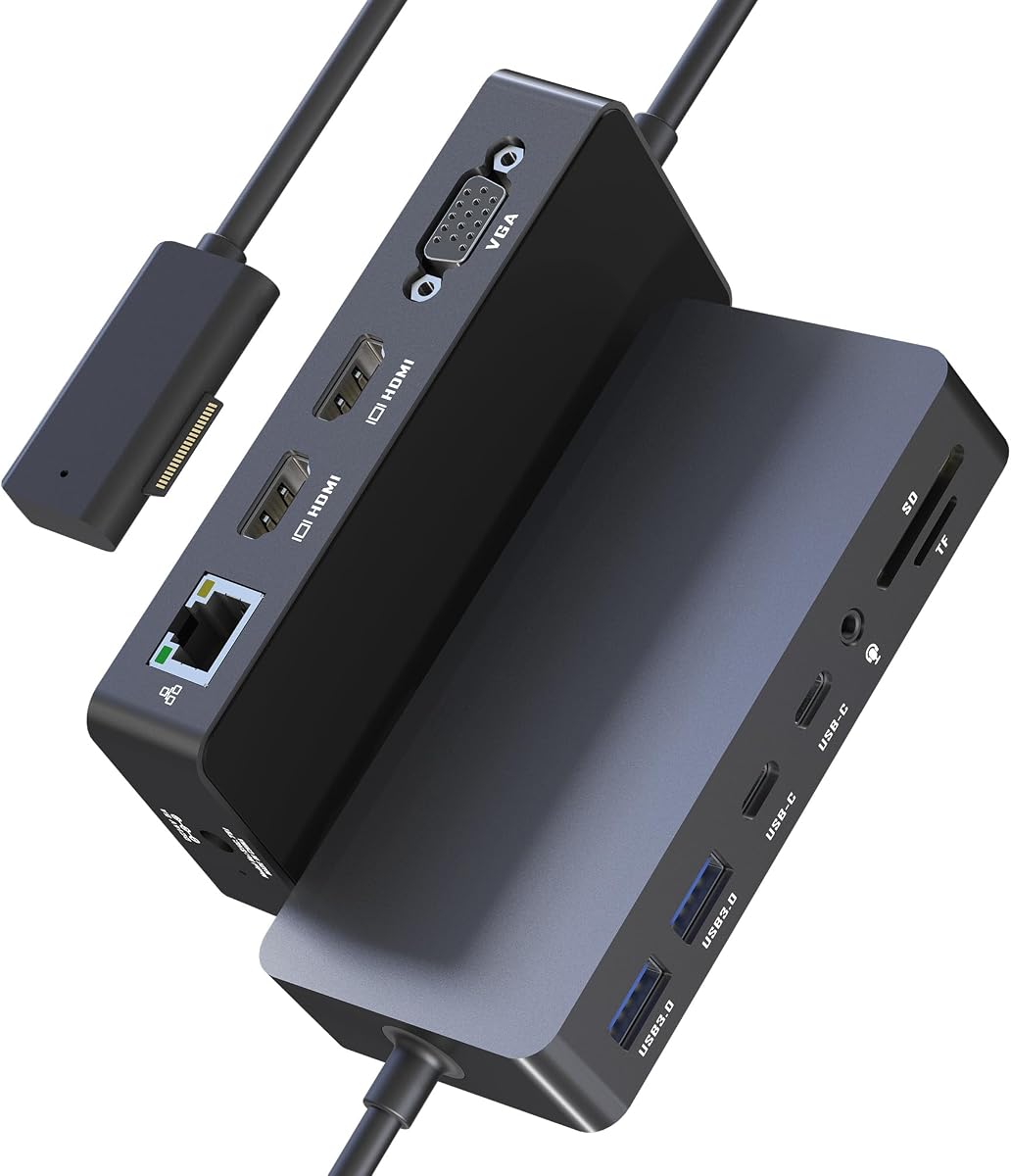
This 12-in-1 Surface Docking Station provides incredible value for users needing multiple display outputs without a high price tag. It holds a 4.1 rating for its broad compatibility with Surface Pro models from 3 to 12.
We may earn a commission when you buy through this link, at no additional cost to you.
You can connect three external screens using two HDMI ports and one VGA port to extend your workspace significantly. The dock also includes SD and TF card slots allowing you to transfer photos at speeds up to 104MB/s.
The main limitation is the VGA port which limits resolution to 1080P but is perfect for older monitors. Combined with the 72W power adapter it ensures your Surface stays charged while running multiple peripherals.
Choose this budget-friendly hub if you need to maximize screen real estate on a tight budget. It offers essential connectivity for students or casual professionals who prioritize multi-monitor setups over cutting-edge speeds.
Use the triple display capability to manage multiple tasks simultaneously by extending your screen across three monitors with ease.
With 12 ports including HDMI VGA USB and card slots this hub covers most basic connectivity needs for everyday productivity.
We may earn a commission when you buy through this link, at no additional cost to you.
This Surface Docking Station has earned an impressive 4.8 rating for its robust build quality and enhanced productivity features. It is designed to transform your Surface device into a professional workstation quickly.
We may earn a commission when you buy through this link, at no additional cost to you.
With two 4K HDMI ports and one VGA port you can enjoy triple display setups that boost workflow efficiency by up to 300 percent. The USB ports deliver blazing-fast 5Gbps data transfer speeds for external SSDs and cameras.
To achieve three external displays you need to turn off the Surface screen which may be a slight inconvenience. However the 72W power supply ensures your device remains charged while connected to the dock.
This option is ideal for creative professionals who need reliable connectivity and stable network access. It strikes a great balance between price and performance making it a strong contender for office setups.
The combination of fast USB transfer speeds and stable Ethernet ensures your creative projects are never slowed down by connectivity issues.
The 72W power adapter provides ample energy to run peripherals and charge your device simultaneously without interruption.
We may earn a commission when you buy through this link, at no additional cost to you.
This 12-in-1 Surface Docking Station is engineered to support high-resolution visual workflows with dual 4K HDMI outputs. It has a 4.2 rating for its ability to handle complex multitasking needs effectively.
We may earn a commission when you buy through this link, at no additional cost to you.
You can connect two 4K monitors at 30Hz and one 1080P VGA monitor for a true triple display experience. The dock includes 5Gbps USB ports and SD/TF slots making file transfers and media access efficient and seamless.
The 72W DC power port ensures your Surface stays charged while you work on demanding tasks like video editing. This stable wired network connection via the 100Mbps Ethernet port further enhances your reliability.
If you work in design or trading where screen real estate is critical this dock is a smart choice. It delivers the visual clarity and connectivity you need without overwhelming your desk with multiple adapters.
Dual 4K outputs allow you to view detailed graphics and spreadsheets with clarity that enhances professional work accuracy.
With 5Gbps USB ports you can move large files quickly between your Surface and external drives without waiting.
We may earn a commission when you buy through this link, at no additional cost to you.
The Microsoft Surface Dock 2 represents the pinnacle of Surface connectivity with next-gen ports and robust power delivery. It boasts a 4.5 rating for its seamless integration with the latest Surface devices.
We may earn a commission when you buy through this link, at no additional cost to you.
You get dual 4K displays at 60Hz for smooth video playback and professional graphics work. The dock includes two front-facing USB-C ports and two rear USB-C ports providing flexible access for all your peripherals.
The 199W power supply ensures your Surface Pro can handle intensive tasks while staying fully charged. A longer 80 cm Surface Connect cable gives you the flexibility to position your dock exactly where you need it.
This is the ultimate choice for premium setups where performance and reliability are non-negotiable. While pricey it offers the best in class connectivity for modern Surface laptops and tablets.
The split between front and rear USB-C ports lets you organize your workspace efficiently while keeping essential connections accessible.
Dual 4K displays at 60Hz ensure your visuals are fluid and crisp for both creative work and media consumption.
We may earn a commission when you buy through this link, at no additional cost to you.
This Microsoft Surface Dock 2 variant delivers seamless connectivity for professionals needing high power and reliable displays. It holds a 4.8 rating for consistent performance across a wide range of Surface devices.
We may earn a commission when you buy through this link, at no additional cost to you.
You can transform your Surface into a desktop PC instantly using the Surface Connect cable for power and data. The dock supports dual 4K monitors at 60Hz ensuring you get high-resolution visuals for your work.
With four USB-C ports and two USB-A ports you have plenty of room to connect keyboards mice and external drives. The included 199W power supply meets the demands of even the most intensive Surface models.
If you need a professional-grade solution for daily office use this dock is a solid investment. It ensures your network and display connections remain stable while keeping your desk tidy with minimal cable clutter.
The 199W power supply guarantees that your device stays charged even when multiple high-draw peripherals are connected to the dock.
Kensington-compatible security lock support helps protect your hardware in shared office environments or public spaces.
We may earn a commission when you buy through this link, at no additional cost to you.
This 12-in-1 Surface Docking Station transforms your device into a desktop powerhouse with essential ports for all needs. It has a 4.3 rating for its versatility in supporting diverse workflows from students to pros.
We may earn a commission when you buy through this link, at no additional cost to you.
You can connect dual 4K@60Hz HDMI monitors and one 1080P VGA monitor for a triple display setup. The 1000Mbps Ethernet port ensures a lightning-fast and stable internet connection for video conferencing and downloads.
The 100W DC charging adapter prevents battery drain while you work on high-demand tasks. USB ports support 5Gbps speeds allowing you to move large files instantly without lag or interruptions.
This dock is perfect for anyone needing a comprehensive expansion solution that keeps your workspace tidy. It balances high-speed data with multiple display options to boost your daily efficiency.
The 1000Mbps Gigabit Ethernet port ensures you never drop a call due to unstable internet during critical work hours.
Use three monitors to separate your tasks like coding browsing and reference material to maximize your focus and output.
We may earn a commission when you buy through this link, at no additional cost to you.
This Renewed Microsoft Surface Dock 2 offers a sustainable way to access premium connectivity at a lower cost. With a 4.7 rating it delivers the same high-performance features as the brand-new version.
We may earn a commission when you buy through this link, at no additional cost to you.
You get dual 4K@60Hz display output and 10Gbps data transfer for smooth multitasking and file sharing. The included 199W power supply and USB-C cable ensure you have everything needed for instant setup.
While the dock is renewed it undergoes rigorous testing to ensure durability across various workspaces. The integrated thermal management keeps performance consistent even during long work sessions.
Choose this eco-friendly option if you want top-tier specs without the full price. It is a smart choice for students or businesses looking to minimize electronic waste while maintaining productivity.
Buying renewed products helps reduce waste while giving you access to high-quality tech that meets your professional needs.
With gigabit Ethernet and dual 4K support you get a professional-grade setup that supports complex workflows effortlessly.
We may earn a commission when you buy through this link, at no additional cost to you.
This Surface Dock uses Surface connection technology to keep your desktop tidy while providing high-speed transmission. It has a 4.2 rating for its straightforward design that covers essential connectivity needs.
We may earn a commission when you buy through this link, at no additional cost to you.
You can connect two external monitors via the Mini DP ports for a dual-screen setup. The dock includes four USB 3.0 ports which let you connect various devices like hard drives and charge mobile phones easily.
The 90W power supply ensures stable compatibility across multiple Surface models from the Pro 4 to the latest Pro 11. The gigabit network card port supports fast internet speeds for uninterrupted streaming and downloads.
This dock is ideal for those who prefer a minimalist setup with essential ports. It offers a reliable way to expand your device capabilities without overwhelming your workspace with complex cables.
The clean design reduces desk clutter while ensuring you have the most important ports for everyday work and media.
The gigabit network card port guarantees fast and reliable internet access for smooth video calls and file uploads.
We may earn a commission when you buy through this link, at no additional cost to you.
Selecting the perfect docking station requires evaluating several factors to ensure it matches your workflow and device capabilities.
Determine which ports you need such as HDMI USB-C or USB-A to connect your monitors peripherals and storage devices. A dock with more versatile ports like USB-C or Thunderbolt offers future-proofing for newer accessories.
Choose a dock that provides enough USB and video outputs to handle all your current hardware without needing extra adapters.
Consider whether you need dual or triple display support and the resolution limits of the ports provided. High-quality docks offer 4K at 60Hz for smooth visuals while budget options might cap at 30Hz or 1080P.
Always check the maximum resolution and refresh rate to ensure your monitors will display content correctly and smoothly.
Ensure the dock can supply enough wattage to charge your Surface Pro while running all connected peripherals. A dock with a dedicated power adapter will maintain battery levels better than a bus-powered hub.
Look for power delivery specs of at least 72W to keep your device charged under moderate to heavy load.
If you work with large files or media check the USB data transfer speeds offered by the docking station. Thunderbolt 4 or USB 3.0 ports offer the fastest speeds for SSDs and external drives.
Prioritize docks with 5Gbps speeds or higher if you regularly transfer photos videos or design assets.
A built-in Ethernet port provides a stable wired internet connection which is crucial for video conferencing and large downloads. This reduces latency and improves connection reliability compared to Wi-Fi.
Choose a dock with Gigabit Ethernet if you need consistent high-speed internet access for professional use.
Verify that the dock is compatible with your specific Surface model whether it is a Pro Laptop or Go device. Some docks rely on Surface Connect while others work via USB-C Thunderbolt.
Check manufacturer compatibility lists to ensure the dock will pair seamlessly with your device's connection type.
Assess the build materials and design to ensure the dock is durable enough for daily use in your environment. A sturdy dock will maintain stable connections and withstand accidental bumps.
Look for docks with solid construction and good reviews regarding longevity to ensure long-term reliability.
Check the warranty period provided by the manufacturer to ensure you have coverage against defects. A longer warranty often indicates confidence in the product's durability and performance.
Prefer docks that offer at least a one-year warranty for peace of mind regarding your investment.
To start using your new docking station connect the power adapter first to ensure stable power delivery for all connected devices. Then plug the Surface Connect or USB-C cable into your Surface Pro and the corresponding port on the dock.
Organize your cables neatly and route them to avoid tangles or damage over time. This keeps your workspace clean and prevents accidental disconnections that could interrupt your workflow.
Regularly inspect the ports for dust or debris and clean them gently with compressed air to maintain optimal connectivity. Avoid forcing any devices into the ports to prevent bending pins or damaging the connectors.
Yes many docking stations support triple monitor setups using HDMI VGA or Mini DisplayPort outputs. Note that some models may require you to turn off the Surface screen to achieve three external displays.
Most docking stations come with their own power adapter that also charges your Surface Pro. This means you usually do not need an extra charger unless your dock lacks power delivery capabilities.
Older Surface models like the Pro 3 to 6 use Surface Connect instead of USB-C so they need a Surface Connect dock. Newer models from Pro 7 onwards generally support USB-C docks effectively.
Thunderbolt 4 docks offer faster data transfer speeds and support for more high-resolution displays compared to standard USB-C docks. They are generally more expensive but provide higher performance for power users.
No a quality docking station does not slow down your computer. It simply extends your device's capabilities allowing you to connect more peripherals without impacting performance.
You can use a dock to connect a gaming controller or external display but the Surface is not designed for heavy gaming. For best results use a dock that supports 60Hz refresh rates.
Most modern Surface Laptops support USB-C or Surface Connect docks but verify your specific model's ports. Always check compatibility before purchasing to ensure it works with your device.
Use compressed air to gently blow out dust from the ports. Avoid using liquids or metal objects that could damage the contacts inside the docking station.
We hope this guide helps you find the perfect dock to transform your Surface Pro into a powerful desktop workstation. Whether you need the speed of Thunderbolt 4 or the affordability of a triple display hub there is a solution for every need.
Prioritize your most important features such as video resolution power delivery or port versatility when making your decision. Investing in the right dock now will save you time and money by avoiding the need for multiple adapters.
Remember to check current prices and availability before purchasing to ensure you get the best deal. Your new docking setup will streamline your workflow and help you stay productive whether you are at home or in the office.