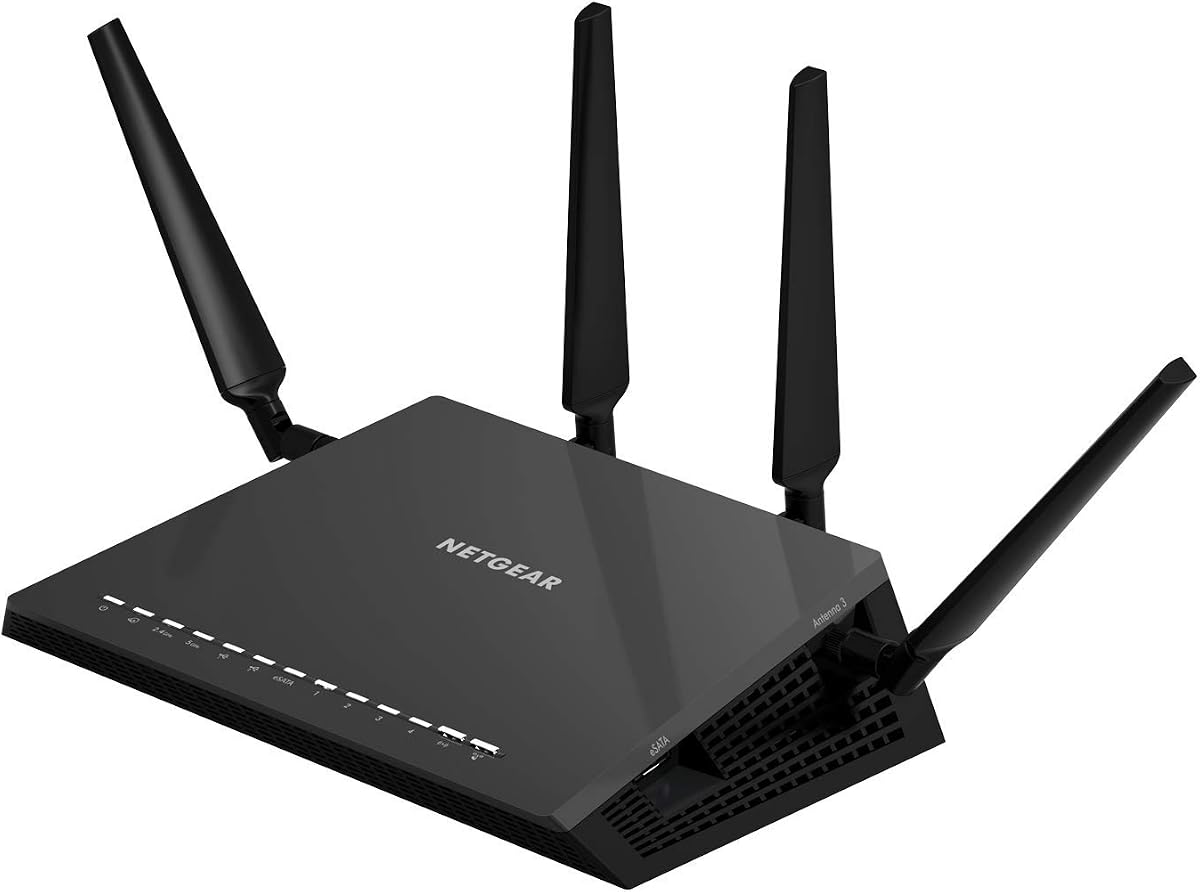
NETGEAR Nighthawk X4S Smart WiFi Router (R7800)
4.4Editor score
1.7GHz dual core processor
45 device support
4 x 1G Ethernet ports
This guide compares the top AC2600 WiFi Router models for speed, coverage, and security to help you choose the right wireless network solution for your home.
Choosing the right wireless network solution is crucial for modern homes filled with smart devices. An AC2600 WiFi router offers the speed and capacity needed to handle streaming, gaming, and work from home tasks without interruption.
We compared ten leading AC2600 models based on real-world performance data, user feedback, and technical specifications. Our analysis focuses on throughput, range, security features, and ease of setup to ensure you get a reliable network.
Each pick below highlights specific strengths like parental controls, mesh compatibility, or gaming optimization. Note that availability and offers change frequently, so verify current details before making your final decision for your home network.
4.4Editor score
4.5Editor score

4.1Editor score
The following table provides a side-by-side comparison of all ten AC2600 models analyzed in this guide. Use this overview to quickly identify key specifications and features that match your specific connectivity needs.


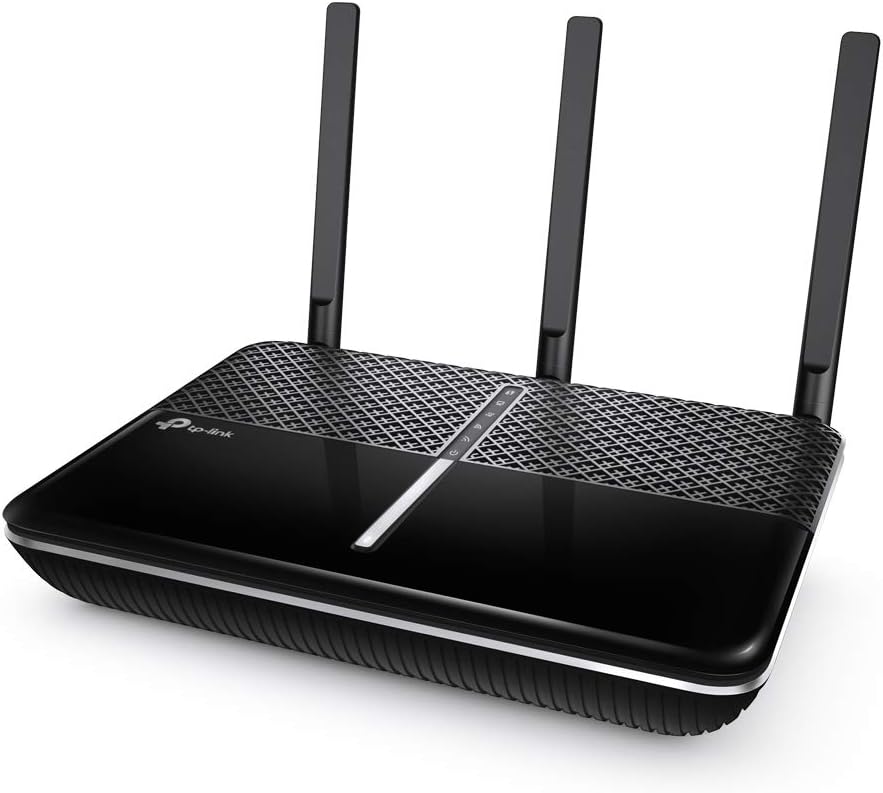
The TP-Link Archer A10 stands out as a reliable choice for households seeking high-speed connectivity without complex features. With a rating of 4.5 stars, it balances performance and ease of use effectively. Its dual-band architecture ensures that streaming and browsing tasks remain smooth even during peak usage times.
We may earn a commission when you buy through this link, at no additional cost to you.
Key strengths include its MU-MIMO technology which allows simultaneous data transmission to multiple devices. This reduces congestion and latency significantly compared to older models. The inclusion of a VPN server adds a layer of security for remote access to your home network which is rare at this price point.
While it lacks USB storage capabilities and may not appeal to users wanting advanced file sharing features, its focus on core routing tasks is commendable. The range provided by its external antennas is sufficient for most medium-sized homes ensuring consistent signal throughout the living areas.
Buyers looking for a straightforward yet powerful router will find this model an excellent fit. It supports voice commands via Amazon Alexa which simplifies guest network management. For general home networking needs this router delivers consistent performance that justifies its position as our top pick.
The intuitive phone UI and Tether app allow quick setup within minutes without technical expertise.
Three external antennas and beamforming technology focus signals to connected devices for better coverage.
We may earn a commission when you buy through this link, at no additional cost to you.
The NETGEAR Nighthawk R7800 is designed for larger homes requiring extensive coverage and robust connection handling. It earns a 4.4-star rating due to its ability to support up to 45 devices simultaneously without performance degradation. This makes it ideal for tech-heavy households with multiple streaming devices and smart home gadgets.
We may earn a commission when you buy through this link, at no additional cost to you.
Its 1.7GHz dual-core processor ensures that network traffic is managed efficiently preventing bottlenecks. The inclusion of both USB 3.0 and eSATA ports allows users to create a personal cloud storage accessible from anywhere. This versatility adds significant value for users who need to share files or printers across their network.
While the cost is higher than average models the build quality and feature set justify the investment. The coverage of up to 2500 square feet eliminates dead zones in most residential settings. However the physical size is considerable so placement requires careful consideration to fit your workspace.
For users prioritizing raw power and connectivity options this router is a top contender. Dynamic QoS prioritizes gaming and streaming traffic for lag-free experiences. It remains a preferred choice for those who demand premium features and reliable long-term performance.
Create a personal cloud with USB and eSATA ports to access files from anywhere securely.
Dynamic QoS and Beamforming optimize data flow to connected devices for smoother streaming.
We may earn a commission when you buy through this link, at no additional cost to you.
The D-Link DIR-2640 offers a balanced mix of features at an accessible price point. With a 4.1-star rating it caters to families needing reliable internet access with strong safety features. Its mesh compatibility allows for future network expansion making it a flexible choice for growing homes.
We may earn a commission when you buy through this link, at no additional cost to you.
A standout feature is the enhanced parental controls which let users create profiles for individuals to manage internet access schedules. This level of control is vital for households with children using shared devices like game consoles and smart TVs. The dual-core processor ensures these tasks run smoothly without slowing down general internet speed.
While the range is not as expansive as high-end models it covers standard living spaces effectively. The wired Gigabit ports provide reliable connections for devices like desktop PCs and consoles. Setup is simplified through the D-Link WiFi app which works on both Android and iOS devices.
This router is ideal for budget-conscious buyers who do not want to compromise on essential security and management tools. It delivers stable performance for daily tasks and offers a solid foundation for smart home networks. For families prioritizing control and affordability this is a smart purchase.
Create profiles for each person to control when and how devices access the network safely.
Set up with Smart Mesh capabilities to extend coverage across your home easily.
We may earn a commission when you buy through this link, at no additional cost to you.
The NETGEAR Nighthawk R7450 delivers consistent performance suitable for various home networking needs. Its 4.3-star rating reflects user satisfaction with its speed and stability. This model is particularly appealing to those who want a no-frills router that handles high bandwidth tasks with ease.
We may earn a commission when you buy through this link, at no additional cost to you.
The Advanced QoS feature is designed to prioritize gaming and streaming traffic ensuring a lag-free experience. Coupled with MU-MIMO technology it manages multiple data streams efficiently. The dual-core processor boosts overall performance across wired and wireless connections which keeps latency low during intensive use.
While it lacks the extensive USB connectivity of more premium models it excels in core routing capabilities. The three amplifiers and external antennas provide better range than average budget routers making it versatile for different home layouts. It is a dependable option for users who prioritize connectivity over extra utilities.
Buyers seeking a balanced router for general home use will find this model meets their expectations well. It supports modern devices and maintains strong signal quality throughout the house. For those focused on gaming or streaming this router offers a reliable platform for daily activities.
Advanced QoS ensures lag-free gaming by prioritizing your gaming traffic over other network usage.
Three amplifiers and external antennas work together to enhance range and signal stability.
We may earn a commission when you buy through this link, at no additional cost to you.
The ASUS Blue Cave stands out with its emphasis on security and unique design. While it has a 3.9-star rating it offers features like lifetime internet security through Trend Micro which protects devices from external threats automatically. This is a significant benefit for users who prioritize online safety without extra costs.
We may earn a commission when you buy through this link, at no additional cost to you.
It supports AiMesh allowing you to expand your network using other compatible routers for whole-home coverage. The Intel WiFi technology ensures advanced network throughput and data speeds up to 2600 Mbps. Parental controls are integrated to help manage family app usage effectively from any mobile device.
Some users report that the setup process requires more attention than standard models which may explain the lower ratings. However the build quality and long-term security features provide value beyond initial configuration. The design is visually distinct which might appeal to those who appreciate modern aesthetics in tech.
This router is a good choice for tech-savvy households needing robust security and future-proof expansion. The inclusion of voice control and advanced parental features adds to its appeal. For those who value safety and modular networking this model offers compelling advantages over competitors.
AiProtection powered by Trend Micro blocks external threats to keep connected devices safe.
AiMesh compatibility allows you to add more routers for extended wireless coverage seamlessly.
We may earn a commission when you buy through this link, at no additional cost to you.
The TP-Link AXE5400 represents a leap forward in wireless technology with its Tri-Band WiFi 6E support. As a 2025 PCMag Editors' Choice it delivers speeds up to 5400 Mbps which is ideal for households with heavy data usage. The 6 GHz band ensures near-zero latency for responsive gaming and video chatting.
We may earn a commission when you buy through this link, at no additional cost to you.
It uses OFDMA technology to increase capacity allowing simultaneous transmission to more devices without congestion. The unique housing design aids heat dissipation ensuring long-term reliability under load. This router supports both VPN server and client functions offering flexibility for remote access and secure connections.
While it is priced higher than traditional AC2600 models the performance gains justify the investment for future-proofing. EasyMesh compatibility makes it easy to extend range without compatibility issues. Users should ensure their devices support WiFi 6E to fully utilize these advanced capabilities.
This model is perfect for users looking to upgrade to the latest standards for maximum speed and efficiency. It works with most ISPs and provides a robust platform for smart homes. For those needing premium performance the AXE5400 is a strong candidate in the current market.
Tri-Band WiFi 6E with 5400 Mbps total speed for faster browsing and streaming.
Supports VPN server and client for secure remote access to your home network.
We may earn a commission when you buy through this link, at no additional cost to you.
The NETGEAR Nighthawk RS90 pushes performance boundaries with its WiFi 7 technology and speeds up to 3.6 Gbps. With a 4.3-star rating it is designed to keep up with busy homes where everyone is online at once. It covers up to 2000 square feet ensuring reliable connections across large areas.
We may earn a commission when you buy through this link, at no additional cost to you.
Its multi-gig wired connections allow users to unlock high-speed internet plans from providers. The dedicated dual-band design ensures consistent performance for gaming and smart home devices. Setup is streamlined through the Nighthawk app which lets you manage networks from anywhere with internet access.
While it is one of the most expensive options on this list its capabilities are unmatched for power users. Security features like Advanced Router Protection help safeguard your family online. Note that to utilize full speeds your devices must support the latest WiFi 7 standards.
For those needing the absolute fastest speeds and largest capacity this router is a top choice. It pairs with existing modems via ethernet for easy integration. If budget allows and you require top-tier performance this model delivers exceptional results.
2.5 Gig WAN port unlocks multi-gig internet plans for faster wired connections.
Free Nighthawk app allows guided setup and network management from your mobile device.
We may earn a commission when you buy through this link, at no additional cost to you.
The NETGEAR Nighthawk R6700AX provides a stable entry into WiFi 6 technology at a competitive price. With a 4.2-star rating it delivers fast reliable internet across every room of small homes or apartments. It supports backward compatibility with older devices which makes transitioning to newer tech smooth.
We may earn a commission when you buy through this link, at no additional cost to you.
Security is enhanced through WPA3 encryption which protects your data and connection effectively. The setup process is guided through the free Nighthawk app for iOS and Android. Wired connections are supported via four Gigabit Ethernet ports for consoles and PCs ensuring stable speeds for heavy users.
Coverage is suitable for apartments or small homes up to 1500 sq ft making it versatile for various living arrangements. Automatic firmware updates keep your router secure without manual intervention. While it lacks some premium features of higher models it meets the needs of most standard households.
This model is ideal for buyers seeking an upgrade from older routers without complex setup. It prioritizes ease of use and security making it a hassle-free option. For those needing solid WiFi 6 performance this router offers a reliable solution.
WPA3 encryption and automatic firmware updates keep your devices and data protected securely.
Nighthawk app allows you to pause devices and set guest networks from anywhere.
We may earn a commission when you buy through this link, at no additional cost to you.
The NETGEAR Nighthawk Pro Gaming XR500 is built specifically to minimize lag and maximize performance. With a 4.3-star rating it offers features that prioritize gaming traffic over other data. This makes it an excellent choice for competitive players who need consistent connections during matches.
We may earn a commission when you buy through this link, at no additional cost to you.
Its geo-filtering feature allows users to connect to the closest servers and players to reduce response times. Quality of Service settings create an express lane for game traffic bypassing congestion. The dual-core processor ensures network efficiency even when multiple devices are online.
While this model is sold as renewed its functional specs remain robust for gaming needs. The AC2600 dual-band speeds deliver fast throughput necessary for modern gaming titles. However the price might be high compared to general routers if you do not prioritize gaming features.
For serious gamers looking to optimize their network this router provides tailored tools that improve experience. It ensures every millisecond counts during gameplay. If low ping is your priority this model offers specialized features that general routers often lack.
Minimize ping and maximize performance with advanced Quality of Service features.
Geo-filtering connects you to the closest servers for faster response times.
We may earn a commission when you buy through this link, at no additional cost to you.
The TP-LINK Archer C2600 provides reliable connectivity for those seeking an entry-level AC2600 router. With a 3.8-star rating it is designed to support 4K HD video and online gaming with ease. Four dual-band antennas with high-powered amplifiers ensure strong signal throughout the home.
We may earn a commission when you buy through this link, at no additional cost to you.
Parental controls allow you to set time limits and keep children safe while browsing online. The 1.4GHz dual-core processor helps maintain high-speed Wi-Fi even during heavy traffic usage. A 2-year warranty offers peace of mind for buyers concerned about longevity and reliability.
While some users may find the setup app less intuitive than other models the core features are solid. Gigabit Ethernet ports provide lightning-fast wired connections for devices needing stable links. It is a cost-effective option for smaller households or those needing a secondary router.
This model suits buyers looking for affordable performance with essential safety features. Its reliability and support make it a trustworthy choice for standard internet needs. For those who value warranty and basic performance this router is a practical investment.
2-year warranty and 24/7 technical support for assistance with setup and configuration.
Lightning-fast wired connections using four Gigabit Ethernet Ports for stable speeds.
We may earn a commission when you buy through this link, at no additional cost to you.
Selecting the right router involves evaluating several key factors to ensure it meets your specific household needs and performance expectations.
AC2600 routers offer combined speeds of up to 2600 Mbps across dual bands. The 5 GHz band provides faster speeds for streaming and gaming while the 2.4 GHz band offers better range. Look for routers that support MU-MIMO to handle multiple devices efficiently.
Prioritize dual-band routers with MU-MIMO for optimal performance in busy households.
Coverage depends on antenna design and power. Models with external antennas usually provide better range than those with internal ones. Consider your home size and layout when selecting a router to ensure signal reaches all rooms.
Choose a router with external antennas if you have a larger home or multiple floors.
A dual-core processor ensures the router can handle multiple tasks like VPNs and QoS without lag. Higher clock speeds like 1.7GHz improve overall network stability. Check processor specs to ensure the device can manage heavy traffic loads.
Look for a dual-core processor with at least 1GHz speed for better multitasking.
Gigabit Ethernet ports are essential for wired devices like consoles or PCs. Some routers include USB ports for sharing storage or printers which adds versatility. Ensure the number of ports meets your wired connection requirements.
Check for enough Gigabit ports and USB options based on your wired device needs.
Built-in security like firewalls and parental controls protect your family online. Some models include subscription-based protection while others offer lifetime basic security. Ensure the router supports modern encryption standards like WPA3.
Prioritize routers with strong security features and parental controls to keep data safe.
Intuitive mobile apps simplify setup and daily management. Voice control integration with Alexa can add convenience for switching networks. A user-friendly interface reduces the technical barrier for average users.
Select a router with a dedicated mobile app for easier setup and management.
Mesh compatibility allows you to expand your network as needs grow. Systems that support adding nodes ensure you can cover dead zones later. This flexibility is valuable for long-term planning.
Check if the router supports mesh or expandable networks for future upgrades.
Reliable customer service and warranty coverage are crucial for troubleshooting issues. Look for companies with 24/7 technical support options. Good warranty terms protect your investment against hardware failures.
Choose brands with strong customer support and clear warranty policies for peace of mind.
Start by connecting the router to your modem using an ethernet cable and powering it on. Use the provided app to scan for a signal and follow the setup wizard to configure your network name and password.
Place the router in a central location away from metal objects and walls to maximize signal range. Avoid placing it on the floor or in closed cabinets as this can block airflow and wireless signals.
Update your router firmware regularly to ensure you have the latest security patches and performance improvements. Monitor connected devices through the app to identify and remove any unauthorized access to your network.
AC2600 indicates the combined maximum wireless speeds of the router across its bands. It usually means up to 800 Mbps on 2.4GHz and 1733 Mbps on 5GHz. This total allows for fast internet suitable for streaming and gaming simultaneously.
Most AC2600 routers can support between 20 to 45 devices simultaneously without significant slowdowns. The exact number depends on the model and the usage intensity of each device. High-end models use MU-MIMO to handle more devices efficiently.
No you can connect a new router to your existing modem using an ethernet cable. Just ensure your modem is compatible with your internet service plan. In some cases you may need to set the modem to bridge mode for best performance.
MU-MIMO allows the router to send data to multiple devices at the same time rather than one by one. This reduces waiting times and improves overall network speed when many devices are connected. It is essential for households with multiple smart devices.
Position the router centrally and elevate it off the floor for better coverage. Avoid obstacles like walls and microwaves that interfere with signals. Updating firmware and switching to less congested channels also helps maintain strong connections.
They offer solid speeds for current needs but newer WiFi 6 and 6E standards are becoming common. For most homes AC2600 remains sufficient for the next few years. If you want top speeds for many years consider upgrading to WiFi 6E models.
Yes AC2600 routers provide low latency and high speeds suitable for gaming. Features like QoS prioritize gaming traffic to reduce lag. Models designed specifically for gaming offer even better performance with specialized tools.
Setup is generally easy with most models offering mobile apps for guided configuration. You simply connect to the router follow on-screen steps to set your network name and password. Technical knowledge is rarely required for basic setup.
The top picks including the TP-Link Archer A10 NETGEAR Nighthawk R7800 and D-Link DIR-2640 offer the best balance of performance and features. Each model brings unique strengths to different household needs ranging from budget-friendly to premium capabilities.
When choosing prioritize factors like processor speed coverage area and security to match your lifestyle. A router with strong MU-MIMO support and parental controls is often the best fit for family environments.
Remember that prices and availability change so verify current options before purchasing. Your network is the backbone of your smart home so investing in the right router ensures long-term satisfaction.