
SYNERLOGIC Mac OS + Word Excel
4.7Editor score
Includes Office shortcuts
Military grade durability
OEM professional appearance
Finding the right Mac keyboard shortcut sticker can transform your daily workflow. These small decals provide instant access to essential commands without cluttering your desk with papers or digital guides.
We evaluated ten leading options based on durability, clarity, and compatibility with modern MacBook models. Our analysis focuses on adhesive quality, layout logic, and how well they integrate with your device aesthetics.
Each pick highlights specific strengths for different user needs. Prices may vary over time so check current listings before purchasing to ensure you get the best deal for your specific setup needs.
4.7Editor score

4.6Editor score

4.6Editor score
As an Amazon Associate we earn from qualifying purchases.
The following table compares key specifications across all ten products to help you identify the best match for your specific Mac model and workflow requirements.

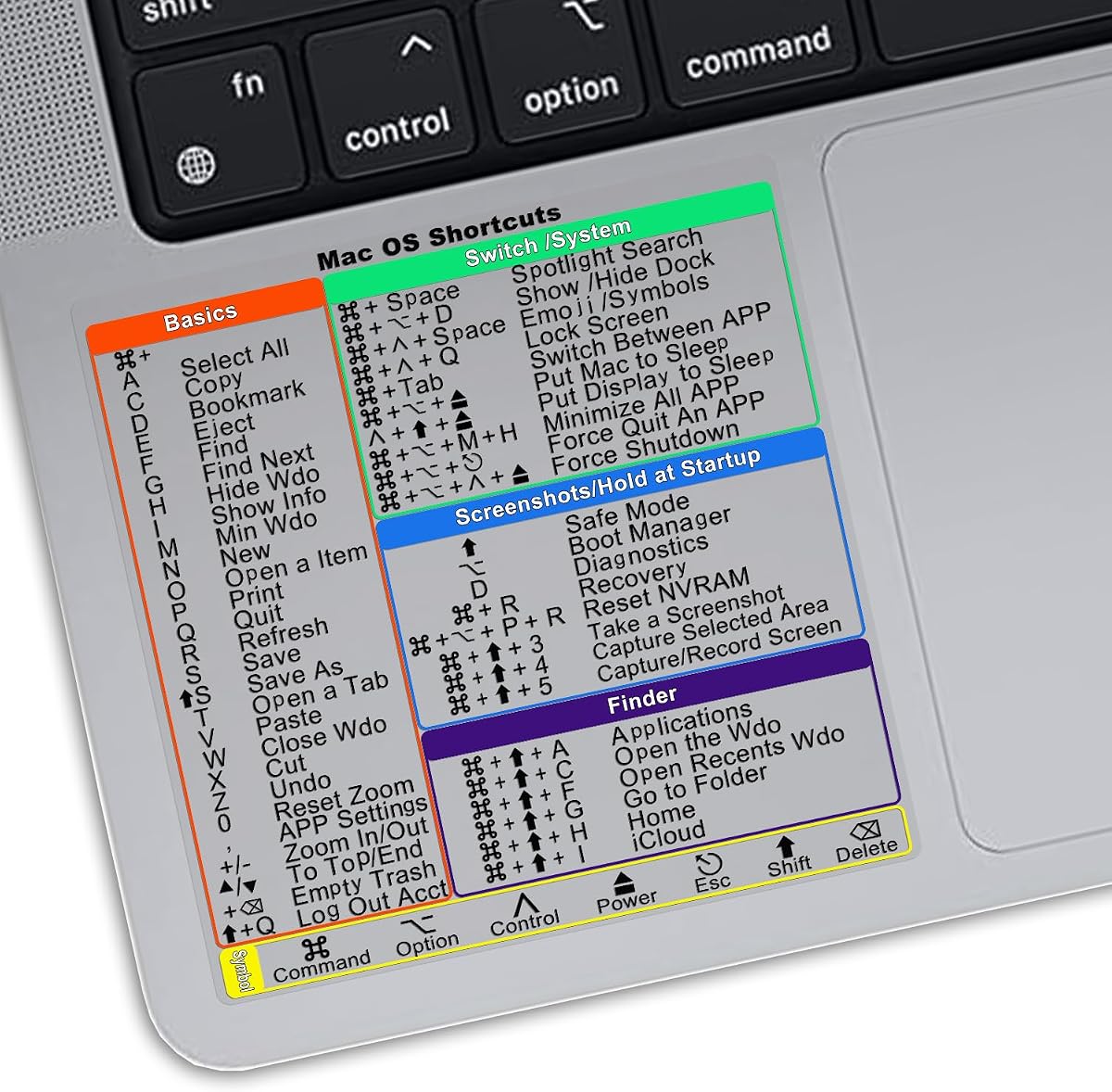


This top rated option delivers reliable performance for most MacBook users. With a 4.6 rating it balances clarity and durability effectively for daily tasks.
We may earn a commission when you buy through this link, at no additional cost to you.
The laminated vinyl ensures long lasting print quality that resists daily wear. Its universal fit covers Air and Pro models seamlessly without blocking keys.
Removal might leave minor residue but it cleans easily with soap and water. This is a minor tradeoff for the strong hold during use.
Ideal for students and professionals seeking instant command access. It remains a solid choice for anyone wanting a trusted visual guide.
The sticker places essential commands directly in your sightline to reduce workflow interruptions significantly.
Made with laminated vinyl this decal withstands daily typing friction and environmental exposure over time.
We may earn a commission when you buy through this link, at no additional cost to you.
This option stands out by combining system and Office shortcuts for versatile productivity support. It carries a high 4.7 rating from satisfied users.
We may earn a commission when you buy through this link, at no additional cost to you.
Military grade vinyl ensures the text stays sharp even after months of heavy use. The clear design blends into the palm rest without visual clutter.
Applying it requires a gradual peel method to avoid air bubbles. Once placed correctly it stays secure without shifting during intense typing sessions.
Perfect for users needing Office help alongside basic system commands. It offers exceptional value for the comprehensive coverage it provides.
Includes specific Word and Excel shortcuts to streamline document creation tasks efficiently.
Compatible with Mac and Intel models ensuring broad usability across different device generations.
We may earn a commission when you buy through this link, at no additional cost to you.
This premium sticker offers a refined experience with residue free removal and water resistance. It aims for high quality standards in every detail.
We may earn a commission when you buy through this link, at no additional cost to you.
The adhesive lifts off cleanly without damaging the device surface. Its ultra thin profile ensures it feels barely there under your wrists during use.
It features a curated list of essentials grouped by task for easy scanning. The matte finish resists smudges effectively to keep text readable.
Recommended for users prioritizing premium aesthetics and ease of removal. The color options help it blend seamlessly with specific MacBook finishes.
Advanced adhesive technology allows the sticker to be removed without leaving any sticky marks.
Water repellent coating protects the text from coffee spills or humidity exposure effectively.
We may earn a commission when you buy through this link, at no additional cost to you.
This sticker targets specific MacBook finishes like Sky Blue and Space Gray for optimal readability. It includes over fifty shortcuts for comprehensive reference.
We may earn a commission when you buy through this link, at no additional cost to you.
The clear vinyl with black text ensures high contrast on lighter surfaces. Adhesive removal leaves no residue behind protecting the device finish.
However it does not fit darker models like Space Black well due to contrast issues. Check your exact device color before purchasing to avoid mismatches.
Best suited for users with compatible silver or blue finishes. It delivers solid performance when the color contrast matches your specific model.
Designed to match lighter MacBook finishes for better visibility and aesthetic harmony.
Scratch resistant vinyl handles daily contact without peeling edges easily.
We may earn a commission when you buy through this link, at no additional cost to you.
Purchasing this pack means you get two sets for multiple devices or backups. It supports modern Apple Silicon chips from M1 up to M5.
We may earn a commission when you buy through this link, at no additional cost to you.
The clear design blends into the keyboard backlight without blocking visual feedback. No residue adhesive ensures easy removal whenever you wish to upgrade.
It focuses on essential commands without unnecessary complexity for quick reference. The UV resistant ink ensures long term readability under normal lighting conditions.
Perfect for households with multiple MacBooks or shared workstations. The value proposition is strong for anyone needing duplicate coverage.
The second pack provides a spare option in case one gets damaged or needs replacement.
Updated for 2026 to ensure accurate shortcuts for the latest Apple Silicon models.
We may earn a commission when you buy through this link, at no additional cost to you.
This three pack offers excellent coverage for teams or families with multiple computers. It holds a strong 4.8 rating reflecting user satisfaction with durability.
We may earn a commission when you buy through this link, at no additional cost to you.
Universal compatibility ensures it works on both Intel and Apple Silicon Macs effectively. The compact size fits neatly without covering essential function keys.
The transparent design keeps the aesthetic clean while providing necessary visual reference. It is straightforward without extra features that might complicate application.
Ideal for bulk needs where cost efficiency matters most. The high rating suggests reliable quality across the set.
Three packs allow distribution across different team members or workspaces easily.
3.25 inch size ensures it fits standard MacBook palm rests without obstruction.
We may earn a commission when you buy through this link, at no additional cost to you.
This universal version is notable for including Mac Mini and iMac compatibility. It offers a broader fit than standard Air Pro only stickers.
We may earn a commission when you buy through this link, at no additional cost to you.
Laminated vinyl provides protection against scratches and spills on desktop keyboards. The adhesive holds firmly even on larger surfaces like external keyboards.
While mostly effective removal might leave light residue that needs cleaning. This is manageable given the broader device support it provides.
Best for users with mixed Mac hardware setups needing one solution. It simplifies sourcing stickers for different device types in one purchase.
Designed to fit not just laptops but also desktop Macs and mini units.
Surface lamination shields the print from daily wear on desktop setups.
We may earn a commission when you buy through this link, at no additional cost to you.
This pack offers four distinct colors including a unique rainbow option for customization. It serves well for Intel Mac users looking for aesthetic variety.
We may earn a commission when you buy through this link, at no additional cost to you.
Vinyl material ensures decent durability against scratches and daily handling. The compact size fits standard 13 inch laptops without cluttering the view.
However it targets older models and may not match newer Apple Silicon designs perfectly. Also it may leave residue upon removal unlike premium residue free options.
Suitable for users wanting style variety at a reasonable cost. It provides good coverage for legacy Mac devices.
Includes black white clear and rainbow to suit different personal preferences.
2.7 inch height ensures it fits easily on smaller laptop surfaces.
We may earn a commission when you buy through this link, at no additional cost to you.
This sticker targets Word and Excel users needing quick access to formatting commands. It provides a specialized cheat sheet for common document tasks.
We may earn a commission when you buy through this link, at no additional cost to you.
The clear white finish ensures good contrast on standard MacBook surfaces. Strong adhesive keeps it securely in place during active typing sessions.
It is best for professionals focused heavily on Office tasks rather than general OS commands. Users needing system wide support might prefer a different option.
Recommended for those who spend most time in spreadsheets or documents. It streamlines workflow for specific application users effectively.
Dedicated shortcuts for Word and Excel enhance document editing efficiency.
Adhesive formula ensures the sticker stays put even with frequent use.
We may earn a commission when you buy through this link, at no additional cost to you.
TeachUcomp brings decades of educational experience to this product design. It uses an alphabetized layout to help users find commands quickly.
We may earn a commission when you buy through this link, at no additional cost to you.
The large size provides clear text visibility for quick reading. No residue adhesive ensures safe removal without damaging your device finish.
It is ideal for beginners needing a structured learning tool. However the large size might not suit smaller palm rest areas comfortably.
Best for those who value educational quality and clarity. The high rating reflects its effectiveness as a teaching aid.
Alphabetized command list speeds up the search process for new users.
Large 3.25 inch size ensures high readability at a glance.
We may earn a commission when you buy through this link, at no additional cost to you.
Choosing the right sticker involves balancing compatibility adhesive quality and design clarity for your specific workflow needs.
Ensure the sticker matches your Mac model. Some fit only 13 to 16 inch models while others cover iMacs or Minis. Always check dimensions and model lists.
Check device model specifically to avoid fit issues or blocked keys.
Look for residue free adhesives to prevent surface damage during removal. Some options leave light residue that needs cleaning with soapy water.
Prioritize residue free options for clean removal and device protection.
Vinyl and laminated materials resist scratches and spills better than paper. This ensures the text remains readable over months of daily use.
Choose laminated or vinyl for long term durability.
An alphabetized layout helps find commands faster than random grouping. Some stickers group by task like navigation or screenshots for better organization.
Select a layout that matches how you search for commands.
Clear finishes blend with your device while opaque options offer higher contrast. Ensure the background color does not blend in with your MacBook color.
Choose contrast that ensures text is readable on your device.
Decide if you need general macOS commands or specific app help like Excel. Some products focus on system shortcuts while others target productivity suites.
Pick a product that covers your most used applications.
Buying multiple stickers provides spares or options for multiple devices. This is useful for families or offices with several MacBooks.
Consider multi packs for cost efficiency and backups.
Choose trusted brands known for software training or tech accessories. Educational brands often design clearer layouts and better guides.
Prefer established brands for reliable quality and design.
Clean the palm rest surface with a dry cloth to remove dust or oils before application. This ensures the adhesive bonds properly without air bubbles.
Peel the backing gradually instead of all at once to align the sticker correctly. Press down slowly as you remove the paper to avoid trapped air.
Avoid touching the adhesive side with fingers to maintain stickiness. Wipe the surface gently with a soft cloth if dust accumulates over time.
Not all models are covered. Most stickers fit 13 to 16 inch laptops but some exclude smaller sizes like 11 inches. Always check product specs for your model.
Most use safe vinyl adhesives. Some may leave light residue but this wipes off with warm soapy water without scratching the finish.
Yes many modern options support M1 through M5 chips. Ensure the product mentions Mac or Intel compatibility for accurate shortcuts.
Laminated vinyl versions can last for years with daily use. They resist fading and wear well compared to standard paper stickers.
Yes universal versions often work on external or desktop keyboards. Check if the size fits the external model before applying.
Yes some products include dedicated Excel and Word shortcuts. Look for titles mentioning Office apps for this specific focus.
We found top options like Synerlogic and TeachUcomp for clarity and durability. These models consistently deliver high value for both beginners and experts.
Prioritize residue free adhesive and proper fit to avoid damage. Matching the sticker design to your workflow ensures it enhances your productivity.
Verify current availability and fit before ordering. Checking your model number ensures you select the perfect match for your needs.